Elgato has launched a brand new range of audio products for content creators which includes five new pieces of hardware, and an update to its audio software, Wave Link which makes it free for all. One of the hardest parts of assembling a live streaming setup for gaming is finding something that will let you configure your audio sources and manage them on the fly.
Elgato's Stream Deck and Stream Deck+ have always been go-to options, but with the arrival of Wave Next, it feels like the first time this brand is properly leaning into helping content creators master audio. While there are a few different streaming mixers out there, the market still feels like it's in need of more, especially when the GO:XLR is in its end of life phase, and alternatives like the RodeCaster Duo are so expensive. Elgato has kicked off its Wave Next range with three new audio interfaces, the Wave XLR MK.2 Pro, the Wave XLR Pro, and the XLR Dock MK.2 for the Stream Deck+.

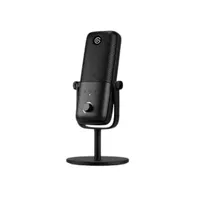
Starting with the microphone, the Elgato Wave 3 MK.2 has been made in partnership with Lewitt, and audio company well known for its studio microphones. It's a USB mic with a cardioid pickup pattern, and while it looks similar on the inside to the original Wave 3, it's hiding a few tricks on the inside.
The MK.2 has Elgato's new WaveFX chip inside it, which gives you processing power on the device level with "no CPU load". With that, you get ClipGuard 2.0 to prevent any audio distortion from being too loud, five DSP effects, and more all within the mic itself, without the need for an interface. Its customizable LED ring will tell you gain levels and let you control things, but there's also an autogain wizard that will find the right pickup strength for your voice and the room you're recording in.

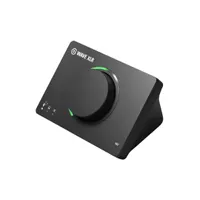
Next up is the Wave XLR MK.2, which is a fairly simplistic audio interface for creators utilizing one XLR mic input for their stream. That brings all the benefits of the WaveFX processor to any XLR mic you might already own, with an overview citing benefits for the popular Shure SM7B if you don't own its pre-amped version, the Shure SM7dB.
It can deliver up to +80dB of gain, which is, for reference, up from what Shure offers with its new MVX2U Gen 2 that was also announced yesterday. Again, the Wave XLR MK.2 has access to autogain wizard though, so you might not really need to adjust things too much if you use that feature.
Another customizable LED ring around the central dial will let you adjust input gain for your mic. This clicks in and can switch between controlling different aspects of your mic's WaveFX settings. On the top of it there's a capacitive mute button, so all you need to do to mute your XLR mic is give the top of the interface a quick tap.
Other than that though, I'm not all that impressed with the onboard controls of the Wave XLR MK.2. It seems from the overview videos that to actually control all of your newly configured WaveLink sources and mixing tables, you'll still need to invest in a Stream Deck+ with clickable keys and turning dials. For a true MK.2 of this device, I'd really have liked to see more ways to control things with that one device to warrant its price a little more.
I'm not quite sure without hands-on time if you can configure the central dial on the Wave XLR to control individual sources, but it sure does seem as though you'll need a Stream Deck+ too if you want to control other audio sources than your microphone.

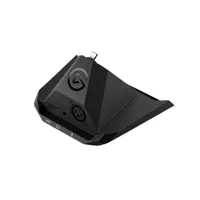
With that in mind, your best option might actually be the XLR Dock MK.2 for Stream Deck+, which is an add on that will give you the same kind of XLR connectivity for the stream controller you might already own. This is going to let you control a lot more, and configure those controls in a way that likely suits you and your setup's various bells and whistles more easily.

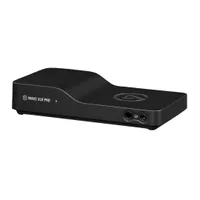
If you're wanting a bit more audio controlling power, the Elgato XLR Pro might be the best option, but again, it's missing some onboard controls to really make it a match for something like the RodeCaster Duo.
The XLR Pro has dual XLR inputs, dual 3.5mm headphone jacks (both of which will make it great for podcasters), dual USB-C ports for multiple devices, and a line in and line out port as well. All in all, it has a 5-mix, 12-channel hardware mixer that will give you WaveFX processing on board.
There's a lot of power and versatility offered here, especially for creators who need to route audio from a PC and console, or from two PCs. I'd be interested to know if there's the capability to use two different USB sources for one PC though, like you can with the RodeCaster Duo, so you can manage even more audio sources from one device.
But again, a lack of physical buttons, dials, and faders on the XLR Pro means you're going to need to invest in a Stream Deck+ to really feel like you can control it all if you don't want to use a mouse and keyboard within the Wave Link software. That's really less than ideal for the price of all of this gear.

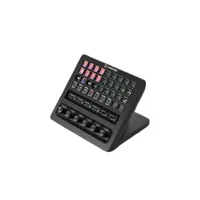
The last, more surprising addition to the Wave Next is the Stream Deck+ XL, which has a slightly silly 36 keys, six twisting knobs, and an elongated touchbar, all of which is configurable to how you like to set it up.

And alongside all of that, Elgato has updated its Wave Link software which has now been "rebuilt from the ground up". You can now make five independent mixes, each with eight channels in them, and a potential four Wave devices. The software will let you add mic effects or EQs to any source, and there looks to be a whole library of mixing tables and effects for you to really dive deep into.
All that, and it's free for everyone to use for the very first time. Until now, you've had to own a Wave mic or some other Elgato hardware to get access to Wave Link, but it now joins the likes of the BEACN mixing software and SteelSeries Sonar as a free and accessible audio app for all PC users.
Need more content creation gear? Check out the best capture cards, the best ring lights for streaming, and the best gaming PCs.

You must confirm your public display name before commenting
Please logout and then login again, you will then be prompted to enter your display name.