
Join The Community
- Join our community
Commenting
Join the discussion
Exclusive Articles
Member-only articles
Weekly Newsletters
Weekly gaming & entertainment news
Member Badges
Earn badges as you go
Exclusive Competitions
Members-only prize draws
Curated Deals Coming Soon
Tech and gaming deals worth grabbing
GET COMMUNITY ACCESS QUICK
For the quickest way to join, simply enter your email below and get access. We will send a confirmation and sign you up to our newsletter to keep you updated on all your gaming news.
By submitting your information you agree to the Terms & Conditions and Privacy Policy and are aged 16 or over.
FIND OUT ABOUT OUR MAGAZINE
Want to subscribe to the magazine? Click the button below to find out more information.
Find out more
GET Community ACCESS QUICK

Join the GamesRadar community for quick access. Enter your email below and we'll send confirmation, and sign you up to our newsletter.

By submitting your information you agree to the Terms & Conditions and Privacy Policy and are aged 16 or over.

Welcome to GamesRADAR+ Community !
Hi ,

Your membership journey starts here.

Keep exploring and earning more as a member.

MY ACCOUNT

Earn your first badge
Read 1 article to unlock your first badge.
Keep earning badges
Explore ways to get more involved as a member.
Latest Games News

Latest Games News

Breaking gaming news and updates

Read Now
Latest Games Reviews

Latest Games Reviews

Expert verdicts on the newest releases

Read Now

See what you’ve unlocked.

Explore your membership benefits.

Explore
Member Exclusives

Stay Ahead with GamesRadar+

Get the biggest gaming news, reviews, and releases straight to your inbox.

Explore
Sign Out
GamesRadar+
US EditionUS CA EditionCanada UK EditionUK AU EditionAustralia
Sign in
  • View Profile
  • Sign out
  • Games
    • Game Insights
      • Games News
      • Games Features
      • Games Reviews
      • Games Guides
      • Big in 2026
      • Big Preview
      • Future Games Show
      • Golden Joystick Awards
    • Genres
      • Action Games
      • RPGs
      • Action RPGs
      • Adventure Games
      • Third Person Shooters
      • FPS Games
    • Platforms
      • PS5
      • Xbox Series X
      • PC
      • Nintendo Switch
      • Nintendo Switch 2
      • Tabletop Gaming
    • Franchises
      • Grand Theft Auto
      • Pokemon
      • Assassin's Creed
      • Monster Hunter
      • Fortnite
      • Cyberpunk
      • Red Dead
      • The Elder Scrolls
      • The Sims
  • Entertainment
    • TV Shows
      • TV News
      • TV Reviews
      • Anime Shows
      • Sci-Fi Shows
      • Superhero Shows
      • Animated Shows
      • Marvel TV Shows
      • Star Wars TV Shows
      • DC TV Shows
    • Movies
      • Movie News
      • Movie Reviews
      • Big Screen Spotlight
      • Superhero Movies
      • Action Movies
      • Anime Movies
      • Sci-Fi Movies
      • Horror Movies
      • Marvel Movies
      • DC Movies
    • Streaming
      • Apple TV Plus
      • Disney Plus
      • Netflix
      • HBO
      • Amazon Prime Video
      • Hulu
    • Comics
      • Marvel Comics
      • DC Comics
  • Hardware
    • Insights
      • Hardware News
      • Hardware Reviews
      • Hardware Features
      • Buying Guides
    • Computing
      • Desktop PCs
      • Laptops
      • Handhelds
    • Peripherals
      • Headsets & Headphones
      • TVs & Monitors
      • Gaming Mice
      • Gaming Keyboards
      • Gaming Chairs
      • Speakers & Audio
    • Accessories & Tech
      • Gaming Controllers
      • Tech
      • SSDs & Hard Drives
      • VR
      • Accessories
      • Retro
  • Deals
    • Toys & Collectibles
    • Lego
    • Dungeons and Dragons
    • Merch
  • Video
    • Videos
    • GR+ Replay - Submit Your Clips
    • G+RLS Podcast
  • Edge
  • Newsletters
    • Quizzes
    • About Us
    • How to pitch to us
    • How we score
    • Newsarama
    • Retro Gamer
  • Home
  • Games
    • View Games
      • Games News
      • Games Features
      • Games Reviews
      • Games Guides
      • Big in 2026
      • Big Preview
      • Future Games Show
      • Golden Joystick Awards
      • Action Games
      • RPGs
      • Action RPGs
      • Adventure Games
      • Third Person Shooters
      • FPS Games
    • Platforms
      • View Platforms
      • PS5
      • Xbox Series X
      • PC
      • Nintendo Switch
      • Nintendo Switch 2
      • Tabletop Gaming
      • Grand Theft Auto
      • Pokemon
      • Assassin's Creed
      • Monster Hunter
      • Fortnite
      • Cyberpunk
      • Red Dead
      • The Elder Scrolls
      • The Sims
  • Entertainment
    • View Entertainment
    • TV Shows
      • View TV Shows
      • TV News
      • TV Reviews
      • Anime Shows
      • Sci-Fi Shows
      • Superhero Shows
      • Animated Shows
      • Marvel TV Shows
      • Star Wars TV Shows
      • DC TV Shows
    • Movies
      • View Movies
      • Movie News
      • Movie Reviews
      • Big Screen Spotlight
      • Superhero Movies
      • Action Movies
      • Anime Movies
      • Sci-Fi Movies
      • Horror Movies
      • Marvel Movies
      • DC Movies
    • Streaming
      • View Streaming
      • Apple TV Plus
      • Disney Plus
      • Netflix
      • HBO
      • Amazon Prime Video
      • Hulu
    • Comics
      • View Comics
      • Marvel Comics
      • DC Comics
  • Hardware
    • View Hardware
      • Hardware News
      • Hardware Reviews
      • Hardware Features
      • Buying Guides
      • Desktop PCs
      • Laptops
      • Handhelds
    • Peripherals
      • View Peripherals
      • Headsets & Headphones
      • TVs & Monitors
      • Gaming Mice
      • Gaming Keyboards
      • Gaming Chairs
      • Speakers & Audio
      • Gaming Controllers
      • Tech
      • SSDs & Hard Drives
      • VR
      • Accessories
      • Retro
  • Deals
    • Toys & Collectibles
    • Lego
    • Dungeons and Dragons
    • Merch
  • Video
    • View Video
    • Videos
    • GR+ Replay - Submit Your Clips
    • G+RLS Podcast
  • Edge
  • Newsletters
    • Quizzes
    • About Us
    • How to pitch to us
    • How we score
    • Newsarama
    • Retro Gamer
Trending
  • GTA 6 review
  • Early Black Friday deals
  • GTA 6 News
  • Golden Joystick winners
  • RPG News
  • G+RLS Podcast
  • Win a GTA 6 collector's box
  • Deal of the Day
Sign up to the GamesRadar+ Newsletter

Weekly digests, tales from the communities you love, and more


By submitting your information you agree to the Terms & Conditions and Privacy Policy and are aged 16 or over.

You are now subscribed

Your newsletter sign-up was successful


Want to add more newsletters?

GamesRadar+

Every Friday

GamesRadar+

Your weekly update on everything you could ever want to know about the games you already love, games we know you're going to love in the near future, and tales from the communities that surround them.

GTA 6 O'clock

Every Thursday

GTA 6 O'clock

Our special GTA 6 newsletter, with breaking news, insider info, and rumor analysis from the award-winning GTA 6 O'clock experts.

Knowledge

Every Friday

Knowledge

From the creators of Edge: A weekly videogame industry newsletter with analysis from expert writers, guidance from professionals, and insight into what's on the horizon.

The Setup

Every Thursday

The Setup

Hardware nerds unite, sign up to our free tech newsletter for a weekly digest of the hottest new tech, the latest gadgets on the test bench, and much more.

Switch 2 Spotlight

Every Wednesday

Switch 2 Spotlight

Sign up to our new Switch 2 newsletter, where we bring you the latest talking points on Nintendo's new console each week, bring you up to date on the news, and recommend what games to play.

The Watchlist

Every Saturday

The Watchlist

Subscribe for a weekly digest of the movie and TV news that matters, direct to your inbox. From first-look trailers, interviews, reviews and explainers, we've got you covered.

SFX

Once a month

SFX

Get sneak previews, exclusive competitions and details of special events each month!


Join the club

Get full access to premium articles, exclusive features and a growing list of member rewards.


An account already exists for this email address, please log in.
  1. Games
  2. RPGs
  3. Wuthering Waves

Wuthering Waves levitator guide

Guides
By Marloes Valentina Stella
last updated 7 June 2024

How to use the levitator in Wuthering Waves to manipulate your surroundings

When you purchase through links on our site, we may earn an affiliate commission. Here’s how it works.

Wuthering Waves levitator
(Image credit: Kuro Games)
  • Facebook
  • X
  • Pinterest
  • Flipboard
  • Email
  • Instagram
Share this article
Join the conversation
Follow us
Add us as a preferred source on Google
Subscribe to our newsletter

The Wuthering Waves levitator is a utility skill used to solve puzzles and defeat tough enemies. It can hold objects in the air to throw or place them as you please. So it's incredibly useful, it's just that Wuthering Waves doesn’t tell you how to unlock the levitator, or how to use it. As a result it's not immediately obvious how to find and use it's abilities to defy gravity. 

From levitating objects to throwing bombs, here’s how to use the levitator in Wuthering Waves.

What is the Wuthering Waves levitator?

What is the Wuthering Waves levitator?

(Image credit: Kuro Games)
Wuthering Waves guide

Check out our Wuthering Waves codes guide for free stuff, and find out how to wish in Wuthering Waves for more characters and weapons. 

The levitator in Wuthering Waves is a utility skill. That includes other things like a grapple and a sensor ability and you can switch between these abilities with the utility wheel (more on that below).

Latest Videos FromGamesRadar+
Watch full video here:

The Wuthering Waves levitator utility skill allows you - as the name suggests - to levitate objects. That's most commonly used to solve puzzles and make exploration easier, but it can also be used to throw objects at your opponents. The levitator ability is first called upon during the Echoing Marche quest, when you need to pick up a bomb flower and throw it at some nearby bushes to burn them down.

Here are a few things to keep in mind regarding the Wuthering Waves levitator ability:

You may like
  • Control Resonant What are the distortions and little warped orbs in Control Resonant?
  • Phantom Blade Zero Soul and The Hunt facing off next to a waterfall 15 Phantom Blade Zero tips for new players to help you navigate the Wulin
  • Control Resonant Control Resonant: Everything you need to know about Control 2
  1. If you walk too far from where you initially picked up an object, the object will disappear.
  2. Beware that some levitational objects are dangerous! Make sure you don’t accidentally hit a bomb flower before picking it up.
  3. You may lose some HP if you throw an object (specifically a bomb) too close to your character. 
  4. The levitator has an aiming option. Don’t forget to use it!
  5. If you start climbing while levitating an object, the object will drop to the ground. However, you can still pull the object towards you after you’ve finished climbing.
  6. Besides using it to clear obstacles or attack enemies, the levitator can help you destroy farmable materials too. As the picture above demonstrates, you may use a bomb flower to destroy nearby ore veins. 

How to unlock the Wuthering Waves levitator

How to unlock the Wuthering Waves levitator

(Image credit: Kuro Games)

To unlock the Wuthering Waves levitator, you just need to play through the main quest line - once you’ve met Sanhua for the first time in Jinzhou’s City Hall, during the First Resonance quest, you will receive the levitator skill. First Resonance is the third main quest in the game, following Utterance of Marvels II. 

Note that this quest also grants you the grapple utility skill but, while you get a small grappling tutorial, you don’t get any instructions on how to use the levitator.

Sign up to the GamesRadar+ Newsletter

Weekly digests, tales from the communities you love, and more

By submitting your information you agree to the Terms & Conditions and Privacy Policy and are aged 16 or over.

How to use the Wuthering Waves levitator
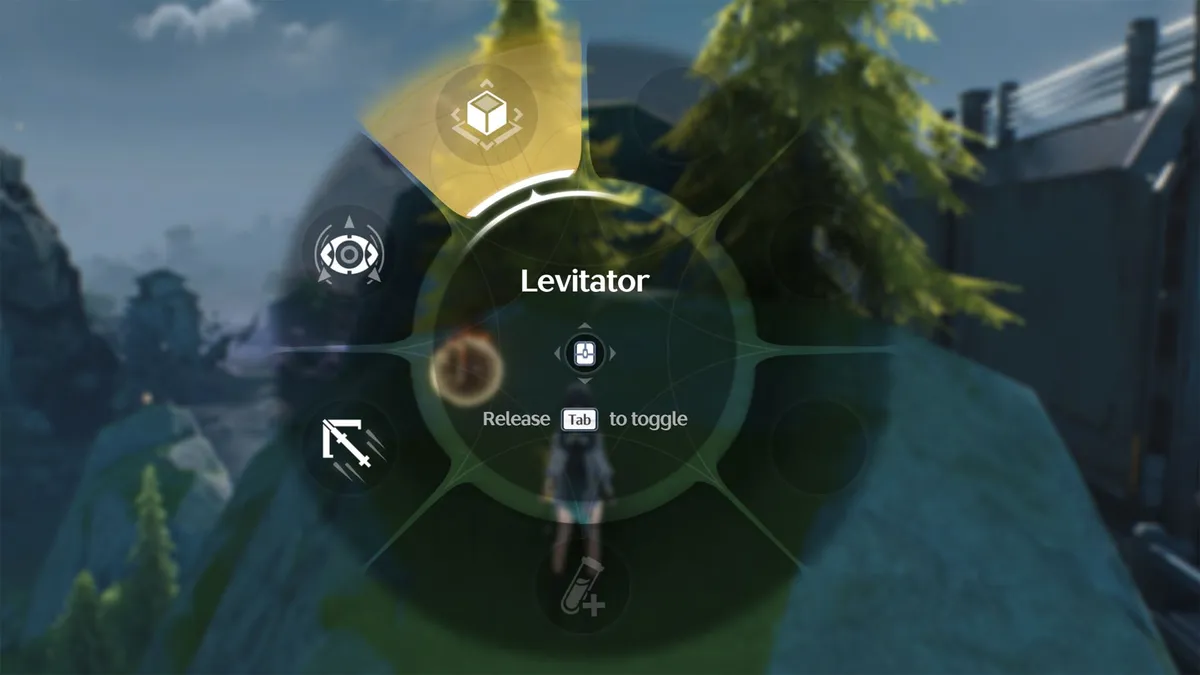
How to use the Wuthering Waves levitator

(Image credit: Kuro Games)

You need to equip the Wuthering Waves levitator in your utility skill slot to use it. On the PC you can hold the ‘TAB’ key to see the utility skill wheel and, to change to the levitator, hover over the levitator button at the top of the wheel, as shown in the picture above, and then release. You can then use it by pressing T

If you’re playing Wuthering Waves on a mobile phone, you must press the utility button in the lower right corner of the screen. When the wheel pops up, select the levitator. You can then use it by pressing the the utility button.

To activate the Wuthering Waves levitator, use your utility skill

(Image credit: Kuro Games)

Nothing will actually happen if you try to use the levitator randomly - you must stand close enough to an item that can be levitated, like a bomb flower. If such an object is within your character’s range, the utility button will start to glow, as shown in the picture above. If you press the levitator ability now, the object will attach to your character and you’ll have the option to aim and throw it, or put it down. 

© GamesRadar+. Not to be reproduced without permission

CATEGORIES
Adventure Games PC Gaming Mobile Gaming Action RPGs Android iPhone PS4 PS5 Platforms PlayStation
Marloes Valentina Stella
Social Links Navigation
Freelance Writer

I’m a freelance journalist who (surprise!) kind of has a thing for videogames. When I’m not working on guides for GamesRadar, you can probably find me somewhere in Teyvat, Novigrad, or Whiterun. Unless I’m feeling competitive, in which case you should try Erangel. You can also find my words on PCGamesN, Fanbyte, PCGamer, Polygon, Esports Insider, and Game Rant.

Read more
Control Resonant
Action RPGs What are the distortions and little warped orbs in Control Resonant?
 
 
Phantom Blade Zero Soul and The Hunt facing off next to a waterfall
Action RPGs 15 Phantom Blade Zero tips for new players to help you navigate the Wulin
 
 
Control Resonant
Action RPGs Control Resonant: Everything you need to know about Control 2
 
 
Phantom Blade Zero A Severed Mindseal friendly shadow warden clasping a primal stone
Action RPGs How to complete A Severed Mindseal in Phantom Blade Zero and find all Primal Stones
 
 
Phantom Blade Zero Whence The Weeping quest started
Action RPGs How to find the source of the weeping in Phantom Blade Zero and complete the Whence The Weeping quest
 
 
Control Resonant
Action RPGs What are the best powers and abilities in Control Resonant?
 
 
Latest in RPGs
Vault Boy ducks and covers in promo art for Fallout
Fallout Bethesda confirm a new cat-themed "Fallout-inspired adventure" is on the way
 
 
Monoco readies for battle in Clair Obscur: Expedition 33
RPGs Clair Obscur: Expedition 33 actor still can't "quite believe" the RPG's record-breaking awards haul
 
 
Star Wars: Knights of the Old Republic
RPGs Star Wars: Fate of the Old Republic director isn't worried about pressure since he made KOTOR
 
 
Clair Obscur: Expedition 33
RPGs Clair Obscur: Expedition 33 writer "didn't think about what the market wanted"
 
 
Closeup image of Deltarune's Jackenstein boss
RPGs Deltarune Chapter 6 is now "structurally complete" as work on Chapter 7 begins
 
 
Clair Obscur: Expedition 33 character Verso
RPGs Clair Obscur: Expedition 33 writer says the games industry "is eating itself" amid mass layoffs
 
 
Latest in Guides
Jason sits at a booth with Dr Merle in the GTA 6 mission The Final Flush
Grand Theft Auto GTA 6 The Final Flush mission walkthrough
 
 
Grand Theft Auto 6 Jason looking at Mattia whose hand is out waiting for a handshake
Grand Theft Auto Should you shake Mattia's hand in GTA 6?
 
 
GTA 6 Equipment
Grand Theft Auto GTA 6 Equipment: All 12 pieces of equipment explained and how to unlock them
 
 
Jason aims his gun at a shore owner in order to obtain the GTA 6 pawn shop safe code
Grand Theft Auto GTA 6 Pawn Shop safe code
 
 
Grand Theft Auto 6 Tourist Trap Jason drinking a beer on his balcony
Grand Theft Auto How to complete the GTA 6 Tourist Trap mission
 
 
GTA 6 How to wear and equip a mask
Grand Theft Auto Learn how to get a mask in GTA 6 to stay anonymous when committing a crime
 
 
LATEST ARTICLES
  1. Where where to find and start The Final Flush mission in GTA 6 and earn a stamina upgrade
    1
    How to complete The Final Flush in GTA 6 and increase your maximum stamina
  2. 2
    "Let's do with witches what I did with Assassins!": Patrice Désilets, Assassin's Creed pioneer, on ongoing making of 1666 Amsterdam
  3. 3
    GTA 6 Equipment: All 12 pieces of equipment explained and how to unlock them
  4. 4
    Should you shake Mattia's hand in GTA 6?
  5. 5
    Learn how to get a mask in GTA 6 to stay anonymous when committing a crime

GamesRadar+ is part of Future US Inc, an international media group and leading digital publisher. Visit our corporate site.

Add as a preferred source on Google Add as a preferred source on Google
  • About us
  • Contact Future's experts
  • Terms and conditions
  • Privacy policy
  • Cookies policy
  • Advertise with us
  • Review guidelines
  • Write for us
  • Accessibility statement
  • Careers

© Future US, Inc. Full 7th Floor, 130 West 42nd Street, New York, NY 10036.

Please login or signup to comment

Please wait...