

GamesRadar+ GamesRadar+
US EditionUS CA EditionCanada UK EditionUK AU EditionAustralia
Sign in
  • View Profile
  • Sign out
  • Games
    • Game Insights
      • Games News
      • Games Features
      • Games Reviews
      • Games Guides
      • Big in 2026
      • The Big Preview
      • On The Radar
      • Indie Spotlight
      • Future Games Show
      • Golden Joystick Awards
    • Genres
      • Action Games
      • RPGs
      • Action RPGs
      • Adventure Games
      • Third Person Shooters
      • FPS Games
    • Platforms
      • PS5
      • Xbox Series X
      • PC
      • Nintendo Switch
      • Nintendo Switch 2
      • Tabletop Gaming
    • Franchises
      • Grand Theft Auto
      • Pokemon
      • Assassin's Creed
      • Monster Hunter
      • Fortnite
      • Cyberpunk
      • Red Dead
      • The Elder Scrolls
      • The Sims
  • Entertainment
    • TV Shows
      • TV News
      • TV Reviews
      • Anime Shows
      • Sci-Fi Shows
      • Superhero Shows
      • Animated Shows
      • Marvel TV Shows
      • Star Wars TV Shows
      • DC TV Shows
    • Movies
      • Movie News
      • Movie Reviews
      • Big Screen Spotlight
      • Superhero Movies
      • Action Movies
      • Anime Movies
      • Sci-Fi Movies
      • Horror Movies
      • Marvel Movies
      • DC Movies
    • Streaming
      • Apple TV Plus
      • Disney Plus
      • Netflix
      • HBO
      • Amazon Prime Video
      • Hulu
    • Comics
      • Marvel Comics
      • DC Comics
    • Toys & Collectibles
    • Lego
    • Dungeons and Dragons
    • Merch
  • Hardware
    • Insights
      • Hardware News
      • Hardware Reviews
      • Hardware Features
    • Computing
      • Desktop PCs
      • Laptops
      • Handhelds
    • Peripherals
      • Headsets & Headphones
      • TVs & Monitors
      • Gaming Mice
      • Gaming Keyboards
      • Gaming Chairs
      • Speakers & Audio
    • Accessories & Tech
      • Gaming Controllers
      • Tech
      • SSDs & Hard Drives
      • VR
      • Accessories
      • Retro
  • Deals
    • Game Deals
    • Tech Deals
    • TV Deals
    • Buying Guides
  • Video
  • Newsletters
    • Quizzes
    • About Us
    • How to pitch to us
    • How we score
    • Newsarama
    • Retro Gamer
    • Total Film
  • home
  • Games
    • View Games
      • Games News
      • Games Features
      • Games Reviews
      • Games Guides
      • Big in 2026
      • The Big Preview
      • On The Radar
      • Indie Spotlight
      • Future Games Show
      • Golden Joystick Awards
      • Action Games
      • RPGs
      • Action RPGs
      • Adventure Games
      • Third Person Shooters
      • FPS Games
    • Platforms
      • View Platforms
      • PS5
      • Xbox Series X
      • PC
      • Nintendo Switch
      • Nintendo Switch 2
      • Tabletop Gaming
      • Grand Theft Auto
      • Pokemon
      • Assassin's Creed
      • Monster Hunter
      • Fortnite
      • Cyberpunk
      • Red Dead
      • The Elder Scrolls
      • The Sims
  • Entertainment
    • View Entertainment
    • TV Shows
      • View TV Shows
      • TV News
      • TV Reviews
      • Anime Shows
      • Sci-Fi Shows
      • Superhero Shows
      • Animated Shows
      • Marvel TV Shows
      • Star Wars TV Shows
      • DC TV Shows
    • Movies
      • View Movies
      • Movie News
      • Movie Reviews
      • Big Screen Spotlight
      • Superhero Movies
      • Action Movies
      • Anime Movies
      • Sci-Fi Movies
      • Horror Movies
      • Marvel Movies
      • DC Movies
    • Streaming
      • View Streaming
      • Apple TV Plus
      • Disney Plus
      • Netflix
      • HBO
      • Amazon Prime Video
      • Hulu
    • Comics
      • View Comics
      • Marvel Comics
      • DC Comics
    • Toys & Collectibles
    • Lego
    • Dungeons and Dragons
    • Merch
  • Hardware
    • View Hardware
      • Hardware News
      • Hardware Reviews
      • Hardware Features
      • Desktop PCs
      • Laptops
      • Handhelds
    • Peripherals
      • View Peripherals
      • Headsets & Headphones
      • TVs & Monitors
      • Gaming Mice
      • Gaming Keyboards
      • Gaming Chairs
      • Speakers & Audio
      • Gaming Controllers
      • Tech
      • SSDs & Hard Drives
      • VR
      • Accessories
      • Retro
  • Deals
    • View Deals
    • Game Deals
    • Tech Deals
    • TV Deals
    • Buying Guides
  • Video
  • Newsletters
    • Quizzes
    • About Us
    • How to pitch to us
    • How we score
    • Newsarama
    • Retro Gamer
    • Total Film
Trending
  • Pokemon Winds and Waves
  • New Games for 2026
  • GamesRadar+ Replay
  • Mario Day deals
  1. Hardware
  2. SSD Hard Drives
  3. PS5

How to install an M.2 SSD into a PS5

Guides
By Iain Wilson last updated 7 December 2023

This PS5 SSD installation guide will help you increase storage and console memory

When you purchase through links on our site, we may earn an affiliate commission. Here’s how it works.

PS5 GPU
(Image credit: Sony)
  • Facebook
  • X
  • Pinterest
  • Flipboard
  • Email
Share this article
Join the conversation
Follow us
Add us as a preferred source on Google
Get the GamesRadar+ Newsletter

Weekly digests, tales from the communities you love, and more


By submitting your information you agree to the Terms & Conditions and Privacy Policy and are aged 16 or over.

You are now subscribed

Your newsletter sign-up was successful


Want to add more newsletters?

GamesRadar+

Every Friday

GamesRadar+

Your weekly update on everything you could ever want to know about the games you already love, games we know you're going to love in the near future, and tales from the communities that surround them.

GTA 6 O'clock

Every Thursday

GTA 6 O'clock

Our special GTA 6 newsletter, with breaking news, insider info, and rumor analysis from the award-winning GTA 6 O'clock experts.

Knowledge

Every Friday

Knowledge

From the creators of Edge: A weekly videogame industry newsletter with analysis from expert writers, guidance from professionals, and insight into what's on the horizon.

The Setup

Every Thursday

The Setup

Hardware nerds unite, sign up to our free tech newsletter for a weekly digest of the hottest new tech, the latest gadgets on the test bench, and much more.

Switch 2 Spotlight

Every Wednesday

Switch 2 Spotlight

Sign up to our new Switch 2 newsletter, where we bring you the latest talking points on Nintendo's new console each week, bring you up to date on the news, and recommend what games to play.

The Watchlist

Every Saturday

The Watchlist

Subscribe for a weekly digest of the movie and TV news that matters, direct to your inbox. From first-look trailers, interviews, reviews and explainers, we've got you covered.

SFX

Once a month

SFX

Get sneak previews, exclusive competitions and details of special events each month!


An account already exists for this email address, please log in.
Subscribe to our newsletter

How to install an M.2 SSD in a PS5 isn't too much of a challenge once it's actually explained clearly, and knowing how to install an SSD in your PlayStation 5 will massively expand your memory options and allow you to have far more games to hand at any one moment. An SSD is incredibly useful for a PS5, because while an HDD can hold PS4 games, the most costly and powerful SSD can store PS5 games and allow you to play them straight off it. To clarify: adding a new PS5 SSD to your console will expand your existing storage, not replace it as it did with previous consoles. This is far better - it means that you'll still be able to use the original 825GB SSD storage afterwards, as well as the new space that the SSD provides.

With that in mind, we'll explain how to install a M.2 SSD in your PS5 in our step-by-step guide below, with clear instructions to expanding your console's memory.

1. Make sure you have the right SSD for PS5

PS5 SSD installation

(Image credit: Sony)

Firstly, ensure the PS5 M.2 SSD you are planning to install has a cooling structure that meets the required specifications for PS5 – you can get more details on this from PlayStation Support. If you're fitting your own heatsink to the M.2 SSD, then ensure you follow the manufacturer's instructions carefully and that the connections are not covered in any way.

2. Ensure your PS5 firmware is up to date

PS5 SSD Installation

(Image credit: Sony)

Make sure your PS5 is updated to the latest firmware version, and confirm it is all working correctly before you shut down your console. Remove the base and any attached cables, then wait for it to cool down if needed.

3. Remove the PS5 side panel

PS5 SSD installation

(Image credit: Sony)

Touch a metal grounded object before you start, to disperse any static electricity that may damage the delicate internal components. Place the PS5 with the PS logo downwards and power button away from you, ideally on a soft surface to avoid scratching the top panel. Remove the lower panel by lifting the bottom right corner and sliding it to your left – see our separate guide on how to replace PS5 panels if you need any more assistance on this.

4. Remove the PS5 expansion cover

PS5 SSD installation

(Image credit: Sony)

Use a #1 Phillips screwdriver to remove the screw holding the expansion cover in place, taking care not to drop the screw inside the PS5 once it's out. Remove the cover from the slot, and place it to once side.
PS5 SSD installation

(Image credit: Sony)

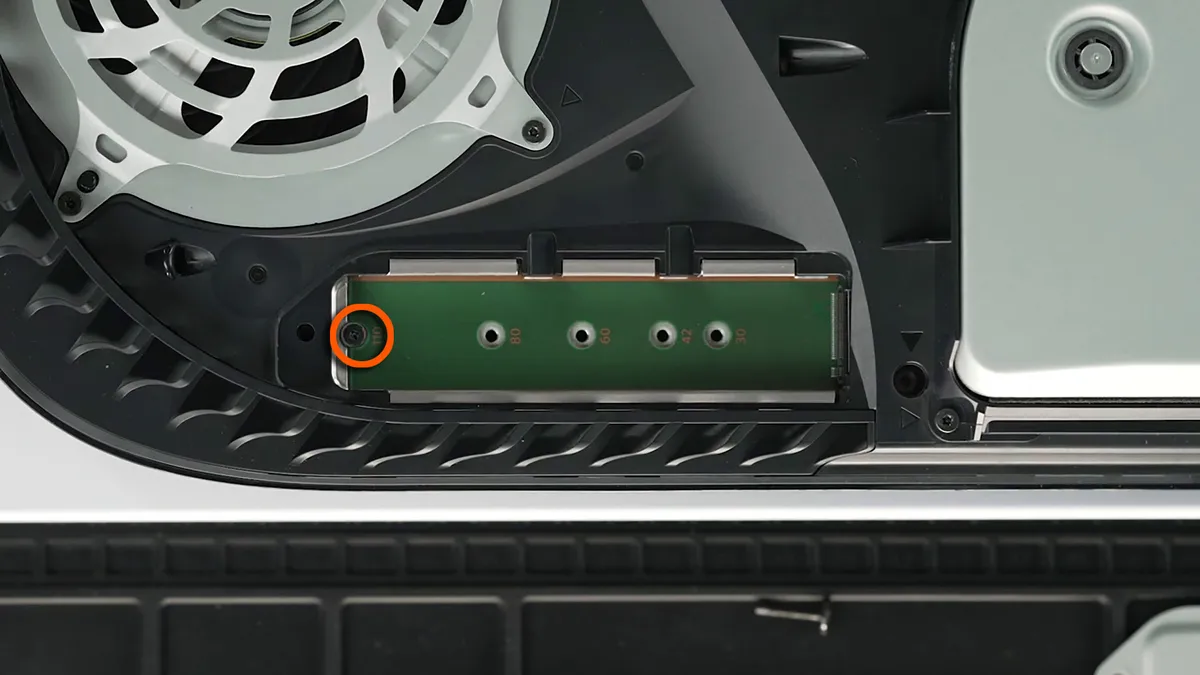
Now you can see inside the expansion bay, carefully remove the screw in the end slot and place it to one side, then move the spacer it was holding into the slot corresponding with the size of your M.2 SSD.

Sign up to the GamesRadar+ Newsletter

Weekly digests, tales from the communities you love, and more

By submitting your information you agree to the Terms & Conditions and Privacy Policy and are aged 16 or over.

5. Insert the SDD into the PS5

PS5 SSD installation

(Image credit: Sony)

Holding the rear edge of your M.2 SSD, align it with the notch on the terminal then from a diagonal position insert it firmly all the way in. 

PS5 SSD installation

(Image credit: Sony)

With the M.2 SSD inserted, tilt it downwards then lock it in place above the spacer using the smaller screw you removed before.

PS5 SSD installation

(Image credit: Sony)

6. Re-attach the PS5 covers

PS5 SSD installation

(Image credit: Sony)

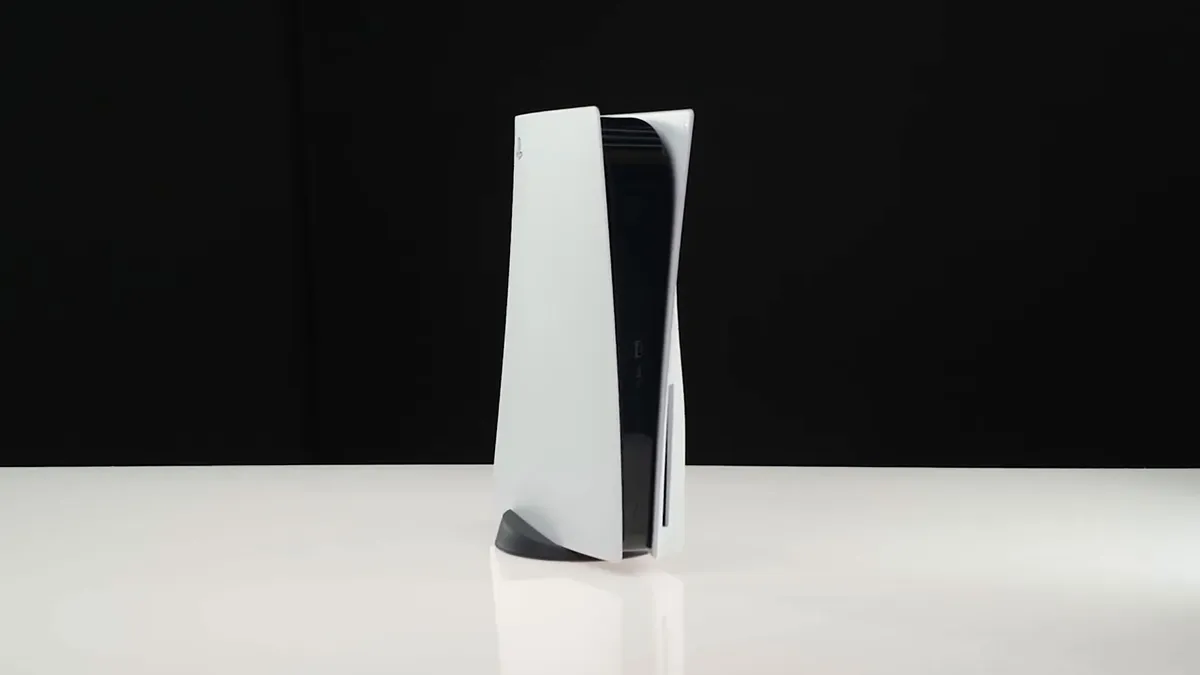
Next, reattach the expansion cover using the larger screw you removed earlier. Finally, put the lower panel back on the PS5, by placing it loosely on top then sliding it to your right – you'll hear a click to confirm it's secured in position.
PS5 SSD installation

(Image credit: Sony)

Now you have successfully installed an M.2 SSD in your PS5, reattach the base and all cables then power it up. You'll be greeted with a formatting guide, where you just need to follow the instructions to prepare your M.2 SSD for use. Once set up, you can transfer your existing games and apps to the newly installed extended storage, as well as set your PS5 to automatically install new games and apps there. Enjoy all of that additional space!

PS4 controller on PS5 | Transfer PS4 games to PS5 | PS5 error codes | PS5 standby mode | Play PS4 games on PS5 | Turn off PS5 adaptive triggers haptic feedback | How to turn off PS5 | Transfer games to PS5 hard drive | Why isn't my PS5 controller charging? | Download PS4 saves on PS5 

TOPICS
PlayStation Plus
Iain Wilson
Iain Wilson
Social Links Navigation
Guides Editor

Iain originally joined Future in 2012 to write guides for CVG, PSM3, and Xbox World, before moving on to join GamesRadar in 2013 as Guides Editor. His words have also appeared in OPM, OXM, PC Gamer, GamesMaster, and SFX. He is better known to many as ‘Mr Trophy’, due to his slightly unhealthy obsession with amassing intangible PlayStation silverware, and he now has over 1,000 Platinum pots weighing down the shelves of his virtual award cabinet. He does not care for Xbox Achievements.

Latest in SSD Hard Drives
Official image of the SANDISK Extreme Portable SSD hooked up to a laptop.
The rising costs of SSDs haven't stopped SanDisk from launching a brand new portable SSD line
 
 
Photo of the Astro Bot imagery on the front of the Seagate game drive, with the Astro Bot DualSense to its side.
This 5TB Seagate Astro Bot hard drive is an astronomically good alternative to the rising costs of SSDs
 
 
WD Black P50
In a RAM-pocalypse world, even your gaming hard drives aren't safe
 
 
Crucial T700 Pro standing upright against its box
I've found the best SSD prices in March 2026, for those who really need an upgrade right now
 
 
Image of the FireCuda 530R sitting on its box.
The FireCuda 530R is a worthwhile addition to any PC build, if you can find it in stock
 
 
Official marketing image showing the Crucial P510 SSD sitting on a gaming desk.
This Crucial P510 is one of the last bastions of reasonably priced gaming SSDs, but it won't be around for long
 
 
Latest in Guides
Marathon Introducing Sekiguchi agent Nona weaveworm
Marathon Introducing Sekiguchi contract walkthrough and how to find the Necrotic Sample and scan your shell
 
 
Ghost of Yotei Legends
How to start Ghost of Yotei Legends online co-op
 
 
A ditto takes a selfie when visiting the Pokopia developer island
How to visit the Pokopia developer island
 
 
Marathon introducing Traxus contract player fighting UESC commander
Marathon Introducing Traxus contract guide and UESC terminal locations for Intersection, Complex, and Bio-Research
 
 
A ditto who looks like a human smiles for a selfie in front of the Pokopia area map.
How many areas there are in Pokemon Pokopia?
 
 
Marathon Introducing NuCaloric shooting tick nest in infested building
Marathon Introducing NuCaloric contract walkthrough and how to find the employee ID card
 
 
LATEST ARTICLES
  1. Close up of PS1 console on woodgrain TV bench next to OSSC with Sir Dan MediEvil figure on top.
    1
    If Sony thinks surge pricing won't prompt me to shun new-gen consoles and go back to the PS1, it should think again
  2. 2
    Spider-Noir showrunner says the goal is "to make a version of Spider-Man that no one had seen before," clarifying it's the "same character, different universe" from the Spider-Verse variant
  3. 3
    Helldivers 2 support agent says "there's no balance team" at Arrowhead because "it's all a team effort": "No dev gets to just change whatever they want without oversight"
  4. 4
    Resident Evil director Shinji Mikami has been working on a new AAA action RPG for at least 1 year after Microsoft closed his last studio, and no one noticed
  5. 5
    How to complete the Marathon Introducing Sekiguchi contract

GamesRadar+ is part of Future US Inc, an international media group and leading digital publisher. Visit our corporate site.

Add as a preferred source on Google Add as a preferred source on Google
  • Terms and conditions
  • Contact Future's experts
  • Privacy policy
  • Cookies policy
  • Accessibility statement
  • Careers
  • About us
  • Advertise with us
  • Review guidelines
  • Write for us
  • Accessibility Statement

© Future US, Inc. Full 7th Floor, 130 West 42nd Street, New York, NY 10036.

Please login or signup to comment

Please wait...