
Join The Community
- Join our community
Commenting
Join the discussion
Exclusive Articles Coming Soon
Member-only articles
Weekly Newsletters
Weekly gaming & entertainment news
Member Badges
Earn badges as you go
Exclusive Competitions
Members-only prize draws
Curated Deals Coming Soon
Tech and gaming deals worth grabbing
GET COMMUNITY ACCESS QUICK
For the quickest way to join, simply enter your email below and get access. We will send a confirmation and sign you up to our newsletter to keep you updated on all your gaming news.
By submitting your information you agree to the Terms & Conditions and Privacy Policy and are aged 16 or over.
FIND OUT ABOUT OUR MAGAZINE
Want to subscribe to the magazine? Click the button below to find out more information.
Find out more
GET Community ACCESS QUICK

Join the GamesRadar community for quick access. Enter your email below and we'll send confirmation, and sign you up to our newsletter.

By submitting your information, you confirm you are aged 16 or over, have read our Privacy Policy and agree to the Terms & Conditions. Geographical rules apply.

Welcome to GamesRADAR+ Community !
Hi ,

Your membership journey starts here.

Keep exploring and earning more as a member.

MY ACCOUNT

Earn your first badge
Read 1 article to unlock your first badge.
Keep earning badges
Explore ways to get more involved as a member.
Latest Games News

Latest Games News

Breaking gaming news and updates

Read Now
Latest Games Reviews

Latest Games Reviews

Expert verdicts on the newest releases

Read Now

See what you’ve unlocked.

Explore your membership benefits.

Explore
Member Exclusives

Stay Ahead with GamesRadar+

Get the biggest gaming news, reviews, and releases straight to your inbox.

Explore

Sign Out
GamesRadar+
US EditionUS CA EditionCanada UK EditionUK AU EditionAustralia
Sign in
  • View Profile
  • Sign out
  • Games
    • Game Insights
      • Games News
      • Games Features
      • Games Reviews
      • Games Guides
      • Big in 2026
      • Big Preview
      • Future Games Show
      • Golden Joystick Awards
    • Genres
      • Action Games
      • RPGs
      • Action RPGs
      • Adventure Games
      • Third Person Shooters
      • FPS Games
    • Platforms
      • PS5
      • Xbox Series X
      • PC
      • Nintendo Switch
      • Nintendo Switch 2
      • Tabletop Gaming
    • Franchises
      • Grand Theft Auto
      • Pokemon
      • Assassin's Creed
      • Monster Hunter
      • Fortnite
      • Cyberpunk
      • Red Dead
      • The Elder Scrolls
      • The Sims
  • Entertainment
    • TV Shows
      • TV News
      • TV Reviews
      • Anime Shows
      • Sci-Fi Shows
      • Superhero Shows
      • Animated Shows
      • Marvel TV Shows
      • Star Wars TV Shows
      • DC TV Shows
    • Movies
      • Movie News
      • Movie Reviews
      • Big Screen Spotlight
      • Superhero Movies
      • Action Movies
      • Anime Movies
      • Sci-Fi Movies
      • Horror Movies
      • Marvel Movies
      • DC Movies
    • Streaming
      • Apple TV Plus
      • Disney Plus
      • Netflix
      • HBO
      • Amazon Prime Video
      • Hulu
    • Comics
      • Marvel Comics
      • DC Comics
  • Hardware
    • Insights
      • Hardware News
      • Hardware Reviews
      • Hardware Features
      • Buying Guides
    • Computing
      • Desktop PCs
      • Laptops
      • Handhelds
    • Peripherals
      • Headsets & Headphones
      • TVs & Monitors
      • Gaming Mice
      • Gaming Keyboards
      • Gaming Chairs
      • Speakers & Audio
    • Accessories & Tech
      • Gaming Controllers
      • Tech
      • SSDs & Hard Drives
      • VR
      • Accessories
      • Retro
  • Deals
    • Toys & Collectibles
    • Lego
    • Dungeons and Dragons
    • Merch
  • Video
    • Videos
    • GR+ Replay - Submit Your Clips
    • G+RLS Podcast
  • Edge
  • Newsletters
    • Quizzes
    • About Us
    • How to pitch to us
    • How we score
    • Newsarama
    • Retro Gamer
  • Home
  • Games
    • View Games
      • Games News
      • Games Features
      • Games Reviews
      • Games Guides
      • Big in 2026
      • Big Preview
      • Future Games Show
      • Golden Joystick Awards
      • Action Games
      • RPGs
      • Action RPGs
      • Adventure Games
      • Third Person Shooters
      • FPS Games
    • Platforms
      • View Platforms
      • PS5
      • Xbox Series X
      • PC
      • Nintendo Switch
      • Nintendo Switch 2
      • Tabletop Gaming
      • Grand Theft Auto
      • Pokemon
      • Assassin's Creed
      • Monster Hunter
      • Fortnite
      • Cyberpunk
      • Red Dead
      • The Elder Scrolls
      • The Sims
  • Entertainment
    • View Entertainment
    • TV Shows
      • View TV Shows
      • TV News
      • TV Reviews
      • Anime Shows
      • Sci-Fi Shows
      • Superhero Shows
      • Animated Shows
      • Marvel TV Shows
      • Star Wars TV Shows
      • DC TV Shows
    • Movies
      • View Movies
      • Movie News
      • Movie Reviews
      • Big Screen Spotlight
      • Superhero Movies
      • Action Movies
      • Anime Movies
      • Sci-Fi Movies
      • Horror Movies
      • Marvel Movies
      • DC Movies
    • Streaming
      • View Streaming
      • Apple TV Plus
      • Disney Plus
      • Netflix
      • HBO
      • Amazon Prime Video
      • Hulu
    • Comics
      • View Comics
      • Marvel Comics
      • DC Comics
  • Hardware
    • View Hardware
      • Hardware News
      • Hardware Reviews
      • Hardware Features
      • Buying Guides
      • Desktop PCs
      • Laptops
      • Handhelds
    • Peripherals
      • View Peripherals
      • Headsets & Headphones
      • TVs & Monitors
      • Gaming Mice
      • Gaming Keyboards
      • Gaming Chairs
      • Speakers & Audio
      • Gaming Controllers
      • Tech
      • SSDs & Hard Drives
      • VR
      • Accessories
      • Retro
  • Deals
    • Toys & Collectibles
    • Lego
    • Dungeons and Dragons
    • Merch
  • Video
    • View Video
    • Videos
    • GR+ Replay - Submit Your Clips
    • G+RLS Podcast
  • Edge
  • Newsletters
    • Quizzes
    • About Us
    • How to pitch to us
    • How we score
    • Newsarama
    • Retro Gamer
Trending
  • EDGE GTAVI exclusive
  • Join our monthly RPG Club
  • Golden Joystick Awards 2026
  • Deal of the Day
  • Countdown to GTA 6
  • RPG Hub
  • G+RLS Podcast
  • Submit your clips. Win prizes
Sign up to the GamesRadar+ Newsletter

Weekly digests, tales from the communities you love, and more


By submitting your information you agree to the Terms & Conditions and Privacy Policy and are aged 16 or over.

You are now subscribed

Your newsletter sign-up was successful


Want to add more newsletters?

GamesRadar+

Every Friday

GamesRadar+

Your weekly update on everything you could ever want to know about the games you already love, games we know you're going to love in the near future, and tales from the communities that surround them.

GTA 6 O'clock

Every Thursday

GTA 6 O'clock

Our special GTA 6 newsletter, with breaking news, insider info, and rumor analysis from the award-winning GTA 6 O'clock experts.

Knowledge

Every Friday

Knowledge

From the creators of Edge: A weekly videogame industry newsletter with analysis from expert writers, guidance from professionals, and insight into what's on the horizon.

The Setup

Every Thursday

The Setup

Hardware nerds unite, sign up to our free tech newsletter for a weekly digest of the hottest new tech, the latest gadgets on the test bench, and much more.

Switch 2 Spotlight

Every Wednesday

Switch 2 Spotlight

Sign up to our new Switch 2 newsletter, where we bring you the latest talking points on Nintendo's new console each week, bring you up to date on the news, and recommend what games to play.

The Watchlist

Every Saturday

The Watchlist

Subscribe for a weekly digest of the movie and TV news that matters, direct to your inbox. From first-look trailers, interviews, reviews and explainers, we've got you covered.

SFX

Once a month

SFX

Get sneak previews, exclusive competitions and details of special events each month!


Join the club

Get full access to premium articles, exclusive features and a growing list of member rewards.


An account already exists for this email address, please log in.
  1. Platforms
  2. PlayStation
  3. PS5

PS5 standby mode and what you can do in PS5 Rest Mode explained

Guides
By Sam Loveridge Contributions by Iain Wilson
last updated 12 December 2025

From downloads to power, here's what PS5 Rest Mode does when activated

When you purchase through links on our site, we may earn an affiliate commission. Here’s how it works.

PS5
(Image credit: Future)
  • Facebook
  • X
  • Pinterest
  • Flipboard
  • Email
Share this article
0
Join the conversation
Follow us
Add us as a preferred source on Google
Subscribe to our newsletter

PS5 standby mode, which is officially known as PS5 Rest Mode, is an optional state you can put your console into when you're not using it, This basically shuts down many of the functions and puts your PlayStation 5 to sleep, but keeps certain processes running in the background at reduced power, meaning you can still download games, system updates, and charge your controller. This halfway house between on and off uses considerably less power, so here are all of the benefits of entering PS5 standby or Rest Mode over just turning it off.

1. Keep your controller charged

DualSense PS5 controller

(Image credit: Future)

One of the great benefits of remembering to plug your pad back in before you let your PS5 drift off to sleep is that in rest mode, your PS5 will still supply power to your USB ports. You can adjust the length of time that the USB ports remain powered for in:
Settings > System > Power Saving > Features Available in Rest Mode

The options are 'Always', 'Three Hours', or 'Off'. Three hours will be plenty to keep your pad topped up, but if you want to make sure it's always fully charged when you come back to it, opt for the Always option. If you have any problems with this, then see our separate guide on why isn't my PS5 controller charging?

Latest Videos FromGamesRadar+
Watch full video here:

2. Updating games behind the scenes

PS5 UI

(Image credit: Sony)

One of the things that has always driven me up the wall with modern gaming is that there's almost always a patch to download before you can play anything. However, like the PS4 before it, the PS5 can automatically download and install game updates and other content while it's in rest mode. That means you should always be able to jump straight into your games the moment you turn your PS5 on, as it's been beavering away in the background. Of course, having top tier Wi-Fi connectivity will also help.

3. Uploading saves to the cloud

PS5 UI

(Image credit: Sony)

If you're a PlayStation Plus subscriber, there's another benefit of opting for PS5 standby mode - cloud saves. Whilst in rest mode, your PS5 will diligently upload any new save files to your PSN Cloud Storage (for both PS4 and PS5 games I might add), meaning you're safe if anything should happen to your locally-stored save or - heaven's forbid - your shiny new PS5. It's another feature that's carried forward from the PS4, but always good to know it's there. 

You may like
  • PS5 accessories on a table, including two DualSense controllers, a charging station and a headset The best PS5 accessories in 2026: everything you need to upgrade your experience
  • Wolverine poses with his claws out in Marvel's Wolverine in his yellow battle suit "AI upscaling is coming to PS5": Sony's base console is getting its own version of a PS5 Pro feature
  • The best PS5 games banner image Cyberpunk 2077, Astro Bot, God of War Ragnarok, and Death Stranding 2: On the Beach Best PS5 games: The 30 greatest PlayStation 5 games to play right now

4. Install games remotely

Enhance your gaming experiences on PS4 and PS5 with the newly redesigned PlayStation App: https://t.co/PkutMmuGSV pic.twitter.com/uXTH1G07yWOctober 28, 2020

If you are opting to always leave your new console in PS5 rest mode, make sure to head into the settings to ensure 'Enable Turning On PS5 from Network' is switched on. You'll find it in the following menu:

Settings > System > Power Saving > Features Available in Rest Mode > Enable Turning On PS5 from Network

Sign up to the GamesRadar+ Newsletter

Weekly digests, tales from the communities you love, and more

By submitting your information you agree to the Terms & Conditions and Privacy Policy and are aged 16 or over.

That way, if you get a digital game code or buy something from the PlayStation Store via the App, your PS5 still start downloading it straight away while in rest mode. Hopefully, that'll mean it's ready to start playing the moment you're reunited with your PS5. 

5. Keep your PS5 game suspended

Ghost of Yotei

(Image credit: PlayStation)

Of course, a lot of the benefits of PS5 rest mode are just gaming housekeeping, but there's also a tangible perk to keeping your console only half-asleep: keeping your game suspended. While the PS5 doesn't quite have the Quick Resume functionality of the Xbox Series X, it can keep your game suspended in rest mode, allowing you to jump straight back in where you left off when you boot up your PS5. 

6. Play PS5 games remotely
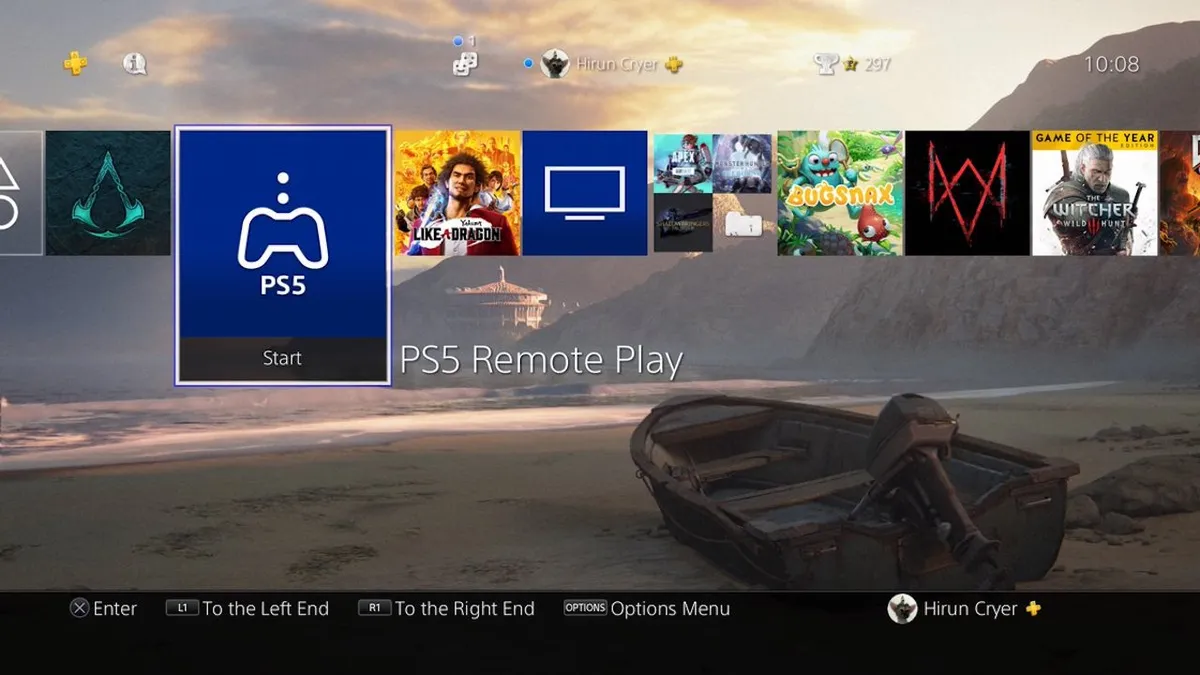
PS5 Remote Play App

(Image credit: Sony)

If you were so inclined, you can also access your PS5 remotely, via the conveniently named feature PS5 Remote Play. 

You may like
  • PS5 accessories on a table, including two DualSense controllers, a charging station and a headset The best PS5 accessories in 2026: everything you need to upgrade your experience
  • Wolverine poses with his claws out in Marvel's Wolverine in his yellow battle suit "AI upscaling is coming to PS5": Sony's base console is getting its own version of a PS5 Pro feature
  • The best PS5 games banner image Cyberpunk 2077, Astro Bot, God of War Ragnarok, and Death Stranding 2: On the Beach Best PS5 games: The 30 greatest PlayStation 5 games to play right now

"We’re updating PS4’s Remote Play feature," says Sony. "Now, in addition to being able to access your PS4 from a PC or a mobile device, your PS4 can access other consoles via Remote Play too, right on your TV. This includes the ability to connect to your PS5 and stream a PS5 game to your PS4 so you can play it there."

So go on, give your PS4 a little more shelf-life with the PS5 Remote Play feature.

7. Ultimately save some power

PS5

(Image credit: Future)

Now of course, leaving your PS5 in standby mode is going to consume more energy than turning it off entirely, but it's way more energy-efficient than the PS4 ever was.

"I am also very pleased to announce the next-generation PlayStation console will include the possibility to suspend gameplay with much lower power consumption than PS4 (which we estimate can be achieved at around 0.5 W)," explained Sony Entertainment CEO, Jim Ryan in a PlayStation Blog post at the end of 2019. "If just one million users enable this feature, it would save equivalent to the average electricity use of 1,000 US homes."

According to a report published by the National Resources Defense Council back in 2014, the PS4 and Xbox One both draw massive amounts of power in standby – the PS4 8.5 watts, and the Xbox One 15.7W. 

The PS5 drawing 0.5W of power compared to the PS4's 8.5W is certainly quite the energy saving.

PS5 review | How to eject a PS5 disc | Transfer games to PS5 hard drive | How to use a PS4 controller with PS5 | Where is the PS5 power button | Best PS5 SSD | Best PS5 external hard drive | Best PS5 headset | Upcoming PS5 games | How to download PS4 saves on PS5 | PS5 deals | Best PS5 headsets

© GamesRadar+. Not to be reproduced without permission.

TOPICS
PlayStation Network Sony PlayStation Plus
Sam Loveridge
Sam Loveridge
Social Links Navigation
Brand Director, GamesRadar+

Sam Loveridge is the Brand Director and former Global Editor-in-Chief of GamesRadar. She joined the team in August 2017. Sam came to GamesRadar after working at TrustedReviews, Digital Spy, and Fandom, following the completion of an MA in Journalism. In her time, she's also had appearances on The Guardian, BBC, and more. Her experience has seen her cover console and PC games, along with gaming hardware, for a decade, and for GamesRadar, she's in charge of the site's overall direction, managing the team, and making sure it's the best it can be. Her gaming passions lie with weird simulation games, big open-world RPGs, and beautifully crafted indies. She plays across all platforms, and specializes in titles like Pokemon, Assassin's Creed, The Sims, and more. Basically, she loves all games that aren't sports or fighting titles! In her spare time, Sam likes to live like Stardew Valley by cooking and baking, growing vegetables, and enjoying life in the countryside.

With contributions from
  • Iain Wilson Guides Editor

You must confirm your public display name before commenting

Please logout and then login again, you will then be prompted to enter your display name.

Read more
PS5 accessories on a table, including two DualSense controllers, a charging station and a headset
Tech The best PS5 accessories in 2026: everything you need to upgrade your experience
 
 
Wolverine poses with his claws out in Marvel's Wolverine in his yellow battle suit
Games "AI upscaling is coming to PS5": Sony's base console is getting its own version of a PS5 Pro feature
 
 
The best PS5 games banner image Cyberpunk 2077, Astro Bot, God of War Ragnarok, and Death Stranding 2: On the Beach
Games Best PS5 games: The 30 greatest PlayStation 5 games to play right now
 
 
God of War Laufey
PS5 PS5 exclusives: Every game released and confirmed so far
 
 
Image of PS5 games and accessories on a blue GamesRadar+ background.
PS5 The best early Black Friday PS5 deals in 2026: the biggest Sony savings so far
 
 
PS5 consoles, games, and accessories on an orange background with Prime Day badge
Hardware Prime Day PS5 deals end today: the best console, game, and accessory savings I've found in the sale
 
 
Latest in PS5
A woman in Fairgames
Third Person Shooters PlayStation adds live-service shooter Fairgames to its constantly expanding graveyard
 
 
A man in a suit in The Outer Worlds 2's Side Effects Guaranteed DLC
RPGs Amid Bethesda takeover and Fallout pivot, Obsidian's finally making good on The Outer Worlds 2 DLC
 
 
A screenshot of the GTA 6 Extended Look. Jason looks out a car window while sitting next to Lucia.
Grand Theft Auto I want an uglier GTA 6 that runs at 60 FPS – 30 FPS on console is more reason to wait for PC
 
 
Villion:Code female character with pink eyes and brown bobbed hair
Persona "There is no doubt that Persona influenced this title," series veteran says of his new RPG
 
 
Lucia moves quickly to aim a gun as she and Jason escape from a robbery while wearing bandanas, from the GTA 6 extended look
Grand Theft Auto A week before GTA 6, Take-Two CEO is already teasing "what comes next" from Rockstar
 
 
Final Fantasy 14
Final Fantasy Final Fantasy 14 patches "certain words" out of Keyboard Brawler, making it a bit less impossible
 
 
Latest in Guides
GTA 6 press shot featuring Lucia and Jason in an open-top car, with Lucia looking over her shoulder while aiming a pistol
Grand Theft Auto How to play GTA 6 on Xbox One
 
 
Phantom Blade Zero Blizzard Blademaster sitting cross-legged with is sword stuck in the ground in front
Action RPGs How to beat Blizzard Blademaster in Phantom Blade Zero
 
 
Zelda Ocarina of Time Remake
The Legend of Zelda How do Gossip Stones work in the Ocarina of Time Remake?
 
 
Press image for GloryBound codes showing a group of gladiators assembled in the coliseum
Survival Games GloryBound codes (November 2026) and how to redeem them for Lucky Spins and Chests
 
 
Phantom Blade Zero Soul running up to the Crimson Manor
Action RPGs How to get inside the Crimson Manor in Phantom Blade Zero and get the Puppet's Tongue
 
 
Ocarina of Time Remake
The Legend of Zelda How to get through the Lost Woods in Zelda Ocarina of Time
 
 
LATEST ARTICLES
  1. Exclusive: The VisionQuest team are keen to return for more
    1
    VisionQuest showrunner and star Paul Bettany "have a lot of ideas" for a potential season 2
  2. 2
    VisionQuest star breaks down the finale's return to its sitcom roots, and the neat Easter egg you probably missed
  3. 3
    Do Billy Maximoff and Agatha Harkness appear in VisionQuest episode 8?
  4. 4
    VisionQuest episode 8 ending explained: Who dies, do Wanda and Billy return, and what happens to Ultron?
  5. 5
    VisionQuest episode 8 Easter eggs: All the Marvel references explained

GamesRadar+ is part of Future US Inc, an international media group and leading digital publisher. Visit our corporate site.

Add as a preferred source on Google Add as a preferred source on Google
  • About us
  • Contact Future's experts
  • Terms and conditions
  • Privacy policy
  • Cookies policy
  • Advertise with us
  • Review guidelines
  • Write for us
  • Accessibility statement
  • Careers

© Future US, Inc. Full 7th Floor, 130 West 42nd Street, New York, NY 10036.

Please login or signup to comment

Please wait...