

GamesRadar+ GamesRadar+
US EditionUS CA EditionCanada UK EditionUK AU EditionAustralia
Sign in
  • View Profile
  • Sign out
  • Games
    • Game Insights
      • Games News
      • Games Features
      • Games Reviews
      • Games Guides
      • Big in 2026
      • The Big Preview
      • On The Radar
      • Indie Spotlight
      • Future Games Show
      • Golden Joystick Awards
    • Genres
      • Action Games
      • RPGs
      • Action RPGs
      • Adventure Games
      • Third Person Shooters
      • FPS Games
    • Platforms
      • PS5
      • Xbox Series X
      • PC
      • Nintendo Switch
      • Nintendo Switch 2
      • Tabletop Gaming
    • Franchises
      • Grand Theft Auto
      • Pokemon
      • Assassin's Creed
      • Monster Hunter
      • Fortnite
      • Cyberpunk
      • Red Dead
      • The Elder Scrolls
      • The Sims
  • Entertainment
    • TV Shows
      • TV News
      • TV Reviews
      • Anime Shows
      • Sci-Fi Shows
      • Superhero Shows
      • Animated Shows
      • Marvel TV Shows
      • Star Wars TV Shows
      • DC TV Shows
    • Movies
      • Movie News
      • Movie Reviews
      • Big Screen Spotlight
      • Superhero Movies
      • Action Movies
      • Anime Movies
      • Sci-Fi Movies
      • Horror Movies
      • Marvel Movies
      • DC Movies
    • Streaming
      • Apple TV Plus
      • Disney Plus
      • Netflix
      • HBO
      • Amazon Prime Video
      • Hulu
    • Comics
      • Marvel Comics
      • DC Comics
    • Toys & Collectibles
    • Lego
    • Dungeons and Dragons
    • Merch
  • Hardware
    • Insights
      • Hardware News
      • Hardware Reviews
      • Hardware Features
    • Computing
      • Desktop PCs
      • Laptops
      • Handhelds
    • Peripherals
      • Headsets & Headphones
      • TVs & Monitors
      • Gaming Mice
      • Gaming Keyboards
      • Gaming Chairs
      • Speakers & Audio
    • Accessories & Tech
      • Gaming Controllers
      • Tech
      • SSDs & Hard Drives
      • VR
      • Accessories
      • Retro
  • Deals
    • Game Deals
    • Tech Deals
    • TV Deals
    • Buying Guides
  • Video
  • Newsletters
    • Quizzes
    • About Us
    • How to pitch to us
    • How we score
    • Newsarama
    • Retro Gamer
    • Total Film
  • home
  • Games
    • View Games
      • Games News
      • Games Features
      • Games Reviews
      • Games Guides
      • Big in 2026
      • The Big Preview
      • On The Radar
      • Indie Spotlight
      • Future Games Show
      • Golden Joystick Awards
      • Action Games
      • RPGs
      • Action RPGs
      • Adventure Games
      • Third Person Shooters
      • FPS Games
    • Platforms
      • View Platforms
      • PS5
      • Xbox Series X
      • PC
      • Nintendo Switch
      • Nintendo Switch 2
      • Tabletop Gaming
      • Grand Theft Auto
      • Pokemon
      • Assassin's Creed
      • Monster Hunter
      • Fortnite
      • Cyberpunk
      • Red Dead
      • The Elder Scrolls
      • The Sims
  • Entertainment
    • View Entertainment
    • TV Shows
      • View TV Shows
      • TV News
      • TV Reviews
      • Anime Shows
      • Sci-Fi Shows
      • Superhero Shows
      • Animated Shows
      • Marvel TV Shows
      • Star Wars TV Shows
      • DC TV Shows
    • Movies
      • View Movies
      • Movie News
      • Movie Reviews
      • Big Screen Spotlight
      • Superhero Movies
      • Action Movies
      • Anime Movies
      • Sci-Fi Movies
      • Horror Movies
      • Marvel Movies
      • DC Movies
    • Streaming
      • View Streaming
      • Apple TV Plus
      • Disney Plus
      • Netflix
      • HBO
      • Amazon Prime Video
      • Hulu
    • Comics
      • View Comics
      • Marvel Comics
      • DC Comics
    • Toys & Collectibles
    • Lego
    • Dungeons and Dragons
    • Merch
  • Hardware
    • View Hardware
      • Hardware News
      • Hardware Reviews
      • Hardware Features
      • Desktop PCs
      • Laptops
      • Handhelds
    • Peripherals
      • View Peripherals
      • Headsets & Headphones
      • TVs & Monitors
      • Gaming Mice
      • Gaming Keyboards
      • Gaming Chairs
      • Speakers & Audio
      • Gaming Controllers
      • Tech
      • SSDs & Hard Drives
      • VR
      • Accessories
      • Retro
  • Deals
    • View Deals
    • Game Deals
    • Tech Deals
    • TV Deals
    • Buying Guides
  • Video
  • Newsletters
    • Quizzes
    • About Us
    • How to pitch to us
    • How we score
    • Newsarama
    • Retro Gamer
    • Total Film
Trending
  • Pokemon Winds and Waves
  • New Games for 2026
  • GamesRadar+ Replay
  • Mario Day deals
Don't miss these
A screenshot from the Pokemon Pokopia trailer shows Ditto transformed into a human.
Pokemon 13 things I wish I knew before starting Pokemon Pokopia
Kingdom Come: Deliverance 2 screenshot of Henry washing his face at a trough
Action RPGs 11 Kingdom Come Deliverance 2 tips and tricks to help you serf on
Marathon player shooting at enemy vandal and triage runners
FPS Games Here are 15 Marathon tips and tricks for new players
Fallout 4 power armor in repair rig
Fallout The best Fallout games, ranked
Fallout 5: A picture of Vault Boy giving a thumbs up in front of a closed vault from the Fallout games.
Fallout Fallout 5: Everything we know so far, and what we hope to see
A woman in a space helmet stares at something off the screen in Arc Raiders
Third Person Shooters How to get all Blueprints in Arc Raiders
Cities Skylines screenshot of a cityscape showing buildings framing roads, with skyscrapers opposite a river in the background
Strategy Games The 15 best city building games to play in 2026
Two Point Museum - a dinosaur bone display
Simulation Games The 15 best simulator games to play in 2026
FC 26
EA Sports FC FC 26 career mode guide to scouting, transfers, and the best teams to manage
The Red Prince in Divinity Original Sin 2
Strategy Games All the best Divinity Original Sin 2 Builds
Arc Raiders blueprints
Third Person Shooters The ultimate Arc Raiders guide and survival handbook
games like fallout - Fallout 4
Fallout The best games like Fallout to jump into while we wait for Fallout 5
Minecraft key art showing Steve holding a pickaxe.
Adventure Games The 25 best crafting games to play in 2026
Best games like Animal Crossing: A group of villagers on a stone bridge during New Horizons.
Animal Crossing 15 Best games like Animal Crossing that are so wholesome it hurts
A player shooting at a robot enemy with no health bar in Arc Raiders
Third Person Shooters I love exploring in Arc Raiders, but there's so much I wish I'd known before I set out
  1. Games
  2. RPG
  3. Fallout
  4. Fallout 76

17 Fallout 76 CAMP beginners tips to help you build a perfect home

Guides
By Ford James, Zoe Delahunty-Light last updated 16 August 2022

These Fallout 76 C.A.M.P. tips will help you to manage your resources and build your dream base

When you purchase through links on our site, we may earn an affiliate commission. Here’s how it works.

Fallout 76 CAMP beginners tips
  • Facebook
  • X
  • Pinterest
  • Flipboard
  • Email
Share this article
Join the conversation
Follow us
Add us as a preferred source on Google
Get the GamesRadar+ Newsletter

Weekly digests, tales from the communities you love, and more


By submitting your information you agree to the Terms & Conditions and Privacy Policy and are aged 16 or over.

You are now subscribed

Your newsletter sign-up was successful


Want to add more newsletters?

GamesRadar+

Every Friday

GamesRadar+

Your weekly update on everything you could ever want to know about the games you already love, games we know you're going to love in the near future, and tales from the communities that surround them.

GTA 6 O'clock

Every Thursday

GTA 6 O'clock

Our special GTA 6 newsletter, with breaking news, insider info, and rumor analysis from the award-winning GTA 6 O'clock experts.

Knowledge

Every Friday

Knowledge

From the creators of Edge: A weekly videogame industry newsletter with analysis from expert writers, guidance from professionals, and insight into what's on the horizon.

The Setup

Every Thursday

The Setup

Hardware nerds unite, sign up to our free tech newsletter for a weekly digest of the hottest new tech, the latest gadgets on the test bench, and much more.

Switch 2 Spotlight

Every Wednesday

Switch 2 Spotlight

Sign up to our new Switch 2 newsletter, where we bring you the latest talking points on Nintendo's new console each week, bring you up to date on the news, and recommend what games to play.

The Watchlist

Every Saturday

The Watchlist

Subscribe for a weekly digest of the movie and TV news that matters, direct to your inbox. From first-look trailers, interviews, reviews and explainers, we've got you covered.

SFX

Once a month

SFX

Get sneak previews, exclusive competitions and details of special events each month!


An account already exists for this email address, please log in.
Subscribe to our newsletter

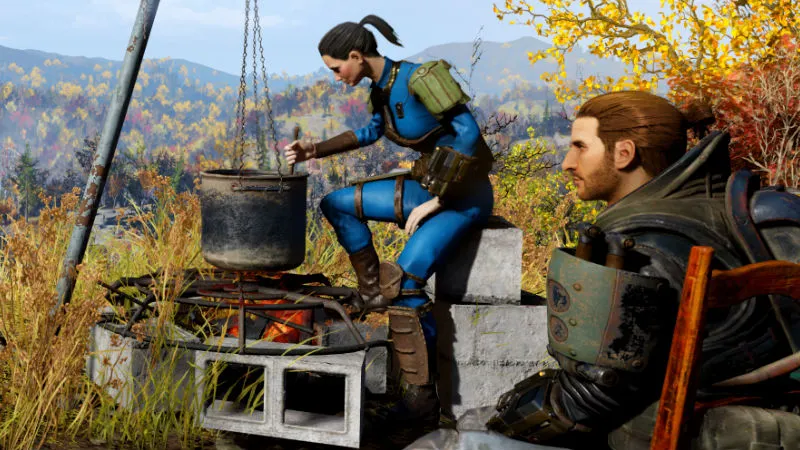
Some Fallout 76 CAMP beginner tips will come in useful when you first place that CAMP module down and wonder what to do next. If you want to build anything you're going to need resources and blueprints, not to mention a location you can actually build on in Fallout 76. Coming up we've got some simpler Fallout 76 CAMP beginner tips to make your post apocalyptic transition into home ownership as painless as possible and get started on building base of your dreams. 

1. Build these five items first

As your base of operations, your C.A.M.P. is your crafting hub. As long as you’ve put down some foundations, you can build anything on top of it, but to start off with prioritise crafting stations. The five basic things you should build first are:

  • Armor workbench (6 Aluminum, 4 Gear, 3 Screw, 3 Spring, 3 Wood)
  • Weapons workbench (6 Aluminum, 3 Gear, 3 Screw, 3 Rubber, 4 Wood)
  • Sleeping Bag (4 Cloth)
  • Turret (1 Circuitry, 2 Gear, 2 Oil)
  • Cooking station (2 Wood, 2 Steel)

To craft some of the more advanced bits of furniture and equipment (like a Tinkerer’s Bench or Hospital Bed) you’ll have to find their Plans in your travels across Appalachia, which unlock the options to craft them. You can tell which objects require Plans by the red padlock over their image in the menu, and if you just see a red circle with a line through it on the image it means you don’t have enough resources to build the object of your heart’s desire. 

You may like
  • Fallout 76 screenshot with a GamesRadar On the Radar overlay Fallout 76 has become a living world that connects every point in the series – within reason
  • Avowed screenshot depicting combat with a corrupted plague bear, the protagonist wielding a sword and a magical spellbook 11 Avowed tips and tricks for beginners in the Living Lands
  • Fallout 4 power armor in repair rig The best Fallout games, ranked

2. Use the Overseers C.A.M.P. at first

Like we mention in our Fallout 76 tips, when you first start off in Fallout 76 don’t expect to be able to build a C.A.M.P. straight away. It’ll take time to gather up enough resources for your first C.A.M.P., so initially instead depend on the Overseer’s C.A.M.P. which you’ll find in the very early stages of your first main quest. It’s already built, and it comes with a weapons workbench, an armor workbench, a cooking station, and a Stash. When you start to voyage out of the starting area later on in your game you’ll want to start thinking about building (and Blueprinting) your own C.A.M.P. as it’ll become harder to find workbenches and cooking stations, but until then the Overseer’s one will do nicely. 

3. If you want to build a huge base, collect EVERYTHING

Seriously: everything. The amount of resources you have is determined by your Junk, so you should loot everything in sight even if at first glance it just looks like...well, junk. You can always store it in your Stash if it starts to weigh you down too much, but a good rule of thumb is to never get rid of any Junk before looking at how much your next structure will cost to build. There’s nothing more annoying than dropping a ton of Gold Plated Flip Lighters and Toy Trucks then realising that their materials were essential to finally being able to build that Armor Workbench you’ve always wanted. 

4. Scrap all junk you pick up

One way to ensure your junk isn’t taking up more weight than is necessary is to scrap it. You can do this at any workbench; simply interact with it and you’ll be able to scrap all of the junk you’re carrying. This will condense it into its raw parts like Excess Adhesive, Steel Scraps, Waste Acid, etc. This way, it will take up less space in your stash and it’s also much easier to sort through when it’s broken down.

5. How to make your items weigh less

Another way to carry far more than you’d usually be able to is to equip the right perk cards. Under the Strength category, as you level up, you’ll gain access to perks like Pack Rat, Travelling Pharmacy, Scattershot and more. These all make certain items like junk and first aid weigh less. Stack these as you level up by investing in your Strength stat and before long, you’ll be able to carry far more. There’s also Strong Back, which gives you a solid +10 to carry weight for so much more junk.

Sign up to the GamesRadar+ Newsletter

Weekly digests, tales from the communities you love, and more

By submitting your information you agree to the Terms & Conditions and Privacy Policy and are aged 16 or over.

6. Regularly dump Junk in your Stash

For budding builders, your Stash is one of the most useful things when it comes to the Fallout 76 CAMP tips to bear in mind. Across the world of Fallout 76 are Stashes, which are chests that store whatever you put in them. You can then access that same stuff from any other Stash on the map. Anyone who’s frantically collecting Junk to prepare for building a C.A.M.P. should treat the Stash like a save button: locate one in a Red Rocket Station or Train Station, comb the surrounding area for as much Junk as you can find, then return to the Stash and dump all of it inside. Then when you plant down your C.A.M.P. you can take everything from your Stash into your inventory - it doesn’t matter if it makes you overencumbered as you’ll just be standing in one place - then build to your heart’s content. 

7. Keep an eye on your Stash limit

While you’re going to want to loot everything and anything at first, be wary of your Stash limit. It currently has a limit of 400lbs and that will fill up scarily quickly once you’ve been on a few journeys to different locations. Bethesda has confirmed that they’ll be increasing the Stash limit in the future, but until then you’ll need to spend some time managing your inventory.

8. Build a CAMP by finding an area that’s not overlapping with another build area

When you first bring out your C.A.M.P., around you you’ll notice a large green sphere - this marks the boundaries of your C.A.M.P., and it can’t overlap with any other nearby build areas. Your C.A.M.P. will turn green when it’s in a viable location, so if it starts off as red just keep walking until it turns the right colour. 

You may like
  • Fallout 76 screenshot with a GamesRadar On the Radar overlay Fallout 76 has become a living world that connects every point in the series – within reason
  • Avowed screenshot depicting combat with a corrupted plague bear, the protagonist wielding a sword and a magical spellbook 11 Avowed tips and tricks for beginners in the Living Lands
  • Fallout 4 power armor in repair rig The best Fallout games, ranked

9. Don’t worry about walls at first

At first do not waste your precious Wood on walls. I know it sounds stupid, but there’s no use in having a neat shack with a perfect roof if you don’t have the resources to build any machines inside. Wood is initially hard to come by in the first couple of hours as you can’t loot that much of it from Junk and instead have to comb the wilderness for fallen trees, so when you find some make sure to prioritise building a weapons workbench, armor workbench, cooking station, turret, and bed over structures. Later on when you’re rolling in enough wood to build a very flammable town, feel free to construct a proper base, but to start off with you’re best off thinking of your C.A.M.P. as a quick-access crafting workshop rather than a permanent location. 

10. Get a bed to restore HP and earn the Rested bonus

If there’s one thing you take away from these Fallout 76 CAMP tips, it should be that beds are much more useful than they are in the single player games. Lying down on one quickly regenerates your HP, and if you stay in it long enough you get a Rested bonus, meaning beds are really handy after a tricky fight when your HP is low. A sleeping bag only needs four Cloth to craft, so its cheapness makes it perfect for quickly placing down after a tussle. As sleeping bags automatically go on the floor there’s a chance for you to contract a Disease, but it’s worth it to restore those HP points in a hurry. 

11. Turrets are a Survivor’s best friend

A turret only costs one Circuitry, two Gear, two Oil, and four Steel resources to craft, so if you’re planning for your C.A.M.P. to be a quick health regeneration station you’re going to want one of these bad boys nearby to keep you safe while you’re napping. In fact, some of resources you need to craft a turret could probably be found in a couple of Oil Canisters or a Desk Fan, so they’re not as expensive to craft as you’d think. 

12. Keep an eye on your Budget

In the top right hand corner of your build screen you’ll see a bar titled ‘Budget’. This keeps track of how much you’ve built in your C.A.M.P., as there’s only a certain amount that you can create in your designated area. It will slowly fill up as you assemble more structures, so make sure to keep an eye on it as you expand your C.A.M.P. because it’s basically there to initially keep your ambitions realistic. Which means you can’t build the same kind of massive impenetrable fortresses that rank among the best Fallout 4 settlements. Boo. 

13. You don’t have to rebuild you C.A.M.P. if you move it around

Thankfully when you decide to move your CAMP around you don’t have to wave goodbye to your beautifully-planned bunker. In your building menu simply go into the Blueprint section, then select all the structures you want to save to a blueprint. Thanks to that blueprint your CAMP will remember exactly where they are, which means that when you put down your CAMP somewhere new you won't lose any of your progress. So if you discover a new location that’s way closer to a ton of glorious Junk or just fancy moving to a remote part of the map where no-one can find you, you can pack up and go in the blink of an eye. Hallelujah. When you get to your desired destination just go back into the blueprint section of your build menu, select the blueprint you've made, then pick where you want your CAMP to be. As long as the ground is flat-ish, isn't overlapping with any other build areas, and you have some resources to spend on rebuilding your CAMP, you're good to go. 

14. Build on The Whitespring Resort for a free defence system

Ok, so this is possibly one of the best Fallout 76 CAMP tips out there. Redditor arczclan twigged that if you make it to The Whitespring Resort in the centre-east of the map, the large whie building to the right of a huge lake, you'll be able to build on its golfing green. The entire Whitespring Resort is protected by a herd of Protectrons and Sentry Bots, which means they'll be the ones taking out super mutants and Deathclaws before they get to your CAMP. You basically get a free state-of-the-art security system just by bunkering down on the golf course, which is a pretty sweet deal indeed. Plus the resort also has tuxedo-wearing robots. Which is something everyone needs to see at least once in their life. 

15. Build at Vipers Nest if you want to be near high-level enemies

In Cranberry Bog you'll find Fort Defiance (otherwise known as Trans-Allegheny Lunatic Asylum on the map above). Just like Whitespring Resort, there's a location north of Fort Defiance called Viper's Nest, a Brotherhood of Steel bunker that comes with a decent defence system that you won't have to build yourself but can definitely take advantage of. Spotted by Redditor InsertCapHere, building your camp near Viper's Nest means you'll be close to high-level enemies like Deathclaws and Scorchbeasts, which allows you to scavenge valuable resources and then flee back your CAMP when those beasts start to catch your scent. If you're lucky, the turrets at Viper's Nest will even help you in eliminating those creatures, meaning you can then get all their loot for half the effort. 

16. Use perks to help build more things

While you can’t build much in the game until you find the right plan out in the Appalachian wilderness, you’ll also need to grab some specific perks to be able to build everything. At the start, you can only construct level one turrets, for example. These are pretty weak and you’re going to want to upgrade them as soon as possible, but for that, you need to make sure you grab the Home Defense perk in the Agility category. It can stack up to three times, at which point you can protect your CAMP with laser and missile turrets. Another useful perk is Contractor, which means everything you build costs 25% less - although that may mean you find yourself with a full Stash more often!

17. Fast travel back to your CAMP before you go anywhere else

If your CAMP is toward the centre of Appalachia, like the Whitesprings Golf Club, make sure you’re always fast travelling to your CAMP first, then on to wherever it is you want to go. This means that you can offload all of your junk and more importantly, it’s completely free to travel to your CAMP. If you’re over in The Mire and you want to go back to The Forest or Ash Heap regions of Appalachia, travelling to your CAMP first - as long as it’s closer to your destination - will reduce the cost. You’ll have to sit through an extra loading screen though.

Fallout 76 power armor | Fallout 76 patch notes  | Fallout 76 vending machines | Fallout 76 mutations | Fallout 76 mothman  | Can you play Fallout 76 single player | Fallout 76 perk cards | How to build the best Fallout 76 CAMP | Fallout 76 map | How to get Two Shot Explosive guns in Fallout 76

CATEGORIES
PC Gaming Xbox One PS4 Platforms Xbox PlayStation
Zoe Delahunty-Light
Zoe Delahunty-Light
Social Links Navigation
Former GamesRadar+ Staff

While here at GamesRadar, Zoe was a features writer and video presenter for us. She's since flown the coop and gone on to work at Eurogamer where she's a video producer, and also runs her own Twitch and YouTube channels. She specialises in huge open-world games, true crime, and lore deep-dives.

Read more
Fallout 76 screenshot with a GamesRadar On the Radar overlay
Fallout 76 has become a living world that connects every point in the series – within reason
 
 
Avowed screenshot depicting combat with a corrupted plague bear, the protagonist wielding a sword and a magical spellbook
11 Avowed tips and tricks for beginners in the Living Lands
 
 
Fallout 4 power armor in repair rig
The best Fallout games, ranked
 
 
Condor leaps into the air in Highguard while aiming through a scoped rifle
12 Highguard tips and tricks for new Wardens to help your team run riot while raiding
 
 
Kingdom Come: Deliverance 2 screenshot of Henry washing his face at a trough
11 Kingdom Come Deliverance 2 tips and tricks to help you serf on
 
 
Arc Raiders character holding golden sledgehammer on dark blue starry background
10 Arc Raiders tips for securing safe victory and epic loot
 
 
Latest in Fallout
Fallout 3 screenshot of someone in power armor standing in front of a rundown version of the Washington Monument
More hopium for Fallout 3 Remastered emerges as the unannounced RPG is named in a product listing for an upcoming figure
 
 
Fallout 4
Fallout 4 was "missing something," but Todd Howard helped confirm "there should be this overriding sense of paranoia"
 
 
Fallout New Vegas
No, a Fallout New Vegas remaster isn't coming from the Tony Hawk's Pro Skater 3 + 4 dev
 
 
Fallout 3
Fallout 3, 4, Skyrim, and Starfield lead says Deus Ex was a "huge influence" on him and his RPGs at Bethesda
 
 
Fallout New Vegas screenshot showing a sniper looking over the wasteland from the jaws of a dinosaur statue
Fallout: New Vegas remaster rumors get fresh ammo as Fallout 76 support studio posts a familiar loading screen
 
 
A character in power armor talks to Dogmeat in Fallout 4
Fallout 4 is now on Switch 2, and first impressions say it's way better than the disastrous Skyrim port last year
 
 
Latest in Guides
Bizarre Lineage codes
Bizarre Lineage codes (March 2026) for free Stat Point Essence, Rare Chests, and more
 
 
Hoppip at the till in the Pokemon Centre in Pokopia
How to access the Pokopia Limited Event and get Hoppip
 
 
Marathon Introducing Sekiguchi agent Nona weaveworm
Marathon Introducing Sekiguchi contract walkthrough and how to find the Necrotic Sample and scan your shell
 
 
Ghost of Yotei Legends
How to start Ghost of Yotei Legends online co-op
 
 
A ditto takes a selfie when visiting the Pokopia developer island
How to visit the Pokopia developer island
 
 
Marathon introducing Traxus contract player fighting UESC commander
Marathon Introducing Traxus contract guide and UESC terminal locations for Intersection, Complex, and Bio-Research
 
 
LATEST ARTICLES
  1. Virtual Boy for Switch 2 sitting on coffee table with TV in backdrop displaying Wario Land gameplay.
    1
    I respect the Virtual Boy as a collectable Switch 2 gadget, but it’s not exactly a retro console remake
  2. 2
    Bizarre Lineage codes (March 2026) for free Stat Point Essence, Rare Chests, and more
  3. 3
    The Thrustmaster T248R is making me question where a sim racing wheel with no direct drive and no modular wheelbase fits in the market in 2026
  4. 4
    These Mario Day-inspired Switch 2 accessories will power up your console more than a super star
  5. 5
    Pokemon fan artist alleges new Palworld clone Pickmon "stole one of my designs," saying "they didn't even try to change something and make it a bit less obvious"

GamesRadar+ is part of Future US Inc, an international media group and leading digital publisher. Visit our corporate site.

Add as a preferred source on Google Add as a preferred source on Google
  • Terms and conditions
  • Contact Future's experts
  • Privacy policy
  • Cookies policy
  • Accessibility statement
  • Careers
  • About us
  • Advertise with us
  • Review guidelines
  • Write for us
  • Accessibility Statement

© Future US, Inc. Full 7th Floor, 130 West 42nd Street, New York, NY 10036.

Please login or signup to comment

Please wait...