
You are now subscribed
Your newsletter sign-up was successful
Want to add more newsletters?

Every Friday
GamesRadar+
Your weekly update on everything you could ever want to know about the games you already love, games we know you're going to love in the near future, and tales from the communities that surround them.

Every Thursday
GTA 6 O'clock
Our special GTA 6 newsletter, with breaking news, insider info, and rumor analysis from the award-winning GTA 6 O'clock experts.

Every Friday
Knowledge
From the creators of Edge: A weekly videogame industry newsletter with analysis from expert writers, guidance from professionals, and insight into what's on the horizon.

Every Thursday
The Setup
Hardware nerds unite, sign up to our free tech newsletter for a weekly digest of the hottest new tech, the latest gadgets on the test bench, and much more.

Every Wednesday
Switch 2 Spotlight
Sign up to our new Switch 2 newsletter, where we bring you the latest talking points on Nintendo's new console each week, bring you up to date on the news, and recommend what games to play.

Every Saturday
The Watchlist
Subscribe for a weekly digest of the movie and TV news that matters, direct to your inbox. From first-look trailers, interviews, reviews and explainers, we've got you covered.

Once a month
SFX
Get sneak previews, exclusive competitions and details of special events each month!
It's been 20 years since I first swapped out my old CRT VHS combo for a new-fangled LCD screen, and since then, I've been grumbling about scanlines. Even some of the best retro console remakes out there neglect to include the visual effect, which in turn impacts the look of pixellated classics. So I decided to take matters into my own hands by investing in a doohickey that lets me add horizontal lines to everything, including even the PS5 and Switch 2.
Okay, let me back up and explain why I picked up an HDMI Scanline Generator in the first place. I still have more than one CRT TV in my life, and since I normally upscale my original consoles using an OSSC with baked-in effects, I'm not exactly deprived of scanlines. My desire to add horizontal lines to virtually everything else stems from trying to make my own Analogue 3D using an N64 HDMI mod, as the '90s system looks rough without pixel separation even at 720p.
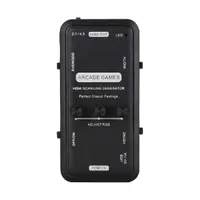
The HDMI Scanline Generator itself isn't remotely complicated to use, and you won't have to mess with any menus or software to get it working. All you virtually have to do to add horizontal lines is hook up a console using an HDMI cable to one end and your gaming TV to another while supplying power via the side USB port. Once you've done that, you should see your source of choice appear on screen with a faux CRT effect, not unlike what you'd apply when using emulators or even some plug-and-play systems.

I should stress that the pixel separation effect in question isn't going to make your modern TV look exactly like a CRT. There's far more to old tube visuals than black horizontal lines, and the original look is actually just a symptom of the original technology that game developers learned to work with. That is to say that real scanlines themselves are actually the rows of pixels drawn by an electron beam to make up a full frame, so adding blank space is just a way to mimic the look, and the technique also results in reduced brightness.
Still, separating the pixels with horizontal lines helps sprites and effects in classic games look less blocky. In turn, that helps graphics look closer to what the designers originally intended, with shading looking more defined and smaller details appearing far clearer than before. This helps explain why some modern retro console companies like Analogue put so much effort into CRT filters that replicate phosphor effects and shadow masked screens, as it arguably matters more than just scaling everything up to 4K.
Side by side with a typical CRT from the '90s, though, it's clear that HDMI scanline generator's look is extremely different. My Philips screen heavily relies on a shadow mask that, upon close inspection, actually looks like vertical lines of pixels rather than horizontal. All the generator is really doing is inserting black rows to provide a faux look, but I'd still argue it's effective for creating a traditional look.


Naturally, a $35 gizmo isn't going to arm your consoles with the same effects as an Analogue system. Yet, the Scanline Generator has actually surpassed all my expectations, adding subtle separation that absolutely makes a difference to older graphics. There is a toggle to switch between thick/thin and even/odd lines, accompanied by red, green, and blue knobs on the front for dialing in CRT-style vibrancy, but other than that, there's little messing around with this thing.
I know for a fact some of you will be asking why you'd even need a standalone scanline generator, given that consoles and emulation devices usually use a software approach. I've already half answered with my HDMI-modded N64 example, but I've also tested plenty of systems that lack the option, like the Atari 2600+, and while Hyperkin's take on the PC Engine, the Retron GX, includes a setting, it currently produces a weird blur effect that's likely tied to emulation quirks.
I have very little self-restraint, so you can bet your hover boots that I've tried the Scanline Generator with the PS5 and Switch 2. I'm not saying you should play Mario Kart World with a CRT effect enabled, but doing so with a GameCube controller in hand did help me feel feels I haven't felt since playing Double Dash on my 14-inch bedroom TV.

Side note, but this is actually the same gadget I recently spotted within the upcoming RetroBox faux CRT TV that's aiming to bring back '90s VHS combo sets. I would like to think the startup company behind the screens isn't planning on just using an LCD display with one of these HDMI Scanline Generators inside, but I suspect we could end up with something based on the same tech within the final product.

If you're seeking more than just subtle scanlines on non-HDMI devices, you'll want to look for a proper upscaler or just go hunting for an original CRT. But, this Scanline Generator is a pretty hands-off hardware-based way of adding pixel separation to most PC or console setups without relying on emulators, especially in instances where the effect isn't an option.
Anyway, if you need me, I'll be in my cave staring at my precious scanlines. No, we're not Gollum.
Looking to play classics on the go? Swing by the best retro handhelds and best gaming handhelds for emulation systems, portable PCs, and more.

You must confirm your public display name before commenting
Please logout and then login again, you will then be prompted to enter your display name.


