

Join The Community
- Join our community
11
Premium Benefits
24/7
Access Available
21K+
Active Members
Commenting
Join the discussion
Exclusive Articles Coming Soon
Member-only articles
Weekly Newsletters
Weekly gaming & entertainment news
Member Badges
Earn badges as you go
Exclusive Competitions
Members-only prize draws
Curated Deals Coming Soon
Tech and gaming deals worth grabbing
GET COMMUNITY ACCESS QUICK
For the quickest way to join, simply enter your email below and get access. We will send a confirmation and sign you up to our newsletter to keep you updated on all your gaming news.
By submitting your information you agree to the Terms & Conditions and Privacy Policy and are aged 16 or over.
FIND OUT ABOUT OUR MAGAZINE
Want to subscribe to the magazine? Click the button below to find out more information.
Find out more
GET Community ACCESS QUICK

Join the GamesRadar community for quick access. Enter your email below and we'll send confirmation, and sign you up to our newsletter.

By submitting your information you agree to the Terms & Conditions and Privacy Policy and are aged 16 or over.

Background
Welcome to GamesRADAR+ Community !
Hi ,

Your membership journey starts here.

Keep exploring and earning more as a member.

MY ACCOUNT

Badge picture
Earn your first badge
Read 1 article to unlock your first badge.
Keep earning badges
Explore ways to get more involved as a member.
Latest Games News

Latest Games News

Breaking gaming news and updates

Read Now
Latest Games Reviews

Latest Games Reviews

Expert verdicts on the newest releases

Read Now

See what you’ve unlocked.

Explore your membership benefits.

Explore
Member Exclusives

Stay Ahead with GamesRadar+

Get the biggest gaming news, reviews, and releases straight to your inbox.

Explore

Sign Out
GamesRadar+ GamesRadar+
US EditionUS CA EditionCanada UK EditionUK AU EditionAustralia
Sign in
  • View Profile
  • Sign out
  • Games
    • Game Insights
      • Games News
      • Games Features
      • Games Reviews
      • Games Guides
      • Big in 2026
      • The Big Preview
      • On The Radar
      • Indie Spotlight
      • Future Games Show
      • Golden Joystick Awards
    • Genres
      • Action Games
      • RPGs
      • Action RPGs
      • Adventure Games
      • Third Person Shooters
      • FPS Games
    • Platforms
      • PS5
      • Xbox Series X
      • PC
      • Nintendo Switch
      • Nintendo Switch 2
      • Tabletop Gaming
    • Franchises
      • Grand Theft Auto
      • Pokemon
      • Assassin's Creed
      • Monster Hunter
      • Fortnite
      • Cyberpunk
      • Red Dead
      • The Elder Scrolls
      • The Sims
  • Entertainment
    • TV Shows
      • TV News
      • TV Reviews
      • Anime Shows
      • Sci-Fi Shows
      • Superhero Shows
      • Animated Shows
      • Marvel TV Shows
      • Star Wars TV Shows
      • DC TV Shows
    • Movies
      • Movie News
      • Movie Reviews
      • Big Screen Spotlight
      • Superhero Movies
      • Action Movies
      • Anime Movies
      • Sci-Fi Movies
      • Horror Movies
      • Marvel Movies
      • DC Movies
    • Streaming
      • Apple TV Plus
      • Disney Plus
      • Netflix
      • HBO
      • Amazon Prime Video
      • Hulu
    • Comics
      • Marvel Comics
      • DC Comics
    • Toys & Collectibles
    • Lego
    • Dungeons and Dragons
    • Merch
  • Hardware
    • Insights
      • Hardware News
      • Hardware Reviews
      • Hardware Features
    • Computing
      • Desktop PCs
      • Laptops
      • Handhelds
    • Peripherals
      • Headsets & Headphones
      • TVs & Monitors
      • Gaming Mice
      • Gaming Keyboards
      • Gaming Chairs
      • Speakers & Audio
    • Accessories & Tech
      • Gaming Controllers
      • Tech
      • SSDs & Hard Drives
      • VR
      • Accessories
      • Retro
  • Deals
    • Game Deals
    • Tech Deals
    • TV Deals
    • Buying Guides
  • Video
    • Video
    • GR+ Replay - Submit Your Clips
  • Newsletters
    • Quizzes
    • About Us
    • How to pitch to us
    • How we score
    • Newsarama
    • Retro Gamer
    • Total Film
  • home
  • Games
    • View Games
      • Games News
      • Games Features
      • Games Reviews
      • Games Guides
      • Big in 2026
      • The Big Preview
      • On The Radar
      • Indie Spotlight
      • Future Games Show
      • Golden Joystick Awards
      • Action Games
      • RPGs
      • Action RPGs
      • Adventure Games
      • Third Person Shooters
      • FPS Games
    • Platforms
      • View Platforms
      • PS5
      • Xbox Series X
      • PC
      • Nintendo Switch
      • Nintendo Switch 2
      • Tabletop Gaming
      • Grand Theft Auto
      • Pokemon
      • Assassin's Creed
      • Monster Hunter
      • Fortnite
      • Cyberpunk
      • Red Dead
      • The Elder Scrolls
      • The Sims
  • Entertainment
    • View Entertainment
    • TV Shows
      • View TV Shows
      • TV News
      • TV Reviews
      • Anime Shows
      • Sci-Fi Shows
      • Superhero Shows
      • Animated Shows
      • Marvel TV Shows
      • Star Wars TV Shows
      • DC TV Shows
    • Movies
      • View Movies
      • Movie News
      • Movie Reviews
      • Big Screen Spotlight
      • Superhero Movies
      • Action Movies
      • Anime Movies
      • Sci-Fi Movies
      • Horror Movies
      • Marvel Movies
      • DC Movies
    • Streaming
      • View Streaming
      • Apple TV Plus
      • Disney Plus
      • Netflix
      • HBO
      • Amazon Prime Video
      • Hulu
    • Comics
      • View Comics
      • Marvel Comics
      • DC Comics
    • Toys & Collectibles
    • Lego
    • Dungeons and Dragons
    • Merch
  • Hardware
    • View Hardware
      • Hardware News
      • Hardware Reviews
      • Hardware Features
      • Desktop PCs
      • Laptops
      • Handhelds
    • Peripherals
      • View Peripherals
      • Headsets & Headphones
      • TVs & Monitors
      • Gaming Mice
      • Gaming Keyboards
      • Gaming Chairs
      • Speakers & Audio
      • Gaming Controllers
      • Tech
      • SSDs & Hard Drives
      • VR
      • Accessories
      • Retro
  • Deals
    • View Deals
    • Game Deals
    • Tech Deals
    • TV Deals
    • Buying Guides
  • Video
    • View Video
    • Video
    • GR+ Replay - Submit Your Clips
  • Newsletters
    • Quizzes
    • About Us
    • How to pitch to us
    • How we score
    • Newsarama
    • Retro Gamer
    • Total Film
Trending
  • Pokemon Winds and Waves
  • New Games for 2026
  • Submit your game clips
  • GDC
Don't miss these
Hand holding N64 controller and 8Bitdo controller with Analogue 3D in backdrop with Donkey Kong 64 cartridge inserted.
Retro You can now use Nintendo's N64 Switch online controller with the Analogue 3D, but I've got a few better options worth looking at
Hand holding HDMI scanline generator with an N64 hooked up to input that is connected to a Philips CRT on the left and a portable monitor on the right.
Retro I still have numerous CRT TVs in my life, but I've found a way to satiate my lust for scanlines on even modern screens
Hyperkin Retron HD connected to Sony PVM CRT with Mega Man 2 cartridge inserted and level select on screen.
Retro Nine years later, the Hyperkin Retron HD is nowhere near as crummy as I remember
C64 Mini sitting on top of Commodore 64 Ultimate with purple RGB lighting enabled.
Retro I stand by the Commodore 64 Ultimate being the better remake, but its mini predecessor is still a cheaper gateway to '80s microcomputing
Screenshot of modded Zelda Game and Watch featured in Macho Nacho Productions with A Link to the Past gameplay on screen.
Retro After five years, I can finally turn the Zelda Game and Watch into a proper retro handheld thanks to new microSD and memory mods
Analogue 3D Prototype colors in Ghost, Glacier, Ocean, Atomic Purple, and Extreme Green.
Retro Five new Analogue 3D "Prototype" consoles are coming in unreleased N64 colors I'd have killed for back in the '90s
Original GameCube with Blueretro Wireless Adapter in port next to Sony PVM CRT with hand holding Switch 2 GameCube controller in front.
Retro I've finally found a way to use the Switch 2 GameCube controller with an actual GameCube
Photo of the Switch N64 controller sitting on a real N64 console.
Gaming Controllers I bought the NSO N64 controller purely for Ocarina of Time, and I've never been a happier Zelda fan
Pokemon Stadium on Sony PVM CRT next to Pikachu N64 console on black desk.
Retro Pikachu just turned 30, so I'm celebrating by using an original N64 to play Pokémon Stadium in style
Virtual Boy for Switch 2 sitting on coffee table with TV in backdrop displaying Wario Land gameplay.
Retro I respect the Virtual Boy as a collectable Switch 2 gadget, but it’s not exactly a retro console remake
Photo of the NSO N64 controller sitting in front of a Switch 2.
Gaming Controllers The NSO N64 controller isn't the most authentic option, but its made me feel like a kid again in the best possible way
Evercade Alpha closeup with Ryu from Street Fighter on screen
Retro Best retro consoles 2026: my favorite ways to play classic capers
Sega Mega Drive connected to Sony PVM with Sonic the Hedgehog 2 title screen on display.
Retro In honor of Sega Genesis designer Hideki Sato, I spent the weekend with an original Mega Drive
Close up of Virtual Boy headset with Wario Land gameplay in backdrop.
Retro How to set up the Virtual Boy for Switch 2 and relive the cursed retro console in seconds
Rayman PS1 case sitting on top of console next to controller.
Retro The Rayman 30th Anniversary Edition is neat and all, but I'd still recommend playing the PS1 original on original hardware
  1. Hardware
  2. Retro

I tried to make my own Analogue 3D using a $35 N64 HDMI mod, and it's not as terrible as you'd think

Features
By Phil Hayton published 26 December 2025

Analogue 3-DIY

When you purchase through links on our site, we may earn an affiliate commission. Here’s how it works.

Close up of HDMI modded N64 on woodgrain coffee table with Zelda: Ocarina of Time gameplay on TV in backdrop.
(Image credit: Phil Hayton)
  • Facebook
  • X
  • Pinterest
  • Flipboard
  • Email
Share this article
0
Join the conversation
Follow us
Add us as a preferred source on Google
Sign up to the GamesRadar+ Newsletter

Weekly digests, tales from the communities you love, and more


By submitting your information you agree to the Terms & Conditions and Privacy Policy and are aged 16 or over.

You are now subscribed

Your newsletter sign-up was successful


Want to add more newsletters?

GamesRadar+

Every Friday

GamesRadar+

Your weekly update on everything you could ever want to know about the games you already love, games we know you're going to love in the near future, and tales from the communities that surround them.

GTA 6 O'clock

Every Thursday

GTA 6 O'clock

Our special GTA 6 newsletter, with breaking news, insider info, and rumor analysis from the award-winning GTA 6 O'clock experts.

Knowledge

Every Friday

Knowledge

From the creators of Edge: A weekly videogame industry newsletter with analysis from expert writers, guidance from professionals, and insight into what's on the horizon.

The Setup

Every Thursday

The Setup

Hardware nerds unite, sign up to our free tech newsletter for a weekly digest of the hottest new tech, the latest gadgets on the test bench, and much more.

Switch 2 Spotlight

Every Wednesday

Switch 2 Spotlight

Sign up to our new Switch 2 newsletter, where we bring you the latest talking points on Nintendo's new console each week, bring you up to date on the news, and recommend what games to play.

The Watchlist

Every Saturday

The Watchlist

Subscribe for a weekly digest of the movie and TV news that matters, direct to your inbox. From first-look trailers, interviews, reviews and explainers, we've got you covered.

SFX

Once a month

SFX

Get sneak previews, exclusive competitions and details of special events each month!


Join the club

Get full access to premium articles, exclusive features and a growing list of member rewards.


An account already exists for this email address, please log in.
Subscribe to our newsletter

They say patience is a virtue, but I sure fell folly to frustration waiting for the Analogue 3D. Rather than just accepting that the remake would likely become the best retro console for N64 games, I decided to HDMI mod my N64 in a bid to make my own. The result? Well, it's actually nowhere near as atrocious as you'd think, even if it's nowhere near as fancy as the FPGA system.

I can already hear many of you shouting at your screens, asking why I've only just got around to trying an N64 HDMI mod. I'm never one to shy away from a retro console project, especially one that can make all the difference to visuals and gameplay. But, when it comes to the Nintendo 64, the custom parts used to be way pricer than they are now, and options like the Ultra HDMI will set you back way over $100.

The N64 HDMI mod that finally lured me to the project is by Highspeedio, the minds behind the AMOLED Game Boy Color screen. By comparison, it only costs around $35, and while it's limited to 720p output, the installation process is pretty similar to the UltraHDMI. Are the results even close to matching the Analogue 3D? Absolutely not, but for the money, you're getting what feels like a solid, freely available alternative for playing on a modern screen.

You may like
  • Hand holding N64 controller and 8Bitdo controller with Analogue 3D in backdrop with Donkey Kong 64 cartridge inserted. You can now use Nintendo's N64 Switch online controller with the Analogue 3D, but I've got a few better options worth looking at
  • Hand holding HDMI scanline generator with an N64 hooked up to input that is connected to a Philips CRT on the left and a portable monitor on the right. I still have numerous CRT TVs in my life, but I've found a way to satiate my lust for scanlines on even modern screens
  • Hyperkin Retron HD connected to Sony PVM CRT with Mega Man 2 cartridge inserted and level select on screen. Nine years later, the Hyperkin Retron HD is nowhere near as crummy as I remember

Harnessing N64 HDMI superpowers

Close up of N64 jewel logo at front of console.

(Image credit: Phil Hayton)

Okay, this is where I potentially shatter your N64 HDMI dreams, as this mod isn’t remotely beginner-friendly. The process involves some pretty scary surface-mount soldering straight onto the console’s CPU legs, not to mention you’ll have to chop its shell a little. That said, I wouldn’t say this upgrade is completely unapproachable, and with the right tools, a little patience, and a lot of concentration, you will pull the project off.

Yes, you’ll need a soldering iron if you don’t already have one, and I personally used a Hakko coreless model. Some experts are going to point and laugh when I say it takes AA batteries, but hey, it’s by a reliable Japanese tool brand and gets hot enough, and I’m personally a fan of not wrestling with a cable. There are countless other options at Amazon, ranging from rechargeable to proper power stations with temperature control, and while I wouldn’t skimp on tools, I get the need to keep project costs low.
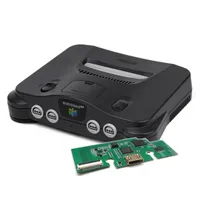
Highspeedio N64 HDMI mod | $39.90 at Aliexpress

Highspeedio N64 HDMI mod | $39.90 at Aliexpress
This mod kit comes with an HDMI mod board for your N64, a ribbon cable that connects to the pins of the console's graphics chip, and a mini HDMI to HDMI adapter. Just keep in mind you will need to modify your system's shell to accommodate the port, so if that's not your jam, you may want to check out replacement shells, too.

View Deal

While it’s not mandatory for every soldiering exercise, I’d strongly recommend picking up some liquid flux too. The technique I use for the HDMI specifically relies on flowing solder across several pads while ensuring nothing is bridged, and good paste will help you achieve that. Some copper wick will come in handy if you need to soak up any accidental solder blobs or reverse any steps in the mod.

You’ll obviously need to pick up the N64 HDMI mod too. The kit includes a main PCB, a ribbon cable, and a mini HDMI adapter, so you won’t need extra components, wires, or additional parts. It might be worth considering taking a peek at replacement shells if you’d rather not mod your original, but if you are keeping everything authentic, the only other thing you’ll need is a screwdriver set that includes a security Gamebit to deal with Nintendo’s pesky proprietary screws.

Sign up to the GamesRadar+ Newsletter

Weekly digests, tales from the communities you love, and more

By submitting your information you agree to the Terms & Conditions and Privacy Policy and are aged 16 or over.

How to install an N64 HDMI mod

N64 with red circles highlighting bottom screw hole placement.

(Image credit: Phil Hayton)

Getting inside your N64 is naturally the first step. Before you even go hunting for screws, make sure to remove your Expansion Pack from the top if you have one (that red thing you use to play Majora’s Mask). That’ll stop anything from catching upon separating both halves of the shell and prevent damage. Once it’s out, flip your ‘90s baby over and remove the six Gamebit screws (three at the top, two for the “feet”, and one right next to the model sticker). I’d highly recommend keeping track of everything you take out and placing them in a separate tray or, at the very least, in specific piles.

N64 with top removed on green board.

(Image credit: Phil Hayton)

Once you’re in, you’ll have even more screws to deal with (yayyyyyy). This time, they’re holding the metal shielding to the main board, so you’ll want to remove them all to lift that off. You should now effectively have an N64 board sitting bare within the bottom shell with all the chips and guts showing, ready to be yonked out.

Okay, here’s the thing - I sometimes like to get carried away. Therefore, I made a couple of questionable decisions during this mod that I would avoid. The first was not taking my time with cutting the shell itself to accommodate the new PCB and port, as rather than snipping into the back to suit a mini HDMI, I grabbed a full-size cable next to me and accidentally based my cuttings on that. Uh-oh.

You may like
  • Hand holding N64 controller and 8Bitdo controller with Analogue 3D in backdrop with Donkey Kong 64 cartridge inserted. You can now use Nintendo's N64 Switch online controller with the Analogue 3D, but I've got a few better options worth looking at
  • Hand holding HDMI scanline generator with an N64 hooked up to input that is connected to a Philips CRT on the left and a portable monitor on the right. I still have numerous CRT TVs in my life, but I've found a way to satiate my lust for scanlines on even modern screens
  • Hyperkin Retron HD connected to Sony PVM CRT with Mega Man 2 cartridge inserted and level select on screen. Nine years later, the Hyperkin Retron HD is nowhere near as crummy as I remember

The result? Uh, yeah, let’s just say I ended up masking off the butchered hole with some electrical tape, and it looks very rough. I’m lucky since I have a couple of N64 consoles and replacement shells, but we’re sticking with my mistake for now. To avoid the same fate, you’ll want to carefully trim a mini HDMI-sized square right under the word “multi-out” at the back of the shell. The mod’s PCB is designed to sit right between the screw pegs, which helps it naturally integrate alongside the original hardware with enough clearance.

N64 with mini HDMI port under original multi-out port.

Learn from my grave mistakes. (Image credit: Phil Hayton)

My second blunder applies to pre-mod prep, as for whatever reason, I sat the main board back into the bottom shell before soldering. That then resulted in me having to gently lift it back up to place the HDMI PCB back under. You don’t want to be doing this after you’ve just secured a rather delicate ribbon cable, so I’d place the part where it’s meant to go, operate on the main board, then re-attach the ribbon upon sandwiching things back together.

N64 with shielding removed to reveal main board and chips.

(Image credit: Phil Hayton)

Look, it’s easy to make daft mistakes when modding, even if you’re constantly tinkering with retro consoles. So long as you take your time and do things in the right order, you’ll get on much better than I did. To give myself credit, I largely avoided issues while actually soldering the ribbon cable to the N64’s PPU, and that really is the biggie with this mod.

Soldering the ribbon cable to the board is going to require counting some really small legs on the side of the PPU. Specifically, you’ll want to locate the chip directly in front of the arrow pointing to the cartridge slot, then rotate things so that you’re facing the side with a small “40” label at bottom right corner. Each of the little pads is going to attach in front of a leg, and to find your starting point, you’ll want to line up the first contact with the sixth leg.

N64 PPU chip close up with red box around "40" label on main board at corner of the pins.

(Image credit: Phil Hayton)

I feel ya, things are getting complicated, but here’s what you’re going to do to help ease the pain. First, you’ll want to line things up and triple-check that the first pad is exactly six legs in. Then, use a piece of Kapton tape to hold the cable in place, as this will help prevent it from moving around while you’re trying to work. I’d then apply some liquid flux across the pads before finally getting yourself into a soldering situation.

N64 PPU with ribbon cable lined up at pins secured by kapton tape to board.

(Image credit: Phil Hayton)

At this point, feel free to get your iron toasty and tin the tip using some solder. The idea here is that you’ll want to gently run your iron across the pads so that solder flows onto the pads. Your first pass will likely result in some of the connections joining together, but rather than panicking, simply add some more flux and run your iron across it again. You should start to see each connection individually, separating. It’s worth having a peek at your work with your phone camera to check that there’s spacing between each connection, but some of you might have better eyesight than me.

I’d take a moment to appreciate your work before moving on to the next step, as you’ve just pulled off what is a pretty fine pitch soldering job. You’ll be pleased to know that the only other point you’ll need to solder is the individual ribbon strand, as it connects to the left leg of that transistor on the right. I actually struggled to get a good joint on the flimsy pad and opted to solder a thin wire from the optional pad instead, so you can do this if things are feeling iffy.

Everything should be secured now, and your last job before buttoning the N64 up is to connect the ribbon to the bottom shell PCB. The flex cable slots into a dedicated connector with a clamp, so you’ll want to gently push it all the way in then lower the black hinged lever to lock it in place.

N64 HDMI mod ribbon cable soldered to PPU with red wire on left connecting to point on board highlighted in red and break-off ribbon connector soldered to component leg on right.

(Image credit: Phil Hayton)

I always prefer to test things before reassembly, which translates to me temporarily plugging back in the power supply, Expansion Pack, a copy of Donkey Kong 64, a controller, and a cable into the shiny new HDMI port. If you’re planning on doing the same, you should immediately see an image spring on your screen, and it’ll hopefully be far crispier than before. I’d also double-check your audio is coming through nice and crystal too, and make sure to press A, B, and START to make sure you can access the PCB’s options menu.

All working? Your reward is putting the shielding and all those screws back in place before finally getting to enjoy an HDMI-modded N64. I’m proud of you, and while I have some nerdy gripes to share about the visual results, it will provide you with far nicer visuals and an easy way to jump straight into original games on a contempoary screen.

Original vs remake

Analogue 3D on right and N64 on left on woodgrain surface.

(Image credit: Future)

I've already spoiled the fact that the Analogue 3D looks nicer than the original N64 with an HDMI mod, and some of that is Nintendo's fault. The big issue with Ninty's OG hardware is that it has some visual effects baked into its hardware, and they look rather unslightly on modern screens. While pulling a clean signal straight from the PPU helps remove some blur effects and dodges that "Vaseline" look of composite video, the FPGA remake really goes the extra mile in providing a proper 4K glow-up.

Let's start with the obvious advantage of the Analogue 3D's 4K output. Serving up a UDH image to your TV will save it from handling upscaling yourself, whereas your screen will have to do that with the N64 HDMI mods' 720p visuals. I wouldn't say it's a massive biggie, as that resolution does map evenly to 4K (3x pixels), but it is still work for the panel that can potentially add lag or latency.

On that note, it is worth stressing that even the Analogue 3D isn't going to change the native resolution of games. Each N64 cartridge still possesses 240p graphics, textures, and visuals, so you're not getting a revamp a la the Nintendo Switch Online library. That's very deliberate since ports and emulated results tend to look a bit weird, with overly sharp character models that stick out compared to the original textures.

Image 1 of 2
Analogue 3D with CRT filter enabled, connected to LG OLED C4 TV with Donkey Kong 64 gameplay on screen featuring Lanky Kong.
(Image credit: Future)
HDMI modded Nintendo 64 connected to LG OLED C4 TV with Donkey Kong 64 gameplay on screen featuring Lanky Kong.
(Image credit: Future)

Rather than taking that approach, the 3D provides "original display modes" that add authentic CRT filters to N64 games. Unlike basic scanlines, these options mimic elements like shadow masks and the phosphor glow of various tube displays, ranging from commercial models to professional PVM and BVM units. All of that is fancy talk for the fact that everything will look just like the original developers intended it to when designing graphics for '90s TVs.

This is something you'll absolutely miss out on with an HDMI-modded N64, as the console's original signal will be at the mercy of modern TVs. Basically, that means you'll be looking at blocky pixels that lack the right separation, which in turn contributes to a muddier look that's further hindered by the lower native resolution. Don't get me wrong, you'll be getting far sharper visuals compared to a stock Nintendo 64 using composite or S-Video, but there will ultimately be a clarity jump.

So, why even bother HDMI-modding your N64? It's a logical question to ask, and I'd say it all comes down to ease of use. Adding that port to the back cuts out the need for additional upscalers, and while the results are only marginally better than S-Video, they're pretty great compared to bog-standard composite on a new screen.

Back view of N64 with HDMI mod and cable connected to LG OLED C4 TV in backdrop with Zelda: Ocarina of Time gameplay on screen.

(Image credit: Phil Hayton)

Upon firing up Ocarina of Time on my freshly modded N64, I could immediately spot improved text sharpness over HDMI compared to composite. That's largely because the former analogue output type suffers from muddy pixels caused by artifacting and poorer color accuracy overall, which does hinder sharpness. While Hyrule still looks a bit scrappy in scaled-up 240p, the signal was also noticably cleaner than even S-Video, hitting color accuracy and sharpness that's at the very least on par with historic RGB mods.

That makes sense given that Highspeedio's HDMI board is pulling a signal straight from the N64's graphics chip, just like some of the more advanced RGB mods out there. Sadly, this isn't a silver bullet for Nintendo 64 games with mess filters baked in, and the only way around that is to use flash carts to strip it out of a ROM or even an Action Replay to remove it using codes (I've had zero success with the latter)

Going the extra mod mile

Hand holding 8Bitdo N64 controller next to original console with Blueretro Bluetooth receiver connected.

(Image credit: Phil Hayton)

I'd say an N64 HDMI mod is technically enough to make your own DIY Analogue 3D, but you can go a step further if you want wireless controllers, effects like scanlines, and USB power. The gamepad side of things is fairly straightforward since it merely involves picking up some wireless adapters, which in turn will let you use a range of pads, including the 8BitDo N64 Wireless controller. I specifically use a Retroscaler four-way wireless receiver, but there are also individual dongles for single ports.

I've already touched on the scanline generator, and it makes far more of a difference than you'd think to an HDMI-modded N64's visuals. The effect is very subtle, adding horizontal separation is more or less like thin black lines. If you stick your nose up to the screen, you're not going to see any nice emulated pixel shapes or a specific aperture grille effect, but everything will look that bit sharper when kicking back. It even has some dials for RGB color adjustment, just in case things need to be tweaked a little after adding the overlay.

If you're really itching to make your N64 more like an Analogue 3D, you can also grab replacement USB-C power supplies that replace the back modular unit. I haven't tested any of these yet, and I'm not so sure the benefits are worthwhile since you'll still need to use a 45W brick. That said, it will reduce the bulk at the back of the console, and using less chonky wire will aid cable management since wrangling the thick original is a pain.

Imitation of imitation is the highest form of flattery

Close up of 8Bitdo N64 Bluetooth controller leaning against Nintendo 64 running Donkey Kong 64.

(Image credit: Phil Hayton)

The question that's currently haunting my waking dreams is whether I was silly to try and make my own Analogue 3D? I could get away with saying I was merely getting around to an N64 HDMI I'd been putting off for years, but it was the new FPGA system that inspired me to try it out.

I've ultimately decided that making my own Analogue 3D alternative, as flawed as it is, was worthwhile. Most of you will still want to stick with simple HDMI upscalers and adapters, and that's just fine; don't let the gatekeepers tell you how to play Donkey Kong 64. But, if you are brave enough to pick up a soldering iron and want far cleaner visuals from your OG console for under $40, I'd absolutely give this mod a try.

The main reason you'd even want to carry out this mod in the first place is the price of FPGA remakes. The Analogue 3D will set you back $270, and even if you do shout at the company to take your money, you'll need to wait for the stock to drop in the new year. Is it worth waiting for if you're big into Nintendo 64 games, but if you consider yourself more of a casual player, I'd start off with enhancing the OG system.


Looking to play classics on the go? Swing by the best retro handhelds for portable emulators and more.

Phil Hayton
Phil Hayton
Social Links Navigation
Hardware Editor

Phil is the Hardware Editor at GamesRadar+ who specializes in retro console setups, choosing the latest gaming handhelds, and navigating the choppy seas of using modern-day PC hardware. In the past, they have covered everything from retro gaming history to the latest gaming news, in-depth features, and tech advice for publications like TechRadar, The Daily Star, the BBC, PCGamesN, and Den of Geek. In their spare time, they pour hours into fixing old consoles, modding Game Boys, exploring ways to get the most out of the Steam Deck, and blasting old CRT TV visuals into their eye sockets.

You must confirm your public display name before commenting

Please logout and then login again, you will then be prompted to enter your display name.

Read more
Hand holding N64 controller and 8Bitdo controller with Analogue 3D in backdrop with Donkey Kong 64 cartridge inserted.
Retro You can now use Nintendo's N64 Switch online controller with the Analogue 3D, but I've got a few better options worth looking at
 
 
Hand holding HDMI scanline generator with an N64 hooked up to input that is connected to a Philips CRT on the left and a portable monitor on the right.
Retro I still have numerous CRT TVs in my life, but I've found a way to satiate my lust for scanlines on even modern screens
 
 
Hyperkin Retron HD connected to Sony PVM CRT with Mega Man 2 cartridge inserted and level select on screen.
Retro Nine years later, the Hyperkin Retron HD is nowhere near as crummy as I remember
 
 
C64 Mini sitting on top of Commodore 64 Ultimate with purple RGB lighting enabled.
Retro I stand by the Commodore 64 Ultimate being the better remake, but its mini predecessor is still a cheaper gateway to '80s microcomputing
 
 
Screenshot of modded Zelda Game and Watch featured in Macho Nacho Productions with A Link to the Past gameplay on screen.
Retro After five years, I can finally turn the Zelda Game and Watch into a proper retro handheld thanks to new microSD and memory mods
 
 
Analogue 3D Prototype colors in Ghost, Glacier, Ocean, Atomic Purple, and Extreme Green.
Retro Five new Analogue 3D "Prototype" consoles are coming in unreleased N64 colors I'd have killed for back in the '90s
 
 
Latest in Retro
Anbernic RG35XXSP with Marvel vs Capcom 2 title screen on display
Handhelds The Game Boy Advance turned 25 this weekend, these are the retro handhelds that help it shine in 2026
 
 
Hands using 8Bitdo N64 controller 2.4G with Nintendo N64 connected to Sony CRT TV with Super Mario 64 on screen.
Retro 8Bitdo has finally revealed the N64 Retro Receiver I've been asking for, but it's trolling me with its new 2.4GHz OG console gamepad
 
 
Hand holding gray 8Bitdo N64 controller in front of original console connected to Sony PVM CRT with Banjo Kazooie intro on screen.
Retro 8Bitdo's gray N64 controller pays a perfect tribute to Ninty's colorful '90s gamepad, but I really wish it came with a dongle
 
 
Turquoise Retroid Pocket G2 handheld on a black background
Retro Retroid discontinues Pocket G2 "due to ongoing fluctuations in memory pricing"
 
 
Hyperkin Retron HD connected to Sony PVM CRT with Mega Man 2 cartridge inserted and level select on screen.
Retro Nine years later, the Hyperkin Retron HD is nowhere near as crummy as I remember
 
 
Hand holding Asus ROG Phone 8 with Gamesir Pocket Taco attached and Zelda Oracle of Ages cutscene on screen.
Retro My new favorite retro controller for Game Boy games launches today, but Amazon might show you Mexican taco kits
 
 
Latest in Features
Tom Holland as Spider-Man in Spider-Man: Brand New Day
Marvel Movies Spider-Man: Brand New Day trailer has crossed 1 billion views faster than any movie in history
 
 
Kiln key art featuring colorful spirit-inhabited pots duking it out
Action Games I built the biggest, ugliest vase Kiln would let me and immediately got bullied by better potters
 
 
Matthew Lillard as Mr. Charles in Daredevil: Born Again season 2
Marvel TV Shows Who is Mr. Charles in Daredevil: Born Again season 2?
 
 
A thief looking down a scope in Marathon
FPS Games After 80 hours of Marathon, I'm glad Bungie didn't try to please everyone
 
 
Meta Quest Pro's right hand side with the lens cover on the front
VR Meta's next VR headset could use pricey Micro-OLED displays, and Valve's Steam Frame could benefit
 
 
Image of the Hori Eevee Cottage Core Switch 2 accessory set.
Accessories The adorable Eevee Cottage Core Switch 2 accessory set from Hori has reignited my love of the classic Pokemon
 
 
LATEST ARTICLES
  1. A Pokemon Perfect Order Booster Box outlined in white, against a colorful, blurred background
    1
    Forget Amazon, this Pokemon card offer is the best I've seen on a must-have new set
  2. 2
    Jimmy Olsen's mystery comedy show features that haven't "been seen in the superhero genre" before
  3. 3
    Doom co-creator John Romero worked on an MMO that was like Pokemon but it taught you maths
  4. 4
    The Harry Potter show won't release a season a year, and everyone is united in saying that's a bad idea
  5. 5
    Dead by Daylight Blood Moon event date and launch time

GamesRadar+ is part of Future US Inc, an international media group and leading digital publisher. Visit our corporate site.

Add as a preferred source on Google Add as a preferred source on Google
  • Terms and conditions
  • Contact Future's experts
  • Privacy policy
  • Cookies policy
  • Accessibility statement
  • Careers
  • About us
  • Advertise with us
  • Review guidelines
  • Write for us
  • Accessibility Statement

© Future US, Inc. Full 7th Floor, 130 West 42nd Street, New York, NY 10036.

Please login or signup to comment

Please wait...