





The phrase gaming keyboard usually means lots of chat about polling rates, keycaps, and switches. But, rather than sparking up a conversation about whether a keeb is creamy, milky, or clacky, I want to talk about a cheap Logitech board that's now under $20 thanks to Black Friday.
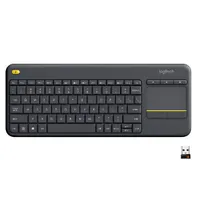
Without it the Logitech K400 Plus, I'd be in a sticky situation when it comes to living room PC gaming. While I mainly use a controller to tackle my Steam backlog on the couch, I always find myself reaching for a gaming keyboard at some point. If you find yourself doing the same, and are tried of having to move your mechanical monster and mouse from your desk, you can grab this all-one-one solution at Amazon for just $19.99. It'll normally set you back $27.99, so I'm pretty on board with the 29% discount.
It feels like there should be tons of keyboards with built in trackpads out there, but many of them will set you back over $20. Plus, many of them are by names you've probably never heard of, so being able to grab a Logitech model for less is pretty impressive.
Should you buy the Logitech K400 Plus?

I'm not going to act like the Logitech K400 Plus is the best gaming keyboard, but it is an accessory I'd struggle to game without. Sure, its mushy membrane keys are only slightly more tactile than a cheap laptop's board, and its trackpad is never going replace a proper mouse. That said, when you're sitting back on the couch and just need to interact with Windows a bit, is keeb is incredibly handy.
The K400 Plus exclusively uses a wireless USB dongle alongside two AA batteries for power. Those would normally be cons, but since I exclusively use the keyboard in the living room, I end up just leaving the adapter in whatever rig I'm using at the time. If the notion of it not being rechargeable is an ick, it might help to mention that I've owned this board since 2020 and haven't changed the batteries once, which is impressive to say the least.

If you've ever caught any reviews or features that include me using a mini PC or gaming handheld in the living room, just know the K400 Plus has played a pivotal role. While testing the Ayaneo AM01 mini PC, I kept Logitech's keyboard connected throughout the setup process and as a way to easily mess with Windows 11 settings. Sure, Steam Big Picture works fine and is what I end up using with the Steam Deck OLED, but for jumping between storefronts on any other machine, you'll want quick keyboard and mouse access.

There are a couple of cons with the Logitech K400 Plus that get on my nerves, but they're not exactly a deal breaker. For starters, it has no wired connectivity, and as someone who loves to misplace dongles, that can be a pain when I decide to randomly leave the adapter in another rig. I also wish it had some way of folding since it's around the same size as a TKL keyboard, but it's low profile nature does mean it'll slide into tight entertainment unit shelves for easy storage.
For under $20, the Logitech K400 Plus is an incredibly handy keyboard to have around. I'd recommend it first to those of you who use a handheld or mini PC in the living room, but I can see it being useful in various other scenarios too where you need to type a few words and nudge a cursor.
Looking for more discounts? Swing by Black Friday Steam Deck deals and Black Friday gaming PC deals for more price cuts. Alternatively, take a peek at Black Friday gaming monitor deals if you need a new screen.

