

GamesRadar+ GamesRadar+
US EditionUS CA EditionCanada UK EditionUK AU EditionAustralia
Sign in
  • View Profile
  • Sign out
  • Games
    • Game Insights
      • Games News
      • Games Features
      • Games Reviews
      • Games Guides
      • Big in 2026
      • The Big Preview
      • On The Radar
      • Indie Spotlight
      • Future Games Show
      • Golden Joystick Awards
    • Genres
      • Action Games
      • RPGs
      • Action RPGs
      • Adventure Games
      • Third Person Shooters
      • FPS Games
    • Platforms
      • PS5
      • Xbox Series X
      • PC
      • Nintendo Switch
      • Nintendo Switch 2
      • Tabletop Gaming
    • Franchises
      • Grand Theft Auto
      • Pokemon
      • Assassin's Creed
      • Monster Hunter
      • Fortnite
      • Cyberpunk
      • Red Dead
      • The Elder Scrolls
      • The Sims
  • Entertainment
    • TV Shows
      • TV News
      • TV Reviews
      • Anime Shows
      • Sci-Fi Shows
      • Superhero Shows
      • Animated Shows
      • Marvel TV Shows
      • Star Wars TV Shows
      • DC TV Shows
    • Movies
      • Movie News
      • Movie Reviews
      • Big Screen Spotlight
      • Superhero Movies
      • Action Movies
      • Anime Movies
      • Sci-Fi Movies
      • Horror Movies
      • Marvel Movies
      • DC Movies
    • Streaming
      • Apple TV Plus
      • Disney Plus
      • Netflix
      • HBO
      • Amazon Prime Video
      • Hulu
    • Comics
      • Marvel Comics
      • DC Comics
    • Toys & Collectibles
    • Lego
    • Dungeons and Dragons
    • Merch
  • Hardware
    • Insights
      • Hardware News
      • Hardware Reviews
      • Hardware Features
    • Computing
      • Desktop PCs
      • Laptops
      • Handhelds
    • Peripherals
      • Headsets & Headphones
      • TVs & Monitors
      • Gaming Mice
      • Gaming Keyboards
      • Gaming Chairs
      • Speakers & Audio
    • Accessories & Tech
      • Gaming Controllers
      • Tech
      • SSDs & Hard Drives
      • VR
      • Accessories
      • Retro
  • Deals
    • Game Deals
    • Tech Deals
    • TV Deals
    • Buying Guides
  • Video
  • Newsletters
    • Quizzes
    • About Us
    • How to pitch to us
    • How we score
    • Newsarama
    • Retro Gamer
    • Total Film
  • home
  • Games
    • View Games
      • Games News
      • Games Features
      • Games Reviews
      • Games Guides
      • Big in 2026
      • The Big Preview
      • On The Radar
      • Indie Spotlight
      • Future Games Show
      • Golden Joystick Awards
      • Action Games
      • RPGs
      • Action RPGs
      • Adventure Games
      • Third Person Shooters
      • FPS Games
    • Platforms
      • View Platforms
      • PS5
      • Xbox Series X
      • PC
      • Nintendo Switch
      • Nintendo Switch 2
      • Tabletop Gaming
      • Grand Theft Auto
      • Pokemon
      • Assassin's Creed
      • Monster Hunter
      • Fortnite
      • Cyberpunk
      • Red Dead
      • The Elder Scrolls
      • The Sims
  • Entertainment
    • View Entertainment
    • TV Shows
      • View TV Shows
      • TV News
      • TV Reviews
      • Anime Shows
      • Sci-Fi Shows
      • Superhero Shows
      • Animated Shows
      • Marvel TV Shows
      • Star Wars TV Shows
      • DC TV Shows
    • Movies
      • View Movies
      • Movie News
      • Movie Reviews
      • Big Screen Spotlight
      • Superhero Movies
      • Action Movies
      • Anime Movies
      • Sci-Fi Movies
      • Horror Movies
      • Marvel Movies
      • DC Movies
    • Streaming
      • View Streaming
      • Apple TV Plus
      • Disney Plus
      • Netflix
      • HBO
      • Amazon Prime Video
      • Hulu
    • Comics
      • View Comics
      • Marvel Comics
      • DC Comics
    • Toys & Collectibles
    • Lego
    • Dungeons and Dragons
    • Merch
  • Hardware
    • View Hardware
      • Hardware News
      • Hardware Reviews
      • Hardware Features
      • Desktop PCs
      • Laptops
      • Handhelds
    • Peripherals
      • View Peripherals
      • Headsets & Headphones
      • TVs & Monitors
      • Gaming Mice
      • Gaming Keyboards
      • Gaming Chairs
      • Speakers & Audio
      • Gaming Controllers
      • Tech
      • SSDs & Hard Drives
      • VR
      • Accessories
      • Retro
  • Deals
    • View Deals
    • Game Deals
    • Tech Deals
    • TV Deals
    • Buying Guides
  • Video
  • Newsletters
    • Quizzes
    • About Us
    • How to pitch to us
    • How we score
    • Newsarama
    • Retro Gamer
    • Total Film
Trending
  • Pokemon Winds and Waves
  • New Games for 2026
  • GamesRadar+ Replay
  • Mario Day deals
Don't miss these
HP Omen Max 16 gaming laptop on a wooden desk
Laptops The best gaming laptop 2026 - HP holds first place as budget machines battle it out
Corsair Galleon 100 SD gaming keyboard on a wooden desk
Gaming Keyboards Corsair's on a roll, this Stream Deck-toting deck is now officially the best full-sized gaming keyboard I've tested so far
SteelSeries Arctis Nova Pro Wireless gaming headset
Headsets & Headphones Best gaming headset 2026 - my go-to cups for every platform
Asus ROG Flow Z13 running Indiana Jones and the Great Circle on battery power
Mobile Gaming The best gaming tablets in 2026
Five different gaming controllers for PC scattered around a desktop surface
Gaming Controllers The best PC controller for gaming 2026
Asus ROG Ally sitting on white desk with stand and Squishmallow big foot on right hand side.
Handhelds If you can stomach second-hand gaming handhelds, I'd look at refurbed Asus ROG Ally and Lenovo Legion Go to survive RAMageddon
Razer Blade 16 2025 gaming laptop running Cyberpunk 2077 with DLSS enabled
Laptops What's the best mobile GPU for a gaming laptop? I've crunched the numbers to find the sweet spot after a year of testing
Close up on macro buttons on the side of the Corsair Vanguard Pro 96 gaming keyboard
Gaming Keyboards Best gaming keyboard 2026: the Vanguard stands strong with another new entry for Corsair
Steam Deck with mascot face on screen surrounded by compatible Steam Deck docks
Handhelds The best Steam Deck dock 2026: the handheld docking stations I'd recommend
Streaming for gamers
Hardware Best live streaming gear for gamers 2026: The best setups for beginners and pros
Acer Nitro 16 gaming laptop open on a wooden table
Laptops The best cheap gaming laptop deals in March 2026: three RTX 5070 rigs worth checking out this week
Acer Predator Orion X review  of the PC next to another ITX chassis
Desktop PCs The best gaming PC 2026: Find your perfect pre-built powerhouse
Verbatim portable monitor with Overwatch 2 character select screen on display next to two Squishmallow frogs
TVs & Monitors The best portable monitors for gaming 2026
The GT Omega Pro Series Gen 2 next to a black and green Razer gaming chair
Gaming Chairs Best gaming chairs 2026: The best options for work and play
Side of Razer BlackShark V3 Pro earcup on a wooden desk
Headsets & Headphones The best PC headset for gaming 2026
  1. Hardware
  2. Laptops

How to create the perfect gaming laptop setup

Features
By Tabitha Baker published 29 September 2022

Ditching the tower? Here's how to build a gaming laptop setup around your portable device

When you purchase through links on our site, we may earn an affiliate commission. Here’s how it works.

gaming laptop setup
(Image credit: Future)
Jump to:
  • Gaming laptop
  • Monitor
  • Keyboard and Mouse
  • Cable management
  • Accessories
  • Facebook
  • X
  • Pinterest
  • Flipboard
  • Email
Share this article
Join the conversation
Follow us
Add us as a preferred source on Google
Get the GamesRadar+ Newsletter

Weekly digests, tales from the communities you love, and more


By submitting your information you agree to the Terms & Conditions and Privacy Policy and are aged 16 or over.

You are now subscribed

Your newsletter sign-up was successful


Want to add more newsletters?

GamesRadar+

Every Friday

GamesRadar+

Your weekly update on everything you could ever want to know about the games you already love, games we know you're going to love in the near future, and tales from the communities that surround them.

GTA 6 O'clock

Every Thursday

GTA 6 O'clock

Our special GTA 6 newsletter, with breaking news, insider info, and rumor analysis from the award-winning GTA 6 O'clock experts.

Knowledge

Every Friday

Knowledge

From the creators of Edge: A weekly videogame industry newsletter with analysis from expert writers, guidance from professionals, and insight into what's on the horizon.

The Setup

Every Thursday

The Setup

Hardware nerds unite, sign up to our free tech newsletter for a weekly digest of the hottest new tech, the latest gadgets on the test bench, and much more.

Switch 2 Spotlight

Every Wednesday

Switch 2 Spotlight

Sign up to our new Switch 2 newsletter, where we bring you the latest talking points on Nintendo's new console each week, bring you up to date on the news, and recommend what games to play.

The Watchlist

Every Saturday

The Watchlist

Subscribe for a weekly digest of the movie and TV news that matters, direct to your inbox. From first-look trailers, interviews, reviews and explainers, we've got you covered.

SFX

Once a month

SFX

Get sneak previews, exclusive competitions and details of special events each month!


An account already exists for this email address, please log in.
Subscribe to our newsletter

Gaming laptops are rapidly taking over from boxy towers and space-hogging desktops. However, creating the perfect gaming laptop setup at home can be a lot more difficult than simply plugging in your PC and forgetting about it. Cable management, desktop space, and accessory inputs all need to be considered here, even down to the logistics of opening a lid to power on. 

The best gaming laptops can rival a PC for their performance these days, which means there's every reason to build a permanent setup around a portable device. You'll be able to enjoy the full desk-based experience, with the additional flexibility to take your games with you as well. We've been building our own gaming laptop setups for years now, iterating on design, layout, and a whole range of accessories and gadgets to make life easier. We're bringing all that experience right here so that you can go straight to the perfect setup without making all the mistakes we made along the way. 

We're taking you through everything here, from finding the right machine for your gaming laptop setup to tidying those cables and finishing up with a flourish. The demands of your own space will require some trial and error, but at the end of it all, you'll have a solid gaming space to be proud of. 

You may like
  • HP Omen Max 16 gaming laptop on a wooden desk The best gaming laptop 2026 - HP holds first place as budget machines battle it out
  • Flexispot E7 Plus in standing mode with Game Boy and screwdriver set sitting on top Best gaming desk 2026: all the surfaces I'd use for PC and console setups
  • Acer Predator Orion X review  of the PC next to another ITX chassis The best gaming PC 2026: Find your perfect pre-built powerhouse

Finding the right gaming laptop for your setup
Asus ROG Zephyrus G14

(Image credit: Future)

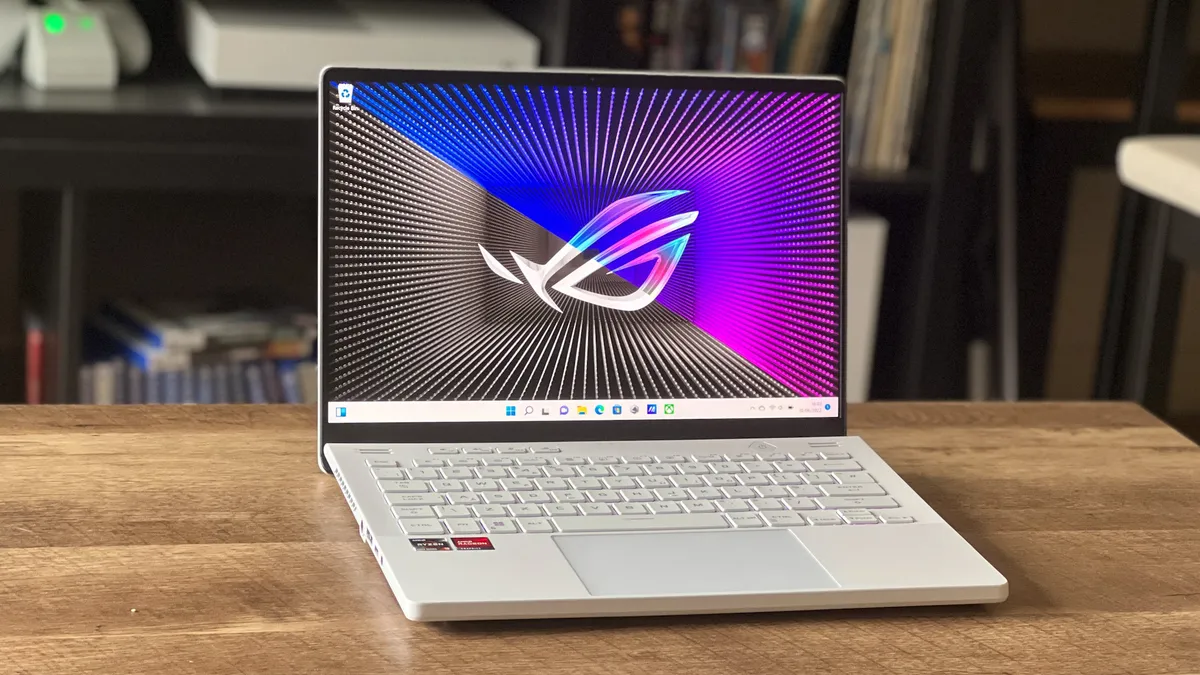
The perfect gaming laptop setup starts with your machine. Of course, you've likely already got your rig to hand, but if you're still hunting down the best gaming laptop for your setup, it's best to do your shopping with your final layout in mind. These decisions won't completely sway you towards one model or another - that's a job for price and specs - but if you're down to two options there are some features that lend themselves better to a more permanent setup. 

The first thing we'd recommend checking for is that there's a power delivery USB-C port. You'll find this invaluable if you're planning on keeping your cables to a minimum by using a docking station, but it's also critical to ensure that the power delivery of your laptop is up to the job of more demanding work. 

Once you've checked for that magic connection, take a look at which sides the ports are on. Consider how you will be angling wires and laying out your setup to ensure cable management is as easy as possible. While this isn't a major deciding factor, it could make all the difference to keeping your setup tidy. There are even plenty of gaming laptops (like the Alienware X-series) offering all their ports on the back for extra neatness. 

A bigger factor is footprint. A 17.3-inch laptop won't sit on your desk as well as a 14-inch model, but you'll likely need more power than these smaller rigs can often provide. That's why we'd recommend going straight down the middle and starting your search with a 15.6-inch device with a slimline build that can easily be risen above the desk. 

Sign up to the GamesRadar+ Newsletter

Weekly digests, tales from the communities you love, and more

By submitting your information you agree to the Terms & Conditions and Privacy Policy and are aged 16 or over.

The following laptops all offer a nicely balanced form factor and keep their ports in a manageable position while offering power delivery through USB-C. 

Today's best gaming laptop deals
New Genuine Lenovo Legion 5...
Lenovo Legion 5 Pro
Walmart
$144.95
View
See all prices
ASUS ROG Zephyrus S15...
Asus ROG Zephyrus G15
Newegg
$2,059
View
See all prices
We check over 250 million products every day for the best prices

Finding the right monitor for your gaming laptop setup
Alienware 34 AW3423DW QD-OLED gaming monitor

(Image credit: Future/Jeremy Laird)

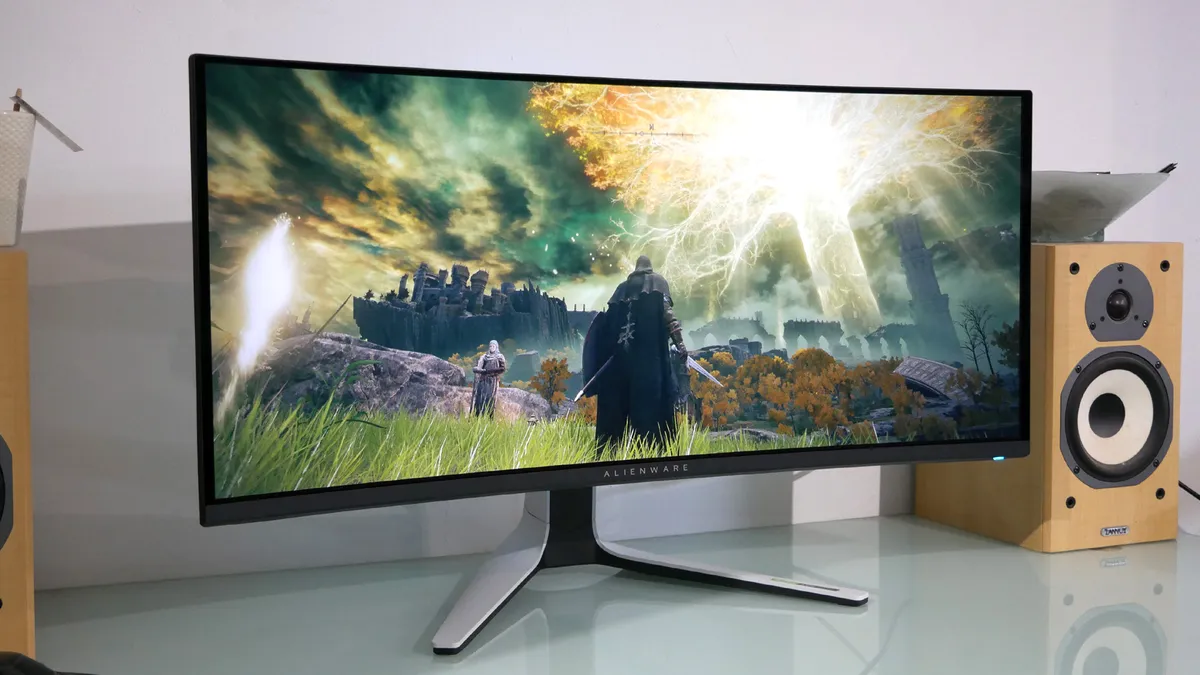
Now onto the next big purchase: your screen. Don't push too hard with your monitor - it's important to remember what your laptop's graphics card can reasonably push out while still offering a solid experience. Many may run straight for the best gaming monitor on the market, but for the best value, we'd recommend keeping things tight to your machine's specs here. A 1440p resolution with a 165Hz refresh rate is the sweet spot for most. 

It's also worth double-checking how many input slots you're getting, especially if you plan on running a console alongside your laptop. Many monitors, like the Asus TUF Gaming VG28UQL1A, offer up two HDMI ports, and even more can display from an HDMI and a DisplayPort as well. 

You may like
  • HP Omen Max 16 gaming laptop on a wooden desk The best gaming laptop 2026 - HP holds first place as budget machines battle it out
  • Flexispot E7 Plus in standing mode with Game Boy and screwdriver set sitting on top Best gaming desk 2026: all the surfaces I'd use for PC and console setups
  • Acer Predator Orion X review  of the PC next to another ITX chassis The best gaming PC 2026: Find your perfect pre-built powerhouse

The final check should be size. Obviously, your monitor needs to be the right size and shape for your desktop, but also make sure you have enough room to comfortably keep your laptop to the side and that the depth of the stand still leaves you with plenty of space for a keyboard and mouse. Many gaming monitors use a v-shaped stand which can take up more space than you'd imagine. A curved gaming monitor offers an excellent compromise in a smaller gaming laptop setup. You're still getting the screen real estate of a larger display (and extra immersion), but saving a few inches overall. 

You'll find some top picks for gaming monitors offering multiple inputs and a nice, steady footprint just below.

Today's best gaming monitor deals
Low Stock
LG UltraGear 27GL850-B 27"...
LG 27GL850-B
Walmart
$740.78
$554.95
View
See all prices
AOC 27G2 27" Frameless Gaming...
AOC 27G2
Amazon
$215.97
View
See all prices
New Dell 32 Curved Gaming...
Dell S3220DGF
Dell
$419.99
View
See all prices
SAMSUNG 32" Odyssey G55C...
Samsung Odyssey G5 32"
Amazon
$329.99
$249.99
View
See all prices
We check over 250 million products every day for the best prices

Finding the right keyboard and mouse for your gaming laptop setup
Logitech G513 gaming keyboard

(Image credit: Future)

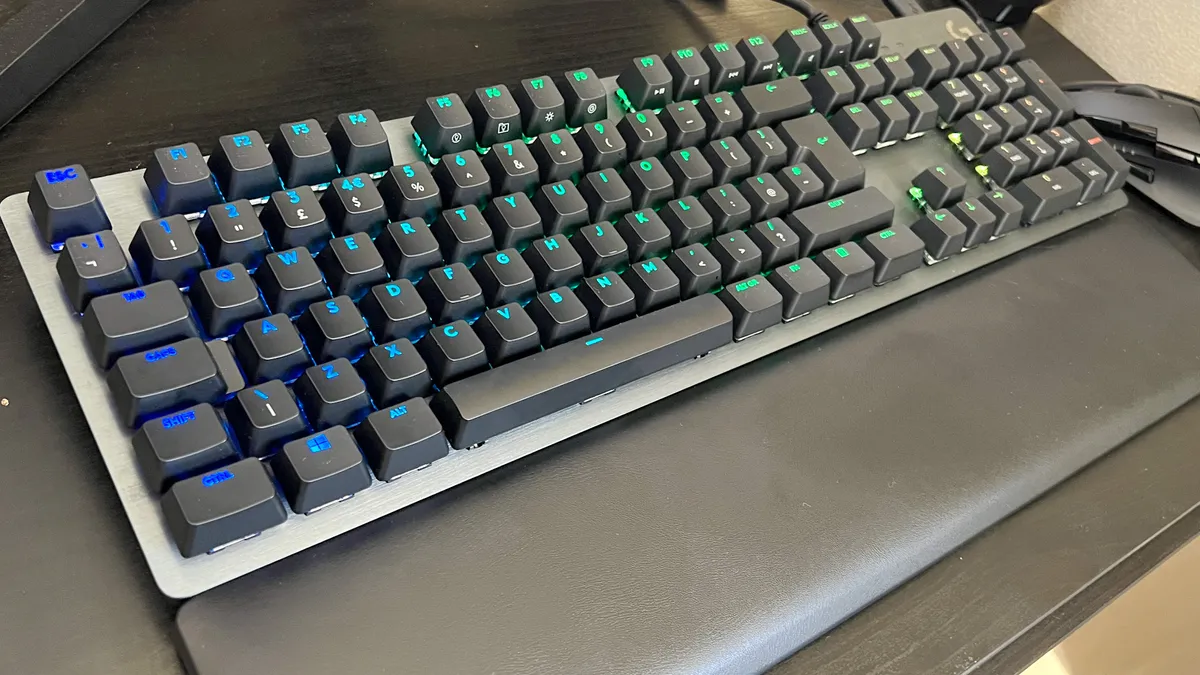
You've got your laptop and you've got a screen for it, next you need to consider your inputs. Yes, a gaming mouse and gaming keyboard feel like fairly standard fare, neither requiring too much consideration from your setup's standpoint. However, there are some ways you can enhance your gaming laptop setup as a whole by making some smart decisions. 

The first thing you'll want to consider is whether you want a fully wired or wireless setup, or something in between. Cable-free accessories can make life far easier (you don't have to spend so much time keeping your desktop free from wires) but they do carry a slight premium. If you can find a good price on a wireless gaming mouse or wireless gaming keyboard, the benefits are immense. As your laptop is likely going to be sitting on the desktop, and potentially on a riser, mouse and keyboard cables can suddenly become a far bigger problem if you're after a clean aesthetic. 

Wireless gear will need charging every now and then, so be sure to keep a USB-C cable handy (we'd recommend finding a power strip that also offers USB ports to keep everything to hand), but makes for a much easier life overall. You can even opt for a system that uses one dongle for all your accessories if you stick with the same brand - the Razer Hyperspeed feature is excellent for this. If this is the route you're planning to go down, we'd recommend starting with the Razer BlackWidow V3 Pro and Razer Viper V2 Pro for a high-end setup. 

That's a lot of cash, though - if you want to sacrifice that one-dongle functionality for a lower price, the Corsair K63 Wireless and Logitech G305 Lightspeed will provide a full setup for under $150 / £150. 

You can save some cash by keeping those cables in your life, but if you do go wired, it's worth investing in a USB hub. You'll be able to plug your devices into a discrete location and then use a single USB cable to reach your laptop, keeping cables to a minimum. We'd recommend picking up a TKL or 65% keyboard to save space if you're running your laptop on the desk as well, with the HyperX Alloy Origins 65 being our top pick. 

Today's best gaming keyboard and mouse deals
Razer Viper V2 Pro HyperSpeed...
Razer Viper V2 Pro
Amazon
$149.99
$105
View
See all prices
Corsair K63 Wireless...
Corsair K63 Wireless
Newegg
$239
View
See all prices
Logitech G305 Lightspeed...
Logitech G305 LIGHTSPEED
Amazon
$49.99
$29.99
View
See all prices
HyperX Alloy Origins 65 -...
HyperX Alloy Origins 65
Amazon
$99.99
$69.99
View
See all prices
Razer Basilisk V3...
Razer Basilisk V3
Amazon
$37.99
View
See all prices
We check over 250 million products every day for the best prices

Cable management for a gaming laptop setup

Now that you have all your essential kits, it's time to wire it all up. There are three main areas of concern you'll have to plan around when cleaning up your cables; power, display, and accessories. 

Your gaming laptop setup will need a minimum of two power outlets: one for your laptop and one for your monitor. Of course, this will only grow if you add chargers, another console, speakers, or extra accessories. Consider investing in a quality, surge-proof power strip to keep everything in one place. This also makes it far easier to tuck plugs away by using a cable box or by holding it underneath your desk with a tray or sticky strips. We'd also recommend investing in some cable clips (for example this TidyHelper batch for under $10 at Amazon), to train your wires up and down desk legs and around the back of your setup. 

Your display is one of the trickier parts of cable management. It will require one power cable and one or two HDMI / DisplayPort cables running to your laptop. Many monitors come with inbuilt cable management grips these days, but if not (or if that clip isn't up to the job), it's worth using a cable tie to keep these wires together and trained down to where they need to go. Again, small clips can then tack these cables to the underside of your desk while they make their way to your machine to keep things tidy. Picking up a shorter cable certainly helps here, as you won't need to mess around with too much extra length. 

Once your laptop is powered up and your monitor is connected, it's time to take a look at your accessories. Make sure you know what you'll be using and where, how you plan on training your wires, and how many power points you'll need. 

Extra accessories for your gaming laptop setup

You've now got a fully functional gaming laptop setup, but there are more ways to improve your creation. That's by keeping your machine's footprint small, creating space, and keeping things ergonomic.

To ensure you don't lose half your desk to your laptop, you can use either a riser or a vertical stand. A laptop riser (generally around $20 at Amazon) is a must if you're using your machine as a second screen, as you'll want to make sure you keep it at eye level - plus you're making space on your desk at the same time. A vertical laptop stand (between $20 and $30 at Amazon) will keep your PC closed but can hold it upright, wedged between two sides to free up loads of space. However, you will need to remove it from the stand to power up. 

If you want to make the most of your space and still keep your setup ergonomic, a monitor stand is an excellent addition. A stand with a shelf underneath also provides an excellent spot for your laptop if you measure up correctly. 

Of course, if you're starting from scratch you can also take a look at the best gaming desks and best gaming chairs to get started. If you want to take full advantage of that portability, though, we'd also recommend checking out the best laptop backpacks on offer. 

Tabitha Baker
Tabitha Baker
Social Links Navigation
Managing Editor - Hardware

Managing Editor of Hardware at GamesRadar+, I originally landed in hardware at our sister site TechRadar before moving over to GamesRadar. In between, I've written for Tom’s Guide, Wireframe, The Indie Game Website and That Video Game Blog, covering everything from the PS5 launch to the Apple Pencil. Now, i'm focused on Nintendo Switch, gaming laptops (and the keyboards, headsets and mice that come with them), PS5, and trying to find the perfect projector. 

Read more
HP Omen Max 16 gaming laptop on a wooden desk
The best gaming laptop 2026 - HP holds first place as budget machines battle it out
 
 
Flexispot E7 Plus in standing mode with Game Boy and screwdriver set sitting on top
Best gaming desk 2026: all the surfaces I'd use for PC and console setups
 
 
Acer Predator Orion X review  of the PC next to another ITX chassis
The best gaming PC 2026: Find your perfect pre-built powerhouse
 
 
Close up on display of Asus ROG Strix Scar 18 gaming laptop
The best Asus gaming laptops 2026
 
 
Razer Blade 16 2025 gaming laptop on a wooden desk
The best Razer laptops in 2026
 
 
Nanoleaf Lines attached to white wall
Ditch the light strips, here's how to build the ultimate RGB gaming setup in 2026
 
 
Latest in Laptops
Underside of Alienware 16 Area-51 gaming laptop with glass viewing window and RGB fans
We could get a shock when 2026 gaming laptop prices are unveiled, here's what you need to know about buying this year
 
 
Acer Nitro V 16 AI gaming laptop on a wooden desk with blue backlighting
RTX 5070 gaming laptops can't be beaten for value when the sales hit, and this Acer Nitro V16 deal proves my point
 
 
Razer Blade 16 2025 gaming laptop running Cyberpunk 2077 with DLSS enabled
What's the best mobile GPU for a gaming laptop? I've crunched the numbers to find the sweet spot after a year of testing
 
 
Razer Laptop Sleeve with Apple accessories attached to the included wireless charging pad on a gray background
Razer's new $130 laptop sleeve can wirelessly charge two devices at the same time
 
 
MSI Katana gaming laptop running Horizon Zero Dawn: Remastered
The MSI Katana is now the best budget gaming laptop I've tested so far, beating Asus for the first time in years
 
 
Alienware 16 Area-51 gaming laptop with lid slightly closed on a wooden desk
Now might be the worst time to buy an Alienware laptop, don't waste your money in 2026
 
 
Latest in Features
In Hitman World of Assassination, Agent 47 sits at the departure gate in an airport during the loading screen
After weeks spent locked into Hitman's Freelancer mode, I realize there's one vital thing 007 First Light needs to learn
 
 
Mario gadgets, accessories, and games on a blue background
The ultimate Mario Day starter pack, kit up for the plumber's big day
 
 
Glen Powell as Becket in How to Make a Killing
How to Make a Killing is Glen Powell's latest mid-budget movie, and I hope he never stops making them
 
 
Jensen Huang next to AI robot on stage at GTC 2024
Nvidia's CEO says "we created the modern video game industry," but all its push into AI upscaling has done is destroy good game optimization
 
 
Cillian Murphy as Tommy Shelby walking in Peaky Blinders: The Immortal Man
Peaky Blinders: The Immortal Man ending explained: does Tommy Shelby die and will there be a new season?
 
 
Lana and Mui run through a wooden marketplace on stilts above a gorgeous blue ocean in Planet of Lana 2, with the Indie Spotlight branded GamesRadar+ badge in the corner
Playing as my alien cat buddy makes this gorgeous puzzle platformer feel like a co-op adventure even when I'm alone
 
 
LATEST ARTICLES
  1. Battlefield 6
    1
    "The fundamentals of FPS should drive our decision": Battlefield 6 designers say developers have a "responsibility" to make games intuitive
  2. 2
    "The first track spoils the whole game": Clair Obscur Expedition 33 devs confirm they were filling your ears with spoilers the entire time
  3. 3
    The Super Mario Galaxy Movie reveals Donald Glover as the voice of Yoshi and more new casting in a star-spanning trailer that sends the entire Mushroom Kingdom to another planet
  4. 4
    Reacher star Alan Ritchson says season 4 is coming this year: "It's by far the best season we've had yet"
  5. 5
    Clair Obscur Expedition 33 took inspiration from a surprising anime - Soul Eater creator's Fire Force: "Because it was a JRPG, we tried to find a mix"

GamesRadar+ is part of Future US Inc, an international media group and leading digital publisher. Visit our corporate site.

Add as a preferred source on Google Add as a preferred source on Google
  • Terms and conditions
  • Contact Future's experts
  • Privacy policy
  • Cookies policy
  • Accessibility statement
  • Careers
  • About us
  • Advertise with us
  • Review guidelines
  • Write for us
  • Accessibility Statement

© Future US, Inc. Full 7th Floor, 130 West 42nd Street, New York, NY 10036.

Please login or signup to comment

Please wait...