I'm a massive GameCube simp, so I've naturally been itching to use the Switch 2 controller with the OG console for over half a year. Originally, I was scheming to use 8Bitdo's nifty Retro Receiver to pair the remake with Ninty's box of wonders wirelessly, but after tirelessly waiting for firmware updates to make that a possibility, I decided to start a love affair with a cheap alternative instead.
The dongle in question is the appropriately named Blueretro Wireless Adapter for Nintendo GameCube. Ultra catchy name aside, the gadget is pretty similar to 8Bitdo's line of receivers in that it'll let you use most of the best retro consoles out there with a modern controller. But, while 8Bitdo's version looks the part thanks to its authentic purple getup, its lesser-known rival has actually received firmware updates to combat Nintendo's tricksy Switch 2 gamepad hurdles.
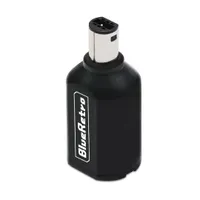
To cut 8Bitdo some slack, Nintendo is really to blame for holding up my GameCube controller plans. For whatever reason, Switch 2 gamepads use a different protocol compared to their predecessors, which resulted in initial incompatibility with other devices using regular Bluetooth. Things are still a little hairy even when it comes to workarounds on PC, but Blueretro's open-source dongle has cracked the connectivity case.

You will potentially need to fiddle with firmware before using the Blueretro Wireless Adapter with your GameCube, but it's otherwise a wonderfully simplistic gadget. All you have to do to make your own official Wavebird alternative is pop the dongle in the console's controller port, hit the sync button on your cordless pad, and sync it to your 2000s hardware just like you would with the gaming handheld. Simples.
Before trying to acquaint your fresh Switch 2 GameCube controller with your aging cubeoid using the dongle, I'd suggest checking its firmware and settings first. Unlike with the 8Bitdo Retro Receiver, you won't have to plug it into a PC using USB-C, as you can instead use your phone's Bluetooth and a web app to flash new firmware and tweak options.
You've actually got Jacques Gagnon, AKA Darthcloud at Github, to thank for the entire Blueretro ecosystem of retro console adapters, including the one I use with my N64. They're the reason the open-source project exists and why the dongles now work with Switch 2 controllers, but you'll see lots of branded options using the tech by names like Retroscaler out there.

It just so happens that I'm using a Retroscaler version of the Blueretro GameCube adapter, and that matters when updating firmware. In theory, you should be able to use the latest bin files for Switch 2 gamepad support at Darthcloud's GitHub with the web configuration tool, but I found that the dongle I'm using would only update with an older version of the app. You'll still be using the former to change settings, but it's worth trying both if you're having issues with a specific adapter version.
Despite having to potentially try two apps, updating the Blueretro adapter is still easy. All you practically have to do is plug it into a GameCube port, press "select device" or "connect" depending on the version you're using, then use the "BlueRetro_hw1_gamecube.bin" file from GitHub to patch. If the update is successful, you'll then be able to sync the Switch 2 GC controller just like any other pad, and you won't even have to map any buttons. Pretty Clever.
I've been messing around with the GameCube port of Zelda: Majora's Mask, off the back of the series' 40th anniversary, so it was the first game I tried with the Switch 2 pad. The controller itself feels slightly different from the original, but it absolutely functions just like an original pad in terms of inputs and responsiveness. I did have to jump back into the app to enable rumble, though, but that was easy enough to do since the option is sitting in the "output" tab in pain view under the "accessories" dropdown.

Off the back of finally getting the "new" GameCube controller working with the console, I ended up spinning up most of my tiny discs. I was worried that the gamepad would forget it has pressure-sensitive triggers when paired with the Blueretro dongle, but I was able to dribble water everywhere while running in Super Mario Sunshine just like with an original pad.
I'm also delighted to report that I wasn't able to sniff out any latency differences between a wired gamepad and the Blueretro dongle. Twitchy deathsled racers like F-Zero GX felt practically identical between controllers, and the connection also remained solid throughout my cosy GameCube floor session (don't judge me, I'm currently sorting out a new testing station).
The short of it here is that you can use the Switch 2 GameCube controller with the actual console, and there aren't many strings attached to cutting the cord. My only very minor and perhaps dorky complaint is that the dongle doesn't tie in as well with Ninty's 2000s hardware as 8Bitdo's receiver, but that matters not when the latter still can't sync up to the remake.

I'll still be keeping an eye out for 8Bitdo GameCube receiver updates, but now was the right time to pick up the Blueretro version. In 2026, I'll be on the hunt for the best retro controllers that boast compatibility with new and original consoles, and I am now considering giving the Switch 2 pad a seat at that illustrious table. Whether it'll end up my absolute top pick for the 24-year-old cuboid remains to be seen, but so far, I'd let it take me out for dinner.
Looking for ways to play classics on the go? Swing by the best retro handhelds for emulation devices and more.

You must confirm your public display name before commenting
Please logout and then login again, you will then be prompted to enter your display name.