Background
Welcome to GamesRADAR+ Community !
Hi ,

Your membership journey starts here.

Keep exploring and earning more as a member.

MY ACCOUNT

Badge picture
Earn your first badge
Read 1 article to unlock your first badge.
Keep earning badges
Explore ways to get more involved as a member.
Latest Games News

Latest Games News

Breaking gaming news and updates

Read Now
Latest Games Reviews

Latest Games Reviews

Expert verdicts on the newest releases

Read Now

See what you’ve unlocked.

Explore your membership benefits.

Explore
Member Exclusives

Stay Ahead with GamesRadar+

Get the biggest gaming news, reviews, and releases straight to your inbox.

Explore

Sign Out
Join The Community
- Join our community
11
Premium Benefits
24/7
Access Available
21K+
Active Members
Commenting
Join the discussion
Exclusive Articles Coming Soon
Member-only articles
Weekly Newsletters
Weekly gaming & entertainment news
Member Badges
Earn badges as you go
Exclusive Competitions
Members-only prize draws
Curated Deals Coming Soon
Tech and gaming deals worth grabbing
GET COMMUNITY ACCESS QUICK
For the quickest way to join, simply enter your email below and get access. We will send a confirmation and sign you up to our newsletter to keep you updated on all your gaming news.
By submitting your information you agree to the Terms & Conditions and Privacy Policy and are aged 16 or over.
FIND OUT ABOUT OUR MAGAZINE
Want to subscribe to the magazine? Click the button below to find out more information.
Find out more
GET Community ACCESS QUICK

Join the GamesRadar community for quick access. Enter your email below and we'll send confirmation, and sign you up to our newsletter.

By submitting your information, you confirm you are aged 16 or over, have read our Privacy Policy and agree to the Terms & Conditions. Geographical rules apply.

GamesRadar+ GamesRadar+
US EditionUS CA EditionCanada UK EditionUK AU EditionAustralia
Sign in
  • View Profile
  • Sign out
  • Games
    • Game Insights
      • Games News
      • Games Features
      • Games Reviews
      • Games Guides
      • Big in 2026
      • Big Preview
      • Future Games Show
      • Golden Joystick Awards
    • Genres
      • Action Games
      • RPGs
      • Action RPGs
      • Adventure Games
      • Third Person Shooters
      • FPS Games
    • Platforms
      • PS5
      • Xbox Series X
      • PC
      • Nintendo Switch
      • Nintendo Switch 2
      • Tabletop Gaming
    • Franchises
      • Grand Theft Auto
      • Pokemon
      • Assassin's Creed
      • Monster Hunter
      • Fortnite
      • Cyberpunk
      • Red Dead
      • The Elder Scrolls
      • The Sims
  • Entertainment
    • TV Shows
      • TV News
      • TV Reviews
      • Anime Shows
      • Sci-Fi Shows
      • Superhero Shows
      • Animated Shows
      • Marvel TV Shows
      • Star Wars TV Shows
      • DC TV Shows
    • Movies
      • Movie News
      • Movie Reviews
      • Big Screen Spotlight
      • Superhero Movies
      • Action Movies
      • Anime Movies
      • Sci-Fi Movies
      • Horror Movies
      • Marvel Movies
      • DC Movies
    • Streaming
      • Apple TV Plus
      • Disney Plus
      • Netflix
      • HBO
      • Amazon Prime Video
      • Hulu
    • Comics
      • Marvel Comics
      • DC Comics
  • Hardware
    • Insights
      • Hardware News
      • Hardware Reviews
      • Hardware Features
      • Buying Guides
    • Computing
      • Desktop PCs
      • Laptops
      • Handhelds
    • Peripherals
      • Headsets & Headphones
      • TVs & Monitors
      • Gaming Mice
      • Gaming Keyboards
      • Gaming Chairs
      • Speakers & Audio
    • Accessories & Tech
      • Gaming Controllers
      • Tech
      • SSDs & Hard Drives
      • VR
      • Accessories
      • Retro
  • Deals
    • Toys & Collectibles
    • Lego
    • Dungeons and Dragons
    • Merch
  • Video
    • Video
    • GR+ Replay - Submit Your Clips
  • Newsletters
    • Quizzes
    • About Us
    • How to pitch to us
    • How we score
    • Newsarama
    • Retro Gamer
  • home
  • Games
    • View Games
      • Games News
      • Games Features
      • Games Reviews
      • Games Guides
      • Big in 2026
      • Big Preview
      • Future Games Show
      • Golden Joystick Awards
      • Action Games
      • RPGs
      • Action RPGs
      • Adventure Games
      • Third Person Shooters
      • FPS Games
    • Platforms
      • View Platforms
      • PS5
      • Xbox Series X
      • PC
      • Nintendo Switch
      • Nintendo Switch 2
      • Tabletop Gaming
      • Grand Theft Auto
      • Pokemon
      • Assassin's Creed
      • Monster Hunter
      • Fortnite
      • Cyberpunk
      • Red Dead
      • The Elder Scrolls
      • The Sims
  • Entertainment
    • View Entertainment
    • TV Shows
      • View TV Shows
      • TV News
      • TV Reviews
      • Anime Shows
      • Sci-Fi Shows
      • Superhero Shows
      • Animated Shows
      • Marvel TV Shows
      • Star Wars TV Shows
      • DC TV Shows
    • Movies
      • View Movies
      • Movie News
      • Movie Reviews
      • Big Screen Spotlight
      • Superhero Movies
      • Action Movies
      • Anime Movies
      • Sci-Fi Movies
      • Horror Movies
      • Marvel Movies
      • DC Movies
    • Streaming
      • View Streaming
      • Apple TV Plus
      • Disney Plus
      • Netflix
      • HBO
      • Amazon Prime Video
      • Hulu
    • Comics
      • View Comics
      • Marvel Comics
      • DC Comics
  • Hardware
    • View Hardware
      • Hardware News
      • Hardware Reviews
      • Hardware Features
      • Buying Guides
      • Desktop PCs
      • Laptops
      • Handhelds
    • Peripherals
      • View Peripherals
      • Headsets & Headphones
      • TVs & Monitors
      • Gaming Mice
      • Gaming Keyboards
      • Gaming Chairs
      • Speakers & Audio
      • Gaming Controllers
      • Tech
      • SSDs & Hard Drives
      • VR
      • Accessories
      • Retro
  • Deals
    • Toys & Collectibles
    • Lego
    • Dungeons and Dragons
    • Merch
  • Video
    • View Video
    • Video
    • GR+ Replay - Submit Your Clips
  • Newsletters
    • Quizzes
    • About Us
    • How to pitch to us
    • How we score
    • Newsarama
    • Retro Gamer
Trending
  • GTA 6 pre-orders
  • Black Flag Resynched
  • New Games 2026
  • Summer Game Fest 2026 schedule
  • Best gaming gadgets
  • Submit your clips. Win prizes
  1. Hardware
  2. Peripherals
  3. Gaming Mice

Turtle Beach Kone II Air review: “comfort reigns supreme”

Reviews
By Tabitha Baker published 24 September 2024

When you purchase through links on our site, we may earn an affiliate commission. Here’s how it works.

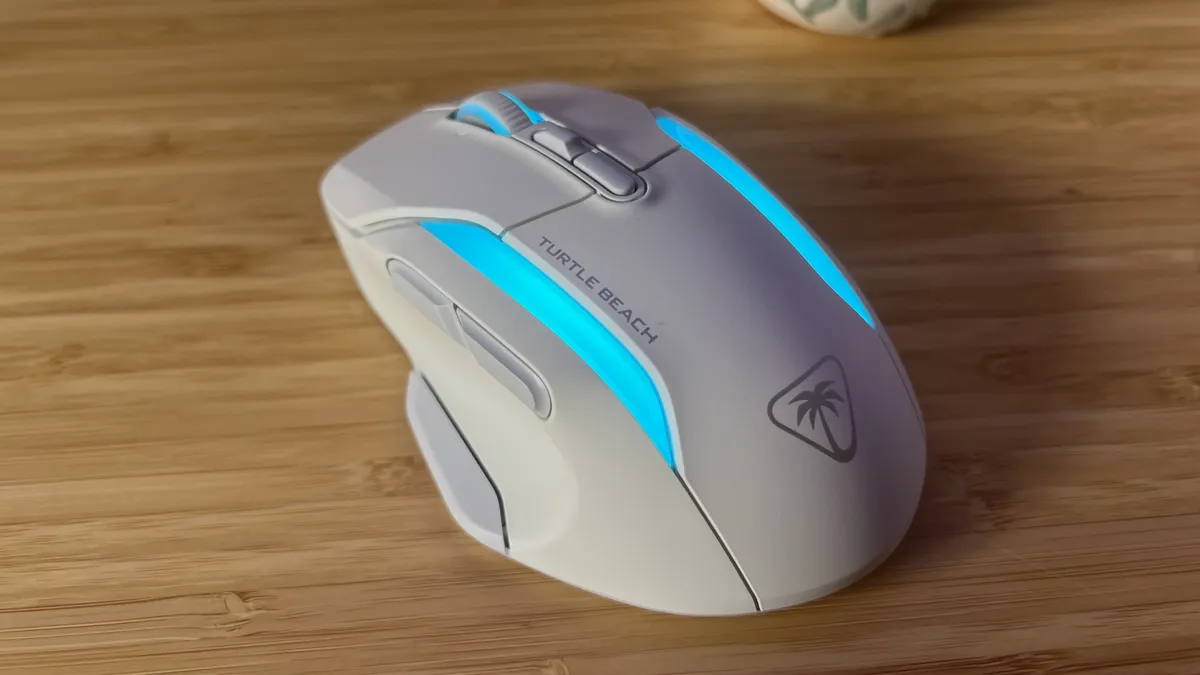
White Turtle Beach Kone II Air gaming mouse with blue RGB on sitting on a wooden desk
(Image credit: © Future)

GamesRadar+ Verdict

The Turtle Beach Kone II Air revives the wide, flat base with a fantastic new sensor, excellent connectivity options, and an improved aesthetic. While it’s a little too heavy to be as versatile as its competition, this is a dream for those with larger hands.

$59.99 at Amazon
$59.99 at Best Buy
$119.99 at Walmart
$119.99 at Target

Pros

  • +

    Incredibly comfortable base

  • +

    Extra programmability

  • +

    Well-tuned weight and chassis

  • +

    Speedy sensor

  • +

    Bright RGB lighting

  • +

    Great battery life

Cons

  • -

    Heavier than the competition

  • -

    Not suited to faster games

Best picks for you
  • The best wireless gaming mouse 2026
  • The best gaming mouse in 2026: all the latest releases compared
  • The best Razer mouse 2026: all the top models compared

Why you can trust GamesRadar+ Our experts review games, movies and tech over countless hours, so you can choose the best for you. Find out more about our reviews policy.

Before Turtle Beach dissolved the Roccat brand, the original Kone Air attempted to pair a modest price tag with a wireless connection. While it got the job done, it made too many sacrifices to truly be considered one of the best gaming mouse models on the market. The new generation is here, though, and I couldn’t be happier. The Turtle Beach Kone II Air does up the price tag, to around double that of the original, but boosts the sensor significantly and adds a rechargeable battery - all in a much slicker feeling chassis. 

I’ve spent the last two weeks testing the wireless Air model, though there’s also a cheaper $69.99 / £59.99 wired model that shares the same functionality and design. It’s a premium pointer considering its wider base, but in a market led by the super light, it’s certainly got a lot to say.

Swipe to scroll horizontally
Key Specs
Price$119.99 / £119.99
Connection2.4GHz / Bluetooth / Wired
ShapeRight-handed
Buttons9
DPI26,000
IPS650
SwitchesTitan Switch Optical
Weight110g

Design

Back of Turtle Beach Kone II Air gaming mouse with RGB on and logo visible

(Image credit: Future)

The Kone’s form factor is never going to be svelte - this is a wide-set mouse for those with larger hands or who prefer a more relaxed palm grip. At its widest point, the Kone II Air measures in at 8.3cm, a considerable increase compared to the Razer Basilisk V3’s 7.5cm and the Corsair Darkstar Wireless’s 6.7cm. This is a wide, flat base with only a very slight hump in the middle - a design that’s stuck around since the early days of the range, but one that provides a particularly comfortable hold. While that form factor made the original model appear cheaper, the Kone II manages to get away with it, thanks to the addition of three vibrant RGB patches. These are dual-zone programmable, and provide a nicely crisp illumination across both sides of the mouse and underneath the scroll wheel. On my white model, a clean cyan shines through particularly well, though there are a range of effects to choose from. 

Latest Videos From

The matte surface texture also helps the Kone II Air feel far more premium than the original. While some may miss the rubberized sides (grip tape is still provided in the box), I much prefer the soft touch plastic coating on the 2024 model. While mice with this material sometimes run the risk of feeling slippery, I was never worried about losing my grip. That’s because this is still a well sculpted chassis. The grooves on each side help gently guide the hand into the correct position, without every feeling tense or unnatural during gameplay. On the left, just above the thumb rest, a particularly deep recess provides both stability and comfort - I was easily able to hook my thumb around the back of this groove for extra precision when pulling down on the mouse, for example. 

Left side of Turtle Beach Kone II Air showing a deep thumb groove and side buttons

(Image credit: Future)

Of course, a wider base is always going to have an impact on the weight and the Roccat Kone II Air doesn’t shy away from its heavier 110g form factor. That’s not as bulky as the original model’s 119g, but it is noticeably chunkier than the 89g Corsair M75 Wireless and the 74g SteelSeries Aerox 5 wireless, both wider-set mice. In practice, that extra weight does mean that the Turtle Beach Kone II Air is less versatile than its direct competition. The Corsair Darkstar Wireless, for example, is my go-to MMO mouse at the moment, but still manages to pack a 96g form factor that brings FPS games within far closer reach. The silhouette and weight of the Kone simply aren’t conducive to these faster paced games, though it does have its place on the battlefield.

The extra weight provides a reassuring presence on the desktop. Games with the space to allow for more considered movements absolutely benefit from the additional level of control and precision that comes with a heavier pointer. Those with larger hands are going to get more out of this than someone with smaller hands like me (I did sometimes struggle to fully manoeuvre my way around the device during a few shootouts).

Front of Turtle Beach Kone II Air gaming mouse with focus on main click buttons

(Image credit: Future)

The actual aesthetic is a strange one. The crisp angular lines running across the main body of the Kone II give it a distinct ‘gamer’ vibe, but this is then undercut by the soft rounded corners of the device as a whole. I would even go so far as to call the front area stubby, it just looks like there should be a tiny bit more main click before the taper begins.

Sign up to the GamesRadar+ Newsletter

Weekly digests, tales from the communities you love, and more

By submitting your information you agree to the Terms & Conditions and Privacy Policy and are aged 16 or over.

Features

While the original Roccat Kone Air prioritized its wireless connection via 2.4GHz and Bluetooth, the Turtle Beach Kone II Air adds wired connectivity as well. That means you can easily plug in to charge up (yes, you can charge now - no more replaceable batteries) or ensure you’re getting the lowest latencies possible. It has to be said, I never noticed a difference in speeds between the wired and 2.4GHz connection - though most wireless gaming mouse models are up to speed standards these days anyway. 

Turtle Beach also states that that wireless connection (and the RGB lighting) can run off a battery that lasts up to 130 hours on 2.4GHz and 350 hours on Bluetooth. That’s high in the world of gaming mice - the Corsair Darkstar Wireless taps out at 80 hours with a smaller system of RGBs and the Razer Basilisk V3 Pro only manages 90 hours. I will spend an average of 7-10 hours using a mouse every day, and at the end of the week I was still at well over 50% charge by the time Monday came around again. 

The wider base and heavier form factor might have given it away but the Turtle Beach Kone II Air hasn’t been designed for first person shooters - and that means we get a load more programmable controls onboard. That’s excellent news for anyone who regularly plays across larger adventure titles or MMO games, having more access to quick functions makes these types of experiences all the more intuitive especially when you can keep your right hand firmly on the mouse at all times. In the Kone’s case, three side buttons (two standard back and forward clickers and a thumb rest paddle underneath) make up the bulk of your customization. However, the scroll wheel can also easily be tipped to the side to make two more inputs, with a third coming from the press of the wheel. 

Underside of Turtle Beach Kone II Air showing skates, USB-A receiver housing, and sensor

(Image credit: Future)

Underneath the scroll wheel, you’ll find a DPI shifter and scroll mode toggle as well. That makes up nine inputs in total, which can be transformed into 21 using the brand’s Easy Shift functionality. When switched on, holding left paddle with the thumb opens you up to another layer of functionality from the same buttons. Unlike in the original Kone, you’ve also got space for several presets as well - excellent for swapping between work and play, or between games.

These are among some of the best side buttons I’ve used on a gaming mouse, offering just the right amount of tension to remain satisfying without being heavy but still steering well clear of accidental presses. That even goes for the paddle sitting beneath the thumb - I’m able to comfortably rest on top of it, and giving it a quick nudge to actuate exactly when I want to. The larger shape means I’m not able to roll my thumb to reach the back side button quite as easily as I would on something smaller like the Razer Cobra Pro, but both clickers are still easily accessible.

All of those button assignments are sorted in the Roccat Swarm software. This is a no-frills experience that neatly avoids plastering ads all over your desktop and instead focuses on getting a wide range of customization options in front of you in an intuitive manner. All of your button assignments are quickly and easily set in here, but you’ll also be configuring your sensor’s DPI, polling rate, debounce, lift off distance, angle snapping, and motion sync, as well as setting your standby timing and viewing battery and update status. Everything is neatly laid out in one place without the need to dig through menus - as someone who uses a lot of these programs for a lot of different devices, not having to re-learn where everything is is a godsend.

Performance

Right side of Turtle Beach Kone II Air

(Image credit: Future)

Of course, the Turtle Beach Kone II Air isn’t going to go toe-to-toe with the likes of the Razer Viper V3 Pro from a pure speed standpoint. However, its feature set means its geared more towards games that require more custom inputs. That doesn’t mean it’s not equipped to track fast, though. 

The Turtle Beach Owl-Eye 26K sensor runs at 650 inches-per-second, making tracking feel effortlessly smooth across a wide range of genres. In a slimmer mouse, this sensor could easily take on more competitive endeavours from a pure specification standpoint. It’s snappy, responsive, and tracks pretty easily across a range of surfaces as well. Meanwhile, the brand’s optical Titan Switches have remained intact underneath each main click, offering a soft but still energetic response. With configurable debounces, repeat presses felt immediate. 

They’re not quite as tactile as the Omron switches in the Corsair Darkstar Wireless, and they felt a little heavier than Razer’s own optical switches. In practice, this meant a little fatigue was creeping in after more frantic moments, when I would sometimes drop a press or two. 

Should you buy the Turtle Beach Kone II Air?

Turtle Beach Kone II Air gaming mouse standing against product packaging on a wood gaming desk

(Image credit: Future)

The Turtle Beach Kone II Air is perfect for a player with larger hands who wants plenty of controls at their finger tips. While I wouldn’t recommend it to those playing competitively due to its size and weight, anyone looking to put comfort first while still remaining relatively fast on the battlefield should be considering this device. It’s cheaper than a lot of its competition, and offers a form factor we don’t see too much of these days. Plus, it absolutely nails its ergonomic design and keeps a cool light show onboard for extra flair. 

With the wireless model coming in so much more expensive than the wired alternative, I would be hesitant to pit it as the better buy of the two. If you don’t mind a tail on your rodent, the cheaper wired version offers excellent value for money. 

From an MMO perspective, the Turtle Beach Kone II Air is just pipped by the slightly more expensive Corsair Darkstar Wireless. With more programmable inputs, a lighter form factor, and more tactile switches, Corsair’s slick pointer retains its crown in this matchup, though its $169.99 / £149.99 MSRP might run the wrong side of some budgets.

Today's best deals
Turtle Beach Kone II Air...
Turtle Beach Kone II Air
Amazon
$59.99
View
See all prices
Turtle Beach Kone II Wired...
Turtle Beach Kone II
Amazon
$56.72
View
See all prices
CORSAIR DARKSTAR WIRELESS RGB...
Corsair Darkstar Wireless
CORSAIR
$149.99
View
See all prices
We check over 250 million products every day for the best prices

How I tested the Turtle Beach Kone II Air

I used the Turtle Beach Kone II Air for a period of three weeks, using the device for all daily work and play. I primarily tested across CS:2, Fallout 4, and Assassin’s Creed Odyssey during this process (though also dabbled in Planet Coaster and TCG Card Shop Simulator: The Prologue) as well. For more information on how we test gaming mice, check out the full GamesRadar+ Hardware Policy.  

We’re also rounding up all the best Razer mouse models on the market, as well as the best Logitech gaming mice. Or, for a full setup refresh, check out the best gaming keyboards we’ve tested so far.  

Turtle Beach Kone II Air: Price Comparison
Turtle Beach Kone II Air...
Amazon
Prime
$59.99
View
Turtle Beach Kone II Air...
Amazon
Prime
$59.99
View
Turtle Beach - Kone II Air...
Best Buy
$119.99
$59.99
View
Turtle Beach Kone II Air...
Walmart
$119.99
View
Turtle Beach Kone II Air...
Target
$119.99
View
Show more
We check over 250 million products every day for the best prices
powered by
Gamesradar
TOPICS
Turtle Beach
CATEGORIES
PC Gaming Platforms
Tabitha Baker
Tabitha Baker
Social Links Navigation
Managing Editor - Hardware

Managing Editor of Hardware at GamesRadar+, I originally landed in hardware at our sister site TechRadar before moving over to GamesRadar. In between, I've written for Tom’s Guide, Wireframe, The Indie Game Website and That Video Game Blog, covering everything from the PS5 launch to the Apple Pencil. Now, i'm focused on Nintendo Switch, gaming laptops (and the keyboards, headsets and mice that come with them), PS5, and trying to find the perfect projector. 

Read more
Side view of Logitech G Pro X2 Superstrike gaming mouse showing logo
Gaming Mice The Logitech G Pro X 2 Superstrike will change the game for some, but not all | Review
 
 
Logitech G305 Lightspeed gaming mouse standing upright on a wooden desk with blue backlighting
Gaming Mice I put this eight year old budget gaming mouse to the test against far newer releases, and it still comes out on top
 
 
Turtle Beach Command Series MC7 gaming mouse on a purple background
Gaming Mice Turtle Beach's new mouse is giving me the ick, and it's not just the obnoxious touchscreen
 
 
A reviewer holding the Asus ROG Raikiri 2
Gaming Controllers The Asus ROG Raikiri II's microswitch buttons are on par with the Razer Wolverine V3 Pro for less money
 
 
Razer Viper V4 Pro gaming mouse on a black mat
Gaming Mice The Razer Viper V4 Pro refreshes the line with "faster and more consistent aim"
 
 
Corsair Sabre V2 Pro Wireless MG gaming mouse on a wooden desk with blue backlighting
Gaming Mice The Corsair Sabre V2 Pro Wireless MG uses a magnesium-alloy chassis to keep its cool | Review
 
 
Latest in Gaming Mice
Turtle Beach Command Series MC7 gaming mouse on a purple background
Gaming Mice Turtle Beach's new mouse is giving me the ick, and it's not just the obnoxious touchscreen
 
 
Logitech G305 Lightspeed gaming mouse standing upright on a wooden desk with blue backlighting
Gaming Mice I put this eight year old budget gaming mouse to the test against far newer releases, and it still comes out on top
 
 
A reveal image showing the five different speed variants of the Razer Gigantus V2 Pro mouse pad
Gaming Mice Razer goes a step further than SteelSeries, offering five different speeds of its latest gaming mouse pad
 
 
Razer Viper V4 Pro gaming mouse on a black mat
Gaming Mice The Razer Viper V4 Pro refreshes the line with "faster and more consistent aim"
 
 
Corsair Scimitar Elite Wireless SE gaming mouse held in a hand against a gaming setup
Gaming Mice Want "ultimate programmability" for less? Corsair's button-heavy gaming mouse is nearly half off right now
 
 
Side view of Logitech G Pro X2 Superstrike gaming mouse showing logo
Gaming Mice The Logitech G Pro X 2 Superstrike will change the game for some, but not all | Review
 
 
Latest in Reviews
Logitech G512 X gaming keyboard with blue backlighting on a wooden desk
Gaming Keyboards The Logitech G512 X isn't an enthusiast's magnetic keyboard, but it could makes sense for beginners
 
 
An Elgato Wave Neo review image
Peripherals The Elgato Wave Neo is meant for work calls, but budget streamers should take note
 
 
The key art for Lego Batman: Legacy of the Dark Knight showing a shadowed Batman superimposed in front of a neon and spotlight lit Gotham City
Action Games Lego Batman: Legacy of the Dark Knight review: "Arkham flavor combines with Lego comedy better than I expected"
 
 
Key art for Zero Parades: For Dead Spies showing Cascade in a red jacket against a backdrop of grey faces
RPGs Zero Parades: For Dead Spies review: "Being built from Disco Elysium's bones is a blessing and a curse for this spy RPG"
 
 
A Steam Controller next to its puck
Gaming Controllers The Steam Controller is unmatched at letting you play mouse and keyboard games from your couch
 
 
Hand holding Retro Fighters Hunter with OG Xbox Crystal Edition and Sony Trinitron TV in backdrop with Oddword: Munch's Odyssee main menu on screen.
Retro Retro Fighters Hunter review
 
 
LATEST ARTICLES
  1. Subnautica 2
    1
    More Subnautica 2 devs weigh in on the survival game's first big discourse since launching
  2. 2
    Lords of the Fallen 2 looks destined for Steam as CI Games reportedly ends agreement with Epic
  3. 3
    How to find all League of Shadows Collectibles in Lego Batman Legacy of the Dark Knight
  4. 4
    Find the best Mandalorian and Grogu merch here, chosen by a Star Wars super-fan
  5. 5
    How to find all Lego Batman Legacy of the Dark Knight New Beginnings Collectibles

GamesRadar+ is part of Future US Inc, an international media group and leading digital publisher. Visit our corporate site.

Add as a preferred source on Google Add as a preferred source on Google
  • Terms and conditions
  • Contact Future's experts
  • Privacy policy
  • Cookies policy
  • Accessibility statement
  • Careers
  • About us
  • Advertise with us
  • Review guidelines
  • Write for us

© Future US, Inc. Full 7th Floor, 130 West 42nd Street, New York, NY 10036.

Please login or signup to comment

Please wait...