GamesRadar+ GamesRadar+
US EditionUS CA EditionCanada UK EditionUK AU EditionAustralia
Sign in
  • View Profile
  • Sign out
  • Games
    • Game Insights
      • Games News
      • Games Features
      • Games Reviews
      • Games Guides
      • Big in 2026
      • The Big Preview
      • On The Radar
      • Indie Spotlight
      • Future Games Show
      • Golden Joystick Awards
    • Genres
      • Action Games
      • RPGs
      • Action RPGs
      • Adventure Games
      • Third Person Shooters
      • FPS Games
    • Platforms
      • PS5
      • Xbox Series X
      • PC
      • Nintendo Switch
      • Nintendo Switch 2
      • Tabletop Gaming
    • Franchises
      • Grand Theft Auto
      • Pokemon
      • Assassin's Creed
      • Monster Hunter
      • Fortnite
      • Cyberpunk
      • Red Dead
      • The Elder Scrolls
      • The Sims
  • Entertainment
    • TV Shows
      • TV News
      • TV Reviews
      • Anime Shows
      • Sci-Fi Shows
      • Superhero Shows
      • Animated Shows
      • Marvel TV Shows
      • Star Wars TV Shows
      • DC TV Shows
    • Movies
      • Movie News
      • Movie Reviews
      • Big Screen Spotlight
      • Superhero Movies
      • Action Movies
      • Anime Movies
      • Sci-Fi Movies
      • Horror Movies
      • Marvel Movies
      • DC Movies
    • Streaming
      • Apple TV Plus
      • Disney Plus
      • Netflix
      • HBO
      • Amazon Prime Video
      • Hulu
    • Comics
      • Marvel Comics
      • DC Comics
    • Toys & Collectibles
    • Lego
    • Dungeons and Dragons
    • Merch
  • Hardware
    • Insights
      • Hardware News
      • Hardware Reviews
      • Hardware Features
    • Computing
      • Desktop PCs
      • Laptops
      • Handhelds
    • Peripherals
      • Headsets & Headphones
      • TVs & Monitors
      • Gaming Mice
      • Gaming Keyboards
      • Gaming Chairs
      • Speakers & Audio
    • Accessories & Tech
      • Gaming Controllers
      • Tech
      • SSDs & Hard Drives
      • VR
      • Accessories
      • Retro
  • Deals
    • Game Deals
    • Tech Deals
    • TV Deals
    • Buying Guides
  • Video
  • Newsletters
    • Quizzes
    • About Us
    • How to pitch to us
    • How we score
    • Newsarama
    • Retro Gamer
    • Total Film
  • home
  • Games
    • View Games
      • Games News
      • Games Features
      • Games Reviews
      • Games Guides
      • Big in 2026
      • The Big Preview
      • On The Radar
      • Indie Spotlight
      • Future Games Show
      • Golden Joystick Awards
      • Action Games
      • RPGs
      • Action RPGs
      • Adventure Games
      • Third Person Shooters
      • FPS Games
    • Platforms
      • View Platforms
      • PS5
      • Xbox Series X
      • PC
      • Nintendo Switch
      • Nintendo Switch 2
      • Tabletop Gaming
      • Grand Theft Auto
      • Pokemon
      • Assassin's Creed
      • Monster Hunter
      • Fortnite
      • Cyberpunk
      • Red Dead
      • The Elder Scrolls
      • The Sims
  • Entertainment
    • View Entertainment
    • TV Shows
      • View TV Shows
      • TV News
      • TV Reviews
      • Anime Shows
      • Sci-Fi Shows
      • Superhero Shows
      • Animated Shows
      • Marvel TV Shows
      • Star Wars TV Shows
      • DC TV Shows
    • Movies
      • View Movies
      • Movie News
      • Movie Reviews
      • Big Screen Spotlight
      • Superhero Movies
      • Action Movies
      • Anime Movies
      • Sci-Fi Movies
      • Horror Movies
      • Marvel Movies
      • DC Movies
    • Streaming
      • View Streaming
      • Apple TV Plus
      • Disney Plus
      • Netflix
      • HBO
      • Amazon Prime Video
      • Hulu
    • Comics
      • View Comics
      • Marvel Comics
      • DC Comics
    • Toys & Collectibles
    • Lego
    • Dungeons and Dragons
    • Merch
  • Hardware
    • View Hardware
      • Hardware News
      • Hardware Reviews
      • Hardware Features
      • Desktop PCs
      • Laptops
      • Handhelds
    • Peripherals
      • View Peripherals
      • Headsets & Headphones
      • TVs & Monitors
      • Gaming Mice
      • Gaming Keyboards
      • Gaming Chairs
      • Speakers & Audio
      • Gaming Controllers
      • Tech
      • SSDs & Hard Drives
      • VR
      • Accessories
      • Retro
  • Deals
    • View Deals
    • Game Deals
    • Tech Deals
    • TV Deals
    • Buying Guides
  • Video
  • Newsletters
    • Quizzes
    • About Us
    • How to pitch to us
    • How we score
    • Newsarama
    • Retro Gamer
    • Total Film
Trending
  • Pokemon Winds and Waves
  • New Games for 2026
  • GamesRadar+ Replay
  • Mario Day deals
Jump to:
  • Quick List
  • Best overall
  • Best Joy-Con alternative
  • Most comfortable
  • Best pro controller
  • Most versatile
  • Best racing wheel
  • Best for handheld-mode
  • FAQ
Don't miss these
SteelSeries Arctis Nova Pro Wireless gaming headset
Headsets & Headphones Best gaming headset 2026 - my go-to cups for every platform
Original GameCube with Blueretro Wireless Adapter in port next to Sony PVM CRT with hand holding Switch 2 GameCube controller in front.
Retro I've finally found a way to use the Switch 2 GameCube controller with an actual GameCube
GameSir G8 Galileo review image of the controller standing up against its box with red RGB lighting behind it
Gaming Controllers The best mobile controller for gaming 2026
Five different gaming controllers for PC scattered around a desktop surface
Gaming Controllers The best PC controller for gaming 2026
Xbox Elite Series 2 controller
Gaming Controllers The best Xbox Series X controller in 2026
A collection of TMR gaming controllers
Gaming Controllers I've tested them for you, and these are the 7 best TMR controllers on the shelves right now
DualSense Edge review image showing the controller next to the original DualSense in Nova Pink
Gaming Controllers The best PS5 controller 2026: Find your Edge
Four pictures of games from our selection of the best Switch 2 games list, showing Donkey Kong, Cloud from Final Fantasy, Mario and Luigi, and three starter Pokemon.
Games The 20 best Switch 2 games to play in 2026
Close up on macro buttons on the side of the Corsair Vanguard Pro 96 gaming keyboard
Gaming Keyboards Best gaming keyboard 2026: the Vanguard stands strong with another new entry for Corsair
Two chefs cooking on a boat with a seagull watching in the Nintendo Switch game Overcooked 2
Platforming Games Best two-player Switch games that let you team up with a friend or family member
Steam Deck with mascot face on screen surrounded by compatible Steam Deck docks
Handhelds The best Steam Deck dock 2026: the handheld docking stations I'd recommend
The best Nintendo Switch Games with the Nintendo Switch console overlaid.
Nintendo The 25 best Nintendo Switch games to play right now
PS4 Controllers
Gaming Controllers The best PS4 controllers you can buy in 2026
Animal Crossing: New Horizons screenshot of cat villager Punchy cooking with a pan
Games The best Switch exclusives to make sure you have in your library
White SteelSeries Arctis Nova Pro Wireless with Xbox Series X controller on a shelf with a pot plant
Headsets & Headphones The best Xbox Series X headset: here's why the SteelSeries Arctis Nova Pro Wireless still reigns supreme in 2026
  1. Hardware
  2. Gaming Controllers
  3. Nintendo Switch

The best Nintendo Switch controllers in 2026

Buying Guides
By Duncan Robertson Contributions from Tabitha Baker last updated 19 August 2025

We're rounding up all the best buttons to complement your console, and testing which ones work with the brand new Switch 2

When you purchase through links on our site, we may earn an affiliate commission. Here’s how it works.

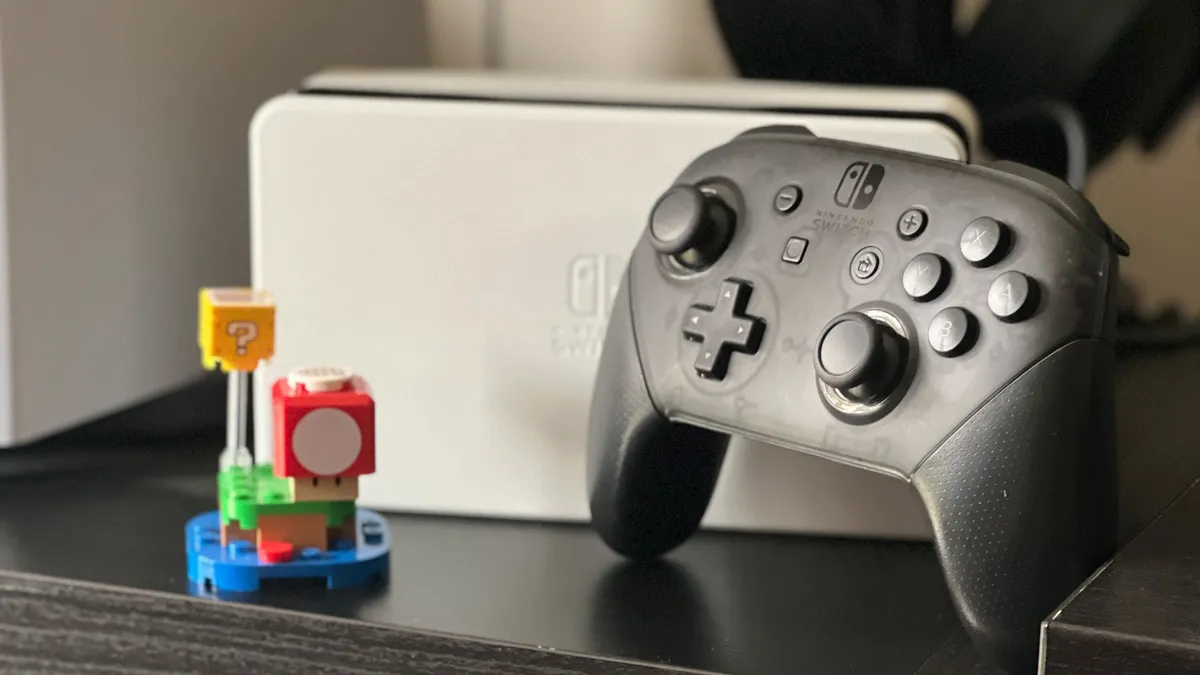
Nintendo Switch Pro Controller
(Image credit: Future)
Jump to:
  • Quick List
  • Best overall
  • Best Joy-Con alternative
  • Most comfortable
  • Best pro controller
  • Most versatile
  • Best racing wheel
  • Best for handheld-mode
  • FAQ
  • Facebook
  • X
  • Pinterest
  • Flipboard
  • Email
Share this article
Join the conversation
Follow us
Add us as a preferred source on Google
Get the GamesRadar+ Newsletter

Weekly digests, tales from the communities you love, and more


By submitting your information you agree to the Terms & Conditions and Privacy Policy and are aged 16 or over.

You are now subscribed

Your newsletter sign-up was successful


Want to add more newsletters?

GamesRadar+

Every Friday

GamesRadar+

Your weekly update on everything you could ever want to know about the games you already love, games we know you're going to love in the near future, and tales from the communities that surround them.

GTA 6 O'clock

Every Thursday

GTA 6 O'clock

Our special GTA 6 newsletter, with breaking news, insider info, and rumor analysis from the award-winning GTA 6 O'clock experts.

Knowledge

Every Friday

Knowledge

From the creators of Edge: A weekly videogame industry newsletter with analysis from expert writers, guidance from professionals, and insight into what's on the horizon.

The Setup

Every Thursday

The Setup

Hardware nerds unite, sign up to our free tech newsletter for a weekly digest of the hottest new tech, the latest gadgets on the test bench, and much more.

Switch 2 Spotlight

Every Wednesday

Switch 2 Spotlight

Sign up to our new Switch 2 newsletter, where we bring you the latest talking points on Nintendo's new console each week, bring you up to date on the news, and recommend what games to play.

The Watchlist

Every Saturday

The Watchlist

Subscribe for a weekly digest of the movie and TV news that matters, direct to your inbox. From first-look trailers, interviews, reviews and explainers, we've got you covered.

SFX

Once a month

SFX

Get sneak previews, exclusive competitions and details of special events each month!


An account already exists for this email address, please log in.
Subscribe to our newsletter

The best Nintendo Switch controllers will give you even more ways to play with these extremely versatile consoles. It seems that for the most part, the majority of Switch controllers work with the Switch 2, but the number of new gamepads launching specifically for the new Nintendo platform is going up, too. There are loads out there to choose from, and while we continually test to see which of the older products work with Switch 2, we're updating this page with our findings.

Thankfully, the gamepads on the list below are still worth buying even if compatibility is an issue, because a lot of them can be counted among the best PC controllers, too. If you aren't planning on upgrading to the new Switch 2, investing in a new controller is one of the best ways to make an aging gaming platform feel just like new. Given the durability problems with a lot of the Switch's first-party controllers, a new controller will also help to futureproof it, and you might be glad to know there are loads of anti-stick drift options available. The Nintendo Switch 2 has now launched, and it brings with it a new Pro Controller with back buttons.

The good news? Cheaper options are rife in original Switch land. It's more than possible to get a decent gamepad or handheld mode controller for under $100. Since this list has existed since before the Switch 2 arrived on the scene, it mainly focuses on options for the original console. That said, I've now added some handy Switch 2 alternatives and information for the controllers on our list below to advise you on what will work for the new model.

The Quick List

Nintendo Switch Pro Controller on a grey background Best overall

1. Nintendo Switch Pro Controller
View at Amazon
View at Walmart
View at Best Buy
View at Dell

The original Nintendo Switch controller is up there with the best simple gamepads ever made. Its battery life is legendary, and for most players, it's ideal.

Read more below

Hori Split Pad Pro controllers on a grey background Best Joy-Con alternative

2. Hori Split Pad Pro
View at Amazon
View at Best Buy
View at Walmart
View at Target

If you want a replacement for the Joy-Con controllers that came with your console, Hori's Split Pad Pro is a much better alternative in our eyes.

Read more below

Nitro Deck+ on a grey background Most comfortable

3. CRKD Nitro Deck+
Check Amazon
Check Walmart

If you play in handheld a lot, the Nitro Deck+ will ensure you have all the functionality you need, and none of the annoying thumb cramps you get from offset sticks.

Read more below

The GameSir Tarantula Pro on its charging stand on a plain background Best pro controller

4. GameSir Tarantula Pro
View at Amazon
Check Walmart

The GameSir Tarantula Pro is one of the best controllers on any platform right now, and its futureproofed thumbsticks and reasonable price make it worth knowing about.

Read more below

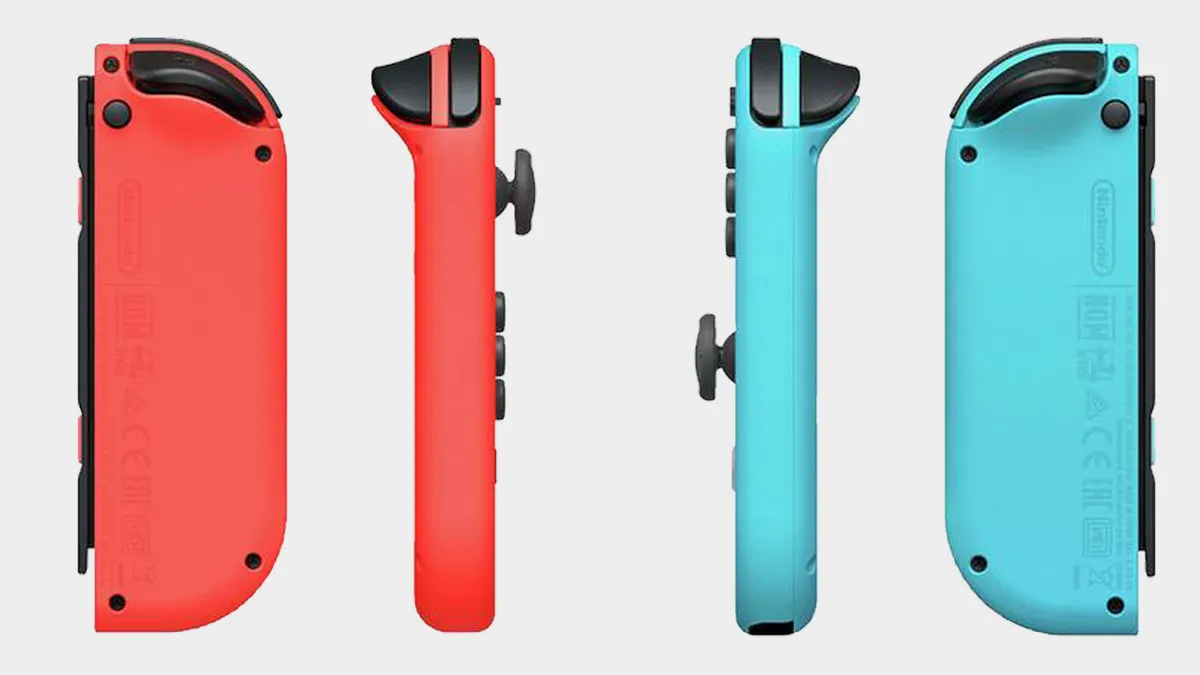
Nitnendo Switch Pastel color Joy-Con controllers on a grey background Most versatile

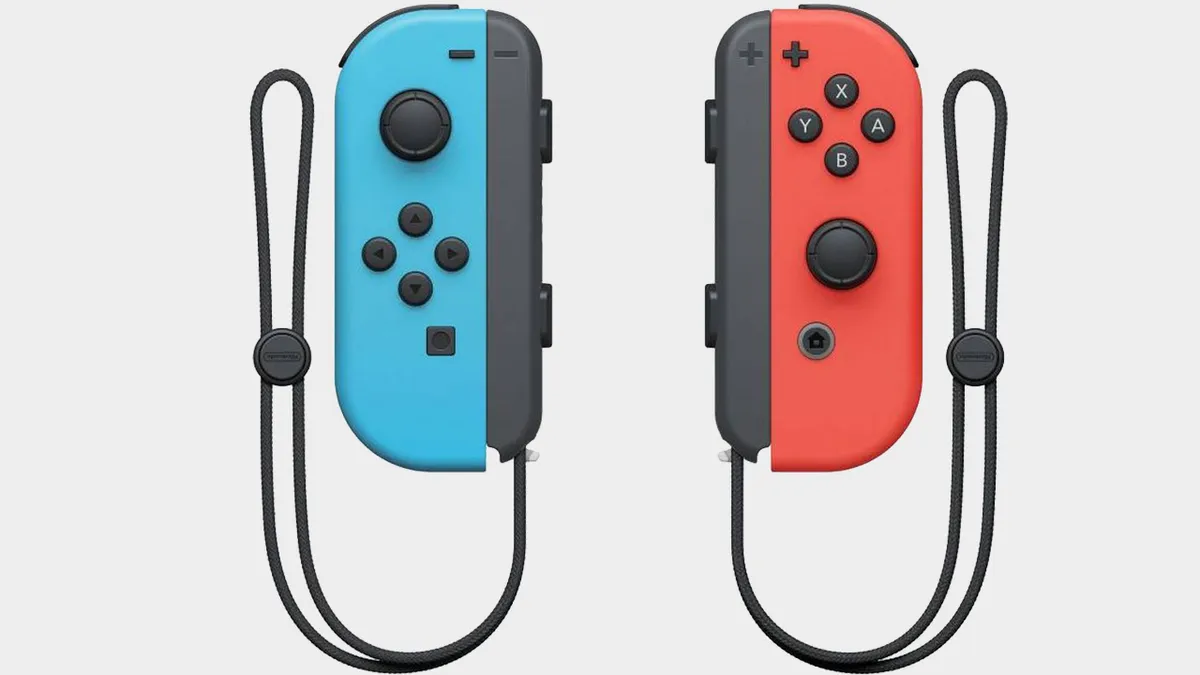
5. Nintendo Switch Joy-Con
View at Amazon
View at Verizon
View at Walmart
View at Best Buy

Plain and simple, the controllers you get with the console are the most versatile option available. Just be wary of that pesky stick drift these are known for.

Read more below

Hori Mario Kart Racing wheel Pro Deluxe on a grey background Best racing wheel

6. Hori Mario Kart Racing Wheel Pro Deluxe
View at Best Buy
View at Target
Check Amazon
Check Walmart

Looking for something that'll enhance your Mario Kart World gameplay? We haven't had confirmation it's compatible, but maybe keep your eye on Hori's solution.

Read more below

Show more ↓

CRKD Nitro Deck on a grey background Best for handheld mode

7. CRKD Nitro Deck
View at Amazon
View at Amazon
View at Amazon
View at Walmart

The Switch's smaller size can make it difficult to use in handheld mode for longer periods of time. The Nitro Deck beefs it up, turning it into a modern-day handheld.

Read more below

Curated by....
Duncan Robertson Author Profile Image
Curated by....
Duncan Robertson
Hardware Editor

I love how many ways there are to control games on the Nintendo Switch, and all of them feel intuitive. I'm lucky enough to test out the latest and greatest gamepads, Joy-Con alternatives, pro controllers, and more so that I can recommend you the best ones. With Switch 2 on its way, I'm already on the hunt for which controllers will carry over to the new system.

The best Nintendo Switch controller overall

Image 1 of 3
Nintendo Switch Pro Controller
(Image credit: Future)
Nintendo Switch Pro Controller
(Image credit: Future)
Nintendo Switch Pro Controller side
(Image credit: Future)

1. Nintendo Switch Pro Controller

The best Switch controller overall

Our expert review:

Average Amazon review:
☆☆☆☆☆

Specifications

Connection: Wireless / wired to dock
Buttons: 2x thumbstick , 4x buttons, d-pad, 2x bumpers, 2x triggers
Battery life: up to 40 hours
Amiibo support: Yes
Haptics: HD rumble
Motion control: Yes
Today's Best Deals
View at Amazon
View at Walmart
View at Best Buy
View at Dell

Reasons to buy

+
Traditional layout
+
Comfortable design
+
Amiibo functionality
+
Thumbsticks are more precise than Joy-Con

Reasons to avoid

-
More expensive than third party wireless options
-
Limited color options

✅ Switch 2 Alternative:

Why you can trust GamesRadar+ Our experts review games, movies and tech over countless hours, so you can choose the best for you. Find out more about our reviews policy.
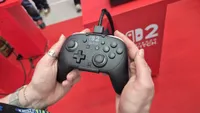
Switch 2 Pro controller | $89.99 at Best Buy

Switch 2 Pro controller | $89.99 at Best Buy
This one is kind of obvious, but if you're on Switch 2, the best alternative for you is going to be the Switch 2's Official Pro Controller. It carries on the great design formula of the first one, and gives it two back buttons as well. You'll also get the C button for using the Switch 2's social features.

View Deal

The Nintendo Switch Pro Controller is essential if you’ll be spending a lot of time on the Switch. Not only does it help avoid the claw-hand you start to get after a long session using the Joy-Cons, it’s just better suited to games like Super Smash Bros. or Splatoon. We also find that the thumbsticks are a little more precise than those seen on the Joy-Con, and are far less prone to drifting.

Buy it if:

✅ You play in docked mode often: This isn't going to make much sense if you tend to play in handheld mode only

✅ You want great battery life: Even today, this controller has some of the best battery life of any wireless controller.

✅ You want something more comfortable: If you find the shape of the Joy-Cons a little uncomfortable and small, this will suit you more.

Don't buy it if:

❌ You want back buttons: Annoyingly, back buttons were kept in the tank for the Switch 2 Pro Controller.

❌ You plan to use Game Chat on Switch 2: There's no C button on this controller, so the Switch 2 Pro Controller makes a bit more sense to buy for the new console.

Design & Features: Yes, the Joy-Con are going to be best for handheld play, but chances are you've already got a set of those knocking about. If you're after the best Nintendo Switch controller for kicking back on the couch and playing games like you would on an at-home console, the original, official Pro controller is where it's at.

You're still getting the HD Rumble, motion sensors, and Amiibo functionality of the Joy-Cons in here, but a far more ergonomic design that feels much more comfortable in larger hands. The Nintendo Switch Pro Controller comes in a stock black, but there are one or two special editions floating around.

Performance: This is a traditional style gamepad, so you're only getting one controller for your cash, and compared to today's standards of what a pro controller is, it isn't going to stand up very tall. But a super comfortable feel and excellent battery life is a big win here that offsets the lack of back buttons and adjustability.

Read more: Nintendo Switch Pro Controller review

The best Joy-Con alternative

Image 1 of 4
Hori Split Pad Pro full set with attachment and controllers
(Image credit: Future)
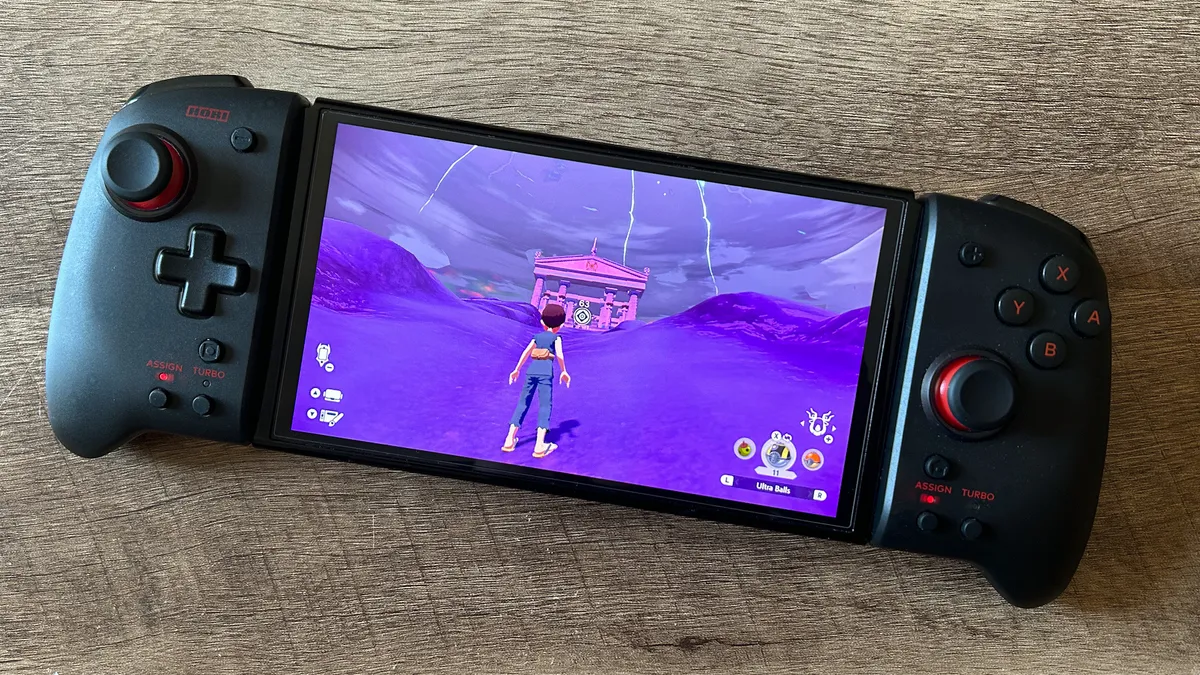
Hori Split Pad Pro controllers on Nintendo Switch OLED playing Pokemon
(Image credit: Future)
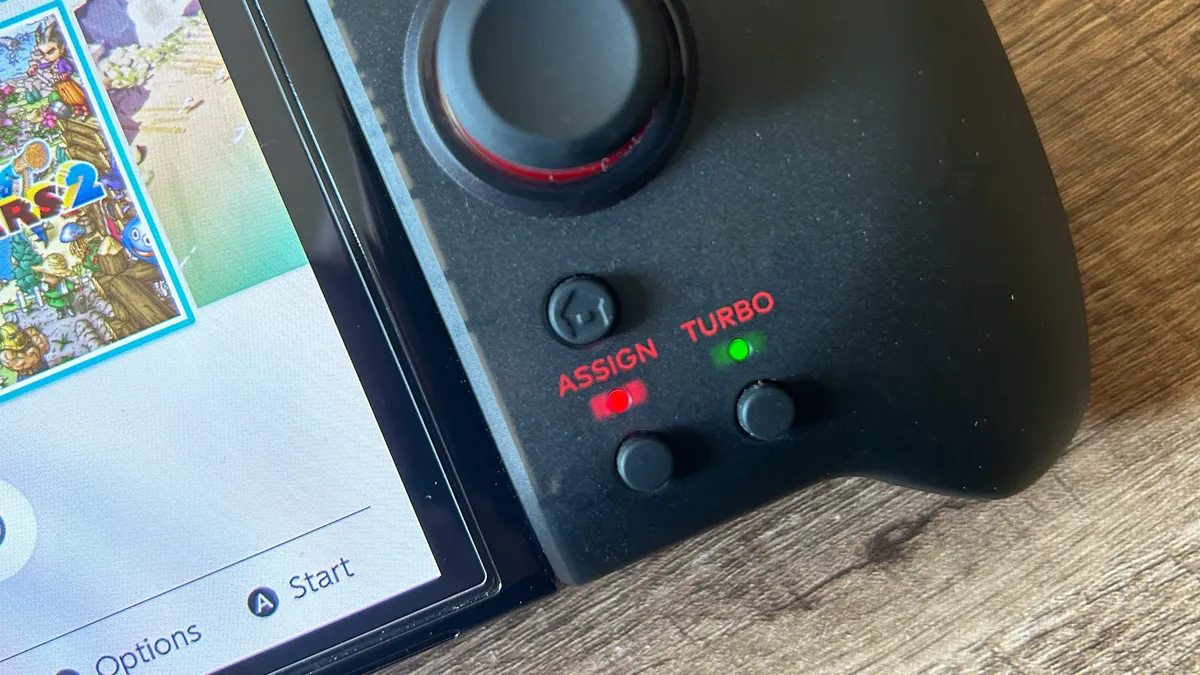
Hori Split Pad Pro assign and turbo buttons with LEDs on
(Image credit: Future)
Hori Split Pad Pro back paddles close up
(Image credit: Future)

2. Hori Split Pad Pro

The best alternative Joy-Cons

Our expert review:

Average Amazon review:
☆☆☆☆☆

Specifications

Connection: Direct to console / wired
Buttons: 2x thumbsticks, Switch face buttons, d-pad, + / -, Home, Screenshot, 2x assignment, 2x turbo, 2x bumper, 2x trigger, 2x rear paddle, 2x volume (attachment), mic mute (attachment)
Battery: NA - uses console battery
Amiibo support: None
Haptics: None
Motion control: None
Today's Best Deals
View at Amazon
View at Best Buy
View at Walmart
View at Target

Reasons to buy

+
Far more comfortable than Joy-Con
+
Greater precision and accuracy
+
Fantastic in handheld mode but attachment also works docked
+
Remappable back paddles
+
Turbo function

Reasons to avoid

-
Won't fit in a Nintendo Switch case
-
No rumble, motion controls, or NFC
-
Only works when connected to console or dock

❌ Switch 2 Alternative:

The market is looking a little thin on Switch 2 Joy-Con alternatives so far, but we'll be keeping our eyes peeled for new options. Annoyingly, any Joy-Con alternatives from the first generation won't work with Switch 2 because the dimensions of the consoles are different, and the new one has magnetic attachments as opposed to rails. They may still work wirelessly as the official Joy-Cons do, but we haven't been able to test them in that capacity yet.

If you don't want to shell out for a set of official Joy-Con Nintendo Switch controllers, the Hori Split Pad Pro offers not only a cheaper option but a far more comfortable one. The larger gamepads slot straight into the sides of your console like normal, but the chunkier form factor gives you a much more comfortable grip, full-sized thumbsticks, wider shoulder buttons, and assignable triggers.

Buy it if:

✅ You don't want to buy another set of Joy-Cons: If you've been burned by stick drift or don't like the comfort the official Switch controllers offer, this is the best alternative.

✅ You have larger hands: If you want a bit more to grab onto when playing in handheld mode, this is a vast improvement over the Joy-Cons.

✅ You want full-sized thumbsticks: Annoyingly, they aren't immune to stick drift, but bigger thumbsticks offer more accuracy.

Don't buy it if:

❌ You want stick drift immunity: If you're looking for something that definitely won't succumb to stick drift, maybe look for another alternative.

❌ You're upgrading to Switch 2: The magnetic rails and different size of the Switch 2 will mean this isn't going to be an option for new-gen players.

Design & Features: We found that the extra heft these controllers give you compared to the Joy-Cons not only made for a far more comfortable experience overall, but also - combined with the extra precise thumbsticks and larger triggers - afforded us greater accuracy in games like Pokemon Legends Arceus, Fortnite, and Fuser as well.

The controllers are officially licensed by Nintendo, so work with the console straight out of the box and come in at just $49.99 / £49.99. That's excellent value and a great alternative to the vanilla Joy-Con set that comes with the Nintendo Switch. There are also a range of special designs to choose from, tying into everything from Pac-Man to Pokemon.

Performance: It's important to note that these Nintendo Switch controllers can only be used when connected directly to the console via the rails in handheld mode, as neither of the two pads offers its own battery. That means they can't be split up to form two separate gamepads either. However, you can also pick up the Split Pad Pro with an accompanying attachment piece to slot in between them. That means you can take your handheld controllers and use them for wired docked play with additional volume and mic mute controls as well.

Read more: Hori Split Pad Pro review
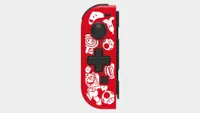
Also Consider: Hori D-Pad controller

Also Consider: Hori D-Pad controller

If only one of your Joy-Con controllers is failing you and you don't want to buy a completely new set, you might be glad to know that a quick fix is available. The Hori D-Pad controller won't quite offer the same experience as an official Joy-Con, but if you're in a pinch or you're looking for that full D-pad experience, it's a sure win. The key here is that price point. While an official Joy-Con will set you back around $45 / £40, Hori's left-hand alternative version retails at $27.99 / £22.99 (and is regularly on sale for far less).

Buy now at Amazon US
Buy now at Hori

View Deal

The most comfortable Switch controller

Image 1 of 6
CRKD Nitro Deck+ with a blank screen
(Image credit: Future / Duncan Robertson)
CRKD Nitro Deck+ while the Switch plays The Legend of Zelda Tears of the Kingdom
(Image credit: Future / Duncan Robertson)
CRKD Nitro Deck+'s left side, showing its textured joystick and sidekick button
(Image credit: Future / Duncan Robertson)
CRKD Nitro Deck+ back and kickstand
(Image credit: Future / Duncan Robertson)
CRKD Nitro Deck+'s back buttons and grip textures
(Image credit: Future / Duncan Robertson)
CRKD Nitro Deck+ review image showing the right hand side of the controller
(Image credit: Future / Duncan Robertson)

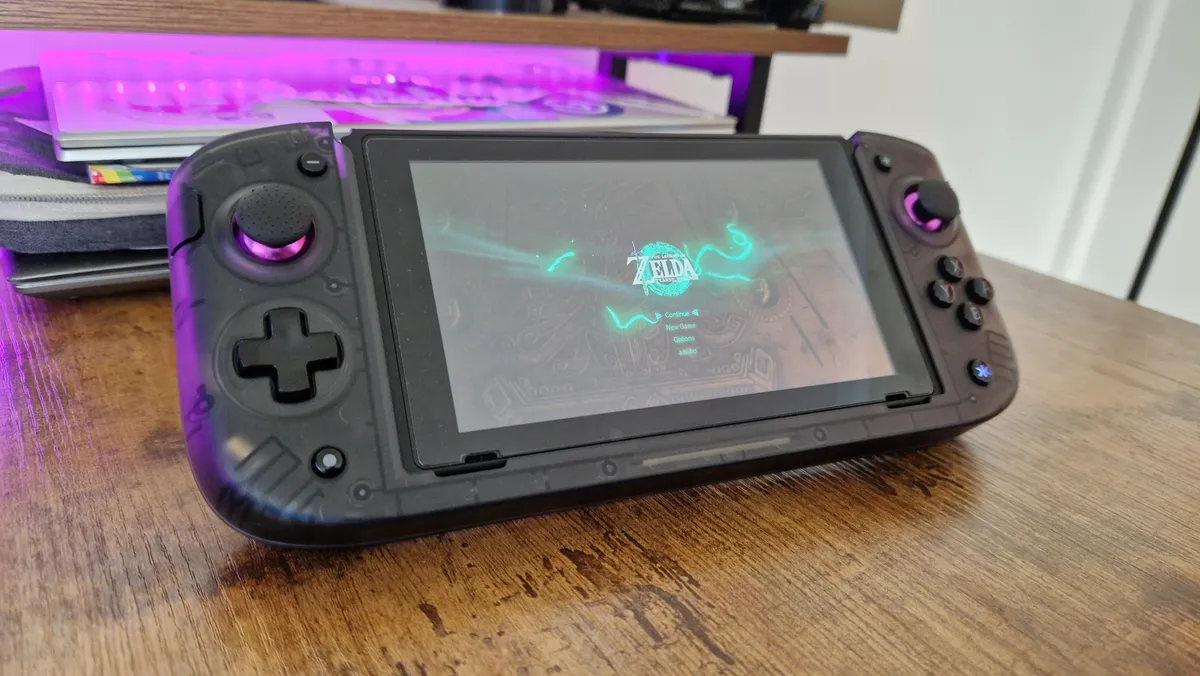
3. CRKD Nitro Deck+

The most comfortable Switch controller
Our expert review:

Specifications

Connection: Docked USB-C / Wired USB-C to USB
Remappable buttons: 6
Buttons: 21
Headset connection: 3.5mm
Weight: 400g
Today's Best Deals
Check Amazon
Check Walmart

Reasons to buy

+
Symmetrical sticks add comfort in almost every game
+
Six extra buttons
+
Improvements over the original Nitro Deck
+
Reasonable price
+
Can work as a Switch Dock

Reasons to avoid

-
Plastics let down the feel
-
Original Nitro Deck is so affordable

❌ Switch 2 Alternative:

As above, this one doesn't really have a Switch 2 alternative just yet. This is a pretty unique controller for the first Switch, and since the dimensions and mounting system are different on the 2025 console, this won't be an option unless you hook it up and try it for yourself with a USB-C cable. Even so, this isn't the most natural Switch 2 option. The nitro Decks were exceedingly popular, though, so I wouldn't be surprised if we see an upgraded model for Switch 2 in the years to come.

The Nitro Deck+ is an updated version of 2023's best Nintendo Switch accessory. With this refreshed design, CRKD has made the thumbsticks symmetrical, which provides a massive quality of life update for those players who get thumb cramps from playing in handheld mode for too long.

Buy it if:

✅ You play in handheld mode: Although you can use the Nitro Deck as a PC controller, we'd recommend it to Switch players who tend to use the console in handheld mode more.

✅ You have larger hands: The Nitro Deck's larger grips and thumbsticks make it so much more comfortable.

✅ You want maximum functionality: With four back buttons and two side bumpers there are so many mappable functions at play here.

Don't buy it if:

❌ You never play in handheld mode: It goes without saying, but don't buy a handheld controller if you only play at home in docked mode.

❌ You're hoping it boosts the internal power of the console: As much as the Nitro Deck+ makes the Switch feel like a Steam Deck, it doesn't improve the internal power of the console.

Design & Features: Not only do we get an improved design, but sidekick buttons give extra utility to this controller, on top of the four back buttons that carry over from the original model. Further, this is a lovely accessory for anyone who wants to dock their switch while holding onto its handheld mode feel. The Nitro Deck+ works with any HDMI to USB-C converter, and lets you enjoy the controller you've invested in on the big screen.

Performance: I found that playing with the Nitro Deck+ was a lot more comfortable than playing with the regular model. For reference, I was a big fan of CRKD's first outing, and it still appears on this list for that reason. Luckily, the Nitro Deck+ isn't much more expensive, and still feels like a worthy investment for a console that's rapidly approaching the end of its tenure as Nintendo's flagship.

One of few let downs I had here were the cheap feeling plastics used on the back buttons. They were hardly a dealbreaker, but did stick out as the only thing that didn't feel premium. Then again, for such a reasonable price, you are getting anti-stick drift thumbsticks that are sure to last you.

The best pro controller for Nintendo Switch

Image 1 of 5
A GameSir Tarantula Pro review image of the gamepad on its stand
(Image credit: Future / Duncan Robertson)
A close-up of the GameSir Tarantula Pro on its charging stand
(Image credit: Future / Duncan Robertson)
The GameSir Tarantula Pro on its charging stand
(Image credit: Future / Duncan Robertson)
The back of the GameSir Tarantula Pro
(Image credit: Future / Duncan Robertson)
The holographic buttons of the GameSir Tarantula Pro
(Image credit: Future / Duncan Robertson)

4. GameSir Tarantula Pro

The best Nintendo Switch pro controller

Our expert review:

Specifications

Connection: USB-A to USB-C, Wireless USB dongle, Bluetooth
Buttons: 20
Remappable buttons: 9
Headset connection: No
Cable length: 2m
Today's Best Deals
View at Amazon
Check Walmart

Reasons to buy

+
Extremely comfortable
+
Symmetrical thumbsticks
+
Reminiscent of the DualShock 4
+
TMR thumbsticks
+
Decent back buttons
+
Good battery life

Reasons to avoid

-
Extra face buttons aren’t all that useful
-
Only two back buttons
-
No carry case

✅ Switch 2:

We haven't been able to test this for ourselves, but according to GameSir's in-house testing, the Tarantula Pro does work with the Switch 2. There are a few reports of buttons registering false inputs, so maybe proceed with caution. When we get the chance to test this, we'll update you.

View Deal

It can be tough to find pro controllers these days that sport symmetrical thumbsticks. It can also be tricky to find ones that feel like a successor to the PS4's DualShock 4, but the GameSir Tarantula Pro fits into both of those categories. This is one of the most comfortable, and most futureproofed controllers on the shelves right now, so it's well worth considering if you're looking for a pro controller to use in more competitive games, or if you need something that's also compatible with PC.

Buy it if:

✅ You play in docked mode: This is one of the best controllers on the shelves right now, so it suits those players who tend to use docked mode.

✅ You prefer a PlayStation layout: Symmetrical thumbsticks can be hard to come by. This remedies that.

✅ You want two back buttons: Two back buttons will be helpful in all sorts of games on Switch, and there are additional face buttons too.

Don't buy it if:

❌ You prefer asymmetrical thumbsticks: It's always a lively debate, but if you prefer the Xbox thumbstick layour, this one isn't for you.

❌ You don't need back buttons: If you don't need the extra functionality you could spend less on something more basic.

Design & Features: The GameSir Tarantula Pro is extremely similar to the DualShock 4 in its design, and sparing some slightly increased girth in its grips, it's almost the exact same dimensions. It does replace the larger touchpad with a smaller, GameSir branded one, however, and frames it with some extra, remappable face buttons. These can be used for macro combinations or whatever other functions you'd like. There's some gentle RGB at play as well that you can customize, and its face buttons have glyphs inside them that swap between the Switch and PC layouts.

Performance: The most notable feature here is TMR thumbsticks which take the excellence and longevity of Hall Sensor tech and kick it up a gear. TMR means you have even more points on an axis that the thumbsticks can register, allowing for more accuracy and precise movements. All that, and there are no physical resistors, so they're just as immune to stick drift. Two back buttons are great here, as they always are with GameSir's controllers, but it's a shame there aren't two more, as they'd really be more useful than the extra face buttons.

This is an all-round classic of a controller that will help you perform better in any genre of game. It's also more comfortable than most pro controllers for longer sessions, and if you liked the PS4's controller, you'll feel right at home here.

The most versatile Switch controllers

Image 1 of 3
Nintendo Switch Joy-Con
(Image credit: Nintendo)
Nintendo Switch Joy-Con
(Image credit: Nintendo)
Nintendo Switch Joy-Con
(Image credit: Nintendo)

5. Nintendo Switch Joy-Con

The most versatile Nintendo Switch controller
Average Amazon review:
☆☆☆☆☆

Specifications

Connection: Wireless / direct to console
Buttons: 1x thumbstick per controller, 4x buttons per controller, 2x triggers per controller
Battery life: Approx 20 hours
Amiibo support: Yes
Haptics: HD rumble
Motion control: Yes
Today's Best Deals
View at Amazon
View at Verizon
View at Walmart
View at Best Buy

Reasons to buy

+
Doubles up for two controllers if necessary
+
Multiple color combinations
+
All the official features
+
Easily slides into handheld mode

Reasons to avoid

-
Occasional Joy-Con drift

✅ Switch 2 Alternative:

Joy Con 2 Controllers | $94.99 at Best Buy

Joy Con 2 Controllers | $94.99 at Best Buy
Shocker, I know, but the best alternative to the Joy-Cons if you're on the Switch 2 is its dedicated controllers. These are slightly larger and have magnetic attachments, but you'll know that already if you've secured your Switch 2. Your original Joy-Cons will work with Switch 2, but only as wireless extras; they won't work for mounting on the sides of your handheld. I wish I could say the new versions fix the stick drift issues of the original, but it seems like they use the same potentiometers that cursed so many gamers from the Switch 1 era.

View Deal

The classic Nintendo Switch Joy-Con are, of course, some of the best Nintendo Switch controllers knocking about. However, with their track record for drifting and, in our experience, less precise thumbsticks, there are better options on the market. Not many of those third-party alternatives will do everything the Joy-Con itself can, though.

Buy it if:

✅ You need a quick and easy replacement: Joy-Cons are known to be pretty fragile, so if you just need a simple replacement, this is staring you in the face.

✅ You like to keep things official: I understand the desire to keep your console and accessories in the family. If you don't want a third-party alternative, go for some Joy-Cons.

✅ You want some color options: Since launch, Nintendo has put out loads of new colorways.

Don't buy it if:

❌ You prefer asymmetrical thumbsticks: It's always a lively debate, but if you prefer the Xbox thumbstick layour, this one isn't for you.

❌ You don't need back buttons: If you don't need the extra functionality you could spend less on something more basic.

Design & Features: While you'll find far greater comfort from something like the Hori Split Pad Pro, there aren't any other brands that can slot into your wireless / motion control playstyle this well. You're covered for all things Switch Sports and Ring Fit Adventure by sticking with something a little more traditional.

Performance: Joy-Con are the best Nintendo Switch controllers for those looking to keep things official while still expressing themselves through a range of different color combinations. Of course, you're getting all the flagship features of the console in here, with HD Rumble and Amiibo support, as well as motion controls. If you're playing docked, you can attach each individual Joy-Con to a grip for a more traditional feel as well. If you've spent a little less on the Nintendo Switch Lite price, these are well worth investing in as they open you up to a whole world of local multiplayer and can easily slot into a Nintendo Switch case as well.

Although you can buy individual Joy-Cons, we wouldn't recommend it - it's more cost-effective to get a pair. More specifically, single packs go for around $49.99 / £39.99, while a pair usually starts at $79.99 / £69.99.

The best racing wheel for Nintendo Switch
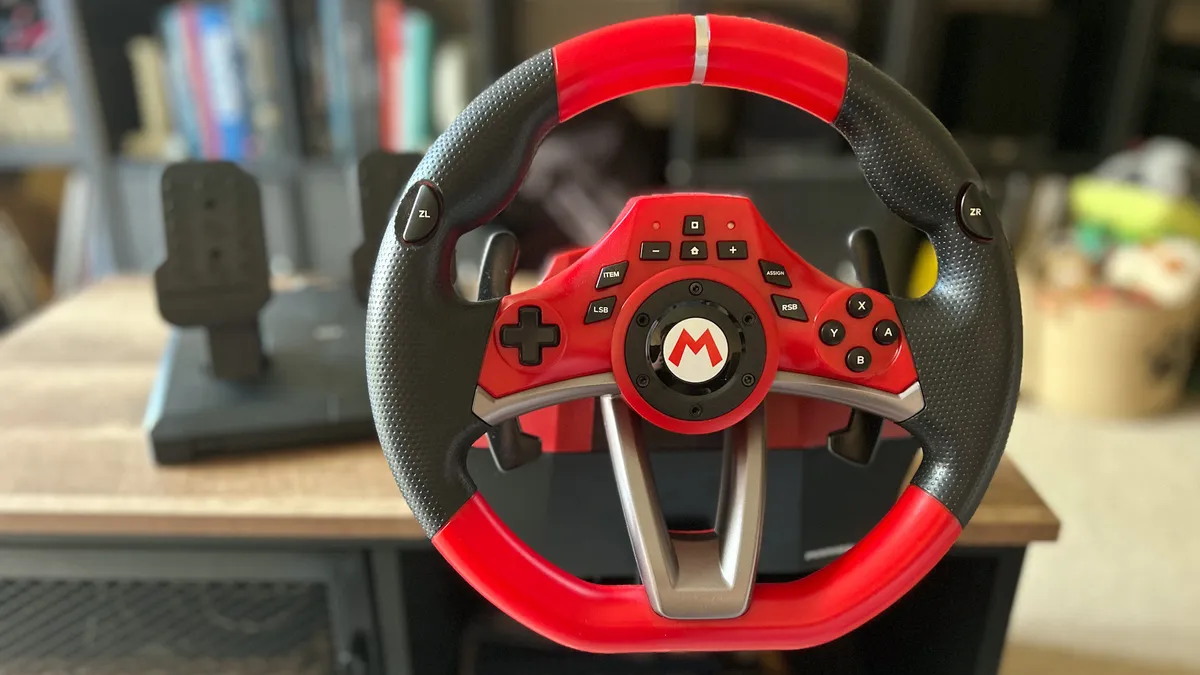
Image 1 of 6
Hori Mario Kart Racing Wheel Pro Deluxe racing wheel attached to a wooden table
(Image credit: Future)
Hori Mario Kart Racing Wheel side on
(Image credit: Future)
Hori Mario Kart Racing Wheel buttons
(Image credit: Future)
Hori Mario Kart Racing Wheel Pro Deluxe clamp pieces separated
(Image credit: Future)
Hori Mario Kart Racing Wheel Pro Deluxe assign button
(Image credit: Future)
Hori Mario Kart Racing Wheel Pro Deluxe
(Image credit: Future)

6. Hori Mario Kart Racing Wheel Pro Deluxe

The best racing wheel for Mario Kart lovers

Our expert review:

Specifications

Compatible with: Nintendo Switch/PC
Connection type: USB
Weight: 1400g
Force Feedback: No
Rumble: No
Maximum rotation angle: 270 degrees
Pedals included: Yes
Clutch pedal: No
Expandable: No
Today's Best Deals
View at Best Buy
View at Target
Check Amazon
Check Walmart

Reasons to buy

+
Mario-inspired aesthetic
+
Excellent range of customization options
+
Good value for money overall
+
Controls allow for use in other games
+
Nice level of resistance in wheel and pedals

Reasons to avoid

-
Suction cups won't reliably hold
-
Pros will need better specs

✅Switch 2 Alternative:

We haven't been able to test this one for ourselves, but by all accounts from users who have tried it online, the Hori wheel and pedals do work with Switch 2 and will elevate your open-world Mario Kart World gameplay.

Hori's Mario Kart racing wheel's bright red plastic and looming M logo in the center immediately indicate what it should be used for. For years the argument has loomed large: what is the best controller to play Mario Kart? This might just put all those disputes to bed.

Buy it if:

✅ You play a lot of Mario Kart: It goes without saying, but maybe don't buy this if you aren't mainlining Mario Kart.

✅ You want a racing wheel for PC: Racing setups are expensive, so if you're thinking of investing in one for PC, maybe make it this one so you can kill two birds with one stone.

✅ You take Mario Kart seriously: If you're serious about your competitive level in Mario Kart, a wheel might be a good way to squeeze another few miliseconds out of your laptimes.

Don't buy it if:

❌ You mainly play FPS games: As fun as Mario Kart is, if you don't play it a lot, you're not really going to get your money's worth here.

❌ You're on a budget: Cheaper Nintendo Switch controllers exist.

Design & Features: No, it's not going to steal any aesthetic awards from the likes of more enthusiast-level racing wheels for PC but it's certainly a design that appeals to its fun-loving Ninty audience. Don't let that light-hearted exterior fool you, though, this is a well-built piece of kit.

Despite its $100/£100 price tag, the Hori Mario Kart Racing Wheel Pro Deluxe still boasts a workable set of specs. That 270º rotation angle isn't going to threaten the 900º or 1000º+ options available further up the price range, but it's certainly more than enough for the more casual player. On Mario Kart's tighter courses, the option of shifting things down to 180º keeps things far more precise too.

Performance: There are no fancy direct-drive systems or force feedback fun here - there's just no room in the price. However, there's still a nice level of resistance behind each twist and turn and especially satisfying pedals. It's difficult to find any racing wheels at $100 / £100, let alone something that actually feels fun to play with. For enthusiast Mario Kart players or folks just trying to spice up their balloon battles, this has to be one of the best Nintendo Switch controllers out there.

The best handheld-mode Switch controller
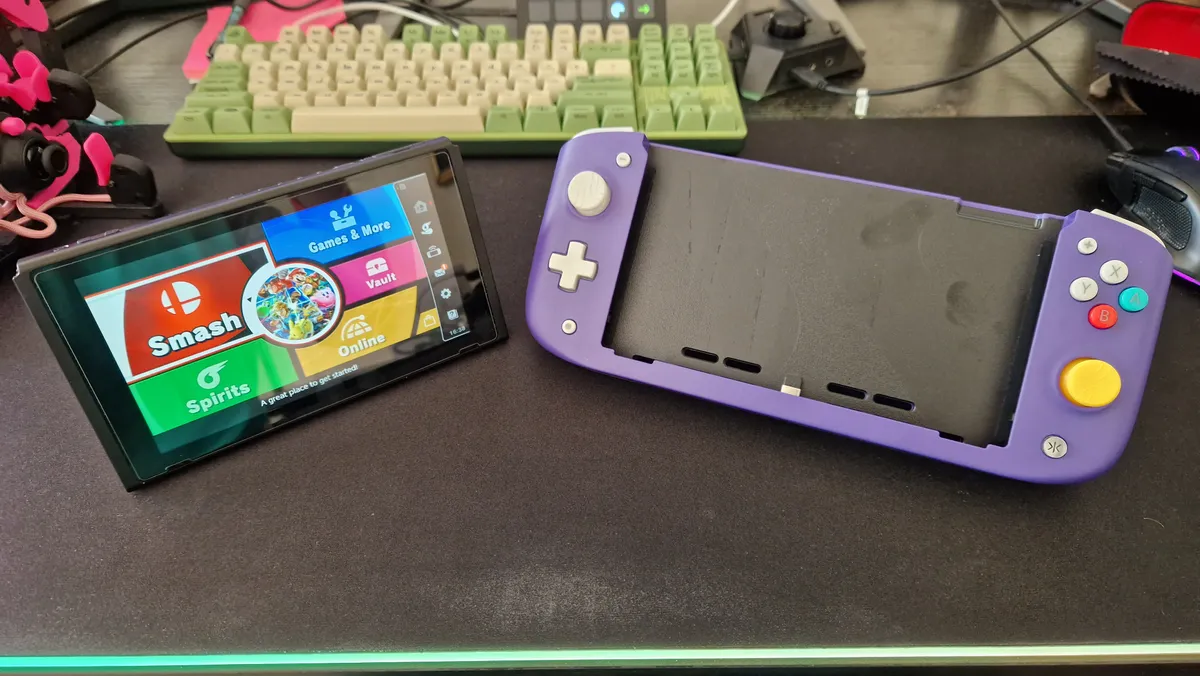
Image 1 of 7
Nitro Deck with the Switch undocked, sitting next to it
(Image credit: Future / Duncan Robertson)
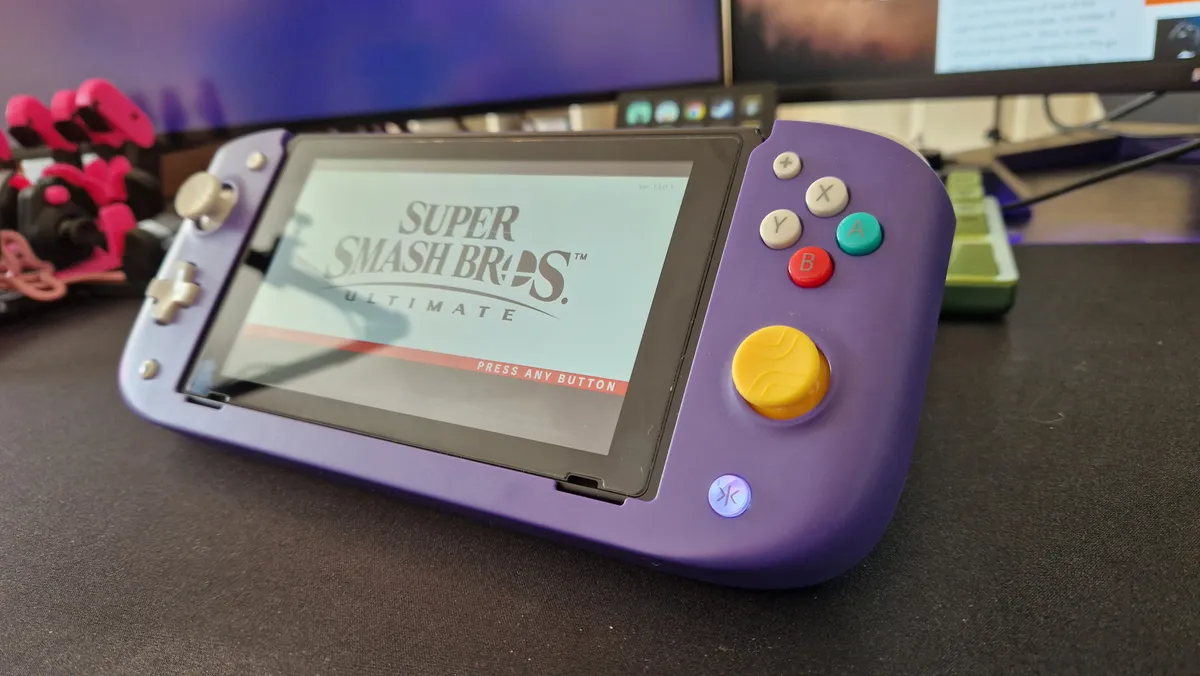
Nitro Deck in Purple retro colour showing Super Smash Bros ultimate
(Image credit: Future / Duncan Robertson)
Nitro Deck's back, showing its back buttons
(Image credit: Future / Duncan Robertson)
Nitro Deck's right hand side showing the face buttons
(Image credit: Future / Duncan Robertson)
Nitro Deck's left hand side showing the d-[ad and thumbstick
(Image credit: Future / Duncan Robertson)
Nitro Deck from above
(Image credit: Future / Duncan Robertson)
Nitro Deck from its bottom, showing its girth
(Image credit: Future / Duncan Robertson)

7. CRKD Nitro Deck

The best handheld-mode Switch controller
Our expert review:

Specifications

Connection: Docked USB-C / Wired USB-C to USB
Remappable buttons: 4
Buttons: 19
Headset connection: 3.5mm
Cable length: 3m
Weight: 400g
Today's Best Deals
View at Amazon
View at Amazon
View at Amazon
View at Walmart

Reasons to buy

+
More comfortable than a Switch in handheld mode
+
Hall Sensor Sticks
+
Four back buttons
+
Lovely designs

Reasons to avoid

-
Rumble is loud and distracting at times
-
Makes the Switch a lot bulkier
-
Slippy thumbsticks

❌ Switch 2 Alternative:

Just like the Nitro Deck+, this one doesn't have a rival in the Switch 2 market so far. Since the dimensions of the console are different, this handheld cradle won't work. That said, it wouldn't surprise me if the Switch 2 gets its own dedicated model at some point.

CRKD's Nitro Deck feels like it's been created to solve a bunch of issues nobody else in the Switch controller market has thought of solutions for. If you have larger hands and like playing your Switch or Switch OLED in handheld mode, you might experience that stiff thumb cramp from having to contort your hands over the tiny joysticks and buttons. Similarly, if you've been plagued by joy-con stick drift, there aren't too many Hall Sensor options out there - especially ones that allow you to play in handheld mode. And what if you've been waiting for a Switch Pro to bring Nintendo's device up to the level of today's gaming handhelds?

Buy it if:

✅ You find the Switch in handheld mode uncomfortable: A larger design means this is much more comfortable to hold.

✅ You need some extra functionality: Four back buttons is really going to broaden your horizons.

✅ You want some color options: There are quite a few colorways from CRKD to choose from if you really want to personalize.

Don't buy it if:

❌ You prefer symmetrical thumbsticks: If you want an even more authentic Steam Deck experience you might prefer the Nitro Deck+.

❌ You're planning to use it with a Switch 2: Because of those different dimensions, you won't be able to use this with a Switch 2.

Design & Features: Embracer Group's first bit of hardware from brand CRKD fills those gaps in the market with the Nitro Deck. This chunkier alternative to buying new joy-cons gives a much more comfortable feel if you have bigger hands and want to play in handheld mode for longer periods. Full-size Hall Sensor thumbsticks give you real peace of mind that you won't encounter any discomfort, or that annoying potentiometer problem.

Performance: On the face of it, the Nitro Deck emulates the look of the Nintendo Switch almost 1:1 when looking at it front-on. Besides a range of colorways and swappable thumbstick caps, buttons are laid out just the same. I will add, however, that all these buttons have a larger, more spread-out feel to them - even if the exact measurements aren't that far off the Joy-Cons. When you flip it over though, the back looks more like a Steam Deck or Asus ROG Ally, and that's thanks to four well-placed back buttons you can map to your will.

Conveniently, the Nitro Deck does have some good connectivity if you don't just want to use it in handheld mode. Through two USB-C ports in the back, you can charge the Switch, as well as play PC games or Switch games using an empty deck as your pro controller.

  • Back to top

Nintendo Switch controllers: FAQ

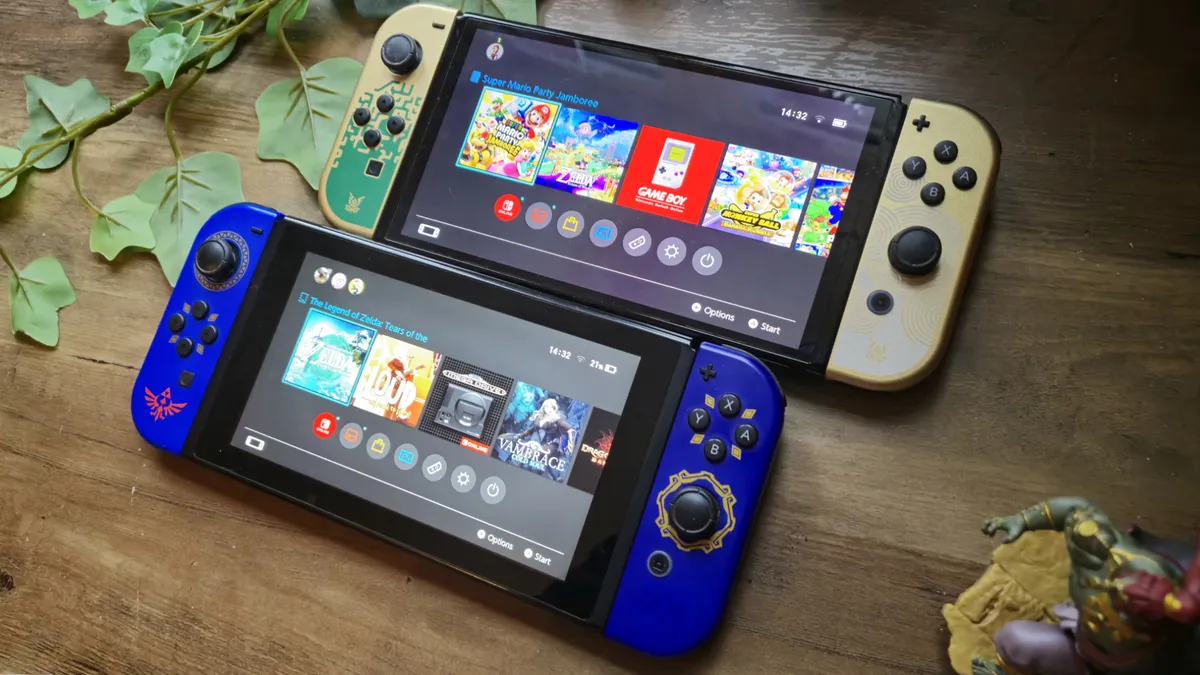
Photo of the OLED Tears of the Kingdom Switch and the LCD Switch together.

(Image credit: Future)

How to choose the right Switch controller for you

If you're torn between which Nintendo Switch controllers will be best for you, the decision likely starts with two choices. You can either go premium with the official Joy-Con or Nintendo Switch Pro Controller, or pick out a cheaper third party alternative. If you opt for the former, you simply need to decide whether you favor handheld (Joy-Con) or docked (Pro Controller) play.

However, grabbing a third party offering requires a little more forethought. Many of these gamepads do away with extra features like rumble, motion controls, and Amiibo functionality - so if any of these are a necessity it's time to go back to square one. However, if you're just after a spare gamepad it's worth checking the size and connectivity of the controller you're after, as well as whether there are any additional paddles, audio options, or design features that would be useful.

You'll find a quick breakdown of each Nintendo Switch controller type just below.

  • Joy-Cons: These are small controllers included with the console. Used as a pair, separately, or slotted onto the portable screen in handheld mode, they're ideal for multiplayer. Picking up an extra pair allows you to run four-player games, for example.
  • Nintendo Switch Pro Controller: Pro Controllers are more traditional. They consist of a classic all-in-one design with two thumbsticks, shoulder bumpers, triggers, and grips on the handles for superior control. They're ideal for games such as Super Smash Bros or Dark Souls due to the levels of precision they offer.
  • Third-party alternatives: These are controllers not made by Nintendo. They're usually much cheaper and look a lot like the official Pro Controller, but they usually lack some of the functionality. That makes them good spares.

Do wireless controllers work with Nintendo Switch?

The Nintendo Switch can handle up to eight wireless controllers at one time, either in handheld or docked mode. However, it's worth noting that you won't be able to connect more than one wireless controller if you are also using the console's Bluetooth function for audio.

Wireless controllers do work on the Nintendo Switch Lite, which means tabletop play is still on the cards even if there's no docking functionality.

Original Switch 2 Pro Controller next to Switch 2 Pro Controller on woodgrain desk.

(Image credit: Future)

Do Nintendo Switch controllers work with every model?

Wireless Nintendo Switch controllers will work with every console; the Lite, standard, and OLED versions. However, you'll only be able to use the vast majority of wired controllers with the standard edition or OLED model, as they require USB-A ports on the dock to connect.

Are Nintendo Pro controllers worth it?

In our opinion, getting a pro controller for your Nintendo Switch can make the world of difference to your console's quality of life. Yes, playing on the go is excellent, but having a proper gamepad you can use when sinking more time into something like Tears of the Kingdom can really make the experience feel more next-gen. Depending on what you play, you might find some third party controllers with extra buttons too, which could come in handy.

What are better than Joy-Cons?

If you're looking for an alternative to the Joy-Con controllers for Nintendo Switch, the Hori Split or the Hori D-Pad controllers are your best bet. They're cheaper, and they don't suffer from stick drift in the same way. That said, the Hori options can't be used wirelessly or for motion controls. Either way, if you're looking for an alternative, those are the best options.

Switch 2 with Donkey Kong Bananza art on screen on wood pattern table next to accessories.

(Image credit: Future)

How to stop a Nintendo Switch controller from drifting

Nintendo Switch controllers can suffer from thumbstick drift. All gamepads are vulnerable to this flaw, but it seem Joy-Con are particularly susceptible. That means it can pay to keep your console in good condition, investing in a case that leaves ample room for the thumbsticks to remain upright. However, even with all the love and attention in the world, those pesky sticks can still start running away from you.

If this happens it's worth first recalibrating the controls in the System Settings (Controllers and Sensors in the menu). If that doesn't help, it's time to get into the nitty gritty and clear out those sticks. You'll need a can of compressed air and a small screwdriver. You'll notice a small rubber flap at the base of your thumbstick, lift this gently with the screwdriver and carefully spray the area underneath with compressed air. This will dislodge any dirt or dust that's clogging the underside of your controller.

If all else fails, it's worth noting that Nintendo is operating a Joy-Con drift repair scheme free of charge.

Can you replace one Joy-Con

If one of your Joy-Con is drifting, or you're simply looking to mix up your aesthetic, you can purchase single controllers - either an official Nintendo gamepad, or a Hori D-Pad model. Both come in less than $30 / £30.


We're also rounding up all the best Nintendo Switch game sales, as well as the latest Ring Fit Adventure prices and all the best cheap Nintendo Switch SD cards. We're also showing you all the best Nintendo Switch chargers for the full kit. We're also showing you how to catch all the latest Nintendo Switch OLED restock updates.

Round up of today's best deals
Nintendo Switch Pro Controller
Amazon
$59
View
See all prices
Hori Nintendo Switch Split...
Hori Split Pad Pro
Amazon
$46.66
View
See all prices
GameSir Tarantula Pro...
GameSir Tarantula Pro
Amazon
$89.99
$69.99
View
See all prices
Nintendo Neon Purple/Neon...
Nintendo Joy-Con Pair
Amazon
$89.99
$76.99
View
See all prices
Hori - Mario Kart Racing Pro...
Hori Mario Kart Racing Wheel Pro Deluxe
Best Buy
$109.99
View
See all prices
CRKD Nitro Deck -...
CRKD Nitro Deck
Amazon
$49.99
$42.99
View
See all prices
We check over 250 million products every day for the best prices
powered by
Gamesradar
Sign up to the GamesRadar+ Newsletter

Weekly digests, tales from the communities you love, and more

By submitting your information you agree to the Terms & Conditions and Privacy Policy and are aged 16 or over.
Duncan Robertson
Duncan Robertson
Social Links Navigation
Hardware Editor

One of my earliest memories is playing SuperMario64 and wondering why the controller I held had three grips, but I only had two hands. Ever since I've been in love with video games and their technology. After graduating from Edinburgh Napier University with a degree in Journalism, I contributed to the Scottish Games Network and completed an Editorial Internship at Expert Reviews. Over the last decade, I’ve been managing my own YouTube channel about my love of games too. These days, I'm one of the resident hardware nerds at GamesRadar+, and I take the lead on our coverage of gaming PCs, VR, controllers, gaming chairs, and content creation gear. Now, I better stop myself here before I get talking about my favourite games like HUNT: Showdown, Dishonored, and Towerfall Ascension.

With contributions from
  • Tabitha BakerManaging Editor - Hardware
Back To Top
Read more
Image of the Nintendo Switch OLED on a table with a headset and gaming earbuds siting around it, taken by writer Rosalie Newcombe.
The best Nintendo Switch accessories 2026: all the top gadgets for your consoles
 
 
Close up photo of the right Joy-Con 2 controller sitting on top of a Switch 2 case, with microSD Express card and gaming earbud case to its right.
The best Nintendo Switch 2 accessories 2026: my top gadgets for your every day carry
 
 
DualSense Edge review image showing the controller next to the original DualSense in Nova Pink
The best PS5 controller 2026: Find your Edge
 
 
Five different gaming controllers for PC scattered around a desktop surface
The best PC controller for gaming 2026
 
 
Genki Covert Dock plugged into Nintendo Switch console
The best Nintendo Switch charger
 
 
Photo of the Lavender Arctis Nova 3 Wireless headset resting on a Nintendo Switch 2.
The best Nintendo Switch headset 2026: SteelSeries is the key for gaming on the go for another year
 
 
Latest in Gaming Controllers
A Thrustmaster T248R and its pedals on a grey carpet
The Thrustmaster T248R is making me question where a sim racing wheel with no direct drive and no modular wheelbase fits in the market in 2026
 
 
Image of the Hori Princess Rosalina Switch 2 controller on a wooden table.
Move over Mario, this Rosalina Switch 2 controller is so stellar that it deserves its own day too
 
 
Image of the PowerA Mario Kart World Switch 2 controller sitting on a pink GamesRadar+ background.
PowerA is rolling out a Mario Kart World Switch 2 controller in time for Mario Day, and I wheely like it
 
 
A reviewer holding the Asus ROG Raikiri 2
The Asus ROG Raikiri II's microswitch buttons are on par with the Razer Wolverine V3 Pro for less money
 
 
A reviewer holding the PDP Riffmaster guitar controller
The Riffmaster Guitar controller is a great vehicle for your gaming nostalgia, but it already feels like it's in its "greatest hits" era
 
 
Photo of the NSO N64 controller sitting in front of a Switch 2.
The NSO N64 controller isn't the most authentic option, but its made me feel like a kid again in the best possible way
 
 
Latest in Buying Guides
Photo of the Mario and Luigi Nendoroid figures sitting next to eachother.
Celebrate MAR10 Day in style with the very best Super Mario merch
 
 
Squirtle and Jigglypuff figures alongside a Poke Ball, with Nintendo DS game cases visible in the background
The best Pokemon merch to celebrate 30 years of the beloved series, chosen by superfans
 
 
Image of the Tears of the Kingdom Link amiibo sitting in front of a shelf of Zelda merch.
Best Legend of Zelda merch, chosen by two lifelong fans
 
 
Cloud MTG card lying on top of a host of other MTG Final Fantasy cards
Check out these Valentine's Day gifts for gamers if you're stuck for ideas
 
 
Photo of the Lavender Arctis Nova 3 Wireless headset resting on a Nintendo Switch 2.
The best Nintendo Switch headset 2026: SteelSeries is the key for gaming on the go for another year
 
 
HP Omen Max 16 gaming laptop on a wooden desk
The best gaming laptop 2026 - HP holds first place as budget machines battle it out
 
 
LATEST ARTICLES
  1. Photo of a Mario nendoroid figure holding a microSD Express card with a Turtle Beach Switch 2 case in the background.
    1
    These Mario Day-inspired Switch 2 accessories will power up your console more than a super star
  2. 2
    Pokemon fan artist alleges new Palworld clone Pickmon "stole one of my designs"
  3. 3
    Mortal Kombat 2 star joins in with Street Fighter movie beef after Game Awards dig because he "loves a good rivalry"
  4. 4
    Project Hail Mary review: "Large scale sci-fi with tons of heart"
  5. 5
    My favorite budget Switch 2 headset just got a makeover for Mario Day, and it's pretty super

GamesRadar+ is part of Future US Inc, an international media group and leading digital publisher. Visit our corporate site.

Add as a preferred source on Google Add as a preferred source on Google
  • Terms and conditions
  • Contact Future's experts
  • Privacy policy
  • Cookies policy
  • Accessibility statement
  • Careers
  • About us
  • Advertise with us
  • Review guidelines
  • Write for us
  • Accessibility Statement

© Future US, Inc. Full 7th Floor, 130 West 42nd Street, New York, NY 10036.

Please login or signup to comment

Please wait...