You are now subscribed
Your newsletter sign-up was successful
Want to add more newsletters?

Every Friday
GamesRadar+
Your weekly update on everything you could ever want to know about the games you already love, games we know you're going to love in the near future, and tales from the communities that surround them.

Every Thursday
GTA 6 O'clock
Our special GTA 6 newsletter, with breaking news, insider info, and rumor analysis from the award-winning GTA 6 O'clock experts.

Every Friday
Knowledge
From the creators of Edge: A weekly videogame industry newsletter with analysis from expert writers, guidance from professionals, and insight into what's on the horizon.

Every Thursday
The Setup
Hardware nerds unite, sign up to our free tech newsletter for a weekly digest of the hottest new tech, the latest gadgets on the test bench, and much more.

Every Wednesday
Switch 2 Spotlight
Sign up to our new Switch 2 newsletter, where we bring you the latest talking points on Nintendo's new console each week, bring you up to date on the news, and recommend what games to play.

Every Saturday
The Watchlist
Subscribe for a weekly digest of the movie and TV news that matters, direct to your inbox. From first-look trailers, interviews, reviews and explainers, we've got you covered.

Once a month
SFX
Get sneak previews, exclusive competitions and details of special events each month!
Alright, that does it - I'm unplugging the internet. I've personally had it up to here with algorithms, the horrors of genAI, and online gaming shenanigans, so I'm treating myself to a '90s retro gaming retreat. As someone who specializes in conjuring up modern ways to use classic consoles and using old hardware in general, I already have a battle plan, and I thought I'd share what I'll be up to before finally logging back in for 2026.
Yes, I am looking to go completely offline for a few days this Christmas. That means no social media doomscrolling, no music streaming, and certainly nothing that will shove AI in my face. Even if you do prefer using the best retro consoles over a PS5, PC, or even a gaming handheld like the Steam Deck, actually disconnecting can be tricky if you rely on the internet in your day-to-day.
Old consoles, new tricks

OSSC upscaler | $111.99 at Amazon
Retroscaler 2x | $79.99 at Amazon
I've covered how to connect retro consoles to your modern TV or monitor repeatedly throughout the years, but getting the right setup together is key. If you are lucky enough to own a functioning CRT with all the right connections at the back for your console of choice, then don't let me stop you from having an ultra authentic Christmas. I'll no doubt end up using one of my tube TVs during the holidays, too, but I'll also be giving my '90s consoles a glow-up using new-fangled gadgets and screens.
At the core of my modern retro setup sits an Open Source Scan Converter (OSSC for short), a device that upscales compatible retro console signals over HDMI. It's technically a line doubler rather than a basic upscaler, meaning it duplicates horizontal pixels to increase resolution with zero lag, something cheaper scalers can't pull off.
There are a few drawbacks with the OSSC compared to more expensive upscalers, depending on your console of choice. Specifically, it's only compatible with RGB signals, meaning you're limited to SCART, Component, or VGA. That means if you've only got that yellow composite connector for your Sega Genesis, SNES, or PS1, you'll need to invest in some new cables, and using the Nintendo 64 is specifically tricky since it's stuck with S-Video at best.

If your console is limited to composite or S-video, I do have workarounds when using the OSSC. The first is to use a transcoder that will convert the signals to RGB, and while I use a pretty old Sony unit, there are new add-on boards for the OSSC. Alternatively, you can opt for an upscaler like the Retrotink 2x that converts those input types to HDMI, but the results are underwhelming in terms of colors and sharpness.
My personal plan is to start yet another playthrough of Final Fantasy IX on the PS1 using the OSSC for a nice visual glow-up. The results will look far nicer than modern ports and their distractingly sharper character models that stick out compared to the backdrops, which is a symptom of many new versions of games from this era. I'll also be diving into some of my favorite Sega Mega Drive (Genesis) romps using the same RGB SCART setup on a 4K display, ultimately achieving crisp visuals with authentic levels of vibrancy and color.
That said, it wouldn't be a '90s Christmas gaming session without the N64, and since getting the console working with the OSSC is extra awkward, I'll likely end up embracing the new Analogue 3D. It's undoubtedly the best way to play Ninty's old cartridge library on modern screens today, since it's virtually a 4K Nintendo 64 with full game and accessory compatibility, but I'm fully aware it won't be an option for most of you right now.

My fallback alternative to the Analogue 3D is still the original N64, but rather than trying to convert the console to RGB and use an OSSC, I'd cut out the middleman with an HDMI mod. Yes, you will have to engage in a bit of soldering for this option, but it is worthwhile since it'll let you pull the video signal from the system and upscale it to 720p over HDMI, meaning you can plug straight in without any upscaling nonsense.

The catch? Well, the N64 hasn't aged too well, so you'll be sprawling questionable textures across a 4K display, warts and all. The Analogue 3D combats this using neat CRT filters that help visuals look like they would on a '90s display, whereas the HDMI mod lacks any such overlays. You can pick up an additional scanline generator that will add some basic pixel separation for a budget effect, and while I'd describe the results as subtle, I'd say it makes all the difference when using the original console.
Again, you could just try and use a CRT and play any old console you can think of, all while avoiding devices that connect to the internet. Grabbing the right old TV is a whole minefield of its own, though, and since we're so close to Christmas, I want to focus on the easiest ways to get yourself set up for the holidays. If you've already got an emulation-based setup that covers systems like the SNES, Genesis, and PS1 to hand, you can substitute that in too, but I reckon most devices like that will still come with online temptations.
For when you're on the go
GBC screen mod | $49.80 at Aliexpress
Super Pocket | $69.99 at Amazon
Analogue Pocket | $219.99
As much as I'd love to lock myself in my game room attic over Christmas, venturing outside for festivities is inevitable. That comes with the danger of accidentally ending up online via your smartphone in between being social or lying around full of turkey, but you could combat this by picking out either an old or new handheld with zero internet connectivity.
Technically speaking, you've got hundreds of the best retro handhelds, both modern and original, to choose from. If you so choose, you could go with one of the many excellent portable emulators out there, like the Anbernic RG Cube, but I'm giving myself the extra challenge of sticking with something with physical game support.
I won't lie, I'm still trying to decide between a few different handhelds, and I'll likely decide as I'm darting out the door for the family Christmas get-together. I am currently leaning towards the wonderful Analogue Pocket since it has the ability to become any Game Boy and a bunch of other portable consoles using additional adapters, all while perfectly replicating original hardware using an FPGA chip.

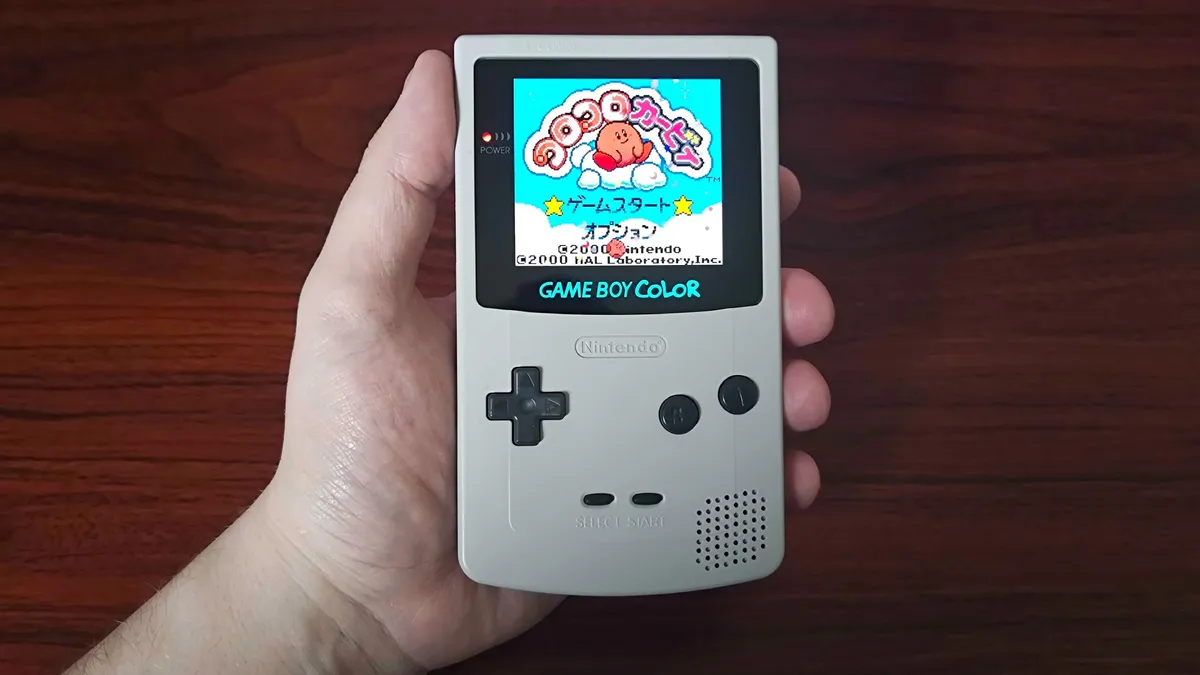
The Pocket could easily just let me decide on a whim whether I'm going to tackle my GBC backlog or revisit some of my favorite Sega Game Gear games, not to mention I could dip into 2000s GBA classics if I fancy switching up decades. At the same time, I am tempted to go for my original Game Boy Color with an AMOLED screen, as it might help my brain pretend it's actually back in 1998. That specific mod isn't too tricky if you've got an original handheld, especially if you go for a replacement shell with the right cut-outs, and it does help Ninty's portable look stupidly vibrant.
Not all my options are Nintendo-flavored, as I've also permanently got a Super Pocket in my backpack. Blaze's budget-friendly Evercade console uses cartridges to run over 500 different arcade classics, ranging from NES ports to Indie releases and even 3D adventures like Tomb Raider and Soul Reaver, thanks to chonkier Giga-carts. If I do get a craving to play some of those latter Eidos greats, I may even consider taking the Evercade EXP-R with me since its horizontal design is a better fit for that era of gaming, but that'll be harder to hide at the dinner table.
It's well worth noting that I won't just be bringing a handheld with me to any get-togethers and parties. With the risk of sounding cringe, I will have a Tamogitchi attached to my carabiner (I have matching trousers for the Starry Night version, don't judge), and I've got an iPod Classic ready to fill in for Spotify. I was actually debating turning an Abnernic handheld into an MP3 player since that is an option, but I've not experimented with that enough yet. Let it be known I was going to stick with the '90s theme for even music and bring a Sony Discman with me, but alas, my CD collection is in storage.

Tamagochi | from $20 at Amazon
I will ultimately end up choosing either the Analogue Pocket or my AMOLED Game Boy Color, and that's in part because I want to bring my Game Boy camera (largely for the bit). Nothing feels more '90s than annoying the life out of my parents trying to take terrible 2-bit photos of them, and I can't imagine anything more offline than printing pictures onto thermal paper using the Ninty's printer.
There's no right way to have an offline Christmas
Believe me when I say my festive anti-internet ramblings here aren't supposed to be a bible. All I wish to do is to inspire you to experiment with modern ways to use your retro consoles and give yourself a break from being online, especially since gaming is sailing towards an all-digital future.
I also want you to take some of these ideas into 2026, as getting back in touch with older technology could help you kickstart a hobby in the new year. I'll be here delving into putting together retro console setups with old and new parts, covering everything from the latest mods to shiny new handheld emulators and even advice on how to hunt for old equipment like CRT TVs (watch this space).
If you do end up spending your time off over the holidays using offline tech, or you already have plans, I'd love to hear all about them. Just make sure you wait until after the festive season to leave a comment, as that way you won't be sucked back into the modern realm of the internet.
Merry Christmas, and may all your PS1 games load without a hitch.
Sticking with modern devices? Swing by the best gaming handheld options for punchy portable PCs and new consoles. If you've already got Valve's portable, check out the best Steam Deck accessories and best Steam Deck docks for setup inspiration.

You must confirm your public display name before commenting
Please logout and then login again, you will then be prompted to enter your display name.