


The Wuthering Waves levitator is a utility skill used to solve puzzles and defeat tough enemies. It can hold objects in the air to throw or place them as you please. So it's incredibly useful, it's just that Wuthering Waves doesn’t tell you how to unlock the levitator, or how to use it. As a result it's not immediately obvious how to find and use it's abilities to defy gravity.
From levitating objects to throwing bombs, here’s how to use the levitator in Wuthering Waves.
What is the Wuthering Waves levitator?

Check out our Wuthering Waves codes guide for free stuff, and find out how to wish in Wuthering Waves for more characters and weapons.
The levitator in Wuthering Waves is a utility skill. That includes other things like a grapple and a sensor ability and you can switch between these abilities with the utility wheel (more on that below).
The Wuthering Waves levitator utility skill allows you - as the name suggests - to levitate objects. That's most commonly used to solve puzzles and make exploration easier, but it can also be used to throw objects at your opponents. The levitator ability is first called upon during the Echoing Marche quest, when you need to pick up a bomb flower and throw it at some nearby bushes to burn them down.
Here are a few things to keep in mind regarding the Wuthering Waves levitator ability:
- If you walk too far from where you initially picked up an object, the object will disappear.
- Beware that some levitational objects are dangerous! Make sure you don’t accidentally hit a bomb flower before picking it up.
- You may lose some HP if you throw an object (specifically a bomb) too close to your character.
- The levitator has an aiming option. Don’t forget to use it!
- If you start climbing while levitating an object, the object will drop to the ground. However, you can still pull the object towards you after you’ve finished climbing.
- Besides using it to clear obstacles or attack enemies, the levitator can help you destroy farmable materials too. As the picture above demonstrates, you may use a bomb flower to destroy nearby ore veins.
How to unlock the Wuthering Waves levitator

To unlock the Wuthering Waves levitator, you just need to play through the main quest line - once you’ve met Sanhua for the first time in Jinzhou’s City Hall, during the First Resonance quest, you will receive the levitator skill. First Resonance is the third main quest in the game, following Utterance of Marvels II.
Note that this quest also grants you the grapple utility skill but, while you get a small grappling tutorial, you don’t get any instructions on how to use the levitator.
How to use the Wuthering Waves levitator
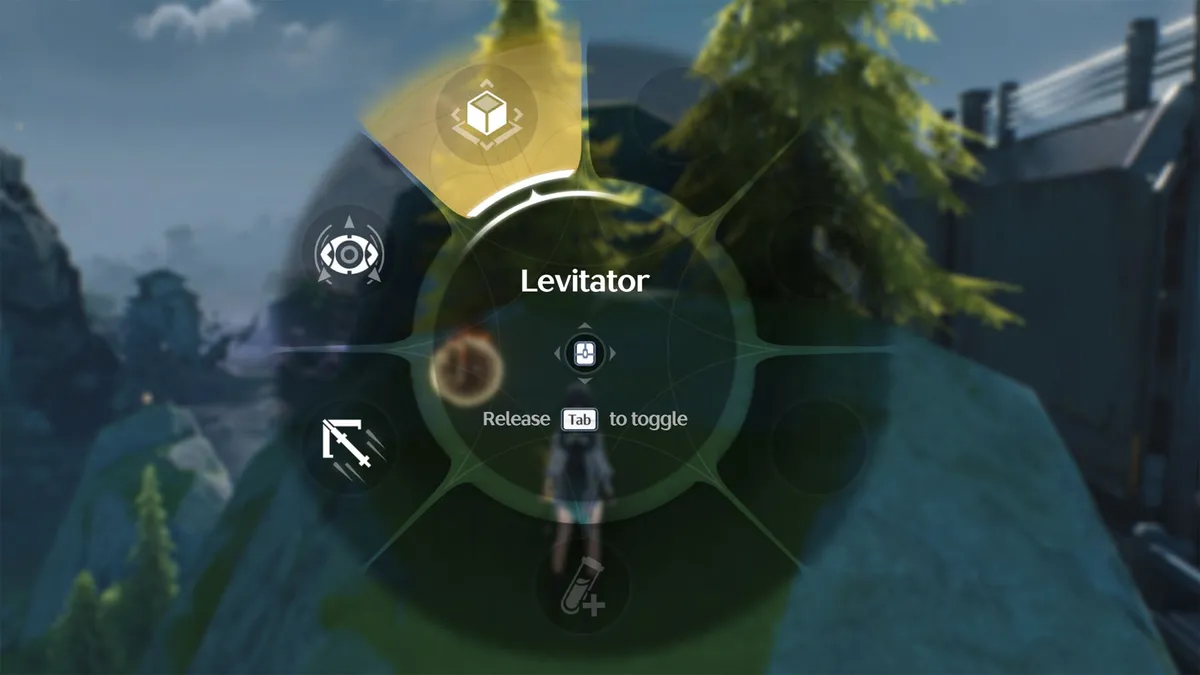
You need to equip the Wuthering Waves levitator in your utility skill slot to use it. On the PC you can hold the ‘TAB’ key to see the utility skill wheel and, to change to the levitator, hover over the levitator button at the top of the wheel, as shown in the picture above, and then release. You can then use it by pressing T
If you’re playing Wuthering Waves on a mobile phone, you must press the utility button in the lower right corner of the screen. When the wheel pops up, select the levitator. You can then use it by pressing the the utility button.

Nothing will actually happen if you try to use the levitator randomly - you must stand close enough to an item that can be levitated, like a bomb flower. If such an object is within your character’s range, the utility button will start to glow, as shown in the picture above. If you press the levitator ability now, the object will attach to your character and you’ll have the option to aim and throw it, or put it down.
© GamesRadar+. Not to be reproduced without permission

