





Knowing how to use Resetti's Animal Crossing New Horizons Reset Service is vital if you want to make sweeping decorative changes to your island without having to reset everything yourself. Until the 3.0 update, Mr. Resetti was only available to contact via the NookPhone, offering his Rescue Service, which is still important and we've delved into more on it below. But his new Reset Service (Reset-ti, get it?) can help you clear large chunks of your island or even the whole thing in one go - the grumpy mole has clearly had a change of heart and found a new passion for helping! So, here's everything you need to know about Resetti in Animal Crossing New Horizons and how his Reset Service works.
How to use the Animal Crossing New Horizons Resetti Reset Service

As of the Animal Crossing New Horizons 3.0 update, Mr. Resetti is now on your island, so have a good look around to find him. When you interact with him, he'll start an impassioned speech about his new job, the Reset Service, and how you can use it. Fortunately, given his love for his new job, he's somehow not so angry anymore (apart from the odd outburst!).
Unlike the Rescue Service though, you can't contact him via the NookPhone. Instead, you need to head over to Resident Services and ask Isabelle to call him in. Then, he'll tunnel his way over to you in no time top offer his various reset services.
Resetti will clear up your entire island or focus on specific areas like the beaches or somewhere you choose. If you want a specific area, he'll hand you a Transceiver and tell you to give him a buzz when you're by the area you want resetting. Fortunately, before you commit to resetting a certain part of your island, or the whole thing, you can see what it'll look like after Resetti's done his work.

Resetti can reset decorative things, like furniture, fencing, ladders, items placed on the ground, and more. But, when it comes to things buried in the ground, he won't touch them. This includes trees, bushes, veggies, and weeds. He also won't clean up anything that's been washed up on the shore. Importantly, for all resetting, you'll need your home storage to be cleared because he'll clean up everything he finds and put it in there!
He also runs an additional service of resetting planted flowers (which can be thrown away rather than stored) and custom designs on the ground. He can even get rid of cockroaches - yikes!
The cost? A whopping 60,000 Bells. But if you're a first-time user of the service, it's totally free. So, bear that in mind before you get to tidying up. Oh, and don't contact him on a festival day as he'll be taking time off.
How to use the Animal Crossing New Horizons Resetti Rescue Service
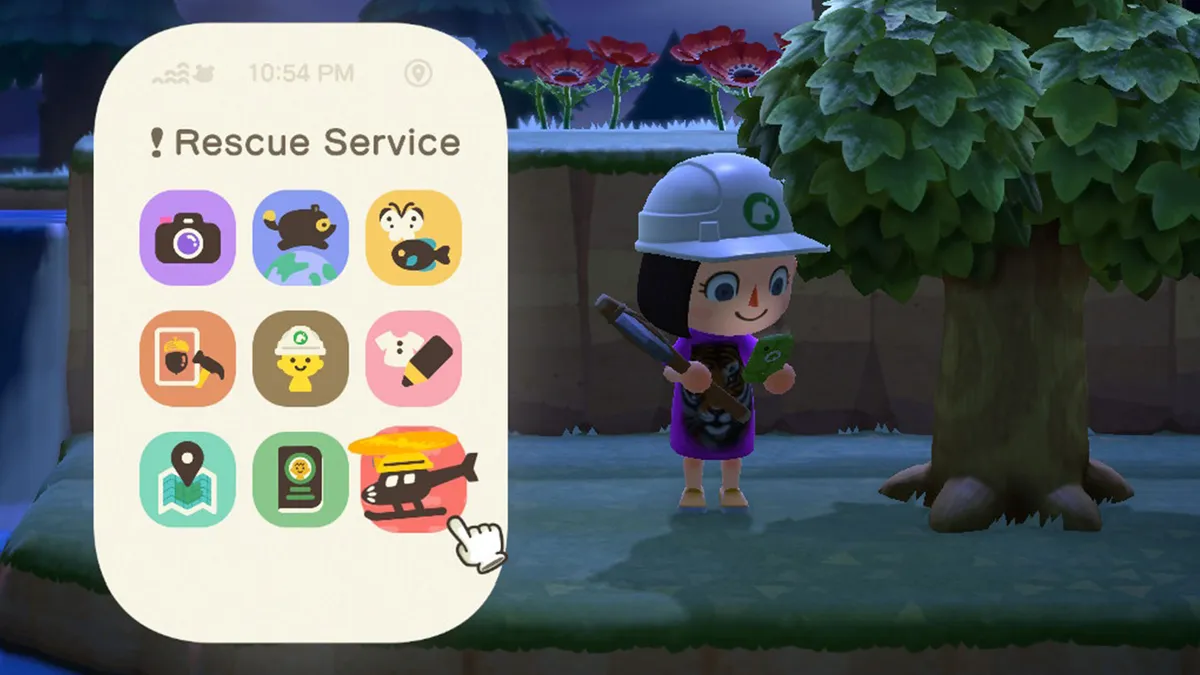
Resetti's regular Rescue Service still exists too for those that get stuck somewhere on their island. Using it is as simple as opening up your NookPhone and selecting the Rescue Service app, which displays a helicopter with his signature whiskers and hard hat as the logo.
If you're stuck or looking to get somewhere fast, he'll sort you out for 100 Nook Miles. But, if you're desperate to see him, well, then you need the Reset Service.
While Resetti can help you wipe your island clean, make sure you don't lose it entirely if you're transferring your Animal Crossing New Horizons save to Switch 2!
© GamesRadar+. Not to be reproduced without permission.

