

GamesRadar+ GamesRadar+
US EditionUS CA EditionCanada UK EditionUK AU EditionAustralia
Sign in
  • View Profile
  • Sign out
  • Games
    • Game Insights
      • Games News
      • Games Features
      • Games Reviews
      • Games Guides
      • Big in 2026
      • The Big Preview
      • On The Radar
      • Indie Spotlight
      • Future Games Show
      • Golden Joystick Awards
    • Genres
      • Action Games
      • RPGs
      • Action RPGs
      • Adventure Games
      • Third Person Shooters
      • FPS Games
    • Platforms
      • PS5
      • Xbox Series X
      • PC
      • Nintendo Switch
      • Nintendo Switch 2
      • Tabletop Gaming
    • Franchises
      • Grand Theft Auto
      • Pokemon
      • Assassin's Creed
      • Monster Hunter
      • Fortnite
      • Cyberpunk
      • Red Dead
      • The Elder Scrolls
      • The Sims
  • Entertainment
    • TV Shows
      • TV News
      • TV Reviews
      • Anime Shows
      • Sci-Fi Shows
      • Superhero Shows
      • Animated Shows
      • Marvel TV Shows
      • Star Wars TV Shows
      • DC TV Shows
    • Movies
      • Movie News
      • Movie Reviews
      • Big Screen Spotlight
      • Superhero Movies
      • Action Movies
      • Anime Movies
      • Sci-Fi Movies
      • Horror Movies
      • Marvel Movies
      • DC Movies
    • Streaming
      • Apple TV Plus
      • Disney Plus
      • Netflix
      • HBO
      • Amazon Prime Video
      • Hulu
    • Comics
      • Marvel Comics
      • DC Comics
    • Toys & Collectibles
    • Lego
    • Dungeons and Dragons
    • Merch
  • Hardware
    • Insights
      • Hardware News
      • Hardware Reviews
      • Hardware Features
    • Computing
      • Desktop PCs
      • Laptops
      • Handhelds
    • Peripherals
      • Headsets & Headphones
      • TVs & Monitors
      • Gaming Mice
      • Gaming Keyboards
      • Gaming Chairs
      • Speakers & Audio
    • Accessories & Tech
      • Gaming Controllers
      • Tech
      • SSDs & Hard Drives
      • VR
      • Accessories
      • Retro
  • Deals
    • Game Deals
    • Tech Deals
    • TV Deals
    • Buying Guides
  • Video
  • Newsletters
    • Quizzes
    • About Us
    • How to pitch to us
    • How we score
    • Newsarama
    • Retro Gamer
    • Total Film
  • home
  • Games
    • View Games
      • Games News
      • Games Features
      • Games Reviews
      • Games Guides
      • Big in 2026
      • The Big Preview
      • On The Radar
      • Indie Spotlight
      • Future Games Show
      • Golden Joystick Awards
      • Action Games
      • RPGs
      • Action RPGs
      • Adventure Games
      • Third Person Shooters
      • FPS Games
    • Platforms
      • View Platforms
      • PS5
      • Xbox Series X
      • PC
      • Nintendo Switch
      • Nintendo Switch 2
      • Tabletop Gaming
      • Grand Theft Auto
      • Pokemon
      • Assassin's Creed
      • Monster Hunter
      • Fortnite
      • Cyberpunk
      • Red Dead
      • The Elder Scrolls
      • The Sims
  • Entertainment
    • View Entertainment
    • TV Shows
      • View TV Shows
      • TV News
      • TV Reviews
      • Anime Shows
      • Sci-Fi Shows
      • Superhero Shows
      • Animated Shows
      • Marvel TV Shows
      • Star Wars TV Shows
      • DC TV Shows
    • Movies
      • View Movies
      • Movie News
      • Movie Reviews
      • Big Screen Spotlight
      • Superhero Movies
      • Action Movies
      • Anime Movies
      • Sci-Fi Movies
      • Horror Movies
      • Marvel Movies
      • DC Movies
    • Streaming
      • View Streaming
      • Apple TV Plus
      • Disney Plus
      • Netflix
      • HBO
      • Amazon Prime Video
      • Hulu
    • Comics
      • View Comics
      • Marvel Comics
      • DC Comics
    • Toys & Collectibles
    • Lego
    • Dungeons and Dragons
    • Merch
  • Hardware
    • View Hardware
      • Hardware News
      • Hardware Reviews
      • Hardware Features
      • Desktop PCs
      • Laptops
      • Handhelds
    • Peripherals
      • View Peripherals
      • Headsets & Headphones
      • TVs & Monitors
      • Gaming Mice
      • Gaming Keyboards
      • Gaming Chairs
      • Speakers & Audio
      • Gaming Controllers
      • Tech
      • SSDs & Hard Drives
      • VR
      • Accessories
      • Retro
  • Deals
    • View Deals
    • Game Deals
    • Tech Deals
    • TV Deals
    • Buying Guides
  • Video
  • Newsletters
    • Quizzes
    • About Us
    • How to pitch to us
    • How we score
    • Newsarama
    • Retro Gamer
    • Total Film
Trending
  • Pokemon Winds and Waves
  • New Games for 2026
  • GamesRadar+ Replay
  • Mario Day deals
Jump to:
  • Building a pond
  • How to add fish to ponds
  1. Games
  2. Simulation
  3. The Sims
  4. The Sims 4

How to build a pond in The Sims 4

Guides
By Sam Loveridge Contributions from Jasmine Gould-Wilson, Grace Dean last updated 31 October 2024

Create a peaceful pond in The Sims 4 and fill it with fish

When you purchase through links on our site, we may earn an affiliate commission. Here’s how it works.

A well-crafted pond in The Sims 4
(Image credit: EA)
Jump to:
  • Building a pond
  • How to add fish to ponds
  • Facebook
  • X
  • Pinterest
  • Flipboard
  • Email
Share this article
Join the conversation
Follow us
Add us as a preferred source on Google
Get the GamesRadar+ Newsletter

Weekly digests, tales from the communities you love, and more


By submitting your information you agree to the Terms & Conditions and Privacy Policy and are aged 16 or over.

You are now subscribed

Your newsletter sign-up was successful


Want to add more newsletters?

GamesRadar+

Every Friday

GamesRadar+

Your weekly update on everything you could ever want to know about the games you already love, games we know you're going to love in the near future, and tales from the communities that surround them.

GTA 6 O'clock

Every Thursday

GTA 6 O'clock

Our special GTA 6 newsletter, with breaking news, insider info, and rumor analysis from the award-winning GTA 6 O'clock experts.

Knowledge

Every Friday

Knowledge

From the creators of Edge: A weekly videogame industry newsletter with analysis from expert writers, guidance from professionals, and insight into what's on the horizon.

The Setup

Every Thursday

The Setup

Hardware nerds unite, sign up to our free tech newsletter for a weekly digest of the hottest new tech, the latest gadgets on the test bench, and much more.

Switch 2 Spotlight

Every Wednesday

Switch 2 Spotlight

Sign up to our new Switch 2 newsletter, where we bring you the latest talking points on Nintendo's new console each week, bring you up to date on the news, and recommend what games to play.

The Watchlist

Every Saturday

The Watchlist

Subscribe for a weekly digest of the movie and TV news that matters, direct to your inbox. From first-look trailers, interviews, reviews and explainers, we've got you covered.

SFX

Once a month

SFX

Get sneak previews, exclusive competitions and details of special events each month!


An account already exists for this email address, please log in.
Subscribe to our newsletter

Learning how to build a pond in The Sims 4 will open up new possibilities in your outdoor space. After all, who doesn't want a peaceful waterscape? That's right, no more sad little swimming pools encircled by shrubbery to hide what it actually is. Plus, these ponds can have fish in them, too!

From algae to frogs, lily pads, and more, you can add something really special to your Sims home. Unfortunately, finding the pond creation tool in Build mode can be tricky. Fortunately, we've collated everything you need to know about building a pond in The Sims 4 into this guide. Whether you're revamping a communal space, or adding a pond to your very own lot, here's how to do it. 

How to build a pond in The Sims 4

1. Use the terrain tool to make your pond shape

Using the terrain tool in The Sims 4

(Image credit: EA)

In Build mode, head over to the terrain tools - which handily looks like a pond - and select "lower terrain" within the "paint tool" area. You can then use this to make the basic shape of your pond. You're able to swap between brush styles (round or square), and adjust the speed and radius at which your tool carves into the land - letting you control the depth a little more easily. 

Compared to the pool tools, using the terrain brushes allows your pond to look much more natural and work better with the landscape. Plus, if you're unhappy with your digging, you can always heighten the terrain or flatten it out entirely to give yourself a fresh start.

2. Fill it with water

Using the water tool in The Sims 4

(Image credit: EA)
CHECK OUT THESE SIMS 4 GUIDES

The Sims 4 Cottage Living

(Image credit: EA)

Sims 4 Cottage Living tips
Sims 4 Cottage Living cheats
How to buy animal clothes in Sims 4 Cottage Living

Once you're happy with your basic pond - or river - shape, flip over to the "water tool" section of the terrain menu. In here, you've got the option to simply just raise the water level, which will add a layer of water with every click according to the vague water level lines you can see in the terrain dip. 

Or you can choose to "fill water to level", which will top up your pond automatically to the max. You can also adjust your max water level too, for finer design capabilities. 

3. Accessorize it
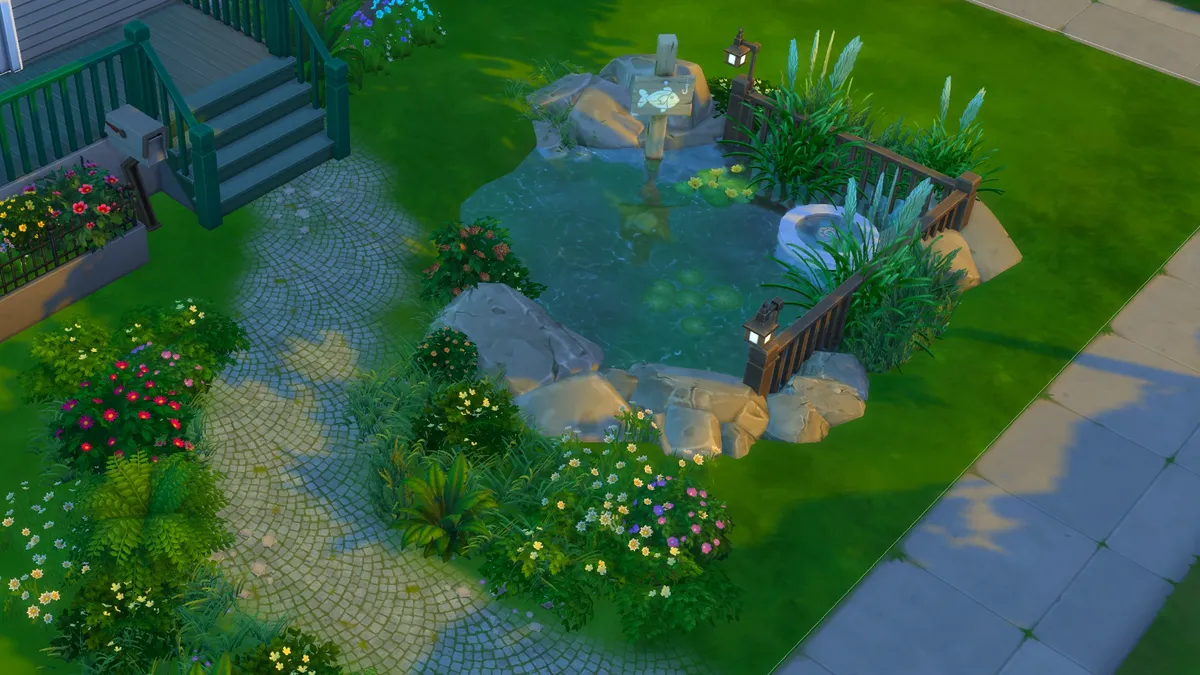
A well-crafted pond in The Sims 4

(Image credit: EA)

After you've got your basic pond built, you can add some accessories, such as flowers or rocks to really round off the pond experience. These can be found next to the terrain tools in Build mode, where there's a section called "outdoor water decor". In here, you can change the water type (there are pond-specific options, too), add plants, rocks, and logs, and also what's known as "pond effects". These are little tiles you can pop onto your pond to spawn things like ducks or swans, or various bugs. They certainly add more character to your pond. 

Sign up to the GamesRadar+ Newsletter

Weekly digests, tales from the communities you love, and more

By submitting your information you agree to the Terms & Conditions and Privacy Policy and are aged 16 or over.

However, it's important to note that the "country fish" option within pond effects is purely a decorative feature. If you want to add catchable (and even edible) fish to your ponds, read on.

How to add fish to ponds inThe Sims 4

A well-established Sims 4 pond, with trees, fish, and various wildlife

(Image credit: EA / Maxis)

To turn your beautiful new pond into a fisherman's paradise, you'll need to first add the "fishing allowed sign" to your pond from the "pond objects" section of the "outdoor water decor". You'll then select the sign in Live mode to allow your Sims to add fish, and also see which fish are available to catch in each pond. 

However, in order to add fish to a pond your Sims will need to trigger the fishing skill and register some fish in their notebook - you can't just buy them from a catalogue. There are two easy ways to do this though:

1. Go fishing

An image of a female Sim fishing from one of the new Sims 4 ponds

(Image credit: EA / Maxis)

By fishing anywhere that allows it, your Sims will gain knowledge of various different fish types - and the more they catch, the more knowledge and fishing skill they'll gain. Once you've caught one of each species, you'll then be able to add that species to your home pond. And yes, that counts for the more tropical fish types you can find across the various Sims 4 expansion packs. 

2. Go grocery shopping

Grocery shopping in The Sims 4

(Image credit: EA / Maxis)

If you're not interested in fishing away from home, or you just want to cut out the middleman to get access to all the best fish, you can utilize shopping. 

Either head to a store, or use the "grocery delivery" option via the phone to stock up on various types of fish. Once you've purchased a fish, you can then use that species in your pond. It's certainly not a cheap option, but it's definitely a lot faster.


Need money for fish? Use our how to get more money in Sims 4 guide to, you guessed it, get more Simoleons.

CATEGORIES
Xbox One Xbox Series X PS5 PS4 PC Gaming Platforms Xbox PlayStation
Sam Loveridge
Sam Loveridge
Social Links Navigation
Brand Director, GamesRadar+

Sam Loveridge is the Brand Director and former Global Editor-in-Chief of GamesRadar. She joined the team in August 2017. Sam came to GamesRadar after working at TrustedReviews, Digital Spy, and Fandom, following the completion of an MA in Journalism. In her time, she's also had appearances on The Guardian, BBC, and more. Her experience has seen her cover console and PC games, along with gaming hardware, for a decade, and for GamesRadar, she's in charge of the site's overall direction, managing the team, and making sure it's the best it can be. Her gaming passions lie with weird simulation games, big open-world RPGs, and beautifully crafted indies. She plays across all platforms, and specializes in titles like Pokemon, Assassin's Creed, The Sims, and more. Basically, she loves all games that aren't sports or fighting titles! In her spare time, Sam likes to live like Stardew Valley by cooking and baking, growing vegetables, and enjoying life in the countryside.

With contributions from
  • Grace DeanFreelance Writer
  • Jasmine Gould-WilsonSenior Staff Writer, GamesRadar+
Latest in The Sims
The Sims 4 tattoo artist career
The Sims 4 Marketplace sparks angry fan reactions and comparisons to paid Fallout and Skyrim mods
 
 
The Sims 4 burglar
The Sims 4 Marketplace is coming with paid mods – because that's definitely what fans of EA's life sim want
 
 
The Sims 2
How The Sims 2 inspired the first generation of YouTubers: "The 2000s were a simpler time"
 
 
The Sims 4 Lovestruck reveal trailer screenshot showing an adult woman with short black hair and a dark lace mask dancing, her hands crossed behind her head
The Sims 4's biggest sex mod, WickedWhims, is launched 400,000 times a day according to its creator
 
 
The Sims
"The Sims has always been more than a game": Maxis says its values aren't changing as it works on "the next evolution"
 
 
The Sims 4 screenshot showing a young woman with shoulder-length wavy brown hair and an academic green coat, her expression surprised
The Sims 4 legend behind piracy tool rendering nearly $1,500 of DLC totally free quits town and takes his loot with 'em, players pay tribute as copycats immediately try to charge for alternatives
 
 
Latest in Guides
Marathon Cutthroat Competition Traxus contract looting in maintenance
How to find rod salvage for the Cutthroat Competition contract in Marathon
 
 
GTA Online Clovers
GTA Online Lucky Clover locations and how to find a Golden Clover
 
 
A Ditto poses for a selfie next to Conkeldurr who helps to make concrete in Pokopia.
How to get concrete in Pokemon Pokopia
 
 
Marathon Schema distance runner implant in armory
Where to find Marathon Schemas and how to use them to buy Armory gear
 
 
Drifloon carries Ditto off to a Pokopia Dream Island
How to get to a Pokopia Dream Island
 
 
Marathon Sekiguchi agent nona talking about parasitism contracts
Full walkthrough for the Marathon Parasitism contract for Sekiguchi
 
 
LATEST ARTICLES
  1. Key art for Diablo 4: Lord of Hatred showing Mephisto, a spiky and angular demon, against a red, lightning backdrop, arm and claw raised menancingly, cropped to show more of him
    1
    Diablo 4's endgame is about to look a lot more like Diablo 2's with low-level loot that can become legendary
  2. 2
    3 new to Netflix shows I recommend you binge-watch this weekend (March 13–March 15)
  3. 3
    Xbox just revealed Gaming Copilot is coming to "current-generation consoles" later this year
  4. 4
    Huntrix is officially returning to the stage as Netflix greenlights KPop Demon Hunters 2
  5. 5
    Arc Raiders devs spent 3 years fighting "on a daily basis" over whether it was "a battle royale" or "a co-op Soul game"

GamesRadar+ is part of Future US Inc, an international media group and leading digital publisher. Visit our corporate site.

Add as a preferred source on Google Add as a preferred source on Google
  • Terms and conditions
  • Contact Future's experts
  • Privacy policy
  • Cookies policy
  • Accessibility statement
  • Careers
  • About us
  • Advertise with us
  • Review guidelines
  • Write for us
  • Accessibility Statement

© Future US, Inc. Full 7th Floor, 130 West 42nd Street, New York, NY 10036.

Please login or signup to comment

Please wait...