

Join The Community
- Join our community
11
Premium Benefits
24/7
Access Available
21K+
Active Members
Commenting
Join the discussion
Exclusive Articles Coming Soon
Member-only articles
Weekly Newsletters
Weekly gaming & entertainment news
Member Badges
Earn badges as you go
Exclusive Competitions
Members-only prize draws
Curated Deals Coming Soon
Tech and gaming deals worth grabbing
GET COMMUNITY ACCESS QUICK
For the quickest way to join, simply enter your email below and get access. We will send a confirmation and sign you up to our newsletter to keep you updated on all your gaming news.
By submitting your information you agree to the Terms & Conditions and Privacy Policy and are aged 16 or over.
FIND OUT ABOUT OUR MAGAZINE
Want to subscribe to the magazine? Click the button below to find out more information.
Find out more
GET Community ACCESS QUICK

Join the GamesRadar community for quick access. Enter your email below and we'll send confirmation, and sign you up to our newsletter.

By submitting your information you agree to the Terms & Conditions and Privacy Policy and are aged 16 or over.

Background
Welcome to GamesRADAR+ Community !
Hi ,

Your membership journey starts here.

Keep exploring and earning more as a member.

MY ACCOUNT

Badge picture
Earn your first badge
Read 1 article to unlock your first badge.
Keep earning badges
Explore ways to get more involved as a member.
Latest Games News

Latest Games News

Breaking gaming news and updates

Read Now
Latest Games Reviews

Latest Games Reviews

Expert verdicts on the newest releases

Read Now

See what you’ve unlocked.

Explore your membership benefits.

Explore
Member Exclusives

Stay Ahead with GamesRadar+

Get the biggest gaming news, reviews, and releases straight to your inbox.

Explore

Sign Out
GamesRadar+ GamesRadar+
US EditionUS CA EditionCanada UK EditionUK AU EditionAustralia
Sign in
  • View Profile
  • Sign out
  • Games
    • Game Insights
      • Games News
      • Games Features
      • Games Reviews
      • Games Guides
      • Big in 2026
      • The Big Preview
      • On The Radar
      • Indie Spotlight
      • Future Games Show
      • Golden Joystick Awards
    • Genres
      • Action Games
      • RPGs
      • Action RPGs
      • Adventure Games
      • Third Person Shooters
      • FPS Games
    • Platforms
      • PS5
      • Xbox Series X
      • PC
      • Nintendo Switch
      • Nintendo Switch 2
      • Tabletop Gaming
    • Franchises
      • Grand Theft Auto
      • Pokemon
      • Assassin's Creed
      • Monster Hunter
      • Fortnite
      • Cyberpunk
      • Red Dead
      • The Elder Scrolls
      • The Sims
  • Entertainment
    • TV Shows
      • TV News
      • TV Reviews
      • Anime Shows
      • Sci-Fi Shows
      • Superhero Shows
      • Animated Shows
      • Marvel TV Shows
      • Star Wars TV Shows
      • DC TV Shows
    • Movies
      • Movie News
      • Movie Reviews
      • Big Screen Spotlight
      • Superhero Movies
      • Action Movies
      • Anime Movies
      • Sci-Fi Movies
      • Horror Movies
      • Marvel Movies
      • DC Movies
    • Streaming
      • Apple TV Plus
      • Disney Plus
      • Netflix
      • HBO
      • Amazon Prime Video
      • Hulu
    • Comics
      • Marvel Comics
      • DC Comics
    • Toys & Collectibles
    • Lego
    • Dungeons and Dragons
    • Merch
  • Hardware
    • Insights
      • Hardware News
      • Hardware Reviews
      • Hardware Features
    • Computing
      • Desktop PCs
      • Laptops
      • Handhelds
    • Peripherals
      • Headsets & Headphones
      • TVs & Monitors
      • Gaming Mice
      • Gaming Keyboards
      • Gaming Chairs
      • Speakers & Audio
    • Accessories & Tech
      • Gaming Controllers
      • Tech
      • SSDs & Hard Drives
      • VR
      • Accessories
      • Retro
  • Deals
    • Game Deals
    • Tech Deals
    • TV Deals
    • Buying Guides
  • Video
  • Newsletters
    • Quizzes
    • About Us
    • How to pitch to us
    • How we score
    • Newsarama
    • Retro Gamer
    • Total Film
  • home
  • Games
    • View Games
      • Games News
      • Games Features
      • Games Reviews
      • Games Guides
      • Big in 2026
      • The Big Preview
      • On The Radar
      • Indie Spotlight
      • Future Games Show
      • Golden Joystick Awards
      • Action Games
      • RPGs
      • Action RPGs
      • Adventure Games
      • Third Person Shooters
      • FPS Games
    • Platforms
      • View Platforms
      • PS5
      • Xbox Series X
      • PC
      • Nintendo Switch
      • Nintendo Switch 2
      • Tabletop Gaming
      • Grand Theft Auto
      • Pokemon
      • Assassin's Creed
      • Monster Hunter
      • Fortnite
      • Cyberpunk
      • Red Dead
      • The Elder Scrolls
      • The Sims
  • Entertainment
    • View Entertainment
    • TV Shows
      • View TV Shows
      • TV News
      • TV Reviews
      • Anime Shows
      • Sci-Fi Shows
      • Superhero Shows
      • Animated Shows
      • Marvel TV Shows
      • Star Wars TV Shows
      • DC TV Shows
    • Movies
      • View Movies
      • Movie News
      • Movie Reviews
      • Big Screen Spotlight
      • Superhero Movies
      • Action Movies
      • Anime Movies
      • Sci-Fi Movies
      • Horror Movies
      • Marvel Movies
      • DC Movies
    • Streaming
      • View Streaming
      • Apple TV Plus
      • Disney Plus
      • Netflix
      • HBO
      • Amazon Prime Video
      • Hulu
    • Comics
      • View Comics
      • Marvel Comics
      • DC Comics
    • Toys & Collectibles
    • Lego
    • Dungeons and Dragons
    • Merch
  • Hardware
    • View Hardware
      • Hardware News
      • Hardware Reviews
      • Hardware Features
      • Desktop PCs
      • Laptops
      • Handhelds
    • Peripherals
      • View Peripherals
      • Headsets & Headphones
      • TVs & Monitors
      • Gaming Mice
      • Gaming Keyboards
      • Gaming Chairs
      • Speakers & Audio
      • Gaming Controllers
      • Tech
      • SSDs & Hard Drives
      • VR
      • Accessories
      • Retro
  • Deals
    • View Deals
    • Game Deals
    • Tech Deals
    • TV Deals
    • Buying Guides
  • Video
  • Newsletters
    • Quizzes
    • About Us
    • How to pitch to us
    • How we score
    • Newsarama
    • Retro Gamer
    • Total Film
Trending
  • Pokemon Winds and Waves
  • New Games for 2026
  • Submit your game clips
  • GDC
  1. Platforms
  2. Nintendo
  3. Nintendo Switch

How to fix Joy-Con drift on the Nintendo Switch

Guides
By Leon Hurley last updated 15 December 2023

Are your sticks wandering? Here's how to fix the Nintendo Switch Joy-Con drift problem

When you purchase through links on our site, we may earn an affiliate commission. Here’s how it works.

joy con drift fix
(Image credit: Nintendo)
  • Facebook
  • X
  • Pinterest
  • Flipboard
  • Email
Share this article
Join the conversation
Follow us
Add us as a preferred source on Google
Get the GamesRadar+ Newsletter

Weekly digests, tales from the communities you love, and more


By submitting your information you agree to the Terms & Conditions and Privacy Policy and are aged 16 or over.

You are now subscribed

Your newsletter sign-up was successful


Want to add more newsletters?

GamesRadar+

Every Friday

GamesRadar+

Your weekly update on everything you could ever want to know about the games you already love, games we know you're going to love in the near future, and tales from the communities that surround them.

GTA 6 O'clock

Every Thursday

GTA 6 O'clock

Our special GTA 6 newsletter, with breaking news, insider info, and rumor analysis from the award-winning GTA 6 O'clock experts.

Knowledge

Every Friday

Knowledge

From the creators of Edge: A weekly videogame industry newsletter with analysis from expert writers, guidance from professionals, and insight into what's on the horizon.

The Setup

Every Thursday

The Setup

Hardware nerds unite, sign up to our free tech newsletter for a weekly digest of the hottest new tech, the latest gadgets on the test bench, and much more.

Switch 2 Spotlight

Every Wednesday

Switch 2 Spotlight

Sign up to our new Switch 2 newsletter, where we bring you the latest talking points on Nintendo's new console each week, bring you up to date on the news, and recommend what games to play.

The Watchlist

Every Saturday

The Watchlist

Subscribe for a weekly digest of the movie and TV news that matters, direct to your inbox. From first-look trailers, interviews, reviews and explainers, we've got you covered.

SFX

Once a month

SFX

Get sneak previews, exclusive competitions and details of special events each month!


Join the club

Get full access to premium articles, exclusive features and a growing list of member rewards.


An account already exists for this email address, please log in.
Subscribe to our newsletter

Nintendo Switch Joy-Con drift is a frustrating issue that can be a surprisingly common problem, causing thumb sticks to literally drift in one direction whatever you actually do with them. There are fixes but the actual cause can change depending on what the issue is, so not everything will work in every situation. But it's always worth trying what's available before you go out and buy another new Joy-Con altogether..

The key distinction is whether your Joy-Con drift is caused by a physical issue or something else, as this'll change what fixes you can use. Whichever the case, we've got all the options covered below, so exhaust these options before having to splash out on replacements.

1. Update and recalibrate your Joy-Con in System Settings 

(Image credit: Nintendo)

Head into Settings and you can update and recalibrate your Nintendo Switch Joy-Cons, which should be your first port of call if you're experiencing drift. It's the simplest, least invasive option so always start here before doing anything else. 

Here's how to do it: 

  1. Head into Systems Settings and click on Controllers and Sensors.
  2. Chose Update Controllers and hit A to start. 
  3. Once that's done, head down the menu for the Calibrate Control Sticks option.

(Image credit: Nintendo)

With the controllers up to date you're ready to start calibrating, which is the option underneath Updating. It'll let you click to choose a stick, and then see the input the Switch is receiving from it. 

Joy-con drift calibrating

(Image credit: Nintendo)

If something does look off, then you can pick the calibrate option. This will ask you to move the stick in certain directions on cue and rotate it, to try and re-centre it. Hopefully ironing out any kinks it might have developed. 

Switch Joy con drift fix

(Image credit: Nintendo)

If this recalibration routine doesn't fix things then there are other things you can do, but they enter into warranty invalidating territory, and can cost some money. So anything other than this is at your own risk. 

Sign up to the GamesRadar+ Newsletter

Weekly digests, tales from the communities you love, and more

By submitting your information you agree to the Terms & Conditions and Privacy Policy and are aged 16 or over.

Use switch and contact cleaner to clean out your Joy-Cons
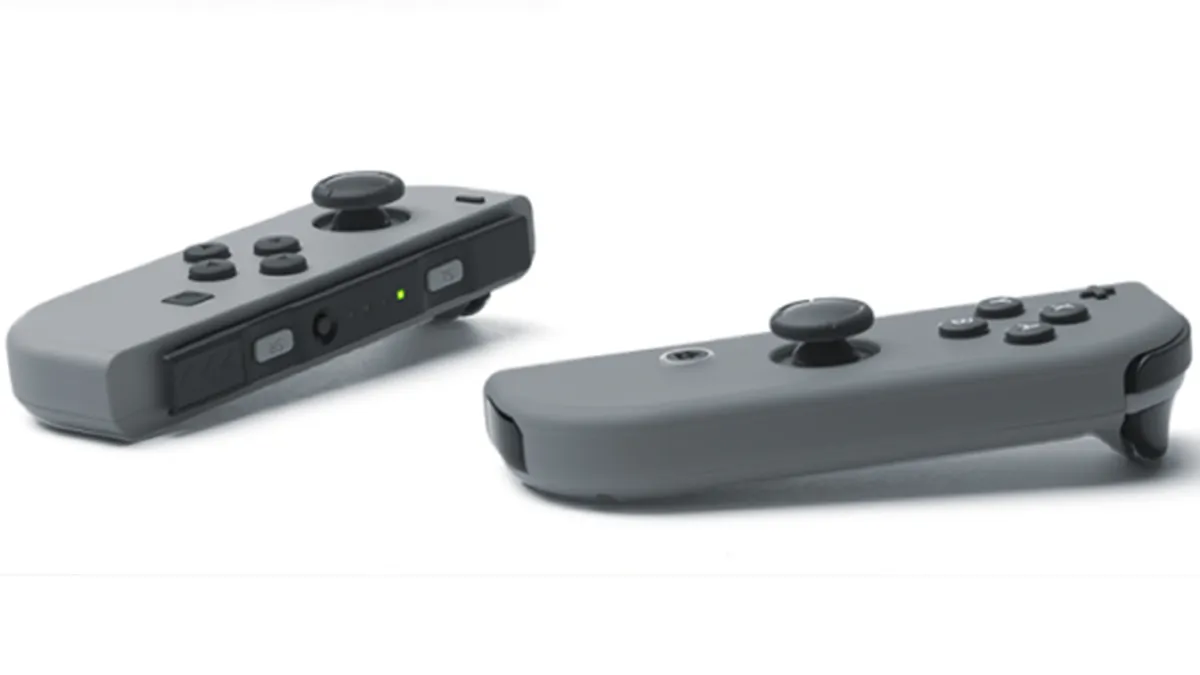
Joy-Cons switch and contact cleaner

(Image credit: Nintendo)

Just to reiterate - once you start pulling apart bits of your Switch there's a chance you could cause damage or make things worse, so you're doing this at your own risk if you proceed.

If calibrating your Switch doesn't fix your Joy-Con drift, then the next option is to try and clean the contacts inside without opening anything up. To do this you'll need professional switch and contact cleaner specifically designed for cleaning electronic components. Don't try any old spray you have around the house - look specifically for the stuff made to clean electrical contacts.   

As well as the proper switch and contact cleaner you'll need a small tool, like a tiny screwdriver or tweezers. Push the affected Joy-Con stick gently back and, using the tool, lift up the tiny rubber skirt around the base so you can see under it. Squirt the tiniest amount of cleaner into the gap you've made, release the rubber skirt and gently massage the stick in all the directions it can go in. Always use the least amount of cleaner possible, as you'll need to leave the Joy-Con to dry afterwards so you don't want it swimming in the stuff. 

If you're lucky the cleaner will clear out any gunk and fluff from the contacts, and restore the Joy-Con to it's former, centred glory.  

Want more Switch Joy-Con help? Check out how to charge Joy-Cons for Nintendo Switch here.

Leon Hurley
Leon Hurley
Social Links Navigation
Managing editor for guides

I'm GamesRadar's Managing Editor for guides. I also write reviews, previews and features, largely about horror, action adventure, FPS and open world games. I previously worked on Kotaku, and the Official PlayStation Magazine and website.

Latest in Nintendo Switch
Zoomed-in, cropped box art for Pokemon FireRed shows Charizard roaring.
Pokemon "The biggest time save in nearly a decade of Pokemon speedrunning" has been discovered in FireRed
 
 
Fortnite New Sanctuary vault
Fortnite How to open the New Sanctuary vault in Fortnite
 
 
MLB The Show 26
Sports Games MLB The Show 26 codes (March 2026) and how to redeem them for free packs
 
 
Mina the Hollower key art cropped to just show Mina
Action RPGs I already know Mina the Hollower is going to ruin my life
 
 
The Legend of Zelda: Breath of the Wild
The Legend of Zelda Breath of the Wild star didn't know what game she was trying for, nor that it was the title role
 
 
FPS Games Overwatch was originally called "Monetized Shooter" because you had to buy each of its heroes
 
 
Latest in Guides
Fortnite New Sanctuary vault
Fortnite How to open the New Sanctuary vault in Fortnite
 
 
Helldivers 2 Illuminate Veracitor chasing Helldiver with harvester nearby
Third Person Shooters How to kill the new Veracitor and Gatekeeper Illuminate enemies in Helldivers 2
 
 
MLB The Show 26
Sports Games MLB The Show 26 codes (March 2026) and how to redeem them for free packs
 
 
Crimson Desert Abyss Without Balance puzzles
RPGs How to solve the Abyss Without Balance and Polar Opposites puzzles in Crimson Desert
 
 
Dragon's Stone Chamber in Crimson Desert
RPGs How to solve the Dragon's Stone Chamber in Crimson Desert
 
 
How to steal in Crimson Desert
RPGs How to steal in Crimson Desert
 
 
LATEST ARTICLES
  1. Shrek
    1
    3 new to Netflix movies I recommend you watch this weekend (March 21 - March 22)
  2. 2
    "My dream game": After 7 hours, Palworld publishing lead delivers his Crimson Desert verdict: "This game is made for me"
  3. 3
    "The biggest time save in nearly a decade of Pokemon speedrunning" has been discovered in FireRed
  4. 4
    Marathon's Cryo Archive is locked to weekends partly because you're going to "lose a lot of gear"
  5. 5
    Arc Raiders devs tortured each other during playtests, juicing Arc into Elden Ring bosses

GamesRadar+ is part of Future US Inc, an international media group and leading digital publisher. Visit our corporate site.

Add as a preferred source on Google Add as a preferred source on Google
  • Terms and conditions
  • Contact Future's experts
  • Privacy policy
  • Cookies policy
  • Accessibility statement
  • Careers
  • About us
  • Advertise with us
  • Review guidelines
  • Write for us
  • Accessibility Statement

© Future US, Inc. Full 7th Floor, 130 West 42nd Street, New York, NY 10036.

Please login or signup to comment

Please wait...