





GamesRadar+ Verdict
The Seagate FireCuda X Vault is a mighty external hard drive that can provide a whopping 8TB or 20TB worth of storage. While that's an ample amount of space for the best PC games, and its RGB lighting is nice, flashy addition, I would only recommend this to those who spend their time gaming and cooking up art and content on the side.
Pros
- +
Available in 8TB (reviewed) and 20TB capacities
- +
Includes Windows 11 controller RGB lighting
- +
Doesn't require an additional power source
- +
Comes with Seagate's Rescue Data Recovery Services
Cons
- -
USB-C cable is irredeemably short
- -
Needs a 15W port for power
- -
Requires a lot of space
Why you can trust GamesRadar+ Our experts review games, movies and tech over countless hours, so you can choose the best for you. Find out more about our reviews policy.
Seagate has given gamers a little bit of a liferaft with the release of the Firecuda X Vault Hard Drive - but it feels best suited to content creators and creatives rather than strictly gamers.
The drive is available in 8TB and 20TB capacities, and is one of those massive blocks that requires you to have the PC gaming desk space to facilitate it. While plenty of the best external hard drive for gaming are portable, this massive beast is not, but it can be as valuable. It doesn't require an additional power supply like so many massive hard drives before it, and its starting $269.99 / £279.99 MSRP makes it a far cheaper equivalent than an 8TB SSD alternative.
I just worry that many rigs might not be able to handle the 15W required to run the drive, and external hard drives are not ideal for running plenty of modern AAA games, or they simply can't. If a gamer and a content creator who needs plenty of storage to back up live-stream recordings, podcast recordings, or even art and photography, then this FireCuda X Vault might be your style, but it's not going to be a casual gamer's best bet.
Key specs
Price |
$269.99 / £279.99 |
Drive Type |
External Hard Drive |
Capacity |
8TB, 20TB |
Weight |
1290g |
Design
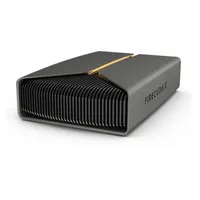
The Seagate Firecuda Vault X Hard Drive is a chonky boy. The external drive stands at 7.795 inches by 2.094 inches by 5.197 inches and weighs a hefty 1290g. Throughout my entire two-week testing time, I was extra cautious not to drop the drive, as in the unlikely event that it were to fall on my big toe, it'd likely take the entire thing out.
While it's pretty big, it's not an eyesore at least. There's a strip of RGB lighting across the front, which glows once you hook it up to your gaming rig. This strip helps contrast against the all-black colorway, which completely covers the rectangular drive. I'm a bit partial to RGB lighting, so I'm definitely a fan of it, though I didn't ever see it once it was hooked up to my gaming rig.
Features
The RGB lighting in question doesn't require any lofty Seagate software when it comes to customization. You can control the strip directly via your Windows 11 settings, which was a relief when my PC is already full of proprietary software bloat. But it's not the lighting that stands out amongst the drive's small list of features, but the bus-powered USB-C.
You don't need to free up a spare plug socket to power up this massive drive, as the accompanying USB-C cable can transfer files and keep it powered up at the same time. However, you will need a USB-C port that can accommodate 15W, which could be a struggle if you're sporting an older rig. Not to mention, the cable provided is absolutely tiny, which you need to consider before investing in this drive. During testing, the only way I could hook it up to my PC was by sitting it on top of my PC tower, which partially covers a vent. I would not recommend you do the same, but the minuscule USB-C cable left me no option, especially as I was limited to only one compatible 15W port.
The external drive also includes support for Seagate's Rescue Data Recovery Services. Basically, should anything happen to your drive and your data, you can send it off to Seagate, and they can work their magic to try and recover your pressure games and files. Hopefully, you don't have to use it, but it's a nice inclusion nevertheless.

Performance
The marketing spiel around the FireCuda X Vault Hard Drive is less to do with speeds as you'd find with the best SSDs for gaming, but that's to be expected. Seagate shared during its April 23, 2026, press release that it's designed to provide "high-capacity desktop storage" so there's less emphasis on how fast games can run when stored on the drive, and more on how much storage there is to play with from the get-go.
While that left me with no on-the-box speeds to compare against, I still ran the external hard drive through my CrystalBenchMark tool on my PC rig, where the FireCuda X Vault was able to achieve average 215.4 MB/s read and 213.61 MB/s write speeds. To put that into perspective, the brand's Astro Bot Limited Edition Gaming Hard Drive achieved 144.41 MB/s read and 141.77 MB/s write speeds, and anything around the 200 MB/s mark is pretty much what I'd expect for a modern external hard drive.
It's naturally nowhere near the speeds you get with top-performing Gen 4 SSD like the Samsung 990 Pro, which can tout 7,462MB/s reads and 6,877MB/s writes, but that's always the case with this type of storage. If you're steadfast on finding a speedy solid-state drive alternative, I'd sooner recommend an external SSD over a traditional hard drive. Running modern PC games directly off an external HD can lead to frame rate issues and pop-in. Not to mention, as they require physically wiring into a spare USB port, your PC can also randomly disconnect, which would not be welcome if you're in the middle of a heated Marvel Rivals match or deep in a 10+ hour match of Talisman with your friends on Steam.
As my rig is not the most advanced of the hardware team, the drive disconnected fairly frequently during testing (likely a power supply issue), which is why I never ran games straight off the drive. However, I did use that testing time to see how fast the FireCuda X Vault could transfer data, including 26.8GB of 4K game clips. The large file was able to stick on the drive in 2 minutes 22 seconds, which I'd be more than happy with if I were regularly moving over files. Again, external SSDs are going to be a bit faster, but if you have a big bunch of data that needs to be moved around day in and day out as a gamer and content creator, the testing provided that there's value to be had in this Seagate drive.
Should you buy the Seagate FireCuda X Vault Gaming Hard Drive?

Having an abundant amount of PC gaming storage is always helpful to have at hand, but I wouldn't recommend the Seagate FireCuda X Vault hard drive to every type of gamer. A hefty $269.99 / £279.99 drive like this is best suited to those who play games and create ample amounts of art and content surrounding them - like VTubers, live-streamers, podcast hosts, and artists.
If you're after the best live streaming gear, then having 8TB or 20TB to spare would be ideal for backing up stream recordings, graphics that you might use for your OBS overlays and setups, and more. All those files can add up pretty fast, and it's always important to have backups. I think Seagate knows this, as despite being aimed primarily at gamers and coming with an Xbox Game Pass Ultimate code, the drive also includes an Adobe Creative Cloud offer straight in the box.
If you fall under the "I game and also create stuff" category, then by all means, pick the FireCuda X Vault hard drive. You're not going to find an 8TB (or 20TB) SSD alternative for its $269.99 launch price, that's for sure. Just make sure you have a USB-C port that can support 15W, and have a rig that can accommodate the big, black block without covering up a vent or two.
How I tested the Seagate FireCuda X Vault Gaming Hard Drive
I spent a little over two weeks with the Seagate FireCure X Vault Hard Drive, where I hooked it up to my PC gaming rig via my spare USB-C port. In that time, I used the CrystalDiskMark benchmarking tool to test the average read and write speeds over three tests and calculated the average result. Additionally, I moved files on and off the drive to see how fast it managed to transfer data. To read more about the ways we test external hard drives and the rest of our gaming tech, have a look at how we test PS5 SSDs and hard drives, and our hardware policy.
If you're after even more storage, check out our guides to the best Nintendo Switch 2 microSD Express cards, the best Xbox Series X hard drives, and the best SSDs for PS5.

