
 Join The Community





The best PS5 controllers will broaden your gaming horizons. A new gamepad, wheel, or mobile controller can expand the ways you enjoy your favorite PS5 games, and even give you a totally fresh take on one you might have played already. Whether you're looking for a replacement for an ageing DualSense, or you're wanting to take your first leap into the world of back buttons and pro features, the PS5 controller market is waiting for you. Luckily, I've been doing the hard part for you, and I've narrowed down your best options into one convenient list.
The pro controller scene for PS5 is arguably better than it ever was for PS4, and I know that from time spent testing and reviewing the latest ones. Some of the gamepads in the list below even feature in our best PC controllers list, and a few are backwards compatible with the PS4. You don't even need to go for the official DualSense Edge if you're looking for something with back buttons either, because there are lots of third-party options you can get that have even more functionality.
Don't forget, either, that there are plenty of situational controllers that will work with the PS5. For example, you can get a mobile controller for taking your games on the go, or opt for the PlayStation Portal. There are also steering wheels that'll be right in line with those PS5 players who enjoy taking to the virtual tracks. There's even a Guitar controller from PDP called the Riffmaster which, although it isn't on this list, is a perfect choice for the rhythm gamers out there. We just heard word about a new version of Hori's fightpad for PS5 as well, which will be a perfect controller to consider for anyone trying to up their rank in games like Tekken. While we wait to test that out, here are the picks you should consider.
The Quick List

Undoubtedly my favorite controller overall at the moment, the Victrix Pro BFG is competitively priced and simply makes you better at every game you touch with it. This is probably one of the best gamepads ever made and we even prefer the customization elements over the Edge.

The DualSense Edge is Sony's first homegrown pro controller, and it's a great all-rounder. Its integration into the PS5's UI makes it a serious contender on this list because of the features on offer. We just wish it wasn't so pricey.

Hall Sensor sticks that are immune to stick drift make this the best gamepad on the shelves for longevity. As if that wasn't enough, Nacon has made something that's great for Esports and multiplayer too.

The Razer Raiju V3 Pro utilizes the speedy Esports engineering from Razer's mice and keyboards, making this one of the fastest controllers on the shelves right now. For competitive players looking for six extra buttons, this is a must.

Despite its stick drift issues and lack of wider support, the DualSense is still one of the most innovative controllers ever made, and it has some excellent features. It's also available in a slew of colors now too.

If you're a fan of remote play, or just playing mobile games while you're out and about, the GameSir G8 Galileo is our current pick for the best mobile controller. The Backbone One is also an option but see below to find out why we prefer this.

Scuf's controllers are known for their quality, if not their high prices. Regardless, if you want a traditional DualSense feel with some extra features from a third party, the Scuf Reflex range is your best bet. You're boosting customization, with a range of designs to choose from as well.

The PlayStation Portal isn't the PS5 handheld we were hoping for, but if you want something for remote play, it doesn't get much better than this.

Logitech's latest mid-range sim racing system has arrived, and the RS50 is the best wheel to grab for any PlayStation gamer right now.
Show more ↓

The PDP Riffmaster reignited the guitar controller market that lay dormant for years. On PS5, this is your best bet for rhythm games at the moment.

Don't tell the other bits of tech I get to review for a living, but controllers are probably my favorite type of gaming hardware. I love testing gamepads, evaluating their ergonomics, their pro features, and testing whether they help or hurt my gaming performance. PS5 controllers are some of the best on the shelves, and I'm always eagerly awaiting the next newcomer to the market.
March 11, 2026: Joining the ranks of the best PS5 controllers this month is the PDP Riffmaster, which I finally got around to reviewing in the last month. If you're looking for a niche PS5 controller that's going to help you rock out in your favorite rhythm games, this guide now has a direction to point you in.
The best PS5 controller overall
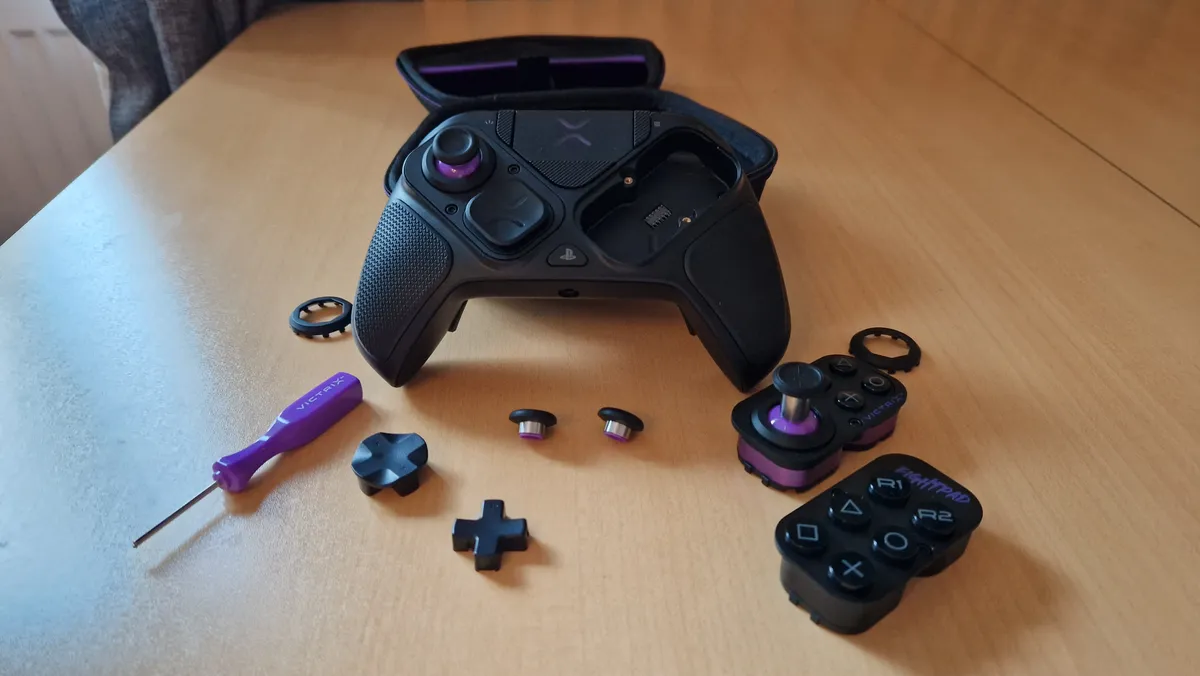

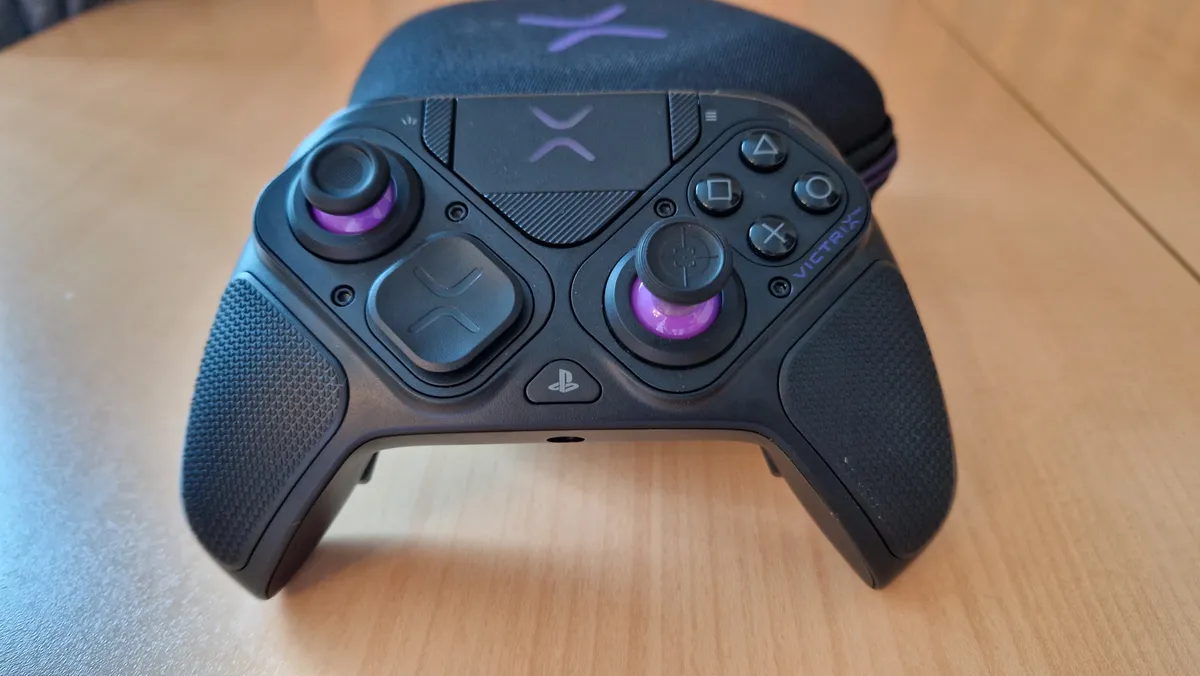


Are you sick of hearing about how a controller can't keep up with a mouse and keyboard? Because with the Victrix Pro BFG at your disposal, that might not be such a clear-cut contest anymore. This is undoubtedly the best PS5 controller because it's been designed with elite performance in mind, and thanks to a clever modular design, you can tailor it to your exact preferences.
Recently, a new version of this controller has been announced by Turtle Beach (which now owns the PDP brands). The "Reloaded" model will sport Hall sensor thumbsticks as standard, but it does cost a little extra. I haven't tested this model out yet, but when I do, I'll be sure to update you.
Design: That modular design means the controller's two facial components are removable, and you can switch them out or even swap them around to suit you, the game you're playing, and the way you want to play. The suite of attachments that come in the case is one of the most conclusive offerings I've ever come across in a controller. Among them are a taller analog stick for precision aiming, multiple D-pad choices, stick gates, and a "fightpad" module that gives you six face buttons. Like the Thrustmaster E-Swap X Pro, the modules can also be flipped around so the sticks are symmetrical.
On the back, you'll find four excellent back buttons that are built so well into the grips of the pad that they're effortless to use. Of course, being an officially licensed PlayStation controller, you get the classic home button, share button, option button, and touchpad.
✅You prioritize performance over any fancy software or features: This controller doesn't have haptic feedback or even rumble, but it has so many clever design features that add a lot of value.
✅You play a lot of multiplayer games: If you play competitively in any online multiplayer game, whether it's a first-person shooter or a fighting game, this is the controller for you.
✅You want the best back buttons on the market: The four back buttons on this controller are really well-designed and placed beautifully. Although some prefer the paddles found on first-party controllers, the Victrix Pro BFG's tactile and highly usable buttons feel excellent.
✅You want to spend as little as possible on a pro controller: The Victrix Pro BFG is cheaper than the other PS5 pro controllers on the shelves at the moment and offers the best value for money in terms of competitive features.
❌You like a heavier controller: The Victrix Pro BFG is pretty lightweight in the hands and isn't the chunkiest for folks that like a more substantial feel.
❌You need those DualSense features: If you mainly play first-party PS5 games, you'll benefit from having Haptic Feedback and trigger resistance, which this controller doesn't offer.
❌You don't care about customization: If you don't need to personalize and customize a controller's modules to your liking, maybe don't go for this one.
Features: In pursuit of pure performance, this controller is relentlessly stripped back. You won't find any rumble or haptic feedback, which is a bit of a shame, and there isn't any DualSense trigger resistance, although the Pro BFG does feature trigger stops. The biggest features of this controller are very much in its design and all the swappable modules and add-ons.
There is a "Tournament Lock" mode that stops you from pressing the system/function buttons during competition, which can sometimes result in disqualification. You don't need any companion software here either, as you can change profiles and button mappings with function button shortcuts alone. Definitely check the manual of this pad to know all of its hidden shortcuts as there are a few useful ones you should know, like double-tapping the function button to mute yourself.
The Victrix Pro BFG's connection is either wired USB-C to USB-A or via a wireless dongle. Battery life here could be better in wireless mode, it lasts around the same time as a DualSense Edge, which isn't impressive considering how stripped-back it is.
Although it's got official PlayStation licensing, it works for PC and PS4 as well.
Performance: In terms of value for money, this is by far one of the best controllers to hit the shelves in recent years, especially when you consider that it's cheaper than its competition up and down this list of the best PS5 controllers.
There isn't a game I can turn this controller to that I don't feel advantaged in. From its ergonomic design, its best-in-class back buttons, its swappable modules, and attachments, to even its size and feel in the hands, there is no better controller at the moment.
It feels ridiculous to argue that, given that the Victrix Pro BFG doesn't have the DualSense's next-generation features. But let's be real for a second - those amazing features are great, but they aren't supported by nearly enough games, and this gamepad focuses on the aspects of a controller that really matter.
Whether it's a first-person shooter, a game you're trying to speedrun, an intense platformer, or a competitive fighting game, this is the best PS5 controller there is.
Comfort | ★★★★ |
Ergonomics | ★★★★★ |
Pro features | ★★★★★ |
Longevity | ★★★★ |
Battery life | ★★★ |
Add-ons | ★★★★★ |
Multiplayer potential | ★★★★ |
Singleplayer potential | ★★★ |
The best PS5 controller for features
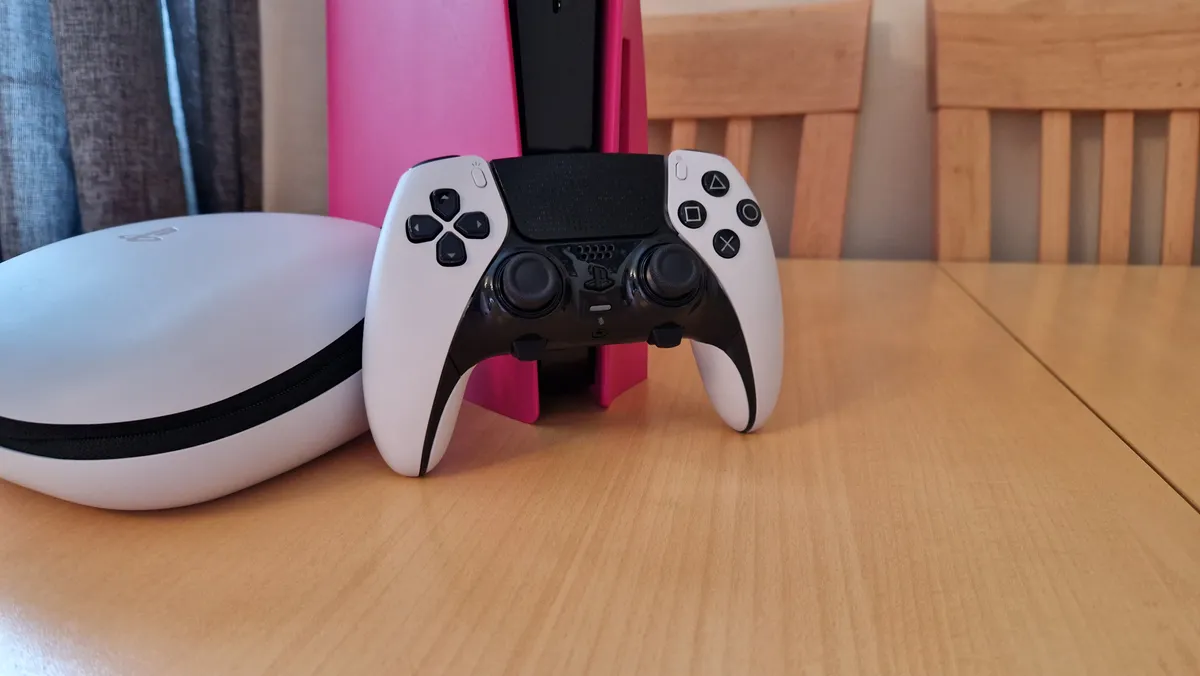


The DualSense Edge is the first homemade pro controller from Sony, and it offers a number of quality-of-life updates over the original DualSense. It isn't everything we hoped for in PlayStation's first official pro gamepad, but it's still one of the best PS5 controllers out there.
✅You want those bespoke DualSense features in an all-around improved package: Adaptive trigger resistance, haptic feedback, and a whole load of software to fine-tune it to your liking.
✅You mainly play single-player, or first-party PS5 exclusives: There's no better way to experience Sony's homemade games than with Sony's first homemade pro controller.
✅You only need two back buttons: It's a shame the DualSense Edge costs more than other PS5 controllers but has fewer back buttons, but at least the paddles provided here are really comfortable.
❌You want a genuine, honest fix to stick drift: You can buy replacement stick modules for the DualSense Edge, but there's not guarantee you won't run into the same drift issues you may have with the DualSense.
❌You want more battery life: The battery life here is worse than on the original DualSense, so it's worth looking elsewhere if that's something that bothers you.
❌You need more than two back buttons: For more competitive, PC-optimized games, I'd recommend a controller with at least four back buttons.
Design and features: Rounded corners at the bottom of the grips, as well as a heftier weight, make it feel much more premium and ergonomic in the hands than the original DualSense. Seriously, this is the comfort I wanted from the DualSense, and I have no idea why rounded corners don't feature in the regular DualSense.
Clever software integration means you can fine-tune bespoke PS5 features like adaptive triggers and haptic feedback, and function buttons found under the control sticks help to change customizable profiles in a flash. Not only that, but you can map all the buttons on the gamepad to your liking, allowing for some serious versatility.
There are also trigger-stop levels at play here. On that note, the triggers have a more textured feel thanks to the sacred symbols being embossed on their lower halves. You don't get much in the way of swappable parts here, but you do get a decent hard case that the controller can be charged while in.
Performance: The DualSense Edge has a shorter battery life than the original DualSense, and doesn't truly fix the widespread stick drift issues. Although entire stick modules can be replaced, we'd have an easier time recommending it if there were genuine alternatives like Hall sensors.
Regardless, this is a really comfortable controller that I use for a lot of PlayStation games I don't feel I need a competitive edge in. It's a good halfway house between something bred for performance and something that has those bespoke PS5 controller features that make gameplay feel truly next-gen.
The two back button attachments are extremely comfortable and work really well. Unfortunately, there are only two of them, which means for a similar price you can get third-party controllers that offer a load more functionality.
Unfortunately, this controller would be so much easier to recommend if it wasn't so expensive for what it is. Compared to Xbox's Elite Series 2, and even the Victrix Pro BFG, you should get a lot more controller for the money here.
Comfort | ★★★★★ |
Ergonomics | ★★★★ |
Pro features | ★★★★ |
Longevity | ★★★ |
Battery life | ★★★ |
Add-ons | ★★★★ |
Multiplayer potential | ★★★★ |
Singleplayer potential | ★★★★ |
The best PS5 controller for longevity


The Nacon Revolution 5 Pro is the spiritual successor to the Nacon Revolution Unlimited, which was one of the best officially licensed pro controllers for PS4. Equipped with Hall Sensor sticks, it's the first controller on this list that's immune to stick drift issues.
Quick note for those looking for a PC controller: The new Revolution X Unlimited is an updated version of this pad, which improves on some of the issues I had with it. If you're really looking for something to play PC games with, I'd argue the Revolution X Unlimited is the better buy, particularly since it's the same price.
✅You want Hall Sensor sticks: No stick drift will be tempting if you've been burned by that problem before.
✅You want something for competitive play: four back buttons and a suite of features and customization means this is up there with the best Esports gamepads you'll find.
✅You prefer a broader controller: the wider and broader build quality of this gamepad makes it welcoming for players with larger hands.
❌You want the best back buttons: a few design flaws mean this doesn't have the best back buttons available, but they're still good.
❌You like tighter stick tensions: The right stick has fairly loose stick tension, so if you prefer a tighter feel, this might not be for you.
❌You use a wired headset: read more in our review, but your microphone audio has a chance to be compromised.
Design and features: In its design, the Nacon Revolution 5 Pro feels very similar to the Nacon Revolution Unlimited. It's got the same broad shoulders and long grips, its face buttons are large, and the circle button spills over the right-hand side in the same way.
Alongside asymmetrical Hall Sensor thumbsticks, the R5P also packs in four back buttons, varying stick tops and gates, weights you can add to the handles, and four profiles per platform. The chassis sports a matted rubberized surface that feels really nice and cool in the hands. Nacon deserves additional praise for putting sustainability at the heart of this gamepad's design.
The features list of the Revolution 5 Pro (R5P) is as exhaustive as you'll find these days: wired and wireless connectivity, an impressive 10-hour lifespan, companion PC software for fine-tuning, and even extensive audio settings and multipoint wireless connectivity.
Performance: When it comes to competitive gaming, the Nacon Revolution 5 Pro is as close as it gets to the Victrix Pro BFG. Its larger size and increased heft might even make it more appealing to a lot of players. Annoyingly, looser stick tension and less ergonomic back buttons make it fall short for us.
Additionally, there are some flaws, particularly if you use a wired headset, as Nacon's noise canceling software means your microphone audio will be accompanied by a grating white noise.
Either way, this is one of the best controllers we tested in 2023, and it felt just as at home in a first-person shooter as it did in a platformer or a third-person game. Being immune to stick drift would make this the best PS5 controller for longevity as it is, but the build quality here gives us so much confidence that this controller will last you a long way into the future.
Comfort | ★★★★ |
Ergonomics | ★★★ |
Pro features | ★★★★★ |
Longevity | ★★★★★ |
Battery life | ★★★★ |
Add-ons | ★★★★ |
Multiplayer potential | ★★★★★ |
Singleplayer potential | ★★★★ |
The best PS5 controller for speed


Razer has brought back the Raiju, and it's done so in tremendous fashion. The Wolverine V2 Pro it initially launched for the PS5 generation held a lot of promise, but its design quirks left a lot to be desired. Now, having seen so much success with the Wolverine V3 Pro on Xbox and PC, it's brought the same refinements to PS5, and then some. This isn't an Xbox controller ported for PlayStation; this is an authentic PlayStation product.
✅You want the most amount of buttons possible on a controller: The Raiju V3 Pro has six extra buttons, giving you loads of spare functionality that'll allow you to keep your thumbs on the sticks.
✅You want symmetrical thumbsticks: It can be tricky to find a pro controller with all the latest bells and whistles without opting for something with offset thumbsticks. The Raiju sorts that issue for you.
✅You want TMR thumbsticks: This controller has the new gold-standard thumbstick tech, meaning it's the first gamepad to bring TMR sticks to PlayStation 5.
❌You want rumble or haptic feedback: Thanks to Sony's licensing parameters, there's no rumble or haptic feedback in this controller, which is a real shame.
❌You prefer a heavier controller: The lack of rumble motors in the grips can leave this feeling a bit lightweight for its price tag.
Design and Features: Often, it can feel as though buying an officially licensed PS5 pro controller means having to adopt the design preferences of Xbox players. Asymmetrical thumbsticks are great, but for PS5 purists who have always used and preferred symmetrical ones have very few places to turn. The Razer Raiju feels authentically PlayStation because it opts for symmetrical sticks, and you don't feel like you're compromising on other features as a result of having them either.
The biggest feature here has to be the inclusion of TMR thumbsticks, which have never been seen in a PlayStation controller before now. These swanky sensors have a much higher resolution than Hall effect ones, which means they can account for a lot more precision and pick up on all of your tiny aiming corrections. Along with six extra buttons, there's a lot of pro-level functionality to be had here.
Razer has used the same PBT as it does in its gaming keyboards for the microswitches. This makes the controller as a whole clicky and extremely responsive. That said, some longer grips than the Wolverine V3 controllers make it more comfortable to hold in more chilled-out games.
Performance: Thanks to those TMR sticks and six ergonomic extra buttons, this controller really lends itself to FPS gameplay. If you have a larger pair of hands, this is a really fitting option for you. The way Razer has integrated the back buttons into the grips means you can use your middle and ring fingers to press them, or just use your middle fingers, and still feel like you're holding the Raiju comfortably.
But thanks to those longer grips, this doesn't just feel like an Esports controller - it's just as at home in a cozier setup because it's comfortable to hold. For those who don't really like back buttons, you can remove them completely so they don't bother you. With only a couple of swappable physical parts that come along in the box, it does feel as though Razer has missed a trick by not including more options for thumbstick tops and back button shapes.
The only main reason I'd not recommend this controller is because compared to the Xbox and PC Wolverine alternatives, it feels very lightweight and dare I say, cheap. The blame for that lies at Sony's door for not allowing any rumble motors or haptics in licensed PS5 controllers, but it's a shame nonetheless. In every other way, this is one of the best controllers money can buy for the PS5 right now.
Comfort | ★★★★ |
Ergonomics | ★★★★ |
Pro features | ★★★★ |
Longevity | ★★★★ |
Battery life | ★★★★ |
Add-ons | ★★★ |
Multiplayer potential | ★★★★★ |
Singleplayer potential | ★★★ |
The best PS5 controller for most players


The DualSense is the one PS5 accessory that's included with the console, but it's also one most of us will undoubtedly buy more than once. With the DualSense, games are more immersive when features like haptic feedback and adaptive triggers are adopted and incorporated into games' mechanics. Feel the textures of gravel in your fingers as you drive through streets, as well as the tension in the strings of your bow as you draw back an arrow.
✅You want those bespoke features: Haptic feedback is a game changer that's worth having for first-party games.
✅You mainly play first-party PS5 exclusives: There's no real replacement for the DualSense in first-party exclusive games since they're designed to be played with it.
✅You don't care about a pro controller and the extra features they bring: If you don't mind not having back buttons and competitive customization features, the DualSense Edge is a premium controller without them.
❌You've been burned before: If you've already gone through one DualSense that's died due to stick drift or poor durability, vote with your wallet and go for something else.
❌You want something long-lasting: The DualSense isn't exactly a reliable or durable gamepad, so go elsewhere if you don't want to buy again later.
❌You want back buttons and mainly play multiplayer games: If you're not playing PlayStation exclusives, why not go for something with more functionality?
Design and features: The DualSense takes a bit of a design leap away from the DualShock 4. It has more abrasive feeling corners to it and arguably isn't as ergonomic. What it lacks in comfort, it gains in features, however.
Haptic feedback is an evolution of rumble that gives you extremely tactile, specific game feel in titles that support it. From rain in Returnal tapping away at your controller, to different weaponry in Ratchet and Clank Rift Apart feeling stupidly distinct, this is the best a controller has ever felt during gameplay.
Adaptive trigger resistance can offer some interesting gameplay angles when supported well, although it's a shame the ability to fine-tune its levels isn't the easiest without the more expensive Edge model. Moreover, in older models of this controller, it isn't uncommon to see trigger springs break or lose tension entirely when a game only tunes this resistance up to full. Kena: Bridge of Spirits crippled my original PS5 controllers.
More colors are now available - Midnight Black, Cosmic Red, Starlight Blue, Nova Pink, and Galactic Purple - have joined the party, there's a bit more choice to work with and to inject some jazz and personalization into your setup. There are also some lovely limited editions to look out for, and I'm sure we'll see more of these in the future.
Performance: While the DualSense is a truly next-gen controller and its features are nothing short of revolutionary, it is disappointing how this controller has performed over time. I wouldn't argue it's lived up to its potential. That's partly down to such a small number of games truly supporting its bespoke features, but it's mainly down to such poor durability.
The DualSense has been plagued with stick drift issues since its launch. The original batch, especially, is infamous for not lasting very long before stick drift becomes a serious issue. This is supposedly a lot better now that Sony hasn't had to cut corners with pandemic manufacturing and can really work on mitigating the issues.
Newer models seem to suffer from this less, but without genuine solutions to this, like Hall Sensor sticks that use tiny electromagnets instead of potentiometers, there's no guarantee this won't happen if you buy a newer DualSense.
Elsewhere, triggers in particular, feel very fragile at times. I've mentioned the springs in mine snapped, and that has given me a glaring lack of trust in this controller's adaptive triggers. As cool as it can be, if it isn't essential to a game, I usually turn trigger resistance off.
Battery life is another concern. It really doesn't last very long, and it's a shame this isn't something that was paid more attention to in the controller's development. These issues make me a bit more critical of the gamepad as a whole and make me seriously miss the comfort of the DualShock 4.
Comfort | ★★★ |
Ergonomics | ★★★ |
Pro features | ★★★ |
Longevity | ★★ |
Battery life | ★★★ |
Add-ons | ★★ |
Multiplayer potential | ★★★ |
Singleplayer potential | ★★★★★ |
The best mobile controller for PS5
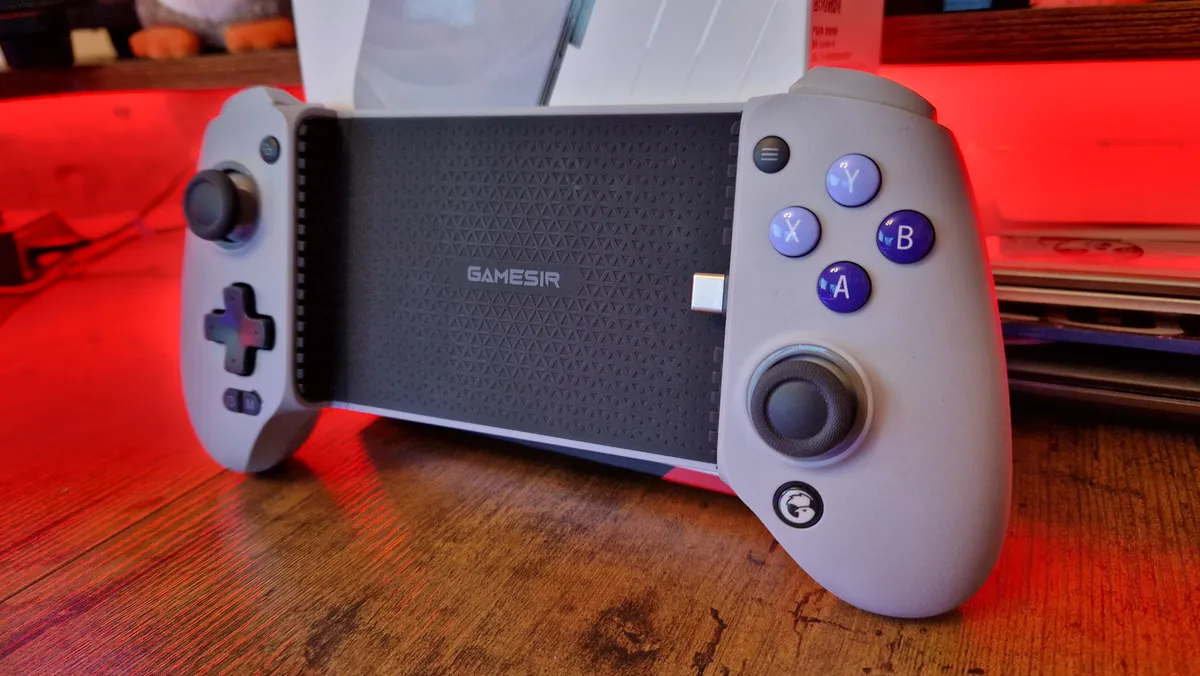


The GameSir G8 Galileo saw the bar that Backbone had clearly set for the mobile controller market and raised it in ways I didn't know it could. This is a bigger, better mobile controller in almost every way, and its cheaper price than its rivals makes it an easy pick for the top of this list.
✅You want to take your games on the go: A mobile controller lets you use remote play to take your gaming session wherever you need to.
✅You think a PlayStation Portal isn't worth it: The new-gen PSP has proven popular, but a good mobile controller that can use Remote Play could save you money.
✅You want a mobile controller that's comfortable for larger hands: The GameSir G8 Galileo is pretty much full-size compared to a normal PS5 controller, so you won't suffer the same hand cramps as you do with other mobile options.
❌You don't use Remote Play
❌You'd rather get something with official licensing: While the G8 is currently our favorite mobile controller and it can use remote play with PS5, it isn't officially licensed.
❌You like the look of the PlayStation Portal: Sony's strange handheld device is another viable Remote Play option for PS5.
Design and features: The G8 Galileo has chunkier, larger grips than other mobile controllers you'll find, and sports Hall Sensor thumbsticks and triggers that make you feel like you're playing on an ordinary gamepad, not a stand-in phone controller for shorter sessions. The design choices here make so much sense - even down to the pivoting USB-C connector that removes any fear your phone could snap it off during removal.
Performance: I didn't realize that I viewed mobile controllers as a means to an end - I only really tend to use them when I'm on a journey somewhere, I have a brief moment of time to kill, or I'm at a friend's house and need to take my games on the go. The G8 Galileo is so much more comfortable and so much more enjoyable to use that I now seek it out for certain games - it's an excuse for me to cloud stream games or use PlayStation Remote Play (yes, it can do both).
The catches here then? Well, unlike the Backbone One, it doesn't have official licensing on either side of the console war, which means it could run into problems further down the line if either company takes a harsher line on third-party mobile controllers. Elsewhere, even if its thumbsticks are immune to stick drift, they aren't quite perfect - they can be subject to friction with the stickgates and run a little hot in first-person shooters. These are hardly big issues though - this is by far the best mobile controller money can buy right now.
Comfort | ★★★★ |
Ergonomics | ★★★★ |
Pro features | ★★★★ |
Longevity | ★★★★★ |
Battery life | ★★★★ |
Add-ons | ★★★ |
Multiplayer potential | ★★★★ |
Singleplayer potential | ★★★★ |

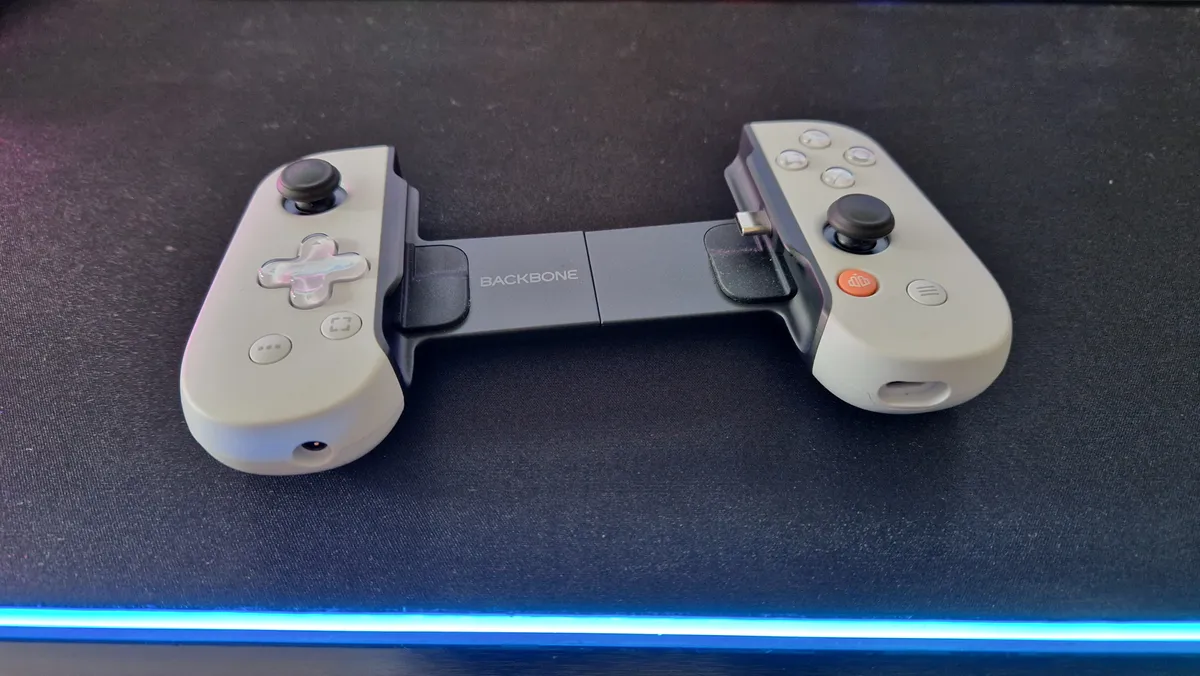
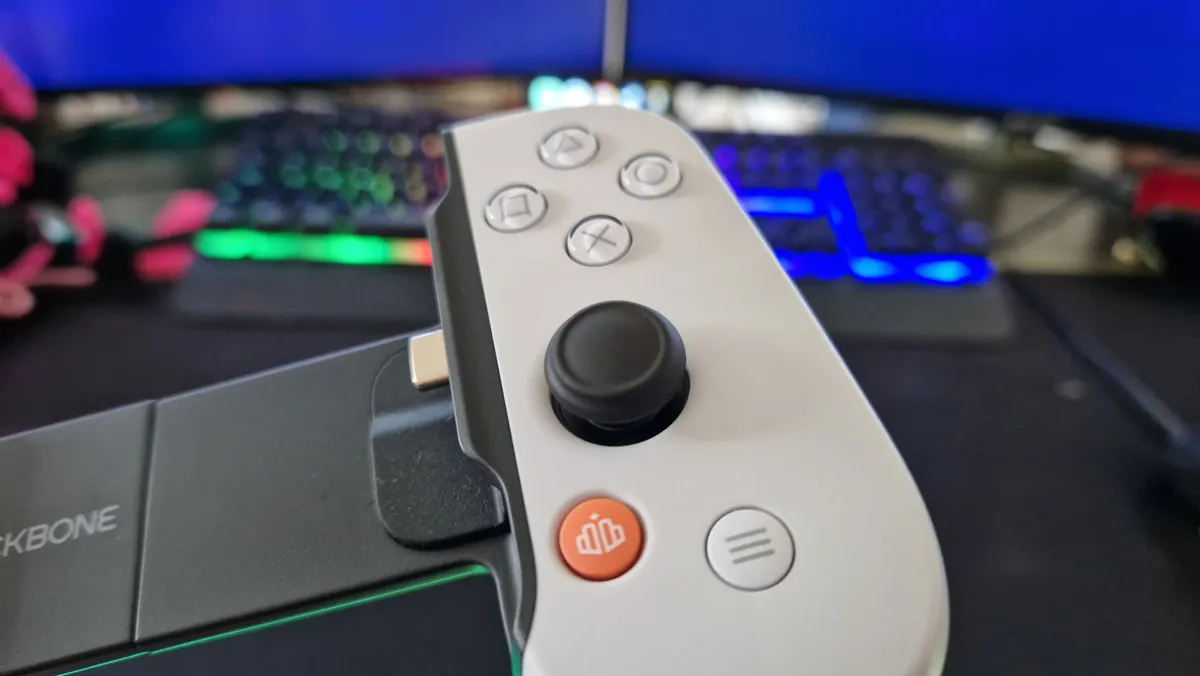

The Backbone One was already a well-established mobile controller for iPhone before Sony gave it official backing. Its original option was already Xbox Game Pass Cloud-compatible, but a brand new officially licensed Xbox variant has just launched too. Of course, you and I know that the PlayStation version was here first, and between you and me, it does a much better job of replicating the look of the console it supports.
✅You like to take your games on the go: Whether it's on a commute, on the toilet, or while someone else uses the TV, the Backbone One PlayStation Edition is a handy little device to have.
✅You think a PlayStation Portal is pointless: We still don't know an awful lot about it, but the Backbone One will no doubt be the clearest reason not to get a Project Q when it arrives.
✅You play games on Game Pass, or mobile as well as the PS5: Backbone One is great because it doesn't tie you down to PlayStation remote play, you can access Game Pass and other mobile gaming services too.
❌You struggle to find the Nintendo Switch's smaller size comfortable: The Backbone One isn't the most comfortable when used in longer sessions.
❌You don't play games on the go: If you don't have a need for it, there's no reason to buy yet another PlayStation accessory
❌You're waiting for PlayStation Portal stock: Sony's strange handheld device does the same as a good mobile controller, but if you're keen for that instead, there's no real need for both.
Design and Features: Straight away, it's easy to see the same design language as the PS5 and the DualSense with Backbone One's PlayStation edition, meaning it'll easily slot into your current PlayStation ecosystem. There are the standard face buttons, the share, options, and in-game menu buttons in lieu of a touchpad, as well as a D-pad, and offset thumbsticks.
There are L1 and R1 bumpers, and some triggers too, although these perhaps are the only thing that makes the Backbone feel a little cheaper. They click fairly loudly, which is a shame since the rest of the buttons feel almost identical to the DualSense - although they're smaller.
In terms of features here, you get a low latency connection, pass-through charging, and a 3.5mm headphone jack for a headset. It would have been nice, but there's no haptic feedback here or trigger resistance - fitting these things into a small package like this would have been tough, and would have pushed the price up. So long as you're an Apple user, it will house almost any iPhone, including the iPhone 13 Pro and 13 Max. As for Android, there is now a USB-C option here which works a treat with my Samsung Galaxy S22+.
Annoyingly, phone cases won't fit here, but Backbone has just collaborated with a minimalist case maker that does mean you can keep your phone in its case during use.
Performance: Remote play is surprisingly easy and much better than you may think, so long as you have the data or Wi-Fi connection to handle it. In fact, with Project Q on the horizon, Backbone One presents an excellent competitor that makes us question why Project Q is being produced at all. With the two likely just being Remote Play controllers for PS5, the Backbone One will almost certainly be cheaper, and isn't just bound to PS5 mobile gaming.
In the same way as the Nintendo Switch, the Backbone One can suffer from its smaller size a little. If you have larger hands like me, your thumbs might ache a little from having to force your hands into the appropriate position to use the Backbone one's asymmetrical sticks. Depending on how long you'd be using this for in one sitting though, it might not even be an issue.
Either way, while it is possible to take a DualSense on the go, having a bespoke controller for the phone itself will make the experience feel much more organic. If you want a bespoke PS5 controller for your phone on your commute, this is your best bet.
Comfort | ★★ |
Ergonomics | ★★ |
Pro features | ★★ |
Longevity | ★★★★ |
Battery life | ★★★★ |
Add-ons | ★★ |
Multiplayer potential | ★★ |
Singleplayer potential | ★★★★ |
The best DualSense alternative
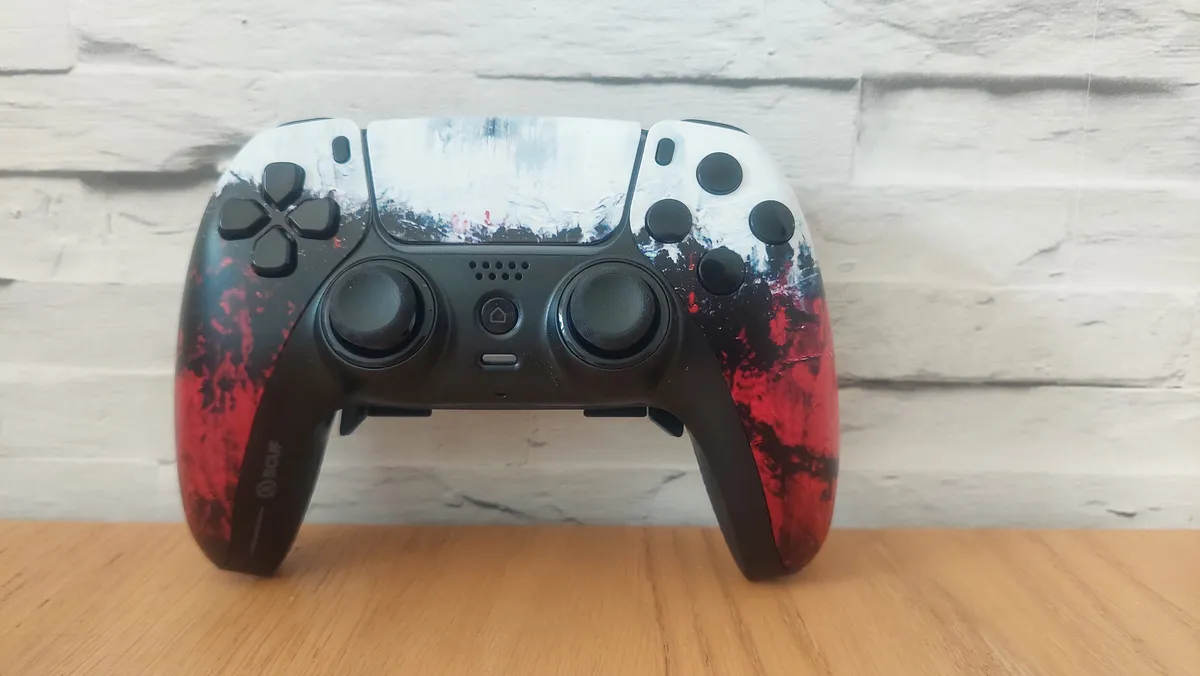
If you're looking for a PS5 pro controller that's as close as it gets to the design of the DualSense, look no further than the Scuf Reflex. It's compatible with PS5 and PC, and presents an array of design options. It may be pricey, but it's established itself as a strong competitor to the DualSense, and it'll likely be the first point of comparison when the DualSense Edge arrives on the shelves.
✅You want to personalize the look of your PS5 controller: If you care about skins, designs, and colors, Scuf has you covered better than anyone.
✅You like the feel of the DualSense, but want four back buttons as opposed to two: The two back buttons on the DualSense Edge are great, but I don't blame you for wanting more.
✅You can afford it: It ain't cheap, but if you have the money, it's all yours.
❌You don't like the feel of the DualSense: It goes without saying, but the evil twin looks and feels exactly like the DualSense, so if you don't like that controller, maybe look elsewhere.
❌You don't have the money: Seriously, there are plenty of other options up and down this list if this costs too much for you.
❌You want haptic feedback: Yet again, there's no haptics, rumble, or trigger resistance.
Design and Features: For starters, The Scuf Reflex already has the Edge beaten in terms of its back buttons. While the Sony option only gives players two additional buttons for a similar price, the Reflex gives you a total of four buttons that can be assigned to in-game functions.
Moreover, it comes in a few different variants: the Reflex, the Reflex Pro, and the Reflex FPS, and all of these have varying levels of customization. With all these options at your fingertips, you're bound to find a model which suits your hands and one that will give you the competitive edge you're looking for without compromising on the design of the DualSense.
There's no haptic feedback or trigger resistance, but other than that, the Scuf Reflex is essentially that evil clone of the DualSense's action hero that pops up for a big fight sequence toward the end of the movie.
Performance: The Scuf Reflex performed great in our review testing, giving our reviewer a pleasant experience of back buttons that were usable, and built into a comfortable position. Our reviewer found that there was good grip, and if you like the design and feel of the DualSense, you're not going to get that much difference with this, since they're almost identical.
What is great, is that you can tailor the look of this gamepad to you. There is a myriad of custom skins and aesthetic choices to go for here, which is a real bonus since that's not common on this list of best PS5 controllers. Annoyingly, the biggest reason not to buy here might just be the high price.
Comfort | ★★★ |
Ergonomics | ★★★ |
Pro features | ★★★ |
Longevity | ★★★★ |
Battery life | ★★★ |
Add-ons | ★★★ |
Multiplayer potential | ★★★★ |
Singleplayer potential | ★★★★ |
The best PS5 controller for remote play

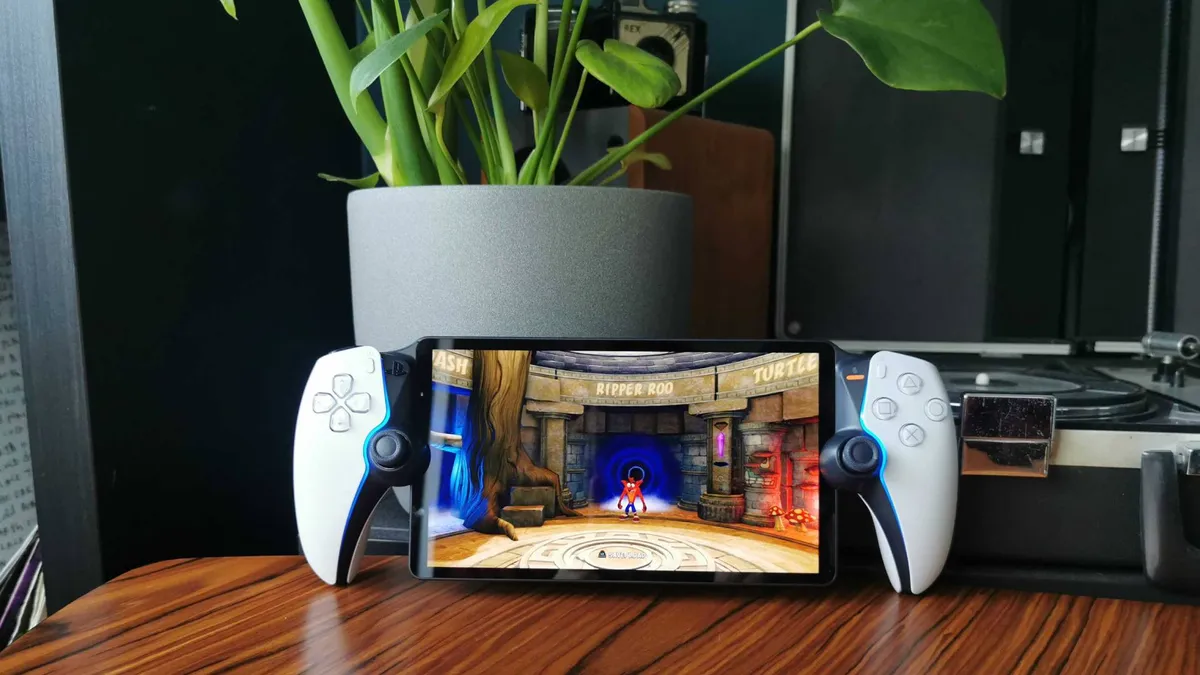
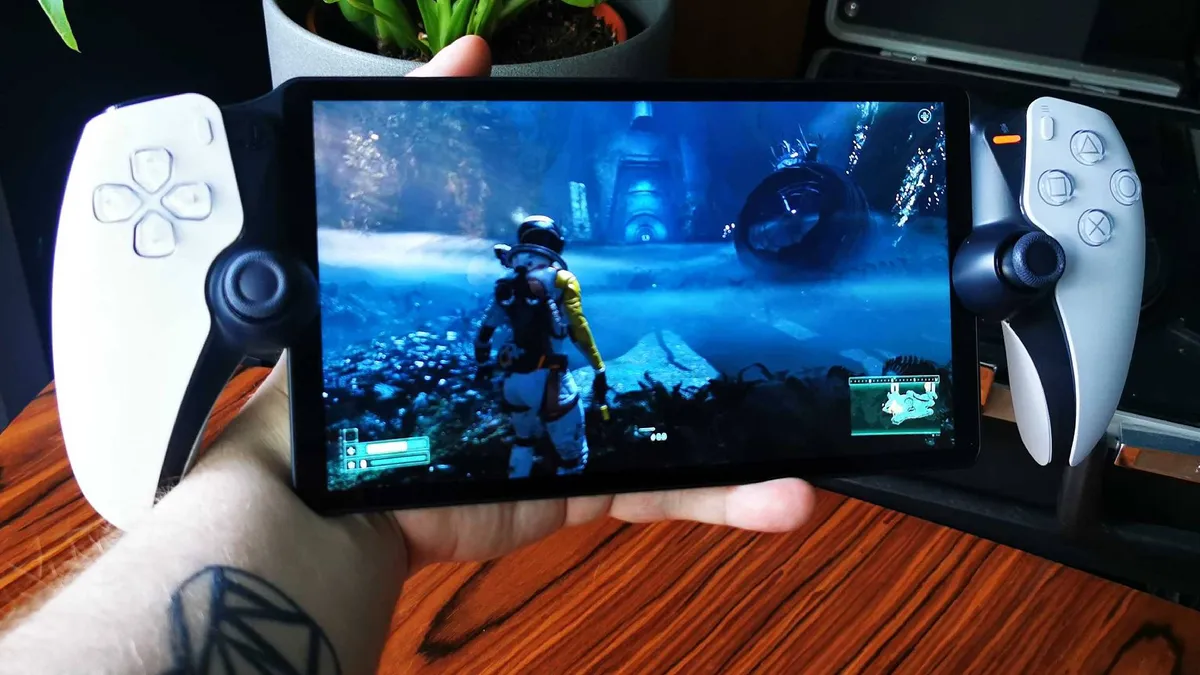


The PlayStation Portal isn't the PS5 handheld we were all dreaming it could be. It can connect to Wi-Fi and remote play with a console that's switched on or in rest mode, but it's not a portable version of the platform. This is a real shame because the potential a device like that could have in today's market is boundless. In reality, what we have is a DualSense controller with a screen, so it's still worth a spot on this list.
✅ You live with others: If you live with other people who want to use the TV, the PlayStation Portal is your best way to keep gaming sessions going.
✅ You want to play on the toilet: Let's be real here, the PlayStation Portal is pretty perfect if you need to take your gaming sessions to other rooms in your home.
✅ You want a PS5 handheld: Regardless of some missing features, this is as close as you'll get to a PS5 handheld.
❌ Your internet is slow: Got a slow network at home? Portal performance may suffer as a result.
❌ You don't have a PS5: This might sound silly, but the PS Portal won't work with the PS4, so you're going to need Sony's new-gen console.
❌ You want access more games: The Portal can only stream games using remote play, so if you're after something with more functionality, this isn't the device for you.
Design and Features: The PS Portal is effectively an 8-inch LCD screen sandwiched between two halves of a DualSense controller. For that reason, you'll get DualSense features like trigger resistance and haptic feedback, but there's not a lot else separating this from a Backbone One mobile controller you'll find a little further down this list. While the handheld itself fully relies on the PS5 in terms of gameplay, at least this will furnish your fingers with full-sized controls, haptic feedback, and adaptive triggers, so it'll feel more like you're playing your PlayStation 5.
That's sort of it though, it really is a controller with a screen. There's no internal processing that'll allow this to run games natively. Aesthetically, at least it blends right into the existing PS5 family. Despite the initial reveal rumors, this device doesn't need to be connected to the same Wi-Fi as your PS5.
Performance: Your mileage will vary based on your broadband connection, but if you use a reliable network, you'll be able to stream PS5 games with next to no lag. You will potentially run into issues if you choose to also download games to your console while playing, but you shouldn't experience any issues if you avoid doing that. Naturally, frame rates and visual performance are intrinsic to whatever you're actually trying to play using the PS5 itself, meaning any shortcomings are its fault rather than the handheld's.
Comfort | ★★★★ |
Ergonomics | ★★★ |
Pro features | ★★ |
Longevity | ★★★ |
Battery life | ★★★★ |
Add-ons | ★★ |
Multiplayer potential | ★★★ |
Singleplayer potential | ★★★★ |
The best racing wheel for PS5


It feels like it's been ages since Logitech came to market with a new sim racing system that was easily recommendable to most PS5 players. Of course, the G Pro and RS Wheel Hub have both been around in recent times, but their high prices have made it difficult to see them as progressions from the classic G923 and G920 wheels that are still popular today.
✅ You’re looking for a sim racing controller
✅ You want excellent features without overspending
✅ You want a compact racing setup
❌ You’re after the most premium wheel there is
❌ You’re brand new to sim racing
Design & Features: The RS50 is so great because it combines the best aspects of this brand's other products. There's power and a modular design that carries over from the premium G Pro setup, but compatibility across platforms and with older pedals and gear shifters for existing fans. All the while, it doesn't cost a grand. Consideration has gone into this system for people who race at a desk, and for those who don't go all-in on a cockpit seat.
The pedals are adjustable, and that goes for the modular aspect of the wheelbase too. Thanks to the RS Wheel Hub, you can attach a versatile number of attachments and wheel shapes to the base.
Performance: The 8Nm wheel base has all the power you'll need for most PS5 and PC racing games, but it managed to fit that power into a smaller footprint, so it doesn't feel like you're sacrificing all of your desk space or making a mainstay racing setup in your living room. Thanks to excellent build quality and Logitech's TRUEFORCE tech, you get detailed and vivid feedback despite the smaller wheelbase.
Overall, for its mid-range price, this is the best all-round sim racing bundle for PS5 players. If you're brand new to sim racing, I'd still opt for a cheaper option because this is still a hefty investment for a beginner who might not make the most out of the RS50's features. For everyone else, this is probably the best one to aim for if you don't have the massive budget needed for the full-fat G Pro.
Comfort | ★★★★ |
Ergonomics | ★★★★ |
Pro features | ★★★★ |
Longevity | ★★★★ |
Battery life | NA |
Add-ons | ★★★★ |
Multiplayer potential | ★★★★ |
Singleplayer potential | ★★★★ |
The best guitar controller for PS5


If you're looking for a very specific type of controller, you've found the right point on this list. Fortnite Festival is alive and kicking, but so are some nostalgic PS4 rhythm games that require a little less "pro" controller and a little more "Axe" controller. The PDP Riffmaster has officially licensed versions for Switch, Xbox, and PS5, making it a go-to for compatibility with every home console.
✅ You play a lot of Fortnite Festival or other rythm games
✅ You don't like the look of other compatible guitar controllers for PS5
❌ You need a clicky strumming bar to keep you in time
❌ You think the design is bland
Design & Features: Obviously, the Riffmaster is slightly different in its design than the other PS5 controllers on this list. That said, it does have the standard PS5 face buttons thanks to its official licensing. You'll even be able to navigate menus thanks to handy quality of life upgrades over the guitar controllers of previous generations. There's a thumbstick on the back of the neck, and a PlayStation button to help pull you into the console's UI.
You can fold away the Riffmaster if you don't want to keep it out on display, which is much more practical than OG Guitar Hero controllers. You can attach a 3.5mm headphone jack, play wirelessly, and even store away the wireless dongle thanks to a handy detachable faceplate that conceals a slot for safe storage.
Performance: As you'd expect, this isn't a controller I'd recommend for first person shooters or most PS5 games. This is really going to serve you in one specific genre of game, and so it's up to you whether or not it'll be worth the investment for you. The great thing about the Riffmaster is that it's improved a lot about the typical guitar controllers we used to see often in the Rock Band and Guitar Hero era. The fret buttons are flat and level with the neck of the guitar, actuating with a premium feel that doesn't require loads of grip strength to actuate. Those quality of life benefits make it really handy to use at your leisure. But it is pricey, so if you're torn between a niche buy like this or a pro controller that'll serve you in other games, it's a tough call.
The Riffmaster is great, but it's not the only option either. There's also CRKD's Gibson Les Paul controller and an upcoming option from the makers of the original Guitar Hero games. I'd argue that either will offer you more rock god personality, but the Riffmaster's reliability and easy PS5 compatibility make it easy to recommend on this list.
How we test the best PS5 controllers
Testing controllers begins with unboxing. This is the early impression stage where we get the device out of its packaging and get a feel for it in the hands. Even without playing games with it, I'll ask how comfortable it is to hold - does it feel natural, smooth, or angular? How heavy is it? These are all things that will inform gaming performance later, so it's good to get an idea for them right away. It's also important to lay out how much you get for your money in this stage, and often, unboxing will be when we go through any attachments or cases that come along with the controller.
Then, it's onto testing. I'll usually make whichever pad I'm reviewing the one I use for all my gaming time until I'm ready to write up my thoughts. That means we'll test across various titles depending on what's relevant, but there are a few games that exist to give us some objective tests. Celeste is a great barometer for platforming precision, so I'll load up some levels of that, and see how the controller helps or hurts me while climbing one of gaming's most hazardous mountains. For first-person shooter accuracy, I'll play Hunt: Showdown. This is the game I've played most of in my life, and my settings never change, so it's a great way to objectively test each new controller and scout out its FPS potential.
Beyond those games, we'll always find a fighting game, a third-person action/adventure, a racing game, and other miscellaneous titles to test with. We'll assess a controller's battery life, back buttons, and durability from continuous testing. If a pad does come with attachments we can swap out, we'll use these to measure how versatile it can be.
For more on how we test the latest controllers, take a gander at our hardware policy.
Best PS5 controller FAQs
How to choose the best PS5 controller for you
Why you can trust GamesRadar+ Our experts review games, movies and tech over countless hours, so you can choose the best for you. Find out more about our reviews policy.
PS5 controllers come in many different forms, and the best way to narrow down your search and get the most for your money is to work out what you'd use one for. Do you need a replacement daily driver because the DualSense has cracked under the pressure of your everyday use? Maybe a new DualSense is the one to go for.
Do you want a pro controller to climb the ladders in your favorite games? If so, what type of game is it? We've detailed above which controllers are good for what type of game, so use that advice to narrow down your search.
Do you have bigger or smaller hands? If you're on the larger side, maybe opt for the Nacon options rather than the Victrix ones, since these brands lean into different size preferences.
Maybe you don't want a multiplayer controller, but you play singleplayer games to a high difficulty, and you want some back buttons to help you out. Maybe the DualSense Edge is the best one for you, since you'll still get all the haptic feedback and trigger resistance the PS5 is known for, but you'll gain the pro features of other gamepads on this list.
Of course, the situational controllers will be worth their weight in gold if you spend a lot of time playing on the go, or playing a specific type of game. Racing games get better the more you play them with a wheel and pedal setup, and remote playing has never been easier thanks to mobile controllers and the PlayStation Portal.
How to connect a PS5 controller to a PC
To connect your PS5 controller to a PC, you'll need to pair the DualSense with your machine via Bluetooth. Begin by ensuring it's no longer connected to your console – if it is, you can press down and hold the PS home button until the controller turns off. Then, press and hold down the PS home button and the share button at the same time until the light bar flashes.
You'll then need to enable Bluetooth on your PC by locating Bluetooth and devices in your settings menu. If your PC has Bluetooth, you should then have the option to turn it on and pair with your controller. If you don't have Bluetooth, you'll need to get a Bluetooth adapter for your PC.
If you’re using a third-party, officially licensed PS5 controller, all you’ll need to do to connect it to a gaming PC is insert the supplied USB dongle or cable. If your controller has a toggle switch to change between PS5 and PC play, you’ll also need to flick that switch.
How to reset a PS5 controller
To reset a PS5 controller, shut down your console and ensure your DualSense is disconnected from its USB cable. Then you'll need to locate the small pin-sized button on the back of the DualSense controller. You'll need a paper clip, pin, or something similar (an ejector tool that can be used on phones to open sim card trays should also work), and use it to push down and hold the button for around five seconds. The controller will then reset, and you can then reconnect it to your console.

How to pair a PS5 controller
To pair your PS5 controller, begin by turning on your PS5 console. To pair a new controller, connect it to a USB-C charging cable (one is included with your console). Simply turn the controller on using the PS home button in the centre of the gamepad when it’s wired up, and the console will do the rest. You should see the lights on the controller flash and stop once it's on and connected to your console.
How to connect a PS5 controller to an iPhone
You can connect your PS5 controller to an iPhone via Bluetooth. To do this, you'll need to hold down the PS home button and the share button at the same time until the light bar flashes. This will put the controller in pairing mode and make it discoverable on your iPhone. Then you need to open up your phone and go to your Bluetooth settings, and then select the controller you want to connect.

Are PS5 Pro controllers worth it?
We'd argue that the best PS5 controllers with back buttons and extra features are definitely worth it, if you can afford them. Having extra mappable buttons provides so much extra functionality compared to a stock DualSense, and if you like to play competitive multiplayer games, these can give you a massive advantage. Other pro controllers will have extra features like trigger stops, custom thumbstick deadzones, and sometimes even modular designs that let you change their make-up to suit you and the game you're playing.
What PS5 controllers do pros use?
If we had to guess, pro players who are looking for a competitive edge for their streams or tournaments are likely using a controller like the Victrix Pro BFG, the Razer Wolverine V2 Pro, or the Scuf Reflex range. These all have back buttons that allow for extra in-game functions than a typical DualSense will. If they're playing last gen games on PS5, they could also be using a PS4 pro controller, like the Nacon Revolution Unlimited, Razer Raiju, or Thrustmaster eSwap Pro.

What is the best PS5 controller to avoid stick drift?
You have a few options if you're looking to take stick drift out of the equation entirely. Firstly, you can buy a controller with Hall Sensor thumbsticks, like the Nacon Revolution 5 Pro. Alternatively, you can mod a regular DualSense or DualSense edge to have Hall Sensor thumbsticks in them. This will void your warranty though, and usually needs to be done by a third party (who we don't endorse and haven't had any dealings with). Controllers like the Victrix Pro BFG don't come with Hall sticks out of the box, but separate Hall Effect modules are available to purchase.
What is the best 3rd party controller PS5?
In our opinion, the best PS5 controller overall is a third party one named the Victrix Pro BFG. It has a modular build so you can swap out the positioning of buttons and sticks, it has four back buttons, and plenty of thumbstick options to help you gear up for your favorite game. If you're looking for specific PS5 features and software integration, the DualSense Edge is a great option, although it's more expensive than the Victrix Pro BFG.

Which PS5 controller version is best?
To begin with, we'd say that the DualSense is one of the best ways to experience PS5 games. A lot of games, especially first-party ones, are designed with the DualSense's bespoke features in mind, so it's got to be one of the best controllers for the console out there. Besides that, we can recommend the Scuf Reflex range, and the Victrix Pro BFG as solid alternatives. We'll soon be testing more models for the PS5 specifically, but there are also a myriad of great PS4 controllers that will work on PS5 if you play a lot of last-gen games.
What colour of PS5 controller is best?
There really is no accounting for taste. After cries for a black version of the Ps5 and DualSense, there are likely many folks who would say that the sleek, classy design of the controller is accentuated by the Midnight Black colour, although it really comes down to preference. The DualSense comes in Nova Pink, Original White, Cosmic Red, Starlight Blue, Galactic Purple, Grey Camouflage, and in a limited edition God of War Ragnarok design.

Why do you need back buttons?
Back buttons are an incredibly useful addition to video game controllers, since they let you have more functionality that isn't controlled by your thumbs. For example, in competitive FPS games, you don't want to take control away from the movement or camera stick, so having back buttons lets you complete actions in the game without losing out on movement. This helps to bring console players a little closer to the performance of mouse and keyboard.
While you're at it, why not kit out more of your set-up with the best PS5 accessories? alternatively, get a noteworthy upgrade with one of the best TVs for PS5 and Xbox Series X.

