
Join The Community
- Join our community
11
Premium Benefits
24/7
Access Available
21K+
Active Members
Commenting
Join the discussion
Exclusive Articles Coming Soon
Member-only articles
Weekly Newsletters
Weekly gaming & entertainment news
Member Badges
Earn badges as you go
Exclusive Competitions
Members-only prize draws
Curated Deals Coming Soon
Tech and gaming deals worth grabbing
GET COMMUNITY ACCESS QUICK
For the quickest way to join, simply enter your email below and get access. We will send a confirmation and sign you up to our newsletter to keep you updated on all your gaming news.
By submitting your information you agree to the Terms & Conditions and Privacy Policy and are aged 16 or over.
FIND OUT ABOUT OUR MAGAZINE
Want to subscribe to the magazine? Click the button below to find out more information.
Find out more
GET Community ACCESS QUICK

Join the GamesRadar community for quick access. Enter your email below and we'll send confirmation, and sign you up to our newsletter.

By submitting your information you agree to the Terms & Conditions and Privacy Policy and are aged 16 or over.

Background
Welcome to GamesRADAR+ Community !
Hi ,

Your membership journey starts here.

Keep exploring and earning more as a member.

MY ACCOUNT

Badge picture
Earn your first badge
Read 1 article to unlock your first badge.
Keep earning badges
Explore ways to get more involved as a member.
Latest Games News

Latest Games News

Breaking gaming news and updates

Read Now
Latest Games Reviews

Latest Games Reviews

Expert verdicts on the newest releases

Read Now

See what you’ve unlocked.

Explore your membership benefits.

Explore
Member Exclusives

Stay Ahead with GamesRadar+

Get the biggest gaming news, reviews, and releases straight to your inbox.

Explore

Sign Out
GamesRadar+ GamesRadar+
US EditionUS CA EditionCanada UK EditionUK AU EditionAustralia
Sign in
  • View Profile
  • Sign out
  • Games
    • Game Insights
      • Games News
      • Games Features
      • Games Reviews
      • Games Guides
      • Big in 2026
      • The Big Preview
      • On The Radar
      • Indie Spotlight
      • Future Games Show
      • Golden Joystick Awards
    • Genres
      • Action Games
      • RPGs
      • Action RPGs
      • Adventure Games
      • Third Person Shooters
      • FPS Games
    • Platforms
      • PS5
      • Xbox Series X
      • PC
      • Nintendo Switch
      • Nintendo Switch 2
      • Tabletop Gaming
    • Franchises
      • Grand Theft Auto
      • Pokemon
      • Assassin's Creed
      • Monster Hunter
      • Fortnite
      • Cyberpunk
      • Red Dead
      • The Elder Scrolls
      • The Sims
  • Entertainment
    • TV Shows
      • TV News
      • TV Reviews
      • Anime Shows
      • Sci-Fi Shows
      • Superhero Shows
      • Animated Shows
      • Marvel TV Shows
      • Star Wars TV Shows
      • DC TV Shows
    • Movies
      • Movie News
      • Movie Reviews
      • Big Screen Spotlight
      • Superhero Movies
      • Action Movies
      • Anime Movies
      • Sci-Fi Movies
      • Horror Movies
      • Marvel Movies
      • DC Movies
    • Streaming
      • Apple TV Plus
      • Disney Plus
      • Netflix
      • HBO
      • Amazon Prime Video
      • Hulu
    • Comics
      • Marvel Comics
      • DC Comics
    • Toys & Collectibles
    • Lego
    • Dungeons and Dragons
    • Merch
  • Hardware
    • Insights
      • Hardware News
      • Hardware Reviews
      • Hardware Features
    • Computing
      • Desktop PCs
      • Laptops
      • Handhelds
    • Peripherals
      • Headsets & Headphones
      • TVs & Monitors
      • Gaming Mice
      • Gaming Keyboards
      • Gaming Chairs
      • Speakers & Audio
    • Accessories & Tech
      • Gaming Controllers
      • Tech
      • SSDs & Hard Drives
      • VR
      • Accessories
      • Retro
  • Deals
    • Game Deals
    • Tech Deals
    • TV Deals
    • Buying Guides
  • Video
    • Video
    • GR+ Replay - Submit Your Clips
  • Newsletters
    • Quizzes
    • About Us
    • How to pitch to us
    • How we score
    • Newsarama
    • Retro Gamer
    • Total Film
  • home
  • Games
    • View Games
      • Games News
      • Games Features
      • Games Reviews
      • Games Guides
      • Big in 2026
      • The Big Preview
      • On The Radar
      • Indie Spotlight
      • Future Games Show
      • Golden Joystick Awards
      • Action Games
      • RPGs
      • Action RPGs
      • Adventure Games
      • Third Person Shooters
      • FPS Games
    • Platforms
      • View Platforms
      • PS5
      • Xbox Series X
      • PC
      • Nintendo Switch
      • Nintendo Switch 2
      • Tabletop Gaming
      • Grand Theft Auto
      • Pokemon
      • Assassin's Creed
      • Monster Hunter
      • Fortnite
      • Cyberpunk
      • Red Dead
      • The Elder Scrolls
      • The Sims
  • Entertainment
    • View Entertainment
    • TV Shows
      • View TV Shows
      • TV News
      • TV Reviews
      • Anime Shows
      • Sci-Fi Shows
      • Superhero Shows
      • Animated Shows
      • Marvel TV Shows
      • Star Wars TV Shows
      • DC TV Shows
    • Movies
      • View Movies
      • Movie News
      • Movie Reviews
      • Big Screen Spotlight
      • Superhero Movies
      • Action Movies
      • Anime Movies
      • Sci-Fi Movies
      • Horror Movies
      • Marvel Movies
      • DC Movies
    • Streaming
      • View Streaming
      • Apple TV Plus
      • Disney Plus
      • Netflix
      • HBO
      • Amazon Prime Video
      • Hulu
    • Comics
      • View Comics
      • Marvel Comics
      • DC Comics
    • Toys & Collectibles
    • Lego
    • Dungeons and Dragons
    • Merch
  • Hardware
    • View Hardware
      • Hardware News
      • Hardware Reviews
      • Hardware Features
      • Desktop PCs
      • Laptops
      • Handhelds
    • Peripherals
      • View Peripherals
      • Headsets & Headphones
      • TVs & Monitors
      • Gaming Mice
      • Gaming Keyboards
      • Gaming Chairs
      • Speakers & Audio
      • Gaming Controllers
      • Tech
      • SSDs & Hard Drives
      • VR
      • Accessories
      • Retro
  • Deals
    • View Deals
    • Game Deals
    • Tech Deals
    • TV Deals
    • Buying Guides
  • Video
    • View Video
    • Video
    • GR+ Replay - Submit Your Clips
  • Newsletters
    • Quizzes
    • About Us
    • How to pitch to us
    • How we score
    • Newsarama
    • Retro Gamer
    • Total Film
Trending
  • Amazon Spring Sale
  • New Games for 2026
  • Crimson Desert
  • Submit your clips. Win prizes
  • Pokopia
Jump to:
  • Pokemon Go
  • Pokemon Red/Blue/Yellow/Gold/Silver/Crystal Virtual Console
  • Pokemon Ruby/Sapphire/Emerald/Fire Red/Leaf Green
  • Pokemon Diamond/Pearl/Platinum/Heart Gold/Soul Silver
  • Pokemon Black/Black 2/White/White 2/X/Y/Omega Ruby/Alpha Sapphire/Sun/Moon/Ultra Sun/Ultra Moon
  • Pokemon Bank
  • Pokemon Sword/Shield/Let's Go Pikachu/Let's Go Eevee
Don't miss these
Pokemon Go codes
Pokemon Pokemon Go codes (March 2026) and how to redeem them
Pokemon
Anime Shows How to watch Pokemon in order: a complete guide to the TV show and movies
Greninja and Sylveon fight in Pokemon Champions
Pokemon I made a competitive team in minutes in Pokemon Champions – this could open the door for newcomers
Pokemon Gold and Silver
Pokemon The best Pokemon games, ranked from worst to best
Secret missions in Pokemon TCG Pocket
Pokemon All Secret missions in Pokemon TCG Pocket
Pokemon Presents 2026
Pokemon All Pokemon Presents 2026 codes and rewards for Pokemon Go, Legends Z-A, TCG Pocket, and more
The lighthouse in Pokopia
Pokemon Pokemon Pokopia Team Initiation Challenge and how to get every item needed
Key art for Pokemon Champions
Pokemon Pokemon Champions: Everything you need to know ahead of the Nintendo game's release
Pokemon Pokopia screenshot showing Charmander, Bulbasaur, and Squirtle all gathered around a Ditto in human form between two green trees
Pokemon The ultimate Pokemon Pokopia guide for restoring the world around you
A screenshot from the Pokemon Pokopia trailer shows Ditto transformed into a human.
Pokemon 13 things I wish I knew before starting Pokemon Pokopia
Pokemon First Partner Illustration Collection Series 1 box against a colorful background with a Charmander, statues, and other items from the original video games
Tabletop Gaming Where to buy Pokemon TCG First Partner Illustration Collection Series 1, the highly anticipated new release
A trainer looking out at the ocean during the trailer for Pokemon Winds and Waves
Pokemon Pokemon Winds and Waves: Everything we know about the next Pokemon game so far
A selection of crafting recipes from the building screen in Pokemon Pokopia
Pokemon How to find new recipes in Pokemon Pokopia
Pokemon Pokopia screenshot
Pokemon Pokemon Pokopia review: "A brilliantly bizarre blend of Pokemon and Animal Crossing"
Image of the Hori Eevee Cottage Core Switch 2 accessory set.
Accessories The adorable Eevee Cottage Core Switch 2 accessory set from Hori has reignited my love of the classic Pokemon
  1. Games
  2. Adventure
  3. Pokemon
  4. Pokemon Home

Pokemon Home transfer guide: How to get Pokemon from Gen 1 to Sword and Shield

Guides
By Ford James published 14 February 2020

How to use Pokemon Home and transfer Pokemon between games

When you purchase through links on our site, we may earn an affiliate commission. Here’s how it works.

(Image credit: The Pokemon Company)
Jump to:
  • Pokemon Go
  • Pokemon Red/Blue/Yellow/Gold/Silver/Crystal Virtual Console
  • Pokemon Ruby/Sapphire/Emerald/Fire Red/Leaf Green
  • Pokemon Diamond/Pearl/Platinum/Heart Gold/Soul Silver
  • Pokemon Black/Black 2/White/White 2/X/Y/Omega Ruby/Alpha Sapphire/Sun/Moon/Ultra Sun/Ultra Moon
  • Pokemon Bank
  • Pokemon Sword/Shield/Let's Go Pikachu/Let's Go Eevee
  • Facebook
  • X
  • Pinterest
  • Flipboard
  • Email
Share this article
Join the conversation
Follow us
Add us as a preferred source on Google
Sign up to the GamesRadar+ Newsletter

Weekly digests, tales from the communities you love, and more


By submitting your information you agree to the Terms & Conditions and Privacy Policy and are aged 16 or over.

You are now subscribed

Your newsletter sign-up was successful


Want to add more newsletters?

GamesRadar+

Every Friday

GamesRadar+

Your weekly update on everything you could ever want to know about the games you already love, games we know you're going to love in the near future, and tales from the communities that surround them.

GTA 6 O'clock

Every Thursday

GTA 6 O'clock

Our special GTA 6 newsletter, with breaking news, insider info, and rumor analysis from the award-winning GTA 6 O'clock experts.

Knowledge

Every Friday

Knowledge

From the creators of Edge: A weekly videogame industry newsletter with analysis from expert writers, guidance from professionals, and insight into what's on the horizon.

The Setup

Every Thursday

The Setup

Hardware nerds unite, sign up to our free tech newsletter for a weekly digest of the hottest new tech, the latest gadgets on the test bench, and much more.

Switch 2 Spotlight

Every Wednesday

Switch 2 Spotlight

Sign up to our new Switch 2 newsletter, where we bring you the latest talking points on Nintendo's new console each week, bring you up to date on the news, and recommend what games to play.

The Watchlist

Every Saturday

The Watchlist

Subscribe for a weekly digest of the movie and TV news that matters, direct to your inbox. From first-look trailers, interviews, reviews and explainers, we've got you covered.

SFX

Once a month

SFX

Get sneak previews, exclusive competitions and details of special events each month!


Join the club

Get full access to premium articles, exclusive features and a growing list of member rewards.


An account already exists for this email address, please log in.
Subscribe to our newsletter

Pokemon Home launched today and as a result, you can now use the app to transfer Pokemon between games. We've got a complete Pokemon Home transfer guide so you can learn how to bring your pocket monsters across from other games and use them in titles like Pokemon Sword and Shield, and Pokemon Let's Go Pikachu and Eevee. Here's everything you need to know about Pokemon Home transfers and trades.

How to transfer Pokemon from every generation through to Pokemon Home

Pokemon Home transfer guide

(Image credit: Nintendo)

Below, we have a guide on how to bring forward Pokemon from every single generation to Pokemon Home and as a result, Pokemon Sword and Shield. Make sure you read everything thoroughly because some parts require either a premium Pokemon Home or Pokemon Bank subscription – which are separate entities – and some of the older games aren't compatible. Good luck, because the process isn't simple!

Pokemon Go

Pokemon Go
(Image credit: Getty Images / Portland Press Herald)

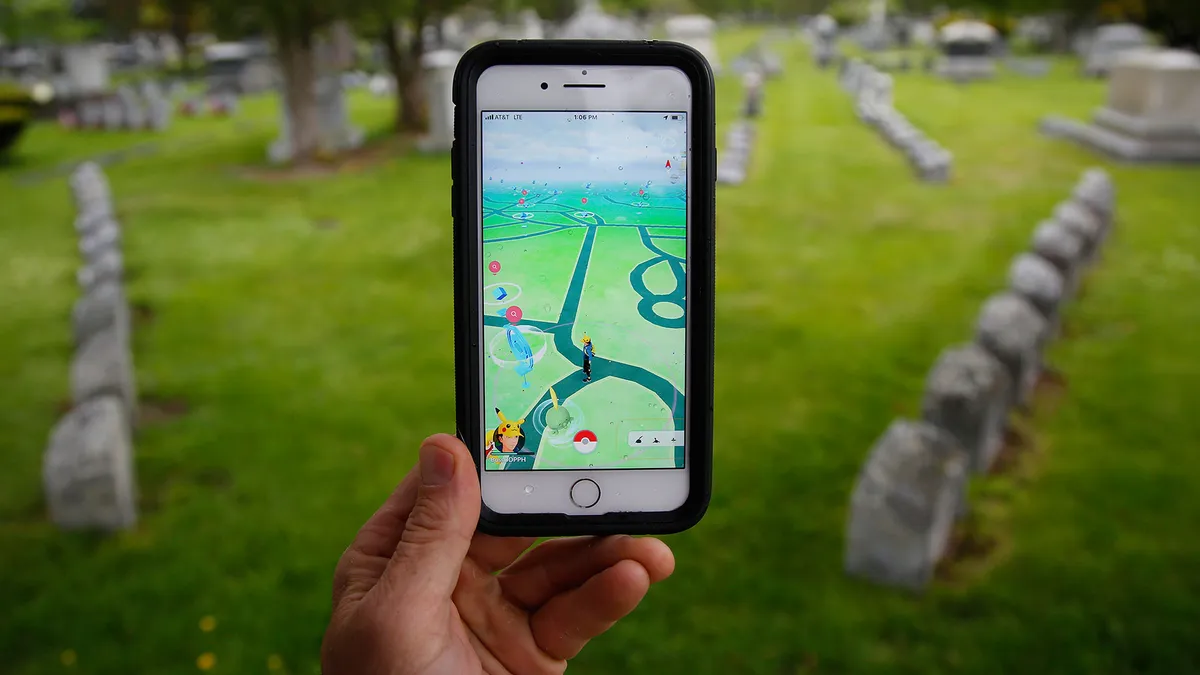
First up, let's get Pokemon Go out of the way. Unfortunately – at the time of writing – you cannot transfer Pokemon from Pokemon Go to Pokemon Home, but you will be able to later down the line. The Pokemon Company hasn't provided an ETA for when Pokemon Go compatibility will be available but it has confirmed it is working on it and is part of the overall plan for Pokemon Home. Sorry, Pokemon Go players! You'll have to wait a little longer.

Article continues below
You may like
  • Zoomed-in, cropped box art for Pokemon FireRed shows Charizard roaring. Pokemon FireRed and LeafGreen re-releases will be compatible with Pokemon Home after all
  • A Gigantamax Machamp appears - from Pokemon Sword and Shield's entry in The Story of Pokemon bookazine These five Pokemon Sword and Shield features made huge changes, taking the RPG series from handheld to the big screen
  • Pokemon Pokopia screenshot showing Charmander, Bulbasaur, and Squirtle all gathered around a Ditto in human form between two green trees The ultimate Pokemon Pokopia guide for restoring the world around you

Pokemon Red/Blue/Yellow/Gold/Silver/Crystal Virtual Console

Pokemon Red, Blue, and Yellow (Gen 1) plus Pokemon Gold, Silver, and Crystal (Gen 2)

(Image credit: The Pokémon Company)

Starting right from the beginning with Gen 1 (Pokemon Red, Blue, Green), Pokemon captured in any of these games can be transferred forward a generation to Gen 2 (Pokemon Gold, Silver, and Crystal). Unfortunately, this can only be done with the Virtual Console versions of these games on Nintendo 3DS. Pokemon on these games on the Game Boy versions can only be traded with each other, and not onto Ruby, Sapphire, Emerald and onwards.

Boot up the game via Virtual Console on Nintendo 3DS and make sure that all of your Pokemon that you want to transfer are in Box 1 of your PC, with no other Pokemon in that box.

Now you need to open up both Pokemon Bank and Poke Transporter – if you don't have them both already then you can download them from the Nintendo 3DS eShop. Make sure you have an active subscription to Pokemon Bank otherwise this whole process won't be possible.

Open Poke Transporter, choose the Pokemon game you want to transfer from, then select Box 1 with all the Pokemon inside that you want to transfer. This will transfer the Pokemon from that game to Pokemon Bank via Poke Transporter. Scroll on down to the section about transferring Pokemon from Pokemon Bank to Pokemon Home to find out how to get them out of Bank.

Sign up to the GamesRadar+ Newsletter

Weekly digests, tales from the communities you love, and more

By submitting your information you agree to the Terms & Conditions and Privacy Policy and are aged 16 or over.

Pokemon Ruby/Sapphire/Emerald/Fire Red/Leaf Green

Pokemon Ruby, Sapphire, Emerald (Gen 3) plus Pokemon Fire Red and Leaf Green (Gen 1 remakes)

Pokemon Ruby and Sapphire

(Image credit: Nintendo)

In order to transfer Pokemon from the Gen 3 games (Pokemon Ruby, Sapphire, and Emerald) and the Gen 1 remakes (Pokemon Fire Red and Leaf Green), you need to own a Nintendo DS with a Game Boy Advance (GBA) cartridge slot. These Pokemon will also go to Pokemon Home via one of the Gen 4 games (Pokemon Diamond, Pearl, and Platinum) or one of the Gen 2 remakes (Pokemon Heart Gold and Pokemon Soul Silver), so you need one of those Nintendo DS games too.

In-game requirements

If you're trading to Pokemon Diamond or Pearl, you need to ensure you've seen every Pokemon in the Sinnoh Pokedex (150 excluding Manaphy), then spoken to Professor Rowan in Sandgem Town to obtain the National Pokedex.

You may like
  • Zoomed-in, cropped box art for Pokemon FireRed shows Charizard roaring. Pokemon FireRed and LeafGreen re-releases will be compatible with Pokemon Home after all
  • A Gigantamax Machamp appears - from Pokemon Sword and Shield's entry in The Story of Pokemon bookazine These five Pokemon Sword and Shield features made huge changes, taking the RPG series from handheld to the big screen
  • Pokemon Pokopia screenshot showing Charmander, Bulbasaur, and Squirtle all gathered around a Ditto in human form between two green trees The ultimate Pokemon Pokopia guide for restoring the world around you

In Pokemon Platinum, you just need to obtain the standard Pokedex from Professor Rowan in Sandgem Town and ensure you have at least two Pokemon in your party.

For Pokemon Heart Gold and Soul Silver, defeat the Elite Four and enter the Hall of Fame, then attempt to board the S.S. Aqua to receive the National Pokedex.

How to trade

Before you trade any Pokemon on from the GBA games, be aware that this is a one-way trade. This means you cannot trade Pokemon back to these games, so make sure you're prepared to not see any of the Pokemon you trade in the GBA games again.

To begin the trade, insert both the GBA game and DS game of your choice into the console. Boot up the DS game and select the "Migrate from [GBA game name]" option in the menu. Say "Yes" to the option to migrate, then select six Pokemon to transfer.

Load up your save game in the DS game then head to the Pal Park. In Diamond, Pearl, and Platinum, the Pal Park location can be found on Route 221. In Heart Gold and Soul Silver, you need to go to Fuschia City. One tip before heading to the Pal Park however is to bring a Pokemon that knows Surf, since some areas are inaccessible without it.

Participate in a Catching Show and you'll be given six Park Balls. These are only usable in the Pal Park but catch a Pokemon every time without fail. Explore the tall grass and the six Pokemon you've transferred from the GBA games will eventually appear, and you can catch them all, at which point you'll be asked if you want to store them in a box.

Pokemon Diamond/Pearl/Platinum/Heart Gold/Soul Silver

Pokemon Diamond, Pearl, Platinum (Gen 4), plus Pokemon Heart Gold and Soul Silver (Gen 2 remakes)

Pokemon Diamond and Pearl

(Image credit: Nintendo)

Now you've got the Pokemon you want to trade up to Pokemon Home on one of the Gen 4 games or the Gen 2 remakes, it's time to get them onto Pokemon Black, Black 2, White, or White 2 (Gen 5). Once again, this is a one-way transfer so you can't transfer them back once they've been brought forward.

In order to do this trade, you need to have two Nintendo DS consoles. One console needs to have the Gen 4 game inserted, while the other needs the Gen 5 game.

In-game requirements

In any of the four Gen 5 games, you need to ensure you've beaten the Elite Four and entered the Hall of Fame. Then head to the Poke Transfer Lab on Route 15. Talk to the scientist at the top of the lab.

How to trade

Once you've done that, select the option to use another Nintendo DS then select DS Wireless Communications. Turn on the other console and select DS Download Play. Select the game with the same ID number as your Gen 5 game in the first console, then select Yes. Pick the six Pokemon you wish to transfer across then you'll be introduced to a minigame.

To complete the minigame, simply drag the stylus around the touch screen to pull the Poke Ball back as if you were throwing it, and pay attention to the top of the screen to see where the ball will end up. Release the stylus from the screen to throw the ball and if there's any Pokemon hiding in a bush, use a ball to nudge them out of it. When a pink cloud appears towards the end of the game, hit it with a ball to cause al the remaining Pokemon to fall asleep. When the minigame finishes, make sure you select "Yes" to transfer them on to the Gen 5 game, otherwise they'll go back to whichever game they came from. From there, the Pokemon will be sent to your PC on Black, Black 2, White, or White 2.

Pokemon Black/Black 2/White/White 2/X/Y/Omega Ruby/Alpha Sapphire/Sun/Moon/Ultra Sun/Ultra Moon

Pokemon Black, White, Black 2, White 2 (Gen 5), Pokemon X, Y, Omega Ruby, Alpha Sapphire (Gen 6), Pokemon Sun, Moon, Ultra Sun, Ultra Moon (Gen 7)

Pokemon Black & White

(Image credit: Nintendo)

Thankfully, when you've got your Pokemon onto any of the games above, the process becomes much simpler thanks to the use of Pokemon Bank. Much like earlier with the first two generations of Pokemon games on the Virtual Console, you need a Pokemon Bank subscription to make this work. Make sure you have it downloaded and purchased, then open and sign in to the app. Select the appropriate game from the list above and your boxes from that game will be displayed on the touch screen.

Above that on the upper screen is where you'll see your Pokemon Bank boxes and you can use the controls to move the respective Pokemon over. When you're done transferring all the Pokemon you want in Pokemon Home, simply save and exit.

Pokemon Bank

Pokemon Bank

Pokemon Bank

(Image credit: Nintendo)

Now you've brought your Pokemon from any game of your choice all the way to Pokemon Bank, but how do you get them from there onto Pokemon Home (and into Pokemon Sword and Shield)?

Boot up Pokemon Bank and on the main menu should be the fairly self-explanatory option "move Pokemon to Pokemon Home". Now you need to get yourself a Moving Key, which is where you'll need to use Pokemon Home on the Nintendo Switch.

On the main menu, select the 3DS icon underneath the Pokedex option. Make sure you have a premium Pokemon Home subscription, then select Begin Move. This will display a Moving Key which expires in three minutes, so type it into Pokemon Bank on your Nintendo 3DS quick time. When you type it in and hit enter, the transfer will commence and Pokemon Home will become unusable for the duration. When it's done, you can choose whether to bring across all the boxes, or individual Pokemon from each box.

Pokemon Sword/Shield/Let's Go Pikachu/Let's Go Eevee

Pokemon Sword, Shield (Gen 8), Let's Go Pikachu, and Let's Go Eevee

Pokemon Sword and Shield Metal Coat

(Image credit: Nintendo)

Since Pokemon Sword and Shield, and Pokemon Let's Go Pikachu and Let's Go Eevee are on the Nintendo Switch, the process for transferring Pokemon from those games to Pokemon Home is considerably easier. Be wary that while Pokemon from Let's Go can be moved to Sword and Shield, they can't then be transferred back to Let's Go; only Sword and Shield have the ability to transfer to and fro.

On Pokemon Home – as long as you're using it on the same Nintendo Switch console as your Pokemon Sword and Shield or Pokemon Let's Go save files – select Pokemon from the main menu.  This will display your relevant save files, and selecting either one will show your Pokemon Home boxes on the left along with your in-game boxes on the right. Drag and drop any Pokemon you like from one to the other, then hit + to save. Any Pokemon that aren't currently in the Pokemon Sword and Shield Pokedex cannot be brought forward into it though.

That's all there is to it! A seriously convoluted process if you want to bring forward some of your oldest Pokemon, but worth it to have your best pals with you in the latest games. Hopefully, when Gen 9 eventually rolls around, Nintendo will stick with the Pokemon Home service to keep things simple!

CATEGORIES
Android iPad iPhone Nintendo Switch Platforms Mobile Gaming Nintendo
Ford James
Ford James
Social Links Navigation
Freelance Writer

Give me a game and I will write every "how to" I possibly can or die trying. When I'm not knee-deep in a game to write guides on, you'll find me hurtling round the track in F1, flinging balls on my phone in Pokemon Go, pretending to know what I'm doing in Football Manager, or clicking on heads in Valorant.

Read more
Zoomed-in, cropped box art for Pokemon FireRed shows Charizard roaring.
Pokemon Pokemon FireRed and LeafGreen re-releases will be compatible with Pokemon Home after all
 
 
A Gigantamax Machamp appears - from Pokemon Sword and Shield's entry in The Story of Pokemon bookazine
Pokemon These five Pokemon Sword and Shield features made huge changes, taking the RPG series from handheld to the big screen
 
 
Pokemon Pokopia screenshot showing Charmander, Bulbasaur, and Squirtle all gathered around a Ditto in human form between two green trees
Pokemon The ultimate Pokemon Pokopia guide for restoring the world around you
 
 
Key art for Pokemon Champions
Pokemon Pokemon Champions: Everything you need to know ahead of the Nintendo game's release
 
 
A player ponders over a crafting bench in Pokemon Pokopia, not available on the Switch 1.
Pokemon Can I play Pokemon Pokopia on Switch 1?
 
 
A broken Pokemon Center in a player's Pokopia Cloud Island.
Pokemon How to create and visit a Pokemon Pokopia Cloud Island
 
 
Latest in Pokemon
Pokemon Pokopia gameplay showing Ditty in human form, frowning in front of a lighthouse
Pokemon Pokemon Pokopia player builds straight-up jail for their least favorite 'mons: "They are (mostly) comfortable"
 
 
A Pokemon called Magikarp looking stressed on screen
Pokemon Pokemon FireRed and LeafGreen devs found that "the programming sucks" in the original RPGs
 
 
Sableye stands in from of a Pokemon Center in Pokopia
Pokemon Pokopia Sableye event date, time, and details
 
 
Pokopia screenshots on Switch 2
Pokemon Pokemon Pokopia sends monthly Switch 2 sales flying by 154% in the UK
 
 
Pokopia screenshots on Switch 2
Pokemon After depleting Pokopia's natural resources, maybe my Pokémon friends would be better off without me
 
 
Key art for Pokemon FireRed and LeafGreen showing Charizard against a swirling red background, cropped for a header image
Pokemon Pokémon FireRed and LeafGreen's recaps and Pokedex were made to bring in more female players
 
 
Latest in Guides
Arc Raiders flex rubber
Third Person Shooters Where to find Arc Flex Rubber in Arc Raiders
 
 
Arc Raiders Dolabra
Third Person Shooters How to get the Legendary Dolabra in Arc Raiders
 
 
Sableye stands in from of a Pokemon Center in Pokopia
Pokemon Pokopia Sableye event date, time, and details
 
 
Arc Raiders High Gain Antenna
Third Person Shooters All Arc Raiders High-Gain Antenna project materials and rewards
 
 
Arc Raiders Assessors
Third Person Shooters Assessors and Close Scrutiny in Arc Raiders explained
 
 
An image of Strawberry Cookie from Cookie Run Kingdom.
RPGs All Cookie Run Kingdom codes (March 2026) for Crystals, Cubes, and more
 
 
LATEST ARTICLES
  1. Divinity
    1
    Larian chief Swen Vincke says Divinity's development has reached a point "where you sense that a game is coming alive"
  2. 2
    Homelander sentences Billy Butcher to death by Soldier Boy in The Boys season 5 teaser
  3. 3
    Former Overwatch lead Jeff Kaplan has "over 5,000 hours" in Rust and calls it "the pinnacle of PvP games," but his own survival game takes cues from World of Warcraft
  4. 4
    The Boys' final season is officially finished as creator Eric Kripke says farewell to "the best professional experience of my life"
  5. 5
    Pokemon Pokopia player decides Animal Crossing: New Horizons-style banishment isn't enough for their least favorite 'mons, straight-up jails them instead: "They are (mostly) comfortable"

GamesRadar+ is part of Future US Inc, an international media group and leading digital publisher. Visit our corporate site.

Add as a preferred source on Google Add as a preferred source on Google
  • Terms and conditions
  • Contact Future's experts
  • Privacy policy
  • Cookies policy
  • Accessibility statement
  • Careers
  • About us
  • Advertise with us
  • Review guidelines
  • Write for us
  • Accessibility Statement

© Future US, Inc. Full 7th Floor, 130 West 42nd Street, New York, NY 10036.

Please login or signup to comment

Please wait...