Join The Community
- Join our community
11
Premium Benefits
24/7
Access Available
21K+
Active Members
Commenting
Join the discussion
Exclusive Articles Coming Soon
Member-only articles
Weekly Newsletters
Weekly gaming & entertainment news
Member Badges
Earn badges as you go
Exclusive Competitions
Members-only prize draws
Curated Deals Coming Soon
Tech and gaming deals worth grabbing
GET COMMUNITY ACCESS QUICK
For the quickest way to join, simply enter your email below and get access. We will send a confirmation and sign you up to our newsletter to keep you updated on all your gaming news.
By submitting your information you agree to the Terms & Conditions and Privacy Policy and are aged 16 or over.
FIND OUT ABOUT OUR MAGAZINE
Want to subscribe to the magazine? Click the button below to find out more information.
Find out more
GET Community ACCESS QUICK

Join the GamesRadar community for quick access. Enter your email below and we'll send confirmation, and sign you up to our newsletter.

By submitting your information you agree to the Terms & Conditions and Privacy Policy and are aged 16 or over.

Background
Welcome to GamesRADAR+ Community !
Hi ,

Your membership journey starts here.

Keep exploring and earning more as a member.

MY ACCOUNT

Badge picture
Earn your first badge
Read 1 article to unlock your first badge.
Keep earning badges
Explore ways to get more involved as a member.
Latest Games News

Latest Games News

Breaking gaming news and updates

Read Now
Latest Games Reviews

Latest Games Reviews

Expert verdicts on the newest releases

Read Now

See what you’ve unlocked.

Explore your membership benefits.

Explore
Member Exclusives

Stay Ahead with GamesRadar+

Get the biggest gaming news, reviews, and releases straight to your inbox.

Explore

Sign Out
GamesRadar+ GamesRadar+
US EditionUS CA EditionCanada UK EditionUK AU EditionAustralia
Sign in
  • View Profile
  • Sign out
  • Games
    • Game Insights
      • Games News
      • Games Features
      • Games Reviews
      • Games Guides
      • Big in 2026
      • The Big Preview
      • On The Radar
      • Indie Spotlight
      • Future Games Show
      • Golden Joystick Awards
    • Genres
      • Action Games
      • RPGs
      • Action RPGs
      • Adventure Games
      • Third Person Shooters
      • FPS Games
    • Platforms
      • PS5
      • Xbox Series X
      • PC
      • Nintendo Switch
      • Nintendo Switch 2
      • Tabletop Gaming
    • Franchises
      • Grand Theft Auto
      • Pokemon
      • Assassin's Creed
      • Monster Hunter
      • Fortnite
      • Cyberpunk
      • Red Dead
      • The Elder Scrolls
      • The Sims
  • Entertainment
    • TV Shows
      • TV News
      • TV Reviews
      • Anime Shows
      • Sci-Fi Shows
      • Superhero Shows
      • Animated Shows
      • Marvel TV Shows
      • Star Wars TV Shows
      • DC TV Shows
    • Movies
      • Movie News
      • Movie Reviews
      • Big Screen Spotlight
      • Superhero Movies
      • Action Movies
      • Anime Movies
      • Sci-Fi Movies
      • Horror Movies
      • Marvel Movies
      • DC Movies
    • Streaming
      • Apple TV Plus
      • Disney Plus
      • Netflix
      • HBO
      • Amazon Prime Video
      • Hulu
    • Comics
      • Marvel Comics
      • DC Comics
    • Toys & Collectibles
    • Lego
    • Dungeons and Dragons
    • Merch
  • Hardware
    • Insights
      • Hardware News
      • Hardware Reviews
      • Hardware Features
    • Computing
      • Desktop PCs
      • Laptops
      • Handhelds
    • Peripherals
      • Headsets & Headphones
      • TVs & Monitors
      • Gaming Mice
      • Gaming Keyboards
      • Gaming Chairs
      • Speakers & Audio
    • Accessories & Tech
      • Gaming Controllers
      • Tech
      • SSDs & Hard Drives
      • VR
      • Accessories
      • Retro
  • Deals
    • Game Deals
    • Tech Deals
    • TV Deals
    • Buying Guides
  • Video
  • Newsletters
    • Quizzes
    • About Us
    • How to pitch to us
    • How we score
    • Newsarama
    • Retro Gamer
    • Total Film
  • home
  • Games
    • View Games
      • Games News
      • Games Features
      • Games Reviews
      • Games Guides
      • Big in 2026
      • The Big Preview
      • On The Radar
      • Indie Spotlight
      • Future Games Show
      • Golden Joystick Awards
      • Action Games
      • RPGs
      • Action RPGs
      • Adventure Games
      • Third Person Shooters
      • FPS Games
    • Platforms
      • View Platforms
      • PS5
      • Xbox Series X
      • PC
      • Nintendo Switch
      • Nintendo Switch 2
      • Tabletop Gaming
      • Grand Theft Auto
      • Pokemon
      • Assassin's Creed
      • Monster Hunter
      • Fortnite
      • Cyberpunk
      • Red Dead
      • The Elder Scrolls
      • The Sims
  • Entertainment
    • View Entertainment
    • TV Shows
      • View TV Shows
      • TV News
      • TV Reviews
      • Anime Shows
      • Sci-Fi Shows
      • Superhero Shows
      • Animated Shows
      • Marvel TV Shows
      • Star Wars TV Shows
      • DC TV Shows
    • Movies
      • View Movies
      • Movie News
      • Movie Reviews
      • Big Screen Spotlight
      • Superhero Movies
      • Action Movies
      • Anime Movies
      • Sci-Fi Movies
      • Horror Movies
      • Marvel Movies
      • DC Movies
    • Streaming
      • View Streaming
      • Apple TV Plus
      • Disney Plus
      • Netflix
      • HBO
      • Amazon Prime Video
      • Hulu
    • Comics
      • View Comics
      • Marvel Comics
      • DC Comics
    • Toys & Collectibles
    • Lego
    • Dungeons and Dragons
    • Merch
  • Hardware
    • View Hardware
      • Hardware News
      • Hardware Reviews
      • Hardware Features
      • Desktop PCs
      • Laptops
      • Handhelds
    • Peripherals
      • View Peripherals
      • Headsets & Headphones
      • TVs & Monitors
      • Gaming Mice
      • Gaming Keyboards
      • Gaming Chairs
      • Speakers & Audio
      • Gaming Controllers
      • Tech
      • SSDs & Hard Drives
      • VR
      • Accessories
      • Retro
  • Deals
    • View Deals
    • Game Deals
    • Tech Deals
    • TV Deals
    • Buying Guides
  • Video
  • Newsletters
    • Quizzes
    • About Us
    • How to pitch to us
    • How we score
    • Newsarama
    • Retro Gamer
    • Total Film
Trending
  • Pokemon Winds and Waves
  • New Games for 2026
  • Submit your game clips
  • GDC
Jump to:
  • Quick list
  • Best overall
  • Best budget
  • Best dual
  • Best high refresh rate
  • Best 4K
  • Best touchscreen
Don't miss these
Alienware 34 AW3423DW QD-OLED
TVs & Monitors Best ultrawide monitor 2026: Big and wide gaming displays
BenQ Mobiuz EX321UX monitor on desk with Overwatch 2 gameplay on screen.
TVs & Monitors The best monitor for PS5 2026: high spec screens for the OG and Pro
BenQ Mobiuz EX321UX monitor on woodgrain desk with Marvel Rivals character select screen displayed and Squirrel Girl selected.
TVs & Monitors Best monitor for Xbox Series X 2026
LG UltraGear 45GR95QE-B with Halo Infinite Spartans on screen sitting on white desk
TVs & Monitors Best curved gaming monitor 2026: displays I'd grab for immersive PC visuals
BenQ X3100i projector with a DualSense controller on a wooden desk
Peripherals The best projector for gaming: the top throwers I've tested in 2026
Person at desk with pink t shirt and curly hair playing Stardew Valley on Steam Machine with mouse and keyboard.
TVs & Monitors The Steam Machine promises a 4K 60fps experience, but I'd pair it with a 1440p monitor if you're sensitive to disappointment
WD_Black P40 image up close showing the branding and WD_Black logo
Games Best external hard drive for gaming 2026: portable console and handheld storage I'd recommend
HP Omen Max 16 gaming laptop on a wooden desk
Laptops The best gaming laptop 2026 - Omen stays on top while Asus fends off Acer in the 14-inch category
Steam Deck with mascot face on screen surrounded by compatible Steam Deck docks
Handhelds The best Steam Deck dock 2026: the handheld docking stations I'd recommend
LG OLED G4 TV with Overwatch 2 on screen and Pharah selected
TVs & Monitors The best gaming TV 2026: my top high-spec living room screens
LG OLED G4 with Overwatch 2 on screen and Game Hub menu
TVs & Monitors Best 120Hz 4K TV 2026: screens for new consoles and PC
Asus ROG Flow Z13 running Indiana Jones and the Great Circle on battery power
Mobile Gaming The best gaming tablets in 2026
Close up on display of Asus ROG Strix Scar 18 gaming laptop
Laptops The best Asus gaming laptops 2026
Gaming laptop, keyboard, headset, controller, PC and Switch 2 case on an orange background
Hardware GamesRadar+'s best of CES 2026: all the gaming gadgets you need to know about this year
Hand holding Anbernic RG Cube with gameplay from Zelda: Oracle of Seasons intro on screen.
Retro Best retro handheld 2026: my portable picks for playing the classics
  1. Hardware
  2. TVs & Monitors

The best portable monitors for gaming 2026

Buying Guides
By Phil Hayton Contributions from Duncan Robertson, Rob Dwiar, Jeremy Laird last updated 23 December 2025

The best portable monitor could your on-the-go gaming setup a boost, whether you've got a laptop or a handheld.

When you purchase through links on our site, we may earn an affiliate commission. Here’s how it works.

Verbatim portable monitor with Overwatch 2 character select screen on display next to two Squishmallow frogs
(Image credit: Future / Phil Hayton)
Jump to:
  • Quick list
  • Best overall
  • Best budget
  • Best dual
  • Best high refresh rate
  • Best 4K
  • Best touchscreen
  • Facebook
  • X
  • Pinterest
  • Flipboard
  • Email
Share this article
Join the conversation
Follow us
Add us as a preferred source on Google
Get the GamesRadar+ Newsletter

Weekly digests, tales from the communities you love, and more


By submitting your information you agree to the Terms & Conditions and Privacy Policy and are aged 16 or over.

You are now subscribed

Your newsletter sign-up was successful


Want to add more newsletters?

GamesRadar+

Every Friday

GamesRadar+

Your weekly update on everything you could ever want to know about the games you already love, games we know you're going to love in the near future, and tales from the communities that surround them.

GTA 6 O'clock

Every Thursday

GTA 6 O'clock

Our special GTA 6 newsletter, with breaking news, insider info, and rumor analysis from the award-winning GTA 6 O'clock experts.

Knowledge

Every Friday

Knowledge

From the creators of Edge: A weekly videogame industry newsletter with analysis from expert writers, guidance from professionals, and insight into what's on the horizon.

The Setup

Every Thursday

The Setup

Hardware nerds unite, sign up to our free tech newsletter for a weekly digest of the hottest new tech, the latest gadgets on the test bench, and much more.

Switch 2 Spotlight

Every Wednesday

Switch 2 Spotlight

Sign up to our new Switch 2 newsletter, where we bring you the latest talking points on Nintendo's new console each week, bring you up to date on the news, and recommend what games to play.

The Watchlist

Every Saturday

The Watchlist

Subscribe for a weekly digest of the movie and TV news that matters, direct to your inbox. From first-look trailers, interviews, reviews and explainers, we've got you covered.

SFX

Once a month

SFX

Get sneak previews, exclusive competitions and details of special events each month!


Join the club

Get full access to premium articles, exclusive features and a growing list of member rewards.


An account already exists for this email address, please log in.
Subscribe to our newsletter

Some of the best portable monitors for gaming out there can put desktop screens to shame, and I've tested plenty that pack a surprising punch. Not everyone is going to need a screen that's thinner, can slide into a backpack or carry case, and still offers up high resolutions and refresh rates, but I'd urge anyone with a gaming handheld or laptop to consider one.

Now is a pretty excellent time to track down a portable gaming monitor, as there is a wealth of options out there. My current overall favorite, the Uperfect Umax 24, takes the fight to the best gaming monitors with a 24.5-inch 1440p 165Hz panel, and while it absolutely pushes the definition of "portable," it's still an extremely travel-friendly screen that offers up single cable USB-C connectivity and QHD visuals.

I'm always on the hunt for new mobile screens to hook up to handhelds, laptops, and consoles. As a result, I have plenty of the best portable gaming monitor picks to recommend, including super affordable 1080p models and even dual displays for those of you into on-the-go productivity. We'll no doubt be treated to new travel-friendly models that push specs to a new height, but that doesn't necessarily mean they'll replace any of my top picks.

The quick list

Uperfect Umax 24 portable monitor with grey backdrop Best overall

1. Uperfect Umax 24
View at Walmart
Check Amazon

The Umax 24 is incredibly large for a portable monitor, but it features big specs to match its massive panel and is surprisingly lightweight for a 24.5-inch screen.

Read more below

KYY K4 Portable Monitor with rainbow graphic on screen. Best budget

2. KYY K3 Portable Monitor
View at Amazon
View at Walmart
View at Amazon

For the money, this budget 1080p panel boasts great portable visuals, a slimline profile, and full USB-C connectivity.

Read more below

Jsaux FlipGo thumbnail Best dual

3. Jsaux FlipGo
View at Amazon
Check Walmart

If it's dual screens you're after, the FlipGo will provide you with a double helping and excellent single-cable connectivity.

Read more below

Verbatim Portable Touchscreen Monitor Best touchscreen

4. Verbatim Portable Touchscreen Monitor
View at Amazon
Check Walmart

A fantastic full HD value option with surprising HDR capabilities.

Read more below

G-Story GSV56QM Best high refresh rate

4. G-Story GSV56QM
View at Amazon
View at Amazon
Check Walmart

You're not getting the 240Hz rates of the Asus at the top of this list, but with a 165Hz rate and adaptive sync at your disposal this is your next best (and much cheaper) option.

Read more below

ViewSonic VX1655-4K monitor Best 4K

5. ViewSonic VX1655-4K
View at Staples
View at Best Buy
View at Amazon
View at Target

This ViewSonic model offers up a 4K resolution at a fair price - perfect for small-screen UHD gaming. You're getting wide compatibility with a range of ports and extra features.

Read more below

Reccomended by
Phil Hayton, Hardware Editor at GamesRadar+
Reccomended by
Phil Hayton
GamesRadar+ Hardware editor

Phil loves using portable monitors for gaming in creative ways, and they make sure to test all the latest options in different scenarios. One week, they'll be chilling in a coffee shop with an external display and a laptop, the next they'll be heading up the Scottish Highlands with a gaming handheld and a travel-friendly screen. As our resident monitor expert, you can trust our savvy hardware review you point out all the pros and caveats you need to pick up the perfect panel.

The best portable monitor for gaming overall

Image 1 of 5
Uperfect Umax 24 portable monitor with Zelda: Tears of the Kingdom gameplay opn screen featuring Link standing on rock looking into distance.
(Image credit: Future / Phil Hayton)
Side view of Uperfect Umax 24 portable monitor ports on desk.
(Image credit: Future / Phil Hayton)
Close up of Uperfect Umax 24 portable monitor buttons on desk.
(Image credit: Future / Phil Hayton)
Back view of Uperfect Umax 24 portable monitor on desk with the kickstand flipped out.
(Image credit: Future / Phil Hayton)
Uperfect Umax 24 portable monitor on desk lying flat with view of thickness.
(Image credit: Future / Phil Hayton)

1. Uperfect Umax 24

The best portable monitor for gaming overall

Our expert review:

Specifications

Screen size:: 17.3-inch
Aspect ratio:: 16:9
Resolution:: 2560 x 1440
Brightness:: 320cd/m2
Response time:: 10ms
Viewing angle:: 178/178 degrees
Contrast ratio:: 1,000:1
Features:: IPS panel, 165Hz refresh rate, adaptive sync, USB-C x 2, HDMI 2.0
Today's Best Deals
View at Walmart
Check Amazon

Reasons to buy

+
High quality IPS panel
+
240Hz plus adaptive sync
+
Built-in battery

Reasons to avoid

-
Very expensive
-
No HDR support

Yes, the Uperfect Umax 24 does push the very definition of a portable monitor, but it turns out 24 inches is ideal when paired with the right specs. This screen goes a step further than its competitors by offering up a much larger 1440p panel that can hit 165Hz, all while boasting easy USB-C connectivity for Switch and Steam Deck,

Buy it if:

✅ You want beefy specs: The Umax 24 features hefty 1440p 165Hz abilities that make all the difference in terms of performance.

✅ You need something large: Uperfect's 24.5-inch screen is the largest portable monitor on the market, and the extra screen space is invaluable for multiplayer sessions.

✅ You'd like something versatile: The Umax 24's size and features like VESA mounting mean it can be used both as a desktop and portable monitor.

Don't buy it if:

❌ You need something for your backpack: The Umax 24 certainly isn't going to fit in your rucksack, and while it has its own carry case, it's not ideal for backpackers.

❌You'd prefer a built-in battery: This screen doesn't come with a battery built-in, so you'll have to use your own Power Bank or fetch juice via USB-C.

Features: Size is certainly one of the Umax 24's biggest selling points. I know for a fact there are plenty of you heading to Google and Reddit looking for the biggest portable monitor possible, and Uperfect's larger 24.5-inch panel is a solid solution. It's big enough to serve as a desktop screen, but by maintaining a surprisingly light 2.64 kg (5.83 lbs) body that's only 0.63-inch-thick, the display maker has created something that's easy to take with you.

You'd be forgiven for thinking that the Umax 24 has to keep specs low to maintain a light form factor, but that's not remotely the case. We're talking about a QHD 165Hz panel that trades blows with desktop screens, even if its brightness is slightly lacking compared to full-blown panels. You're also getting plenty of ports, including two USB-C connectors for versatile power options and gaming handheld connectivity, and the latter is super important ahead of the Nintendo Switch 2.

Design: The Umax 24 is light, and while it's not going to fit in any normal backpack, there are bundles that come with an extra-large sleeve. That makes it arguably as easy to take with you as a laptop, albeit one that's 24.5 inches. Since it's already ridiculously large, it naturally forgoes any extras like a built-in battery to keep things slim, but you'll still be able to use your own power bank via USB-C. Plus, you're getting integrated speakers, which contributes to the all-in-one nature of the panel.

Performance: As an extra-large way to access your Switch, Steam Deck, or PC library on the go, the Umax 24 is a heavy hitter. It's nice and crisp at 1440p, and the 165Hz refresh rate helps everything feel that bit slicker when you can hit higher frame rates. Even when you are sticking to 60fps, Mario Kart 8 Deluxe feels nice and swift thanks to the faster refresh rate, and while I wouldn't rely on this panel for proper competitive play in shooters, its 10ms response time isn't offensive.

Brightness is slightly lacking, and the panel's supposed HDR abilities fall short for that reason. But, that's a pitfall of many desktop screens that aren't much brighter, and since it pulls off respectable colors for an IPS display, it'll still make for an excellent way to fit some multiplayer sessions into your travels. The extra size means that whether you're in a hotel room, on a camping trip, or just having a wee garden get-together, the Umax 24 is going to feel like you're playing on a proper-sized screen even though it's extremely easy to take with you.

Verdict: The Umax 24 isn't going to be ideal for those of you needing something that'll slip into your backpack alongside a laptop. However, its size helps to excel when it comes to providing an on-the-go gaming setup, and it goes the extra mile in terms of resolution, refresh rate, and sheer panel size.

The best budget portable monitor for gaming

Image 1 of 5
KYY Portable monitor connected to Steam Deck OLED with Tomb Raider gameplay on screen.
(Image credit: Phil Hayton)
KYY K3 Portable monitor lying on woodgrain desk facing upwards.
(Image credit: Phil Hayton)
Side view of KYY K3 Portable monitor with stand propped up.
(Image credit: Phil Hayton)
Back view of KYY Portable monitor with stand propped up
(Image credit: Phil Hayton)
Close up of KYY K3 Portable Monitor OSD menu with Cyberpunk 2077 gameplay behind options.
(Image credit: Phil Hayton)

2. KYY K3 Portable Monitor

The best budget portable monitor

Our expert review:

Specifications

Screen size:: 15.6-inch
Aspect ratio:: 16:9
Resolution:: 1920x1080
Brightness:: 300cd/m2
Response time:: 1ms
Viewing angle:: 178/178 degrees
Contrast ratio:: 1,000:1
Features:: IPS panel, USB-C, 1x HDMI
Today's Best Deals
Check Amazon
Check Walmart
View at Amazon

Reasons to buy

+
Wildly cheap when discounted
+
Respectable 1080p visuals
+
Decent colors for a budget IPS
+
Full USB-C connectivity and mini HDMI
+
Bonus built-in speakers

Reasons to avoid

-
No built in battery
-
Only 60Hz
-
Speakers are pretty low spec
-
OSD controls are painful

It's incredibly hard to grumble with what the KYY K3 Portable Monitor offers at its price point, as it's a well rounded 1080p option that'll normally cost under $100 and features full USB-C support. That makes it a winner for gaming handhelds and laptops alike, not to mention it also manages to squeeze features and a folio stand into the package too.

Buy it if:

✅ You want a cheap external screen: The K3 is built with budget-conscious gamers with USB-C devices in mind, and it makes for an affordable handheld screen extender.

✅ You play at 1080p: This monitor is 1080p 60Hz, so it's best suited to low spec gamers on mobile devices.

✅ You need USB-C and HDMI: You won't be short of ports thanks to the K3's USB-C and mini HDMI abilities.

Don't buy it if:

❌You want at least 1440p: You'll want to aim for something with a higher resolution since the K3 sticks with 1080p.

❌You want a battery: At this price point, built-in batteries are rare, so you'll need to spend more for the luxury.

Features: If you're looking for standout features that bring something unique to the table, the KYY K3 perhaps isn't for you. This is a back-to-basics 1080p display that focuses instead on providing solid HD performance in a slimline package, but it does ensure you'll have a comprehensive setup to hand. Not only has it got a set of basic 1W speakers built in, but it's IO is fairly robust since it includes mini HDMI and two USB-C with DisplayPort Alt support. That will enable you to use a single cable for video and power, which in turn makes potential setups more portable.

Design: The KYY K3 looks like someone snapped the keyboard off of a laptop, and that's not actually a bad thing. Its traditional approach to design means it's only really as bulky as a slimline ultrabook, and that's with its included plastic folio stand case attached. The ports all reside on the side, so there's no funny business involved with hooking up your device of choice, but the OSD toggle is unfortunately one of those painful to use pivoting dials that often featured on cheap 2010s TVs.

Performance: It's important to adjust your performance expectations when talking about a sub-$100 portable monitor, but the KYY K3 holds up better than most cheap options. Its brightness and contrast levels are actually pretty nice for an IPS display of this size, and while it'll struggle it broad daylight, it's not what I'd call unusably dim. It is worth highlighting that while this display advertises HDR abilities, you're not going to be getting anything close to true High Dynamic Range with this display.

I used the K3 with the Steam Deck, OG Nintendo Switch, and MSI Claw 8 AI+ during testing, and I experienced zero issues while playing a bunch of games. Mario Kart 8 Deluxe, in particular, feels exceptional on this panel since its resolution and refresh rate are a good match, whereas I also had a good time playing PC releases like Cyberpunk 2077 and Tomb Raider Trilogy. The speakers were pretty low volume, but serviceable if you're in a reasonably quiet environment, but I'd happily sit and tackle my Steam library using this panel within a portable setup.

Verdict: As a no-thrills option for playing handheld games on a larger screen, the KYY K3 is an absolute winner. It naturally comes with caveats, particularly when it comes to brightness, but it's USB-C functionality and slim design make it a backpack essential even for players who wouldn't normally opt for a portable monitor.

The best dual portable monitor

Image 1 of 6
Jsaux FlipGo with Tomb Raider Remastered gameplay on bottom screen
(Image credit: Future / Phil Hayton)
Jsaux FlipGo with Tomb Raider 2 menu spread across both screens
(Image credit: Future / Phil Hayton)
Jsaux FlipGo lying on desk with orange cover attached
(Image credit: Future / Phil Hayton)
Back of Jsaux FlipGo lying face down with orange cover attached
(Image credit: Future / Phil Hayton)
Jsaux FlipGo sitting on desk next to optional magnetic stand and plant
(Image credit: Future / Phil Hayton)
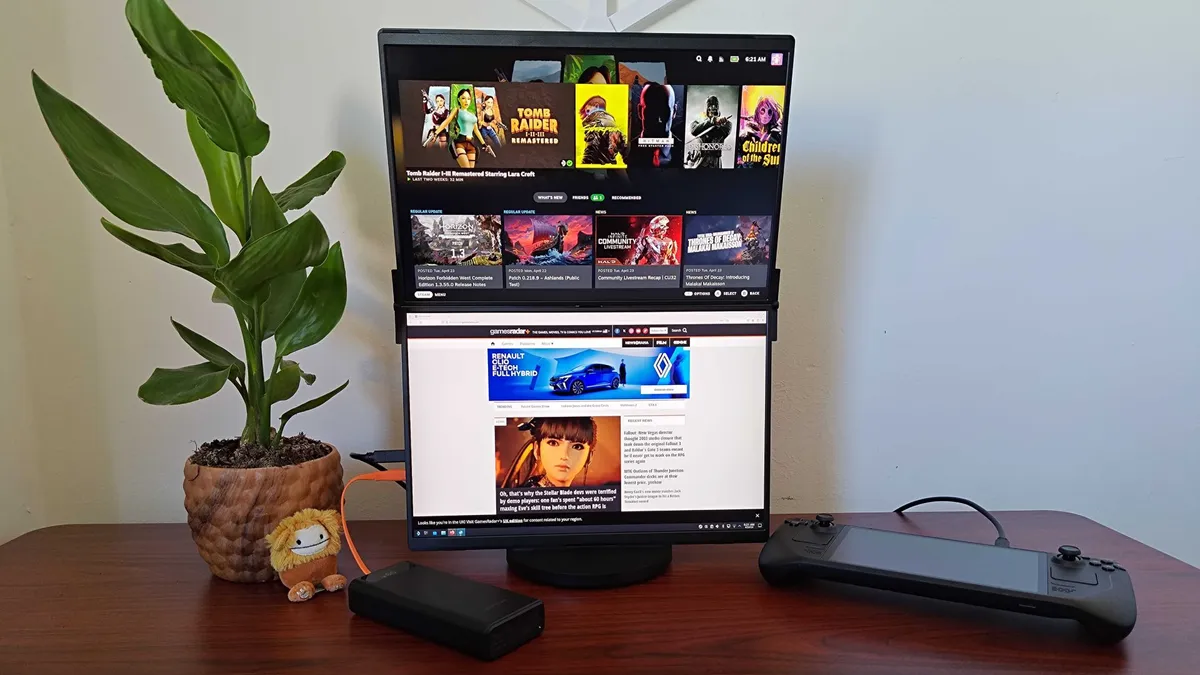
Jsaux FlipGo connected to Steam Deck on desk with GamesRadar+ home page and Steam Big Picture displayed
(Image credit: Future / Phil Hayton)

3. Jsaux FlipGo

The best dual portable monitor

Our expert review:

Specifications

Screen size:: Up to 16-inch
Aspect ratio:: 3:2 or 16:10
Resolution:: Up to
Brightness:: Up to 500 nits
Response time:: 6ms
Viewing angle:: 170/170 degrees
Contrast ratio:: 1,500:1
Features:: 3 x USB-C ports, 2 x USB-A, mini HDMI, AMD FreeSync
Today's Best Deals
View at Amazon
View at Amazon
View at Amazon
Check Walmart

Reasons to buy

+
Dual QHD screens
+
Plenty of ports
+
Single cable connectivity via USB-C

Reasons to avoid

-
No built-in battery
-
More for productivity than gaming

If your aim is to put together a dual screen monitor setup you can take on the go, the Jsaux FlipGo could be key. This double-stacked panel comes armed with everything you'll need to bring a desktop experience with you, and it makes for a great way to enlarge your gaming handheld screen to boot.

Buy it if:

✅ You need a dual screen setup: A double helping of panels will enable you to use multiple desktops on the go.

✅ You also care about productivity: While the FlipGo is great for gaming, it's real strengths lie with multitasking

✅ You've got a gaming handheld: The FlipGo will hook up to your handhelds with a single cable, enabling you to play games and run other applications in desktop mode.

Don't buy it if:

❌You don't need two screens: It sounds silly, but if you don't actually need two displays, this isn't the monitor for you.

❌You'd prefer a horizontal layout : If the stacked approach isn't your bag, you might be better off looking for alternative layouts.

Features: Wearing a clam-shell design that's not unlike a gaming laptop, the FlipGo is designed to cram as much screen space into as small a footprint as possible. Rather than extending outwards like most dual options out there, Jsaux stacks things vertically, and it'll all fold down into something that'll fit in your backpack. It also comes with an orange cover that might not be to everyone's tastes, but is going to add some extra protection for the display's aluminium body.

Design: The FlipGo boasts both DisplayLink support and an UltraView mode, meaning you can use the display as two extra screens or one extended panel. You'll be able to plug USB-C devices straight into this screen with a single cable, but mini HDMI is also present to maximise compatibility. Sadly, there's no built-in battery with this one, so you'll need a power bank like the Jsaux 20000mAh 65w if you want to truly cut the cord.

Performance: While the FlipGo is two screens in one, it doesn't skimp on visual fidelity. Both panels look pretty great thanks to their QHD resolution, and contrast ain't half bad considering we're talking about IPS. The displays are also pretty bright, with that 500 nits punching through even in brightly lit areas.

Verdict: As a dual screen package, the Jsaux FlipGo is arguably one of the most appealing options out there. The nature of its layout might not be directly suited to gaming, but there's a lot you can do with a duo of screens in this formfactor.

Read more: Jsaux FlipGo review

The best high refresh rate portable monitor

G-Story portable monitor

(Image credit: G-Story)

4. G-Story GSV56QM

The best high-refresh rate portable monitor

Specifications

Screen size:: 15.6-inch
Aspect ratio:: 16:9
Resolution:: 1920x1080
Brightness:: 300cd/m2
Response time:: 1ms
Viewing angle:: 178/178 degrees
Contrast ratio:: 1,200:1
Features:: IPS panel, 165Hz refresh, adaptive sync, USB-C x2, HDMI, HDR
Today's Best Deals
Check Amazon
Check Walmart
View at Amazon

Reasons to buy

+
Great all-round feature set
+
Relatively affordable
+
IPS image quality and low response

Reasons to avoid

-
Not true HDR
-
No built-in battery

The G-Story GSV56QM is a portable monitor that actually gives the ASUS ROG Strix XG17 a run for its money, despite having a lower refresh rate. The part that makes this technically a better option solely based on speed is its snappier response time, which will matter if you care about every frame in competitive scenarios.

Buy it if:

✅ You care about responsiveness: With a 1ms response rate, this is one of the snappiest portable monitors around.

✅ You play at high frame rates: The G-Story's 165Hz refresh rate will feel silky smooth when boosting fps on the go.

✅ You want great performance for less: For the price, you're getting beefy specs that are on par with more expensive options.

Don't buy it if:

❌You want a faster refresh rate: For most players, 165Hz will be plenty, but those of you looking for faster will want to upspent to Asus' screen.

❌You care about looks: The GSV56QM isn't what we'd call pretty, and it's not going to impress anyone at a LAN event.

Features: At a glance, the GSV56QM feels fairly ordinary, wielding a 1080p display and a decent selection of ports, including a few USB-C connectors. Yet, it's actually a bit of a monster specs-wise, offering a 15.6-inch panel with a 165Hz refresh rate and that aforementioned 1ms response time. There's probably an argument to be had over whether 3ms paired with 240Hz is more beneficial, but it's still impressive to see responsiveness like that in this sort of package.

Design: In terms of looks, the G-Story does look slightly dated, with a fairly thick bottom bezel and a logo that feels straight out of the 2000s. It's also strangely got a pair of micro USB ports facing outwards, even though that standard should be dead and buried by now. That said, the GSV56QM does feel well thought out when it comes to design, with a headphone jack conveniently facing outwards alongside some front firing speakers.

Performance: On paper, the GSV56QM holds up as a great portable competitive gaming monitor, especially when it comes to response time. There is a bit question mark over why it labels itself as a HDR screen, however, as its 300 nit brightness capabilities and lack of local dimming mean it can't really pull off proper High Dynamic Range. That aside, this screen has the potential to be a reliable speedy screen, providing your laptop can make use of 165Hz.

Verdict: For the money, the G-Story GSV56QM is a great option for players craving high refresh rate portable gaming. If 165Hz isn't enough to satiate your needs, you'll have to splash out on our top option, but it's hard to argue with what this panel offers up for the price.

The best 4K portable monitor for gaming

ViewSonic VX1655-4K monitor

(Image credit: ViewSonic)

5. ViewSonic VX1655-4K

The best 4K portable monitor
Average Amazon review:
☆☆☆☆☆

Specifications

Screen size:: 15.6-inch
Aspect ratio:: 16:9
Resolution:: 3840x2160
Brightness:: 350cd/m2
Response time:: 5ms
Viewing angle:: 178/178 degrees
Contrast ratio:: 800:1
Features:: IPS panel, 2x USB-A, USB-C, HDMI
Today's Best Deals
View at Staples
View at Best Buy
View at Amazon
View at Target

Reasons to buy

+
True 4K display
+
Relatively affordable
+
Wide compatibility

Reasons to avoid

-
No high refresh or HDR
-
No battery

If your hellbent on playing at 4K no matter where you are, the ViewSonic VX1655-4K will see you right. You'll pay extra for a UHD panel, but the package doesn't skimp on build quality and features to make room for its high resolution.

Buy it if:

✅ 4K visuals are a must: If you absolutely need to have a 4K screen, this is a good portable option.

✅ You want to play PS5: Not that we'd advise taking your console with you on a hiking trip, but this display will pair nicely with Sony's console.

✅ You need good compatibility: This display's ports will accommodate most modern consoles, PCs, and devices, so you won't be stuck trying to hook things up.

Don't buy it if:

❌ You've no need for 4K: Players who aren't planning on playing games at UHD resolution will be better off choosing a lower spec option.

❌You want a bigger 4K display: At 15.6 inches, you might not feel the benefits of UHD compared to larger displays, but they won't be cheap or easy to find.

Features: Kitted out with the usual USB-C and HDMI ports, you'll be able to easily hook this screen up to anything that can handle 4K visuals. Whether you've got one of the best gaming laptops around or you just fancy torturing your Steam Deck, proper UHD visuals are on the menu with this display.

Design: Aesthetically, the ViewSonic VX1655-4K is a bit conservative, which will suit some of you out there that aren't into gamer vibes. That said, it cleverly uses its back IO block as a stick stand, meaning the extra bulk at the back serves more than one purpose.

Performance: Naturally, you'll be capped at 60Hz using this 4K monitor, but that's not going to matter so much if you're not into shooters (or lack a decent GPU). Response times aren't abysmal, but you might also want to curb your expectations if you're used to speedy desktop screens.

Verdict: We'll eventually see cheaper (and better) 4K screens hit the marker as the technology matures. For the time being, the ViewSonic VX1655-4K is a reliable way to take UHD visuals with you on the go, and we'd pick this model over various no-name brands out there.

The best touchscreen portable monitor for gaming

Image 1 of 5
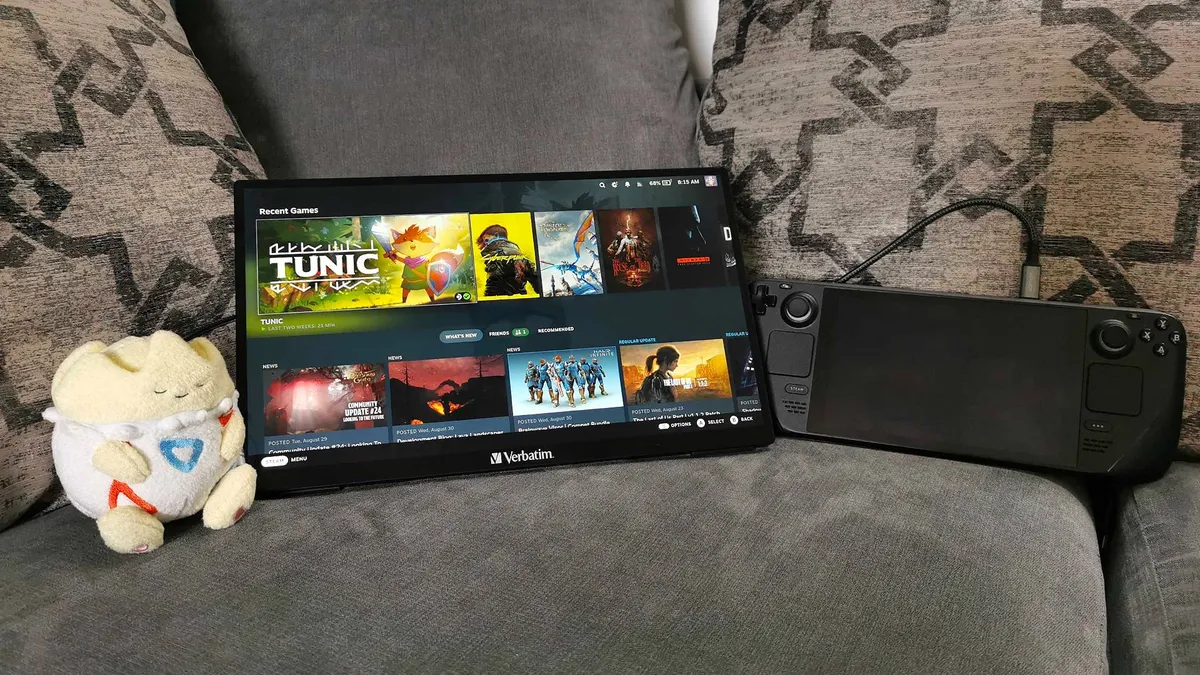
verbatim portable touchscreen monitor
(Image credit: Future / Phil Hayton)
verbatim portable touchscreen monitor
(Image credit: Future / Phil Hayton)
verbatim portable touchscreen monitor
(Image credit: Future / Phil Hayton)
verbatim portable touchscreen monitor
(Image credit: Future / Phil Hayton)
verbatim portable touchscreen monitor
(Image credit: Future / Phil Hayton)

6. Verbatim Portable Touchscreen Monitor

The best touchscreen portable monitor

Our expert review:

Specifications

Screen size:: 15.6-inch
Aspect ratio:: 16:9
Resolution:: 1920x1080
Brightness:: 300cd/m2
Response time:: 5ms
Viewing angle:: 178/178 degrees
Contrast ratio:: 1,000:1
Features:: IPS panel, USB-C, 1x HDMI
Today's Best Deals
Check Amazon
Check Walmart
View at Amazon

Reasons to buy

+
Nice 1080p visuals
+
Great build quality
+
HDR compatibility

Reasons to avoid

-
Lacks a build-in battery

Portable monitors can cost a pretty penny, but Verbatim's Portable Touchscreen Monitor manages to offer great features for less. It's main draw is naturally its capacitive panel, especially since it makes for a great way to navigate your Steam Deck without a controller, but it's got plenty of other perks going for it too.

Buy it if:

✅ You want great specs for less: Verbatim's screen offers surprisingly great specs considering it's cheaper than its competition

✅ You want a touchscreen: This panel will save you having plug in additional peripherals when trying to browse menus or set things up.

✅ You need something sleek: This model is pretty thin, meaning it's more likely to fit in your bag without causing a fuss.

Don't buy it if:

❌ You'd rather have a built-in battery: Power banks can provide this screen with juice, but you might prefer something with an integrated solution.

❌You want something bigger : At 15-inches, this screen will feel fairly standard in terms of size.

Features: It's worth noting this screen lacks a built in battery, and that may matter if you're looking for a completely untethered experience. However, if you hook it up to your own battery bank, you'll be able to pair it with the best gaming handhelds out there and benefit from features like HDR and touchscreen support. Depending on what you're using it for, trading away an integrated battery for those traits is more than worthwhile, not to mention it helps cut cost.

Design: In terms of design, Verbatim's monitor is clad with a metal shell, and it's pretty thin even by portable monitor standards. One of its stand out elements is the fact it has a kickstand built in, so you won't have to use any dual-use cases to prop it up on a desk.

Performance: We tested the Verbatim Portable Touchscreen Monitor using laptops and handhelds like the Steam Deck, and for the price, it performed admirably. 15.6 inches is arguably the perfect size for a 1080p screen, and we didn't notice any particularly soft visuals as a result of sits resolution. Even PS5 gameplay looks pretty decent on this screen, which is a feat given that we normally use a 4K panel with our new gen consoles.

Verdict: Your mileage may vary when it comes to price, but you should be able to snag one of these monitors for under (or just over) the $200 mark in the US. If you're in the UK, you'll easily find it for under £200, and it's a fantastic option for the money.

Read more: Verbatim Portable Touchscreen Monitor review

Best portable monitor: FAQs

Is a portable monitor worth it for gaming?

Ideally, you'll want to use a portable monitor for playing games on the go rather than solely at your desk. Achieving a lighter weight and travel-friendly design normally means playing at lower resolutions and refresh rates, which is a perfect match for handhelds and laptops but not so much for high-spec desktop PCs.

Can you use a portable monitor for gaming?

Many portable monitors are made with gaming in mind, featuring higher refresh rate capabilities and extras like HDR support. Even if you're eyeing up a basic screen designed around productivity, there's nothing stopping you connecting a laptop, PC, or console and diving into your favorite outings.

How should I choose a portable monitor?

Before clicking buy on a portable monitor, it's worth breaking down your specific needs. For example, if you're going to be working or playing games away from power outlets, you're going to want a built in battery, while FPS fans might want to focus on getting something with a higher refresh rate. Ultimately, you should pick a screen that fits your requirements, rather than just opting for the model other people claim is best.

Can I use a portable monitor as a second screen?

When connected to a device, portable monitors function just like a secondary screens. You'll be able to configure your chosen display using a PC or laptop to extend or mirror your workspace, while consoles will send a single output through to the panel.

Can you use a portable monitor with the Steam Deck

Yes, the Steam Deck can be hooked up to a portable monitor, and most models will connect via a single USB-C cable. That'll save you picking up a separate docking station, meaning you won't have to carry as much kit around. Most portable PCs like the Asus ROG Ally and Lenovo Legion Go will play nice with on the go panels too, but you will need some sort of dock to use the Nintendo Switch.

How we test portable monitors at GamesRadar+

Why you can trust GamesRadar+ Our experts review games, movies and tech over countless hours, so you can choose the best for you. Find out more about our reviews policy.

verbatim portable touchscreen monitor

(Image credit: Future / Phil Hayton)

Just like with stationary screens, we spend hours testing portable monitors, but there a few key differences involved. For example, if a display has a built in battery, we add in additional benchmarks to assess longevity and capacity, as both become vital when cutting the cord.

Of course, we also check each portable monitor's specs, design, features, and performance too, and all four traits help decide whether we should recommend a display. To do this, we typically use the panel as our daily driver by playing the latest games, which enables us to push a screen's resolution and refresh capabilities to their limit. In turn, this also let's us assess other qualities like contrast, color, and brightness, all while seeing how it brings console and PC games to life.

For more information, you can read more on How we test monitors at GamesRadar+ here, and for an overview of our approach to gaming tech then you can check out our full Hardware Policy.


If you're looking for something TV-shaped and specialist, then check out our best TV for PS5 ad Xbox Series X, best OLED TV, and best 120Hz 4K TV guides.

Round up of today's best deals
Low Stock
UPERFECT 24.5 Inch Computer...
Uperfect Umax 24
Walmart
$359.99
$339.99
View
See all prices
JSAUX FlipGo Pro 13.5" Dual...
Jsaux FlipGO
Amazon
$459.99
View
See all prices
JSAUX FlipGo Pro 16" Dual...
JSAUX FlipGo Pro 16
Amazon
$599.99
View
See all prices
ViewSonic VX1655-4K 15.6 Inch...
ViewSonic VX1655-4K
Amazon
$439.99
View
See all prices
We check over 250 million products every day for the best prices
powered by
Gamesradar
Sign up to the GamesRadar+ Newsletter

Weekly digests, tales from the communities you love, and more

By submitting your information you agree to the Terms & Conditions and Privacy Policy and are aged 16 or over.
TOPICS
Asus Nvidia
Phil Hayton
Phil Hayton
Social Links Navigation
Hardware Editor

Phil is the Hardware Editor at GamesRadar+ who specializes in retro console setups, choosing the latest gaming handhelds, and navigating the choppy seas of using modern-day PC hardware. In the past, they have covered everything from retro gaming history to the latest gaming news, in-depth features, and tech advice for publications like TechRadar, The Daily Star, the BBC, PCGamesN, and Den of Geek. In their spare time, they pour hours into fixing old consoles, modding Game Boys, exploring ways to get the most out of the Steam Deck, and blasting old CRT TV visuals into their eye sockets.

With contributions from
  • Jeremy LairdFreelance Writer
  • Rob DwiarManaging Editor, TechRadar Gaming
  • Duncan RobertsonHardware Editor
Back To Top
Read more
Alienware 34 AW3423DW QD-OLED
TVs & Monitors Best ultrawide monitor 2026: Big and wide gaming displays
 
 
BenQ Mobiuz EX321UX monitor on desk with Overwatch 2 gameplay on screen.
TVs & Monitors The best monitor for PS5 2026: high spec screens for the OG and Pro
 
 
BenQ Mobiuz EX321UX monitor on woodgrain desk with Marvel Rivals character select screen displayed and Squirrel Girl selected.
TVs & Monitors Best monitor for Xbox Series X 2026
 
 
LG UltraGear 45GR95QE-B with Halo Infinite Spartans on screen sitting on white desk
TVs & Monitors Best curved gaming monitor 2026: displays I'd grab for immersive PC visuals
 
 
BenQ X3100i projector with a DualSense controller on a wooden desk
Peripherals The best projector for gaming: the top throwers I've tested in 2026
 
 
Person at desk with pink t shirt and curly hair playing Stardew Valley on Steam Machine with mouse and keyboard.
TVs & Monitors The Steam Machine promises a 4K 60fps experience, but I'd pair it with a 1440p monitor if you're sensitive to disappointment
 
 
Latest in TVs & Monitors
Person at desk with pink t shirt and curly hair playing Stardew Valley on Steam Machine with mouse and keyboard.
TVs & Monitors The Steam Machine promises a 4K 60fps experience, but I'd pair it with a 1440p monitor if you're sensitive to disappointment
 
 
Back of Samsung Odyssey OLED G6 monitor with RGB right light in view
TVs & Monitors Marathon is asking a lot of my reflexes, so I'm hunting down the best high refresh rate gaming monitors
 
 
27-inch KTC G27P6 OLED monitor on desk next to plant with Tomb Raider Trilogy gameplay on screen
TVs & Monitors Two years later, I'd still say this 1440p OLED monitor is the one to watch during sales like Presidents Day
 
 
1040Hz Samsung Odyssey G60H with blue backdrop and purple GamesRadar+ logos.
TVs & Monitors Samsung's 1040Hz gaming monitor isn't for mortals like me, and I know most of us lack the GPU
 
 
Hand holding remote in front of LG OLED C4 TV with Mario Kart World gameplay on screen.
TVs & Monitors New year, new TV? I'd highly recommend going for this older LG OLED for gaming in 2026
 
 
LG OLED C4 55-inch TV connected to Switch 2 with Mario Kart World gameplay on screen featuring Cow in cloud cart.
TVs & Monitors I just found a larger version of the LG OLED TV that transformed my console setup, hiding out at Amazon for a record low price
 
 
Latest in Buying Guides
Photo of the Mario and Luigi Nendoroid figures sitting next to eachother.
Toys & Collectibles Celebrate MAR10 Day in style with the very best Super Mario merch
 
 
Squirtle and Jigglypuff figures alongside a Poke Ball, with Nintendo DS game cases visible in the background
Toys & Collectibles The best Pokemon merch to celebrate 30 years of the beloved series, chosen by superfans
 
 
Image of the Tears of the Kingdom Link amiibo sitting in front of a shelf of Zelda merch.
Toys & Collectibles Best Legend of Zelda merch, chosen by two lifelong fans
 
 
Cloud MTG card lying on top of a host of other MTG Final Fantasy cards
Games Check out these Valentine's Day gifts for gamers if you're stuck for ideas
 
 
Photo of the Lavender Arctis Nova 3 Wireless headset resting on a Nintendo Switch 2.
Headsets & Headphones The best Nintendo Switch headset 2026: SteelSeries is the key for gaming on the go for another year
 
 
Corsair Vanguard Pro 96, Asus ROG Azoth 96 HE, Corsair Galleon 100 SD and Cherry MX 8.2 Pro TMR TKL on a wooden desk
Gaming Keyboards Best Hall effect keyboard 2026
 
 
LATEST ARTICLES
  1. Shrek
    1
    3 new to Netflix movies I recommend you watch this weekend (March 21 - March 22)
  2. 2
    "My dream game": After 7 hours, Palworld publishing lead delivers his Crimson Desert verdict: "This game is made for me"
  3. 3
    "The biggest time save in nearly a decade of Pokemon speedrunning" has been discovered in FireRed
  4. 4
    Marathon's Cryo Archive is locked to weekends partly because you're going to "lose a lot of gear"
  5. 5
    Arc Raiders devs tortured each other during playtests, juicing Arc into Elden Ring bosses

GamesRadar+ is part of Future US Inc, an international media group and leading digital publisher. Visit our corporate site.

Add as a preferred source on Google Add as a preferred source on Google
  • Terms and conditions
  • Contact Future's experts
  • Privacy policy
  • Cookies policy
  • Accessibility statement
  • Careers
  • About us
  • Advertise with us
  • Review guidelines
  • Write for us
  • Accessibility Statement

© Future US, Inc. Full 7th Floor, 130 West 42nd Street, New York, NY 10036.

Please login or signup to comment

Please wait...