


The best Xbox One accessories will give your aged Microsoft machine a new lease of life, especially if you're not yetready to pick up an Xbox Series X/S. With your controllers worn out, your storage constantly full, and no new games to play, your Xbox One is probably beginning to feel pretty old. Fortunately, grabbing some high-quality accessories can help it feel almost brand new again.
There isn't a shortage of great gear out there, so we've narrowed this list down to the most essential, genuinely helpful bits of kit. Plus, all of this gear can hold its own against the best Xbox Series X accessories to boot. Thanks to the Series X's backward compatibility, these older devices have never looked so good, and have never been better value. After all, grabbing a new console can be expensive enough as it is, so spending even more on extra kit isn't exactly ideal.
To help you find all the best peripherals you can get, we've pulled together a list of all our favorite controllers, headsets, wheels, and more down below. We've had our hands on a massive variety of console tech over the years, but we've saved the best for this page.
Quick Links

The Xbox One Elite Wireless Controller Series 2 controller comes decked out with programmable buttons, back paddles, and hot-swappable thumbsticks making it one of the best Xbox controllers out there.

The WD_Black P40 is our go-to storage solution for the Xbox One. The external drive is available in models up to 4TB, which is more than enough space to download and store all your favorite Xbox and Game Pass games. Plus, there's even some RGB lighting at play here too.

The SteelSeries Arctis 9X is specifically designed with the Xbox One in mind. The wireless gaming headset brings the brand's signature high-quality audio and long battery life, making it an ideal fit for Xbox One owners.

The Logitech G923 steering wheel is compatible with a huge range of Xbox One driving games and keeps a good balance of affordability while not skipping out on premium features.

Xbox Game Pass easily remains the best way to get the most out of your Xbox One. It gives you access to a huge library of Xbox One games, new releases, and access to online multiplayer all in one package.

I'm an avid supporter of making the most of the gaming tech you already have - and one of the simplest ways to breathe new life into your aging tech is to pair it off with some top-tier accessories. The best Xbox One accessories are plentiful, especially as the last-gen Microsoft machine has been out for a while, but that can make it confusing to know what's best for your older console. That's why I'm here to use my experience as a gaming tech writer, and Xbox hardware owner, to make recommending the best accessories a breeze.
The best Xbox One controller


If you want precision and exceptionally high build-quality, you want the Xbox Elite Wireless Controller Series 2. With programmable buttons, back paddles, and thumbsticks that can be swapped for performance-targeted alternatives, this is one of the best Xbox One controllers available. It's also an improvement on the original Elite in almost every way.
We found that most of these improvements were on the software side. Sure, you're picking up a more durable piece of kit, and we were particularly enamored with the textured surface that now spans the whole grip, but it's the under-the-hood customization that really wowed us. We were able to completely remap the entire gamepad, all with a new slew of input options. Add the ability to tweak individual analog stick tension and lower travel distance in each button and the whole thing feels far more premium than the original model.
Needless to say, this superb device builds on all the excellent qualities of the standard Xbox One wireless controller (namely the excellent d-pad and responsive shoulder buttons) while adding a huge amount of customization options and additional features along the way. The clicky rear paddles are fantastic, a great way to rebind controls that normally live on the d-pad to a spot you can reach without having to lift off the analog sticks, and being able to swap the function of literally every button means you can tailor the Elite to suit your personal play style. It looks, feels, and plays like a truly premium controller, and even tops our roundup of the best controllers for PC gaming.
If you're after something a little cheaper, it's also worth noting that the Xbox Elite Series 2 Core is now out in the wild for $129.99 / £114.99. That's considerably less than the $179.99 / £159.99 MSRP of the full-fat Elite, but you are dropping all the extra components. That means you can still tweak certain aspects of the experience, but the interchangeable d-pad, thumbsticks, paddles, and charging dock are out of the picture here.
Read more: Xbox Elite Wireless Controller Series 2 review
The best Xbox One storage

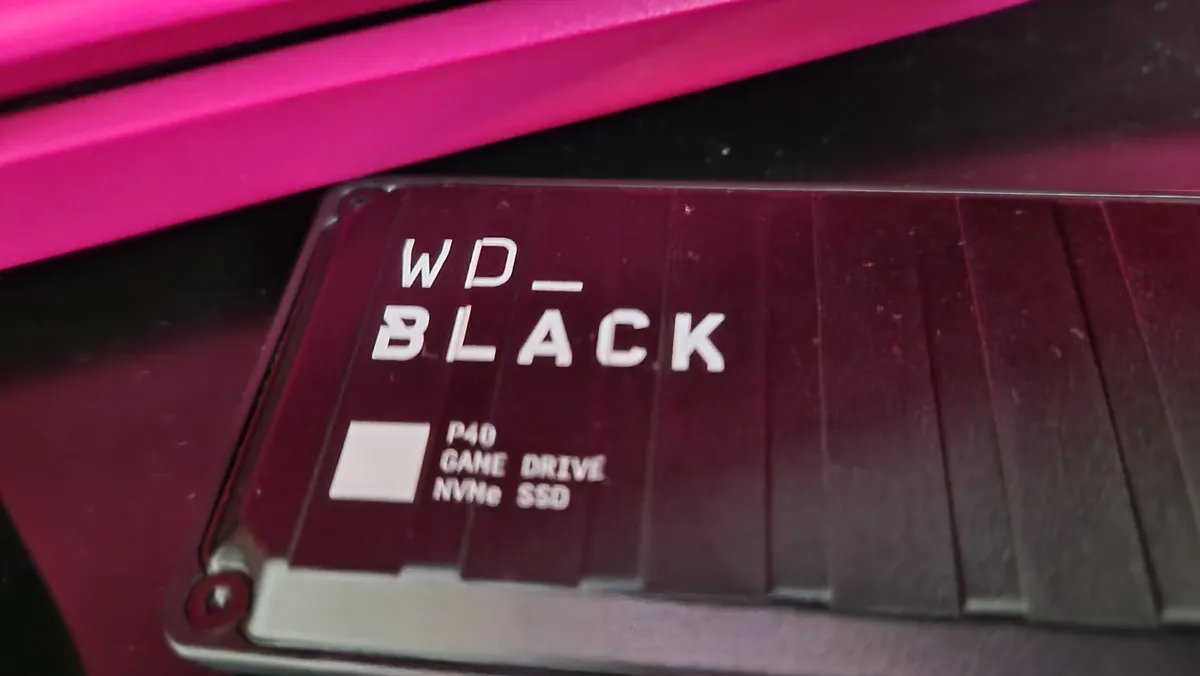


The WD_Black P40 SSD is the latest in WD's gaming-focused external hard drives, and it's one of the best performers you can get your hands on. It takes the speedy specs and robust design of the P50 and carries both over to a small form factor body that makes use of some lovely ambient RGB lighting.
Unfortunately, the P40 is one of the more expensive options up and down this list, particularly because it's a recent release from one of the biggest names in storage. For your purchase though, you get the drive itself, WD's Windows dashboard, a USB-C cable and USB-A adapter, a quick install guide, and a 5-year warranty I'd be surprised if you need to use.
Read and write speeds were great in testing. The 2000MB/s speed you see on the box is as good as you'll get in an external hard drive, but in reality, it translates to some great load times and transfer speeds on PS5 and PC. I had a load of game capture footage stored on my PS5 I had been meaning to move across to my computer for video editing, and even though it was about 30 clips spanning a total of 22GB, the P40 swallowed it up from the PS5 in about a minute. The same was true of games once I formatted the drive for some extra storage. I transferred three games that added up to 18GB, and it moved across in just shy of a minute.
The best Xbox One headset


Want the very best Xbox One headset? You want the SteelSeries Arctis 9X. Specially engineered to run wirelessly on the console, it offers superb audio to go with its very respectable battery-life. Because of that trademark SteelSeries headband, this is also a headset you can use for hours without getting uncomfortable - it's fairly light at 1.2lbs / 372g.
Of course, we all expect excellent audio from a premium piece of kit like this, but the SteelSeries Arctis 9X stood out in our testing for another reason; connectivity. You're able to connect via Bluetooth and Xbox Wireless at the same time here - perfect for keeping in touch with your phone or music while playing. In our testing, everything was as streamlined as advertized, and we never encountered any interference or connection drops.
We were a little disappointed that the included mic, while being clear and accurate, was retractable rather than removable. It's a small design gripe, but one that shows just how far this headset is ingrained in its gaming use. Such a feature, along with the green lines etched into the headband, mean this headset won't exactly fit right in on your commute.
However, just a little further down that headband, you'll find some seriously comfortable cups. The sweat-resistant nylon "AirWeave" cushions have been touted to improve airflow by SteelSeries, and we agree. In all our Apex Legends rages, we never felt pinching or a sense of clammy claustrophobia from these cups, and longer sessions were a breeze because of it.
Overall, then? This is a great choice if you're looking for a high-quality gaming headset for Xbox.
Read more: SteelSeries Arctis 9X review
The best Xbox One steering wheel


The Logitech G923 is a world renowned Xbox steering wheel - perfect for a massive range of games and packing some neat features into a solid price point. Logitech has been in the racing wheel game for decades, with their recent endeavours in Force Feedback skyrocketing them to the top. The G923 is the best of the bunch so far - balancing affordability with all the features a hobbyist will love.
The G923 is compatible with everything from Forza to Formula 1, with special TrueForce Feedback available on Grid, Assetto Corsa Competizione, iRacing, Snow Runner, and Dirt Rally. That makes for excellent immersion, and a super smooth response, and with a luxury aluminium, steel, and leather build everything feels great under hand as well.
Expect the wheel to be wrestled out of your grip while you get used to it thanks to the strong torque
Logitech G923 review
We found the G923 to be nice and easy to set up in our own testing, with a simple desk clamp system - though this clamp will only work for tabletops under 3cm. While many games won't allow you to make the most of that TrueForce system, we still found the standard force feedback support to be particularly impressive.
All of that pedigree won't quite satisfy beginners in its $399 / £349 MSRP - but we regularly see far less impressive wheels retailing at well over that amount. If you've already committed to reinvigorating your driving setup, this is our go-to recommendation (and one of the best PC racing wheels for PC to boot).
Read more: Logitech G923 review
The best Xbox One Subscription
Microsoft's subscription services offer some of the absolute best Xbox One accessories out there. However, there are plenty of ways to get around their monthly prices. You'll find all the latest Xbox Game Pass deals just below.
5. Xbox Game Pass Ultimate
Why you can trust GamesRadar+ Our experts review games, movies and tech over countless hours, so you can choose the best for you. Find out more about our reviews policy.

If you're planning to pick up Xbox Game Pass, it's worth considering the 'Ultimate' version. Although this one's a little more expensive, it gets you Xbox Game Pass for consoles, Xbox Live Gold, and Xbox Game Pass for PC. That's exceptional value for money when you take into account the sheer volume of games you're getting and that's exactly what makes it one of the best Xbox One accessories going. It also means you don't have to worry about picking up Xbox Live for your online gaming needs.
To save you a bit of cash, we've listed the most up-to-date reductions on Xbox Game Pass Ultimate below.
Best Xbox One accessories: FAQ
Will Xbox One accessories work on Xbox Series X?
The vast majority of Xbox One accessories will work with Xbox Series X. That's thanks to Microsoft's commitment to both forwards and backwards compatibility, which means controllers, services, steering wheels and more are all compatible between the two systems. However, if you're picking up a particularly old piece of kit we'd recommend double checking with the brand.
Do Xbox One accessories work with PC?
Official Xbox controllers will work with PC, as will gaming headsets built for Xbox. However, if you're after one of the best Xbox steering wheels, it's worth double checking that your choices are supported by Windows 10 or 11.
How to use the Xbox Accessories app
Microsoft has a built-in configuration system for Xbox One accessories on Xbox One and Xbox Series X / S. This app allows you to tweak settings on your controller and headset to further personalize your experience.
First, open the guide using the home button. Then, head to the Profile & System menu > Settings > Devices & Connections > Accessories. You can now select the 'Configure' option to make changes to your setup.
How we test Xbox One accessories
Xbox One accessories aren't exactly a dying breed. Thanks to the fact that Xbox Series X gear can also be used on the previous generation, there's still plenty of kit to sort through. However, if we're recommending a product for Xbox One you can bet that we've tested it on that console specifically. We're yet to come across an Xbox Series X gadget that doesn't work as advertized on an older system, but the threat still lurks. That's why we test everything across both consoles, and PC where appropriate, to make sure you're getting the best value for money possible.
Beyond that, you can find out exactly how we test gaming headsets and how we test controllers with our dedicated guides - and find out how we make all our recommendations with the full GamesRadar+ Hardware Policy.
For more savings, check out our guide to the latest Xbox Series S deals and Xbox controller deals. Or for more equipment, take a look at the best Nintendo Switch accessories and best PS5 accessories for more inspiration.

