GamesRadar+ Verdict
The PrismXR charging dock is certainly one of the neatest stands for the Quest 3 you'll find on the shelves. It keeps things low-profile, charges the headset and its controllers, and doesn't take up much room on a shelf or desk. But there are some definite annoyances that prevent this from being an easy recommendation.
Pros
- +
Charges the controllers and the headset
- +
Supplies rechargeable batteries for the controllers
- +
Neat, tidy look while on display
- +
Handy indicator LEDs to show how much each element is charged
- +
Compatible with headstraps from other brands
Cons
- -
Annoying, incessant beeping
- -
Doesn't seem to turn itself off when the headset is fully charged
- -
Separate version for the Quest 3S
- -
-Not the fastest method of charging
Why you can trust GamesRadar+ Our experts review games, movies and tech over countless hours, so you can choose the best for you. Find out more about our reviews policy.
Pretty soon after setting up my Quest 3, I realised how quickly the controllers lose battery. In fact, even if I didn't use them or the headset for a week or two, I'd frequently come back to find them completely drained. Having only used a charging stand that gave power to the headset itself, I knew my budget for batteries would thank me if I tried something that charged the controllers too.
So, to the best Meta Quest accessories I turned, and of all the available charging stands, PrismXR's filled the most gaps in the market for me. It charges the headset and the controllers, but also feels perfect for anyone who wants a pretty low-profile way of displaying their VR loadout. It doesn't have fancy RGB or stand too high for a lot of shelfing units, and its aesthetic matches the Quest 3's as though it was made by Meta itself.
For $69.99 / £69.99, it's roughly on par with the cost of most other charging docks, so let's see how it performs.
Design & Features

Having just reviewed the PrismXR charging belt for Quest 3 and 3S, I had high hopes for this dock as a follow-up. Just like the charging belt, this is fairly self-explanatory. The Carina D1 is a dock that you can plug in via USB-C that'll magnetically charge your headset and controllers.
Rather annoyingly, because this was designed with the Meta Quest 3 in mind before the 3S arrived on the scene, it has a fairly snug design that's bespoke for the original VR headset. For that reason, you'll need to opt for a separate version of this device for the Quest 3S, which leaves the door open for wrong purchases, but does help to create a neater match with whichever headset you own.
From a quick search of both charging docks on Amazon and at PrismXR's own website, they seem to do the exact same thing, and for the most part, are the same price. That said, I'd think about looking into the price history of either at your own leisure because, like any and all Quest 3 accessories, their prices fluctuate madly.
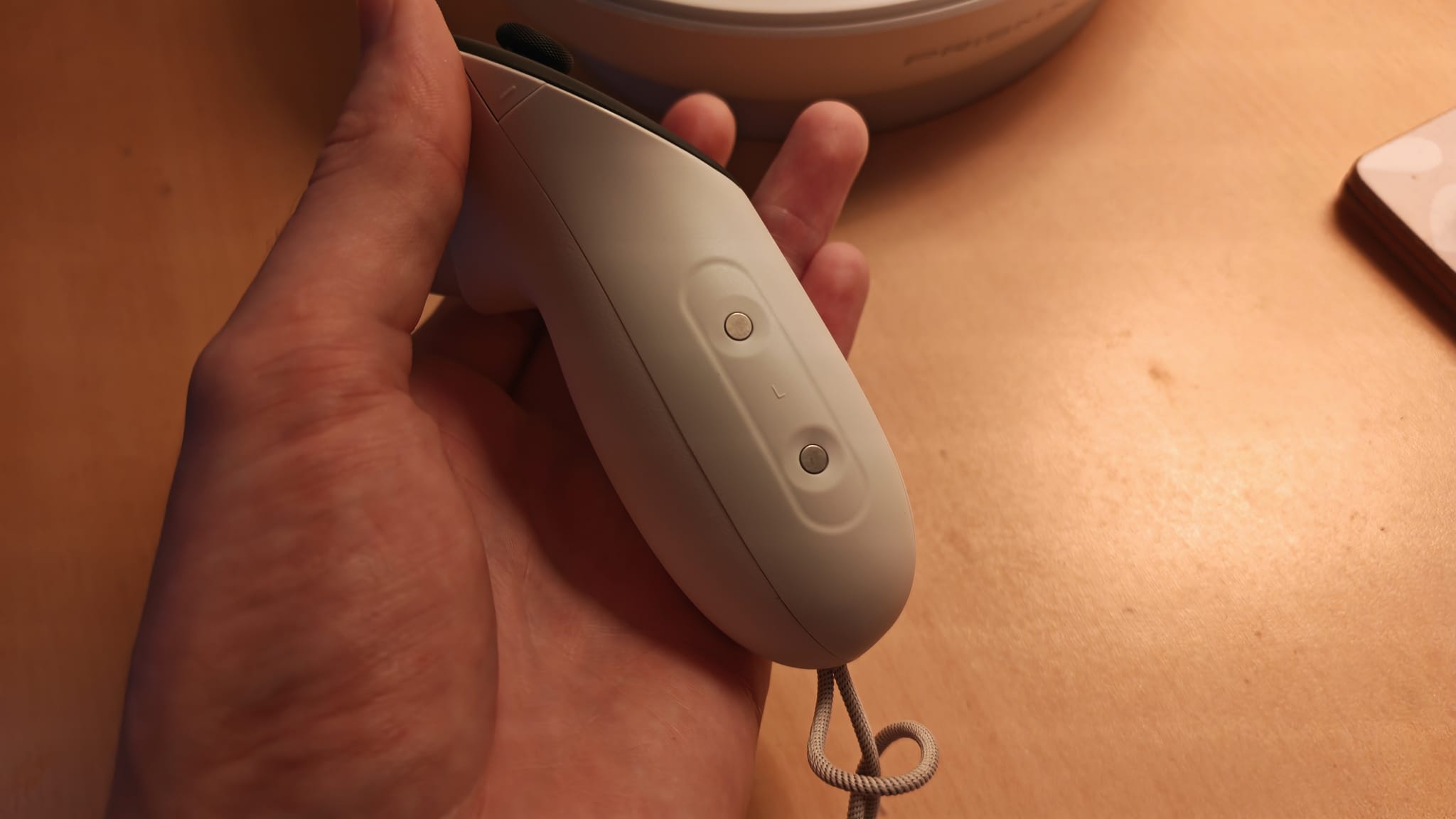
To keep the controllers charged, the D1 dock comes with rechargeable batteries, as well as different grip plates for your controllers so that they can attach magnetically. These feel exactly the same as the stock ones when using the controllers during VR play, and only take a minute to swap out.
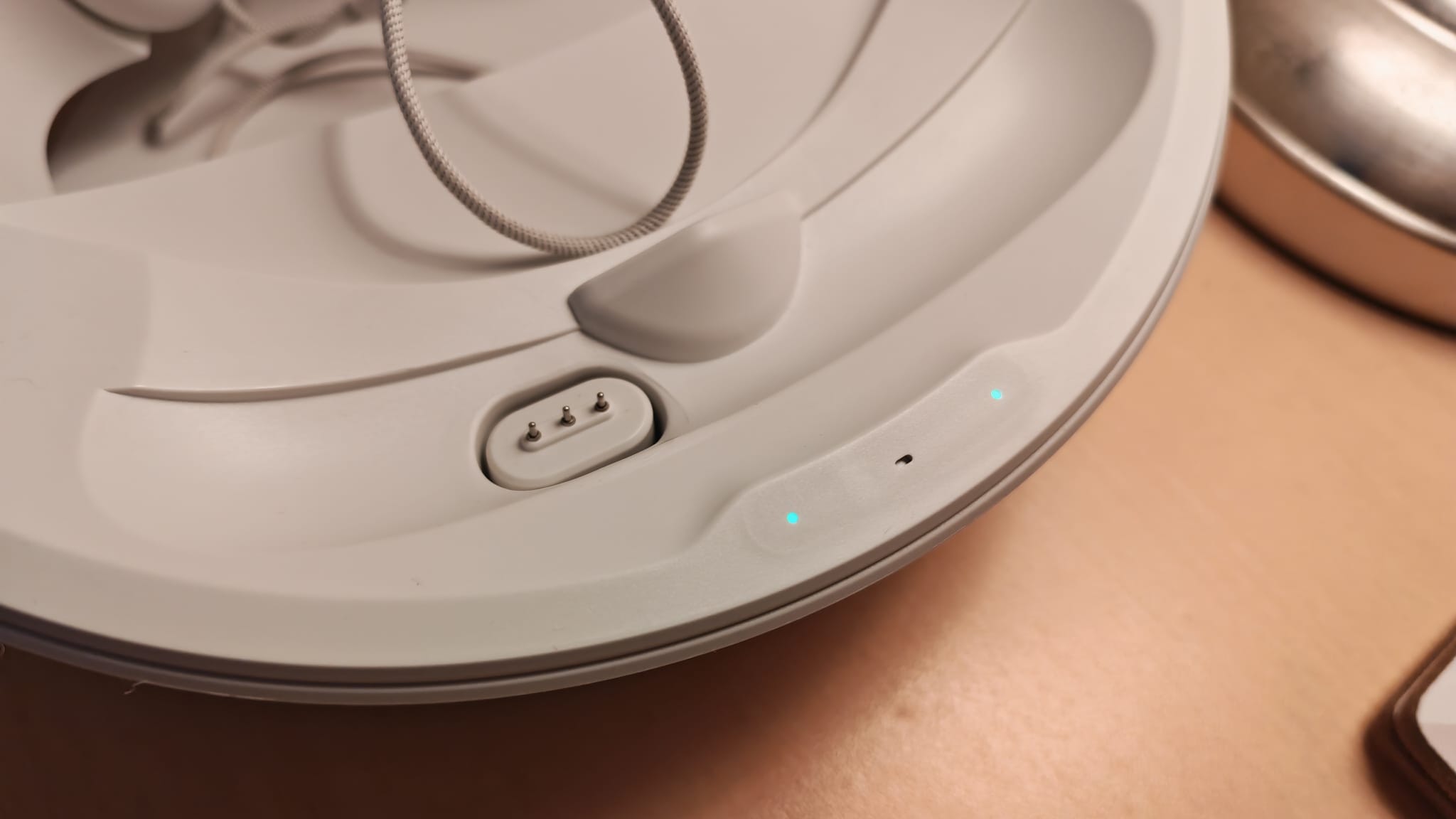
Magnetics are the name of the game here, as magnetic charging pins are used to connect the bottom of the headset to the charging dock. For the overall aesthetic of the Carina D1, this helps to keep things nice and neat - there are no cables to be seen from the front.

Perhaps my favorite thing about the dock's design is that it has a handy head strap pedestal at the back, which allows for more compatibility with third-party accessories. I was worried my KIWI Design Comfort Battery Strap wouldn't fit, but thanks to this handy add-on, I had no problems.
In terms of technicals, the Carina D1 Charging Dock can Fast Charge up to 27W, which PrismXR says will take your Quest 3 from 0% to 50% in 45 minutes, and fully charge in 1hr50. The controllers have a quoted charging time of 2hr30.
There are also some handy LED indicators on the front of the stand that tell you what level of battery the headset and two controllers are, and as I'll come on to, there are audible indicating bleeps too.
Performance

I really like the look of the PrismXR charging dock. Its nest design means I was spoiled for choice for where to put it in my living space. It could fit in one of the shelves in my cube unit because it isn't too tall. It's not obnoxiously wide, so it can sit nicely with the other gaming hardware on my desk or a shelf. But at the same time, it still looks neat and tidy, and its white design lines up exactly with the color of the headset.
The only real test of this dock, besides its looks, is how it charges the headset and controllers. If I'm honest, I'd like it to be a bit quicker, but that's mainly because I'm used to plugging it in at the wall with a super-fast charger and seeing it juice up pretty speedily.
Arguably, for a charging stand, I don't think it necessarily needs to be super quick because it's where you put it when you know it'll be sitting to rest between sessions. Still, I found it took around an hour to charge the headset up to its 50% mark while the controllers were also connected - which I suppose matches up with the quoted 45-minute mark that I'll assume refers to just the headset being connected.

The times when I've used this charging stand and haven't been faced with annoying bleeps fill me with more confidence that this isn't an issue you'll definitely run into
At least the indicating LEDs are a handy way to keep tabs on charging progress. What isn't so handy is a very loud beeping tone that the D1 will pierce your eardrums with. When you first connect the headset and controllers, it'll beep. When it finishes charging them? It'll beep, and sometimes, keep beeping. I've seen reports of these bleeps being buggy and incessant for multiple users. Certainly, the first time I used the D1, that's the experience I had when my headset reached full charge. Other reports seem to suggest that the beeping is due to a faulty connection, which would line up with my experience of other times when the headset reached full charge, then didn't beep at all. Either way, these beeps are loud and a very annoying point of convenience-gone-wrong if they continually bug out for people.
What's more unclear is whether or not the dock can turn itself off when the Quest 3 reaches full charge, because if not, it could cause you battery life issues further down the road. Unless you go and unplug the dock entirely or remove the headset so the magnetic pins aren't connected, it could keep charging your headset, or, in my case, beeping loudly. The times when I've used this charging stand and haven't been faced with annoying bleeps fill me with more confidence that this isn't an issue you'll definitely run into, but since this is a known issue for other users who have had larger connection problems, it's all a little unclear.
Considering this brand's charging belt will turn itself off when it detects a fully charged headset, it's a bit of a shame that the charging dock isn't more upfront that it will do so as well. If you touch the LEDs, they'll go to sleep, but I'm not sure whether that actually turns the charging power off. Thankfully, I've found that my headset will still sit fine on the dock when it's just out of place enough that the pins aren't touching. This isn't ideal though, and goes against the snug aesthetic the charging stand is going for.
Should you buy the Prism XR Carina D1 Charging Dock?

Irritating beeping aside, I do think this charging stand is one of the better and more versatile ones available for the Quest 3. PrismXR has made something that's well designed and caters to a large cross-section of VR gamers who have lots of storage needs and headstraps already integrated into their setups.
It's a shame that the charging isn't quicker, and there's definite friction with those indicating bleeps - which seem to be the most frequently reported issue in most customer reviews.
Regardless, this is a charging stand I'll be keeping in my loadout, mainly thanks to its convenience of charging the headset along with its controllers, which can prove tricky otherwise.
How I tested the PrismXR Carina D1 Charging Dock
I integrated the PrismXR Carina D1 Charging Dock into my gaming setup for a number of weeks before this review was written. Since receiving the testing sample from PrismXR, it's been my main method of charging my VR headset and controllers. To put it to the test, I set a timer on how long it took to charge the headset in various scenarios: when it was at 0%, when it was at 50% going to 100%, and a full charge. I compared my experience to my time spent with other Quest 3 accessories.
For more on how we test the latest gadgets, check out the GamesRadar+ hardware policy.
Happy with flat screen games for now? Take a look at the best PC controllers, the best gaming PCs, and the best gaming monitors

You must confirm your public display name before commenting
Please logout and then login again, you will then be prompted to enter your display name.