
Background
Welcome to GamesRADAR+ Community !
Hi ,

Your membership journey starts here.

Keep exploring and earning more as a member.

MY ACCOUNT

Badge picture
Earn your first badge
Read 1 article to unlock your first badge.
Keep earning badges
Explore ways to get more involved as a member.
Latest Games News

Latest Games News

Breaking gaming news and updates

Read Now
Latest Games Reviews

Latest Games Reviews

Expert verdicts on the newest releases

Read Now

See what you’ve unlocked.

Explore your membership benefits.

Explore
Member Exclusives

Stay Ahead with GamesRadar+

Get the biggest gaming news, reviews, and releases straight to your inbox.

Explore

Sign Out
Join The Community
- Join our community
11
Premium Benefits
24/7
Access Available
21K+
Active Members
Commenting
Join the discussion
Exclusive Articles Coming Soon
Member-only articles
Weekly Newsletters
Weekly gaming & entertainment news
Member Badges
Earn badges as you go
Exclusive Competitions
Members-only prize draws
Curated Deals Coming Soon
Tech and gaming deals worth grabbing
GET COMMUNITY ACCESS QUICK
For the quickest way to join, simply enter your email below and get access. We will send a confirmation and sign you up to our newsletter to keep you updated on all your gaming news.
By submitting your information you agree to the Terms & Conditions and Privacy Policy and are aged 16 or over.
FIND OUT ABOUT OUR MAGAZINE
Want to subscribe to the magazine? Click the button below to find out more information.
Find out more
GET Community ACCESS QUICK

Join the GamesRadar community for quick access. Enter your email below and we'll send confirmation, and sign you up to our newsletter.

By submitting your information, you confirm you are aged 16 or over, have read our Privacy Policy and agree to the Terms & Conditions. Geographical rules apply.

GamesRadar+ GamesRadar+
US EditionUS CA EditionCanada UK EditionUK AU EditionAustralia
Sign in
  • View Profile
  • Sign out
  • Games
    • Game Insights
      • Games News
      • Games Features
      • Games Reviews
      • Games Guides
      • Big in 2026
      • Big Preview
      • Future Games Show
      • Golden Joystick Awards
    • Genres
      • Action Games
      • RPGs
      • Action RPGs
      • Adventure Games
      • Third Person Shooters
      • FPS Games
    • Platforms
      • PS5
      • Xbox Series X
      • PC
      • Nintendo Switch
      • Nintendo Switch 2
      • Tabletop Gaming
    • Franchises
      • Grand Theft Auto
      • Pokemon
      • Assassin's Creed
      • Monster Hunter
      • Fortnite
      • Cyberpunk
      • Red Dead
      • The Elder Scrolls
      • The Sims
  • Entertainment
    • TV Shows
      • TV News
      • TV Reviews
      • Anime Shows
      • Sci-Fi Shows
      • Superhero Shows
      • Animated Shows
      • Marvel TV Shows
      • Star Wars TV Shows
      • DC TV Shows
    • Movies
      • Movie News
      • Movie Reviews
      • Big Screen Spotlight
      • Superhero Movies
      • Action Movies
      • Anime Movies
      • Sci-Fi Movies
      • Horror Movies
      • Marvel Movies
      • DC Movies
    • Streaming
      • Apple TV Plus
      • Disney Plus
      • Netflix
      • HBO
      • Amazon Prime Video
      • Hulu
    • Comics
      • Marvel Comics
      • DC Comics
  • Hardware
    • Insights
      • Hardware News
      • Hardware Reviews
      • Hardware Features
      • Buying Guides
    • Computing
      • Desktop PCs
      • Laptops
      • Handhelds
    • Peripherals
      • Headsets & Headphones
      • TVs & Monitors
      • Gaming Mice
      • Gaming Keyboards
      • Gaming Chairs
      • Speakers & Audio
    • Accessories & Tech
      • Gaming Controllers
      • Tech
      • SSDs & Hard Drives
      • VR
      • Accessories
      • Retro
  • Deals
    • Toys & Collectibles
    • Lego
    • Dungeons and Dragons
    • Merch
  • Video
    • Videos
    • GR+ Replay - Submit Your Clips
    • G+RLS Podcast
  • Newsletters
    • Quizzes
    • About Us
    • How to pitch to us
    • How we score
    • Newsarama
    • Retro Gamer
  • Home
  • Games
    • View Games
      • Games News
      • Games Features
      • Games Reviews
      • Games Guides
      • Big in 2026
      • Big Preview
      • Future Games Show
      • Golden Joystick Awards
      • Action Games
      • RPGs
      • Action RPGs
      • Adventure Games
      • Third Person Shooters
      • FPS Games
    • Platforms
      • View Platforms
      • PS5
      • Xbox Series X
      • PC
      • Nintendo Switch
      • Nintendo Switch 2
      • Tabletop Gaming
      • Grand Theft Auto
      • Pokemon
      • Assassin's Creed
      • Monster Hunter
      • Fortnite
      • Cyberpunk
      • Red Dead
      • The Elder Scrolls
      • The Sims
  • Entertainment
    • View Entertainment
    • TV Shows
      • View TV Shows
      • TV News
      • TV Reviews
      • Anime Shows
      • Sci-Fi Shows
      • Superhero Shows
      • Animated Shows
      • Marvel TV Shows
      • Star Wars TV Shows
      • DC TV Shows
    • Movies
      • View Movies
      • Movie News
      • Movie Reviews
      • Big Screen Spotlight
      • Superhero Movies
      • Action Movies
      • Anime Movies
      • Sci-Fi Movies
      • Horror Movies
      • Marvel Movies
      • DC Movies
    • Streaming
      • View Streaming
      • Apple TV Plus
      • Disney Plus
      • Netflix
      • HBO
      • Amazon Prime Video
      • Hulu
    • Comics
      • View Comics
      • Marvel Comics
      • DC Comics
  • Hardware
    • View Hardware
      • Hardware News
      • Hardware Reviews
      • Hardware Features
      • Buying Guides
      • Desktop PCs
      • Laptops
      • Handhelds
    • Peripherals
      • View Peripherals
      • Headsets & Headphones
      • TVs & Monitors
      • Gaming Mice
      • Gaming Keyboards
      • Gaming Chairs
      • Speakers & Audio
      • Gaming Controllers
      • Tech
      • SSDs & Hard Drives
      • VR
      • Accessories
      • Retro
  • Deals
    • Toys & Collectibles
    • Lego
    • Dungeons and Dragons
    • Merch
  • Video
    • View Video
    • Videos
    • GR+ Replay - Submit Your Clips
    • G+RLS Podcast
  • Newsletters
    • Quizzes
    • About Us
    • How to pitch to us
    • How we score
    • Newsarama
    • Retro Gamer
Trending
  • Spider-Man: Brand New Day ending explained
  • New Games 2026
  • G+RLS Podcast
  • GTA 6 pre-orders
  • Best gaming tech
  • Submit your clips. Win prizes
  1. Hardware
  2. TVs & Monitors

Samsung Odyssey OLED G6 review: “glorious gaming visuals for under $1,000”

Reviews
By Phil Hayton
Published 31 July 2024

When you purchase through links on our site, we may earn an affiliate commission. Here’s how it works.

Samsung Odyssey OLED G6 with Pharah on Overwatch 2 character select screen
(Image credit: © Future / Phil Hayton)

GamesRadar+ Verdict

The Samsung Odyssey OLED G6 is a great example of a gaming monitor that can achieve super-fast speeds while still offering up glorious colors and contrast. Qualities like its anti-glare coating and striking aesthetic help it stand tall among other 1440p rivals, and it sets the QHD monitor bar to lofty new heights thanks to its balanced specs.

Check Amazon
Check Best Buy

Pros

  • +

    Exceptional colors

  • +

    Excellent HDR

  • +

    Responsive 360Hz abilities

  • +

    Stunning design

Cons

  • -

    No USB-C hub

Best picks for you
  • Best curved gaming monitor 2026: displays I'd grab for immersive PC visuals
  • The best gaming monitor 2026: the most impressive displays I've tested this year
  • The best gaming TV 2026: my top high-spec living room screens

Why you can trust GamesRadar+ Our experts review games, movies and tech over countless hours, so you can choose the best for you. Find out more about our reviews policy.

I didn’t originally have the Samsung Odyssey OLED G6 down as one of my favorite gaming monitors of the year, as I figured the accolade would go to a 4K screen. Now that I’ve spent a chunk of time with the new 1440p 360Hz screen, I can say without a doubt that I’m a silly billy, as this display strikes a tremendous balance between speed, sensational visuals, and sleek aesthetics.

Don’t get me wrong, I can’t promise the Samsung Odyssey OLED G6 won’t be stripped of its best gaming monitor title over the next few months, as the screen scene is fast-moving. However, I can guarantee that even if fierce rivals come for its crown, this new OLED screen will serve fantastic results for PC players, console lovers, and even retro enthusiasts alike. Plus, I love the idea of picking up a panel for your PS5 that could serve as a fast refresh rate display for FPS games if you go down that path at a later date.

There are admittedly a few things missing from the OLED G6 that I’d have loved to see included, but it’s important to remember this $799 / £799 display isn’t Samsung’s flagship. Therefore, I can understand why some more premium perks have been omitted, and I’m still pretty content with the overall package for the price. Yes, the KTC G27P6 does bite its ankles a little thanks to its budget-friendly price point, but this screen isn’t as comparable compared to the Corsair Xeneon 27QHD240 and expensive alternatives.

Latest Videos FromGamesRadar+
Watch full video here:

Specs

Image 1 of 2
Samsung Odyssey OLED G6 with green Kiki's Delivery Service wallpaper on Windows 11 desktop
(Image credit: Future / Phil Hayton)
View of Samsung Odyssey OLED G6 back ports including two HDMI, DisplayPort, and USB connections
(Image credit: Future / Phil Hayton)
Image 1 of 2

View Original

Samsung Odyssey OLED G6 with green Kiki's Delivery Service wallpaper on Windows 11 desktop
Image 2 of 2

View Original

View of Samsung Odyssey OLED G6 back ports including two HDMI, DisplayPort, and USB connections

I’ve already spoiled the Odyssey OLED G6’s key screen specs, as we’re looking at a 27-inch 1440p 360Hz display. Other ingredients include a 0.03 GtG response time and HDR 10 alongside other expected traits like a 1,000,000:1 contrast ratio and 250 nits peak brightness.

Swipe to scroll horizontally
Samsung Odyssey OLED G6 specs

Specs

Samsung Odyssey OLED G6 (G60SD)

Price

$899.99 / £799

Panel type

OLED

Screen size

27-inch

Aspect ratio

16:9

Resolution

2560 x 1440

Refresh rate

360Hz

Brightness

300 nits

Viewing angles

178°/178°

Contrast ratio

1,000,000:1

As for ports, the OLED G6 keeps things fairly standard with two HDMI 2.1 ports, one DisplayPort, and two full-sized USB connections linked to a standard hub. I am slightly bummed out that this screen doesn’t boast Steam Deck dock capabilities via USB-C, but I’ve come to terms with that not being a huge deal since you can pick up a docking station for your gaming handheld fairly cheaply.

Design

Image 1 of 2
Back of Samsung Odyssey OLED G6 monitor with RGB right light in view
(Image credit: Future / Phil Hayton)
Samsung Odyssey OLED G6 pentagon shape stand
(Image credit: Future / Phil Hayton)
Image 1 of 2

View Original

Back of Samsung Odyssey OLED G6 monitor with RGB right light in view
Image 2 of 2

View Original

Samsung Odyssey OLED G6 pentagon shape stand

Please forgive me, as I’m about to gush over Samsung’s whole aesthetic approach with the Odyssey OLED G6. I’ll forgive any of you who can’t see what’s so special, but my feelings come from a heart that’s dealt with numerous screens over the past few years.

First off, I’m in love with the OLED G6’s flat hexagonal base. I was somewhat surprised by this, as I usually hate weird pedestal designs taking up needless space, but the low-profile design featured here provides somewhere to sit soundbars or even just other desktop bits (like whatever plushie has won my favor in a week). Its silver finish also makes for a nice change from the usual black getup screens tend to go with – something that’ll please those of you maintaining a brighter setup.

Sign up to the GamesRadar+ Newsletter

Weekly digests, tales from the communities you love, and more

By submitting your information you agree to the Terms & Conditions and Privacy Policy and are aged 16 or over.

Before we head around the back, I need to highlight the OLED G6’s pivot and height adjustment abilities. It doesn’t perform any tricks not found with other rivals, but I immediately noticed a difference in how easy it is to move around. Too many displays feel needlessly stiff, which ultimately puts me off switching things vertically for some cheeky TATE arcade game sessions.

Samsung Odyssey OLED G6 rotated to portait mode with green Kiki's Delivery Service wallpaper on screen

(Image credit: Future / Phil Hayton)

I also want to point out that the OLED G6 suffers from that same extra black masking border around its bezel, which always leaves me longing for a proper edge-to-edge screen. It’s not something I can justify marking Samsung’s display down for, as I’ve yet to find one that avoids committing this sin. Any company that wants to impress me in 2025 will somehow come up with a way to completely eradicate borders to the same degree as a gaming phone, as it’s the one thing that keeps catching my eye with modern monitors.

The rear of the G6 is an absolute treat on numerous levels, not least due to the refined vortex RGB light ring at the back. The back panel is notably slimmer than previous Odyssey models, despite the fact that there’s a dynamic heat pump cooling system stowed away underneath. The illuminated ring also feels subtle enough to appeal to those who are averse to rainbow lighting, with elegant tapering factoring it into the overall design without its presence feeling too obvious.

Close up of Samsung Odyssey OLED G6 RGB ring

(Image credit: Future / Phil Hayton)

I’ve said this many times, but I much prefer ports that face outwards instead of under a lip, and Samsung has nailed this sentiment with its setup. You’ll still be able to easily manage cables using the pedestal and clips, but it negates any fumbling around when trying to hook up another console or PC. Trust me, this is a wonderful boon if you find yourself constantly switching out your PS5 and rig for another device on the fly.

Next to the ports is the dreaded OSD menu nub – a mainstay of gaming monitors today. Funnily enough, the first time I used one of these dastardly wee joysticks was with a 2010s Samsung TV, so I do subconsciously blame the company for its standardization. Despite this, the control nipple is actually one of the less offensive versions I’ve used lately, with each direction feeling precise. It probably helps that the settings menu itself is streamlined, as you won’t have to dive three pages deep into options to reach simple dials.

Let it be known that I’m holding back on my usual “all monitors should come with a remote” rant since Samsung does include one with the Odyssey OLED G8. Am I still annoyed? Yes, but I get why the company would position the perk as a premium extra.

Features 

Samsung Odyssey OLED G6 OSD menu

(Image credit: Future / Phil Hayton)

While I wouldn’t exactly call the Odyssey OLED G6 feature-packed, the screen does offer excellent tricks to benefit its overall viewing experience. One of the most prevalent talking points about this monitor is its anti-glare coating, which bats away reflections far better than any screen I’ve tried to date. My office is pretty glary, to say the least, and the only real way for me to avoid the usual light beams is to close my blinds. At least, that was the case before using the G6, as I’ve yet to find an angle that succumbs to my big window.

As for settings dwelling within the G6, some key elements stand out within the OSD. The first thing that caught my eye was the Infinity Core sub-menu containing a bunch of customization options for the RGB ring round back. It’s always pleasing to see these dials accessible from the monitor itself rather than via a separate piece of software, and you can even set the lighting to color-match whatever’s on your screen. It’s not quite as impressive as the Ambiglow system built into the Philips Evnia 42M2N8900 as it seems to only do static colors, but I’m all for neat extras where I can find them.

Speaking of which, the G6 also provides the usual array of gaming quirks within its OSD, including virtual crosshairs and adaptive sync settings. Objectively speaking, it’s more important to have OLED screen care options to hand than any of those, and I’m pleased to report there’s a logo brightness and pixel refresh mode within general settings. If you’re more worried about your peepers than potential panel burn-in, you’ll be able to access eye-care settings by pushing left, in turn providing filters that ditch blue light to varying degrees.

I’ll round off my thoughts on features by touching on the Odyssey OLED G6’s no-thrills USB hub. It’s effectively just a way to hook up a gaming keyboard and mouse to your PC via a single cable, so nothing earth-shattering in terms of handheld and laptop support. I’m still glad it's a thing, don’t get me wrong, but I do enjoy directly hooking my Steam Deck OLED to screens these days.

Performance 

Samsung Odyssey OLED G6 with Another Crab's Treasure gameplay on screen

(Image credit: Future / Phil Hayton)

Speed and contrast should naturally be on the G6’s side since we’re talking about a 360Hz OLED panel, and I’m not remotely disappointed in the real-life results. Every game used to test Samsung’s colorful speedster felt vibrant and snappy, not to mention I couldn’t detect any softness at 1440p.

To kick things off, I decided to go back to Another Crab's Treasure, a vivid underwater roguelike that puts OLED screens to work. The experience was undoubtedly elevated thanks to the excellent colors and contrast produced, but everything felt a bit deeper compared to other similar panels I’ve tested, including my favorite KTC screen. Getting everything to pop that bit more with extra attention to darker areas really makes the difference in this scenario, and it’s proof that firmware can do a lot of heavy lifting.

I’m also still making my way through Still Wakes the Deep, so reviewing the G6 provided me with a reason to spend some time on the game’s ghastly oil rig. It’s easy to praise an OLED screen when displaying vibrant worlds, but I like to think how they deal with dingy environments makes more of an impact. And, for what it’s worth, Samsung’s screen does an admiral job of bringing The Chinese Room’s Scottish nightmare to life, with shadows maintaining a perfectly murky but detailed presence on screen.

Samsung Odyssey OLED G6 with Cyberpunk 2077 gameplay on screen featuring neon signs in Night City

(Image credit: Future / Phil Hayton)

On that note, I am delighted at the OLED G6’s HDR abilities, as I frequently have a bad time when using the feature. Rather than trading away brightness and vibrancy, this monitor enhances those darker scenes and adds excellent differentiation. Neon signs in the likes of Cyberpunk 2077 cut through the darkness of Night City to provide a genuine glow rather than a compromised effect, adding to the sense of realism already established by the OLED panel itself. The last time I was this impressed with HDR was when testing the new LG OLED G4, so it's nice to see screens reach the standard of the best gaming TVs out there.

It’d be criminal to ignore the G6’s 360Hz refresh rate, so I naturally was forced to enjoy a good few sessions of Halo Infinite. This isn’t my first rodeo with a monitor with this kind of speed, and I did feel a difference when using the Alienware AW2724HF last year. The difference here is that Samsung has avoided stooping to 1080p to provide extra responsiveness and pulling off a 50:9 KD ratio in Capture the Flag feels all the better when enjoying excellent map visuals.
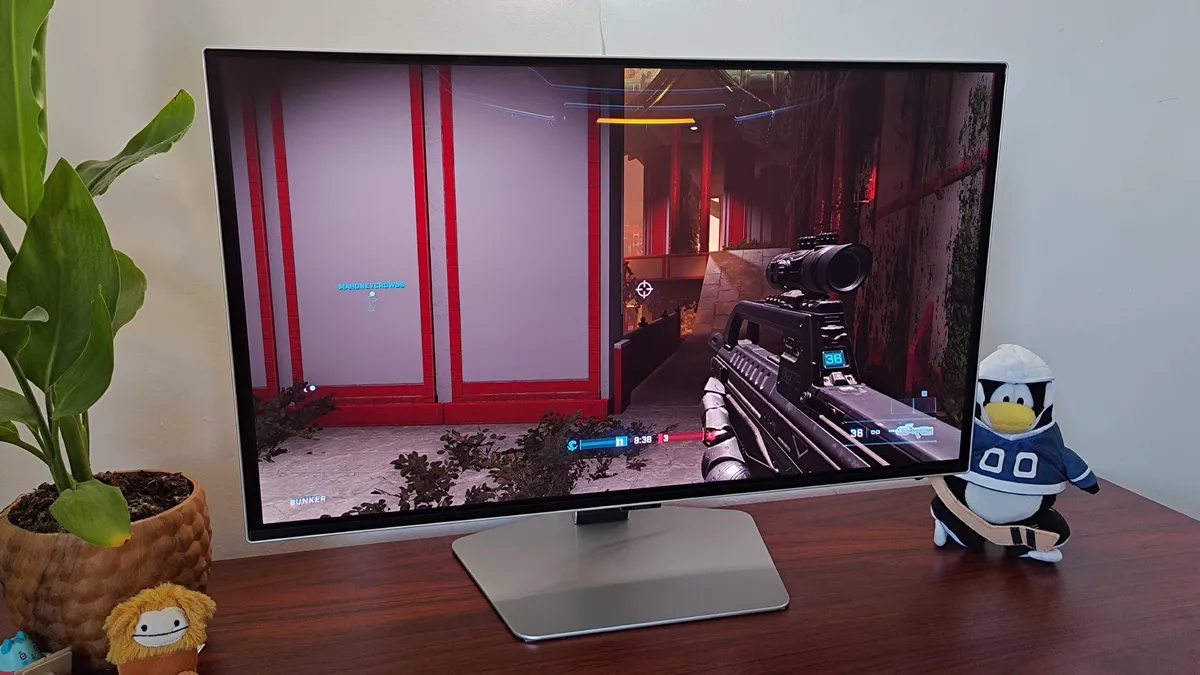
Samsung Odyssey OLED G6 with Halo Infinite multiplayer gameplay on screen

(Image credit: Future / Phil Hayton)

For real, though, I genuinely felt like I was at peak performance as a virtual Spartan using this monitor, and it even lured me back into messing around with Overwatch 2 matches. It’s worth stressing that you realistically need a beefy PC to feel the benefits of 360Hz without dialing everything down to boost fps. But, if you do happen to have an Nvidia GeForce RTX 4090 rig to hand, you’ll get to feel smug as you jetpack around as Pharah with pinpoint accuracy and responsiveness.

Outside of my usual tests, I’ve also been subjecting the G6 to my usual shenanigans. For anyone unacquainted, that ranges from chaotic Baldur’s Gate 3 sessions to hooking up an Xbox 360 using an upscaler mainly for the giggles, and the screen held up in every predicament I placed it in. My main worry was that I’d spot some softness compared to the 4K screens I normally use day-to-day, but I genuinely couldn’t really tell the difference at 1440p on this display. Keep in mind that sticking with 27 inches is likely the reason, but it’s still a point worth making in Samsung’s favor.

Should you buy the Samsung Odyssey G6? 

Samsung Odyssey OLED G6 with Astarion from Balder's Gate 3 on screen

(Image credit: Future / Phil Hayton)

As far as OLED gaming monitors go, the Samsung Odyssey G6 is one of the punchiest panels out there. Raising the refresh rate bar from 240Hz to 360Hz is impressive enough, but this incredibly balanced screen also offers up fantastic HDR, incredibly useful anti-glare properties, and colors that cement why the tech is worth investing in over VA and IPS displays.

At 27 inches, I’d say the OLED G6 will still satiate even PC enthusiasts with its 1440p capabilities, as its smaller size keeps visuals from feeling soft. For those of you who really can’t stand the idea of not maxing out things at 4K, or if you’re looking for a UHD alternative for your PS5 and Xbox Series X, you’ll want to wait for my Samsung Odyssey G8 thoughts instead. Otherwise, I’d say this is the gaming monitor to buy right now if you’re looking for glorious gaming results for under $1,000.

Today's best Samsung Odyssey OLED G6 G60SD deals
Samsung 27” Odyssey OLED G6...
Amazon
Prime
$899.99
$661.19
View
Samsung - 27" Odyssey OLED G6...
Best Buy
$899.99
$699
View
Samsung Odyssey OLED G6 G60SD...
Samsung
$899.99
View
We check over 250 million products every day for the best prices

How I tested the Samsung Odyssey G6 

For a month, I used the Samsung Odyssey G6 to play several games using an RTX 4090 gaming PC. During that time, I assessed the screen’s capabilities when it comes to contrast, colors, HDR, and refresh rate alongside its included features and perks. To check responsiveness, I played several sessions of Halo Infinite and Overwatch 2 at 1440p and tweaked settings to match the panel’s 360Hz refresh rate with an appropriate frame rate, taking note of responsiveness compared to alternative 144Hz and 240Hz models.

I also leisurely played Still Wakes the Deep and Another Crab’s Treasure using the display to get a feel for the OLED G6’s brightness, contrast, and HDR results in different lighting scenarios, including during the daytime next to a large window.

For more information on how we test gaming monitors and other screens, check out our GamesRadar+ hardware policy to learn more.


Looking for more screens? Swing by the best monitor for PS5 and the best monitor for Xbox Series X for our console panel picks. Alternatively, take a peek at the best ultrawide monitors for a panoramic view.

Samsung Odyssey OLED G6: Price Comparison
View Similar Amazon US
Amazon
No price information
Check Amazon
Best Buy - View Similar
Best Buy
No price information
Check Best Buy
We check over 250 million products every day for the best prices
powered by
Gamesradar
CATEGORIES
PC Gaming Platforms
Phil Hayton
Phil Hayton
Social Links Navigation
Hardware Editor

Phil is the Hardware Editor at GamesRadar+ who specializes in retro console setups, choosing the latest gaming handhelds, and navigating the choppy seas of using modern-day PC hardware. In the past, they have covered everything from retro gaming history to the latest gaming news, in-depth features, and tech advice for publications like TechRadar, The Daily Star, the BBC, PCGamesN, and Den of Geek. In their spare time, they pour hours into fixing old consoles, modding Game Boys, exploring ways to get the most out of the Steam Deck, and blasting old CRT TV visuals into their eye sockets.

Read more
AOC GAMING Q27G4ZD monitor on desk with pink and blue rippled wallpaper.
TVs & Monitors AOC GAMING Q27G4ZD review
 
 
BenQ Mobiuz EX271UZ monitor on desk with purple CatchyOS wallpaper on screen.
TVs & Monitors The BenQ Mobiuz EX271UZ is a solid OLED monitor that's missing a few tricks for the price
 
 
BenQ Mobiuz EX271UZ monitor on desk with purple CatchyOS wallpaper on screen.
TVs & Monitors BenQ's 27-inch monitor is a solid QD-OLED contender, but I wouldn't spend $100 more for 4K over 500Hz
 
 
LG UltraGear 25G590B with glowing purple backdrop.
TVs & Monitors LG has finally created a 1,000Hz gaming monitor, but it's a Pandora's Box no one needed to open
 
 
Verbatim portable monitor with Overwatch 2 character select screen on display next to two Squishmallow frogs
TVs & Monitors The best portable monitors for gaming 2026
 
 
Close up of Sony Trinitron PVM CRT TV with Morrigan from Darkstalkers posing with arms up.
TVs & Monitors CRTs are the GOAT for retro gaming, but I need monitor makers to consider making OLED alternatives
 
 
Latest in TVs & Monitors
AOC GAMING Q27G4ZD monitor on desk with pink and blue rippled wallpaper.
TVs & Monitors AOC GAMING Q27G4ZD review
 
 
Two curved ultrawide 34-inch Alienware monitors in back of 32-inch curved monitor with blue desert backdrop.
TVs & Monitors Alienware is celebrating its 30th anniversary with three new monitors
 
 
A reviewer holding the Acer Smart Dial in front of a gaming monitor that's playing Outer Worlds 2
TVs & Monitors RAM costs a fortune and PS6 is going digital, but Acer is making remote controls for monitors
 
 
LG OLED C6 TV on left and Samsung Mini LED overlapping on right with purple backdrop.
TVs & Monitors These 4th of July deals could save you from squinting at the World Cup on a tiny, dull screen
 
 
Three Hisense TVs next to a sign saying 'Prime Day deals'.
TVs & Monitors Prime Day hasn't even begun, and Amazon's dumping loads of gaming-ready Hisense TVs — but you've only a day left
 
 
LG UltraGear Dual-mode monitor with Doom: The Dark Ages gameplay on screen.
TVs & Monitors Dual-mode monitors have changed the way I PC game, and they could save you from buying twice
 
 
Latest in Reviews
Asus ROG NUC mini PC on a wooden desk
Desktop PCs The Asus ROG NUC is a Steam Machine for the big kids, with their big wallets
 
 
A OneOdio Solocaster sitting next to headphones and an XLR microphone
Peripherals This $60 live streaming mixer tries to imitate a $499 audio powerhouse, and I'm not sure it succeeds
 
 
Tom Holland as Spider-Man in Spider-Man: Brand New Day
Marvel Movies Spider-Man: Brand New Day review "Marvel Studios’ strongest standalone outing since Avengers: Endgame"
 
 
A reviewer holding the Intel Core Ultra 5 250K Plus
Desktop PCs Intel Core Ultra 5 250K Plus review: "Trying to beat AMD at its own game"
 
 
Halo Campaign Evolved artwork showing Master Chief posing with his assault rifle on the ring
Halo Halo: Campaign Evolved review: "An FPS in its purest form, but also a wasted opportunity for a new spin on a classic"
 
 
Photo of the Samsung 990 SSD sitting on top of its blue packaging.
SSDs and Hard Drives The Samsung 990 SSD is a super speedy and reliable drive, but it's difficult to recommend when the Pro model is right there for the taking
 
 
LATEST ARTICLES
  1. Satya Nadella and Jensen Huang on grey and black backgrounds
    1
    Games AI veteran says it can be useful, but we've made mountains out of ChatGPT's molehills
  2. 2
    Wind Waker 2 was in development before Zelda lead was told Toon Link "alienated" American teenagers
  3. 3
    Marvel cancels Wonder Man season 2 just 4 months after announcement
  4. 4
    We won't get "the next FromSoftware" or "another Remedy or Larian" at this rate, warns veteran dev
  5. 5
    Guillermo del Toro says "please, I beg you," make a less roguelike-y version of Dead Cells

GamesRadar+ is part of Future US Inc, an international media group and leading digital publisher. Visit our corporate site.

Add as a preferred source on Google Add as a preferred source on Google
  • Terms and conditions
  • Contact Future's experts
  • Privacy policy
  • Cookies policy
  • Accessibility statement
  • Careers
  • About us
  • Advertise with us
  • Review guidelines
  • Write for us

© Future US, Inc. Full 7th Floor, 130 West 42nd Street, New York, NY 10036.

Please login or signup to comment

Please wait...