You are now subscribed
Your newsletter sign-up was successful
Want to add more newsletters?

Every Friday
GamesRadar+
Your weekly update on everything you could ever want to know about the games you already love, games we know you're going to love in the near future, and tales from the communities that surround them.

Every Thursday
GTA 6 O'clock
Our special GTA 6 newsletter, with breaking news, insider info, and rumor analysis from the award-winning GTA 6 O'clock experts.

Every Friday
Knowledge
From the creators of Edge: A weekly videogame industry newsletter with analysis from expert writers, guidance from professionals, and insight into what's on the horizon.

Every Thursday
The Setup
Hardware nerds unite, sign up to our free tech newsletter for a weekly digest of the hottest new tech, the latest gadgets on the test bench, and much more.

Every Wednesday
Switch 2 Spotlight
Sign up to our new Switch 2 newsletter, where we bring you the latest talking points on Nintendo's new console each week, bring you up to date on the news, and recommend what games to play.

Every Saturday
The Watchlist
Subscribe for a weekly digest of the movie and TV news that matters, direct to your inbox. From first-look trailers, interviews, reviews and explainers, we've got you covered.

Once a month
SFX
Get sneak previews, exclusive competitions and details of special events each month!
Hideki Sato, the mind behind iconic consoles like the Sega Genesis, Saturn, and Dreamcast, has passed away at the age of 75. The designer and his R&D team undoubtedly changed the gaming scene forever, keeping fierce rivals like Atari, Nintendo, and eventually Sony on their toes with bold hardware ideas, and the Mega Drive exemplifies that legacy.
Of course, Hideki Sato's involvement in making the best retro consoles started well before the Sega Genesis. The designer first joined the then-budding arcade hardware maker back in 1971, and those coin-op efforts eventually led to the creation of the company's first home console, the Sega SG-1000. That Japanese-exclusive Nintendo Famicom (NES) rival pretty much put a design approach in motion that would lead to the better-known Sega Master System and eventually end with the Dreamcast, but the brand was arguably immortalised via the Mega Drive.
Sega really did what Nintendidn't

Even just at a glance, you can tell Sega wanted to stand out with the Mega Drive. Compared to its rounder and slightly more colorful Super Nintendo rival and its simplistic two-button design, the 16-bit system looks like someone ripped it from a high-end audio setup or an expensive car dashboard, setting a sophisticated tone for the company's hardware.
Of course, the actual look of the Mega Drive can be attributed to industrial designer Mitsushige Shiraiwa, who deliberately infused the console with those aforementioned vibes. Subtle touches like using a blend of glossy and matte plastics, including vent-style ridges purely for aesthetic rather than functionality, and that gold 16-BIT badge on the front all feed into Sato's overarching goal of the hardware within, and it all culminates in what is a really novel hardware experience in 2026.
One of my favorite elements of the Mega Drive / Genesis is undoubtedly its front 3.5mm headphone jack and accompanying volume slider. To this day, I still like to plug in a pair of headphones and blast my ears with Sonic the Hedgehog 2's soundtrack straight from the source, and it makes for a really novel way to play 16-bit games compared to consoles before and after.

As quirky as having stereo output on the front of a non-portable console is, the feature is a double-edged sword. The back AV ports use mono sound, which made sense 30 years ago since it matched the standard of most consumer CRT TVs. Today, though, it means you'll need to either mod your system or use a cable that also taps into the 3.5mm jack. That setup can feel overly convoluted today since the SNES spits out stereo natively, but I still think it's a charming part of using the OG hardware in the modern age.
On the flip side, the Mega Drive did something arguably more important right with its AV: RGB output. While it took three versions of the SG-1000 to eventually include the higher quality video signal with the Mark III and Master System, it helped the 16-bit machine normalise not just using composite RCA phonos when it arrived in 1988.
Yes, other systems did use RGB output before Sega, including the Japanese exclusive Epoch Super Cassette Vision. The SNES also came armed with similar abilities when it arrived two years later in 1990, but I fully believe the Mega Drive / Genesis inspired Nintendo to include it. After all, we are talking about the company that, for whatever reason, decided to limit the N64 to composite and S-video, which is a headache if you're trying to navigate how to connect retro consoles to a modern TV or monitor.
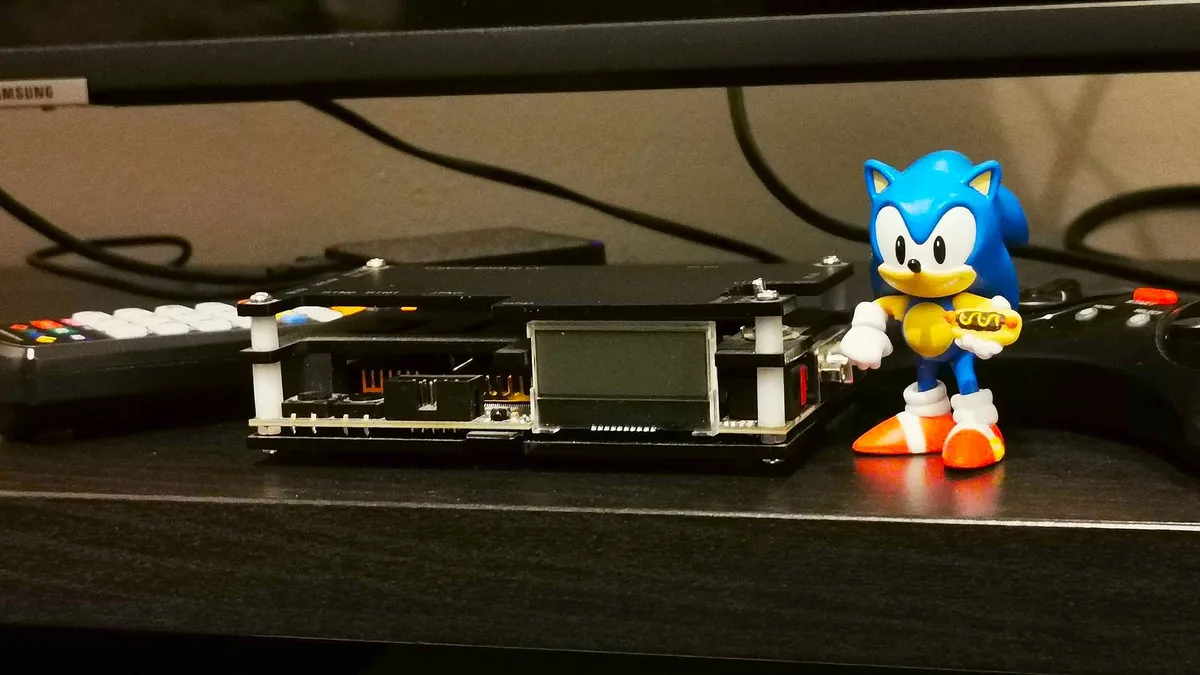
In contrast, it's pretty easy to get a sharp and clean RGB signal out of Sega's system. Whether you're using a PAL or NTSC-J Mega Drive or a US Genesis, you can use the same Scart cable to hook up to upscalers like the OSSC. That's thanks to the fact that the 8-pin DIN is the same on the Model 1 version, and while the Mega Drive 2 / Genesis 2 uses a smaller 5-pin port, the same pinout applies to all regions. The same can't be said for the SNES, as the Super Famicom uses a different standard than the American and European consoles.
RGB scart cable | $9.99 at Amazon
OSSC upscaler | $111.99 at Amazon
Hyperkin HDMI | $29.99 at Amazon
Sega's approach to output really makes a difference when using a Genesis in 2026. While I would highly recommend using RGB output if you can, the port's standardized pinout means you can tap into S-Video and composite using fairly generic cables, as I personally use the same RCA lead for my PC Engine and Mega Drive when using specific old CRT TVs without Scart input. While Nintendo did end up using the same proprietary connector for all its consoles between the SNES and GameCube, I still appreciate that Sato and his team led the charge on AV standardization.
Complicated outsides, simpler innards

After spending a weekend using my original Mega Drive consoles, I've also come to appreciate the simplicity of Sega's approach to hardware. Looks are absolutely deceiving when it comes to the 16-bit system, as while elements like its speedy Motorola 68000 CPU, aforementioned stereo headphone abilities, and even quirks like the side edge connector for hooking up to the eventual Mega CD add-on feel complicated, it's far easier to mod a Genesis than its rivals.
Specifically, I'm talking about the curse of region locks and compatibility. Every console maker throughout history is guilty of restricting the use of imported games in one way or another, but whether Sato and his team meant it or not, the Mega Drive is pretty easy to navigate in this regard. Modding your system so that it will happily run Mega Drive and Genesis-branded carts is as simple as removing a piece of plastic, and even circumventing DRM blocks included in cartridges later on isn't rocket science.
This all matters if you want to appreciate the majesty that is the Mega Drive / Genesis in 2026, as you'll want access to Sega's entire global catalogue. Plus, Japanese imports are often cheaper than their PAL or NTSC-U counterparts, so playing them on whatever console variant you actually have is important. The two main things that will help you achieve that is removing the plastic insert inside the console that blocks different-shaped carts and, if you're feeling handy, adding a switch to some jumpers on the board to toggle between PAL and NTSC as well as English and Japanese text.

You can go a step further with the latter mod by adding the right crystal oscillator to PAL systems so that it properly runs at 60Hz. However, the jumper mod will get around that previously mentioned DRM included specifically with blue Mega Drive and red Genesis-branded cartridges released in the '90s.
Having to mod the console at all might sound like a faff, but it's a very simple process compared to the SNES. Modding Nintendo's system with similar region-switching abilities is quite a bit more involved, especially if you're using a PAL machine. Ultimately, it's still all doable, and US players can remove plastic from the shell to make Japanese games fit, but it feels all the easier when using a Mega Drive.
The reason I'm highlighting how simple it is to work with the OG Mega Drive / Genesis hardware in terms of mods and multi-regions all comes down to the games. If you're going to go out of your way to use the actual hardware rather than emulators or the Nintendo Switch Online catalogue, you'll want to have access to more than just the common releases, and while Sato perhaps didn't anticipate players going to retro game stores and picking up carts from across the world, I'm glad his team made design choices that make it easier in the 21st century.
Sure, you could just use the Switch, but where's the fun in that?

I want to take a moment to say that you should enjoy Mega Drive / Genesis games in any manner you like. For some of you, using the Switch Expansion Pack to play some of the console's standout releases will make more sense, while some of you might have even already picked up something like the Anbernic RG ARC-D for its extremely authentic controls ($79.99 at Amazon, FYI). That's all fine and well, but if you are looking to experience the system's "blast processing" first-hand and get a taste for what the actual experience was like in the '90s, you should make a point of using the OG system.
At this stage, Genesis emulation isn't really a chore for devices. Even the cheapest handhelds out there, like the Anbernic RG28XX, can produce solid results, but using real hardware still hits different. Sometimes it's extremely subtle differences, like the way the piercing sounds produced by the original Yamaha YM2612 FM synthesis chip, or even the rough and ready pixels, analogue signal, warts and all. If you do have access to a CRT, you'll also get to enjoy sprites that look like developers originally intended, thanks to the definition and pixel separation afforded by shadow mask layers (or Sony's Aperture grille tech if you're lucky enough to own a Trinatron.
These are effects that emulators are starting to bake in, but I'd argue they'll never beat the real deal. I should note that I do regularly play Mega Drive games on a gaming monitor using an upscaler, and OLED screens like the Dough Spectrum Black 32 can really help the console's original graphics sing. There is something undeniably special about sitting down with the exact setup I used 30 years ago, though, and spending the weekend parked in front of said setup felt like a great way to pay homage to Sega's legendary console designer.

I could go on at length about how I prefer the sounds and rougher graphics of the Mega Drive / Genesis in Sega versions of games compared to the SNES (looking at you, Disney's Aladdin), or how I'll always pick the 6-button Mega Drive controller over Nintendo's gamepad (Retro-bit's wireless version is a great alternative for $35.99, but the Genesis design has recently changed).
However, the main point I'm trying to make is that the Sega Mega Drive is a system worth honoring, and making a point of at least trying the original hardware is one way you can celebrate the legacy Hideki Sato has now left behind.
Looking for ways to play on the go? Swing by the best gaming handheld options for portable PCs, emulation devices, and more. If you've already got Valve's powerhouse, take a peek at the best Steam Deck accessories and best Steam Deck docks to enhance your setup.

You must confirm your public display name before commenting
Please logout and then login again, you will then be prompted to enter your display name.