

Background
Welcome to GamesRADAR+ Community !
Hi ,

Your membership journey starts here.

Keep exploring and earning more as a member.

MY ACCOUNT

Badge picture
Earn your first badge
Read 1 article to unlock your first badge.
Keep earning badges
Explore ways to get more involved as a member.
Latest Games News

Latest Games News

Breaking gaming news and updates

Read Now
Latest Games Reviews

Latest Games Reviews

Expert verdicts on the newest releases

Read Now

See what you’ve unlocked.

Explore your membership benefits.

Explore
Member Exclusives

Stay Ahead with GamesRadar+

Get the biggest gaming news, reviews, and releases straight to your inbox.

Explore

Sign Out
GamesRadar+ GamesRadar+
US EditionUS CA EditionCanada UK EditionUK AU EditionAustralia
Sign in
  • View Profile
  • Sign out
  • Games
    • Game Insights
      • Games News
      • Games Features
      • Games Reviews
      • Games Guides
      • Big in 2026
      • Big Preview
      • Future Games Show
      • Golden Joystick Awards
    • Genres
      • Action Games
      • RPGs
      • Action RPGs
      • Adventure Games
      • Third Person Shooters
      • FPS Games
    • Platforms
      • PS5
      • Xbox Series X
      • PC
      • Nintendo Switch
      • Nintendo Switch 2
      • Tabletop Gaming
    • Franchises
      • Grand Theft Auto
      • Pokemon
      • Assassin's Creed
      • Monster Hunter
      • Fortnite
      • Cyberpunk
      • Red Dead
      • The Elder Scrolls
      • The Sims
  • Entertainment
    • TV Shows
      • TV News
      • TV Reviews
      • Anime Shows
      • Sci-Fi Shows
      • Superhero Shows
      • Animated Shows
      • Marvel TV Shows
      • Star Wars TV Shows
      • DC TV Shows
    • Movies
      • Movie News
      • Movie Reviews
      • Big Screen Spotlight
      • Superhero Movies
      • Action Movies
      • Anime Movies
      • Sci-Fi Movies
      • Horror Movies
      • Marvel Movies
      • DC Movies
    • Streaming
      • Apple TV Plus
      • Disney Plus
      • Netflix
      • HBO
      • Amazon Prime Video
      • Hulu
    • Comics
      • Marvel Comics
      • DC Comics
    • Toys & Collectibles
    • Lego
    • Dungeons and Dragons
    • Merch
  • Hardware
    • Insights
      • Hardware News
      • Hardware Reviews
      • Hardware Features
    • Computing
      • Desktop PCs
      • Laptops
      • Handhelds
    • Peripherals
      • Headsets & Headphones
      • TVs & Monitors
      • Gaming Mice
      • Gaming Keyboards
      • Gaming Chairs
      • Speakers & Audio
    • Accessories & Tech
      • Gaming Controllers
      • Tech
      • SSDs & Hard Drives
      • VR
      • Accessories
      • Retro
  • Deals
    • Game Deals
    • Tech Deals
    • TV Deals
    • Buying Guides
  • Video
    • Video
    • GR+ Replay - Submit Your Clips
  • Newsletters
    • Quizzes
    • About Us
    • How to pitch to us
    • How we score
    • Newsarama
    • Retro Gamer
  • home
  • Games
    • View Games
      • Games News
      • Games Features
      • Games Reviews
      • Games Guides
      • Big in 2026
      • Big Preview
      • Future Games Show
      • Golden Joystick Awards
      • Action Games
      • RPGs
      • Action RPGs
      • Adventure Games
      • Third Person Shooters
      • FPS Games
    • Platforms
      • View Platforms
      • PS5
      • Xbox Series X
      • PC
      • Nintendo Switch
      • Nintendo Switch 2
      • Tabletop Gaming
      • Grand Theft Auto
      • Pokemon
      • Assassin's Creed
      • Monster Hunter
      • Fortnite
      • Cyberpunk
      • Red Dead
      • The Elder Scrolls
      • The Sims
  • Entertainment
    • View Entertainment
    • TV Shows
      • View TV Shows
      • TV News
      • TV Reviews
      • Anime Shows
      • Sci-Fi Shows
      • Superhero Shows
      • Animated Shows
      • Marvel TV Shows
      • Star Wars TV Shows
      • DC TV Shows
    • Movies
      • View Movies
      • Movie News
      • Movie Reviews
      • Big Screen Spotlight
      • Superhero Movies
      • Action Movies
      • Anime Movies
      • Sci-Fi Movies
      • Horror Movies
      • Marvel Movies
      • DC Movies
    • Streaming
      • View Streaming
      • Apple TV Plus
      • Disney Plus
      • Netflix
      • HBO
      • Amazon Prime Video
      • Hulu
    • Comics
      • View Comics
      • Marvel Comics
      • DC Comics
    • Toys & Collectibles
    • Lego
    • Dungeons and Dragons
    • Merch
  • Hardware
    • View Hardware
      • Hardware News
      • Hardware Reviews
      • Hardware Features
      • Desktop PCs
      • Laptops
      • Handhelds
    • Peripherals
      • View Peripherals
      • Headsets & Headphones
      • TVs & Monitors
      • Gaming Mice
      • Gaming Keyboards
      • Gaming Chairs
      • Speakers & Audio
      • Gaming Controllers
      • Tech
      • SSDs & Hard Drives
      • VR
      • Accessories
      • Retro
  • Deals
    • View Deals
    • Game Deals
    • Tech Deals
    • TV Deals
    • Buying Guides
  • Video
    • View Video
    • Video
    • GR+ Replay - Submit Your Clips
  • Newsletters
    • Quizzes
    • About Us
    • How to pitch to us
    • How we score
    • Newsarama
    • Retro Gamer
Trending
  • Saros review
  • Arc Raiders
  • The Boys S5
  • Best turn-based RPGs
  • Submit your clips. Win prizes
  • Delta Force giveaway
Don't miss these
Asus ROG Zephyrus G14 gaming laptop with lid facing camera on a wooden desk
Laptops The new Asus ROG Zephyrus G14 is doing a lot with its extra wattage, but I'm bracing myself for the price tag
Five different gaming controllers for PC scattered around a desktop surface
Gaming Controllers The best PC controller for gaming 2026
HP Omen Max 16 gaming laptop on a wooden desk
Laptops The best gaming laptop 2026 - new releases start hitting the test bench
The Valerion VisionMaster 2 Pro on a table, with its remote leaning against it.
Hardware The Valerion VisionMaster Pro 2 is a no-holds-barred cinephile projector
A collection of TMR gaming controllers
Gaming Controllers I've tested them for you, and these are the 7 best TMR controllers on the shelves right now
Steam Deck with mascot face on screen surrounded by compatible Steam Deck docks
Handhelds The best Steam Deck dock 2026: the handheld docking stations I'd recommend
Verbatim portable monitor with Overwatch 2 character select screen on display next to two Squishmallow frogs
TVs & Monitors The best portable monitors for gaming 2026
DualSense Edge review image showing the controller next to the original DualSense in Nova Pink
Gaming Controllers The best PS5 controller 2026: Find your Edge
LG OLED G4 with Overwatch 2 practice gameplay on screen
TVs & Monitors Best TV for PS5 and Xbox Series X 2026: 4K panels for your high spec console
Streaming for gamers
Hardware Best live streaming gear for gamers 2026: The best setups for beginners and pros
Flexispot E7 Plus standing desk with monitor, Blueant speaker and plant on top
Peripherals Best standing desk 2026: Switch from seat to feet
Close up on macro buttons on the side of the Corsair Vanguard Pro 96 gaming keyboard
Gaming Keyboards Best gaming keyboard 2026: the Vanguard stands strong with another new entry for Corsair
BenQ Mobiuz EX321UX monitor on desk with Overwatch 2 gameplay on screen.
TVs & Monitors The best monitor for PS5 2026: high spec screens for the OG and Pro
Alienware 34 AW3423DW QD-OLED
TVs & Monitors Best ultrawide monitor 2026
Elgato HD60 X
Tech Best capture card 2026: top picks for recording and streaming on consoles and PC
  1. Hardware
  2. Peripherals

Elgato Prompter review: “Elgato at its innovative best”

Reviews
By Duncan Robertson published 18 September 2024

When you purchase through links on our site, we may earn an affiliate commission. Here’s how it works.

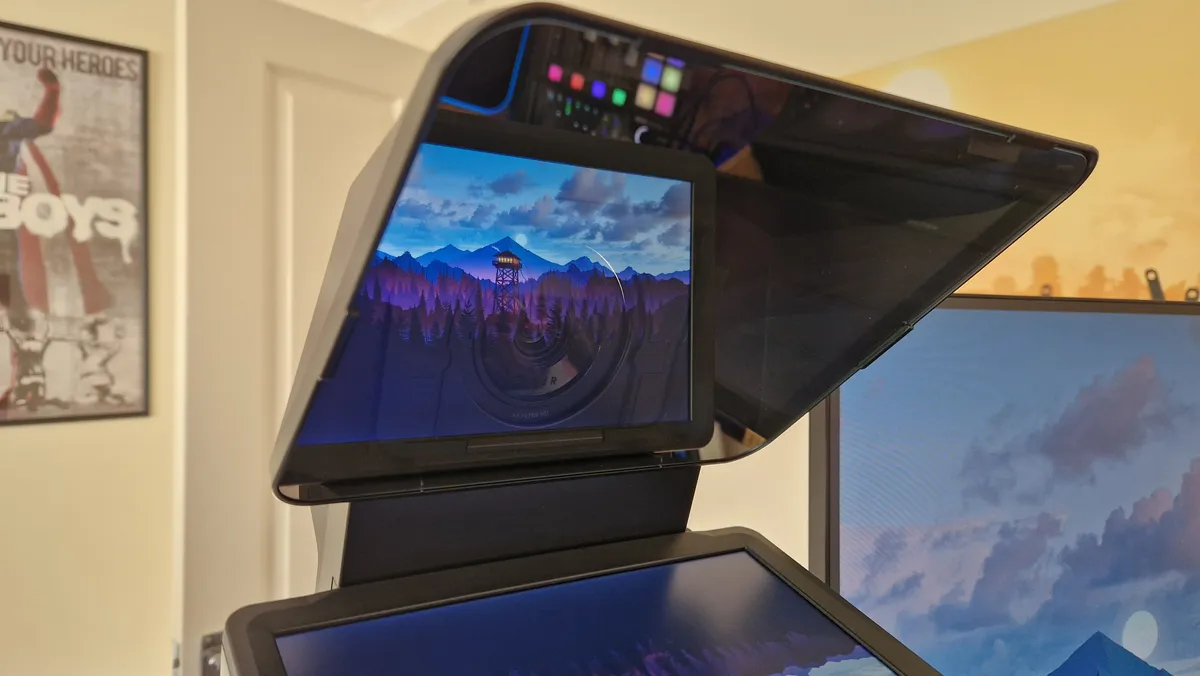
Elgato Prompter review image showing the device displaying a Firewatch background
(Image credit: © Future / Duncan Robertson)

GamesRadar+ Verdict

The Elgato Prompter has transformed the way I’m able to present video script to a camera. It shows what the manufacturer is capable of when it innovates. The result is a device that feels like it’s been missing from the current setup of your everyday content creator until now. As a prompter, it’s extremely powerful, but in its other use cases, it isn’t quite as perfect as I’d hoped.

$269.99 at Amazon
$289.99 at Best Buy
$299.99 at Sweetwater
$299.99 at Newegg

Pros

  • +

    An excellent prompter first and foremost

  • +

    Great adjustability settings

  • +

    Can be used as an additional PC display

  • +

    Live streaming utility

  • +

    Decent camera compatibility

Cons

  • -

    USB-C connectivity only

  • -

    A bit small to be truly viable as a PC display

  • -

    YouTube chat integration is still missing

  • -

    CLimited refresh rate options

Best picks for you
  • Best capture card 2026: top picks for recording and streaming on consoles and PC
  • Best live streaming gear for gamers 2026: The best setups for beginners and pros
  • Best streaming mixers in 2026: Master your live audio like a pro

Why you can trust GamesRadar+ Our experts review games, movies and tech over countless hours, so you can choose the best for you. Find out more about our reviews policy.

The Elgato Prompter is the type of product that defines this brand. I first used Elgato products way back in 2015 when I bought its first-ever capture card, the Game Capture HD. Since then, streaming and content creation hardware has popped up from almost every gaming peripheral brand, but Elgato has always been the trailblazer, inventing never-before-seen products you wonder how anyone ever achieved success without.

Before this becomes a puff piece about Elgato, let me make clear that this manufacturer has not been my favorite in recent years. Innovation has often given way to iterative products that don’t offer people anything new, but still demand a higher price than rival companies. I understand that not every product Elgato makes can reinvent the wheel, but this is a wing of Corsair that’s at its best when it’s creating the first of something - products that have never before appeared on our best gear for streaming lists.

The Elgato Prompter is such a product. It feels as practical as the original Game Capture and as intuitive as the first Stream Deck. This is Elgato truly innovating, and despite a lofty price of $279.99 / £279.99, it’s something I’d even recommend to beginners. If you plan to present a script to camera often, this is a must-have device that has no true alternative.

Article continues below

Design

Elgato Prompter from behind with a Razer Kiyo Pro Ultra seated on it

(Image credit: Future / Duncan Robertson)

I’m not going to claim that Elgato invented the teleprompter. An inverted display and some reflective glass have been used since the dawn of television to make speaking directly into a camera lens feel more natural. For streamers and content creators, though, options are pretty limited. You can get something to set your phone in, or you can buy a tablet and attach it to a tripod. Alternatives on Amazon often feel so make-shift that they’re not worth the bother. Elgato has changed that by taking the traditional teleprompter and adapting it for the internet, making it the perfect solution for the masses. 

As you might expect, there are two main parts to the Prompter, a 9-inch display with a 1024 x 600p resolution, and then a reflective piece of special glass fixed above it. Behind the glass sits a housing for attaching a camera that will then, in theory, capture footage at the same quality it would usually. 

The “attaching a camera” bit is where discussing the design of Elgato’s Prompter gets quite tricky because there are so many moving parts that will differ for you depending on which camera and even lens you’re using. In the box, you get a slew of what Elgato calls step-up rings - special fittings that you can poke your camera through. To be precise, you get a 49, 52, 55, 58, 62, 67, 72, 77, and 82 mm ring, which gives you loads of leeway for adding different cameras.

Elgato Prompter's right-angle USB-C cable

(Image credit: Future / Duncan Robertson)

If you’re using one of the best webcams, there’s a backplate that will help smaller lenses remain secure, as well as a fixing plate that holds them in place from below. There’s definitely scope for a lot of webcams to work, but, based on my testing with several different models, the overall design does feel more tilted at DSLR cameras and the shape of Elgato’s own Facecams, like the Facecam MK2.

Sign up to the GamesRadar+ Newsletter

Weekly digests, tales from the communities you love, and more

By submitting your information you agree to the Terms & Conditions and Privacy Policy and are aged 16 or over.

Helpfully, Elgato also provides a handy USB-C to USB-A 3.0 cable, which has a right angle at the “C” end so it won’t pull at the prompter. I’ve also played around with the included shroud that comes in the box, which adds yet more versatility for lighting control. I did love that inside Elgato’s very sustainable packaging, you get everything you’ll need for setting up the Prompter, including mounting screws and a cleaning cloth. The only thing you’ll really need to buy separately is a tripod, but chances are, if you’re looking into buying a prompter like this, you’ll already have one.

Features

Elgato Prompter review photo from above

(Image credit: Future / Duncan Robertson)

As is the case for all of Elgato’s products that aren’t capture cards, the Prompter is controlled through the brand’s Camera Hub software. This gives the Prompter its three distinct “modes”, all of which can be helpful depending on what you’re up to. The first mode is a straight-up display mode, which your PC or Mac will recognize by default. This is exactly what it sounds like - the Prompter will act as a defacto display you can position and configure how you’d like. It uses a panel with a 60Hz refresh rate, and for reasons I’ll come onto, I wish there were more options here. 

The second is the prompter mode. This loads up a script you add into the Camera Hub, and the display turns into what you’d expect of a teleprompter. What I really like in this mode is how many settings Elgato thought to include. Camera Hub allows you to control the brightness and contrast level of the display, the speed of the scroll, the margin size, and even the color and font of the text and background, which is huge for someone like me who has dyslexia. If you want the size of the text to be larger, you can change that as well to make it the most comfortable reading experience for you. When you paste a script into the software, it will automatically load into chapters that make clicking to different points in the script so much easier. Additionally, if you move your mouse cursor onto the prompter’s display, you can scroll up and down manually.
Elgato Prompter review image showing the reflective glass of the device

(Image credit: Future / Duncan Robertson)

New settings for the Prompter mode seem to be in the works as well because even since I got my review unit, the ability for Camera Hub to scroll the Prompter’s text using your voice (and natural reading speed) has been added. I can’t wait to see what more utility comes later on.

The third mode is more useful for streamers, because it’s a chat window. In concept, you throw your Twitch handle into the settings menu, and the display will then let you monitor your Twitch stream’s chat. Viewers can feel as though you are actually talking directly to them if you do this because looking at the camera is looking at what they’ve been saying. Annoyingly, YouTube chat still can’t be integrated, which is a real shame. I have no doubt this is in the pipeline, but it’s taking a frustratingly long time to add.

Performance

Elgato Prompter in prompter mode

(Image credit: Future / Duncan Robertson)

Having a prompter this powerful has made creating my videos on YouTube so much easier. Before, I’d have to earmark the parts of my scripts I’d want to appear on camera for, memorize them, and then deliver them accordingly when laying down a voice-over track. This was fine, but a less-than-perfect solution. If I changed my mind later and wanted a different part of the script on camera, then I wouldn’t have the option on the cutting room floor. Now, I can deliver an entire script directly to the camera with all the expressions and eye contact I’d like, and I have so many options when it comes to editing. 

Not only that, but memorising parts of a script and practising delivery can be tricky and time consuming. The Prompter allows me to read more naturally, and if I want a different take, it’s easy to skip back a chapter and redo. Before having a Prompter to read from, I used to do this annoying thing where my eyes would already start moving away from the lens and toward my script before a natural cutting point. Now, the script and camera are one, so I don’t need inventive cutting to get around bad presenting.

As a content creation tool alone, this product is unmatched, but for its other use cases, I’m not sure it’s truly viable.

Then, when you add the customization options, you get so much scope to make the Prompter feel like your own. As a dyslexic, I can find reading certain fonts harder than others, and coloring the texts or backgrounds can really help me. I love that Elgato has supplied that option, because so often dyslexic people aren’t thought of, and need to adapt to what everyone else can do easily. Being able to change font and margin size is a huge win too. Depending on the distance you are from your camera when recording, the margin on the prompter can make it obvious you’re reading - which viewers will be able to pick up on.

Now, I know this isn’t one of the best gaming monitors, but I wish the Elgato Prompter could change its refresh rate. I use a Razer Kiyo Pro Ultra because it’s probably the best webcam ever made, but at 4K, it can still only capture at 30fps. When you have a display projecting light at 60Hz up into a lens capturing at 30Hz, you can get a bad case of glare and flickering. Changing brightness and contrast levels can help, as can using the included shroud to block out other lighting sources. Nevertheless, this is a flaw for anyone not using a DSLR camera because it makes even the uppermost echelon of webcams feel troublesome. I also think there’s a slight disparity between the step-up ring that’s most appropriate for the Kiyo Pro Ultra’s and its actual size - and it wouldn’t surprise me if that’s the case for some of Elgato’s other rival products.

Elgato Prompter review from the side, next to a vertical gaming monitor

(Image credit: Future / Duncan Robertson)

Zooming out, this refresh rate issue speaks to my wider issues with Elgato’s Prompter. As a content creation tool alone, this product is unmatched, but for its other use cases, I’m not sure it’s truly viable.

I was so excited to use the Elgato Prompter as a third display, but in all honesty, it isn’t really worth keeping it plugged in. As a USB-C peripheral with no HDMI or DisplayPort connectivity, it puts extra strain on your CPU, and even with an Intel Core i5-13600K, I noticed that extra bandwidth being used. Furthermore, I wish the prompter was a little bit larger. As a third display in combination with two 27-inch monitors, it ends up looking too small and awkward to actually use comfortably. Throwing a video call window into the Prompter’s admittedly crystal clear display is a great idea, but the application will appear so small that you’ll probably end up squinting at whichever colleagues you have on a call, which would look more unnatural than just having them sit on a display underneath your webcam.

If I use my Prompter as a display, it’s usually to keep a file window or Spotify open, giving me easy access at any moment. The file window option is especially useful for video editing so I could drag and drop things onto my timeline, but for the most part, I ended up unplugging because it was more trouble than it was worth, and it was churning my PC fans into a frenzy. This went for using the Stream Chat mode too, unfortunately.

I can’t help but feel a second edition of the Prompter which will inevitably arrive in the future would benefit from a larger size, more refresh rate options, and either HDMI or DisplayPort support.

Should you buy the Elgato Prompter?

Elgato Prompter as an integrated PC display

(Image credit: Future / Duncan Robertson)

If you’re a content creator, the Elgato Prompter needs to be something you’re considering. I’d argue it’ll make as much difference to your content as one of the best microphones for streaming and gaming - and I value those highly.

For streamers and remote workers, I’d say it’s less valuable than Elgato would have you think. It’s just a little too small and a little too demanding for the average user who probably already has a million USB peripherals providing them value. 

If you’re a YouTuber or somebody who finds themselves presenting a script to camera often, this is no short of a must-have. This is Elgato at its innovative best and a product that’s given my content creation setup a massive quality-of-life boost.

Admittedly, this isn’t a cheap piece of kit, but it’s something I’d prioritize if you want to come across naturally on camera while having the confidence that your viewers will be seeing an authentic version of you.

TODAY'S BEST DEALS
$269.99 at Amazon
$289.99 at Best Buy
$299.99 at Sweetwater
$299.99 at Newegg

How I tested the Elgato Prompter

I integrated the Elgato Prompter into my gaming, content creation, and work-from-home setup for around two months before writing up this review. In that time, I’ve had extensive experience with all of its use cases, including videos delivered to camera, use of it as a display for PC, and as a chat window while live streaming. 

Having been a content creator for YouTube for a while, I was able to compare my time spent testing the Prompter with my years of not having it, and I enjoyed being able to test out how the different settings in the Elgato Camera Hub changed my experience. You can compare my on-screen delivery in this video where I didn’t have the prompter with this one, where I did use it. 

For more on how we test gaming and streaming tech, check out the full GamesRadar+ Hardware Policy. 


A prompter isn’t the only thing that’ll make a difference to your content-creating setup. Check out the best ring lights for streaming, the best green screen, and the best streaming mixers. 

Elgato Prompter: Price Comparison
22 Amazon customer reviews
☆☆☆☆☆
Elgato Prompter –...
Amazon
Prime
$299.99
$269.99
View
Elgato - Prompter -...
Best Buy
$289.99
View
Elgato Prompter
Sweetwater
$299.99
View
Elgato Prompter with Display...
Newegg
$299.99
View
bundle
Elgato Prompter
Dell
$299.99
View
Show more
We check over 250 million products every day for the best prices
powered by
Gamesradar
TOPICS
Corsair Twitch YouTube
Duncan Robertson
Duncan Robertson
Social Links Navigation
Hardware Editor

One of my earliest memories is playing SuperMario64 and wondering why the controller I held had three grips, but I only had two hands. Ever since I've been in love with video games and their technology. After graduating from Edinburgh Napier University with a degree in Journalism, I contributed to the Scottish Games Network and completed an Editorial Internship at Expert Reviews. Over the last decade, I’ve been managing my own YouTube channel about my love of games too. These days, I'm one of the resident hardware nerds at GamesRadar+, and I take the lead on our coverage of gaming PCs, VR, controllers, gaming chairs, and content creation gear. Now, I better stop myself here before I get talking about my favourite games like HUNT: Showdown, Dishonored, and Towerfall Ascension.

Read more
An Elgato Stream Deck Plus showing different application logos on its keys
Peripherals Elgato drops the Stream Deck Plus back to a record-low we've only seen twice before
 
 
Streaming for gamers
Hardware Best live streaming gear for gamers 2026: The best setups for beginners and pros
 
 
The design of the YoloLiv YoloCam S3
Peripherals This webcam promises DSLR image quality, and it isn't too far off
 
 
A side-by-side image of the Elgato Wave XLR MK.2 and the new Wave Link software's mixing table
Peripherals "Our vision for what creator audio should be" - Elgato launches Wave Next, a new generation of powerful audio hardware with software that's free for everyone
 
 
Elgato HD60 X
Tech Best capture card 2026: top picks for recording and streaming on consoles and PC
 
 
Best streaming mixer hero image showing a BEACN Mix Create next to a RodeCaster Duo
Peripherals Best streaming mixers in 2026: Master your live audio like a pro
 
 
Latest in Peripherals
Close up on magnetic switches underneath Asus ROG Azoth 96 HE arrow keys
Gaming Keyboards This top-shelf Hall effect gaming keyboard has a pricing problem, but Amazon's working on it
 
 
Close up on extra function buttons on Keychron V6 Max
Gaming Keyboards Keychron essentially just made its top keyboards 3D-printable
 
 
Logitech G305 Lightspeed gaming mouse standing upright on a wooden desk with blue backlighting
Gaming Mice I put this eight year old budget gaming mouse to the test against far newer releases, and it still comes out on top
 
 
KOORUI GN02 monitor with Overwatch 2 main menu on screen
Peripherals Can a VPN let you play region-locked games?
 
 
LG UltraGear Dual Resolution monitor on desk next to plant, Bigfoot Squishville, and Club Penguin plush with Overwatch 2 gameplay on screen.
Peripherals What should gamers look for in a VPN?
 
 
PS5 Pro and PS5 original console on a wooden table
Peripherals Console gaming on a VPN: what works on PS5/Xbox Series X
 
 
Latest in Reviews
Stranger Things: Tales From '85
Sci-Fi Shows Stranger Things: Tales From '85 review: "Makes you nostalgic for the early days of Stranger Things"
 
 
Saros Review
Roguelike Games Saros review: "A lean fusion of roguelike sci-fi action and eldritch horror that successfully remixes Returnal"
 
 
Two Cities of Sigmar Grenadiers painted by Will Salmon.
Tabletop Gaming Warhammer: Spearhead – City of Ash review - "If you've never played Spearhead before and want an easy way into the game, then – finally – this is it"
 
 
A group of blue fairies block the view of a billboard that says Titanium Court, each with expressive faces including the lead who peers over sunglasses
Roguelike Games Titanium Court review: "Balatro meets Blue Prince in this roguelike match-three RTS that's been massaging my brain"
 
 
Eyla talks to the player in a colorful, collapsed structure in Tides of Tomorrow
Adventure Games Tides of Tomorrow review: "Your choices in this microplastics apocalypse are shaped by other players"
 
 
Asus ROG Zephyrus G14 gaming laptop with lid facing camera on a wooden desk
Laptops The new Asus ROG Zephyrus G14 is doing a lot with its extra wattage, but I'm bracing myself for the price tag
 
 
LATEST ARTICLES
  1. Clair Obscur: Expedition 33 screenshot of Verso, a man with black hair with white streaks running through his fringe
    1
    Clair Obscur: Expedition 33 actor Ben Starr says live-action Street Fighter or God of War adaptations aren't necessary, since "I don't think video games need to justify their existence by being TV shows"
  2. 2
    A new Minecraft mob might have leaked thanks to a holiday decoration, and I already love it based on its name alone
  3. 3
    Henry Cavill and Stranger Things' Millie Bobby Brown feature in fiery new look at Enola Holmes 3
  4. 4
    All-In-One Switch 2 cases are my vacation must-have, and this Turtle Beach 2-in-1 option is a great place to start
  5. 5
    Until Dawn dev's new sci-fi horror builds on Alien and The Thing's coworker paranoia: "It's a different, more mature way of viewing relationships"

GamesRadar+ is part of Future US Inc, an international media group and leading digital publisher. Visit our corporate site.

Add as a preferred source on Google Add as a preferred source on Google
  • Terms and conditions
  • Contact Future's experts
  • Privacy policy
  • Cookies policy
  • Accessibility statement
  • Careers
  • About us
  • Advertise with us
  • Review guidelines
  • Write for us

© Future US, Inc. Full 7th Floor, 130 West 42nd Street, New York, NY 10036.

Please login or signup to comment

Please wait...