





GamesRadar+ Verdict
The Mchose V9 Turbo Magnetic Wireless Gaming Headset is one of the most feature-full headsets for its $139.99 price tag. Other brands usually charge far more for a mighty 200-hour battery life, tri-mode connectivity options, EQ settings, and a handy charging stand that doubles as a wireless transmitter, like what you get packed in with their pair, so it's bursting with value. Yet, its middling raw sound quality and limited availability prevent me from giving this a full five-star review, no matter how impressive the V9 Turbo can otherwise be.
Pros
- +
Great price point
- +
Supports wired, Bluetooth and 2.4GHz connection types
- +
Comes with a charging stand
- +
Packs in a massive 200-hour battery life
- +
Charging stand doubles as wireless transmitter
- +
Available in a variety of colorways
Cons
- -
Lacks power in the low-end
- -
Average microphone quality
- -
Limited availability
Why you can trust GamesRadar+ Our experts review games, movies and tech over countless hours, so you can choose the best for you. Find out more about our reviews policy.
The more you spend time with the Mchose V9 Turbo Wireless Gaming Headset, the more you'll appreciate it. At first, I looked at the pair as if it were the bizarre lovechild of the Razer BlackShark V3 Pro and the Fractal Design Scape, thanks to its eerily similar design, on-board control placement, and charging stand. Yet, the more time I spend with it, the more I grew to love it for its own merits.
The best gaming headsets around its $139.99 MSRP typically don't come with features like a whopping 200-hour battery life, 60mm audio drivers, or a magnetic look-in-place RGB charging stand. The Scape charges $199.99 for the privilege, and its stand doesn't look nearly as nice.
It's not a perfect pair. Its average out-of-the-box sound lets it down. Especially as relying on the Mchose Hub software to give it an adequate boost means it's more of a PC headset for gaming than something I'd recommend to console players. It's also only available on the Mchose official online store for now, so availability is limited. Yet, if you want a mid-range headset with more high-end features, and absolutely hate charging as much as I do, this is one of my new favorite headsets that you'll find below a $150 price point.
Key specs
Price |
$139 / £119 |
Acoustic design |
Closed-back, over ear |
Connection |
2.4GHz / Bluetooth Wireless / Wired |
Drivers |
60mm Composite Diaphragm Drivers |
Frequency response |
20 Hz–28,000 Hz |
Microphone |
AI Noise-Canceling Microphone with 360-degree Voice Pickup |
ANC |
No |
Controls |
Volume knob, power button, quick switch button, mic mute button |
Battery |
Up to 200 hours + includes RGB charging station |
Weight |
320g (excluding microphone) |
Compatibility |
PC, PS5, Nintendo Switch & Switch 2, mobile |
Design

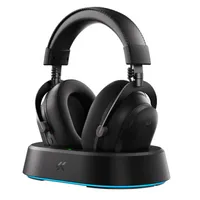
The pair of cups themselves looks so similar to Razer's BlackShark line that I wondered at first if MCHOSE had been copying some homework. The V9 Turbo shares the same over-shaped earcups and bulbous volume dial, as well as a similar placement for its on-board controls. The pairs aren't an exact match, of course. But I wouldn't blame you if you couldn't tell them apart at first glance.
Looking closer, you'll spot a glossy Mchose logo can be found on the exterior of each cup. Meanwhile, its full brand name is embossed on the soft-to-the-touch headband. Talking of soft, the 90-degree swivel ear cups have padding that's coated in both fabric and a leather-like material, so you get the best of both worlds. Mchose even pack in an additional fabric pair to attach, if that's your preference.
Features

If you're wondering where those Fractal Design Scape similarities are found, it's all in that charging stand. They aren't new by any means, but I can't help but be reminded of Fractal Design's version when gazing at the oval-shaped wedges of the V9 Turbo's stand.
Mchose's version is at least a bit flashier, as it's rocking a rim of RGB lighting around the bottom. It's also a lot larger than the Scape's version, but this makes it easier to drop down and magnetically lock in the headset when you need to give it more juice. It's not just built for charging either as it also doubles up as a wireless transmitter.
You can hook it up to your gaming PC or console of choice, and it'll act similarly to a 2.4GHz wireless dongle. The headset actually comes with one of them too, which can be placed within the stand or directly into your PC or Nintendo Switch 2 dock; it just depends on your preference. That's good news for multiplatform gamers, as it means you can easily switch between PC and consoles at a whim.

The huge range of features on offer with the Mchose V9 Turbo is what makes it so special. Not because these features aren't present in other mid-range headsets out there, but because so rarely will you find all that the V9 Turbo has to offer for just $140. Besides the charging stand, the headset itself is packed with 60mm Composite Diaphragm audio drivers, 7.1 channel surround sound, EQ customisation via the Mchose Hub software, and a whopping up to 200-hour battery life.
Performance
As the charging stand is a pretty chonky boy, it felt fitting to test the headset with my gaming PC first. The desk space was also ideal for the charging stand to rest on, and testing on PC first gave me access to the Mchose Hub for customizing its RGB lighting and messing around with EQ settings. Yet before I got deep into tinkering around with the audio, I checked out its out-of-the-box sound.
The only real disparity I could hear was with the lower end. The mid to high range frequencies sound really bright and crisp, but the raw sound just doesn't have enough power in the bass. To make up for that, I used the Mchose Hub and selected the 'Dynamic Low Frequency' setting, and that's where things started to get gut-punchingly good.
The setting is designed to "enhance strong rhythms" and make beats sound more powerful, and it definitely achieved that. While playing Marvel Rivals, the underlying sounds that follow Galacta's voice as you take down enemy team members sounded more thunderous and blood-pumping, as did the music that swells just before every match. This transposed its way to Counter-Strike 2 too, where every shot I fired sounded far more satisfying than had I left the setting alone.
When I switched over to the PS5, I sadly lost the ability to use the Mchose Hub. There is a Mchose Hub web version, but this wouldn't run on my phone, no matter what I tried. With no app version available, that left me with the basic sound for my Sony gaming, which wasn't ideal, but it wasn't the worst thing either. Marvel Rivals still sounded great, and the 7.1 channel surround sound let me pinpoint the footsteps of nearby Spider-Man players that continuously tried to flank me down, as they like to do. As I'm still slowly getting my way through the Fatal Frame 2 Crimson Butterfly Remake, I also put its creepy soundstage to the test with the V9 Turbo, and discovered an entirely adequate sound quality.

At this point, I did start to desperately miss the Dynamic Low Frequency setting. After whipping out the Nintendo Switch 2 also for some Mario Kart World and Lylat Wars via the Nintendo Switch Online N64 game library, I started to realise that the V9 Turbo is best for PC players. Its natural sound quality isn't bad by any stretch, but to truly get your money's worth, it's better to have that easy access to the Mchose Hub.
The Hub is also where you can select from a range of game audio presets. For esports fans, you can also find a list of these designed in tandem with a range of competitive players. I will admit though, that as my brain prioritizes storing information about headsets and the best Nintendo Switch 2 accessories, the names 'Baize', 'YJJ' or 'Nanbowan' didn't do anything for me. What did were the additional settings for the microphone, which allow you to toggle on AI noise reduction, side tone, and even some monster sound effects for some bizarre reason?

Talking of the microphone, it's fine. It doesn't carry the same broadcast quality as the Razer BlackShark V3 Pro that I've been comparing this headset to throughout this review, but it's not horrific when mixed into Discord or used to chat to co-workers in meetings either. Just beware that it will have a strange echo if you forget to toggle off any other headset settings, including the Dynamic Low Frequency or Audio Brightening options available via the Hub.
The microphone itself is detachable and features a little ring of blue LED lighting, which glows red when it's muted. A detail I very much appreciated during testing, as someone who regularly accidentally mutes themselves in Discord and when playing online games like Talisman and Marvel Rivals with their friends.
Should you buy the MCHOSE V9 Turbo wireless gaming headset?

If you care more about the wealth of features of a headset than its audio quality alone, then the V9 Turbo is a great choice. That may sound negative, but even after spending two weeks with the pair, I'm continually impressed by all the value Mchose managed to pack in. This is a feature-full headset, and there's nothing wrong with wanting to get your money's worth.
It's not just the only headset you'll find with a charging stand for just $139.99, but its stand is one of my favorites that I've used to date. It looks fantastic even without the rainbow wave of RGB lighting glowing underneath, and dropping the headset down into it for some extra juice is easy peasy. Mchose even made sure to include a cut-out wedge so you don't need to detach the microphone when charging, either.
I wouldn't ever recommend a headset purely for the stand it comes with, of course, and you can find mid-range headsets like the SteelSeries Arctis Nova 5 Wireless for a similar price that are not only more console-friendly but provide better raw audio and microphone quality. Whether the Mchose V9 Turbo is a better fit for you will depend on whether you don't mind tinkering around with EQ settings to get a better sound, and whether you're a PC and console-gaming fan.
How I tested MCHOSE V9 Turbo wireless gaming headset
I had the Mchose V9 Turbo wireless gaming headset as part of my everyday gaming setup for a little over two weeks in order to put it through its paces. In that time, I had the charging stand set up at my desk, where I was able to use the headset to play Counter-Strike 2, Marvel Rivals, and Paranormasight The Mermaid's Curse. When not playing on my PC, I unhooked the wireless dongle from the charging stand to plug into my PS5, where I tested the V9 Turbo alongside the console version of Marvel Rivals, Fatal Frame 2 Crimson Butterfly Remake, and Doom Eternal. Additionally, I used the pair's Bluetooth capabilities to test it alongside the Nintendo Switch 2 to play Pokemon Pokopia, Mario Kart World, and Tomodachi Life Living the Dream.
When not gaming, I had the headset on my head while listening to the Invincable soundtrack, Headnoise's 'The Noise of Art' album, and the Nintendo Music app. I also used it to catch up on TV, including the latest episodes of High Potential and Malcolm in the Middle Life's Still Unfair on Disney+. For more information on how we test gaming headsets, check out the full GamesRadar+ Hardware Policy.
If you're dreaming of a more premium pair for your gaming setup, check out our best PS5 headsets, the best Nintendo Switch headsets, and the best Xbox Series X headset guides.

