

Join The Community
- Join our community
11
Premium Benefits
24/7
Access Available
21K+
Active Members
Commenting
Join the discussion
Exclusive Articles Coming Soon
Member-only articles
Weekly Newsletters
Weekly gaming & entertainment news
Member Badges
Earn badges as you go
Exclusive Competitions
Members-only prize draws
Curated Deals Coming Soon
Tech and gaming deals worth grabbing
GET COMMUNITY ACCESS QUICK
For the quickest way to join, simply enter your email below and get access. We will send a confirmation and sign you up to our newsletter to keep you updated on all your gaming news.
By submitting your information you agree to the Terms & Conditions and Privacy Policy and are aged 16 or over.
FIND OUT ABOUT OUR MAGAZINE
Want to subscribe to the magazine? Click the button below to find out more information.
Find out more
GET Community ACCESS QUICK

Join the GamesRadar community for quick access. Enter your email below and we'll send confirmation, and sign you up to our newsletter.

By submitting your information, you confirm you are aged 16 or over, have read our Privacy Policy and agree to the Terms & Conditions. Geographical rules apply.

Background
Welcome to GamesRADAR+ Community !
Hi ,

Your membership journey starts here.

Keep exploring and earning more as a member.

MY ACCOUNT

Badge picture
Earn your first badge
Read 1 article to unlock your first badge.
Keep earning badges
Explore ways to get more involved as a member.
Latest Games News

Latest Games News

Breaking gaming news and updates

Read Now
Latest Games Reviews

Latest Games Reviews

Expert verdicts on the newest releases

Read Now

See what you’ve unlocked.

Explore your membership benefits.

Explore
Member Exclusives

Stay Ahead with GamesRadar+

Get the biggest gaming news, reviews, and releases straight to your inbox.

Explore

Sign Out
GamesRadar+ GamesRadar+
US EditionUS CA EditionCanada UK EditionUK AU EditionAustralia
Sign in
  • View Profile
  • Sign out
  • Games
    • Game Insights
      • Games News
      • Games Features
      • Games Reviews
      • Games Guides
      • Big in 2026
      • Big Preview
      • Future Games Show
      • Golden Joystick Awards
    • Genres
      • Action Games
      • RPGs
      • Action RPGs
      • Adventure Games
      • Third Person Shooters
      • FPS Games
    • Platforms
      • PS5
      • Xbox Series X
      • PC
      • Nintendo Switch
      • Nintendo Switch 2
      • Tabletop Gaming
    • Franchises
      • Grand Theft Auto
      • Pokemon
      • Assassin's Creed
      • Monster Hunter
      • Fortnite
      • Cyberpunk
      • Red Dead
      • The Elder Scrolls
      • The Sims
  • Entertainment
    • TV Shows
      • TV News
      • TV Reviews
      • Anime Shows
      • Sci-Fi Shows
      • Superhero Shows
      • Animated Shows
      • Marvel TV Shows
      • Star Wars TV Shows
      • DC TV Shows
    • Movies
      • Movie News
      • Movie Reviews
      • Big Screen Spotlight
      • Superhero Movies
      • Action Movies
      • Anime Movies
      • Sci-Fi Movies
      • Horror Movies
      • Marvel Movies
      • DC Movies
    • Streaming
      • Apple TV Plus
      • Disney Plus
      • Netflix
      • HBO
      • Amazon Prime Video
      • Hulu
    • Comics
      • Marvel Comics
      • DC Comics
  • Hardware
    • Insights
      • Hardware News
      • Hardware Reviews
      • Hardware Features
      • Buying Guides
    • Computing
      • Desktop PCs
      • Laptops
      • Handhelds
    • Peripherals
      • Headsets & Headphones
      • TVs & Monitors
      • Gaming Mice
      • Gaming Keyboards
      • Gaming Chairs
      • Speakers & Audio
    • Accessories & Tech
      • Gaming Controllers
      • Tech
      • SSDs & Hard Drives
      • VR
      • Accessories
      • Retro
  • Deals
    • Toys & Collectibles
    • Lego
    • Dungeons and Dragons
    • Merch
  • Video
    • Video
    • GR+ Replay - Submit Your Clips
  • Newsletters
    • Quizzes
    • About Us
    • How to pitch to us
    • How we score
    • Newsarama
    • Retro Gamer
  • Home
  • Games
    • View Games
      • Games News
      • Games Features
      • Games Reviews
      • Games Guides
      • Big in 2026
      • Big Preview
      • Future Games Show
      • Golden Joystick Awards
      • Action Games
      • RPGs
      • Action RPGs
      • Adventure Games
      • Third Person Shooters
      • FPS Games
    • Platforms
      • View Platforms
      • PS5
      • Xbox Series X
      • PC
      • Nintendo Switch
      • Nintendo Switch 2
      • Tabletop Gaming
      • Grand Theft Auto
      • Pokemon
      • Assassin's Creed
      • Monster Hunter
      • Fortnite
      • Cyberpunk
      • Red Dead
      • The Elder Scrolls
      • The Sims
  • Entertainment
    • View Entertainment
    • TV Shows
      • View TV Shows
      • TV News
      • TV Reviews
      • Anime Shows
      • Sci-Fi Shows
      • Superhero Shows
      • Animated Shows
      • Marvel TV Shows
      • Star Wars TV Shows
      • DC TV Shows
    • Movies
      • View Movies
      • Movie News
      • Movie Reviews
      • Big Screen Spotlight
      • Superhero Movies
      • Action Movies
      • Anime Movies
      • Sci-Fi Movies
      • Horror Movies
      • Marvel Movies
      • DC Movies
    • Streaming
      • View Streaming
      • Apple TV Plus
      • Disney Plus
      • Netflix
      • HBO
      • Amazon Prime Video
      • Hulu
    • Comics
      • View Comics
      • Marvel Comics
      • DC Comics
  • Hardware
    • View Hardware
      • Hardware News
      • Hardware Reviews
      • Hardware Features
      • Buying Guides
      • Desktop PCs
      • Laptops
      • Handhelds
    • Peripherals
      • View Peripherals
      • Headsets & Headphones
      • TVs & Monitors
      • Gaming Mice
      • Gaming Keyboards
      • Gaming Chairs
      • Speakers & Audio
      • Gaming Controllers
      • Tech
      • SSDs & Hard Drives
      • VR
      • Accessories
      • Retro
  • Deals
    • Toys & Collectibles
    • Lego
    • Dungeons and Dragons
    • Merch
  • Video
    • View Video
    • Video
    • GR+ Replay - Submit Your Clips
  • Newsletters
    • Quizzes
    • About Us
    • How to pitch to us
    • How we score
    • Newsarama
    • Retro Gamer
Trending
  • GTA 6 pre-orders
  • Summer Preview
  • New Games 2026
  • Best gaming tech
  • TennoCon 2026
  • Submit your clips. Win prizes
Sign up to the GamesRadar+ Newsletter

Weekly digests, tales from the communities you love, and more


By submitting your information you agree to the Terms & Conditions and Privacy Policy and are aged 16 or over.

You are now subscribed

Your newsletter sign-up was successful


Want to add more newsletters?

GamesRadar+

Every Friday

GamesRadar+

Your weekly update on everything you could ever want to know about the games you already love, games we know you're going to love in the near future, and tales from the communities that surround them.

GTA 6 O'clock

Every Thursday

GTA 6 O'clock

Our special GTA 6 newsletter, with breaking news, insider info, and rumor analysis from the award-winning GTA 6 O'clock experts.

Knowledge

Every Friday

Knowledge

From the creators of Edge: A weekly videogame industry newsletter with analysis from expert writers, guidance from professionals, and insight into what's on the horizon.

The Setup

Every Thursday

The Setup

Hardware nerds unite, sign up to our free tech newsletter for a weekly digest of the hottest new tech, the latest gadgets on the test bench, and much more.

Switch 2 Spotlight

Every Wednesday

Switch 2 Spotlight

Sign up to our new Switch 2 newsletter, where we bring you the latest talking points on Nintendo's new console each week, bring you up to date on the news, and recommend what games to play.

The Watchlist

Every Saturday

The Watchlist

Subscribe for a weekly digest of the movie and TV news that matters, direct to your inbox. From first-look trailers, interviews, reviews and explainers, we've got you covered.

SFX

Once a month

SFX

Get sneak previews, exclusive competitions and details of special events each month!


Join the club

Get full access to premium articles, exclusive features and a growing list of member rewards.


An account already exists for this email address, please log in.
  1. Games
  2. Action Games
  3. Death Stranding

13 Death Stranding tips to help you perfect your delivery

Guides
By Leon Hurley
Last updated 4 April 2025

Survive the Death Stranding Director's Cut with these tips

When you purchase through links on our site, we may earn an affiliate commission. Here’s how it works.

death stranding tips
(Image credit: Sony)
  • Facebook
  • X
  • Pinterest
  • Flipboard
  • Email
Share this article
0
Join the conversation
Follow us
Add us as a preferred source on Google
Subscribe to our newsletter

Having some Death Stranding tips on hand is essential to finding safe passage, whether you're revisiting the world after being away for a while or checking out the Director's Cut for the first time. There's very little that is 'usual' in this game, which means you'll need to get to grips with tough combat, strange systems, and an even stranger setting where your adventure is taking place. Even the basics of walking around without tripping and falling over requires practice and an understanding of the system, but you'll need to get to grips with this so you don't risk damaging your precious cargo.

Almost every basic Death Stranding step you can take has a catch or hoop to jump through, and while most stuff is easy once you know how, the 'knowing how' bit can sometimes be really obscure, or not accessible until you reach a certain point in the story. So, take the pain out of those discoveries and cut straight to the things you need to know fast with these Death Stranding tips. 

1. Play the story

death stranding story

(Image credit: Sony)

Because Death Stranding largely involves walking over rocky and hard to cover ground, you‘ll want to play the story to unlock some crucial gear that makes it all easier. It’s tempting to go off and start making side deliveries to all the different Death Stranding Preppers you’ll meet, but it’s a lot of work for little reward. Most of what you can earn this way is cosmetic (hats, new outfit colors, etc), or a minor upgrade to essential gear you unlock on the main story missions. A lot of the preppers also require a 3 Star or higher rating to cough up anything good, so you can be walking back and forth for ages and not really get much out of it. Sticking to the story means you get vital equipment quicker, as well as keeping the plot together and easier to follow - if you spend 20 hours between cutscenes delivering underpants for random characters, it’s easy to lose the thread of what’s going on.

2. Always watch your stamina and keep it topped up

death stranding stamina

(Image credit: Sony)

Stamina is an important part of the game - from staying upright to having the juice to escape if you need to make a run for it - so keep an eye on it. When it starts flashing, stop whatever you’re doing and wait for it to refill, especially in water as if you run out in an area marked yellow by your scanner you’ll be washed away. Use your flask to make sure its potential is maxed out, and remember you can top up your flask from any water source - so if it’s running low then stand in rivers to top it up. Finally, if too much of your stamina bar is greyed out then visit a safe room to rest, where you can also drink some Monster Energy drink for a stamina boost. 

3. Watch your momentum and direction to help stay upright if you take a fall

death stranding fall

(Image credit: Sony)

Sam’s movement in Death Stranding is a mixture of physics, luck, and an apparently random trip speed/direction. He’s just as likely to gently stumble as he is to hurl himself face forward into the ground without warning - be extra careful near ravines and cliff edges as well, as falls seem to be scripted for extra drama the closer you get to any heights. While the game tells you to jam on both shoulder buttons for balance when you lose your footing, pulling the stick in the opposite direction also helps. Once Sam starts to stumble you’re basically fighting gravity to regain his balance, so steer away from the fall. 

You may like
  • Pragmata Diana hacking in the Shelter with her arm outstretched 12 Pragmata tips and tricks for new players
  • Marathon player facing three UESC robots in corridor on Outpost map Here are 15 Marathon tips and tricks for new players
  • 15 essential Metro Exodus tips to know before you play

4. You’ll get all the gear you need from the story

death stranding gear

(Image credit: Sony)

All the important gear and equipment you need to progress in Death Stranding comes from the main story. You’ll earn minor upgrades and cosmetic bits from the side missions delivering to preppers, but nothing you actually need. These extras might give you an upgrade to the carrier that can take more weight, for example; a few hats, and a ton of extra colors for customisation, but nothing essential. Worth considering before you sink hours into making deliveries that don’t really get you much. 

5. Use the Floating Carriers as soon as you unlock them

death stranding Floating Carriers

(Image credit: Sony)

The worst thing that can happen in Death Stranding is dropping your cargo and damaging it, meaning you have to return to the start location, redeploy the package and start again. The easiest way to avoid this is to unlock the Floating Carrier as soon as possible, which you can get when the story takes you to the weather station. It allows you to carry cargo behind you on a tethered floating trolly. There’s two advantages here. Firstly, it leaves you free of a lot of crushing weight that can drain your stamina and leave you toppling. Secondly, if you trip or take a bad fall the carrier will either disconnect or float to the ground - it’s almost impossible to damage anything you put in it. 

Sign up to the GamesRadar+ Newsletter

Weekly digests, tales from the communities you love, and more

By submitting your information you agree to the Terms & Conditions and Privacy Policy and are aged 16 or over.

6. Use your binoculars to check distances, as well as heights to see if a fall is dangerous

death stranding binoculars

(Image credit: Sony)

Using L1/LB to bring up your binoculars lets you see at a distance, but it also comes with a range finder that can measure distances. It’s especially handy to see how far down things are, and useful to see if your 30 meter ropes will reach where you’re going and to tell if you're going to hurt yourself jumping down - if the numbers turn red, you’re probably going to have a bad day. 

7. Always check available orders after a drop off

Death Stranding orders

(Image credit: Sony)

Whenever you complete a delivery, see what cargo they have to take elsewhere. Everything will show up on the map, so it’s easy to see what’s available in the direction you're heading. If they have anything along the route you might be taking you may as well grab it and drop it off as you go. With likes and deliveries contributing to Sam’s overall rank there's no harm in taking any easy payoffs, especially if it means you don’t have to trek miles in the wrong direction to do it.

8. If you find a new prepper without anything to deliver, scan around for lost cargo
death stranding prepper cargo

(Image credit: Sony)

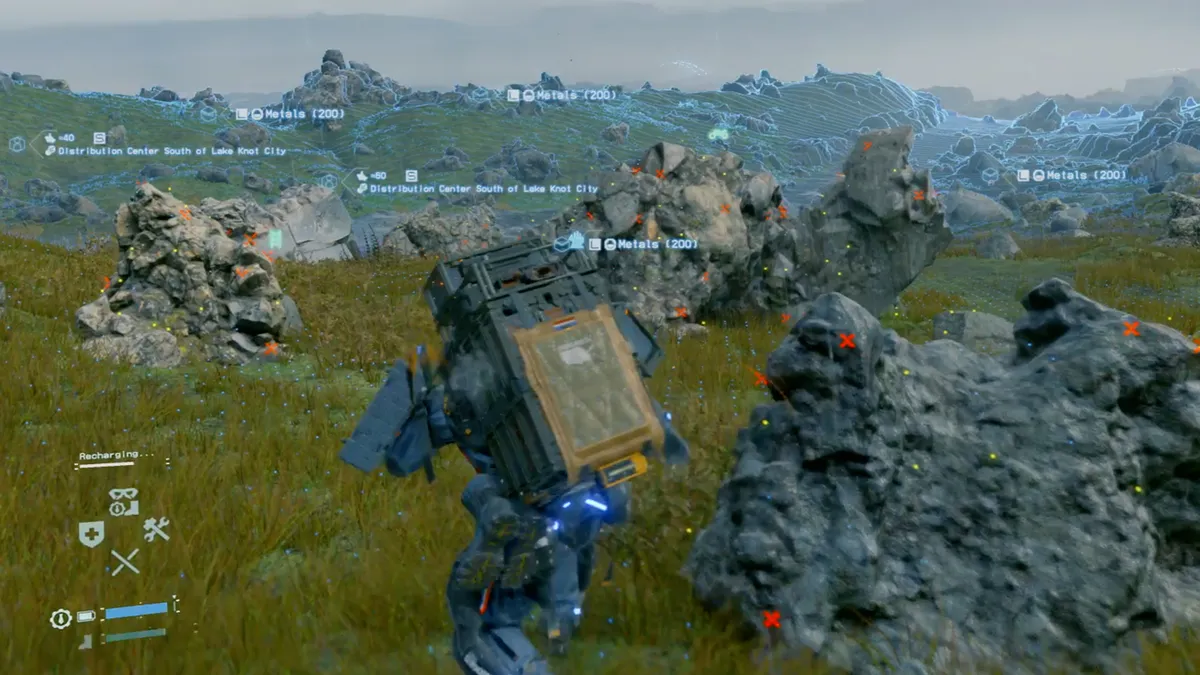
Most of the time you’ll find new preppers via the deliveries you pick up. However, you can find a few simply by exploring (especially around the midpoint of the game). The trouble is that if you don’t have anything to give them you can’t interact with them. To save you having to come back later, take a look around the area and scan for any lost cargo. If you’re lucky you’ll find a package with their name on, which you can pick up and deliver to access them and their terminal.

You may like
  • Pragmata Diana hacking in the Shelter with her arm outstretched 12 Pragmata tips and tricks for new players
  • Marathon player facing three UESC robots in corridor on Outpost map Here are 15 Marathon tips and tricks for new players
  • 15 essential Metro Exodus tips to know before you play

9. Private lockers are specific to each location

death stranding private locker

(Image credit: Sony)

You’ll probably work this out pretty quickly, but the private lockers you can access at various locations are specific to that location. There’s no magic box you can access from anywhere in the game. Bear that in mind when you’re offloading weapons, gear, cargo, and anything else as you’ll only be able to access it from where you left it.

10. Learn how to read your scanner to avoid BTs

death stranding sensor

(Image credit: Sony)

It’s fairly easy to avoid BTs in Death Stranding, as long as you follow your Odradek (the flappy sensor thing on Sam’s shoulder). You can see BTs when still, but they’ll disappear when you move or hold your breath. While moving use the Odradek, which will light up white and clap in the direction of the nearest threat. The nearer you get to danger the faster the clap and when you’re about to hit a BT it’ll turn orange and start spinning - until that point your basically completely safe. If a BT notices you and starts heading your way the Odradek also forms a hand shape to point at the imminent danger. Holding your breath at this point will help you sneak away without it finding you. 

11. If a BT catches you, just run away

death stranding BTs

(Image credit: Sony)

If you do get caught by a BT, you’ll be dragged off for a one-on-one boss fight with a larger creature. However you can also… just run away. The boss encounter takes place in a large pool of tar and if you can get out of that, the encounter ends. So if you don’t want to fight, or haven’t got enough gear to do so, just get out of the tar to escape. Because there is so little threat to actually being caught (beyond some cargo damage), getting grabbed on purpose and then escaping is a handy way to clear an area if you can’t be bothered to creep around.

12. Always take a spare pair of boots

death stranding boots

(Image credit: Sony)

You should never really get caught out without any spare boots to hand. Always have a second or third set on your boot hook - it’s literally the only thing you can store on it - and fabricate a new pair whenever you swap them. Your footwear can run out surprisingly quickly and it’s easy to set out thinking you'll make it, only to get caught up and find yourself in bare feet. Sandleweed, a plant you can use to wrap your feet will do in a pinch, but there’s really no excuse for needing to.

13. Check the mirror and BB in the safe room

death stranding bb mirror

(Image credit: Sony)

No spoilers here, but keep checking both the mirror and BB whenever you visit Sam’s room over the course of the game. It’ll be worth it.

How to start the new Death Stranding Director's Cut missions | What is aphenphosmphobia in Death Stranding? | Death Stranding fast travel | Every Death Stranding cameo | Get more likes in Death Stranding | Death Stranding holograms | Death Stranding EX grenades | Death Stranding Weapons | Death Stranding DOOMs birthday | Death Stranding ending

© GamesRadar+. Not to be reproduced without permission.

CATEGORIES
PS5 PC Gaming PS4 Xbox Series X Platforms PlayStation Xbox
Leon Hurley
Leon Hurley
Social Links Navigation
Managing editor for guides

I'm GamesRadar's Managing Editor for guides. I also write reviews, previews and features, largely about horror, action adventure, FPS and open world games. I previously worked on Kotaku, and the Official PlayStation Magazine and website.

You must confirm your public display name before commenting

Please logout and then login again, you will then be prompted to enter your display name.

Read more
Pragmata Diana hacking in the Shelter with her arm outstretched
Action Games 12 Pragmata tips and tricks for new players
 
 
Marathon player facing three UESC robots in corridor on Outpost map
FPS Games Here are 15 Marathon tips and tricks for new players
 
 
Games 15 essential Metro Exodus tips to know before you play
 
 
Final Fantasy 7 Rebirth tips
Final Fantasy 6 Final Fantasy 7 Rebirth tips to aid your adventures
 
 
Gothic 1 Remake
RPGs What to do first in the Gothic Remake?
 
 
Helldivers 2 stratagems emancipator autocannon exosuit in bug nest
Third Person Shooters How to unlock Helldivers 2 Exosuits and tips for using them
 
 
Latest in Action Games
GTA 6 Ultimate Edition screenshot, showing Lucia getting her nails done in a salon while wearing sunglasses, a striped top, hoop earrings, and a ponytail
Grand Theft Auto Digital-only GTA 6 Ultimate Edition screenshot literally says "buy more useless s***"
 
 
Diana's eyes glow with digital energy in Pragmata
Action Games Bayonetta creator says Capcom might be thriving thanks to a constant push to create new IP like Pragmata
 
 
A taxi takes a jump from a lorry in Crazy Taxi: World Tour, with the orange and blue GamesRadar+ Summer Preview 2026 branding
Action Games "Sorry to keep you waiting": Crazy Taxi's creator knows World Tour has been a long time coming
 
 
A dark-haired schoolgirl stands in front of a school chalkboard and looks off to her right in Gakuran on Roblox.
Action Games Gakuran codes (July 2026) for free Rerolls
 
 
Assassin's Creed Black Flag Resynced screenshot from trailer showing edward kenway and james kidd standing in front of table with a treasure map on it
Assassin's Creed When are the AC Black Flag preload and release times for PC and consoles?
 
 
GTA 6
Grand Theft Auto GTA 6 going no-disc is "unfair to studios still backing physical," Lords of the Fallen 2 boss says
 
 
Latest in Guides
A dark-haired schoolgirl stands in front of a school chalkboard and looks off to her right in Gakuran on Roblox.
Action Games Gakuran codes (July 2026) for free Rerolls
 
 
Assassin's Creed Black Flag Resynced screenshot from trailer showing edward kenway and james kidd standing in front of table with a treasure map on it
Assassin's Creed When are the AC Black Flag preload and release times for PC and consoles?
 
 
A woman in a bikini and Daisy Dukes waves in the Roblox game Haze Seas.
RPGs Haze Seas codes (July 2026) for Cash, Gems, and more
 
 
A pink-haired player aims her harpoon into the distance in 100 Days at Sea.
Survival Games 100 Days at Sea codes (July 2026) for Pearls
 
 
Mega Diancie ex deck build in Pokemon TCG Pocket
Pokemon Best Mega Diancie ex deck in Pokemon TCG Pocket
 
 
Hand holding PS5 DualSense in front of original PS2 connected to Sony PVM CRT TV on right with 8Bitdo Retro Receiver connected and Silent Hill 2 gameplay on screen.
Retro How to use new controllers with retro consoles
 
 
LATEST ARTICLES
  1. A man lifts the lid of a Lego Poke Ball with a diorama inside
    1
    New Lego Pokemon sets include a Polly Pocket-style diorama that's like my childhood come to life
  2. 2
    AI seems to be turning Sega Dreamcast keychains into slop, but the final product could be safe
  3. 3
    The Odyssey star says sci-fi mindbender Tenet is one of Christopher Nolan's "underrated" movies
  4. 4
    Blizzard devs in the dark as president says they "can expect to hear more" soon about Xbox's plan
  5. 5
    Bethesda must focus on its "strongest franchises," boss says as Xbox layoffs reportedly hit hard

GamesRadar+ is part of Future US Inc, an international media group and leading digital publisher. Visit our corporate site.

Add as a preferred source on Google Add as a preferred source on Google
  • Terms and conditions
  • Contact Future's experts
  • Privacy policy
  • Cookies policy
  • Accessibility statement
  • Careers
  • About us
  • Advertise with us
  • Review guidelines
  • Write for us

© Future US, Inc. Full 7th Floor, 130 West 42nd Street, New York, NY 10036.

Please login or signup to comment

Please wait...