GamesRadar+ GamesRadar+
US EditionUS CA EditionCanada UK EditionUK AU EditionAustralia
Sign in
  • View Profile
  • Sign out
  • Games
    • Game Insights
      • Games News
      • Games Features
      • Games Reviews
      • Games Guides
      • Big in 2026
      • The Big Preview
      • On The Radar
      • Indie Spotlight
      • Future Games Show
      • Golden Joystick Awards
    • Genres
      • Action Games
      • RPGs
      • Action RPGs
      • Adventure Games
      • Third Person Shooters
      • FPS Games
    • Platforms
      • PS5
      • Xbox Series X
      • PC
      • Nintendo Switch
      • Nintendo Switch 2
      • Tabletop Gaming
    • Franchises
      • Grand Theft Auto
      • Pokemon
      • Assassin's Creed
      • Monster Hunter
      • Fortnite
      • Cyberpunk
      • Red Dead
      • The Elder Scrolls
      • The Sims
  • Entertainment
    • TV Shows
      • TV News
      • TV Reviews
      • Anime Shows
      • Sci-Fi Shows
      • Superhero Shows
      • Animated Shows
      • Marvel TV Shows
      • Star Wars TV Shows
      • DC TV Shows
    • Movies
      • Movie News
      • Movie Reviews
      • Big Screen Spotlight
      • Superhero Movies
      • Action Movies
      • Anime Movies
      • Sci-Fi Movies
      • Horror Movies
      • Marvel Movies
      • DC Movies
    • Streaming
      • Apple TV Plus
      • Disney Plus
      • Netflix
      • HBO
      • Amazon Prime Video
      • Hulu
    • Comics
      • Marvel Comics
      • DC Comics
    • Toys & Collectibles
    • Lego
    • Dungeons and Dragons
    • Merch
  • Hardware
    • Insights
      • Hardware News
      • Hardware Reviews
      • Hardware Features
    • Computing
      • Desktop PCs
      • Laptops
      • Handhelds
    • Peripherals
      • Headsets & Headphones
      • TVs & Monitors
      • Gaming Mice
      • Gaming Keyboards
      • Gaming Chairs
      • Speakers & Audio
    • Accessories & Tech
      • Gaming Controllers
      • Tech
      • SSDs & Hard Drives
      • VR
      • Accessories
      • Retro
  • Deals
    • Game Deals
    • Tech Deals
    • TV Deals
    • Buying Guides
  • Video
  • Newsletters
    • Quizzes
    • About Us
    • How to pitch to us
    • How we score
    • Newsarama
    • Retro Gamer
    • Total Film
  • home
  • Games
    • View Games
      • Games News
      • Games Features
      • Games Reviews
      • Games Guides
      • Big in 2026
      • The Big Preview
      • On The Radar
      • Indie Spotlight
      • Future Games Show
      • Golden Joystick Awards
      • Action Games
      • RPGs
      • Action RPGs
      • Adventure Games
      • Third Person Shooters
      • FPS Games
    • Platforms
      • View Platforms
      • PS5
      • Xbox Series X
      • PC
      • Nintendo Switch
      • Nintendo Switch 2
      • Tabletop Gaming
      • Grand Theft Auto
      • Pokemon
      • Assassin's Creed
      • Monster Hunter
      • Fortnite
      • Cyberpunk
      • Red Dead
      • The Elder Scrolls
      • The Sims
  • Entertainment
    • View Entertainment
    • TV Shows
      • View TV Shows
      • TV News
      • TV Reviews
      • Anime Shows
      • Sci-Fi Shows
      • Superhero Shows
      • Animated Shows
      • Marvel TV Shows
      • Star Wars TV Shows
      • DC TV Shows
    • Movies
      • View Movies
      • Movie News
      • Movie Reviews
      • Big Screen Spotlight
      • Superhero Movies
      • Action Movies
      • Anime Movies
      • Sci-Fi Movies
      • Horror Movies
      • Marvel Movies
      • DC Movies
    • Streaming
      • View Streaming
      • Apple TV Plus
      • Disney Plus
      • Netflix
      • HBO
      • Amazon Prime Video
      • Hulu
    • Comics
      • View Comics
      • Marvel Comics
      • DC Comics
    • Toys & Collectibles
    • Lego
    • Dungeons and Dragons
    • Merch
  • Hardware
    • View Hardware
      • Hardware News
      • Hardware Reviews
      • Hardware Features
      • Desktop PCs
      • Laptops
      • Handhelds
    • Peripherals
      • View Peripherals
      • Headsets & Headphones
      • TVs & Monitors
      • Gaming Mice
      • Gaming Keyboards
      • Gaming Chairs
      • Speakers & Audio
      • Gaming Controllers
      • Tech
      • SSDs & Hard Drives
      • VR
      • Accessories
      • Retro
  • Deals
    • View Deals
    • Game Deals
    • Tech Deals
    • TV Deals
    • Buying Guides
  • Video
  • Newsletters
    • Quizzes
    • About Us
    • How to pitch to us
    • How we score
    • Newsarama
    • Retro Gamer
    • Total Film
Trending
  • Pokemon Winds and Waves
  • New Games for 2026
  • GamesRadar+ Replay
  • Mario Day deals
Jump to:
  • The Quick List
  • Best overall
  • Best 1080p
  • Best budget
  • Best internal
  • Best for Elgato fans
  • Best all-in-one
  • Best value
  • FAQs
Don't miss these
HP Omen Max 16 gaming laptop on a wooden desk
Laptops The best gaming laptop 2026 - HP holds first place as budget machines battle it out
Corsair Galleon 100 SD gaming keyboard on a wooden desk
Gaming Keyboards Corsair's on a roll, this Stream Deck-toting deck is now officially the best full-sized gaming keyboard I've tested so far
SteelSeries Arctis Nova Pro Wireless gaming headset
Headsets & Headphones Best gaming headset 2026 - my go-to cups for every platform
SteelSeries Arctis Nova Pro Wireless in white being held in front of a PS5
Headsets & Headphones The best PS5 headset 2026: SteelSeries holds onto the crown for another year
Five different gaming controllers for PC scattered around a desktop surface
Gaming Controllers The best PC controller for gaming 2026
Evercade Alpha closeup with Ryu from Street Fighter on screen
Retro Best retro consoles 2026: my favorite ways to play classic capers
Xbox Elite Series 2 controller
Gaming Controllers The best Xbox Series X controller in 2026
A collection of TMR gaming controllers
Gaming Controllers I've tested them for you, and these are the 7 best TMR controllers on the shelves right now
DualSense Edge review image showing the controller next to the original DualSense in Nova Pink
Gaming Controllers The best PS5 controller 2026: Find your Edge
Close up on macro buttons on the side of the Corsair Vanguard Pro 96 gaming keyboard
Gaming Keyboards Best gaming keyboard 2026: the Vanguard stands strong with another new entry for Corsair
LG UltraGear  32GS95UE-B gaming monitor with Pharah from Overwatch 2 on screen on woodgrain desk
TVs & Monitors The best gaming monitor 2026: the most impressive displays I've tested this year
Steam Deck with mascot face on screen surrounded by compatible Steam Deck docks
Handhelds The best Steam Deck dock 2026: the handheld docking stations I'd recommend
WD Black C50 Xbox storage card leaning on a Series X controller
SSDs and Hard Drives Best Xbox Series X hard drive, SSD, and memory card solutions in 2026: all the fastest solutions we've tested
A side-by-side image of the Elgato Wave XLR MK.2 and the new Wave Link software's mixing table
Peripherals "Our vision for what creator audio should be" - Elgato launches Wave Next, a new generation of powerful audio hardware with software that's free for everyone
Streaming for gamers
Hardware Best live streaming gear for gamers 2026: The best setups for beginners and pros
  1. Hardware
  2. Tech

Best capture card 2026: top picks for recording and streaming on consoles and PC

Buying Guides
By Duncan Robertson Contributions from Alex Berry last updated 31 October 2025

Looking to upgrade, or kick off your content creation career? These are the best capture cards on the market.

When you purchase through links on our site, we may earn an affiliate commission. Here’s how it works.

Elgato HD60 X
(Image credit: Future / Alex Berry)
Jump to:
  • The Quick List
  • Best overall
  • Best 1080p
  • Best budget
  • Best internal
  • Best for Elgato fans
  • Best all-in-one
  • Best value
  • FAQs
  • Facebook
  • X
  • Pinterest
  • Flipboard
  • Email
Share this article
Join the conversation
Follow us
Add us as a preferred source on Google
Get the GamesRadar+ Newsletter

Weekly digests, tales from the communities you love, and more


By submitting your information you agree to the Terms & Conditions and Privacy Policy and are aged 16 or over.

You are now subscribed

Your newsletter sign-up was successful


Want to add more newsletters?

GamesRadar+

Every Friday

GamesRadar+

Your weekly update on everything you could ever want to know about the games you already love, games we know you're going to love in the near future, and tales from the communities that surround them.

GTA 6 O'clock

Every Thursday

GTA 6 O'clock

Our special GTA 6 newsletter, with breaking news, insider info, and rumor analysis from the award-winning GTA 6 O'clock experts.

Knowledge

Every Friday

Knowledge

From the creators of Edge: A weekly videogame industry newsletter with analysis from expert writers, guidance from professionals, and insight into what's on the horizon.

The Setup

Every Thursday

The Setup

Hardware nerds unite, sign up to our free tech newsletter for a weekly digest of the hottest new tech, the latest gadgets on the test bench, and much more.

Switch 2 Spotlight

Every Wednesday

Switch 2 Spotlight

Sign up to our new Switch 2 newsletter, where we bring you the latest talking points on Nintendo's new console each week, bring you up to date on the news, and recommend what games to play.

The Watchlist

Every Saturday

The Watchlist

Subscribe for a weekly digest of the movie and TV news that matters, direct to your inbox. From first-look trailers, interviews, reviews and explainers, we've got you covered.

SFX

Once a month

SFX

Get sneak previews, exclusive competitions and details of special events each month!


An account already exists for this email address, please log in.
Subscribe to our newsletter

The best capture cards are still a vital piece of kit for anyone who needs to record gameplay in 2025, especially if they need to capture footage on a platform that isn't a PC. I've heard some creators say that this once sought-after peripheral is no longer needed because consoles are so good at recording gameplay and Nvidia and AMD can do it all natively. That's true for PC players on a single computer setup, but if you plan on broadcasting console gameplay, a dedicated capture card is going to allow you so much more production quality.

There are areas where we'd recommend beginners save some cash because the best gear for streaming can cost a small fortune, but a capture card is one of the essentials in our opinion. Nowadays, some of the best options on the market can natively record in 4K, at 60fps or higher, so there are products out there for the pros too. While passthrough in 4K has been available for years now, we're now seeing capture devices take things to a whole new level, with 8K potential and VRR for PC players. Just keep in mind that Twitch still doesn't allow for streams in 4K, so this is only really a bonus for YouTube creators.

For PC gamers, one of the best capture cards may not be as necessary, but will really take the strain off of hardware components. Depending on your rig and GPU, recording via software or OBS can mean choppy footage and a slew of other issues, so a separate capture card can really alleviate stress. There's also the option of an internal capture card if you're rocking a two-PC setup.

The Quick List

AverMedia's Live Gamer Ultra 2.1 on a grey background Best overall

1. AverMedia Live Gamer Ultra 2.1
View at Amazon
View at Amazon
Check Walmart

AverMedia's latest external capture card is a monster that can record up to 4K144 footage. It's by far the best external capture card out there.

Read more below

Elgato HD60 S capture card on a plain grey background Best 1080p

2. Elgato Game Capture HD60S
View at Amazon
Check Walmart

If it's a simple, no-fuss capture card you seek, the majority of people will get by with the HD60S. It has great passthrough and Full HD capture capabilities.

Read more below

The NZXT Signal HD60 capture card on a plain background Best budget

3. NZXT Signal HD60
View at Amazon
Check Walmart

The NZXT Signal HD60 takes away a lot of software faff from the usual capture card experience, and it's priced fairly for your average gamer and creator.

Read more below

Elgato 4K Pro capture card product render image on a grey background Best internal

4. Elgato Game Capture 4K Pro
View at Dell
View at Amazon
View at Best Buy
View at Walmart

If you want to eliminate the clutter of an extra USB-C device, an internal capture card will suit you best. The 4K Pro from Elgato offers 8K futureproofing.

Read more below

Elgato's HD60X capture card on a grey background Best for Elgato fans

5. Elgato Game Capture HD60X
View at Amazon
View at Sweetwater
View at Newegg
View at Best Buy

When it comes to the best capture cards, Most creators are either an Elgato kid or an AverMedia kid. If you've bought into the Elgato family, this is the best for you.

Read more below

The Rode Streamer X on a grey background Best all-in-one

6. RODE Streamer X
View at Sweetwater
View at Amazon
View at Walmart
View at Newegg

This device goes above and beyond, working as a streaming mixer, controller, and capture card all rolled into one. It's a try jack-of-all-trades.

Read more below

AverMedia Live Gamer Extreme 3 with blue lighting on a grey background Best value

7. AverMedia Live Gamer Extreme 3
View at Amazon
View at Amazon
Check Walmart

Similar to the HD60S, this card gives you access to some great features for the price you pay. There's even 4K support here, which is great for the money.

Read more below

Curated by
Duncan Robertson Author Profile Image
Curated by
Duncan Robertson
Hardware Editor

I've been using capture cards for just shy of a decade now, and started with Elgato's first-ever. Over the last nine years, I've seen so many competitors rise up, and some names have become mainstays. I still use these devices to record a lot of the gameplay I use in my YouTube videos, and depending on your setup, one might suit you more than others. Allow me to help narrow down your search.

The best capture card overall
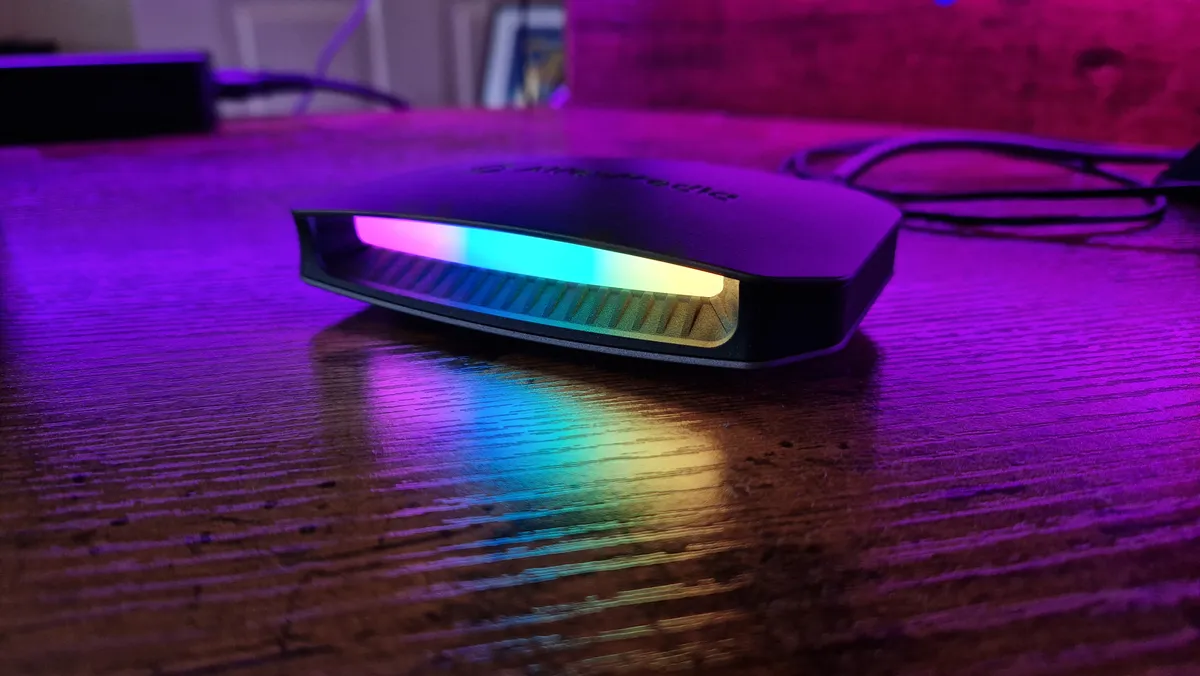
Image 1 of 5
AverMedia Live Gamer Ultra 2.1's lighting up close
(Image credit: Future / Duncan Robertson)
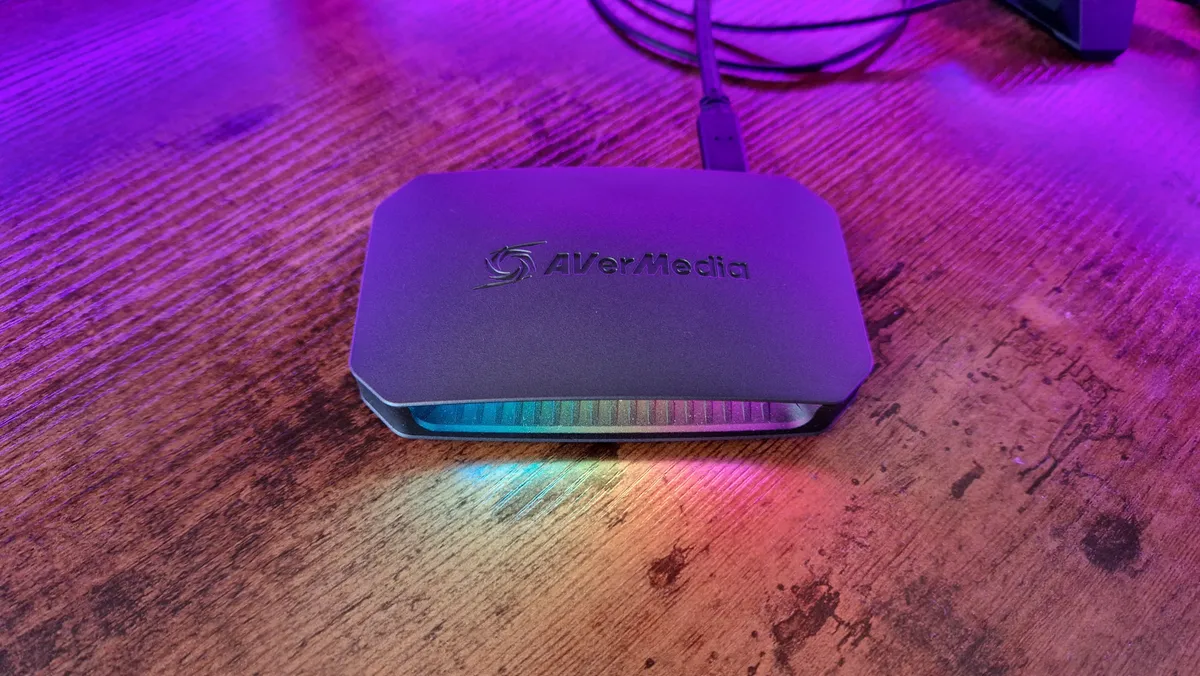
AverMedia Live Gamer Ultra 2.1's branding on its top
(Image credit: Future / Duncan Robertson)
AverMedia Live Gamer Ultra 2.1 with its RGB lighting array on
(Image credit: Future / Duncan Robertson)
AverMedia Live Gamer Ultra 2.1's IO connection ports
(Image credit: Future / Duncan Robertson)
AverMedia Live Gamer Ultra 2.1 from above
(Image credit: Future / Duncan Robertson)

1. AverMedia Live Gamer Ultra 2.1

The best external capture card overall

Our expert review:

Specifications

Passthrough resolution: Up to 4K
Capture resolution: Up to 4K
Passthrough frame rate: VRR - 144Hz
Capture frame rate: 29.97, 30, 50, 59.94, and 60fps
Interface: USB-C, USB 3.0
Works with: Consoles, PC & Mac
Today's Best Deals
View at Amazon
View at Amazon
Check Walmart

Reasons to buy

+
Turns in crystal clear footage
+
Captures vibrant colors
+
Solid passthrough for PC and console players
+
Nice design

Reasons to avoid

-
Some important settings are missing
-
Occasional choppy footage when recording back-to-back

The AverMedia Live Gamer Ultra 2.1 is a truly next-gen capture card. It takes the great features set down by the Elgato HD60X and boosts what we expect from the best external capture cards into current generation standards.

Buy it if:

✅ You want to capture 4K footage: This card is futureproofed with excellent 4K capabilities and loads of options for video editors.


✅ You want VRR support: If you don't want to miss out on frame rates when you're playing and recording footage, you need a card like this which can support variable refresh rates of up to 144Hz.


✅You're recording gameplay from a console or PC: Whether you're recording PS5, Nintendo Switch, or high-end gaming PC footage with a second computer, this is the card to do it all.

Don't buy it if:

❌ You only need 1080p recordings: This is one geared at professionals needing to record anything, not really for beginners.

❌ You wouldn't use the high frame rate support: If you aren't actually in need of any gameplay capture beyond 60fps, this is going to be overkill for you.

Design & Features: Its design definitely echoes that, since most capture cards don't put a lot of effort into the looks department and yet this does. The Live Gamer Ultra 2.1 has a gentle RGB array on its front that you can sync with your PC components and a clever horizontal design that helps cable routing to be simple and the product as a whole to be displayable.

In terms of features, you get up to 4K60 capture, VRR passthrough of up to 144Hz, HDR and Ultrawide monitor support, and a slew of in-software recording options. Annoyingly, the companion application, RECentral 4, doesn't have any color grading settings and doesn't let you change the captured image settings. Luckily, these things are all finely tuned in the background.

Performance: This card performs brilliantly when recording footage, and its passthrough lacks no detail compared to using a regular HDMI 2.1 cable. Captures are crystal clear with really vivid colors, and besides some lacking clarity when recording multiple captures back to back, it's excellent and makes your gameplay look just as good as it does in your setup with minimal technical headaches thrown in.

Overall, this is the best external capture card you'll find on the shelves at the moment.

The best 1080p capture card for most people

Image 1 of 4
Elgato HD60S campture card sitting on a jumble of cables
(Image credit: Future / Duncan Robertson)
Elgato HD60S propped up against two monitors
(Image credit: Future / Duncan Robertson)
Elgato HD60S capture card's in-connection ports
(Image credit: Future / Duncan Robertson)
Elgato HD60S capture card's HDMI-out port
(Image credit: Future / Duncan Robertson)

2. Elgato Game Capture HD60S

The best 1080p capture card for most people
Average Amazon review:
☆☆☆☆☆

Specifications

Resolution: 1080p
Frame rate: 60fps
Interface: USB 3.0
Works with: Consoles, PC & Mac
Today's Best Deals
View at Amazon
Check Walmart

Reasons to buy

+
Works with both PC and Mac
+
Great quality capture
+
Reasonable price
+
Instant game view

Reasons to avoid

-
Editing software isn't perfect
-
Elgato software can be prone to technical issues

Elgato is one of the biggest, best-known names in capture, and for good reason: their devices are relatively cheap, easy to use, and function incredibly well. The HD60S isn't necessarily trying to do anything special - it launched as a more affordable, more approachable option against blossoming 4K capture cards. But in fairness, Full HD footage is all that most creators really need if they aren't hoping to go pro.

Buy it if:

✅ You're just starting out: This is a perfect choice for anyone getting started with content creation.


✅ You play console games: This is really geared at console players broadcasting or recording gameplay externally.


✅You only need basic features: If you just want something simple to capture footage without putting extra strain on your console, this'll do.

Don't buy it if:

❌ You've been burned by Elgato products before: While I faced very few technical difficulties with this card, there are a couple of quirks with Elgato's own software that felt as unreliable as ever.

❌ You care about recording chat audio: You'll probably need to invest in some audio gear and/or a chat link cable for that, depending on your setup.

Design & Features: The Game Capture HD60S is easy to set up, simply plugging in between your PS4/Xbox One and the TV. It also does all of the work for you, with the software cycling through resolution options until it finds a signal (although you can also set it up and tweak options manually should you have any problems getting a signal on your TV).

Another great bonus is that you don't need the software running to use it: as long as it can draw power it'll send a signal to your screen so there's no need to unplug it when you don't want to capture.

Performance: The capture software that comes with it is clear and easy to use, with a few basic, useful options to fiddle with the audio and streaming setups. There's an audio in on the unit itself if you want to add audio directly to your stream, although depending on your setup you still might need to use a chat link cable.

The only area in which it disappoints is its rudimentary editing package that's only really good for trimming. For most folks just looking to record some console gameplay in 1080p 60fps, it's going to do the trick and then some.

The best budget capture card
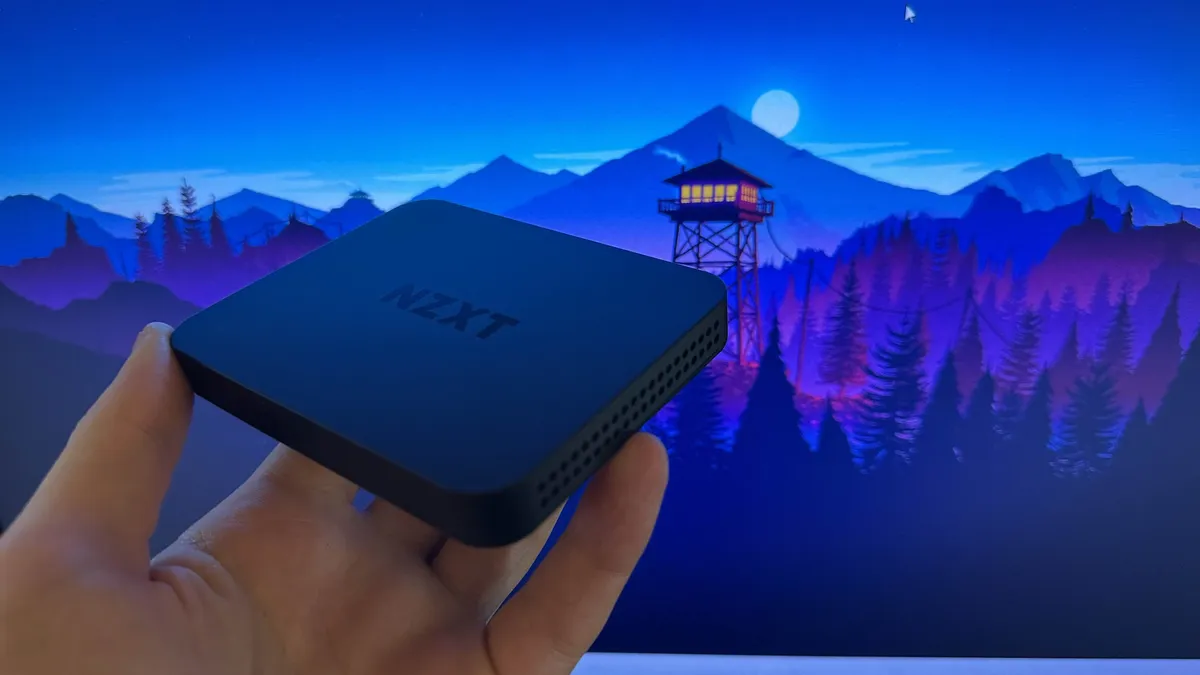
Image 1 of 4
The NZXT Signal HD60 being held in front of a purple Firewatch game background
(Image credit: Future / Fraser Porter)
The connection ports of the NZXT Signal HD60 capture card
(Image credit: Future / Fraser Porter)
The top branding of the NZXT Signal HD60 capture card
(Image credit: Future / Fraser Porter)
NZXT Signal HD60's connection ports being held in front of the camera by a reviewer
(Image credit: Future / Fraser Porter)

3. NZXT Signal HD60

The best budget capture card

Our expert review:

Specifications

Passthrough resolution: 4K
Capture resolution: 1080p
Passthrough frame rate: 60fps
Capture frame rate: 60fps
Interface: USB 3.2
Works with: Consoles, PC & Mac
Today's Best Deals
View at Amazon
Check Walmart

Reasons to buy

+
Small and compact
+
Very reasonable price
+
Simple setup
+
Great HDMI passthrough

Reasons to avoid

-
Slight issue with audio
-
No support for MacBook

NZXT is a maker of gaming PCs, PC cases, AIO coolers, and various peripherals in the gaming hardware space. Its entry-level capture card looks at the overly complicated landscape of capture card devices today and shows brands like Elgato and AverMedia how it's done.

Buy it if:

✅ You're on a budget: If you're looking for cheap and cheerful, this is a great product that saves you looking for something older.


✅ You don't like having to use capture software: While you can use NZXT Cam here, you can just channel it straight into OBS instead.


✅You want a no-fuss capture card: Some people don't need all the frills and features, and the Signal is a quick and easy, simple-to-use capture card for that crowd.

Don't buy it if:

❌ You need 4K support: If you ever want to graduate to recording 4K files, this isn't futureproofed for that.

❌ You want in-depth capture software: If you're a video editor looking for as many options as possible, this isn't for you.

Design & Features: The Signal HD60 isn't trying to be anything fancy - it's a simple 1080p capture device that has 4K passthrough, but kicks a solid 60fps feed to your display while recording up to 1080p 60fps gameplay footage. There's no flashy RGB, it's quite literally a black box you plug some HDMI cables into. There isn't even dedicated software you must use (like the other brands enforce upon you after taking your money). There's compatibility with NZXT Cam, but the creators of this device know that you almost certainly want to use this with OBS or Streamlabs, so they cut out the middleman and let you get stuck in.

Performance: It must be said that this is a beautifully priced device, coming in under $100 / £100, meaning it's an accessible piece of streaming kit for everyone that isn't going to break the bank. With how costly a microphone, camera, and all the other parts of a streaming setup can be, you'll be glad to see a 1080p capture card that doesn't demand an arm and a leg, especially if content creation is just a hobby for you.

In testing, this capture card did us proud, recording seamless gameplay at a rock solid 1080p, 60fps, and thanks to there being no underbaked software to trip things up, it gave us next to no technical difficulties either. Believe me, sometimes that's really all you can ask for with a capture card.

The best internal capture card

Image 1 of 5
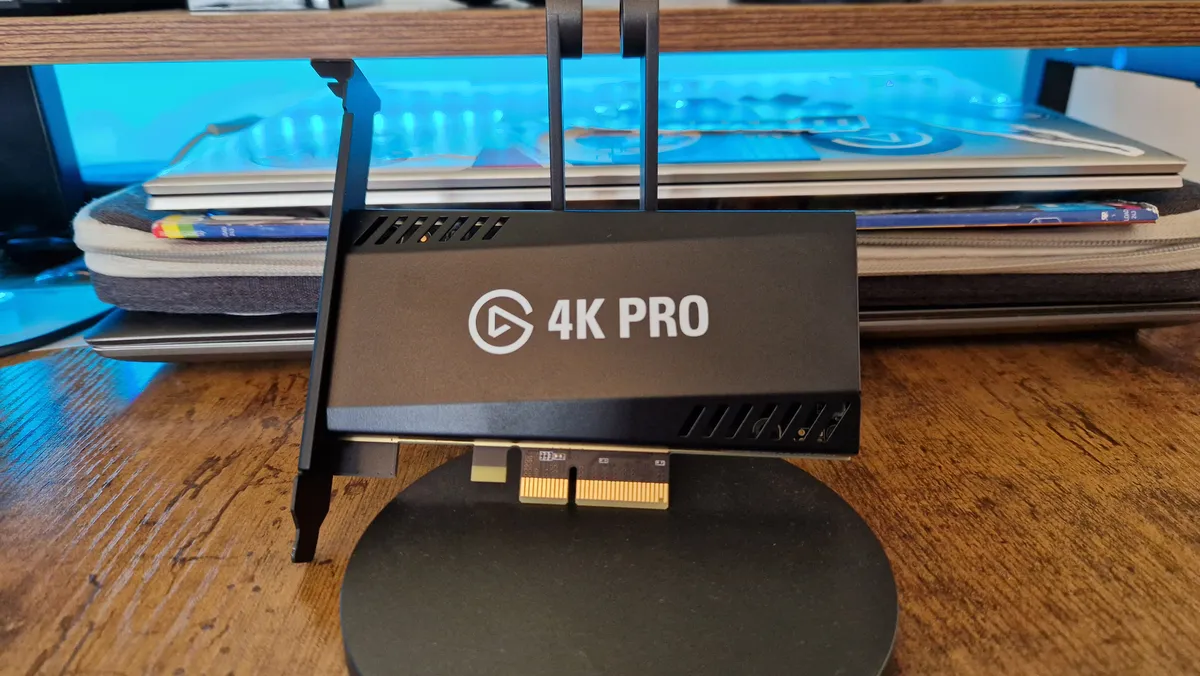
Elgato Game Capture 4K Pro's branding
(Image credit: Future / Duncan Robertson)
Elgato Game Capture 4K Pro's connection ports sticking out the back of a gaming PC
(Image credit: Future / Duncan Robertson)
Elgato Game Capture 4K Pro sitting up against a stand
(Image credit: Future / Duncan Robertson)
Elgato Game Capture 4K Pro standing upright
(Image credit: Future / Duncan Robertson)
Elgato Game Capture 4K Pro's PCIe connector
(Image credit: Future / Duncan Robertson)

4. Elgato Game Capture 4K Pro

The best internal capture card

Our expert review:

Specifications

Resolution: 4K captures, 8K passthrough
Frame rate: 60fps captures, 240Hz passthrough
Interface: PCIe 2.0 x4
Works with: PC only
Today's Best Deals
View at Dell
View at Amazon
View at Best Buy
View at Walmart

Reasons to buy

+
4K60 game capture without the clutter of another USB device
+
Ability to customize image quality
+
VRR passthrough
+
8K futureproofing

Reasons to avoid

-
Not as many recording options as the competition
-
Passthrough can have some frame rate wobbles
-
Elgato’s software can be volatile
-
Not distinct enough from the 4K60 Pro

The Elgato Game Capture 4K Pro is the latest internal capture card from Corsair's content creation arm. Where all the other entries on this list require an external USB connection of some kind, this mounts onto a gaming PC's motherboard through a PCIe 2.0 x 4 slot (like a GPU slot or similar). If that sounds up your street, then keep reading.

Buy it if:

✅ You're a PC player: If you play and broadcast with a PC setup, an internal capture card can save you a lot of headaches with cables and the like.


✅ You want futureproofing: This card has support for 8K, which you won't find with many alternatives.


✅You have space on your PC's motherboard: You'll need to make sure you have a space PCiE slot to install this in your computer.

Don't buy it if:

❌ You don't have a gaming PC already: There's no way to use this outwith a gaming PC, so keep that in mind.

❌ You don't care about the VRR and 8K features: If it's a simple option you seek, maybe spend less money.

Design & Features: The 4K Pro is only an incremental update over the brand's previous internal options. In truth, the 4K60 Pro and 4K60 Pro MK2 aren't too different from what you get here, so if they're on sale for cheaper, it might be worth considering them. Nevertheless, as time goes on, this will be the internal card to look out for, and that's because it supports up to 8K60 passthrough.

You get a lot of next-gen features here despite a very plain Jane design. There's VRR passthrough, and multi-app support so you can stream and record to separate apps at the same time, and you can tweak your image quality settings thanks to Elgato's 4K Capture Utility.

Performance: With that said, we are a bit disappointed that this costs the same as AverMedia's best external option, and it doesn't offer nearly as many recording options. You can record great footage, but only at 30fps or 60fps at 720p, 1080p, 1440p, and 4K. Yes, that is all most people will ever need, but for a card that's dubbed as next-gen and has the word "pro" in its name, we expected a bit more in terms of recording options.

It's a shame that VRR support for passthrough doesn't carry over to the recording side, especially since 8K is so far in the future at this point. Still, if it's an internal device you seek, you'll struggle to find a better fit for your streaming PC.

The best capture card for Elgato fans

Elgato HD60 X capture card

(Image credit: Future/Alex Berry)

5. Elgato HD60 X

The best capture card for Elgato fans

Our expert review:

Specifications

Resolution: Up to 4K
Frame rate: Up to 60fps Recording, Up to 240fps Passthrough
Interface: USB 3.0
Works with: Consoles, PC & Mac
Today's Best Deals
View at Amazon
View at Sweetwater
View at Newegg
View at Best Buy

Reasons to buy

+
Plug and play setup
+
Great quality capture
+
Variable Refresh Rate support

Reasons to avoid

-
Much more expensive than its 'S' predecessor

Elgato has been a go-to name for capture cards for years, and the HD60 X is the sum of that experience. An evolution rather than revolution, it builds on the HD60 S+ to deliver an outstanding experience for both capture and passthrough. Offering impressive features with a simple plug-and-play setup, we think the HD60 X will likely sit at the top of most creators' best capture card leaderboards.

Buy it if:

✅ You're an Elgato enjoyer: If you've used and gotten along well with Elgato products in the past, this is the brand's best external option in our opinion.


✅ You want an external capture card: Internal devices aren't for everyone, and if you want the flexibility of being able to take your capture card to different setups, the HD60X is more convenient.


✅You care about 4K: This is one of the most popular choices for those looking to graduate their content to 4K for the first time.

Don't buy it if:

❌ You're just a beginner: There's no denying this is a bit more expensive, so if you're just starting out, this is a big investment.

❌ You don't need this sort of firepower: If you're just in need of a 1080p capture card for Switch or last-gen platforms, this might be too heavy-duty.

Design & Features: The first mainstream capture card to offer variable refresh rate (VRR) support for passthrough, our testing proved that the HD60 X is the perfect companion for both the PS5 and Xbox Series X. There’s 10-bit HDR on offer for both capture and passthrough too, and with latency-free HDMI output, you won’t even know you’re running your gameplay through a capture device at all. Throughout testing, I kept my Series X running through the HD60 X, even when just casually gaming, and noticed no impact on picture quality, input responsiveness, or visual performance.

Performance: The HD60 X will capture 4K content at 30fps and 1080p or 1440p content at up to 60fps, while offering 4K60fps or a whopping 1080p240fps via HDMI passthrough. Even playing via the preview in OBS, responsiveness remained high, and all but the most competitive gamers likely won’t notice any input delay at all. Elgato does offer their own capture software, the inspiringly named ‘Elgato 4K Capture Utility’, but my advice is to stick with OBS. I found recording quality to be noticeably worse using Elgato’s software, with a few frustrating UI bugs along the way, too.

Ignoring their software offering, we think the Elgato HD60 X ticks just about every box and might just be the best external capture card for console gamers and streamers available right now.

Read more: Elgato HD60 X review

The best all-in-one capture card

Image 1 of 5
RODE Streamer X up close
(Image credit: Future / Alex Berry)
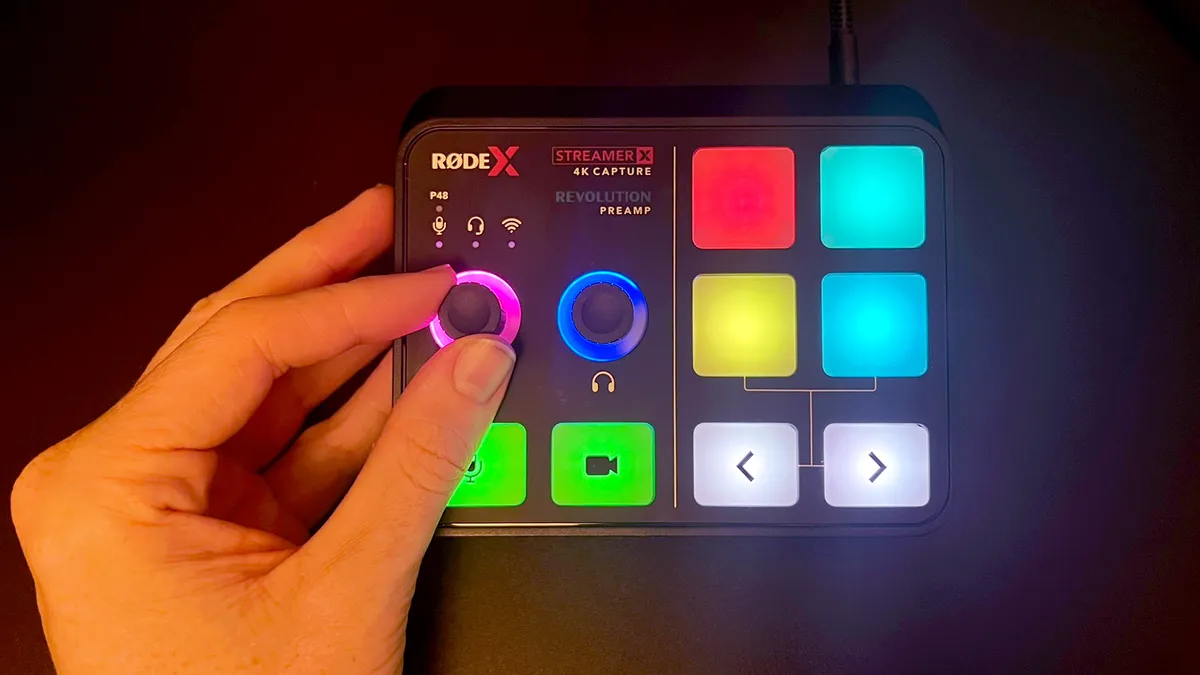
RODE Streamer X switched on and being used by a reviewer, showing the multiple touchpads and lights operating
(Image credit: Future / Alex Berry)
RODE Streamer X while switched off, showing its dials and touchpads
(Image credit: Future / Alex Berry)
RODE Streamer X's various IO ports
(Image credit: Future / Alex Berry)
RODE Streamer X's audio controls up close
(Image credit: Future / Alex Berry)

6. Rode Streamer X

The best all-in-one capture card

Our expert review:

Specifications

Passthrough resolution: 4K
Capture resolution: 4K
Passthrough frame rate: Up to 4K60, 1440p144 HDR, 1080p240 HDR
Capture frame rate: Up to 4K30, 1440p60, 1080p120, 1080p60 HDR
Interface: USB 3.0
Works with: Consoles, PC & Mac
Today's Best Deals
View at Sweetwater
View at Amazon
View at Walmart
View at Newegg

Reasons to buy

+
Neat all-in-one solution
+
Strong audio performance
+
Customizable SMART pads
+
Dual-PC output and HDMI passthrough

Reasons to avoid

-
Lacking some 4K bells and whistles
-
No HDMI 2.1

The Rode Streamer X promises more than any other capture card on this list because while it's a perfectly capable capture card that can record footage at up to 4K30, it's also an audio interface with all the pedigree of the brand's audio hardware behind it.

Buy it if:

✅ You want more than just a capture card: This is the content creation jack of all trades, giving you a capture card, audio interface, and stream controller all in one.


✅ You want more desk space and fewer devices: Trying to consolidate desk real estate? Something like this will give you room to breathe.


✅You want more than basic capture card features: As 4K capture devices go, this isn't the most in-depth.

Don't buy it if:

❌ You only need a capture device: If you don't actually need a content creation device that can do it all, you could go for a more basic capture card instead.

❌ You want high FPS 4K features: HDMI quirks mean you won't get high-end 4K support here.

Design & Features: The design of this capture card is very in line with Rode's other streaming gear - it has customizable Smart pads, XLR ports for top-drawer microphones, and some handy gain dials that are readable thanks to clear lighting. Conveniently, it has dual-PC output and pretty solid HDMI passthrough for varying resolutions, and its price for the combined efforts of an audio interface and capture card will no doubt be enticing for those looking to consolidate their streaming gadgets.

Performance: Of course, with a jack-of-all-trades, there's going to be some trade-offs for those looking for the best capture card out there. Strangely, there's no HDMI 2.1 support, so while captures of up to 4k30 are possible and a passthrough of up to 4K60 is supported, higher frame rates aren't going to be possible above 1080p. Luckily, VRR and HDR are there - here's hoping Rode puts out a sequel in time that can deal with some beefier visual capture.

As an audio interface, it's no surprise that this does the trick. Rode is excellent for audio gear, and in our review, we found it to be almost as solid as the BEACN Mic Create, although it was somewhat hampered by its small form factor and lack of more dials. HDMI gain control would have been really handy, but again, when you go for something aimed at consolidating two gadgets into one, there are going to be some compromises.

Nonetheless, this is a very capable capture card and one that adds a bit more utility than is typically expected.

The best value capture card
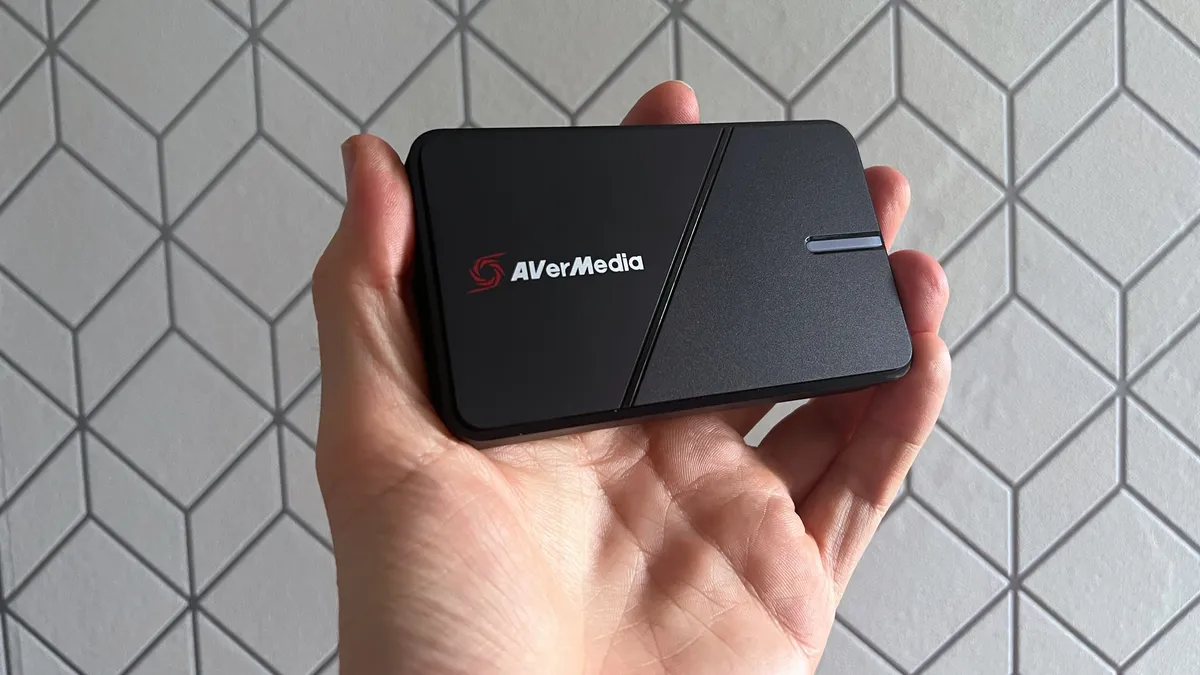
AverMedia Live Gamer Extreme 3 capture card

(Image credit: Future/Alex Berry)

7. AverMedia Live Gamer Extreme 3

The best value capture card

Our expert review:

Specifications

Resolution: Up to 4K
Frame rate: Up to 120fps
Interface: USB 3.0/Type-C
Works with: Consoles, PC & Mac
Today's Best Deals
View at Amazon
View at Amazon
Check Walmart

Reasons to buy

+
Simple Plug and Play Option
+
Cheaper than others
+
Variable refresh rate support

Reasons to avoid

-
Struggles at high resolutions
-
No HDR capture

Another entry into the best capture card market for AverMedia, the GC551G2 Live Gamer Extreme 3 brings variable refresh rate support to the party. With 4K30 capture and 4K60 HDR passthrough, the spec sheet is pretty attractive for console gamers. It’s also one of the more reasonably priced options at this end of the market: at $169.99/£159.99, it’s nearly 20% cheaper than our top-ranked Elgato HD60 X.

Buy it if:

✅ You want a middle-of-the-road option: Want a bit of everything? This is a great mid-range capture card.


✅ You don't want to spend an arm and a leg: There's a decent range of features here while not setting you back a small fortune.


✅You only need 4K passthrough: Your gameplay won't suffer in terms of fidelity, but you'll only get SDR recordings out of this card.

Don't buy it if:

❌ You want 120fps at 4K: You can get 120Hz options at lesser resolutions, but not 4K.

❌ You want something that'll sit nicely on a desk: HDMI cables can lift this up and set it on its side with ease.

Design & Features: Wonderfully simple to get started with, the Live Gamer Extreme 3 is a plug-and-play option with next to no setup required. Offering latency-free HDMI passthrough in full 4K60 with HDR support you won’t even notice the card is between your console and TV, though be aware, unlike other cards the LGE3 will only capture SDR content.

Performance: On the recording side, there’s support for up to 4K30 with super smooth 120fps capture at lower resolutions. Variable refresh rate support is new to the AverMedia range and it works well. In testing I noticed no artefacts or screen tearing while gaming, even at higher frame rates and the experience was smooth throughout.

While it’s not the most powerful capture option available, the AverMedia Live Gamer Extreme 3 boasts an impressive spec sheet and generally performs well across the board. If capturing HDR content isn’t a concern or you’re not looking to push the limit with the highest resolution game capture the LGE3 is a great value pick and won’t let you down.

Read more: AverMedia Live Gamer Extreme 3 review

Best capture card 2023 - frequently asked questions

Elgato HD60S campture card sitting on a jumble of cables

(Image credit: Future / Duncan Robertson)

Do you need a capture card for PC?

The short answer here is no. On PC, software like OBS and OBS Streamlabs can record the footage for you. However, using just software can put a strain on your hardware components and result in frame rate drops and choppy footage. Beyond getting a second PC specifically for streaming, a capture card might just be your best bet.

If you have an Nvidia graphics card released within the last few years then you also have the free option of using Nvidia Shadowplay to capture gameplay and stream to the likes of Twitch and YouTube.

On consoles, you can record and stream footage as you play, but this doesn't give you the same number of options as one of the best capture cards.

Is there a capture card better than Elgato?

Elgato is definitely one of the best capture card brands out there, but that doesn't mean there aren't alternatives. AverMedia has plenty of great capture card options, for example, and we'd argue it has the best options if Elgato isn't for you. Epiphan Systems Inc. also has a really great compact capture card in the form of its AV.io 4K, which is worth a look too. If you'd rather a brand you know elsewhere, the Razer Ripsaw is also a solid choice.

LG UltraGear 45GR95QE with Tunic gameplay on screen

(Image credit: Future / Phil Hayton)

Should I buy a capture card for streaming?

A capture card is an ideal way to record and stream your gameplay footage without impacting your gameplay. Depending on your internet speed and hardware set up, streaming from one PC that you're also running your games on can cause choppy footage, frame rate dips and a slew of other inconsistencies.

One of the best capture cards will take a lot of the strain off of your hardware, and will save you buying a second PC just to stream off of. Many capture cards use passthrough, which has gotten a lot more efficient in recent years as to not cause latency in your gameplay while recording or streaming.

Which capture cards do most streamers use?

We've rounded up all the latest and most coveted capture cards, although, one of the most popular brands in the content creator scene is Elgato. Through the original Game Capture HD, through to the likes of the HD60 S and HD60 X, Elgato has proven to be one of the go-to brands for streaming and video game content creation. That's not to count out the likes of AverMedia, who has been involved in the scene for arguably just as long. Razer and EVGA are viable brands, too.

PS5 capture

(Image credit: Sony)

Should I use OBS or a capture card?

While OBS and Streamlabs are great for natively recording the gameplay from one PC, we'd suggest using one of the best capture cards if you're using a dual PC setup, or you're recording console gameplay. This will take the strain off your hardware and genuinely provide more peace of mind that your footage or live stream will be consistent and free of choppy footage. It all depends on your stream setup though, and the platforms you use for gameplay, of course.

Is a 4K capture card worth it?

Why you can trust GamesRadar+ Our experts review games, movies and tech over countless hours, so you can choose the best for you. Find out more about our reviews policy.

Although they're definitely futureproofed, 4K capture cards are by far the most expensive option you can go for. As great as 4K is, maybe think about the logistics of it within your content plan. If you're streaming, 4K footage isn't even supported by Twitch. If you're recording and editing footage to be used later, you're staring down the barrel of more storage space and longer encoding times.

If you're a fulltime content creator, providing 4K options to your audience can make a difference. If, however, you're just starting out or you're not looking to be the next Twitch or YouTube star, we'd recommend a more budget-friendly option.


Pair your capture card with one of the best gaming PCs for maximum quality. What's more, live stream in comfort with the best gaming desk and best gaming chair.

Round up of today's best deals
AVerMedia 4K60 Capture Card...
AVerMedia Live Gamer ULTRA 2.1
Amazon
$209.99
View
See all prices
Elgato HD60 S, External...
Elgato HD60 S
Amazon
$239.99
$224.98
View
See all prices
NZXT Signal HD60 Full HD USB...
NZXT Signal HD60
Amazon
$99
View
See all prices
deal
Elgato Game Capture 4K Pro
Dell
$279.99
View
See all prices
Elgato HD60 X - Stream and...
Elgato HD60 X
Amazon
$179.99
$159.99
View
See all prices
Rode Streamer X Audio...
Rode Streamer X Audio Interface and
Sweetwater
$206.10
View
See all prices
AVerMedia 4K Capture Card for...
AverMedia Live Gamer Extreme 3
Amazon
$119.99
View
See all prices
We check over 250 million products every day for the best prices
powered by
Gamesradar
Sign up to the GamesRadar+ Newsletter

Weekly digests, tales from the communities you love, and more

By submitting your information you agree to the Terms & Conditions and Privacy Policy and are aged 16 or over.
Duncan Robertson
Duncan Robertson
Social Links Navigation
Hardware Editor

One of my earliest memories is playing SuperMario64 and wondering why the controller I held had three grips, but I only had two hands. Ever since I've been in love with video games and their technology. After graduating from Edinburgh Napier University with a degree in Journalism, I contributed to the Scottish Games Network and completed an Editorial Internship at Expert Reviews. Over the last decade, I’ve been managing my own YouTube channel about my love of games too. These days, I'm one of the resident hardware nerds at GamesRadar+, and I take the lead on our coverage of gaming PCs, VR, controllers, gaming chairs, and content creation gear. Now, I better stop myself here before I get talking about my favourite games like HUNT: Showdown, Dishonored, and Towerfall Ascension.

With contributions from
  • Alex BerryStreamer
Back To Top
Read more
Best streaming mixer hero image showing a BEACN Mix Create next to a RodeCaster Duo
Best streaming mixers in 2026: Master your live audio like a pro
 
 
Streaming for gamers
Best live streaming gear for gamers 2026: The best setups for beginners and pros
 
 
A side-by-side image of the Elgato Wave XLR MK.2 and the new Wave Link software's mixing table
"Our vision for what creator audio should be" - Elgato launches Wave Next, a new generation of powerful audio hardware with software that's free for everyone
 
 
Amazon Basics HDMI cable with navy and red GamesRadar backdrop
Best HDMI cable for PS5, Xbox Series X, Switch 2, and PC in 2026
 
 
BenQ X3100i projector with a DualSense controller on a wooden desk
Best projector for PS5 and Xbox Series X in 2026
 
 
BenQ Mobiuz EX321UX monitor on desk with Overwatch 2 gameplay on screen.
The best monitor for PS5 2026: high spec screens for the OG and Pro
 
 
Latest in Tech
The inverted RTX 5080 GPU inside the Acer Predator Orion 7000 (2025)
With GPUs getting pricier in 2026, here are 3 ways I'll keep my old one lasting longer
 
 
The text 'Cyber Monday iPad deals' next to the pictures of five different iPads.
The clock is ticking on Cyber Monday iPad deals, so I've found the five best that are still live
 
 
The iPad A16 next to a sign saying "Black Friday deals".
Apple's cheapest iPad just hit a brand new record-low price for Black Friday
 
 
Wave Browser turns your browsing sessions into action that cleans up the ocean.
Surf the web for good with Wave Browser
 
 
Fezibo Triple Motor L-Shaped Desk review image showing the desk with pink RGB lighting turned on
L-shaped standing desks can be pricey, but there's still time to get this one for under $300
 
 
A young black woman playing a mobile game on the Samsung Galaxy S25 in a stylish kitchen
Want the best gaming on the go? Why Samsung Galaxy Phones are your best option for mobile gaming
 
 
Latest in Buying Guides
Photo of the Mario and Luigi Nendoroid figures sitting next to eachother.
Celebrate MAR10 Day in style with the very best Super Mario merch
 
 
Squirtle and Jigglypuff figures alongside a Poke Ball, with Nintendo DS game cases visible in the background
The best Pokemon merch to celebrate 30 years of the beloved series, chosen by superfans
 
 
Image of the Tears of the Kingdom Link amiibo sitting in front of a shelf of Zelda merch.
Best Legend of Zelda merch, chosen by two lifelong fans
 
 
Cloud MTG card lying on top of a host of other MTG Final Fantasy cards
Check out these Valentine's Day gifts for gamers if you're stuck for ideas
 
 
Photo of the Lavender Arctis Nova 3 Wireless headset resting on a Nintendo Switch 2.
The best Nintendo Switch headset 2026: SteelSeries is the key for gaming on the go for another year
 
 
HP Omen Max 16 gaming laptop on a wooden desk
The best gaming laptop 2026 - HP holds first place as budget machines battle it out
 
 
LATEST ARTICLES
  1. Virtual Boy for Switch 2 sitting on coffee table with TV in backdrop displaying Wario Land gameplay.
    1
    I respect the Virtual Boy as a collectable Switch 2 gadget, but it’s not exactly a retro console remake
  2. 2
    Bizarre Lineage codes (March 2026) for free Stat Point Essence, Rare Chests, and more
  3. 3
    The Thrustmaster T248R is making me question where a sim racing wheel with no direct drive and no modular wheelbase fits in the market in 2026
  4. 4
    These Mario Day-inspired Switch 2 accessories will power up your console more than a super star
  5. 5
    Pokemon fan artist alleges new Palworld clone Pickmon "stole one of my designs," saying "they didn't even try to change something and make it a bit less obvious"

GamesRadar+ is part of Future US Inc, an international media group and leading digital publisher. Visit our corporate site.

Add as a preferred source on Google Add as a preferred source on Google
  • Terms and conditions
  • Contact Future's experts
  • Privacy policy
  • Cookies policy
  • Accessibility statement
  • Careers
  • About us
  • Advertise with us
  • Review guidelines
  • Write for us
  • Accessibility Statement

© Future US, Inc. Full 7th Floor, 130 West 42nd Street, New York, NY 10036.

Please login or signup to comment

Please wait...