

Join The Community
- Join our community
11
Premium Benefits
24/7
Access Available
21K+
Active Members
Commenting
Join the discussion
Exclusive Articles Coming Soon
Member-only articles
Weekly Newsletters
Weekly gaming & entertainment news
Member Badges
Earn badges as you go
Exclusive Competitions
Members-only prize draws
Curated Deals Coming Soon
Tech and gaming deals worth grabbing
GET COMMUNITY ACCESS QUICK
For the quickest way to join, simply enter your email below and get access. We will send a confirmation and sign you up to our newsletter to keep you updated on all your gaming news.
By submitting your information you agree to the Terms & Conditions and Privacy Policy and are aged 16 or over.
FIND OUT ABOUT OUR MAGAZINE
Want to subscribe to the magazine? Click the button below to find out more information.
Find out more
GET Community ACCESS QUICK

Join the GamesRadar community for quick access. Enter your email below and we'll send confirmation, and sign you up to our newsletter.

By submitting your information, you confirm you are aged 16 or over, have read our Privacy Policy and agree to the Terms & Conditions. Geographical rules apply.

Background
Welcome to GamesRADAR+ Community !
Hi ,

Your membership journey starts here.

Keep exploring and earning more as a member.

MY ACCOUNT

Badge picture
Earn your first badge
Read 1 article to unlock your first badge.
Keep earning badges
Explore ways to get more involved as a member.
Latest Games News

Latest Games News

Breaking gaming news and updates

Read Now
Latest Games Reviews

Latest Games Reviews

Expert verdicts on the newest releases

Read Now

See what you’ve unlocked.

Explore your membership benefits.

Explore
Member Exclusives

Stay Ahead with GamesRadar+

Get the biggest gaming news, reviews, and releases straight to your inbox.

Explore

Sign Out
GamesRadar+ GamesRadar+
US EditionUS CA EditionCanada UK EditionUK AU EditionAustralia
Sign in
  • View Profile
  • Sign out
  • Games
    • Game Insights
      • Games News
      • Games Features
      • Games Reviews
      • Games Guides
      • Big in 2026
      • Big Preview
      • Future Games Show
      • Golden Joystick Awards
    • Genres
      • Action Games
      • RPGs
      • Action RPGs
      • Adventure Games
      • Third Person Shooters
      • FPS Games
    • Platforms
      • PS5
      • Xbox Series X
      • PC
      • Nintendo Switch
      • Nintendo Switch 2
      • Tabletop Gaming
    • Franchises
      • Grand Theft Auto
      • Pokemon
      • Assassin's Creed
      • Monster Hunter
      • Fortnite
      • Cyberpunk
      • Red Dead
      • The Elder Scrolls
      • The Sims
  • Entertainment
    • TV Shows
      • TV News
      • TV Reviews
      • Anime Shows
      • Sci-Fi Shows
      • Superhero Shows
      • Animated Shows
      • Marvel TV Shows
      • Star Wars TV Shows
      • DC TV Shows
    • Movies
      • Movie News
      • Movie Reviews
      • Big Screen Spotlight
      • Superhero Movies
      • Action Movies
      • Anime Movies
      • Sci-Fi Movies
      • Horror Movies
      • Marvel Movies
      • DC Movies
    • Streaming
      • Apple TV Plus
      • Disney Plus
      • Netflix
      • HBO
      • Amazon Prime Video
      • Hulu
    • Comics
      • Marvel Comics
      • DC Comics
  • Hardware
    • Insights
      • Hardware News
      • Hardware Reviews
      • Hardware Features
      • Buying Guides
    • Computing
      • Desktop PCs
      • Laptops
      • Handhelds
    • Peripherals
      • Headsets & Headphones
      • TVs & Monitors
      • Gaming Mice
      • Gaming Keyboards
      • Gaming Chairs
      • Speakers & Audio
    • Accessories & Tech
      • Gaming Controllers
      • Tech
      • SSDs & Hard Drives
      • VR
      • Accessories
      • Retro
  • Deals
    • Toys & Collectibles
    • Lego
    • Dungeons and Dragons
    • Merch
  • Video
    • Video
    • GR+ Replay - Submit Your Clips
  • Newsletters
    • Quizzes
    • About Us
    • How to pitch to us
    • How we score
    • Newsarama
    • Retro Gamer
  • Home
  • Games
    • View Games
      • Games News
      • Games Features
      • Games Reviews
      • Games Guides
      • Big in 2026
      • Big Preview
      • Future Games Show
      • Golden Joystick Awards
      • Action Games
      • RPGs
      • Action RPGs
      • Adventure Games
      • Third Person Shooters
      • FPS Games
    • Platforms
      • View Platforms
      • PS5
      • Xbox Series X
      • PC
      • Nintendo Switch
      • Nintendo Switch 2
      • Tabletop Gaming
      • Grand Theft Auto
      • Pokemon
      • Assassin's Creed
      • Monster Hunter
      • Fortnite
      • Cyberpunk
      • Red Dead
      • The Elder Scrolls
      • The Sims
  • Entertainment
    • View Entertainment
    • TV Shows
      • View TV Shows
      • TV News
      • TV Reviews
      • Anime Shows
      • Sci-Fi Shows
      • Superhero Shows
      • Animated Shows
      • Marvel TV Shows
      • Star Wars TV Shows
      • DC TV Shows
    • Movies
      • View Movies
      • Movie News
      • Movie Reviews
      • Big Screen Spotlight
      • Superhero Movies
      • Action Movies
      • Anime Movies
      • Sci-Fi Movies
      • Horror Movies
      • Marvel Movies
      • DC Movies
    • Streaming
      • View Streaming
      • Apple TV Plus
      • Disney Plus
      • Netflix
      • HBO
      • Amazon Prime Video
      • Hulu
    • Comics
      • View Comics
      • Marvel Comics
      • DC Comics
  • Hardware
    • View Hardware
      • Hardware News
      • Hardware Reviews
      • Hardware Features
      • Buying Guides
      • Desktop PCs
      • Laptops
      • Handhelds
    • Peripherals
      • View Peripherals
      • Headsets & Headphones
      • TVs & Monitors
      • Gaming Mice
      • Gaming Keyboards
      • Gaming Chairs
      • Speakers & Audio
      • Gaming Controllers
      • Tech
      • SSDs & Hard Drives
      • VR
      • Accessories
      • Retro
  • Deals
    • Toys & Collectibles
    • Lego
    • Dungeons and Dragons
    • Merch
  • Video
    • View Video
    • Video
    • GR+ Replay - Submit Your Clips
  • Newsletters
    • Quizzes
    • About Us
    • How to pitch to us
    • How we score
    • Newsarama
    • Retro Gamer
Trending
  • GTA 6 pre-orders
  • Summer Preview
  • New Games 2026
  • Best gaming tech
  • Tennocon 2026
  • Submit your clips. Win prizes
Sign up to the GamesRadar+ Newsletter

Weekly digests, tales from the communities you love, and more


By submitting your information you agree to the Terms & Conditions and Privacy Policy and are aged 16 or over.

You are now subscribed

Your newsletter sign-up was successful


Want to add more newsletters?

GamesRadar+

Every Friday

GamesRadar+

Your weekly update on everything you could ever want to know about the games you already love, games we know you're going to love in the near future, and tales from the communities that surround them.

GTA 6 O'clock

Every Thursday

GTA 6 O'clock

Our special GTA 6 newsletter, with breaking news, insider info, and rumor analysis from the award-winning GTA 6 O'clock experts.

Knowledge

Every Friday

Knowledge

From the creators of Edge: A weekly videogame industry newsletter with analysis from expert writers, guidance from professionals, and insight into what's on the horizon.

The Setup

Every Thursday

The Setup

Hardware nerds unite, sign up to our free tech newsletter for a weekly digest of the hottest new tech, the latest gadgets on the test bench, and much more.

Switch 2 Spotlight

Every Wednesday

Switch 2 Spotlight

Sign up to our new Switch 2 newsletter, where we bring you the latest talking points on Nintendo's new console each week, bring you up to date on the news, and recommend what games to play.

The Watchlist

Every Saturday

The Watchlist

Subscribe for a weekly digest of the movie and TV news that matters, direct to your inbox. From first-look trailers, interviews, reviews and explainers, we've got you covered.

SFX

Once a month

SFX

Get sneak previews, exclusive competitions and details of special events each month!


Join the club

Get full access to premium articles, exclusive features and a growing list of member rewards.


An account already exists for this email address, please log in.
  1. Games
  2. Action
  3. Sea of Thieves

Sea of Thieves Lost Shipments Voyage guide

Guides
By Mark Delaney published 2 February 2021

Find the loot, manifest, and more when you undertake a Sea of Thieves Lost Shipments Voyage

When you purchase through links on our site, we may earn an affiliate commission. Here’s how it works.

Sea of Thieves Lost Shipments Voyage
(Image credit: Rare)
  • Facebook
  • X
  • Pinterest
  • Flipboard
  • Email
Share this article
Join the conversation
Follow us
Add us as a preferred source on Google
Subscribe to our newsletter

The Sea of Thieves Lost Shipments Voyage can be confusing. Whether you're still finding your sea legs or have sailed for miles in Sea of Thieves there's a lot to unpack, with clues to find, a Sea of Thieves Captains Key, and cash in the final piece of the Voyage, the Merchant Manifest. In this Sea of Thieves Lost Shipments guide, we'll show you how to do it all and succeed at this brand new Voyage type that arrived with the introduction of Seasons.

Sea of Thieves Shroudbreaker | Sea of Thieves Tall tales | Sea of Thieves tips | How to summon Sea of Thieves Shrouded Ghost megalodon | Sea of Thieves gold guide | Sea of Thieves animal locations | How to fish in Sea of Thieves | Sea of Thieves Cursed Rogue | Sea of Thieves Merchant Alliance guide | Sea of Thieves pirate legend guide

1. Buy a Lost Shipments Voyage from Larinna to start the Lost Shipments Voyage

Sea of Thieves Lost Shipments Voyage

(Image credit: Rare)

The first thing you'll need to do is buy a Lost Shipments Voyage from Larinna, the NPC idling outside any outpost at which you may spawn, and in her stock you'll find you can buy one such Voyage from her at a time. In a future update, the Merchants themselves will also sell these Voyages, but at the start of Season One, they're being given for free from Larinna.

Once you have the Voyage in your log, head onto your ship and vote to begin with your crew (or solo if that's how you're playing). This will put a new Voyage item in your inventory, the Lost Shipments Map, which details the intended route of the ship you're searching for. 

2. Check the Lost Shipments Voyage map to see where to go
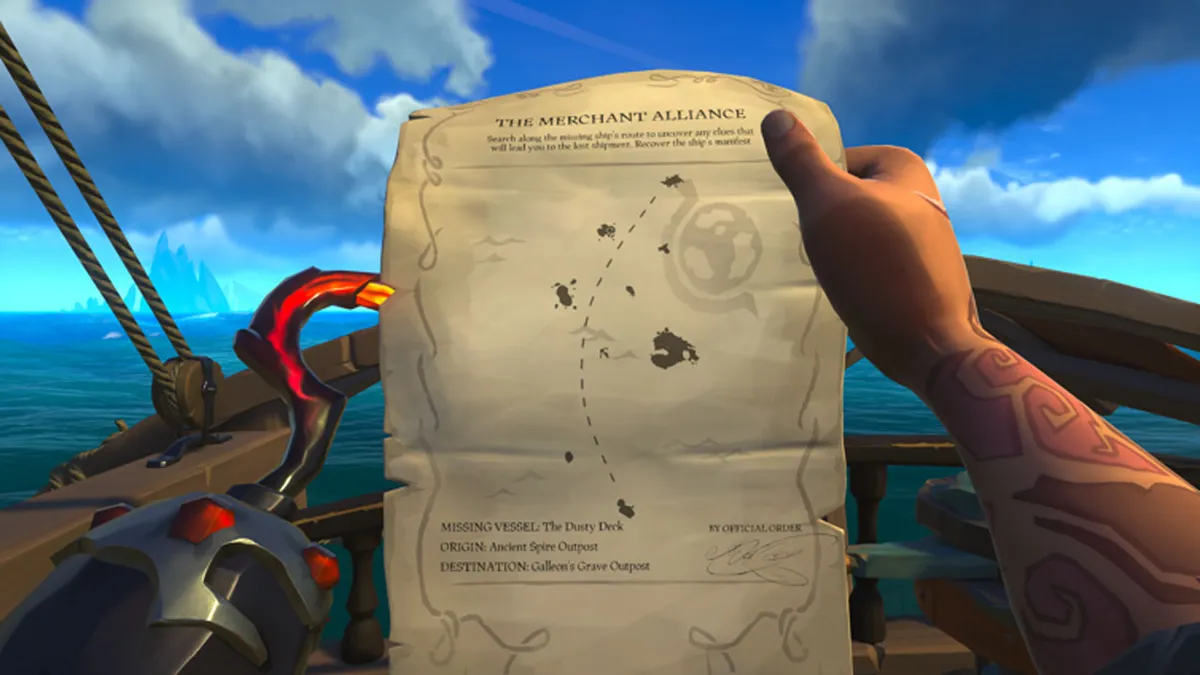
Sea of Thieves Lost Shipments Voyage

(Image credit: Rare)

Pay attention to the finer details on this map. At the bottom, it tells you where the ship left from and where it intended to arrive. As we already know this mission has us searching for a shipwreck, the puzzle is in solving where along the way the fateful crew sunk and left behind all that loot.

You may like
  • Fifteen Men on a Dead Man's Chest in Windrose How to complete Fifteen men on a Dead Man’s chest mission in Windrose
  • arc raiders a line in the sand Safe Harbour Arc Raiders quest guide
  • Ship Models in Arc Raiders How to find all Ship Models in Arc Raiders

Sea of Thieves Lost Shipments Voyage

(Image credit: Rare)

If you're lucky enough to already be standing on the island where their route began, head off in the same direction the crew did by using the map and retracing their nautical steps. If you need to instead start at a different island, do that first. Head off on the same path as the ship once you've reached its original starting point.

3. Look for birds to find your first clue as you sail

Sea of Thieves Lost Shipments Voyage

(Image credit: Rare)

It won't be long before you see your first clue, evidenced by a small but tight flock of birds circling over some flotsam. This at-sea loot pile is unique to Lost Shipments Voyages and can be identified by their broken barrels and wood planks painted with blue stripes.

Sign up to the GamesRadar+ Newsletter

Weekly digests, tales from the communities you love, and more

By submitting your information you agree to the Terms & Conditions and Privacy Policy and are aged 16 or over.

This is to differentiate it from the typical flotsam you may find in the game on or off voyages. Halt your ship beside the wreckage and search for a few key items, including perhaps a literal key. The Captain's Key can be found on every Lost Shipments Voyage without exception, but without a keen eye for the details, a sloppy pirate may also overlook it entirely.

Sea of Thieves Lost Shipments Voyage

(Image credit: Rare)

The trick to finding a Captain's Key is to look out for a unique light blue glint in the sun, which is different from any other shimmers the game uses to denote valuables at a distance. 

Sea of Thieves Lost Shipments Voyage

(Image credit: Rare)

If you see a light blue glint at this location, grab that key for later. If you're sure it's not there, don't worry as it's likely further along the route.

You may like
  • Fifteen Men on a Dead Man's Chest in Windrose How to complete Fifteen men on a Dead Man’s chest mission in Windrose
  • arc raiders a line in the sand Safe Harbour Arc Raiders quest guide
  • Ship Models in Arc Raiders How to find all Ship Models in Arc Raiders

Sea of Thieves Lost Shipments Voyage

(Image credit: Rare)

While at the wreckage location, be sure to also grab any loot and clues you may find, which can float there as either a Clue in a Bottle or inside one of the barrels as a Curious Note. It may also be found on an island if a previous clue sent you to one. Once found, you'll get the next figurative breadcrumb for your Voyage as a new quest item. Check it to find the next procedurally generated hint.

4. Check the clues for more details

Sea of Thieves Lost Shipments Voyage

(Image credit: Rare)

These clues come in different styles. A clue may point to a specific island by name, such as "Shark Tooth Key." A clue may instead point to a spot on the map, which you locate using the map table's grid, such as "R11." A clue may even give you merely a hint, such as keywords like "shrouded in fog." Since foggy conditions move about the map like thunderstorms, such a clue could only point to the Fort of the Damned because it's the only location always wrapped in such low-lying clouds.

Sea of Thieves Lost Shipments Voyage

(Image credit: Rare)

If you get such a subtle clue, it will pay to be familiar with the map, but such clues seem only to arise in the higher-level versions of Lost Shipments Voyages, so you needn't worry if you're starting out rather fresh in the game.

This process of finding clues which lead you to new clues can continue a few times based once more on the game's procedural generation and your pirate's Merchants Alliance level, and each step of the way you can see other clues on your Lost Shipments Map in hand, giving you a rough estimate of how and where they veered off course.

5. Locate the wreck

Sea of Thieves Lost Shipments Voyage

(Image credit: Rare)

Eventually you'll correctly follow a clue to a location at sea, and it may look as though there is nothing there. That's because you have to dive under the water. If you followed the clues correctly, you'll find the shipwreck you've been searching for.

Sea of Thieves Lost Shipments Voyage

(Image credit: Rare)

Assuming you found the Captain's Key, use it to open up the Captain's Quarters to reveal a sizeable stash of Merchants Alliance loot, more lucrative than any other mission type provided by the guild, really.

Sea of Thieves Lost Shipments Voyage

(Image credit: Rare)

With that cache secured by you and your crewmates, you still need to find the voyage's last item. Swim under the top deck and look out for a unique skeleton NPC somewhere down in the lower decks, drowned but still clutching the Merchant Manifest.

Sea of Thieves Lost Shipments Voyage

(Image credit: Rare)

Even if you get away with all the loot in the Captain's Quarters, the voyage isn't marked as complete until you find the Manifest, so grab that, swim up, and celebrate a voyage well done. Now get to an outpost to sell that loot before you get Kraken'd.

CATEGORIES
PC Gaming Xbox One Xbox Series X Platforms Xbox
Mark Delaney
Mark Delaney
Social Links Navigation
Freelance Journalist

Mark Delaney is a prolific copywriter and journalist. Having contributed to publications like GamesRadar+ and Official Xbox Magazine, writing news, features, reviews, and guides, he has since turned his eye to other adventures in the industry. In 2019, Mark became OpenCritic's first in-house staff writer, and in 2021 he became the guides editor over at GameSpot.

Read more
Fifteen Men on a Dead Man's Chest in Windrose
Survival Games How to complete Fifteen men on a Dead Man’s chest mission in Windrose
 
 
arc raiders a line in the sand
Third Person Shooters Safe Harbour Arc Raiders quest guide
 
 
Ship Models in Arc Raiders
Third Person Shooters How to find all Ship Models in Arc Raiders
 
 
Arc Raiders raider in skull cap
Third Person Shooters How to complete the Arc Raiders Forgotten Relics event
 
 
The best ships in Windrose
Survival Games The best ships in Windrose to dominate the seas
 
 
Adventure Games Assassin's Creed Black Flag buried treasure guide
 
 
Latest in Action
GTA 6 character in sunglasses
Grand Theft Auto Fans respond to GTA 6 price reveal by pre-ordering the $100 Ultimate Edition for free with MS points
 
 
Two characters close up to each other in Splatoon Raiders
Splatoon How to watch the Splatoon Raiders Nintendo Direct and Treehouse: Live
 
 
Image of some official GTA 6 artwork by Rockstar Games on a purple GamesRadar+ background.
Grand Theft Auto Where to pre-order GTA 6: bundles, discounts, and fastest delivery times compared
 
 
Hollow Knight: Silksong still of Hornet dueling a sword wielding bug
Action Games "Massive" Hollow Knight: Silksong mod promises areas and mechanics that Team Cherry cut
 
 
Assassin's Creed Black Flag Resynced reveal trailer screenshot shows Edward Kenway steering a ship.
Assassin's Creed Assassin's Creed Black Flag Resynced is both "faithful" to the original and "like a new product", says tech director
 
 
GTA 6 Ultimate Edition screenshot
Grand Theft Auto Despite Sony saying GTA 6 "plays best on PS5," Xbox reports "record orders" of Rockstar's new game
 
 
Latest in Guides
Darktide Skitarii warriors looking at camera in cutscene
FPS Games How Darktide Capacitance and Charges work for the Skitarii class
 
 
Darktide Skitarii on choose class menu
FPS Games Skitarii builds to take into any Darktide mission
 
 
GTA 6 trailer screenshots
Grand Theft Auto What is the GTA 6 GB size going to be?
 
 
Forza Horizon 6 car driving by on road as sky lanterns rise up
Forza Horizon Where to find Sky Lanterns in Forza Horizon 6
 
 
Grand Theft Auto 6 (GTA 6) screenshot showing protagonists Jason and Lucia lying on a bed together
Grand Theft Auto When is GTA 6 going to be on PC?
 
 
Forza Horizon 6 black Ford Cosworth drifting in front of the Japanese Temple of Nachi Falls with ther waterfall visible in the distance
Forza Horizon Where to find Temple of Nachi Falls in Forza Horizon 6 for the Temple of Zoom daily challenge
 
 
LATEST ARTICLES
  1. Shooting at two Barons of Hell in Doom
    1
    Doom legend John Romero says the FPS game's 20 million shareware players "were not 'pirates' by default" and "history is messier than 'pirates killed the companies'"
  2. 2
    Jessica Jones star Krysten Ritter set to return for Dexter: Resurrection season 2 despite her character's fate in season 1
  3. 3
    Generative AI is a "plague," says Dragon Age vet David Gaider: "It's not ready for prime time. There's just a lot of executives who really, really want it to be"
  4. 4
    Supergirl writer seemingly misinterpreted the Woman of Tomorrow comic ending
  5. 5
    "Life changing": Gorgeous Metroidvania hits 150,000 Steam wishlists, enlists Nier Automata and Dark Souls singer, and reaches 6x its $40,000 Kickstarter goal in one day

GamesRadar+ is part of Future US Inc, an international media group and leading digital publisher. Visit our corporate site.

Add as a preferred source on Google Add as a preferred source on Google
  • Terms and conditions
  • Contact Future's experts
  • Privacy policy
  • Cookies policy
  • Accessibility statement
  • Careers
  • About us
  • Advertise with us
  • Review guidelines
  • Write for us

© Future US, Inc. Full 7th Floor, 130 West 42nd Street, New York, NY 10036.

Please login or signup to comment

Please wait...