
Join The Community
- Join our community
11
Premium Benefits
24/7
Access Available
21K+
Active Members
Commenting
Join the discussion
Exclusive Articles Coming Soon
Member-only articles
Weekly Newsletters
Weekly gaming & entertainment news
Member Badges
Earn badges as you go
Exclusive Competitions
Members-only prize draws
Curated Deals Coming Soon
Tech and gaming deals worth grabbing
GET COMMUNITY ACCESS QUICK
For the quickest way to join, simply enter your email below and get access. We will send a confirmation and sign you up to our newsletter to keep you updated on all your gaming news.
By submitting your information you agree to the Terms & Conditions and Privacy Policy and are aged 16 or over.
FIND OUT ABOUT OUR MAGAZINE
Want to subscribe to the magazine? Click the button below to find out more information.
Find out more
GET Community ACCESS QUICK

Join the GamesRadar community for quick access. Enter your email below and we'll send confirmation, and sign you up to our newsletter.

By submitting your information, you confirm you are aged 16 or over, have read our Privacy Policy and agree to the Terms & Conditions. Geographical rules apply.

Background
Welcome to GamesRADAR+ Community !
Hi ,

Your membership journey starts here.

Keep exploring and earning more as a member.

MY ACCOUNT

Badge picture
Earn your first badge
Read 1 article to unlock your first badge.
Keep earning badges
Explore ways to get more involved as a member.
Latest Games News

Latest Games News

Breaking gaming news and updates

Read Now
Latest Games Reviews

Latest Games Reviews

Expert verdicts on the newest releases

Read Now

See what you’ve unlocked.

Explore your membership benefits.

Explore
Member Exclusives

Stay Ahead with GamesRadar+

Get the biggest gaming news, reviews, and releases straight to your inbox.

Explore

Sign Out
GamesRadar+ GamesRadar+
US EditionUS CA EditionCanada UK EditionUK AU EditionAustralia
Sign in
  • View Profile
  • Sign out
  • Games
    • Game Insights
      • Games News
      • Games Features
      • Games Reviews
      • Games Guides
      • Big in 2026
      • Big Preview
      • Future Games Show
      • Golden Joystick Awards
    • Genres
      • Action Games
      • RPGs
      • Action RPGs
      • Adventure Games
      • Third Person Shooters
      • FPS Games
    • Platforms
      • PS5
      • Xbox Series X
      • PC
      • Nintendo Switch
      • Nintendo Switch 2
      • Tabletop Gaming
    • Franchises
      • Grand Theft Auto
      • Pokemon
      • Assassin's Creed
      • Monster Hunter
      • Fortnite
      • Cyberpunk
      • Red Dead
      • The Elder Scrolls
      • The Sims
  • Entertainment
    • TV Shows
      • TV News
      • TV Reviews
      • Anime Shows
      • Sci-Fi Shows
      • Superhero Shows
      • Animated Shows
      • Marvel TV Shows
      • Star Wars TV Shows
      • DC TV Shows
    • Movies
      • Movie News
      • Movie Reviews
      • Big Screen Spotlight
      • Superhero Movies
      • Action Movies
      • Anime Movies
      • Sci-Fi Movies
      • Horror Movies
      • Marvel Movies
      • DC Movies
    • Streaming
      • Apple TV Plus
      • Disney Plus
      • Netflix
      • HBO
      • Amazon Prime Video
      • Hulu
    • Comics
      • Marvel Comics
      • DC Comics
  • Hardware
    • Insights
      • Hardware News
      • Hardware Reviews
      • Hardware Features
      • Buying Guides
    • Computing
      • Desktop PCs
      • Laptops
      • Handhelds
    • Peripherals
      • Headsets & Headphones
      • TVs & Monitors
      • Gaming Mice
      • Gaming Keyboards
      • Gaming Chairs
      • Speakers & Audio
    • Accessories & Tech
      • Gaming Controllers
      • Tech
      • SSDs & Hard Drives
      • VR
      • Accessories
      • Retro
  • Deals
    • Toys & Collectibles
    • Lego
    • Dungeons and Dragons
    • Merch
  • Video
    • Videos
    • GR+ Replay - Submit Your Clips
    • G+RLS Podcast
  • Newsletters
    • Quizzes
    • About Us
    • How to pitch to us
    • How we score
    • Newsarama
    • Retro Gamer
  • Home
  • Games
    • View Games
      • Games News
      • Games Features
      • Games Reviews
      • Games Guides
      • Big in 2026
      • Big Preview
      • Future Games Show
      • Golden Joystick Awards
      • Action Games
      • RPGs
      • Action RPGs
      • Adventure Games
      • Third Person Shooters
      • FPS Games
    • Platforms
      • View Platforms
      • PS5
      • Xbox Series X
      • PC
      • Nintendo Switch
      • Nintendo Switch 2
      • Tabletop Gaming
      • Grand Theft Auto
      • Pokemon
      • Assassin's Creed
      • Monster Hunter
      • Fortnite
      • Cyberpunk
      • Red Dead
      • The Elder Scrolls
      • The Sims
  • Entertainment
    • View Entertainment
    • TV Shows
      • View TV Shows
      • TV News
      • TV Reviews
      • Anime Shows
      • Sci-Fi Shows
      • Superhero Shows
      • Animated Shows
      • Marvel TV Shows
      • Star Wars TV Shows
      • DC TV Shows
    • Movies
      • View Movies
      • Movie News
      • Movie Reviews
      • Big Screen Spotlight
      • Superhero Movies
      • Action Movies
      • Anime Movies
      • Sci-Fi Movies
      • Horror Movies
      • Marvel Movies
      • DC Movies
    • Streaming
      • View Streaming
      • Apple TV Plus
      • Disney Plus
      • Netflix
      • HBO
      • Amazon Prime Video
      • Hulu
    • Comics
      • View Comics
      • Marvel Comics
      • DC Comics
  • Hardware
    • View Hardware
      • Hardware News
      • Hardware Reviews
      • Hardware Features
      • Buying Guides
      • Desktop PCs
      • Laptops
      • Handhelds
    • Peripherals
      • View Peripherals
      • Headsets & Headphones
      • TVs & Monitors
      • Gaming Mice
      • Gaming Keyboards
      • Gaming Chairs
      • Speakers & Audio
      • Gaming Controllers
      • Tech
      • SSDs & Hard Drives
      • VR
      • Accessories
      • Retro
  • Deals
    • Toys & Collectibles
    • Lego
    • Dungeons and Dragons
    • Merch
  • Video
    • View Video
    • Videos
    • GR+ Replay - Submit Your Clips
    • G+RLS Podcast
  • Newsletters
    • Quizzes
    • About Us
    • How to pitch to us
    • How we score
    • Newsarama
    • Retro Gamer
Trending
  • BlizzCon 2026
  • Countdown to GTA 6
  • Join our monthly RPG Club
  • Game of the Week
  • G+RLS Podcast
  • GTA 6
  • Best gaming tech
  • Submit your clips. Win prizes
GamesRadar+'s weekly hardware digest

Hardware nerds unite, sign up to our free tech newsletter for a weekly digest of the hottest new tech, the latest gadgets on the test bench, and much more from the team at GamesRadar+.


By submitting your information you agree to the Terms & Conditions and Privacy Policy and are aged 16 or over.

You are now subscribed

Your newsletter sign-up was successful


Want to add more newsletters?

GamesRadar+

Every Friday

GamesRadar+

Your weekly update on everything you could ever want to know about the games you already love, games we know you're going to love in the near future, and tales from the communities that surround them.

GTA 6 O'clock

Every Thursday

GTA 6 O'clock

Our special GTA 6 newsletter, with breaking news, insider info, and rumor analysis from the award-winning GTA 6 O'clock experts.

Knowledge

Every Friday

Knowledge

From the creators of Edge: A weekly videogame industry newsletter with analysis from expert writers, guidance from professionals, and insight into what's on the horizon.

The Setup

Every Thursday

The Setup

Hardware nerds unite, sign up to our free tech newsletter for a weekly digest of the hottest new tech, the latest gadgets on the test bench, and much more.

Switch 2 Spotlight

Every Wednesday

Switch 2 Spotlight

Sign up to our new Switch 2 newsletter, where we bring you the latest talking points on Nintendo's new console each week, bring you up to date on the news, and recommend what games to play.

The Watchlist

Every Saturday

The Watchlist

Subscribe for a weekly digest of the movie and TV news that matters, direct to your inbox. From first-look trailers, interviews, reviews and explainers, we've got you covered.

SFX

Once a month

SFX

Get sneak previews, exclusive competitions and details of special events each month!


Join the club

Get full access to premium articles, exclusive features and a growing list of member rewards.


An account already exists for this email address, please log in.
  1. Hardware
  2. Retro

I'm getting a Switch 2 day one, but I still still be using my original GameCube to play all my favorite oldies

Features
By Phil Hayton
Published 4 April 2025

I'm already arming my GameCube with the same perks as the Switch 2.

When you purchase through links on our site, we may earn an affiliate commission. Here’s how it works.

Spiced Orange Nintendo GameCube on woodgrain desk next to plant with Kirby figure sitting on top.
(Image credit: Future / Phil Hayton)
  • Facebook
  • X
  • Pinterest
  • Flipboard
  • Email
Share this article
0
Join the conversation
Follow us
Add us as a preferred source on Google
Subscribe to our newsletter

The GameCube is up there with my favorite retro consoles, so you'd think I'd be more excited that the Switch 2 will run some of its greatest capers. Don't get me wrong, I'm hyped that more people will get to experience the majesty that is The Legend of Zelda: Wind Waker and Luigi's Mansion on a new system, but I'll be sticking to the original cuboid.

I'm not saying I will completely avoid Ninty's online GameCube library once my Nintendo Switch pre-order arrives. But, it's going to take more than ten adventures to satiate my mid-2000s retro needs, and since there are multiple ways to hook up the OG system to a modern gaming TV using HDMI, it feels like that should still be the default way to play.

Yes, I'm fully aware that playing GameCube games on the Switch 2 will be both convenient and make things portable. The thing is, I'm the type of nerd who loves a setup challenge, and the idea of hooking up 24 year old machine to new screens and achieving fantastic visuals is just my jam. If you can relate to that, I'll happily show you how to get the most out of your old console and play all of its greatest outings, whether you grab the new handheld or not.

Latest Videos FromGamesRadar+
Watch full video here:

Upscale your cube

Hand holding Spiced Orange Nintendo GameCube in front of purple and blue RGB lights.

(Image credit: Future / Phil Hayton)

Normally, I like to try and get anyone who mentions playing GameCube games to pick up a CRT and become old tech loving weirdo like me. That normally results in some mocking and eyerolling, which then leads me to recommending upscaling solutions for modern screens. If you've ever tried to hook up an old console, you'll have potentially ran into the teeny tiny issue of not having any means to actually connect it to your TV or gaming monitor, and there are devices that will help you do that and more.

I'll start with the options specific for the GameCube since bespoke gadgets exist. If you're strictly looking for a plug-and-play solution with no regard for fidelity, there's a bunch of HDMI cables that'll plug straight into the cuboid out there. For example, there's a wire that will use your system's S-Video output and convert it to digital for $29.99 at Amazon, but it won't really provide your old games with any sort of glow up as it'll simply passthrough a 480p resolution and let your screen do all the upscaling.

You may like
  • Pokemon Stadium with close up of Gengar on Sony PVM CRT next to Pikachu N64 console on black desk. How to play N64 games
  • GamesRadar+ Prime Day deals badge next to Atari 2600+ and Godzilla figure holding tiny Atari on right. The best Prime Day retro gaming deals live: consoles and handhelds handpicked by a classics expert
  • Amazon Prime Day deals badge surrounded by Nintendo Switch 2 accessories and games Prime Day Nintendo Switch 2 deals will end tonight, so I'm bringing you all the last-minute offers under $50

Just to clarify, modern TVs and monitors are typically not great at upscaling old resolutions. Sure, they can pull it off, but you'll be effectively stretching standard definition to suit higher native panels. Depending on the display, input lag can also be an issue, although gaming mode options do curb that on newer models.

Nintendo 64 connected to monitor via OSCC and Sony transcoder with Zelda Ocarina of Time start screen displayed.

(Image credit: Future / Phil Hayton)

If you're looking to try and match the clarity that will be afforded to Switch 2 players, you'll need to pair your cube with a dedicated retro upscaler. I recently shared my N64 setup off in response to further Analogue 64 delays, and I actually use a very similar approach for the console's successor.

GamesRadar+'s weekly hardware digest

Hardware nerds unite, sign up to our free tech newsletter for a weekly digest of the hottest new tech, the latest gadgets on the test bench, and much more from the team at GamesRadar+.

By submitting your information you agree to the Terms & Conditions and Privacy Policy and are aged 16 or over.

To save you another click, I personally use an OSSC (Open Source Can Converter) for all my retro consoles. It's better described as a "line doubler" rather than a regular upscaler since it takes old visuals and multiplies pixel rows to achieve a higher resolution. Since the GameCube boasts RGB output, I'm able to hook Ninty's box straight up to the gadget using a Scart cable, which in turn allows it to be upscaled and sent over HDMI to screens.
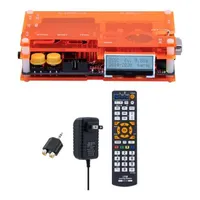
Mcbazel OSSC line-doubler | $139.90$125.91 at Amazon

Mcbazel OSSC line-doubler | $139.90 $125.91 at Amazon
You'll be able to hook up an original GameCube to this upscaler and ramp up its resolution to HD using HDMI. Just keep in mind you'll need to either use an RGB Scart cable or Components with this specific gadget as yellow composite cables won't work without a transcoder.

View Deal

The results are crispy to say the least, with x2 doubling transforming the GameCube's visuals from 480p to 960p (1280 x 960), which scales pretty nicely to modern displays. The results should be pretty close to the Switch 2 even though the handheld will run at 4K in docked mode since Online games run at 1350 x 900, based on what I saw during the Direct reveal.

Just like everything in life, there's a cheap and a premium side to upscaling, and I view the OSSC as a middle ground solution. If you go raking around, you'll find some very budget genetic upscalers that start at $9.98. I'd absolutely avoid the boxes that simply just chuck a composite signal through HDMI as the colors will be muddy and outlines will lack definition, but I used the $29.99 Scart to HDMI converter long enough to know it is somewhat passable. Don't get me wrong, it's still not great and suffers from occasional quirks like sync issues, a bit of lag, and botched interlacing handling that leads to visual shenanigans, but it's not atrocious.

You may like
  • Pokemon Stadium with close up of Gengar on Sony PVM CRT next to Pikachu N64 console on black desk. How to play N64 games
  • GamesRadar+ Prime Day deals badge next to Atari 2600+ and Godzilla figure holding tiny Atari on right. The best Prime Day retro gaming deals live: consoles and handhelds handpicked by a classics expert
  • Amazon Prime Day deals badge surrounded by Nintendo Switch 2 accessories and games Prime Day Nintendo Switch 2 deals will end tonight, so I'm bringing you all the last-minute offers under $50

Before you pick up any old upscaler, just know that you need to use the right cable to get the cleanest image possible, as the console supports multiple output types. I use a Scart cable to tap into the cube's RGB signal, which produces nice sharp results with distinct colors that don't bleed into each other. S-Video is also an option too and looks fairly decent, but if you use the common yellow composite connection alongside red and yellow phonos for audio, you'll get a guestimated take on your game's visuals that often looks like it's coated in Vaseline.

Three cable types with Scart on left, components in centre, and S-video with composite cables on right.

(Image credit: Future / Phil Hayton)

Component is also an option, and it is technically the best signal the GameCube has to offer. The only issue is that good quality cables, like the $59.99 Retro-Bit Prism are pretty pricey, and I'd argue it won't look that much better than if you go with Scart.

All that to say that pairing your old GameCube with an upscaler will help you play all those 2000s gems you either love or missed at similar quality to the Switch 2. There's a bit of an assumption with old systems that they'll always look pants unless you use emulation or a new fangled take on the original hardware. The Cube is the one console that actually gives out a clean enough signal to look pretty fantastic when upscaled correctly, and it's really just a case of using the right gadget for the job.

New controller, old cube

Hand holding GameCube controller connected to Switch 2

(Image credit: Future / Sam Loveridge)

There is admittedly one thing that could tempt me into playing GameCube games on Switch 2, and it's that pesky new wireless controller. Unlike the old Wavebirds from back in the day, It looks exactly like the original and cuts the cord, so Nintendo sort of has me in its clutches a bit via the accessory. However, my OG hardware loving instincts are already getting me to think about ways to whip up a similar experience with my current setup, and it reminded me there is a potential solution already.

Enter the 8BitDo Bluetooth Retro Receiver, a doohickie that's available for $16.92 that plugs into the original GameCube controller port and syncs up to new pads. You can use the adapter to pair your DualSense, Xbox, and Switch Pro controller to the system, and that latter perk could potentially translate to Switch 2 compatibility. Nintendo has confirmed that current wireless accessories will be compatible with the new handheld, so that should mean the dongle will sync.
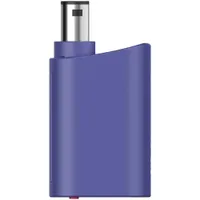
8BitDo Bluetooth Retro | $24.99 at Amazon

8BitDo Bluetooth Retro | $24.99 at Amazon
While compatibility with the new wireless Switch 2 GameCube controller isn't confirmed, it will likely sync up to the new gamepad and current supports Switch Pro, Dualsense, and Xbox controllers. Simply put, you'll be able to cut the cord and kick back with whatever set of buttons takes your fancy on the OG console.

View Deal

The idea of buying a brand new GameCube controller in 2025 for my old console is already making me smile. I'm hoping the Bluetooth works the same so that the 8BitDo just connects like it would with a Pro controller, but I'll have to get my hands on one to confirm that. As a backup, though, there are other pads out there like the NYXI Warrior that look almost like a wireless take on the real deal. That will set you back around $68.99 at Amazon, but it could be worth the money if you're serious about an OG Cube setup this year.

I've virtually only scraped the surface of modern GameCube setups with my approach, as there's a whole wealth of mods out there for the system too. Think of this as a starting point for playing GC games for those of you who are tempted to pick up a Switch 2 for that reason alone. I'm not saying don't buy Ninty's new handheld, but just know that there are already ways to play all of the adventures coming to the Online service and hundreds of others if you fancy building a new physical collection. Hey, with game pricing verging towards the $80 mark, you might even be able to grab expensive oldies for fairly cheap.


Already using Valve's handheld for retro games? Swing by the best Steam Deck accessories and best Steam Deck dock for excellent add-ons. Alternatively, take a peek at the best gaming monitors if you need a high-spec screen.

Phil Hayton
Phil Hayton
Social Links Navigation
Hardware Editor

Phil is the Hardware Editor at GamesRadar+ who specializes in retro console setups, choosing the latest gaming handhelds, and navigating the choppy seas of using modern-day PC hardware. In the past, they have covered everything from retro gaming history to the latest gaming news, in-depth features, and tech advice for publications like TechRadar, The Daily Star, the BBC, PCGamesN, and Den of Geek. In their spare time, they pour hours into fixing old consoles, modding Game Boys, exploring ways to get the most out of the Steam Deck, and blasting old CRT TV visuals into their eye sockets.

You must confirm your public display name before commenting

Please logout and then login again, you will then be prompted to enter your display name.

Read more
Pokemon Stadium with close up of Gengar on Sony PVM CRT next to Pikachu N64 console on black desk.
Retro How to play N64 games
 
 
GamesRadar+ Prime Day deals badge next to Atari 2600+ and Godzilla figure holding tiny Atari on right.
Retro The best Prime Day retro gaming deals live: consoles and handhelds handpicked by a classics expert
 
 
Amazon Prime Day deals badge surrounded by Nintendo Switch 2 accessories and games
Nintendo Switch 2 Prime Day Nintendo Switch 2 deals will end tonight, so I'm bringing you all the last-minute offers under $50
 
 
Black PS2 on right and pink PS2 Slim on left with stack of PS2 games in front with a controller on top next to a light gun.
Retro How to play PS2 games
 
 
Close up of Sonic the Hedgehog 2 gameplay on Sony CRT TV with Sonic and Tails sprites standing on a slope.
Retro My original Sega Genesis setup will help you celebrate Sonic's 35th anniversary in style
 
 
Evercade Alpha closeup with Ryu from Street Fighter on screen
Retro Best retro consoles 2026: my favorite ways to play classic capers
 
 
Latest in Retro
Three Traveller ULW10 with member of Unico team interacting with buttons.
Retro Peeking inside the Unico's faux CRT TV has put some of my fears to rest, but the lag is absurd
 
 
Neo Geo AES+ console with Jackal and Milky from Shock Troopers standing in front.
Retro The Neo Geo AES+ now isn't happening until September 2027
 
 
3D scan of Star Trek 25th Anniversary for PC with gameplay in backdrop.
Retro GOG now lets you turn digital games into big box PC releases
 
 
Hands using Retroid Pocket Duo Lite to play Mario Kart 7 with Mario using glider.
Handhelds Retroid just said "hold my DS" to Anbernic and revealed a $149 Pocket Duo Lite
 
 
Hand holding grey N64 controller in front of Zelda Ocarina of Time gameplay trailer on monitor with Link on Epona looking and Death Mountain in the distance.
Retro You probably shouldn't play the Zelda Ocarina of Time remake with an N64 controller, but I'm willing to try anyway
 
 
Resistance: Fall of Man PS3 disc in external Blu-ray drive tray.
Retro Yes, you can now run PS3 games from disc on PC using RPCS3, but there's a catch that ruined my plans
 
 
Latest in Features
Star Wars Zero Company screenshots
Strategy Games I've learned to love Star Wars Zero Company's permadeath – by letting the new hires die
 
 
Diablo 5 character concept art showing a mysterious figure with a cloaked hood, armor, and large wings
Diablo Diablo 5: Everything you need to know about the next era of Diablo
 
 
Dreadline Express screenshot from Steam
Adventure Games Dreadline Express is more Myst than Balatro, but this Metroidvania deckbuilder is just as creative
 
 
StarCraft 2030 screenshot
Third Person Shooters StarCraft: Everything we know so far about Blizzard's new open-world, story-driven shooter
 
 
The models from the new Sons of Behemat range, against a shelf unit of board games
Tabletop Gaming These new Sons of Behemat models are exactly what the Warhammer Age of Sigmar army needs
 
 
Xanthe, one of the lieutenants in The Blood of Dawnwalker
RPGs I nerfed The Blood of Dawnwalker's hardest boss by fighting her early and stole her instakill power
 
 
LATEST ARTICLES
  1. Marvel's Wolverine Captain Terror whiskey bottle
    1
    How to find every Whiskey Bottle in Marvel's Wolverine
  2. 2
    Best Marvel's Wolverine Techniques to unlock first
  3. 3
    Every suit in Marvel's Wolverine and how to unlock them all
  4. 4
    How long does it take to complete Marvel's Wolverine?
  5. 5
    What is the code to Shiro's apartment closet in Marvel's Wolverine?

GamesRadar+ is part of Future US Inc, an international media group and leading digital publisher. Visit our corporate site.

Add as a preferred source on Google Add as a preferred source on Google
  • About us
  • Contact Future's experts
  • Terms and conditions
  • Privacy policy
  • Cookies policy
  • Advertise with us
  • Review guidelines
  • Write for us
  • Accessibility statement
  • Careers

© Future US, Inc. Full 7th Floor, 130 West 42nd Street, New York, NY 10036.

Please login or signup to comment

Please wait...