GamesRadar+ GamesRadar+
US EditionUS CA EditionCanada UK EditionUK AU EditionAustralia
Sign in
  • View Profile
  • Sign out
  • Games
    • Game Insights
      • Games News
      • Games Features
      • Games Reviews
      • Games Guides
      • Big in 2026
      • The Big Preview
      • On The Radar
      • Indie Spotlight
      • Future Games Show
      • Golden Joystick Awards
    • Genres
      • Action Games
      • RPGs
      • Action RPGs
      • Adventure Games
      • Third Person Shooters
      • FPS Games
    • Platforms
      • PS5
      • Xbox Series X
      • PC
      • Nintendo Switch
      • Nintendo Switch 2
      • Tabletop Gaming
    • Franchises
      • Grand Theft Auto
      • Pokemon
      • Assassin's Creed
      • Monster Hunter
      • Fortnite
      • Cyberpunk
      • Red Dead
      • The Elder Scrolls
      • The Sims
  • Entertainment
    • TV Shows
      • TV News
      • TV Reviews
      • Anime Shows
      • Sci-Fi Shows
      • Superhero Shows
      • Animated Shows
      • Marvel TV Shows
      • Star Wars TV Shows
      • DC TV Shows
    • Movies
      • Movie News
      • Movie Reviews
      • Big Screen Spotlight
      • Superhero Movies
      • Action Movies
      • Anime Movies
      • Sci-Fi Movies
      • Horror Movies
      • Marvel Movies
      • DC Movies
    • Streaming
      • Apple TV Plus
      • Disney Plus
      • Netflix
      • HBO
      • Amazon Prime Video
      • Hulu
    • Comics
      • Marvel Comics
      • DC Comics
    • Toys & Collectibles
    • Lego
    • Dungeons and Dragons
    • Merch
  • Hardware
    • Insights
      • Hardware News
      • Hardware Reviews
      • Hardware Features
    • Computing
      • Desktop PCs
      • Laptops
      • Handhelds
    • Peripherals
      • Headsets & Headphones
      • TVs & Monitors
      • Gaming Mice
      • Gaming Keyboards
      • Gaming Chairs
      • Speakers & Audio
    • Accessories & Tech
      • Gaming Controllers
      • Tech
      • SSDs & Hard Drives
      • VR
      • Accessories
      • Retro
  • Deals
    • Game Deals
    • Tech Deals
    • TV Deals
    • Buying Guides
  • Video
  • Newsletters
    • Quizzes
    • About Us
    • How to pitch to us
    • How we score
    • Newsarama
    • Retro Gamer
    • Total Film
  • home
  • Games
    • View Games
      • Games News
      • Games Features
      • Games Reviews
      • Games Guides
      • Big in 2026
      • The Big Preview
      • On The Radar
      • Indie Spotlight
      • Future Games Show
      • Golden Joystick Awards
      • Action Games
      • RPGs
      • Action RPGs
      • Adventure Games
      • Third Person Shooters
      • FPS Games
    • Platforms
      • View Platforms
      • PS5
      • Xbox Series X
      • PC
      • Nintendo Switch
      • Nintendo Switch 2
      • Tabletop Gaming
      • Grand Theft Auto
      • Pokemon
      • Assassin's Creed
      • Monster Hunter
      • Fortnite
      • Cyberpunk
      • Red Dead
      • The Elder Scrolls
      • The Sims
  • Entertainment
    • View Entertainment
    • TV Shows
      • View TV Shows
      • TV News
      • TV Reviews
      • Anime Shows
      • Sci-Fi Shows
      • Superhero Shows
      • Animated Shows
      • Marvel TV Shows
      • Star Wars TV Shows
      • DC TV Shows
    • Movies
      • View Movies
      • Movie News
      • Movie Reviews
      • Big Screen Spotlight
      • Superhero Movies
      • Action Movies
      • Anime Movies
      • Sci-Fi Movies
      • Horror Movies
      • Marvel Movies
      • DC Movies
    • Streaming
      • View Streaming
      • Apple TV Plus
      • Disney Plus
      • Netflix
      • HBO
      • Amazon Prime Video
      • Hulu
    • Comics
      • View Comics
      • Marvel Comics
      • DC Comics
    • Toys & Collectibles
    • Lego
    • Dungeons and Dragons
    • Merch
  • Hardware
    • View Hardware
      • Hardware News
      • Hardware Reviews
      • Hardware Features
      • Desktop PCs
      • Laptops
      • Handhelds
    • Peripherals
      • View Peripherals
      • Headsets & Headphones
      • TVs & Monitors
      • Gaming Mice
      • Gaming Keyboards
      • Gaming Chairs
      • Speakers & Audio
      • Gaming Controllers
      • Tech
      • SSDs & Hard Drives
      • VR
      • Accessories
      • Retro
  • Deals
    • View Deals
    • Game Deals
    • Tech Deals
    • TV Deals
    • Buying Guides
  • Video
  • Newsletters
    • Quizzes
    • About Us
    • How to pitch to us
    • How we score
    • Newsarama
    • Retro Gamer
    • Total Film
Trending
  • Pokemon Winds and Waves
  • New Games for 2026
  • GamesRadar+ Replay
  • Mario Day deals
Jump to:
  • Price
  • Comfort
  • Controls
  • Design
  • Compatibility
  • Verdict
  1. Hardware
  2. Accessories

Hori Split Pad Pro vs Compact: which Joy-Con alternative is best?

Features
By Tabitha Baker published 28 April 2023

The battle of the ergonomic gamepads

When you purchase through links on our site, we may earn an affiliate commission. Here’s how it works.

Hori Split Pad Pro and Hori Split Pad Compact on a wooden table
(Image credit: Future)
Jump to:
  • Price
  • Comfort
  • Controls
  • Design
  • Compatibility
  • Verdict
  • Facebook
  • X
  • Pinterest
  • Flipboard
  • Email
Share this article
Join the conversation
Follow us
Add us as a preferred source on Google
Get the GamesRadar+ Newsletter

Weekly digests, tales from the communities you love, and more


By submitting your information you agree to the Terms & Conditions and Privacy Policy and are aged 16 or over.

You are now subscribed

Your newsletter sign-up was successful


Want to add more newsletters?

GamesRadar+

Every Friday

GamesRadar+

Your weekly update on everything you could ever want to know about the games you already love, games we know you're going to love in the near future, and tales from the communities that surround them.

GTA 6 O'clock

Every Thursday

GTA 6 O'clock

Our special GTA 6 newsletter, with breaking news, insider info, and rumor analysis from the award-winning GTA 6 O'clock experts.

Knowledge

Every Friday

Knowledge

From the creators of Edge: A weekly videogame industry newsletter with analysis from expert writers, guidance from professionals, and insight into what's on the horizon.

The Setup

Every Thursday

The Setup

Hardware nerds unite, sign up to our free tech newsletter for a weekly digest of the hottest new tech, the latest gadgets on the test bench, and much more.

Switch 2 Spotlight

Every Wednesday

Switch 2 Spotlight

Sign up to our new Switch 2 newsletter, where we bring you the latest talking points on Nintendo's new console each week, bring you up to date on the news, and recommend what games to play.

The Watchlist

Every Saturday

The Watchlist

Subscribe for a weekly digest of the movie and TV news that matters, direct to your inbox. From first-look trailers, interviews, reviews and explainers, we've got you covered.

SFX

Once a month

SFX

Get sneak previews, exclusive competitions and details of special events each month!


An account already exists for this email address, please log in.
Subscribe to our newsletter

With all their drifting concerns, high price tags, and uncomfortable designs, many are seeking alternatives to the classic Nintendo Switch Joy-Con. Thankfully, there's no shortage of budget-minded third party gamepads. Hori, however, has long produced some of the best Nintendo Switch accessories on the market and it has two sets of clickers up its sleeve. 

The Split Pad series offers Joy-Con like attachment to the main handheld tablet, with the extra benefits of a more ergonomic design, remappable back buttons, and even a handy turbo feature. There are two versions to consider, though - the Hori Split Pad Pro and the Hori Split Pad Compact. 

As the name would suggest, the Compact model takes everything the Pro does (at least at a feature level) and shrinks it down into a smaller footprint. That brings it more inline with the majority of Nintendo Switch controllers out there. However, there's more to consider in this equation. We've had our hands on both versions for the last couple of months, testing and comparing to see which Joy-Con alternative you should buy. 

In short, we'd recommend the Hori Split Pad Pro for its additional comfort features and more satisfying feel. That verdict comes after weeks of weighing cost, comfort, controls, design, and compatibility to find the victor. That's not to say everyone will be best served by the Pro, though, and you'll find our full breakdown of each model's pros and cons just below. 

TL;DR: Hori Split Pad Pro vs Compact

Hori Split Pad Pro

  • $49.99 / £39.99
  • Chunky, more ergonomic form factor
  • Larger, more tactile face buttons
  • Taller thumbsticks
  • Larger remappable back buttons
  • Turbo functionality
  • More colorway options
  • Attachment Set for docked mode

Hori Split Pad Compact

  • $49.99 / £49.99
  • More streamlined squared design
  • Smaller, mushier face buttons
  • Smaller but still precise thumbsticks
  • Smaller remappable back buttons
  • Turbo functionality
  • Limited colorway options
  • Won't work in docked mode
Today's best Hori Split Pad deals
Hori Nintendo Switch Split...
Hori Split Pad Pro
Amazon
$46.66
View
See all prices
HORI Switch Split Pad Compact...
Hori Split Pad Compact
Amazon
$49.99
$34.50
View
See all prices
HORI Split Pad Pro Attachment...
Hori Split Pad Pro + Attachment Set
Amazon
$67.39
View
See all prices
We check over 250 million products every day for the best prices

Hori Split Pad Pro vs Compact: Price

Hori Split Pad Pro and Compact controllers face up and face down on a wooden table

(Image credit: Future)

Hori Split Pad Pro

  • $49.99 / £39.99 for controllers only
  • $79.99 / £69.99 for Attachment Set

Hori Split Pad Compact

  • $49.99 / £49.99 for controllers only

Both the Hori Split Pad Pro and Compact sit under $50 / £50 when buying the controllers by themselves. However, the Pro model has a slightly cheaper price in the UK at £39.99. You're paying the same whichever version you buy in the US, unless you opt for the full Attachment Set, which includes a centrepiece for use with a docked system. Considering the benefits below, the Pro offers far greater value for money than the Compact, even when at the same $49.99 MSRP in the US. 

Hori Split Pad Pro vs Compact: Comfort

Image 1 of 2
Hori Split Pad Pro back paddles close up
Hori Split Pad Pro(Image credit: Future)
Back of Hori Split Pad Compact controllers showing textured surface and rear buttons
Hori Split Pad Compact(Image credit: Future)

Hori Split Pad Pro

  • Larger size and additional grips
  • Rougher texture along the back
  • Larger face buttons
  • Curved d-pad
  • Larger, smooth thumbsticks

Hori Split Pad Compact

  • Square design
  • Only slightly textured along the back
  • Smaller face buttons
  • Curved d-pad
  • Smaller textured thumbsticks

There's no getting around it, the Hori Split Pad Pro is far more comfortable than the Compact. The larger size and chunkier grips makes for a more ergonomically-minded form factor straight off the bat, allowing the hands to gently cradle the handheld system in the palm. The Split Pad Compact does widen out at the base, allowing for a more comfortable grip than a Joy-Con, but the squared off design and lack of legs mean it's not as naturally relaxed in the hand. 

On top of that, the Split Pad Pro has a rougher texture running along the back of each controller. With diamond ridges in the plastic itself, there's far greater grip than the slightly bobbled plastic on the Compact model. 

Sign up to the GamesRadar+ Newsletter

Weekly digests, tales from the communities you love, and more

By submitting your information you agree to the Terms & Conditions and Privacy Policy and are aged 16 or over.

Hori Split Pad Pro and Compact backs on a wooden table

(Image credit: Future)

Around the front, by nature of its size, the Pro version carries taller, slightly larger face buttons than the Compact version. In our testing, we found that this did make for a more comfortable experience overall, with a satisfying button feel and plenty of space to navigate the button array. However, young children will likely get on with the reduced size of the Compact better.

Hori Split Pad Pro vs Compact face buttons side by side

(Image credit: Future)

Similarly, the thumbsticks on the Pro have a larger diameter with a taller stem. While that generally makes them more comfortable to use, and easier to wield in more precise gameplay scenarios, the thumb does need to travel further to swap to d-pad or face button controls. Overall, we preferred the experience of the Pro's thumbsticks, though it should be noted that the grippy texture present on the Compact's version allows for more controlled movement.

The Hori Split Pad Pro offers greater comfort overall, though those buying for small children will prefer the reduced thumbstick height and smaller face buttons of the Compact.

Hori Split Pad Pro vs Compact: Controls
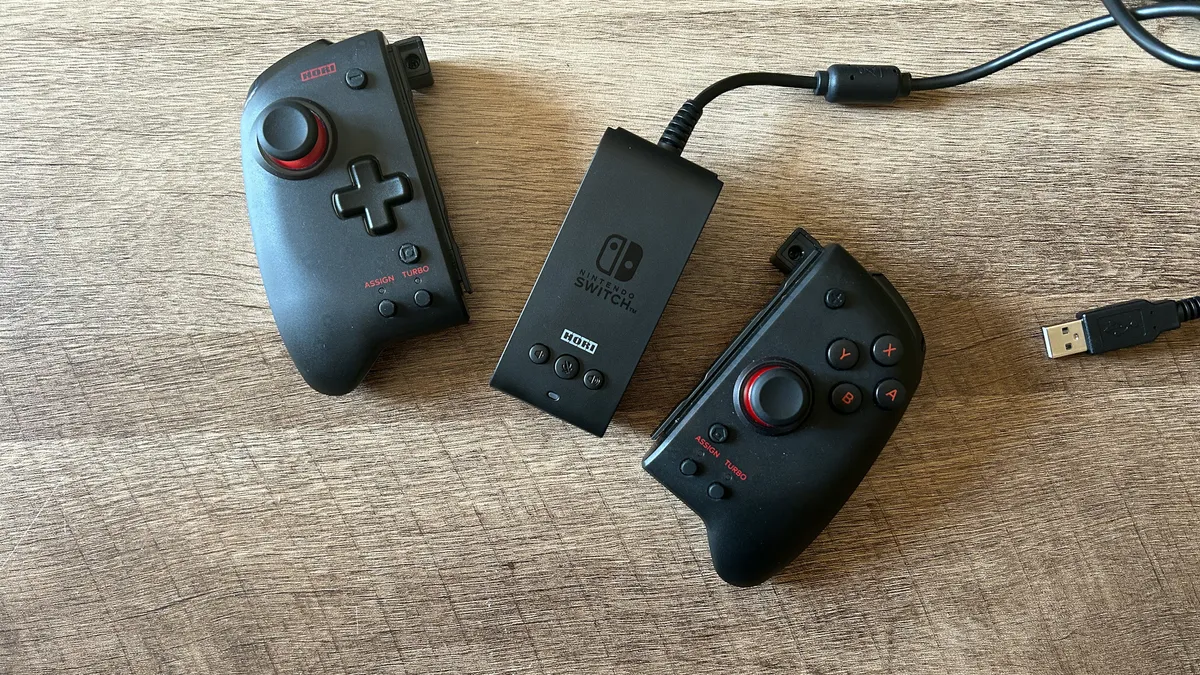
Image 1 of 2
Hori Split Pad Pro controllers and attachment piece detached on a table
Hori Split Pad Pro(Image credit: Future)
Hori Split Pad Compact controllers on a wooden table
Hori Split Pad Compact(Image credit: Future)

Hori Split Pad Pro

  • Full control scheme
  • Snappier face buttons and d-pad
  • Precise, responsive thumbsticks
  • More pronounced back buttons
  • Turbo functionality

Hori Split Pad Compact

  • Full control scheme
  • Mushy face buttons and d-pad
  • Precise, responsive thumbsticks
  • Back buttons inline with body
  • Turbo functionality

With both models offering the same full control scheme layout, there's very little difference in the functionality of both the Pro and Compact. However, the implementation of the face buttons, d-pad, and programmable back buttons does differ between the two models. While the fully fledged Hori Split Pad Pro offers a snappy response in its ABXY and d-pad controls, thanks to the larger size and longer travel distance, the Compact's options feel a little mushy under the hand. This was one of the first things we noticed during our testing, and it certainly makes for a different experience overall. While both feel responsive, the Pro is considerably snappier. 

Hori Split Pad Pro vs Compact thumbsticks close up

(Image credit: Future)

Both controllers do offer excellent thumbsticks, though, with far greater precision and accuracy compared to the Joy-Con. These have the resistance and speed of something more akin to the Nintendo Switch Pro Controller. As mentioned above, the additional height on the Pro model can add a sliver of additional time moving between thumbsticks and buttons, but it also provides a greater sense of control overall.

The only other difference between the two control schemes is the back buttons. While these clickers sit slightly away from the main body of the Pro model, they are in-line with the main Compact chassis. That means there's far less travel and more of a chance of accidental presses. We were regularly hitting these back buttons by mistake in testing, whereas the Pro version was nicely positioned and ready to hit exactly when needed.

Both the Pro and Compact offer the option to map these back buttons to a wide range of commands, as well as assign a turbo function to certain inputs. In both cases, this is quick and easy to set up via two dedicated clickers at the bottom of each gamepad.

Hori Split Pad Pro vs Compact: Design
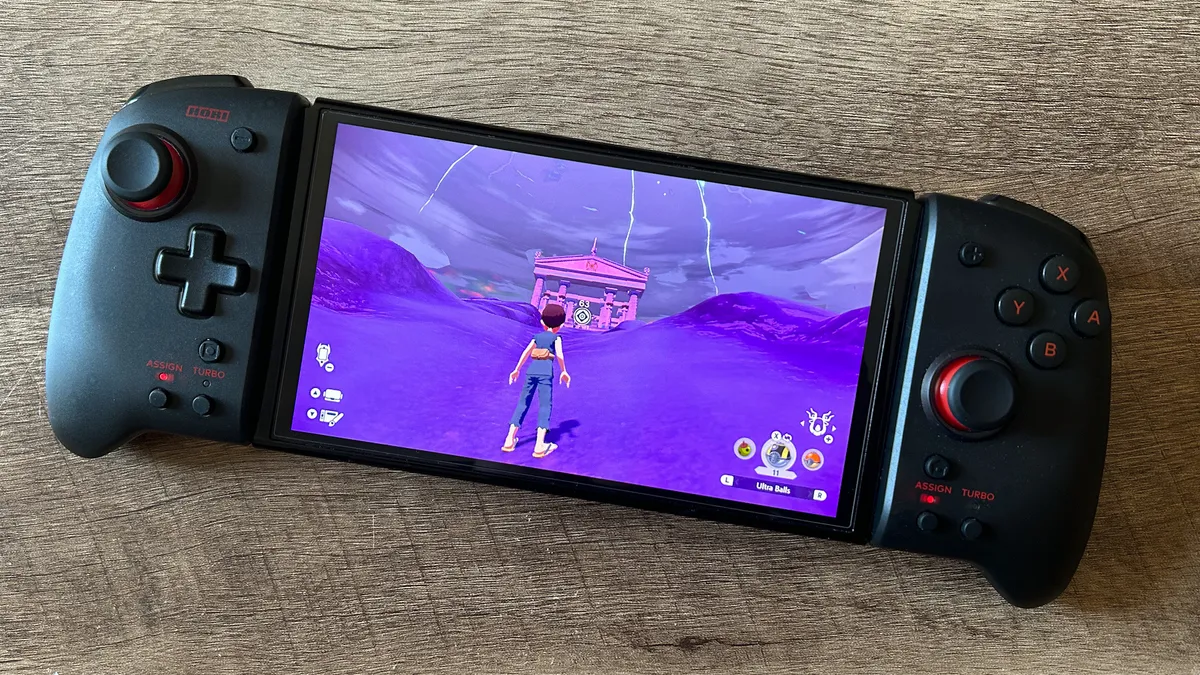
Image 1 of 2
Hori Split Pad Pro controllers on Nintendo Switch OLED playing Pokemon
Hori Split Pad Pro(Image credit: Future)
Hori Split Pad Compact running Dragon Quest Builders 2 on a Nintendo Switch
Hori Split Pad Compact(Image credit: Future)

Hori Split Pad Pro

  • Bulky form factor
  • More colorway options
  • Solid, durable plastic materials
  • High quality rail sliders

Hori Split Pad Compact

  • More streamlined form factor
  • Fewer colorway options
  • Solid, durable plastic materials
  • High quality rail sliders

Depending on how you want your Switch to look, the design category might be the Hori Split Pad Pro's downfall. The extra heft required to make a controller this comfortable and tactile means the Pro model dramatically changes the look and feel of your handheld overall. This is a bulky device, significantly adding to the device's footprint and creating a chunky bulbous aesthetic. By contrast, the square design of the Compact is far more in keeping with the ethos of the Switch itself. It's far more streamlined and keeps the footprint similar to that of a set of Joy-Con. While neither the Pro or Compact will fit into a standard clamshell Nintendo Switch case, it is easier to transport the Compact model in a separate backpack pocket. 

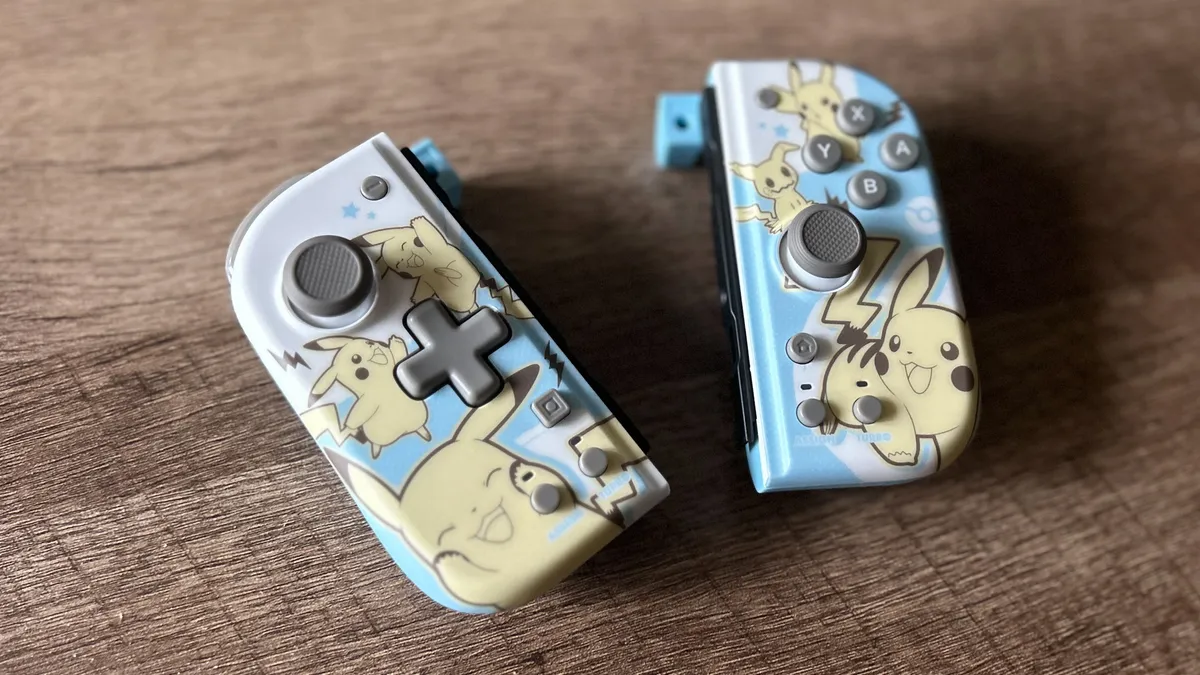
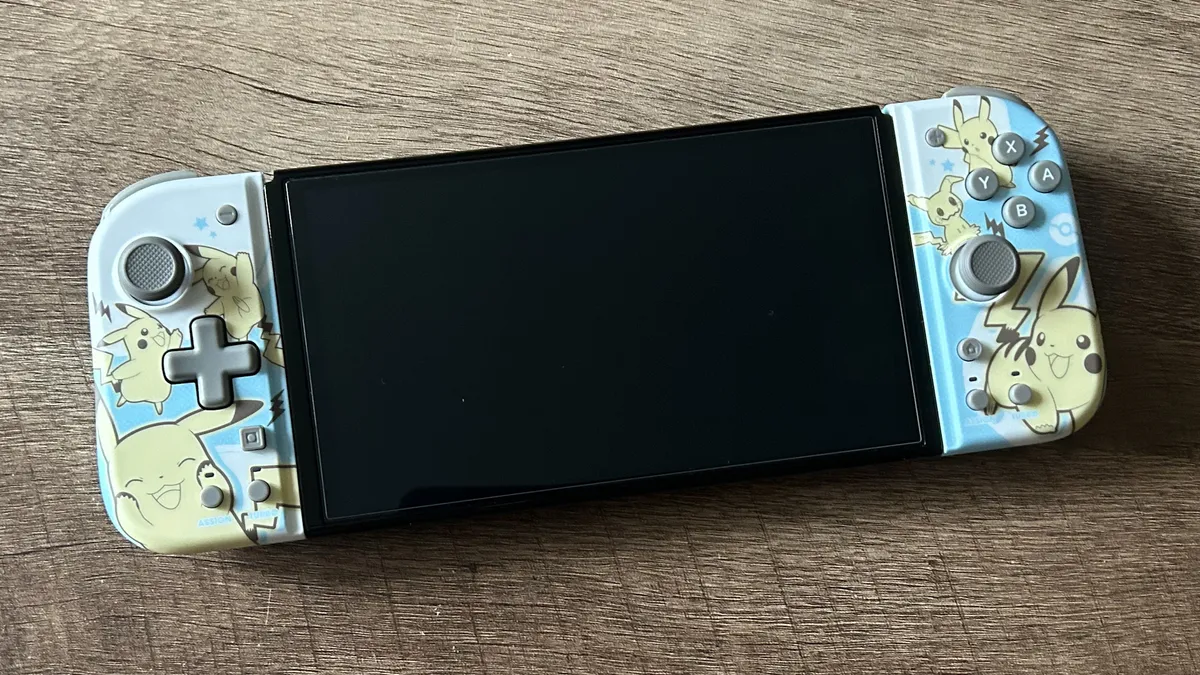
Aside from physical form factor, though, the Hori Split Pad Pro does offer a wider range of colorways and more choice between franchises if you're opting for a special edition. At the time of writing, the Pro comes in black, blue, and red, with special editions spanning Pokemon, Pac-Man, Mega Man, and Sonic in a variety of different character decals. The Compact is only available in red or gray, with only two special edition options, both of them Pokemon. 

Still, both controllers are built to a high quality. There's a solid, durable plastic chassis keeping each one scuff-free and save, with no wobble or flex in the rail sliders. 

Hori Split Pad Pro vs Compact: Compatibility

Image 1 of 2
Hori Split Pad Pro full set with attachment and controllers
Hori Split Pad Pro(Image credit: Future)
Hori Split Pad Compact controllers attached to Nintendo Switch system on a wooden table
Hori Split Pad Compact(Image credit: Future)

Hori Split Pad Pro

  • Attachment Set for docked mode
  • No wireless connection

Hori Split Pad Compact

  • Can only be used in handheld mode
  • No wireless connection

Neither the Hori Split Pad Pro nor the Compact allow for a wireless connection. That means you won't be able to split these controllers up for separate use across multiplayer sessions. However, the Pro does take the edge here if you're willing to pay a little extra. While the Compact will only work when directly attached to the Nintendo Switch system, the Pro is also available in an Attachment Set. This package includes a central panel to be slotted in between each controller, which can then be connected to a docked system via USB-A. 

Hori Split Pad Pro vs Compact: which should you buy?

Hori Split Pad Pro vs Hori Split Pad Compact controllers on a wooden table

(Image credit: Future)

We'd recommend the vast majority of players buy the Hori Split Pad Pro over the Compact model. Prices are about the same (if slightly cheaper in the UK), and you're getting a far more comfortable form factor, better control scheme, and better button feel overall, more aesthetic choice, and the option to use the device with a docked console should you opt for the Attachment Set. The Compact does have its audience, though. Younger children will likely find the slightly smaller face buttons and reduced footprint much easier to navigate. Plus, those looking to keep the slick, streamlined design of the Switch will likely prefer the square shape of the Compact as well. 

Buy the Hori Split Pad Pro if:

You're looking to maximise comfort

You don't need to worry about controls being too big

You prefer a snappier, more tactile experience

You don't mind a chunkier form factor

Today's best Hori Split Pad Pro deals
306 Amazon customer reviews
☆☆☆☆☆
Hori Nintendo Switch Split...
Amazon
Prime
$46.66
View
Hori - Split Pad Pro for...
Best Buy
$46.66
View
Low Stock
HORI Nintendo Switch Split...
Walmart
$49.88
View
Show more
We check over 250 million products every day for the best prices

Buy the Hori Split Pad Compact If:

You're buying for younger children

You still want to keep the Switch aesthetic

You don't want to navigate a larger control scheme

You don't need to use it for docked mode

Today's best Hori Split Pad Compact deals
HORI Switch Split Pad Compact...
Amazon
Prime
$49.99
$34.50
View
Low Stock
HORI Nintendo Switch and...
Walmart
$45.98
View
Hori - Split Pad Compact for...
Best Buy
$59.99
View
Show more
We check over 250 million products every day for the best prices

Of course, we're also rounding up plenty more accessories. You can find all the best Nintendo Switch chargers and the best Nintendo Switch headsets right here. For more storage, we'd also recommend checking out the best Nintendo Switch SD cards on the market as well. 

Tabitha Baker
Tabitha Baker
Social Links Navigation
Managing Editor - Hardware

Managing Editor of Hardware at GamesRadar+, I originally landed in hardware at our sister site TechRadar before moving over to GamesRadar. In between, I've written for Tom’s Guide, Wireframe, The Indie Game Website and That Video Game Blog, covering everything from the PS5 launch to the Apple Pencil. Now, i'm focused on Nintendo Switch, gaming laptops (and the keyboards, headsets and mice that come with them), PS5, and trying to find the perfect projector. 

Latest in Accessories
Photo of a Mario nendoroid figure holding a microSD Express card with a Turtle Beach Switch 2 case in the background.
These Mario Day-inspired Switch 2 accessories will power up your console more than a super star
 
 
Photo of the Asus TUF Gaming Hatsune Miku collection sitting on a white desk.
I'm still using the Hatsune Miku Asus TUF Gaming collection this Miku Day, and that's never going to change
 
 
Image of the new Sword Kirby amiibo sitting on a blurred Kirby Air Riders game screenshot.
More Kirby Air Riders amiibo are incoming, and I'm still trying to budget for the first ones
 
 
Photo of the 1TB PNY Switch 2 microSD Express card sitting on top of the handheld.
This 1TB PNY microSD Express Card has solved my Switch 2 storage woes for the better
 
 
Official marketing image showing a Switch 2 Princess Rosalina case sitting on a wooden surface.
I just stumbled upon an official Hori Princess Rosalina Switch 2 case, and I'm having a moment
 
 
Image of the Hori Pokemon Pokopia Switch 2 case and Pokedex game cart case on a wooden surface.
Hori has made my Pokemon Day with this new line of Pokopia and Ditto-themed Switch 2 accessories
 
 
Latest in Features
BG3
The future of RPGs is isometric
 
 
Underside of Alienware 16 Area-51 gaming laptop with glass viewing window and RGB fans
We could get a shock when 2026 gaming laptop prices are unveiled, here's what you need to know about buying this year
 
 
Emily Rudd as Nami and Iñaki Godoy as Monkey D. Luffy in Netflix's One Piece
One Piece season 2 ending explained: Who is Mr. Zero? Who dies? Will there be a season 3?
 
 
In Hitman World of Assassination, Agent 47 sits at the departure gate in an airport during the loading screen
After weeks spent locked into Hitman's Freelancer mode, I realize there's one vital thing 007 First Light needs to learn
 
 
Mario gadgets, accessories, and games on a blue background
The ultimate Mario Day starter pack, kit up for the plumber's big day
 
 
Glen Powell as Becket in How to Make a Killing
How to Make a Killing is Glen Powell's latest mid-budget movie, and I hope he never stops making them
 
 
LATEST ARTICLES
  1. Arc Raiders player in heavy rain with shield shorting out
    1
    Arc Raiders turns down electromagnetic storm lightning despite some players preferring the chaos, as Embark promises compensation for folks impacted by recent server issues
  2. 2
    Game of Thrones creators' beleaguered, big-budget Netflix sci-fi show reportedly getting a reduced episode count for seasons 2 and 3
  3. 3
    Ghost of Yotei devs tried to add Zelda: Breath of the Wild-style rock climbing, but discovered "rock climbing is not a core aspect of being a wandering ronin"
  4. 4
    The future of RPGs is isometric
  5. 5
    Lego Luigi kit lets you recreate the iconic Mario Kart death stare

GamesRadar+ is part of Future US Inc, an international media group and leading digital publisher. Visit our corporate site.

Add as a preferred source on Google Add as a preferred source on Google
  • Terms and conditions
  • Contact Future's experts
  • Privacy policy
  • Cookies policy
  • Accessibility statement
  • Careers
  • About us
  • Advertise with us
  • Review guidelines
  • Write for us
  • Accessibility Statement

© Future US, Inc. Full 7th Floor, 130 West 42nd Street, New York, NY 10036.

Please login or signup to comment

Please wait...