

The best Xbox Series X controllers might be your best bet if you're on the hunt for a new gamepad right now. This platform has such a deep, rich selection of excellent pro controllers that span up and down the price range. Whether you're looking for a spare gamepad or the latest and greatest pro model, I've tested loads of them, and I'm ready to help you shop.
Thanks to Microsoft being, well, Microsoft, any and all Xbox controllers will also be best PC controller contenders. That means that all of the pads below are ones I'd recommend to PC players as well, from the premium options from Nacon, Razer, and Turtle Beach down to the budget options from Hyperkin and GameSir. Alongside the Victrix Pro BFG for Xbox, which is currently my top pick overall, there are some serious rivals to consider. In the last year alone, I've reviewed new products from Razer, Scuf, GameSir, Hyperkin, and PowerA. There's a murderer's row of excellent brands making Xbox controllers, and from my hands-on time with them, I know which are worth spending money on.

As a long-term lover of pro controllers, I take great joy in keeping up with the world of Xbox gamepads. There's such a massive selection of great controllers for PC and Xbox that work just as well on either platform and as an enthusiast, I love testing the latest models out. That said, pro controllers aren't for everyone, so I'm determined to find you the perfect gaming tool for you and the games you play.
The Quick List

With excellent customization options and a solid price point, the Victrix Pro BFG is the best gamepad out there for competitive players.

With some of the best back paddles ever put on a gamepad, and excellent customization options with the console, this is as good as it gets.

We'd recommend this over a straight replacement Core controller because it has some exceptional features and real comfort for a budget price.

The GameSir G7 Pro is the first officially licensed Xbox controller to feature TMR thumbsticks, making it a must-buy and excellent value for money.

The latest model of the Wolverine sports mechanical buttons found in Razer's gaming mice, meaning it's capable of some breathtaking speed when you're in a game.

Nacon's latest Xbox controller has amazing face buttons and cooling rubberized grips that make it feel worth every penny of its price tag. It's also extremely feature-rich.
Load the next 2 products ↓

The $150 Fusion Pro from PowerA gets you a lot of the benefits of the most expensive pro controllers on this list for around $50 less, making it a top-pick.

If you're a fan of controllers with symmetrical thumbstick layouts (like PlayStation ones), your best bet in the Xbox market is the Hyperkin Competitor.

Its ergonomics and classic offset feel mean that for the majority of players on Xbox Series X or S, this is all the controller you'll really need.

Scuf is a highly sought-after brand in the controller world, but its prices can be tough to stomach. For good bang for buck, I'd recommend the Valor Pro.
The best Xbox Series X controller overall
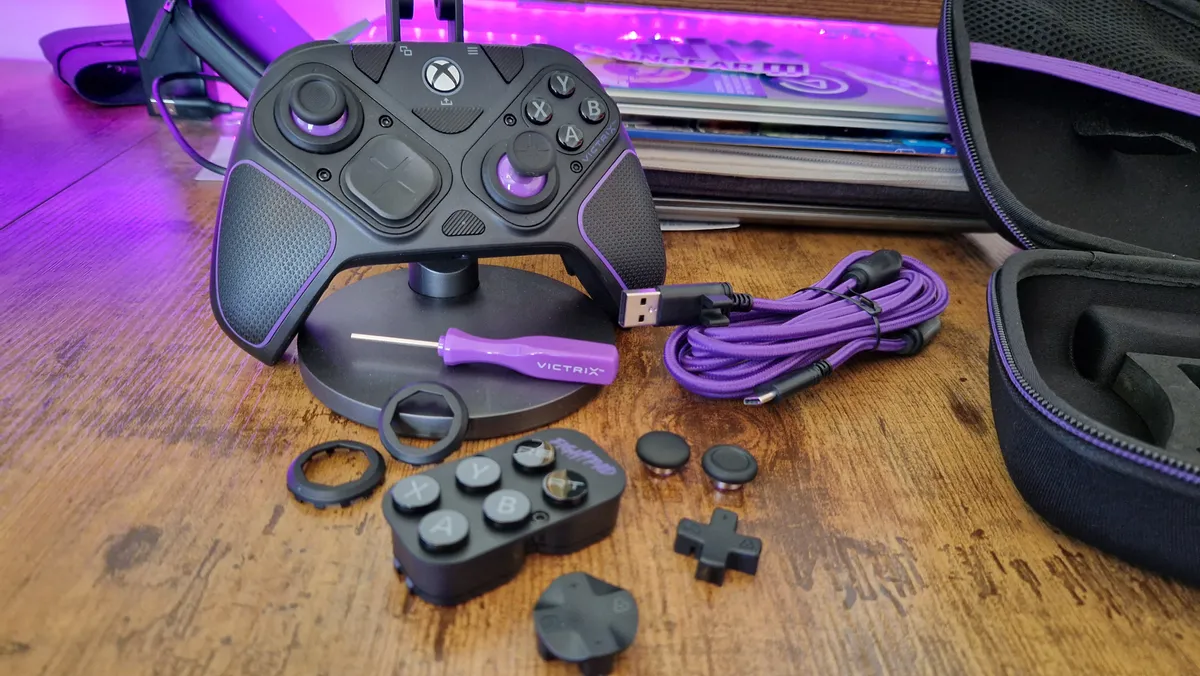


Our favorite PS5 controller has made its way to Xbox, and its refreshed model for Microsoft's console might even be an improvement. In our eyes, this is one of the best gamepads ever made, so to say it's been improved on is a big deal. For competitive players, there is simply no better controller to choose right now. No matter the genre of game you play, the modular design of this controller means you can bend it to your will.
✅ You want something for competitive gaming: Four back buttons and a modular design makes this a super versatile performance pad for all sorts of gaming genres.
✅ Your budget is under $200 / £200: For $179.99 / £179.99, this is excellent value for money against the other officially licensed competition for Xbox.
✅ You want a wireless controller: The Victrix Pro BFG for Xbox was one of the first officially licensed gamepads to launch with wireless support on Xbox, after years of Microsoft stipulating they had to be wired-only.
❌ You want Hall sensor thumbsticks out of the box: This controller sports potentiometer sticks, but there is the option to buy Hall modules later.
❌ You aren't interested in back buttons: The four back buttons on this controller are hard to ignore, so if you want something you won't accidentally press, maybe look elsewhere.
Design & Features: But what does that mean in practical terms? The facial components here can be lifted out and rotated, meaning you can finally have symmetrical thumbsticks on Xbox. You can also swap out the components entirely which is massive for fighting game fans - especially since there's a dedicated fightpad module in the box with six facial buttons.
This new Xbox version comes with all the same add-ons PS5 owners get, as well as integrated rumble motors and improved battery life. You don't get Hall sensor tech out of the box here, but if it ever becomes an issue for you, a Hall sensor thumbstick module is available for purchase, for an additional fee.
Performance: What you have here then, is a competitive Esports controller that now excels in competitive games as it did before, but has even more single-player potential thanks to its additional rumbly feedback. Combine that with the back buttons and it's an easy one to recommend to any player. It was also one of the first officially licensed Xbox controllers to get the wireless support he had been waiting on for years.
Compared to some of its rivals, the BFG for Xbox is priced really competitively too. It often works out about the same price as the Elite Series 2 when its at full price, and I've seen the BFG get discounted down to $150, making it an absolute steal. For under $200, you get so much value for money and a lot of versatility. It's that ability to change this gamepad to your liking that makes it the best overall pick on this list.
Read more: Victrix Pro BFG for Xbox review
Comfort | ★★★★ |
Ergonomics | ★★★★★ |
Pro features | ★★★★★ |
Longevity | ★★★★★ |
Battery life | ★★★ |
Add-ons | ★★★★★ |
Multiplayer potential | ★★★★★ |
Singleplayer potential | ★★★★ |
The best Xbox Series X controller for most players


To the surprise of absolutely no one, the Elite Series 2 is one of the best Xbox Series X controllers, even as it ages against the officially licensed competition on this list. It really is still the one to beat for most Xbox (and PC) users who like the traditional feel of this brand's controllers. Even despite its age, this controller is well worth buying, and with no word about an Elite Series 3 coming any time soon, there's no reason to hold off.
✅ You want a first-party controller: If you want Microsoft's homemade pro controller, this is the one to go for.
✅ You don't mind something older: If you can put up with something a few years older than other options on this list, you might also save some money.
✅ You want four magnetic back paddles: Magnetic back paddles are hard to beat for their speed and feel, and they're pretty uncommon on other controllers.
❌ You want Hall sensor thumbsticks: Stick drift could be a problem you run into, and there's no real counter.
❌ You don't need the attachments: If you aren't interested in the various attachments of the Elite Series 2, you could get the same great controller for cheaper by opting for the Core edition.
Design & Features: The one upside to the Elite Series 2 getting older is that it's much more prone to deals and discounts, and the more affordable Elite Series 2 Core is a nice route in if you aren't too fussed about the attachments.
Firing on all cylinders though, the full-fat Elite Series 2 is a force to be reckoned with. With four magnetic back paddles, there are few gamepads that can match the feel and comfort of this controller. The component pack also gives you some different thumbstick tops, and the tight tension on the potentiometer modules gives the controller a really speedy feel.
Performance: Besides the excellent versatility and comfort of this controller, the extended 40-hour battery life is one of the things that really sets it apart from others on the market. Some third-party controllers don't even have wireless support on Xbox, and if they do their battery lives don't tend to be this generous.
Where the Elite Series 2 does show its age slightly is in its potentiometer thumbsticks which have been reported to suffer from stick drift after a while. There's no ability to have Hall sensor tech here, which is worth considering if you want a long-term investment.
Read more: Xbox Elite 2 controller review
Comfort | ★★★★ |
Ergonomics | ★★★★ |
Pro features | ★★★★ |
Longevity | ★★★ |
Battery life | ★★★★★ |
Add-ons | ★★★★ |
Multiplayer potential | ★★★★★ |
Singleplayer potential | ★★★★ |
The best budget Xbox Series X controller
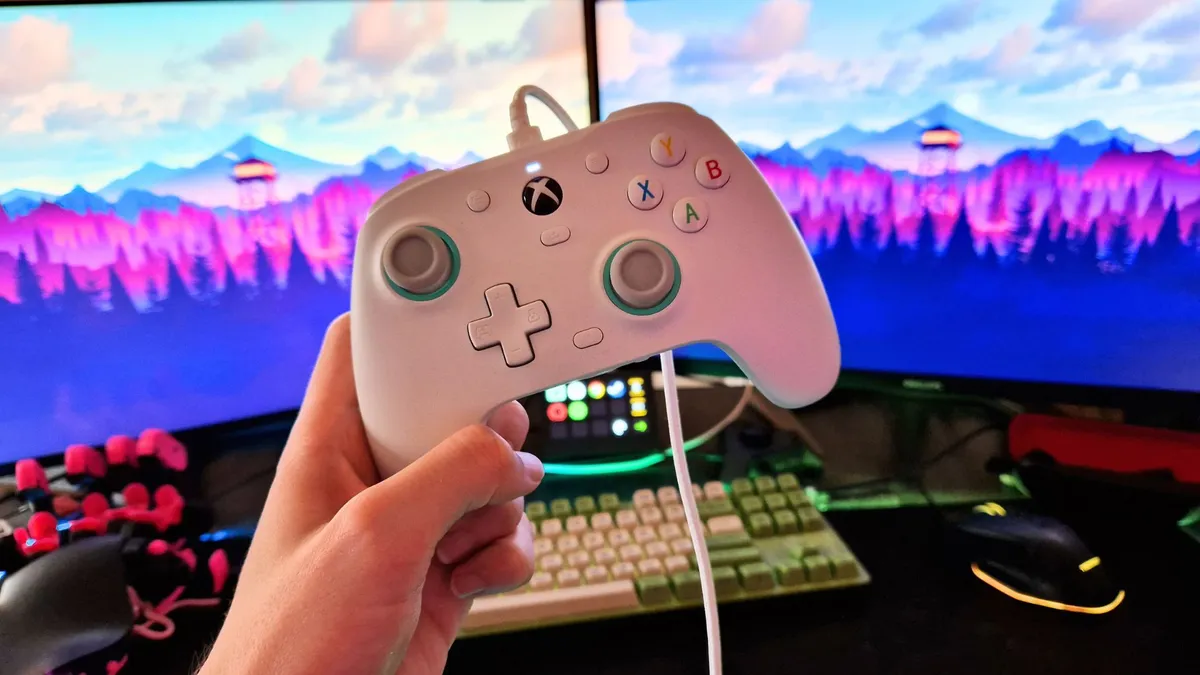


The GameSir G7 SE was the first officially licensed controller for Xbox Series X to include Hall Effect Sensor thumbsticks. For those who might not know, these types of thumbsticks use tiny electromagnets and last far longer than the potentiometers you'll find in controllers up and down this list. Essentially, it means it's immune to stick drift. Considering this pad is on par, if not cheaper than the stock Xbox controller, you're getting so much value for money here.
✅ You want something cheap: A price tag of under $60 for a pro controller is a rare thing, especially in the officially licensed accessory world.
✅ You like a traditional Xbox feel: It's on the smaller side, but the shape and ergonomics of this gamepad are close to the traditional Xbox ones.
✅ You're looking for a spare, or something to replace your original controller: Since the G7 SE is about the same price as the stock Xbox controller, I'd argue this is a much better replacement since it gives you loads more features.
❌ You want wireless support: Perhaps the biggest drawback to this controller is that it has no wireless connectivity.
❌ You want something a bit bigger: The GameSir Kaleid, Kaleid Flux, and upcoming G7 Pro are probably better for those with larger hands.
Design & Features: Annoyingly, since it's a third-party controller made before 2024, there's no wireless support to be had here, and there are some pretty unruly thumbstick dead zones out of the box. Luckily you can play around with this by heading to GameSir's Nexus software on PC. There you can also play around with button assignments, vibration, and more. Speaking of vibration, it feels really subtle and precise with the G7 SE.
You get two back buttons here, which is the standard for any GameSir controller. Besides that, it has a smaller shape to it that feels authentic to the official Core controller that comes with your console.
Performance: An alternate accolade for the GameSir G7 SE could have been the best Xbox Series X controller for platforming because that's where I found it came into its own. Its two back buttons feel incredible - as is the norm with GameSir controllers, but the compact and tactile feel of the G7 SE means it feels great to use in sidescrolling or top-down titles.
For its budget price tag, the G7 SE offers a lot of value as well, because you're getting an awful lot of pro controller features for the price of a stock one. No matter what award you want to give this, the Game Sir G7 SE is one of the best Xbox Series X controllers - and one you should definitely consider buying over the regular Core controller that comes with your console.
Read more: GameSir G7 SE review
Comfort | ★★★ |
Ergonomics | ★★★★ |
Pro features | ★★★★ |
Longevity | ★★★★ |
Battery life | NA |
Add-ons | NA |
Multiplayer potential | ★★★ |
Singleplayer potential | ★★★ |
The best TMR controller for Xbox


TMR thumbsticks are making waves in the controller market in 2025, and for good reason. These are an evolution of Hall sensor sticks that have been slowly becoming the standard in the last few years. The GameSir G7 Pro is the first officially licensed Xbox controller to harness TMR thumbsticks, and that's a reason to recommend this pad on its own. However, the value for money here is wild, and this controller could easily have stolen the " best value" award from PowerA if it wanted to.
✅ You prefer a minimalist design: The relatively low-profile design of this controller goes really nicely in a clean setup.
✅ You don't want swappable parts: There are a couple of D-pads in the box, but no other swappable components besides.
✅ You want TMR thumbsticks: Of all the TMR thumbstick controllers I've tested so far, this is one of the best all-rounders.
❌ You want wireless play on Xbox: Annoyingly, this is only going to work wirelessly on PC. You'll need to tether it to your console with a cable on Xbox
❌ You won't use the extra bumpers: The G7 SE doesn't miss out on all that much if you're playing on Xbox, so you could save money by going for that instead.
Design & Features: If you've played around with the cheaper members of the GameSir G7 family already, the Pro version is going to look familiar. It's had a minimalist glow-up to give it a more premium look and feel. The transparent buttons, metalic accents, and grey rubberized textures give this a really clean aesthetic.
As well as the standard GameSir back buttons, you also have two additional bumper buttons on the top of the controller, and all four of these extra functions are remappable. The standout feature here has to be the TMR thumbsticks however, which you'll have guessed from the award its won on this guide.
The G7 Pro is a wireless controller that comes with a charging stand and a wireless USB dongle, but annoyingly, if you play on Xbox, you'll only have wired play at your disposal.
Performance: The G7 Pro is a fantastic all-rounder. Its clicky buttons feel great to use in all sorts of gaming genres, and its fantastic TMR thumbsticks feel ultra precise. Its parts do feel a tad cheap at times, especially compared to other "pro" model controllers from other brands. The win for GameSir comes with the price, however, because while it feels a tad cheaper, it's around $100 less than other rivals on this list.
I'd have loved to see a few more "pro" features to really drive the value for money prospect. You miss out on a carrying case, some more swappable parts, and another set of back buttons here, and those are things that would take this brand to the next level.
Comfort | ★★★★ |
Ergonomics | ★★★★ |
Pro features | ★★★ |
Longevity | ★★★★ |
Battery life | ★★★ |
Add-ons | ★ |
Multiplayer potential | ★★★★ |
Singleplayer potential | ★★★★ |
The best Xbox Series X controller for speed
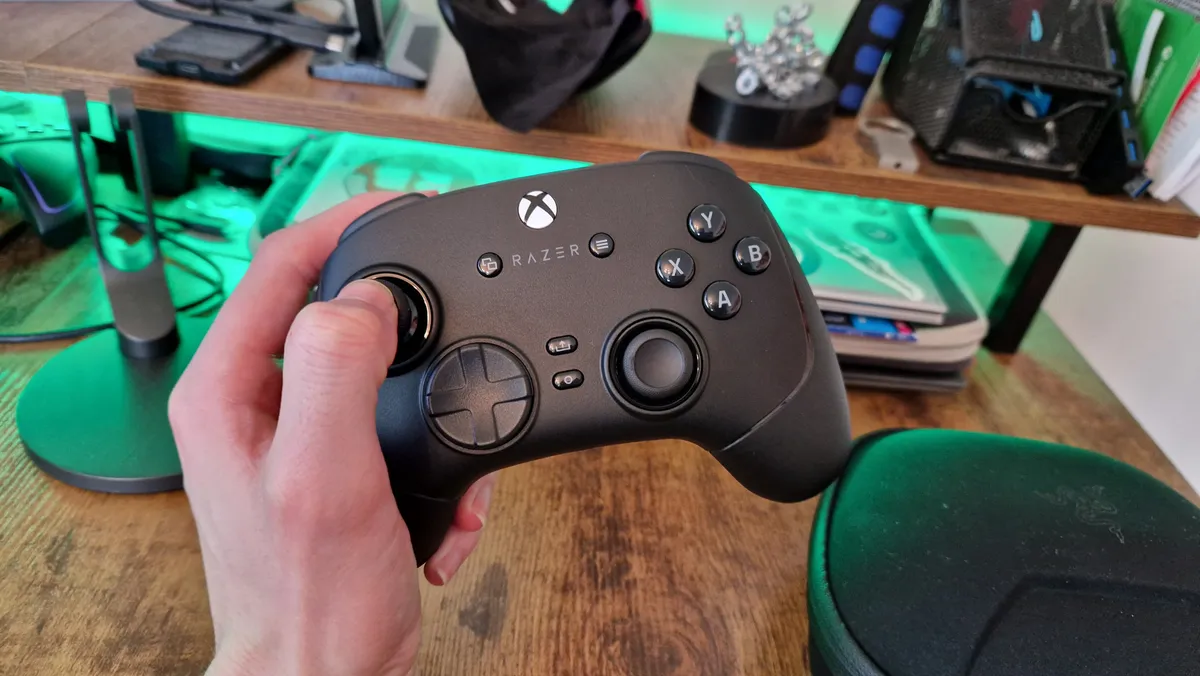


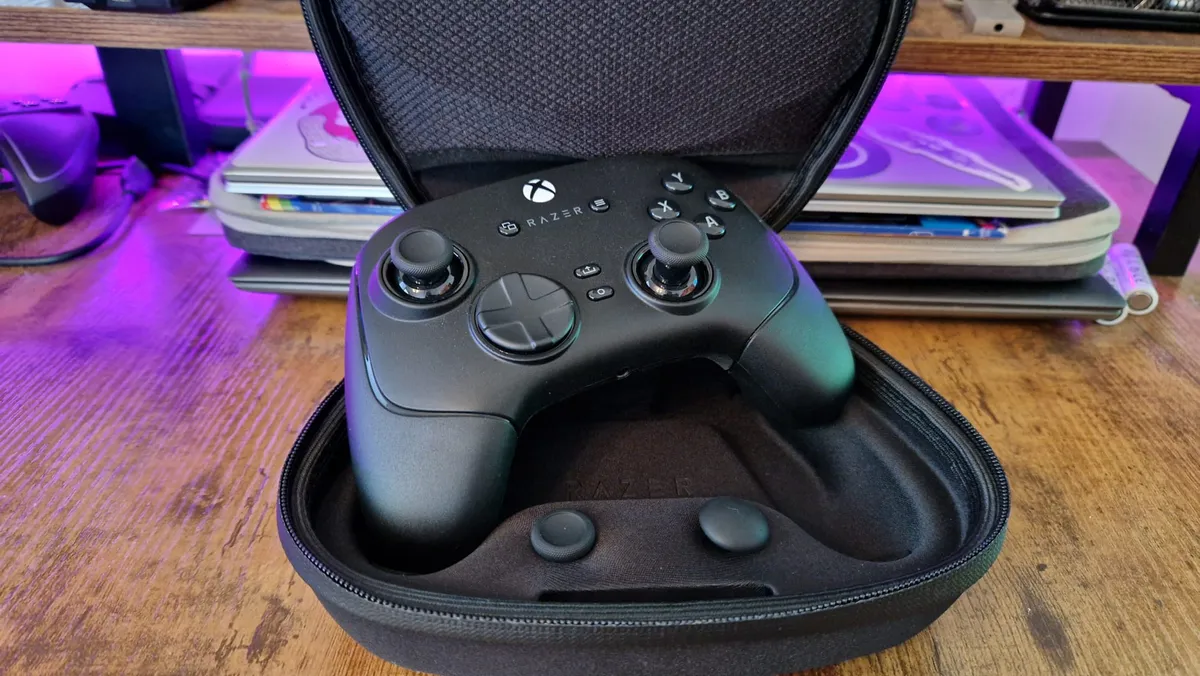

The Razer Wolverine V3 Pro is by far and away the best controller this brand has ever produced. It evolves what was great about the former Wolverine models, prices it down from the PS5 version, and improves so much about the ergonomics and feel. Thanks to the utilization of mechanical buttons from Razer's gaming mice, this is capable of playing at extraordinary speeds.
✅ You want a competitive controller: Six extra back buttons and innovative design flourishes make this a serious mouse and keyboard rival.
✅ You like microswitches: This is packed with microswitch buttons, so if you aren't a fan of clicky buttons, maybe consider something else.
✅ You want something built to last: Between Hall sensor thumbsticks and a robust chassis, this is a controller that'll last you years into the future.
❌ You're on a budget: Razer controllers are always pricey, so if you can't afford the $200 price of this pad, look at something else.
❌ You want some RGB: This controller has more of a pro aesthetic to it, so if you'd rather have a flashy RGB controller, there are other options out there.
Design & Features: The traditional Wolverine build is still here, with chunky, rounded grips and broad shoulders. Four back buttons remain, although their placement now actually makes sense because they're integrated into where your fingers naturally grip the thing. You'll also get two additional bumpers, which adds a lot of versatility and potential for mapping. This is also the first Razer controller to feature wireless support on Xbox, as well as a carry case and some swappable thumbstick tops. The V3 is capable of a 1,000Hz polling rate when using a wired connection on PC as well, so there's lots of Esports potential here.
Performance: In practice, this is a much better controller than the Wolverine V2 Pro for PS5, and that's partly due to a much more robust build quality compared to the Sony-licensed hollow model. Wireless support on Xbox or PC is going to be a big win for people too, although be wary of anything that may block the signal because more than with any other controller I've tested recently, the V3 Pro can suffer in that respect.
Still, the unparalleled speed and feel of the microswitch and membrane buttons here really does make a difference. There are few pads that can keep up with the pace of this controller, so if you find yourself constantly a step behind your opponents, this is the product to choose. Even at an adjusted price from the PS5 option, it is still undeniably expensive at $200.
Read more: Razer Wolverine V3 Pro review
Comfort | ★★★★ |
Ergonomics | ★★★★ |
Pro features | ★★★★ |
Longevity | ★★★★ |
Battery life | ★★★★ |
Add-ons | ★★★★ |
Multiplayer potential | ★★★★★ |
Singleplayer potential | ★★★★ |
The most premium Xbox Series X controller


Some of the more recent Xbox Series X controllers can cost a pretty penny (around $200). While you do pay for quality when it comes to most of them, you can still wonder why on earth these pads cost so much. The Nacon Revolution X Unlimited is one of the few that makes every button press, stick flick, and long session using it feel like they're worth every penny you've spent on it. Its long list of features goes a long way as well.
✅You want to avoid stick drift: The RXU comes with Hall Effect thumbsticks and triggers so that you don't need to buy a replacement due to stick drift.
✅You want a premium feel: The cooling rubberized grips of this controller and the unique face buttons make it feel like so much more than just a gaming accessory.
✅You want lots of extra buttons: With four great back buttons and two extra bumpers, you've got loads of functionality at your fingertips.
❌You don't like loose stick tension: The thumbsticks of the Revolution X Unlimited have quite a loose tension, which means they can be harder to pin down into precise places when aiming.
❌You want a modular build: While there are plenty of attachments, this isn't the fully modular controller the BFG is.
❌You don't need six extra buttons: If you won't make use of the extensive features at play here, you'll be better off saving money and getting something cheaper.
Design & Features: Where other controllers in the market are downsizing their face buttons, Nacon still isn't afraid to make its design strokes big and bold. Front and central on the RXU is the new touchpad, which early adopters of the PS5 version of this controller missed out on. This is a somewhat useful way to interact with the controller's settings, but a lot of the big adjustments need to be made through Nacon's controller App on Windows, which makes this signature feature feel a bit like a gimmick.
Luckily, the rest of the controller feels worth the time and effort Nacon has put into reworking it after the launch of the PS5 model. The face buttons feel newly refreshed, touting a beautifully clean and clicky actuation. The back buttons feel refined and are so easy to press, and the addition of two extra bumpers adds so much versatility. Rubberized grips help the controller feel cool in your hands, no matter how intense gameplay is getting. For your money, you also get small adjusting weights, a carry case, charging stand, cable, and a few attachments.
Performance: This is a really strong all-rounder of a controller. Its excellent features make it a brilliant pad to use in competitive multiplayer games, while its premium feel gives it so much singleplayer potential. I just wish the thumbsticks could have a tighter tension. There are few that dare to go loose, which I suppose helps the RXU to stand apart from its peers. Still, it undermines what is otherwise an excellent controller for FPS games.
The best value Xbox Series X Controller


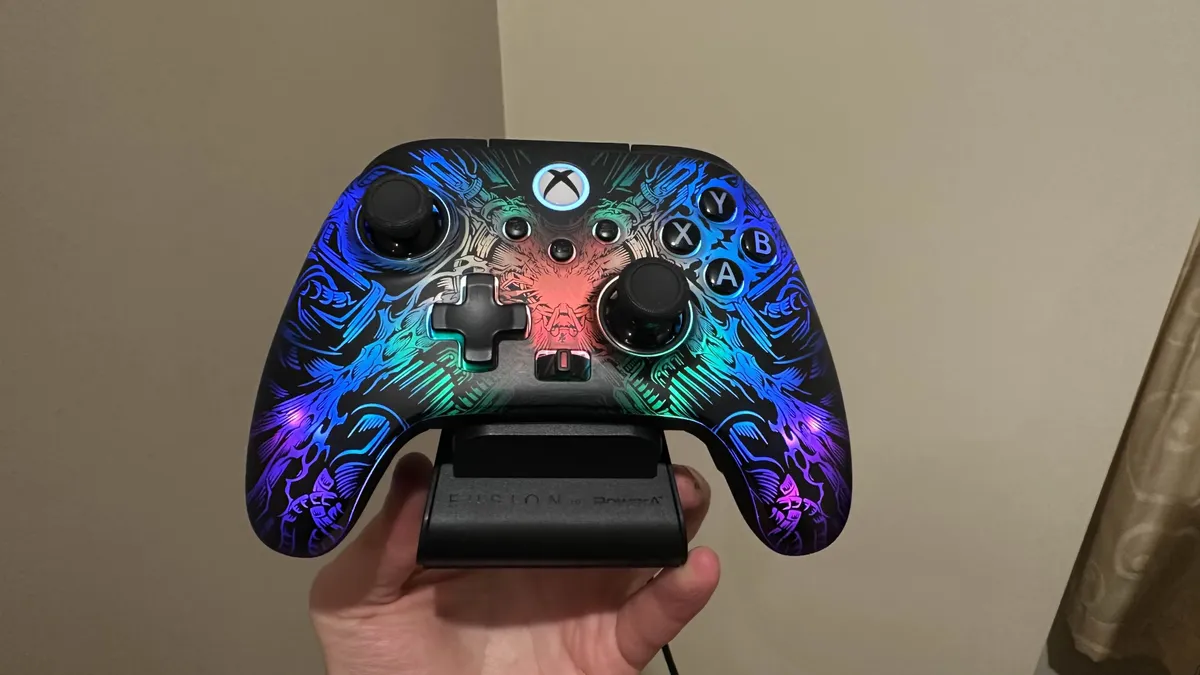


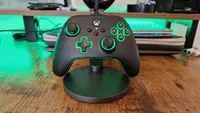
Where do I even begin with the PowerA Fusion Pro Wireless? If it weren't for the Victrix Pro BFG's slight edge in versatility, this may even steal the top spot on this list. It offers a four back buttons package with innovative design elements and loads of features, and it's only $150 - which is roughly $50 cheaper than other pads that offer this much utility. Oh yeah, and it has a stunning ghost RGB design that looks incredible.
✅ You want excellent value for money: It's not cheap at $149, but the value you get from this controller punches well into the $200 category.
✅ You want four back buttons: Not all controllers of this price come with four back buttons, and the ones on this controller are excellent.
✅ You like RGB: The lighting on this controller is in a league of its own, just take a look at it.
❌ You really aren't a fan of RGB: The ghost lighting here could make a believer out of anyone, but if you really hate RGB of any kind then look elsewhere.
❌ You want a modular design: While you can change aspects of this controller to suit you, it isn't the fully modular controller the BFG is.
Design & Features: If you've played around with PowerA's controllers before, you'll know that they pack some of the most robust build quality of any gamepads you can find. The shape and feel are very reminiscent of the traditional Xbox controller, but the amount PowerA does to jazz up that formula is so impressive.
There are Hall sensor thumbsticks, wireless support, a charging stand, four mappable back buttons, a massive 30-hour battery life, three-way trigger locks, a headset dial, up to three different profiles, and a carry case. Perhaps my favorite feature is its twisting thumbsticks which can grow and shrink to different heights without the need for swapping out parts.
Such excellent design is coupled with a ghost RGB which shines when you want it to, and goes completely unseen when the controller is switched off. It's like the swords of Middle Earth that glow blue when orcs are near, except it's a beautiful RGB pattern on a pro controller.
Performance: As you can imagine, the PowerA Fusion Pro Wireless performed really well in our review, earning it a five-star score. No matter the game you turn it to, it'll be comfortable, and useful, and it'll look and feel great at the same time. The trigger locks don't bring down the actuation level to the level most others do, but this is a double-edged sword. In some ways, it makes them a bit useless, and in others, it keeps some of the feel of a trigger pull while adding some speed. Overall, this is a fantastic controller for the money.
Read more: PowerA Fusion Pro Wireless review
Comfort | ★★★ |
Ergonomics | ★★★★ |
Pro features | ★★★★ |
Longevity | ★★★★ |
Battery life | ★★★ |
Add-ons | ★★★ |
Multiplayer potential | ★★★★ |
Singleplayer potential | ★★★★ |
The best symmetrical Xbox Series X controller


The Hyperkin Competitor has enjoyed a lot of time in the spotlight in the last year thanks to its ballsy attempt to be a better PS5 controller than the actual PS5 controller. There's more here than a risky design - it's a great controller underneath, and one that PlayStation and Xbox fans alike can enjoy - especially thanks to its great price.
✅ You like symmetrical thumbsticks: If you prefer a symmetrical layout, your options are limited on Xbox
✅ You're familiar with the PS5 controller already: If you're converting from the PS5 or just like the shape of the DualSense, this is a good option.
✅ You're on a tight budget: This is a super affordable pad, so it's not going to take a big investment.
❌ You care about wireless play: This one is limited to wired play.
❌ You want TMR thumbsticks: Hall effect are a great substitue here though.
Design & Features: They say imitation is the sincerest form of flattery, but I'm not sure Sony should be happy with the resemblance of this controller to its flagship DualSense. Of course, a close resemblance to a PS5 controller isn't going to be a massive attraction for Xbox veterans - the main lure here is that it has symmetrical thubsticks, which is hardly ever found in the Xbox market.
Other than that, you have Hall sticks, two back buttons that can lock if you don't want to use them, rounded grips, a decent weight, wired play only, and a comfortable shape.
Performance: The Competitor is a really strong controller, and one that, in many ways, improves on the stock PS5 controller with additional features and ergonomics. I found that it was almost like-for-like in terms of build quality, and while it's a shame you don't get the bells and whistles of other Xbox pro controllers like wireless play and a charging stand, or any kind of customization software, for the really low price, Hyperkin has made an excellent gamepad here.
Comfort | ★★★★ |
Ergonomics | ★★★★ |
Pro features | ★★ |
Longevity | ★★★ |
Battery life | NA |
Add-ons | ★ |
Multiplayer potential | ★★★★ |
Singleplayer potential | ★★★★ |
The best basic Xbox Series X controller


The stock Xbox Series X controller has a massive range of colors and designs to choose from, not to mention some beautiful limited editions as well. Beyond aesthetics, it has a cult following for its ergonomics and classic offset feel in the hands. For the majority of players on Xbox Series X or S, this is all you'll really need. Just keep in mind there are better options out there functionality-wise.
✅ You don't need pro features: If you only need a basic controller and want the traditional Xbox feel, look no further.
✅ You want color options: The Xbox controller comes in lots of unique colors and designs.
✅ Back buttons aren't your thing: There's no problem with using a regular controller. They've done the job until now, right?
❌ You want a bit more bang for your buck: You can get a pro controller for the same price, if not cheaper than this today, so don't limit yourself.
❌ You want stick drift immunity: There's no block to stick drift with this controller, which is worth thinking about if you're going to spend the money.
Design & Features: This time around we have USB-C charging which is faster than Micro-USB (if you use a rechargeable pack at least) and there's a 'hybrid' D-pad that takes its cues from a more premium Xbox controller that we'll mention later. Like with many other players, we have found the big inclusion to be the share button which was missing all of the last generation (while the DualShock 4 had it from the start) - which does exactly what it should, enabling you to take snaps or clips and share media easily.
Performance: Predictably, we've found it to work smoothly and beautifully via cable or the usual pairing mode, and it's got that excellent performance and comfort by default. It will be very familiar to Xbox One owners from the last generation but there are subtle tweaks that do make it an objectively better controller.
However, there's an overwhelming reason why this iteration is easy for us to recommend and why it is similar to the previous generation's - if it isn't broken, you don't fix it. This is a traditional Xbox controller, and that's all a lot of people ever need. It's comfortable, allows for speedy performance in the right hands, and does the basics well.
Just keep in mind that you don't get much value for your money as a result. There are other pro controller out there today under $60 that give you a whole host of features, more practical wireless support, and work with Xbox. Moreover, if you've been burned by stick drift before, Hall sensor options might be more appealing.
Read more: Our impressions of the Xbox Series X controller
Comfort | ★★★ |
Ergonomics | ★★★★ |
Pro features | ★ |
Longevity | ★★ |
Battery life | ★★★ |
Add-ons | NA |
Multiplayer potential | ★★★ |
Singleplayer potential | ★★★★ |
The best Scuf controller for Xbox
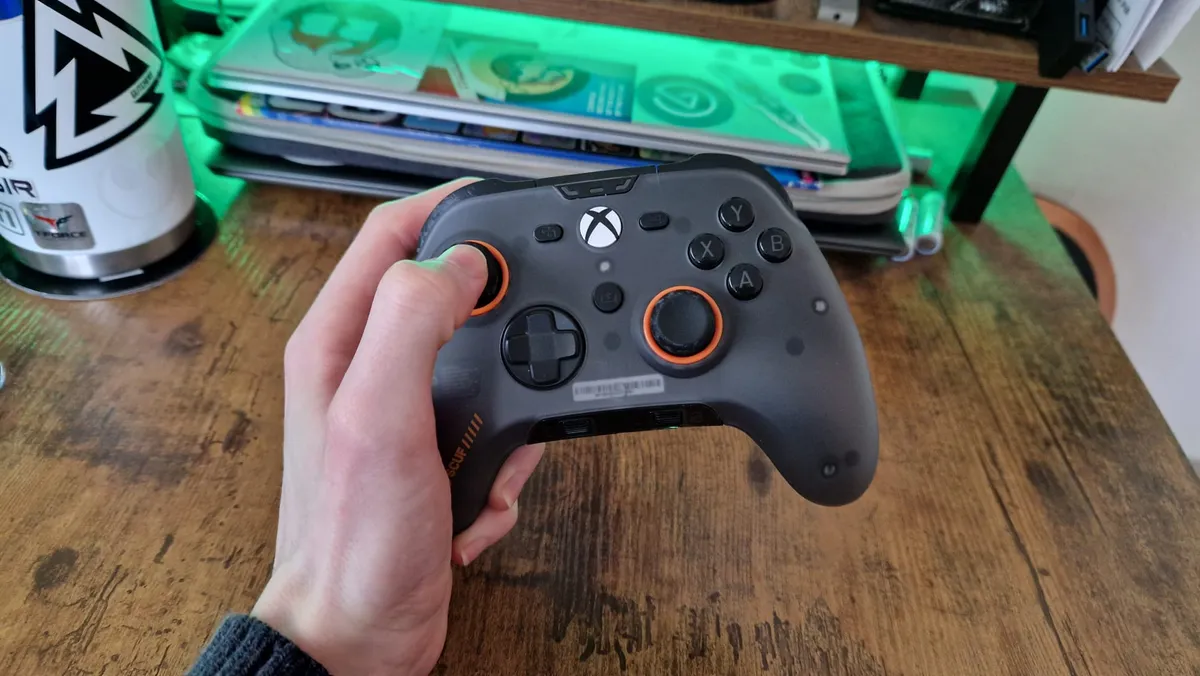


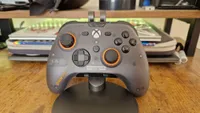
I'm going to level with you on this one. I am not a big fan of the Scuf Valor Pro. I think for this brand's first foray back into the world of officially licensed pro controllers, this was a really bizarre choice. It's a wired-only controller that missed the boat on TMR sticks and didn't really do anything to stand out from the crowd during a really competitive year for Xbox controllers. However, given how expensive Scuf pads can be, I like the value for money you get here.
✅ You want a Scuf controller: This brand pulls in a lot of eyes, but if you're looking to dodge its high prices, this might be your best bet.
✅ You want four back buttons: If you want four back buttons for extra functionality, this has them.
✅ You don't mind a wire: This one is wired only, so if you want the option of going wireless, look elsewhere.
❌ You want color options and wired play: The wireless version of this pad is now out and offers both of those things.
❌ You hate slippy thumbsticks: If this is one of your pet peeves with controllers, you might want to consider something else.
Design & Features: The Scuf Valor Pro is an officially licensed Xbox Series X controller that will be familiar to anyone who has used or seen the brand's pricey Instinct Pro controller. Honestly, what you need to know about it is what it's missing. It doesn't have the classic Scuf customization option when it comes to colorways, even if its faceplate can be swapped out for other designs. It doesn't have wireless play or a charging stand, which a lot of modern competitor controllers do. It doesn't have TMR sticks or swappable parts either.
But in missing these things, the price is a lot more palatable than many other Xbox pro controllers.
What it does have for the money is a set of four back buttons and a comfortable grip in the hands - which is really the main thing you buy a Scuf controller for. It does have Hall sensor sticks, which will negate stick drift and keep your accuracy in shooters high.
Performance: If you're looking for good value for money, the performance you get here is good - relative to other Scuf pads. Annoyingly, the thumbstick tops aren't the best, and I found during testing that my thumbs were slipping off them regularly. But it is hard to argue with four back buttons at this price, especially now that the Valor Pro has access to the customization app made for its wireless sibling.
It is worth mentioning that even though this is the Scuf pad I'd recommend, the Wireless option does offer more in the way of features. But you do not need to spend big on a Scuf controller these days to get the best things the Valor Pro has left out. The GameSir G7 Pro, for example, gives you four extra buttons, TMR sticks, wireless play, and more for less money than the Valor Pro. If you've only really looked into one brand, and it's Scuf, maybe look elsewhere before committing yourself to it.
Comfort | ★★★★ |
Ergonomics | ★★★★ |
Pro features | ★★★ |
Longevity | ★★★ |
Battery life | NA |
Add-ons | ★ |
Multiplayer potential | ★★★★ |
Singleplayer potential | ★★★ |
Best Xbox Series X controller: FAQs
What is the best Xbox Series X controller for FPS?
In our eyes, the best Xbox Series X controllers for competitive multiplayer shooters are ones with four back buttons (or more). This is because they allow you to assign more in-game functions to other digits, freeing up your thumbs to keep you moving and looking. The Official Elite Series 2 is a fantastic choice for these sorts of games since you can also set custom deadzones. The Scuf Instinct Pro and Razer Wolverine V2 are also solid third party choices.

Is the Xbox Series X controller different to Xbox One?
The Xbox Series X Core controller does differ from the original model released with the previous generation console. The most noticeable change is the redesigned D-Pad, offering a concave approach to ensure diagonal inputs are a lot smoother. The Xbox Series X controller also makes use of a low latency connection with Series X consoles and adds a Share button to the face. The newer gamepad also charges via USB-C, carries a slightly smaller form factor, and replaces the shiny plastic covering of the Xbox One model with a matte finish.
What is the best third party alternative to the Xbox Elite 2?
We'd argue that the best Xbox Series X controller overall is the Elite Series 2 - there simply isn't a better all-round alternative. However for competitive players, Scuf's controllers are an excellent go-to. We list the Scuf Instinct Pro as the best Xbox Series X controller for eSports thanks to its superb back buttons and great overall build quality. You also have the added benefit of customizing the design for yourself.

What is the best Xbox controller in the world?
The best Xbox Series X controller overall is the Microsoft Elite Series 2, but we'd recommend the majority of players check out the Xbox Wireless controller. It works smoothly and has all the features any casual gamers would need. The most affordable Xbox Series X controller, however, has to be the Turtle Beach React-R. It presents features which are typically only present in much more expensive controllers.
What is the Xbox Series X controller compatible with?
The official Xbox Series X controller is compatible with the new generation of consoles, the Xbox Series S, all Xbox One models, PC, Android, and iOS. If you use GamePass via your Smart TV, the Xbox Series X controller may also be compatible with that too, but check the specific TV models to be sure.

How we test Xbox Series X controllers
In brief, every controller that we have had our hands on is used in a series of different video games to accommodate for most genres. This means that we'll test the responsiveness of the sticks, face buttons, bumpers, triggers, and any other additional features found on the unit. If a controller is wired or relies on rechargeable batteries, then the duration of the lifespan is tested, too. The same can be said for any specialist software, such as drivers, that may be included with the gamepad as well.
For more on how we test controllers at GamesRadar+ check out our full article, and for something more representative of our holistic approach to the latest gear, check out our Hardware Policy.
Also tested
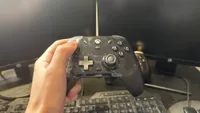
We're also rounding up plenty more Xbox Series X accessories (and all the best Xbox One accessories if you're after something a little cheaper), like the best Xbox steering wheels and the best Xbox Series X hard drives.


