You are now subscribed
Your newsletter sign-up was successful
Want to add more newsletters?

Every Friday
GamesRadar+
Your weekly update on everything you could ever want to know about the games you already love, games we know you're going to love in the near future, and tales from the communities that surround them.

Every Thursday
GTA 6 O'clock
Our special GTA 6 newsletter, with breaking news, insider info, and rumor analysis from the award-winning GTA 6 O'clock experts.

Every Friday
Knowledge
From the creators of Edge: A weekly videogame industry newsletter with analysis from expert writers, guidance from professionals, and insight into what's on the horizon.

Every Thursday
The Setup
Hardware nerds unite, sign up to our free tech newsletter for a weekly digest of the hottest new tech, the latest gadgets on the test bench, and much more.

Every Wednesday
Switch 2 Spotlight
Sign up to our new Switch 2 newsletter, where we bring you the latest talking points on Nintendo's new console each week, bring you up to date on the news, and recommend what games to play.

Every Saturday
The Watchlist
Subscribe for a weekly digest of the movie and TV news that matters, direct to your inbox. From first-look trailers, interviews, reviews and explainers, we've got you covered.

Once a month
SFX
Get sneak previews, exclusive competitions and details of special events each month!
The freshly-announced Rayman 30th Anniversary Edition has reminded me that I have a mixed relationship with remastered classics. For the record, I'm glad that classics from bygone generations consistently get the chance to shine on the latest platforms, but I'm also hoping players will consider trying the iconic Ubisoft platformer on an actual PS1.
Again, I'm all for having convenient access to classics like Rayman on systems like the PS5 and Switch 2. If anything, this is really just a PSA that's designed to get you thinking about revisiting the best retro consoles from yesteryear, as I fully believe that experiencing old hardware, even if it is slightly convoluted, is important, as there might come a time when it's harder to find either working physical copies of games or systems like the PS1 to play them on.

As for how you can go about playing the original Rayman while getting a sense of the original hardware, I have a few options. The first is to just straight up get a hold of an original PlayStation and a CRT TV, as this is basically going to place you in my exact shoes upon receiving the platformer for Christmas back in 1995. I could rant on for hours about how an old screen is going to accurately portray the OG adventure's graphics in all their 4:3 pixelated glory, but I'll quit while I'm ahead and instead move on to how you can connect the retro console to a modern TV or monitor since that's a less ambitious project than finding an old tube screen.
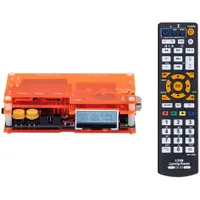
I'll start with the way I hook up all my old consoles to screens, and that involves using an Open Source Scan Converter (or OSSC for short). Designed to let you plug in an old RGB-compatible cable and then upscale the visual using line doubling, this gadget is going to help old video signals look great on contemporary displays, eliminating potential lag, muddy quality, and weird aspect ratios that can come with using your TV's own connectors or a cheap HDMI converter.
For this sort of setup, you'll need that aforementioned RGB cable to connect your PS1 to the OSSC. If you're not especially nerdy about signal quality, there are Scart options (a standard that's more common in Europe) available from $8 at Amazon, but if you're looking for gold standard results, you'll want to check out specialist sites like Retro Gaming Cables since they'll sell a variety of options with the right shielding to curb artifacts and interference.
On that note, I feel like fresher-faced players won't be aware that the PS2 can play PS1 games. If you're using Sony's 2000s sequel, you can hook up to the OSSC either using the aforementioned RGB Scart cable or using a component cable if you're feeling fancy. The results should be similar, but the latter exists to let the PS2 hit higher resolutions in supported games, whereas Scart tends to produce more accurate colors.
If you're on a very tight budget, you might also want to give an HDMI adapter a try. I've got friends who use Kaico's $14.99 model specifically, and while there are drawbacks like slightly softer image quality and room for latency, it's still going to provide you with cleaner results than letting your TV with inputs handle the upscaling.
At this point, PS3 fans will be screaming in my direction about how the system can also run PS1 games. That is completely true, and it does make for an ultra-convenient way of playing since its HDMI abilities negate the need for upscaling or specific cables. But, since the whole idea of this project is to get you using hardware associated with the OG game, I'd say playing on PlayStation 3 and using the Anniversary port will feel largely the same, whereas using its predecessors will help you achieve the right vibes.

Those said vibes are attached to really simple things like being able to hear a physical disc whirring away, potentially quite loudly if your PS1 laser is aging, and having Sony's non-Dual Shock gamepad to hand. The latter isn't strictly necessary, but using the much smaller controller and the d-pad exclusively just feels right for a 2D platformer like Rayman.
This might give some of you the ick, and I completely get it, but I also love the idea of having to use the OG Rayman original memory card saves or, god forbid, the password system. Yes, having access to the 30th Anniversary's save state and rewind function will save you from tearing your helicopter hair out, and I reckon I'll regret saying this once I've spent the weekend playing the original. However, having restricted opportunities to save your progress or jotting down passwords will simply help you appreciate the new version's fancy features more.
I must stress that telling you to try the original Rayman on PS1 off the back of the 30th Anniversary reveal is supposed to simply fuel a fun project rather than serve as gatekeeping. I'm pretty hyped to try the shiny new remastered collection, especially since it includes the PS1, MS-DOS, Jaguar, Game Boy Color, GBA, and even an unreleased SNES prototype. It's also packed full of extras like an interactive documentary, but I reckon all of that will hit harder once you've tried an original version for yourself.
Looking for ways to play classic capers on the go? Swing by the best retro handhelds and best gaming handhelds for emulation devices, portable PCs, and more.

You must confirm your public display name before commenting
Please logout and then login again, you will then be prompted to enter your display name.