GamesRadar+ Verdict
If I were heading into a competitive gaming event tomorrow and had to choose a controller for it, the Flydigi Apex 5 would be on an immediate shortlist. This gamepad does so many things well that I finally understand the hype that Redditors have for this brand. I still have reservations about accessibility, about software reliability, and about customer service, but with an integrated menu system, the Apex 5 finds ways around those things. For all my concerns about this brand based on past experiences, it's very hard to deny that this is one of the best controllers on the shelves right now.
Pros
- +
Excellent mix of back buttons and paddles
- +
Grippy thumbsticks
- +
Six extra buttons
- +
On-board display and menu system
- +
Adjustable stick tension
- +
Premium facial elements
- +
Adaptive trigger resistance you control
Cons
- -
Still very tricky to get hold of this brand and its software
- -
Harsh corners under the triggers can be uncomfortable
Why you can trust GamesRadar+ Our experts review games, movies and tech over countless hours, so you can choose the best for you. Find out more about our reviews policy.
It's safe to say I haven't had the best experience with Flydigi so far. After hearing Redditors screaming from the virtual hilltops that this brand's products are some of the best PC controllers ever made, and after years of trying to get hold of them to arrange some reviews, I finally tried one in July last year.
Long story short, I ended up having an awful experience, which resulted in a one-star review - the lowest score I've given in my career so far. So yes, I have a lot of reservations about this brand, which I'll fill you in on soon enough, but in contrast to my time with the Flydigi Vader 4 Pro, the brand's Apex 5 controller could not feel further removed. I can finally see why Redditors go crazy for Flydigi, because in a very short space of time, this has become one of my favorite controllers of the last few years.
At $159.99 / £150, but often found a bit cheaper from the right retailer, the Apex 5 does demand more from your wallet than something from GameSir, PowerA, or 8BitDo. But it has the premium feel you'll likely want if you're serious about finding a good gamepad. The good news is that at this price, it still isn't quite as expensive as the premium Xbox Series X controllers out there from the biggest names.
Design

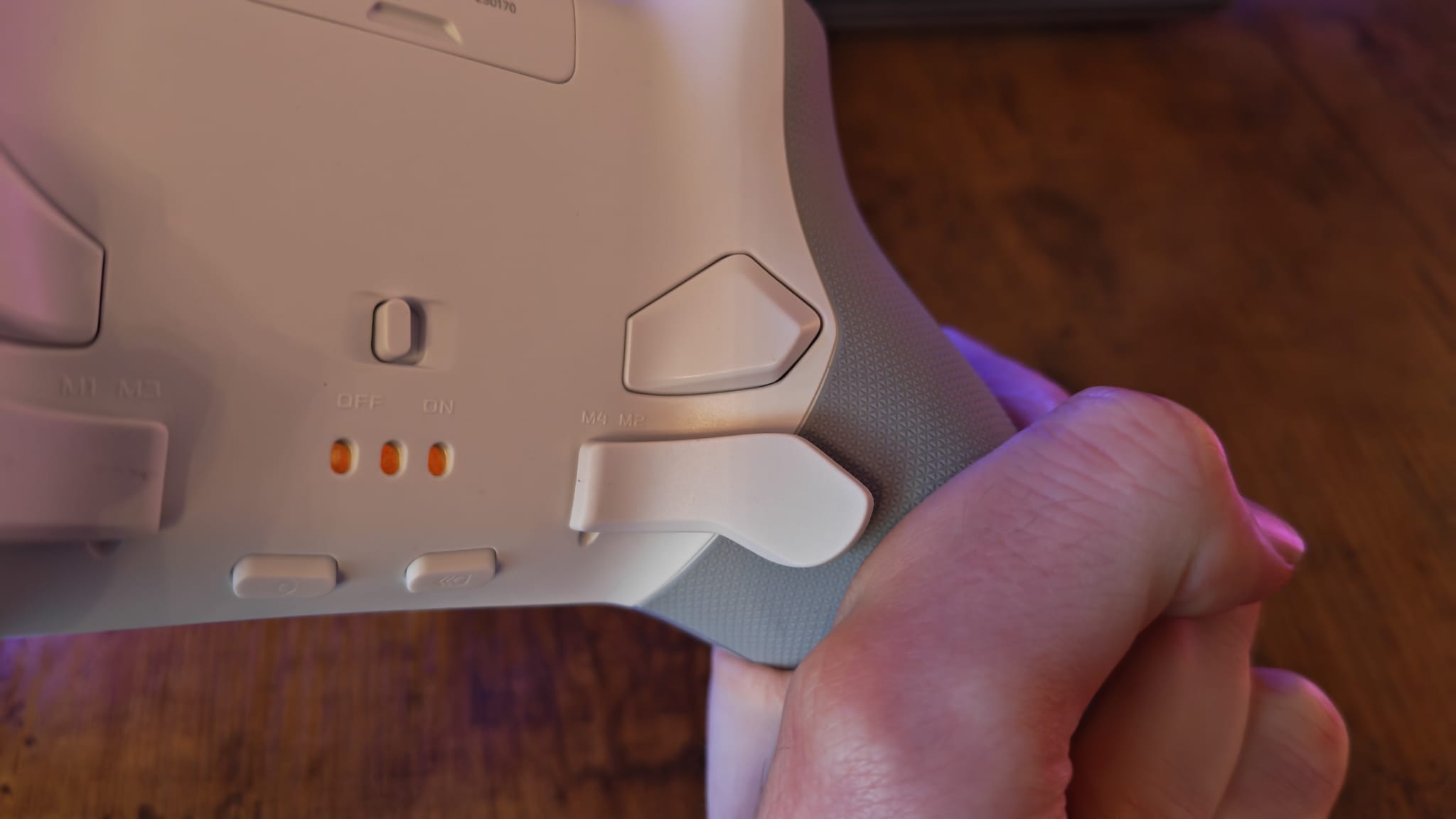
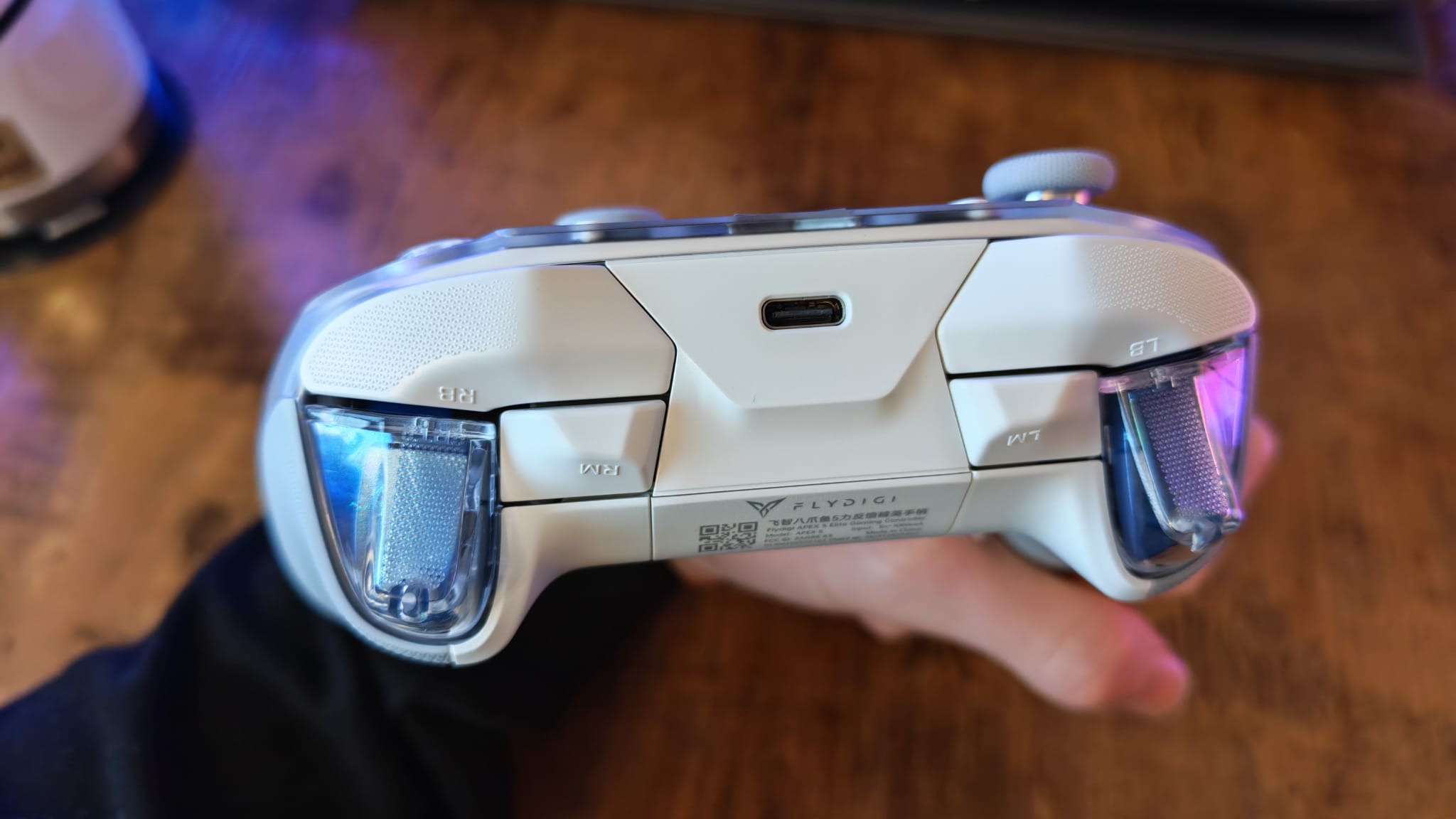
Last week, I reviewed the Gulikit KK3 Max and spoke at length about the differences between back buttons and back paddles. Right on cue, the Flydigi Apex 5 comes to me with a hybrid setup that uses both. There are two back buttons and two back paddles here, providing a premium and unique feel paired with excellent positioning for your fingers.
This is just one aspect of the Apex 5 that tries to do things a bit differently. The general shape isn't too dissimilar to other asymmetrical controllers but, aesthetically, there's a more adventurous outlook for sure. The white body is complemented by gray accents and rubberized textures on the grips. A translucent faceplate lets you see behind the curtain in places, but mainly leaves room for RGB lighting to glow through the whole thing. But then, adding class to the Apex 5, is an opaque, slightly reflective faceplate that's hiding a small display under it.
The Apex 5 has a really pleasing design overall, with a distinct identity once you look past its general shape. Great looks are definitely bolstered by grips that are long enough to seat my pinkies, as well as a weight that lets you know you're holding a premium gaming peripheral.
Features

As mentioned already, there are four extra mappable buttons on the back of this controller. Although there are two longer paddles, these are set into the spine of the Apex 5, so you won't be able to swap them out. They still have the actuation feel of those high-end paddles found on the DualSense Edge and Elite Series 2. On top of the controller we also have two additional bumpers, which means the Apex 5 has a total of six programmable buttons.
The face buttons and D-pad both utilize clicky microswitches, and these are the closest I've found so far to the luxury actuation on the Nacon Revolution X Unlimited. The Apex 5's face buttons have a transparent shell with a white surface underneath, clicking in quietly with a good amount of travel. The D-pad slopes up on each of its four corners, but it is an 8-way floating panel that offers more than a traditional four-way D-pad. I love this shape because it makes sliding your thumb around on it really easy and precise directional presses a breeze.

The thumbsticks don't have the clever twisting adjustment of the Vader 4, but you can remove the faceplate and use a small tool that comes in the Apex 5's box to tighten or loosen their tension. These are Hall effect sticks but, more so than other Hall controllers I've tested lately, they don't feels as hamstrung compared to more advanced TMR controllers out there. The surface is super grippy - which is a welcome change to a few controllers I've tested lately that have forgotten this very basic need - looking at you, 8BitDo Pro 3. Thanks to that tension adjustment, the sticks also bounce and spring back from every flick with an energy that's hard to quantify.
On closer inspection, you may notice that this controller's thumbstick modules have an individualised axis for moving side to side, which provides a unique bounce back for quick aim flicks. It's a bit of a shame that you can't swap out the thumbsticks for taller tops, but thanks to the distinct design here, I didn't necessarily feel I was missing out. In other words, I felt I could be just as accurate with the Flydigi Apex 5 as I could with a TMR controller. Beyond clever design quirks, it nails the basics by giving you grippy thumbstick tops that are really easy to maneuver accurately.

I did feel like I was missing out in the triggers. It feels odd for a controller this pro-grade to not have trigger stop switches. Of course, having a screen and a menu does open the Apex 5 up to a few more bells and whistles, so I went digging. It turns out that, while there are no manual trigger stop switches, the Apex 5 has digital, adaptive trigger resistance that feels eerily similar to the PS5's DualSense. There are multiple ways to configure it too, for varying degrees of resistance intensity. This is a super unique thing in the PC controller market, and even third-party PS5 controllers don't have this feature due to licensing parameters.
The Manba One still remains the king of the on-board menu controllers though. The Apex 5 has enough to its menus (which are set to Chinese out of the box, just to let you know) to allow you to map buttons, change profiles, activate trigger resistance, or turbo modes, but that's sort of it. You can't activate a no-deadzone mode; you can't adjust trigger deadzones either. It's an okay menu, but one that still means you need a companion app on PC to get into the nitty-gritty details.
Flydigi quirks

Unfortunately, getting hold of Flydigi's space station or game centre software proved almost as difficult this time around as it did during my Vader 4 Pro review. At least here in the UK, using multiple PCs and VPNs to try and skirt around security issues, I couldn't access Flydigi's website. I even used different browsers, and found it really difficult to find this brand's controller software.
That really isn't great - I was coming up against the same warning as last year: "This site can’t provide a secure connection en.flydigi.com uses an unsupported protocol. ERR_SSL_VERSION_OR_CIPHER_MISMATCH”, it told me.
I've heard accounts from commenters on my Vader 4 Pro review and on Reddit saying they've had no problem getting into Flydigi's app, but myself and other users have been totally unable to actually get the full suite of customization that we should with these products. This is a massive issue and, honestly, the biggest reason I've kept a half star off the score of this review. Without easy access to the manufacturer of this product, it'll be very difficult to approach them for customer service or to enact warranties, repairs, returns, or anything else. That wouldn't usually be a worry for me, but the Vader 4 bricked itself while I was trying to test it. In talks with some of Flydigi's PR folks, it does seem as though bricking issues are a widespread enough problem for the brand to be taking measures against it.

The only available software I could get hold of this time around (not through a YouTuber's own dodgy description link, like last time) was for an outdated version of the Space Station app, which didn't service or recognise the Apex 5, only the Apex 4.
In an otherwise glowing review, I do want to stress that this is a factor that gives me a lot of concern. Flydigi should be going to great lengths to make its software accessible, safe, and easily found by its customers in all regions as soon as they open the box. The manuals the company provides don't go into detail or really help at all with setup. Any QR codes in the box don't take you to the software you need to get the full use out of the controller you buy, and the only way I could even change the on-board menu into English was by looking up a video of someone doing it in Chinese and emulating their navigation.
It's all really unfriendly to the consumer, and while it does feel like Flydigi is on the right path to improving this stuff after talking with them more about it, it's the reason why I'm so hesitant to recommend this brand - even after such a positive experience with the Apex 5.
Performance
Thankfully, the controller menu does have enough depth to it that I could test it and use it without problems. The TLDR of this performance section is that this controller is good. Damn good, and damn good at everything I threw at it.
Starting with my go-to FPS game, Hunt: Showdown, the Apex 5 felt very fluent in a game with this many inputs. Those six extra buttons felt immediately useful, and I felt I had speed and accuracy while moving around the bayou with this in hand. I'd even say it gives the Razer Wolverine V3 Pro a run for its money in terms of responsiveness. Again, for a controller that doesn't have TMR sticks or a no-deadzone mode (that I had access to, anyway), this felt exceedingly accurate when making precise shots, flicks, and finicky sniping adjustments.

I had been trying, for about a week before testing, to get a gold skull on a Towerfall Ascension level (completing a level on hardcore difficulty with no deaths) as a solo player. I got pretty darn close with the Gulikit KK3 Max. One of the first times out with the Apex 5, I nailed the level easily, feeling like I was in total control the entire time, even as sycthe-wielding enemies flooded the screen. Was that down to me being a week into practice with it? Was that down to the excellent, grippy thumbsticks and clicky actuations of the Apex 5? I'll let you be the judge, but either way, it's a very capable controller in 2D platforming games.
Something that flies under the radar amongst all of that impressive functionality is comfort. I've played around eight hours of Cyberpunk 2077 and GTA 4 in the last week or two, and the Apex 5 has been sitting pretty in my hands. Besides a fairly pronounced angle sitting underneath the triggers that my middle fingers tend to uncomfortably rub up against, this is a really nice gamepad for longer sessions. Driving around Liberty City or Night City feels uncharacteristically great, with the bounce of the thumbsticks making drifts around corners feel stupidly satisfying.
There's a handy on/off switch on the back of the Apex 5, which could save it some power. It'll also turn off after about five minutes while connected and not being used. Still, out of the box, I only got around four or five hours out of it. After a full charge, I've been playing for at least 5 hours, and the screen is still showing more than half charge, so there's decent lifespan to be had.
Should you buy the Flydigi Apex 5?

I absolutely love the Flydigi Apex 5. It's a superb controller that suits any gamer who prefers a snappy feel and lots of functionality. It's truly brilliant in FPS games thanks to a great design that gets the basics right, but it has a premium feel and pleasing design elements that make it an all-round champ of the market right now.
I would caveat my strong recommendation by saying that the only reason I was able to get full use out of it was because of its screen and on-board menu system. Without that, I'd likely be staring down the barrel of yet another "pro" controller from Flydigi that I couldn't use properly. Consider this a glowing endorsement of this particular controller, but I am still very sceptical about this brand, and I think there are lots of improvements to be made. Before purchasing, maybe ensure that you can access Flydigi's website, software, and have some customer service and warranty assurances prepared in case you need them.
After my dire experience with the Flydigi Vader 4 Pro, this is a night-and-day comparison. The Apex 5 is a fantastic controller for PC and Switch 2 play. In a market that's crammed full of really great options at competitive prices, this stands out and then some.
How I tested the Flydigi Apex 5
As with all the controllers I review, I adopted the Apex 5 as my own for just over a week before this article was written. In that time, I used it as my main controller for all gaming. I used its on-board menu to customize its settings, and tried my best to find the manufacturer's own website and software to fine-tune it further to no avail.
I compared my time with the Apex 5 closely to other PC and Xbox controllers of this price, as well as to the Vader 4 Pro, since it's my only other barometer for this brand's products.
For more on how we test controllers, check out the full-length GamesRadar+ hardware policy.
Also take a look at the best Nintendo Switch 2 controllers, the best mobile controllers, and the best PC racing wheels.
You must confirm your public display name before commenting
Please logout and then login again, you will then be prompted to enter your display name.