

Background
Welcome to GamesRADAR+ Community !
Hi ,

Your membership journey starts here.

Keep exploring and earning more as a member.

MY ACCOUNT

Badge picture
Earn your first badge
Read 1 article to unlock your first badge.
Keep earning badges
Explore ways to get more involved as a member.
Latest Games News

Latest Games News

Breaking gaming news and updates

Read Now
Latest Games Reviews

Latest Games Reviews

Expert verdicts on the newest releases

Read Now

See what you’ve unlocked.

Explore your membership benefits.

Explore
Member Exclusives

Stay Ahead with GamesRadar+

Get the biggest gaming news, reviews, and releases straight to your inbox.

Explore

Sign Out
GamesRadar+ GamesRadar+
US EditionUS CA EditionCanada UK EditionUK AU EditionAustralia
Sign in
  • View Profile
  • Sign out
  • Games
    • Game Insights
      • Games News
      • Games Features
      • Games Reviews
      • Games Guides
      • Big in 2026
      • Big Preview
      • Future Games Show
      • Golden Joystick Awards
    • Genres
      • Action Games
      • RPGs
      • Action RPGs
      • Adventure Games
      • Third Person Shooters
      • FPS Games
    • Platforms
      • PS5
      • Xbox Series X
      • PC
      • Nintendo Switch
      • Nintendo Switch 2
      • Tabletop Gaming
    • Franchises
      • Grand Theft Auto
      • Pokemon
      • Assassin's Creed
      • Monster Hunter
      • Fortnite
      • Cyberpunk
      • Red Dead
      • The Elder Scrolls
      • The Sims
  • Entertainment
    • TV Shows
      • TV News
      • TV Reviews
      • Anime Shows
      • Sci-Fi Shows
      • Superhero Shows
      • Animated Shows
      • Marvel TV Shows
      • Star Wars TV Shows
      • DC TV Shows
    • Movies
      • Movie News
      • Movie Reviews
      • Big Screen Spotlight
      • Superhero Movies
      • Action Movies
      • Anime Movies
      • Sci-Fi Movies
      • Horror Movies
      • Marvel Movies
      • DC Movies
    • Streaming
      • Apple TV Plus
      • Disney Plus
      • Netflix
      • HBO
      • Amazon Prime Video
      • Hulu
    • Comics
      • Marvel Comics
      • DC Comics
    • Toys & Collectibles
    • Lego
    • Dungeons and Dragons
    • Merch
  • Hardware
    • Insights
      • Hardware News
      • Hardware Reviews
      • Hardware Features
    • Computing
      • Desktop PCs
      • Laptops
      • Handhelds
    • Peripherals
      • Headsets & Headphones
      • TVs & Monitors
      • Gaming Mice
      • Gaming Keyboards
      • Gaming Chairs
      • Speakers & Audio
    • Accessories & Tech
      • Gaming Controllers
      • Tech
      • SSDs & Hard Drives
      • VR
      • Accessories
      • Retro
  • Deals
    • Game Deals
    • Tech Deals
    • TV Deals
    • Buying Guides
  • Video
    • Video
    • GR+ Replay - Submit Your Clips
  • Newsletters
    • Quizzes
    • About Us
    • How to pitch to us
    • How we score
    • Newsarama
    • Retro Gamer
  • home
  • Games
    • View Games
      • Games News
      • Games Features
      • Games Reviews
      • Games Guides
      • Big in 2026
      • Big Preview
      • Future Games Show
      • Golden Joystick Awards
      • Action Games
      • RPGs
      • Action RPGs
      • Adventure Games
      • Third Person Shooters
      • FPS Games
    • Platforms
      • View Platforms
      • PS5
      • Xbox Series X
      • PC
      • Nintendo Switch
      • Nintendo Switch 2
      • Tabletop Gaming
      • Grand Theft Auto
      • Pokemon
      • Assassin's Creed
      • Monster Hunter
      • Fortnite
      • Cyberpunk
      • Red Dead
      • The Elder Scrolls
      • The Sims
  • Entertainment
    • View Entertainment
    • TV Shows
      • View TV Shows
      • TV News
      • TV Reviews
      • Anime Shows
      • Sci-Fi Shows
      • Superhero Shows
      • Animated Shows
      • Marvel TV Shows
      • Star Wars TV Shows
      • DC TV Shows
    • Movies
      • View Movies
      • Movie News
      • Movie Reviews
      • Big Screen Spotlight
      • Superhero Movies
      • Action Movies
      • Anime Movies
      • Sci-Fi Movies
      • Horror Movies
      • Marvel Movies
      • DC Movies
    • Streaming
      • View Streaming
      • Apple TV Plus
      • Disney Plus
      • Netflix
      • HBO
      • Amazon Prime Video
      • Hulu
    • Comics
      • View Comics
      • Marvel Comics
      • DC Comics
    • Toys & Collectibles
    • Lego
    • Dungeons and Dragons
    • Merch
  • Hardware
    • View Hardware
      • Hardware News
      • Hardware Reviews
      • Hardware Features
      • Desktop PCs
      • Laptops
      • Handhelds
    • Peripherals
      • View Peripherals
      • Headsets & Headphones
      • TVs & Monitors
      • Gaming Mice
      • Gaming Keyboards
      • Gaming Chairs
      • Speakers & Audio
      • Gaming Controllers
      • Tech
      • SSDs & Hard Drives
      • VR
      • Accessories
      • Retro
  • Deals
    • View Deals
    • Game Deals
    • Tech Deals
    • TV Deals
    • Buying Guides
  • Video
    • View Video
    • Video
    • GR+ Replay - Submit Your Clips
  • Newsletters
    • Quizzes
    • About Us
    • How to pitch to us
    • How we score
    • Newsarama
    • Retro Gamer
Trending
  • Saros review
  • Arc Raiders
  • The Boys S5
  • Best turn-based RPGs
  • Submit your clips. Win prizes
  • Delta Force giveaway
Don't miss these
Five different gaming controllers for PC scattered around a desktop surface
Gaming Controllers The best PC controller for gaming 2026
GameSir G8 Galileo review image of the controller standing up against its box with red RGB lighting behind it
Gaming Controllers The best mobile controller for gaming 2026
A collection of TMR gaming controllers
Gaming Controllers I've tested them for you, and these are the 7 best TMR controllers on the shelves right now
Nintendo Switch 2 sitting in centre with Steam Deck OLED above on left, Anbernic RG Cube aboveon right, Anbernic RG28XX directly left, Modretro Chromatic on right, and MSI Claw 8 AI+ below on woodgrain desk.
Handhelds Best gaming handheld 2026: portable consoles and PCs I'd take on the go
A marketing image for the Dragon's Dogma 2 Edition of the GameSir G7 Pro with a dragon behind it
Gaming Controllers GameSir has randomly launched a special edition of its best gamepad dedicated to a two-year-old RPG
A side by side of the Steam Controller with the Razer Wolverine V3 Pro 8K
Gaming Controllers The Steam Controller doesn't appear to be a hit for competitive play, so here are the best alternatives
Nintendo Switch 2 playing Donkey Kong Bananza with Pro Controller to the left
Gaming Controllers The best Nintendo Switch 2 controller 2026: Compatible gamepads road tested with Ninty's new handheld
DualSense Edge review image showing the controller next to the original DualSense in Nova Pink
Gaming Controllers The best PS5 controller 2026: Find your Edge
The Azeron Keyzen and Cyborg II from the top down, comparing their switches
Gaming Controllers You don't have to choose between a controller and a keyboard; there's a secret third option
Hand holding 8Bitdo M30 2.4GHz controller in front of desk with Japanese Sega Mega Drive connected to Sony Trinitron CRT TV with BLÅHAJ Ikea shark on top and Golden Axe title on screen.
Retro I’m punching myself for not buying an 8Bitdo M30 sooner, as it’s a near-perfect wireless Sega Mega Drive controller
The GT Omega Pro Series Gen 2 next to a black and green Razer gaming chair
Gaming Chairs Best gaming chairs 2026: The best options for work and play
Logitech G305 Lightspeed gaming mouse standing upright on a wooden desk with blue backlighting
Gaming Mice I put this eight year old budget gaming mouse to the test against far newer releases, and it still comes out on top
Close up on macro buttons on the side of the Corsair Vanguard Pro 96 gaming keyboard
Gaming Keyboards Best gaming keyboard 2026: Asus strikes again with another Azoth entry
A side-by-side image of the Razer Wolverine V3 Pro and the Asus ROG Raikiri 2
Gaming Controllers These are the fastest two Xbox controllers on the shelves right now, but which should you buy?
Hand holding Retro Fighters StrikerDC Dreamcast controller next to Valve Steam Controller on screen in backdrop.
Retro The Steam Controller is all the rage, but I've been distracted by a modern Dreamcast controller that's more like Valve's original pad
  1. Hardware
  2. Gaming Controllers

Flydigi Vader 4 Pro review: “I’ve never run into as many issues with one gamepad as I have with this”

Reviews
By Duncan Robertson published 4 July 2025
14 Comments Join the conversation

When you purchase through links on our site, we may earn an affiliate commission. Here’s how it works.

A review image of the Flydigi Vader 4 Pro controller
(Image credit: © Future / Duncan Robertson)

GamesRadar+ Verdict

Based on the glowing reviews some Redditors give this controller, I was expecting the Flydigi Vader 4 Pro to blow me away. Unfortunately, I can comfortably say this is one of the most problematic controllers I’ve tested in my time as a hardware editor. Flydigi’s website, software, and customer service are inaccessible, the controller itself has design flaws, and despite doing everything I could to make the Vader 4 Pro work, it refused. The gamepad is now bricked after I tried to get its main features to work, and clever stick tension adjusters feel like a wasted perk on a controller that I simply cannot recommend to anyone.

Pros

  • +

    Adjustable stick tension

  • +

    Comfortable shape

  • +

    Six extra buttons

Cons

  • -

    Horrendous user experience

  • -

    Customization software is impossible to find and doesn’t work

  • -

    D-Pad gets stuck in position

  • -

    No way to set back button assignments without additional software

  • -

    The Android app doesn’t work

  • -

    Poorly shaped back buttons

Best picks for you
  • I've tested them for you, and these are the 7 best TMR controllers on the shelves right now
  • The best PC controller for gaming 2026
  • The best Xbox Series X controller in 2026

Why you can trust GamesRadar+ Our experts review games, movies and tech over countless hours, so you can choose the best for you. Find out more about our reviews policy.

If you go for a scroll on the r/Controller subreddit, it won’t be long before you come across people talking about the Flydigi Vader 4 Pro. This Chinese brand has clearly made an impression on a large subset of PC players, because the Vader 4 Pro is heralded as one of the best controllers a lot of Redditors have ever used. For that reason, I’ve been very keen to try one out.

With so many positive reviews, I thought the Vader 4 Pro was going to be a shoo-in for our best PC controllers list. There’s no smoke without fire, and I thought there really must be something to all of these reviews. I’ve been testing gamepads professionally for the better part of three years now, and my interest in, and use of pro controllers has gone on far longer. Flydigi has escaped me until now, because I must say, this was a brand that was tricky to get a hold of.

To save some of you some time, I’ll get to the bottom line quickly. Out of the countless controllers I’ve tested as the resident expert here at GamesRadar+, the Vader 4 Pro is the hardest one for me to recommend. Occasionally, I’ll need to accept that I’ve been sent a faulty unit, so if I run into some quirks while testing, I’ll forgive them. The Vader 4 Pro has been out for years, so it doesn’t get a pass for being an early testing sample. It has bugs upon bugs, and its user experience, which is all down to Flydigi, is the worst of any brand I’ve reviewed. There are too many red flags to ignore here, and although I’d love to see what all those Redditors love about this $50-80 controller, I can’t recommend against buying it more strongly.

Article continues below

Design

The V-shaped designs on the Flydigi Vader 4 Pro

(Image credit: Future / Duncan Robertson)

The Flydigi Vader 4 Pro doesn’t seem like anything too unique at first glance. It looks like an Xbox controller thanks to that typical offset thumbstick layout, and has some nice V-shaped design flourishes that set it apart from Flydigi’s other pro pads. There’s a nice strip of RGB lighting that’s (supposed to be) customizable in the brand’s PC software.

There are two noticeable design points on the face of the controller I want to highlight. Firstly, there are some grey rings around the thumbsticks. When you twist those around, they change the stick tension of each module. That means that if you prefer to flick and whip your thumbsticks around at light speed with no resistance, you can spin these rings all the way to the left. If you want a tighter experience, turn them to the right and have sticks that will take more pressure to move in any direction, and will flick back to their central position immediately.

The adjustable thumbsticks of the Flydigi Vader 4 Pro

(Image credit: Future / Duncan Robertson)

That’s a superb bit of controller design, and one I wish was present on any other pro controller these days. It’s either a feature that other controllers ignore completely or one they turn into a pesky DIY job because you need specific tools for the job.

The other clever design point I want to spotlight is the two extra face buttons. If a controller wants to offer six face buttons, it usually pulls back on every other feature to pursue fighting game enjoyers. I’m glad this is a gamepad that can offer two extra face buttons as well as the four back buttons it has. That’s unique, and I hope more brands take note. It is a bit of a shame that these buttons are cheap-feeling plastic ones that don’t align at all with the regular AXBY buttons, which are clicky microswitches.

Sign up to the GamesRadar+ Newsletter

Weekly digests, tales from the communities you love, and more

By submitting your information you agree to the Terms & Conditions and Privacy Policy and are aged 16 or over.

Features

The back buttons on the Flydigi Vader 4 Pro

(Image credit: Future / Duncan Robertson)

The four back buttons that feature on the Vader 4 Pro are a little disappointing if I’m honest. They’re placed horizontally, which isn’t always a bad thing. But these ones remind me of the Asus ROG Raikiri Pro because their design and shape are at odds with being able to use them comfortably. The outer buttons are fine and are angled appropriately with the grips to make pressing them easy. For some reason, the inner ones are angled away from your middle fingers, meaning it takes a larger readjustment for your hands to use them with one finger. The back buttons as a whole are placed far too high up for your ring fingers to be in play, so I’m not sure what the thinking was here. It doesn’t help that the smooth plastic surface is extremely slippery, and the buttons are angled, meaning you constantly slip off them.

The Vader 4 Pro features trigger stop switches, which turn them into clicky mouse-switch-style actuators. The D-pad is a circular one that also clicks in, albeit with a much cheaper plastic feel to it.

The Vader 4 Pro is compatible with Flydigi’s lineup of charging stands and has two wireless charging capacitors on its bottom. That helps to give this controller enough juice to power its wireless battery, which, I’d love to tell you lasts a certain amount of time, but as I’ll come onto, testing wasn’t successful enough for me to find out. There’s wireless connectivity for PC players, as well as wider compatibility for Nintendo Switch and Bluetooth devices.

Performance

A close up of the Flydigi Vader 4 Pro's face buttons

(Image credit: Future / Duncan Robertson)

I think the best way to explain why I'm not a fan of this controller is to outline my testing process from start to finish in as much detail as possible. I’ve laid this out as honestly and as clearly as possible because I feel it’s the best way to make it clear to Flydigi and any potential buyers that this was an unsalvageable product.

When I unbox a new controller I’m about to test, I always start in the same way. Nearly all of them have back buttons these days, so job one is getting those mapped. Some gamepads need you to download a PC application to assign extra buttons, while others only need you to open up the instruction pamphlet and use some handy button combinations. The best controllers have an option for both. The worst ones force you to download the extra software.

When I unboxed the Vader 4 Pro, the instructions made no mention of the six extra buttons this controller put in my hands. A small table mentioned “key mapping” and pointed me toward some companion software called "Flydigi Space Station". I wasn't so sure about this, because on other controllers, "key mapping" could mean mapping the normal buttons on the controller to mouse and keyboard functions to help with general use on PC. Since it was the closest thing to button assignments I could see in the information in front of me, to Google I went.

The Flydigi Vader 4 Pro's six face buttons

(Image credit: Future / Duncan Robertson)

I searched for the official Flydigi website since this is where I thought I’d find the official software easily. The Google search brought it up, and I clicked. Nothing. Just a blank screen and a notice saying “This site can’t provide a secure connection en.flydigi.com uses an unsupported protocol. ERR_SSL_VERSION_OR_CIPHER_MISMATCH”. This notice essentially means that there's a problem with the security protocol of the website you're trying to visit, which should raise some suspicion.

I instead googled “Flydigi Space Station Software”, and no official website result came back for it. A few results pointed toward software called Flydigi Game Center, but I couldn't access any download links for that either because the brand's website kept throwing up the same security issue.

My experience with this controller has been a disaster. In all my testing, reviewing, and coverage of the controller market, I’ve never run into as many issues with one gamepad as I have with this one.

Hm, that’s bizarre, I thought, maybe if I scan the QR code on the instruction leaflet, I’ll have more joy getting to an in-depth user manual. I scanned it, my phone immediately warned me that I might be getting scammed, and that I should seriously think about whether I want to continue to the URL. Both of these security warnings back to back were not encouraging, so I exited out. I tried in multiple territories using a VPN, I tried different browsers, different devices, and even tried removing the “en” from the beginning of the URL, and every time I was met with the same issue. This website was clearly problematic, and I couldn’t find a way to access it.

It was then that the red flags really started to appear. From a search on Reddit, despite all the people recommending the controller, there were threads of people talking about issues where they couldn’t use the software, or that they finally downloaded it, and it immediately triggered their systems to take multiple screenshots. Granted, this could be a Windows 11 update quirk someone has run into, but when all other signs point to this software being problematic, it doesn’t fill me with confidence. Others who had bought the Vader 4 Pro were totally unable to use the software they needed to get their money’s worth out of this controller.

I found a YouTuber, MikeTheTech, who had uploaded the Space Station software to his own website around 3 years ago because it was so inaccessible, even back then. From all my research, that seemed to be the only way to actually download what was said to be Flydigi’s application. When that’s your only option as someone who has spent money on a peripheral, that’s totally messed up. I’ve never seen that from any of the other controller brands I’ve reviewed. Furthermore, if the entire Flydigi website isn’t accessible, that doesn’t just mean you can’t assign button mappings; it means you can’t reach out to Flydigi for customer support, or to organize a replacement product or refund.

The back of the Flydigi Vader 4 Pro

(Image credit: Future / Duncan Robertson)
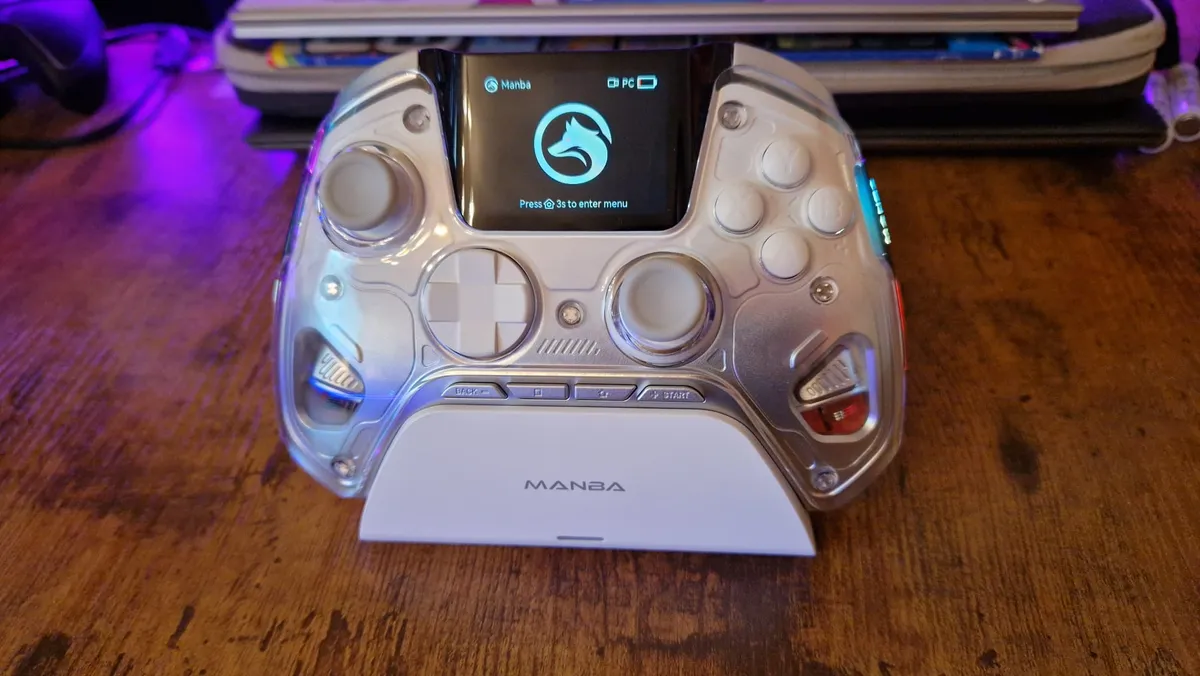
Consider instead:

A Manba One review image showing the controller in its charging stand with its display on

(Image credit: Future / Duncan Robertson)

The Manba One: $69.99 at Amazon
GameSir Cyclone 2:
$49.99 at Amazon

I decided to at least give the controller a whirl without using the extra buttons for now, and see if I could get past the software hurdle another day. I plugged into my PC, loaded up Celeste, and the controller worked fine. It was fairly comfortable, it had decent feedback, and I loved being able to play around with the stick tension. Sadly, when navigating menus, I felt the D-pad reacting very slowly to my presses. After a quick look, that’s because the pad was actually getting stuck in the down direction. Not encouraging from a design standpoint in the slightest.

After a while, it felt totally pointless reviewing a controller with six extra buttons while not being able to use them.

I decided to try out the Android Flydigi app to see if linking it up there would work. It didn’t. There was a way to connect the Vader 4 Pro to my phone via Bluetooth, but the only button that looked like it would let me configure any settings was sitting underneath my phone's navigation bar, and the app didn’t scroll to let me press it.

Reluctantly, I knew what my last remaining option was. I headed to MikeTheTech’s video once again. The comments seemed to attest to the download he was talking about not being malware, so I decided to give it a try since I had no other option.

The Flydigi Vader 4 Pro on a desk

(Image credit: Future / Duncan Robertson)

I downloaded the software, I loaded it up, and immediately, the controller and my PC started behaving very strangely. Spotify toggled play and pause, Steam big picture mode opened, and a keyboard for the controller to use within Windows 11 appeared on my screen. It wasn’t malware, and a quick security scan showed that much, but it was not what you want from a simple bit of controller software.

Once I got the application to calm down, I did manage to set a few back button assignments. That said, whenever I assigned one, the window would minimize. I had read from a few users on Reddit that the software had to remain open for those changes to save, though, so I kept it open. I loaded up Celeste again, and no matter what I did, the game now didn’t recognize the Vader 4 Pro as a controller. I tried everything in the software that I could, I played around with Steam controller settings, and I went back to the internet to look for people who had similar problems. There was nothing. Connected to my PC via the wireless dongle or a cable, the Vader 4 Pro now wasn’t working in any game. After closing the software and unplugging, it wasn’t even being recognized by the Space Station software anymore. It was bricked.

Should you buy the Flydigi Vader 4 Pro?

I think it's safe to say that my experience with this controller has been a disaster. In all my testing, reviewing, and coverage of the controller market, I’ve never run into as many issues with one gamepad as I have with this one. There must be something great about it that a lot of Redditors enjoy, and power to them. All I can share with you is my honest experience, and when I compare it to the multitude of controllers I’ve reviewed throughout my career so far, this is probably the most problematic.

I strongly advise that you steer clear of buying this controller, because there are so many others that are worth your money. There are pads out there priced similarly, offer great features and work without all of these points of friction.

TODAY'S BEST DEALS
$79.99 at Amazon
Check Walmart

How I tested the Flydigi Vader 4 Pro

I attempted to test the Flydigi Vader 4 Pro in the same ways I test any and all other controllers. For a full rundown of everything I attempted to make this controller work, check out the performance section.

For more on how we test, check out the full GamesRadar+ Hardware Policy.


For more on the wonderful world of controllers, check out the best Xbox Series X controllers, the best PS5 controllers, and the best Nintendo Switch controllers.

Duncan Robertson
Duncan Robertson
Social Links Navigation
Hardware Editor

One of my earliest memories is playing SuperMario64 and wondering why the controller I held had three grips, but I only had two hands. Ever since I've been in love with video games and their technology. After graduating from Edinburgh Napier University with a degree in Journalism, I contributed to the Scottish Games Network and completed an Editorial Internship at Expert Reviews. Over the last decade, I’ve been managing my own YouTube channel about my love of games too. These days, I'm one of the resident hardware nerds at GamesRadar+, and I take the lead on our coverage of gaming PCs, VR, controllers, gaming chairs, and content creation gear. Now, I better stop myself here before I get talking about my favourite games like HUNT: Showdown, Dishonored, and Towerfall Ascension.

You must confirm your public display name before commenting

Please logout and then login again, you will then be prompted to enter your display name.

Read more
The Flydigi Apex 5 with its screen and lighting on
Gaming Controllers I finally understand the hype for Flydigi controllers thanks to the Apex 5
 
 
The Flydigi Apex 5 with its screen and lighting on
Gaming Controllers I'm a controller reviewer with a gap in my testing schedule, and this is what I'm gaming with
 
 
Five different gaming controllers for PC scattered around a desktop surface
Gaming Controllers The best PC controller for gaming 2026
 
 
A reviewer holding the Asus ROG Raikiri 2
Gaming Controllers The Asus ROG Raikiri II's microswitch buttons are on par with the Razer Wolverine V3 Pro for less money
 
 
A collection of TMR gaming controllers
Gaming Controllers I've tested them for you, and these are the 7 best TMR controllers on the shelves right now
 
 
Close up of Gulikit Elves 2 Pro leaning against white Sega Saturn next to Sony PVM CRT TV.
Retro I could swap out every retro controller I own with this Sega Saturn-inspired Bluetooth gamepad, and it happens to be under $35 right now
 
 
Latest in Gaming Controllers
A side by side image of the Steam Controller next to a screenshot from a Planet Coaster trailer
Gaming Controllers The Steam Controller could help make a city builder-sized dent in my gaming backlog
 
 
A marketing image for the Dragon's Dogma 2 Edition of the GameSir G7 Pro with a dragon behind it
Gaming Controllers GameSir has randomly launched a special edition of its best gamepad dedicated to a two-year-old RPG
 
 
A side by side of the Steam Controller with the Razer Wolverine V3 Pro 8K
Gaming Controllers The Steam Controller doesn't appear to be a hit for competitive play, so here are the best alternatives
 
 
Steam Controller with blue frame
Gaming Controllers Valve's new Steam Controller launches May 4 at $99, and it will be a zoo without pre-orders
 
 
The Logitech G RS50 with the track wheel on it
Gaming Controllers Forza Horizon 6 launches in under a month, here's the racing wheel I'd recommend right now
 
 
Someone using the Steam controller to play Hollow Knight
Gaming Controllers A leaked Steam Controller review claims Valve will charge you $99 for it - is that too much?
 
 
Latest in Reviews
An Elgato Wave 3 Mk2 microphone next to two Stream Decks
Peripherals Elgato's new Wave 3 Mk2 combines the best parts of dynamic and condenser microphones
 
 
Warhammer Quest: Darkwater box on a wooden table
Board Games If you want to play Warhammer without needing to buy armies, scenery, and extra models, this board game is for you
 
 
Hero art for Invincible VS Showing Omni-Man and Invincible clashing
Fighting Games Invincible VS review: "A joyfully gory fighting game adaptation"
 
 
Two minotaurs ready their weapons on a battlefield, from the Heroes of Might and Magic: Olden Era opening cinematic
Strategy Games Heroes of Might and Magic Olden Era early access review: "The legendary strategy RPG series finally reclaims its throne"
 
 
Stranger Things: Tales From '85
Sci-Fi Shows Stranger Things: Tales From '85 review: "Makes you nostalgic for the early days of Stranger Things"
 
 
Hand holding Retro Fighters StrikerDC wireless controller in front of Sega Dreamcast connected to a Sony Trinitron CRT TV.
Retro Retro Fighters StrikerDC review
 
 
LATEST ARTICLES
  1. Pragmata Diana hacking in the Shelter with her arm outstretched
    1
    Capcom teases that Pragmata might have a future as a franchise, after at least 6 years in development hell pays off with 1 million sales in 2 days
  2. 2
    Kingdom Come: Deliverance 2 studio insists AI used in "early stages of production" only, dodges questions about translator allegedly replaced by AI but says "we do not see AI as a substitute for human work"
  3. 3
    Elder Scrolls Online vet hates when people call the MMO a "WoW clone" since "you're not going to have fun at all" if you play it like Blizzard's game
  4. 4
    Assassin's Creed Black Flag Resynced grants my wish and cuts PS3-era online nonsense, but now it's been replaced with the modern online nonsense of Shadows
  5. 5
    Andy Serkis says playing Snoke in Star Wars: The Force Awakens was "a massive challenge" because the humanoid was "evolving as we were going along"

GamesRadar+ is part of Future US Inc, an international media group and leading digital publisher. Visit our corporate site.

Add as a preferred source on Google Add as a preferred source on Google
  • Terms and conditions
  • Contact Future's experts
  • Privacy policy
  • Cookies policy
  • Accessibility statement
  • Careers
  • About us
  • Advertise with us
  • Review guidelines
  • Write for us

© Future US, Inc. Full 7th Floor, 130 West 42nd Street, New York, NY 10036.

Please login or signup to comment

Please wait...