GamesRadar+ Verdict
The EasySMX S10 Lite controller for the Nintendo Switch 2 is as cute as it is comfortable to play. The ergonomic controller is equipped with the most satisfying and clicky face buttons I've pressed in my time as a hardware reviewer and Nintendo fan. The gamepad is missing all the bells and whistles of more premium Switch 2 Pro controllers, like amiibo support and 2.4GHz wireless, and the customizable DIY faceplate, while clever, doesn't live up to any of its potential. However, I never grew tired of using this quality, well-rounded wireless gamepad.
Pros
- +
Includes 'one button wake-up' for Switch 2
- +
Available in pink, blue, and black
- +
Utilizes comfortable Pro pad design
- +
Hall effect sticks
- +
Includes 9-axis motion controls
- +
Features built-in rumble
- +
Compatible with Switch 2, Switch & PC
Cons
- -
No 2.4GHz wireless support
- -
Lacks NFC amiibo-reading tech
- -
Customization is limited
- -
Requires a fiddly Firmware update out of the box
Why you can trust GamesRadar+ Our experts review games, movies and tech over countless hours, so you can choose the best for you. Find out more about our reviews policy.
There is no stopping the avalanche of best Nintendo Switch 2 controller fodder that's out there. Each week, it feels like my co-worker and controller expert, Duncan Robertson, is writing up news about yet another new Switch 2 pad. As much as I love his insights, it's always disappointing to read that so few of these new releases include one key feature: the ability to wake up the handheld from sleep mode.
The "one-button wake-up" is reserved for Nintendo's own premium Switch 2 Pro controller and a very few select third-party pads that can also "shake" to wake the console. So when I was approached to take a look at the EasySMX S10 Lite, I was pretty excited. Not only does it have the elusive ability to wake the Switch 2 up from its deep suspended slumber at the touch of the Home button, but it also has a reasonable $39.99 / £29.93 MSRP.
There are cheaper Switch 2 controllers out there, like the 8BitDo Ultimate 2C. Not to mention ones that pack in 2.4GHz connectivity as opposed to just Bluetooth, like the EasySMX S10 Lite pad. Yet, those remain absent from the one-button-to-wake tech that EasySMX managed to pack into this cute and super comfortable pad.
Key specs
Price | $39.99 / £29.93 |
Connection | Wired & Bluetooth |
Amiibo support | No |
Polling rate | 1000Hz (Wired), 125Hz (Bluetooth) |
Compatibility | Switch 2, Switch, Windows 7/8/8.1/10/11, Android/iOS |
Design
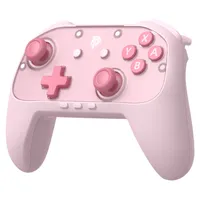
The EasySMX S10 Lite is almost identical to its older S10 model, but that won't mean a lot if you've never had experience with any EasySMX products before. Both controllers share that asymmetrical pro controller design, with a pair of textured grips that look not dissimilar to the official Nintendo Switch 2 Pro Controller. However, unlike Nintendo's first-party pad, the controller I'm reviewing here today has a transparent face plate cover that magnetically attaches to the controller.
These can be removed to allow you to "express your personality with DIY Magnetic Faceplates & Stickers" in their stead. However, the controller didn't come with any additional faceplates or stickers, bar the transparent plastic plate that's sitting on it by default. The official EasySMX online store doesn't provide any you can buy either, so while the option to customize the controller is there, there's not a lot you can currently do with it.
It's still a pretty pad without any personalization. I was lovingly provided with the pink colorway to review, which aligns nicely with my need to have a cute and cozy gaming space. It's a nice shade too, and even the buttons have been given a pink makeover, ranging from baby pink to a darker shade for the full spread of buttons. The controller is also available in blue and black versions if you aren't keen on pink.
Features

The 'one-button wake-up' feature of the EasySMX S10 Lite is the crux of what makes this pad pretty special. Typically, this is found in the pricier $89.99 / £74.99 controllers if it's available at all. But EasySMX has included it, and some of the key features of its more premium S10 controller lineup, into this cheaper pad.
The NFC-reading tech to support amiibos, TMR sticks, and the swappable D-pad from pricier products are not present, however. When EasySMX tells you this is a "Lite" model, you should believe it. However, the swappable faceplates, comfortable design, and Bluetooth connectivity remained unchanged.

The controller features all the typical buttons you'd expect from any "pro" style controller. There are two sets of sticks, a d-pad, a set of XYBA buttons, two sets of trigger buttons, GL and GR back buttons, and all those Switch 2 faceplate buttons you need. The plus and minus buttons are centered on the front of the pad's face; meanwhile, you can find the capture, Game Chat, and Home buttons just underneath.
While its S10 Elite counterpart has TMR sticks to find against any stick-drift issues, the S10 Lite does not. However, it does feature Hall effect sticks, which act pretty similarly in that the magnet and sensor behind the stick don't make physical contact, so there's less wear and tear over time.
Performance

Pokémon Pokopia was released shortly after I took up the cute, pink pad. I'm about 40 hours into the Dragon Quest Builders-like, and being quick to get into the groove of dismantling and destroying blocks and building my own creations was down to this comfortable controller.
The XYBA buttons are some of the most satisfying-to-press buttons I've ever come across. Instead of rounded, bulbous circles that I was used to touching with the 8BitDo Ultimate 2, the buttons lay flat and gave off the most pleasant-sounding click I've ever heard. Each time I took up this controller, it was like I was starring in my own ASMR video. The wonderful clicky sensation wasn't just unique to the face buttons, but both sets of triggers felt the same.
The back GL and GR paddles are also some of the best I've used in a controller, as my fingers naturally sat into their hollowed-out grooves. They were also as easy to customize as they were comfortable, as the Switch 2 registered the S10 Lite as a Pro controller and allowed me to set button mappings in the console's UI. In Pokopia, I mapped these to the minus and plus buttons to make it easier to bring up the camera or the Pokedex. Since then, I have now exclusively used this controller for all my Pokopia adventures.

Unfortunately, the pink D-pad wasn't on the same level as the rest of the buttons. While it holds a traditional cross-shaped design, in practice, it felt more similar to an octagonal d-pad, which I am not a fan of. This resulted in multiple instances where I'd accidentally swap to the next page in my Pokopia storage boxes or select the wrong Pokémon in my Fire Red party. It's not the worst D-pad I've ever used, and I still much prefer it over the directional buttons on the right Switch 2 Joy-Con controller, but something about it always felt off under my thumb.
My grievances would end there if it weren't for the bizarre firmware update process. Despite being marketed for the Nintendo Switch 2 right on the box, this controller needs a firmware update in order to connect properly to the handheld. That's fine, as firmware updates are more than common with all controller brands, but the process was a bit bizarre. I didn't just have to hook up the pad to my gaming PC with the included USB-C charging cable, but I had to ensure the L3 button (the left trigger) was pushed in and held throughout.
The actual updating process was quick, and I just had to wait for the status bar to fill. However, if your hands are prone to cramping, or you have any mobility or joint issues like I do, I'd recommend asking a friend to update it for you first. My hand never slipped off the L3 button, but it wasn't the most comfortable updating process, and felt a bit bizarre when brands like 8BitDo usually involve just hooking their products up to a PC and letting the firmware or software do its thing.
Once it was updated, that 'one-button to wake-up' process worked right as it said it would. You have to hold the Home button for a couple of seconds, but it can and will wake your Switch 2 up from sleep every single time. During my original review, this was something the 8BitDo Ultimate 2 couldn't manage; it was a neat thing to experience on a cheaper pad like the S10 Lite.
Before I round things up, I need to let you know that EasySMX doesn't share the battery life on its website or the controller's accompanying manual. Yet, I can share that I charged the controller once at the beginning of those two weeks, and played countless hours of Pokémon Pokopia, Mario Kart World, and Pokémon Fire Red, all without the 1000mAh battery ever running out of juice, which is pretty impressive.
Should you buy the EasySMX S10 Lite Switch 2 controller?

There's sometimes an expectation that Nintendo controllers by brands that advertise themselves in stereotypical 'cute' colors are all style and no substance. But the EasySMX S10 Lite is a great all-rounder that packs in some higher-end features despite its low-end price.
This is a great-looking controller, made all the better by its inclusion of hall effect sticks, lovely clicky buttons, and the ability to wake up the Switch 2 at the touch of a button - a feature that many far pricier Switch 2 pads lack entirely. However, finding it available outside the official EasySMX site and at the usual US and UK retailers might be a bit of a challenge. While other EasySMX pads are readily available at the likes of Amazon and Best Buy, the S10 Lite has yet to join them.
There's also the glaring issue that older S10 models, like the EasySMX S10 Lite, are regularly discounted and sometimes just dollars away from the price of this pad. The Elite model contains the same features, but swaps the Hall-effect sticks for TMR versions and can even wake the Switch 2 from sleep mode. It's not available in these exclusive pink, blue, and full-black colorways, and you'd need to actually catch it on sale in the first place. However, it's a far more premium alternative to Nintendo's Switch 2 Pro controller, if that's what you're after. If you want a nice batch of features and a cute, wireless pink pad, the EasySMX S10 Lite is a quality pad to pick instead.
How I tested the EasySMX S10 Lite Switch 2 controller
The EasySMX S10 Lite Switch 2 controller became my go-to pad for the entirety of the two-week testing time, so I could put it through its paces for this review. During testing, I used the controller to play everything from Pokémon Pokopia, Mario Kart World, Donkey Kong Bananza, Pokémon Fire Red, and the Tomodatchi Life Living the Dream demo. Instead of using the Switch 2 Joy-Cons, the S10 Lite became my singular controller, used day in and day out to wake up and play my Nintendo Switch 2.
For more on how we test controllers, check out the full-length GamesRadar+ Hardware Policy.
Our guides to the best PC controllers for gaming, the best PS5 controllers, and the best Xbox Series X controllers are full of even more of our team's top controller picks.

You must confirm your public display name before commenting
Please logout and then login again, you will then be prompted to enter your display name.