

Background
Welcome to GamesRADAR+ Community !
Hi ,

Your membership journey starts here.

Keep exploring and earning more as a member.

MY ACCOUNT

Badge picture
Earn your first badge
Read 1 article to unlock your first badge.
Keep earning badges
Explore ways to get more involved as a member.
Latest Games News

Latest Games News

Breaking gaming news and updates

Read Now
Latest Games Reviews

Latest Games Reviews

Expert verdicts on the newest releases

Read Now

See what you’ve unlocked.

Explore your membership benefits.

Explore
Member Exclusives

Stay Ahead with GamesRadar+

Get the biggest gaming news, reviews, and releases straight to your inbox.

Explore

Sign Out
Join The Community
- Join our community
Commenting
Join the discussion
Exclusive Articles Coming Soon
Member-only articles
Weekly Newsletters
Weekly gaming & entertainment news
Member Badges
Earn badges as you go
Exclusive Competitions
Members-only prize draws
Curated Deals Coming Soon
Tech and gaming deals worth grabbing
GET COMMUNITY ACCESS QUICK
For the quickest way to join, simply enter your email below and get access. We will send a confirmation and sign you up to our newsletter to keep you updated on all your gaming news.
By submitting your information you agree to the Terms & Conditions and Privacy Policy and are aged 16 or over.
FIND OUT ABOUT OUR MAGAZINE
Want to subscribe to the magazine? Click the button below to find out more information.
Find out more
GET Community ACCESS QUICK

Join the GamesRadar community for quick access. Enter your email below and we'll send confirmation, and sign you up to our newsletter.

By submitting your information, you confirm you are aged 16 or over, have read our Privacy Policy and agree to the Terms & Conditions. Geographical rules apply.

GamesRadar+ GamesRadar+
US EditionUS CA EditionCanada UK EditionUK AU EditionAustralia
Sign in
  • View Profile
  • Sign out
  • Games
    • Game Insights
      • Games News
      • Games Features
      • Games Reviews
      • Games Guides
      • Big in 2026
      • Big Preview
      • Future Games Show
      • Golden Joystick Awards
    • Genres
      • Action Games
      • RPGs
      • Action RPGs
      • Adventure Games
      • Third Person Shooters
      • FPS Games
    • Platforms
      • PS5
      • Xbox Series X
      • PC
      • Nintendo Switch
      • Nintendo Switch 2
      • Tabletop Gaming
    • Franchises
      • Grand Theft Auto
      • Pokemon
      • Assassin's Creed
      • Monster Hunter
      • Fortnite
      • Cyberpunk
      • Red Dead
      • The Elder Scrolls
      • The Sims
  • Entertainment
    • TV Shows
      • TV News
      • TV Reviews
      • Anime Shows
      • Sci-Fi Shows
      • Superhero Shows
      • Animated Shows
      • Marvel TV Shows
      • Star Wars TV Shows
      • DC TV Shows
    • Movies
      • Movie News
      • Movie Reviews
      • Big Screen Spotlight
      • Superhero Movies
      • Action Movies
      • Anime Movies
      • Sci-Fi Movies
      • Horror Movies
      • Marvel Movies
      • DC Movies
    • Streaming
      • Apple TV Plus
      • Disney Plus
      • Netflix
      • HBO
      • Amazon Prime Video
      • Hulu
    • Comics
      • Marvel Comics
      • DC Comics
  • Hardware
    • Insights
      • Hardware News
      • Hardware Reviews
      • Hardware Features
      • Buying Guides
    • Computing
      • Desktop PCs
      • Laptops
      • Handhelds
    • Peripherals
      • Headsets & Headphones
      • TVs & Monitors
      • Gaming Mice
      • Gaming Keyboards
      • Gaming Chairs
      • Speakers & Audio
    • Accessories & Tech
      • Gaming Controllers
      • Tech
      • SSDs & Hard Drives
      • VR
      • Accessories
      • Retro
  • Deals
    • Toys & Collectibles
    • Lego
    • Dungeons and Dragons
    • Merch
  • Video
    • Videos
    • GR+ Replay - Submit Your Clips
    • G+RLS Podcast
  • Newsletters
    • Quizzes
    • About Us
    • How to pitch to us
    • How we score
    • Newsarama
    • Retro Gamer
  • Home
  • Games
    • View Games
      • Games News
      • Games Features
      • Games Reviews
      • Games Guides
      • Big in 2026
      • Big Preview
      • Future Games Show
      • Golden Joystick Awards
      • Action Games
      • RPGs
      • Action RPGs
      • Adventure Games
      • Third Person Shooters
      • FPS Games
    • Platforms
      • View Platforms
      • PS5
      • Xbox Series X
      • PC
      • Nintendo Switch
      • Nintendo Switch 2
      • Tabletop Gaming
      • Grand Theft Auto
      • Pokemon
      • Assassin's Creed
      • Monster Hunter
      • Fortnite
      • Cyberpunk
      • Red Dead
      • The Elder Scrolls
      • The Sims
  • Entertainment
    • View Entertainment
    • TV Shows
      • View TV Shows
      • TV News
      • TV Reviews
      • Anime Shows
      • Sci-Fi Shows
      • Superhero Shows
      • Animated Shows
      • Marvel TV Shows
      • Star Wars TV Shows
      • DC TV Shows
    • Movies
      • View Movies
      • Movie News
      • Movie Reviews
      • Big Screen Spotlight
      • Superhero Movies
      • Action Movies
      • Anime Movies
      • Sci-Fi Movies
      • Horror Movies
      • Marvel Movies
      • DC Movies
    • Streaming
      • View Streaming
      • Apple TV Plus
      • Disney Plus
      • Netflix
      • HBO
      • Amazon Prime Video
      • Hulu
    • Comics
      • View Comics
      • Marvel Comics
      • DC Comics
  • Hardware
    • View Hardware
      • Hardware News
      • Hardware Reviews
      • Hardware Features
      • Buying Guides
      • Desktop PCs
      • Laptops
      • Handhelds
    • Peripherals
      • View Peripherals
      • Headsets & Headphones
      • TVs & Monitors
      • Gaming Mice
      • Gaming Keyboards
      • Gaming Chairs
      • Speakers & Audio
      • Gaming Controllers
      • Tech
      • SSDs & Hard Drives
      • VR
      • Accessories
      • Retro
  • Deals
    • Toys & Collectibles
    • Lego
    • Dungeons and Dragons
    • Merch
  • Video
    • View Video
    • Videos
    • GR+ Replay - Submit Your Clips
    • G+RLS Podcast
  • Newsletters
    • Quizzes
    • About Us
    • How to pitch to us
    • How we score
    • Newsarama
    • Retro Gamer
Trending
  • BlizzCon 2026
  • Countdown to GTA 6
  • Join our monthly RPG Club
  • Game of the Week
  • G+RLS Podcast
  • GTA 6
  • Best gaming tech
  • Submit your clips. Win prizes
  1. Hardware
  2. Peripherals
  3. Gaming Keyboards

HyperX Alloy Elite RGB Mechanical Gaming Keyboard review: 'Expensive, but offers brilliant performance'

A premium look and feel, that’s completely customisable to boot

Reviews
By Shabana Arif
Published 30 July 2018

When you purchase through links on our site, we may earn an affiliate commission. Here’s how it works.

GamesRadar+ Verdict

We love the HyperX Alloy Elite RGB. You won’t have to compromise style for substance; it offers top notch performance and will make a gorgeous addition to your desk.

Pros

  • +

    Choice of three Cherry MX switches

  • +

    Discrete media controls

  • +

    Anti-ghosting

Cons

  • -

    Steep price tag for the RGB feature

  • -

    Wrist rest could be bigger

Best picks for you
  • Best gaming keyboard 2026: Asus strikes again with another Azoth entry
  • Best Hall effect keyboard 2026
  • The best wireless gaming keyboard in 2026

Why you can trust GamesRadar+ Our experts review games, movies and tech over countless hours, so you can choose the best for you. Find out more about our reviews policy.

There’s something to be said for a functional piece of kit that spruces the place up a bit, and the HyperX Alloy Elite RGB Mechanical Gaming Keyboard ticks all the boxes and then some. It’s a sight to behold, with a steel frame, satin matte black finish, and fully customisable RGB profiles.  As well as looking slick, the keyboard’s performance isn’t to be sniffed at either, with high profile keys floating above your choice of three Cherry MX switches, like a fleet of tiny plastic ships atop a sea of ever-changing light. It’s superb to look at, is what I’m getting at, and has a relatively small footprint compared to its competitors. 

It does have a somewhat hefty price tag just for the addition of RGB, jumping up to $169/ £150 from the $109 / £120 single-colour model that came before it, but it has a robust build, outstanding performance, and will satiate even the most ardent peacocks amongst you. If you want more, here are the best gaming keyboard options for 2018. And if you need it, here are the best gaming mouse options.

Today's best HyperX Alloy Elite deals
970 Amazon customer reviews
☆☆☆☆☆
View Similar Amazon US
Amazon
No price information
Check Amazon
Best Buy - View Similar
Best Buy
No price information
Check Best Buy
We check over 250 million products every day for the best prices

HyperX Alloy Elite RGB - Design

The HyperX Alloy Elite RGB is, for all intents and purposes, the same as the HyperX Alloy Elite, which features a red backlight, rather than the RGB’s resplendent rainbow of colours that maintain a vibrant, but unobtrusive glow that spills out from beneath the keys. 

Latest Videos FromGamesRadar+
Watch full video here:

It has a buttery-smooth solid steel frame that lends a weighty, premium feel to the hardware, without being overly heavy or oversized. The rest of the keyboard is made up of plastic, and while you might expect more metal for your money at the price point, it doesn’t feel flimsy. The high profile, concave, mechanical keys feel great to the touch, although there is an adjustment period if you’re used to a lower profile, but it’s nothing that will deter you.

There’s nothing soft about the design; it’s all angles, but they’re offset against the depth of the keyboard, and once the whole thing lights up, it looks like it’s always belonged on your desk, ready to come alive as you dispense head shots in shooters, or hammer out orders in a RTS.

A sleek light bar separates the steel casing of the main body from the plastic strip above that houses the discrete media controls on the left, and the three buttons on the right that toggle Game Mode, cycle through the three brightness settings, and switch between the three customisable onboard profiles. 

A durable, non-removable, braided USB cable connects the Alloy Elite RGB to your PC via two regular USB 2.0 connectors, but you’ll find a USB 2.0 pass-through port on the back of the keyboard to make up for the inconvenience. Tucked away on the underside are two small legs that provided enough of an elevation for my personal preference, but might be somewhat lacking in the size department for others.   

GamesRadar+'s weekly hardware digest

Hardware nerds unite, sign up to our free tech newsletter for a weekly digest of the hottest new tech, the latest gadgets on the test bench, and much more from the team at GamesRadar+.

By submitting your information you agree to the Terms & Conditions and Privacy Policy and are aged 16 or over.

You’ll also find a wrist rest in the box, along with eight titanium-coloured gaming keycaps with textured WASD keys, and a keycap removal tool. While the wrist rest isn’t padded, its textured surface is comfortable enough, but could stand to be a mite bigger to provide maximum comfort for those with long fingers or large hands. 

HyperX Alloy Elite RGB - Features

HyperX is quick to highlight the Alloy Elite RGB’s 100% anti-ghosting and N-Key rollover functionality, which means that it can register each key pressed, so the ham-handed amongst you should watch what they’re pressing, although the anti-ghosting feature serves to stop any untouched keys getting erroneously registered. Handy when you're playing the fastest, best PC games out there.

The keys sit atop Cherry MX Switches, and you can choose between the red linear, tactile brown, and tactile clicky blue. The keyboard we were sent for review featured the Cherry red switches, which are perfect for gaming with their low actuation, although you might want to opt for brown for a happy medium between work and play, depending on your preference. 

The light bar and dynamic, fully customisable lighting effects are the second selling-point, and ultimately, what you’re paying for when stepping up from the Alloy Elite’s $109/£120 price tag to the RGB’s $169/£150.

Settings are managed via the Ngenuity software that comes equipped with a default profile. There are three onboard profiles that can be changed with relative ease - providing you read through the pop-ups as you navigate through the software’s menus - and preset profiles for a decent number of titles, like Fallout 4, Destiny 2, and Overwatch. You can also set up your own macros here. 

The three customisable options are lighting, Game Mode, and Macros. The lighting options are worth delving into, considering this is what justifies the extra cost between the single-colour model and the RGB. Freestyle is for the fusspots amongst you; you can assign colours to individual keys, as well as choosing effects like explosion or HyperX’s unique Flame pattern, to create a dazzling light show to accompany your in-game action. 

If you’d prefer less faff but still want to keep some measure of personalisation atop your desk, you can assign colours to groups of keys, like the light bar, WASD keys, arrow keys, and so on, with Zones. Effects is the fuss-free option, letting you pick a colour for the entire keyboard, although the wave setting spices things up a bit with a rainbow of soft light that oscillates across the keys in the direction and speed of your choosing.    

There’s more to customise than just looks too, thanks to Game Mode. Predominantly a gaming keyboard, this function deactivates certain keys using a dedicated button, so that if you’re in the middle of a keyboard-mashing frenzy, you don’t have to worry about accidentally hitting anything that will boot you out of the action. You can change or add to the default settings for Game Mode in the Ngenuity software.  

Despite being a mix of plastic and steel, it’s a sturdy little thing, and at 17.5-inches long, it takes up less space than alternative models from Logitech and Razer, that can hog up to 18-inches.

HyperX Alloy Elite RGB - Performance
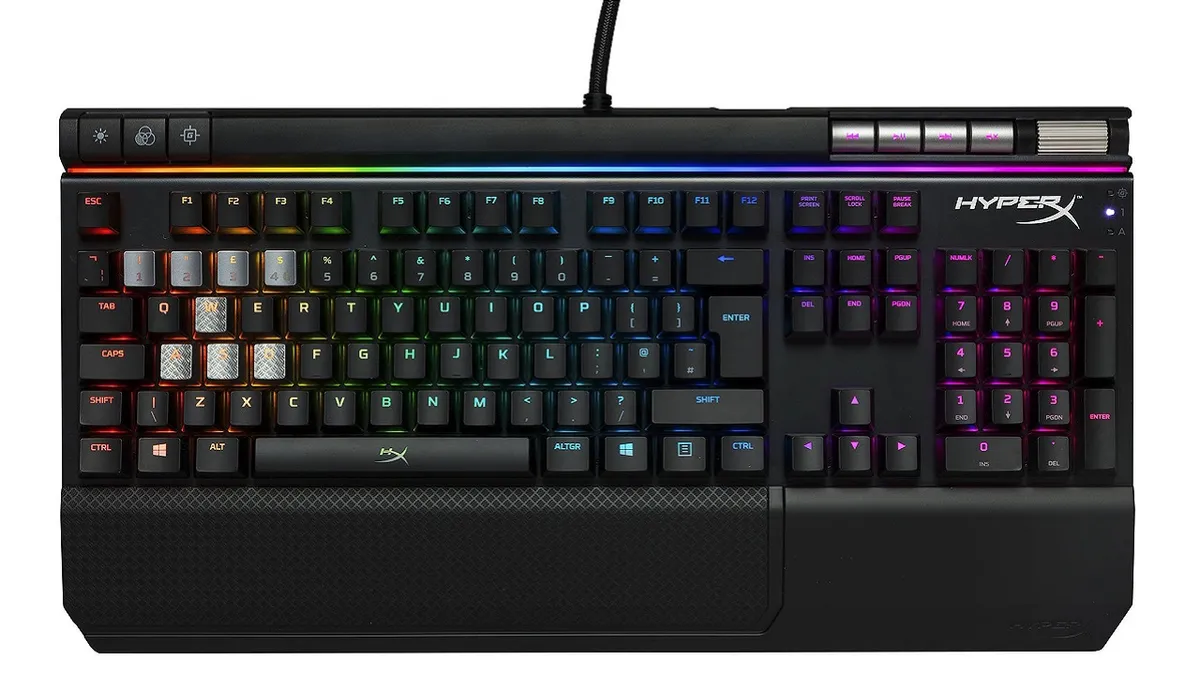
With easy to navigate media and keyboard controls, full NKRO support, and the addition of the textured WASD keys, the HyperX Alloy Elite RGB is top notch for both work and play. The keys offer little wobble and you can opt for your choice of Cherry MX Switches to create the perfect storm of tactile feedback for your taste. 

The HyperX Ngenuity software is easy enough to use as long as you take the time to read the on-screen instructions, and you can set up and deploy the onboard profiles with ease. Plus, the media controls are great, and while the volume wheel might not provide enough resistance for some, it’s smooth and responsive.

Overall - should you buy it?

Aside from the ability to light up like a Christmas tree, there’s not a lot of difference between the Alloy Elite RGB and the single-colour Alloy Elite, which makes the price difference between the two models difficult to justify if you’re simply after performance. If pretty things aren’t at the top of your priority list, you’re looking to save some cash, or if you’re a big fan of black and red, the HyperX’s single-colour Alloy Elite will be just fine for your needs. 

The HyperX Alloy Elite RGB Mechanical Keyboard is beautiful to look at, and despite its £150 price tag, if you have the extra cash to spend, you’ll be easily seduced by the dizzying array of light shows you can conduct at the touch of a button. It’s worth noting that there are cheaper alternatives, like the Corsair K68 RGB, that has the added bonus of being water resistant for just $119/ £119, as well as offering full NKRO support and 100% anti-ghosting. Overall, though, this is a brilliant keyboard and comes highly recommended.

Some online stores give us a small cut if you buy something through one of our links. Read our affiliate policy for more info.

TOPICS
HyperX
Shabana Arif
Shabana Arif
Social Links Navigation
Freelance Writer

Shabana was born looking like a girl wearing a Pikachu hoodie, so when such things became popular, she fitted right in. She writes guides, reviews and features for GR+ when she isn't screaming at Dark Souls 2 on YouTube.

Read more
Close up on macro buttons on the side of the Corsair Vanguard Pro 96 gaming keyboard
Gaming Keyboards Best gaming keyboard 2026: Asus strikes again with another Azoth entry
 
 
Keychron K2 Ultra 8K gaming keyboard on a wooden desk with blue backlighting
Gaming Keyboards The Keychron K2 Ultra 8K is a dense, heavy keyboard in more ways than one
 
 
Corsair Vanguard Pro 96, Asus ROG Azoth 96 HE, Corsair Galleon 100 SD and Cherry MX 8.2 Pro TMR TKL on a wooden desk
Gaming Keyboards Best Hall effect keyboard 2026
 
 
Asus ROG Azoth keyboard
Gaming Keyboards The best wireless gaming keyboard in 2026
 
 
Asus ROG Azoth lubing
Gaming Keyboards The best hot-swappable keyboard in 2026: all the top customizable decks compared
 
 
Corsair Clipper Pro Mini 60 keyboard on a wooden desk with blue backlighting
Gaming Keyboards The Corsair Clipper Pro Mini 60 hides surprising versatility and value for money in its unassuming 60% form factor
 
 
Latest in Gaming Keyboards
Close up on bottom right buttons of the Corsair Clipper Pro Mini 60 gaming keyboard, with dual-function arrow key legends on the sides
Gaming Keyboards Corsair's latest gaming keyboard just joined the ranks of the best planks I've tested so far
 
 
Official marketing image of the Centauri60 Asuka Edition HE Gaming Keyboard.
Gaming Keyboards I'm growing impatient for the new Evangelion anime, but this Asuka gaming keyboard helps
 
 
Keychron K2 Ultra 8K gaming keyboard on a wooden desk with blue backlighting
Gaming Keyboards The Keychron K2 Ultra 8K is a dense, heavy keyboard in more ways than one
 
 
Close up on RGB Hall effect switches inside Razer Huntsman V3 HE gaming keyboard
Gaming Keyboards Razer launches the Hall effect Huntsman V3 HE and is that... a half decent price I see?
 
 
Corsair Clipper Pro Mini 60 keyboard on a wooden desk with blue backlighting
Gaming Keyboards The Corsair Clipper Pro Mini 60 hides surprising versatility and value for money in its unassuming 60% form factor
 
 
Official close up of the EV63 Ghost in the Shell edition keyboard.
Gaming Keyboards There's a new anime series on the way, but I can't stop thinking about these Ghost in the Shell edition keyboards
 
 
Latest in Reviews
Austin Abrams as Bryan in Resident Evil
Horror Movies Resident Evil movie review: "The best Resi movie by a distance and the best video game movie full stop"
 
 
Sony Inzone M10S II monitor on black desk next to books and a plant with Overwatch main screen on display.
TVs & Monitors Sony Inzone M10S II review
 
 
Leda strums a guitar in Fire Emblem: Fortune's Weave
RPGs Fire Emblem: Fortune's Weave review: "Deep tactical battles and a compelling narrative make this an ambitious epic"
 
 
Emerland box on a plain background
Board Games Emerland review: "So much more than a new coat of paint on Everdell"
 
 
Marvel's Wolverine - close up of Wolverine's face in his game suit with teh cowl up
Action Games Marvel's Wolverine review: "Missing that crucial X-Factor"
 
 
Duel of Meloch box, cards, and components on a plain background
Board Games Duel of Meloch review: "A bold experiment that blends two beloved strategy board games together"
 
 
LATEST ARTICLES
  1. World of Warcraft: Forever
    1
    World of Warcraft: Forever beta struggles as devs marvel at all the people "hammering at the door"
  2. 2
    Steam is shoveling RPGs at people, and I think it's the perfect time to get Divinity: Original Sin
  3. 3
    Zack Snyder says Jeffrey Dean Morgan wants to play Snake Plissken in Escape from New York reboot
  4. 4
    Valve's Gabe Newell warns of "one of the biggest mistakes game developers make" in unearthed clip
  5. 5
    Palworld Palfarm is less like Stardew Valley than you might expect, lead says

GamesRadar+ is part of Future US Inc, an international media group and leading digital publisher. Visit our corporate site.

Add as a preferred source on Google Add as a preferred source on Google
  • About us
  • Contact Future's experts
  • Terms and conditions
  • Privacy policy
  • Cookies policy
  • Advertise with us
  • Review guidelines
  • Write for us
  • Accessibility statement
  • Careers

© Future US, Inc. Full 7th Floor, 130 West 42nd Street, New York, NY 10036.

Please login or signup to comment

Please wait...