
Join The Community
- Join our community
Commenting
Join the discussion
Exclusive Articles Coming Soon
Member-only articles
Weekly Newsletters
Weekly gaming & entertainment news
Member Badges
Earn badges as you go
Exclusive Competitions
Members-only prize draws
Curated Deals Coming Soon
Tech and gaming deals worth grabbing
GET COMMUNITY ACCESS QUICK
For the quickest way to join, simply enter your email below and get access. We will send a confirmation and sign you up to our newsletter to keep you updated on all your gaming news.
By submitting your information you agree to the Terms & Conditions and Privacy Policy and are aged 16 or over.
FIND OUT ABOUT OUR MAGAZINE
Want to subscribe to the magazine? Click the button below to find out more information.
Find out more
GET Community ACCESS QUICK

Join the GamesRadar community for quick access. Enter your email below and we'll send confirmation, and sign you up to our newsletter.

By submitting your information, you confirm you are aged 16 or over, have read our Privacy Policy and agree to the Terms & Conditions. Geographical rules apply.

Welcome to GamesRADAR+ Community !
Hi ,

Your membership journey starts here.

Keep exploring and earning more as a member.

MY ACCOUNT

Earn your first badge
Read 1 article to unlock your first badge.
Keep earning badges
Explore ways to get more involved as a member.
Latest Games News

Latest Games News

Breaking gaming news and updates

Read Now
Latest Games Reviews

Latest Games Reviews

Expert verdicts on the newest releases

Read Now

See what you’ve unlocked.

Explore your membership benefits.

Explore
Member Exclusives

Stay Ahead with GamesRadar+

Get the biggest gaming news, reviews, and releases straight to your inbox.

Explore

Sign Out
GamesRadar+
US EditionUS CA EditionCanada UK EditionUK AU EditionAustralia
Sign in
  • View Profile
  • Sign out
  • Games
    • Game Insights
      • Games News
      • Games Features
      • Games Reviews
      • Games Guides
      • Big in 2026
      • Big Preview
      • Future Games Show
      • Golden Joystick Awards
    • Genres
      • Action Games
      • RPGs
      • Action RPGs
      • Adventure Games
      • Third Person Shooters
      • FPS Games
    • Platforms
      • PS5
      • Xbox Series X
      • PC
      • Nintendo Switch
      • Nintendo Switch 2
      • Tabletop Gaming
    • Franchises
      • Grand Theft Auto
      • Pokemon
      • Assassin's Creed
      • Monster Hunter
      • Fortnite
      • Cyberpunk
      • Red Dead
      • The Elder Scrolls
      • The Sims
  • Entertainment
    • TV Shows
      • TV News
      • TV Reviews
      • Anime Shows
      • Sci-Fi Shows
      • Superhero Shows
      • Animated Shows
      • Marvel TV Shows
      • Star Wars TV Shows
      • DC TV Shows
    • Movies
      • Movie News
      • Movie Reviews
      • Big Screen Spotlight
      • Superhero Movies
      • Action Movies
      • Anime Movies
      • Sci-Fi Movies
      • Horror Movies
      • Marvel Movies
      • DC Movies
    • Streaming
      • Apple TV Plus
      • Disney Plus
      • Netflix
      • HBO
      • Amazon Prime Video
      • Hulu
    • Comics
      • Marvel Comics
      • DC Comics
  • Hardware
    • Insights
      • Hardware News
      • Hardware Reviews
      • Hardware Features
      • Buying Guides
    • Computing
      • Desktop PCs
      • Laptops
      • Handhelds
    • Peripherals
      • Headsets & Headphones
      • TVs & Monitors
      • Gaming Mice
      • Gaming Keyboards
      • Gaming Chairs
      • Speakers & Audio
    • Accessories & Tech
      • Gaming Controllers
      • Tech
      • SSDs & Hard Drives
      • VR
      • Accessories
      • Retro
  • Deals
    • Toys & Collectibles
    • Lego
    • Dungeons and Dragons
    • Merch
  • Video
    • Videos
    • GR+ Replay - Submit Your Clips
    • G+RLS Podcast
  • Edge
  • Newsletters
    • Quizzes
    • About Us
    • How to pitch to us
    • How we score
    • Newsarama
    • Retro Gamer
  • Home
  • Games
    • View Games
      • Games News
      • Games Features
      • Games Reviews
      • Games Guides
      • Big in 2026
      • Big Preview
      • Future Games Show
      • Golden Joystick Awards
      • Action Games
      • RPGs
      • Action RPGs
      • Adventure Games
      • Third Person Shooters
      • FPS Games
    • Platforms
      • View Platforms
      • PS5
      • Xbox Series X
      • PC
      • Nintendo Switch
      • Nintendo Switch 2
      • Tabletop Gaming
      • Grand Theft Auto
      • Pokemon
      • Assassin's Creed
      • Monster Hunter
      • Fortnite
      • Cyberpunk
      • Red Dead
      • The Elder Scrolls
      • The Sims
  • Entertainment
    • View Entertainment
    • TV Shows
      • View TV Shows
      • TV News
      • TV Reviews
      • Anime Shows
      • Sci-Fi Shows
      • Superhero Shows
      • Animated Shows
      • Marvel TV Shows
      • Star Wars TV Shows
      • DC TV Shows
    • Movies
      • View Movies
      • Movie News
      • Movie Reviews
      • Big Screen Spotlight
      • Superhero Movies
      • Action Movies
      • Anime Movies
      • Sci-Fi Movies
      • Horror Movies
      • Marvel Movies
      • DC Movies
    • Streaming
      • View Streaming
      • Apple TV Plus
      • Disney Plus
      • Netflix
      • HBO
      • Amazon Prime Video
      • Hulu
    • Comics
      • View Comics
      • Marvel Comics
      • DC Comics
  • Hardware
    • View Hardware
      • Hardware News
      • Hardware Reviews
      • Hardware Features
      • Buying Guides
      • Desktop PCs
      • Laptops
      • Handhelds
    • Peripherals
      • View Peripherals
      • Headsets & Headphones
      • TVs & Monitors
      • Gaming Mice
      • Gaming Keyboards
      • Gaming Chairs
      • Speakers & Audio
      • Gaming Controllers
      • Tech
      • SSDs & Hard Drives
      • VR
      • Accessories
      • Retro
  • Deals
    • Toys & Collectibles
    • Lego
    • Dungeons and Dragons
    • Merch
  • Video
    • View Video
    • Videos
    • GR+ Replay - Submit Your Clips
    • G+RLS Podcast
  • Edge
  • Newsletters
    • Quizzes
    • About Us
    • How to pitch to us
    • How we score
    • Newsarama
    • Retro Gamer
Trending
  • EDGE GTAVI exclusive
  • Join our monthly RPG Club
  • Golden Joystick Awards 2026
  • Deal of the Day
  • Countdown to GTA 6
  • RPG Hub
  • G+RLS Podcast
  • Submit your clips. Win prizes
Sign up to the GamesRadar+ Newsletter

Weekly digests, tales from the communities you love, and more


By submitting your information you agree to the Terms & Conditions and Privacy Policy and are aged 16 or over.

You are now subscribed

Your newsletter sign-up was successful


Want to add more newsletters?

GamesRadar+

Every Friday

GamesRadar+

Your weekly update on everything you could ever want to know about the games you already love, games we know you're going to love in the near future, and tales from the communities that surround them.

GTA 6 O'clock

Every Thursday

GTA 6 O'clock

Our special GTA 6 newsletter, with breaking news, insider info, and rumor analysis from the award-winning GTA 6 O'clock experts.

Knowledge

Every Friday

Knowledge

From the creators of Edge: A weekly videogame industry newsletter with analysis from expert writers, guidance from professionals, and insight into what's on the horizon.

The Setup

Every Thursday

The Setup

Hardware nerds unite, sign up to our free tech newsletter for a weekly digest of the hottest new tech, the latest gadgets on the test bench, and much more.

Switch 2 Spotlight

Every Wednesday

Switch 2 Spotlight

Sign up to our new Switch 2 newsletter, where we bring you the latest talking points on Nintendo's new console each week, bring you up to date on the news, and recommend what games to play.

The Watchlist

Every Saturday

The Watchlist

Subscribe for a weekly digest of the movie and TV news that matters, direct to your inbox. From first-look trailers, interviews, reviews and explainers, we've got you covered.

SFX

Once a month

SFX

Get sneak previews, exclusive competitions and details of special events each month!


Join the club

Get full access to premium articles, exclusive features and a growing list of member rewards.


An account already exists for this email address, please log in.
  1. Games
  2. RPG
  3. The Elder Scrolls
  4. Elder Scrolls Blades

Elder Scrolls Blades tips: 13 tips to get you started in Bethesda's mobile RPG

Guides
By Samuel Horti
Published 3 May 2019

If you're wondering where to begin with the latest RPG hit to come to mobile, check out our Elder Scrolls Blades tips

When you purchase through links on our site, we may earn an affiliate commission. Here’s how it works.

  • Facebook
  • X
  • Pinterest
  • Flipboard
  • Email
Share this article
Join the conversation
Follow us
Add us as a preferred source on Google
Subscribe to our newsletter

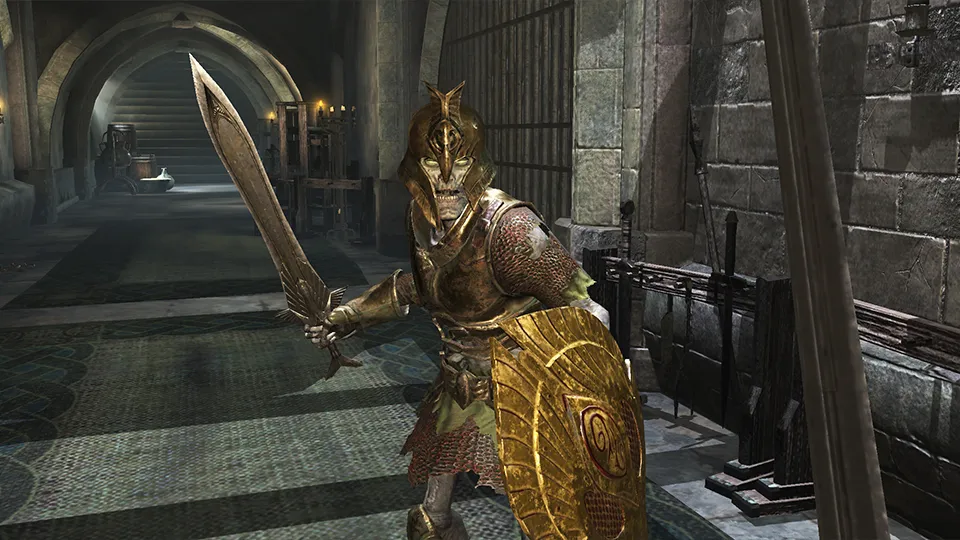
If you're feeling overwhelmed at the start of the game, these Elder Scrolls Blades tips should help you out. It might not be a fully-fledged Bethesda RPG, but it’s complex compared to most mobile games, and it can take a while to get used to its combination of town building, combat, and looting.

How to earn Elder Scrolls Blades gems | Elder Scrolls hacks| Elder Scrolls Blades Armor

To help you get started in the Elder Scrolls Blades, we’ve compiled a list of handy hints and tips that should make your first ten hours or so much less painful. And even if you’ve got past that point, we reckon there are some secrets here that you didn’t already know about. When you're up to speed with all of our Elder Scrolls Blades tips, why not take a look at how the Elder Scrolls Blades gems work?

Latest Videos FromGamesRadar+
Watch full video here:

Regularly check off your challenges

Elder Scrolls Blades tips - Daily Challenges

Challenges, which you can find in the quest menu, are a handy way of earning extra cash, and will reward you for completing basic actions such as dealing a certain amount of damage. However, you don’t get the reward automatically: you have to go back onto the challenge page and tap the ‘claim’ button. New challenges also won’t load until you’ve cleared old ones from the menu. For that reason, you should check the challenge page regularly to make sure you’re checking off any that you’ve completing.

Time your blocks—and unleash spells

Shields are vital in the early game, and can negate almost all incoming damage from low-level enemies. If you time your block just before an enemy strikes, you’ll stagger them. This gives you time to get in a few swipes, or—even better—charge up spells with a long casting time. Fireball is a powerful early-game spell, but it takes a long time to cast and you’ll set yourself on fire if you’re interrupted, so trigger it as soon as you stagger an enemy to get it off safely. 

You may like
  • Phantom Blade Zero Soul and The Hunt facing off next to a waterfall 15 Phantom Blade Zero tips for new players to help you navigate the Wulin
  • The Witcher 3 next-gen Essential Witcher 3 tips to know if you're a beginner
  • Task Bar Hero Runes menu with lots of upgrades unlocked Best Task Bar Hero Runes and upgrades to get first

Hit the right, left, right combo

If you string successive attacks together you deal a lot more damage. Rather than just tapping with one hand, the best way rack up combos is to hold your phone landscape and attack with both thumbs. As soon as you’ve finished your attack with one hand, start your attack on the other. Keep alternating back and forth to tear through enemies—and always make sure you charge attacks until the circle is full to ensure you get critical strikes. 

Grab healing abilities, such as Absorb and Adrenaline Dodge

Elder Scrolls Blades tips - Healing

Health potions are hard to come by until you unlock the Alchemist—and even then, you don’t want to glug a potion every time you get hit. It’s therefore worth investing skill points in healing spells and abilities to keep yourself topped up during missions. The Absorb spell is your best bet until you hit level 10, at which point you want to grab Adrenaline Dodge as soon as you can: it will both evade incoming damage and heal you up in one go.

Sign up to the GamesRadar+ Newsletter

Weekly digests, tales from the communities you love, and more

By submitting your information you agree to the Terms & Conditions and Privacy Policy and are aged 16 or over.

Be patient with small animals

Sometimes, the hardest enemies in Blades’ are the smallest. Rats and wolves are annoying to fight because they stay out of range of your attacks and then come in for quick strikes. The best way to deal with them is to keep your finger or thumb held down, ready for an attack. Then, just as they leap forward, trigger the attack. Once you get the timing down, you’ll kill them easily. 

Don’t buy armour and weapons early

Buying armour and weapons from the Smithy might seem like a good idea, but it’s really just a waste of money. You’ll find much more powerful items in chests—plus, items scale with you, which means the fancy new sword you just bought will be useless in a few hours’ time. Instead, save your money for upgrading your town.

Focus on town upgrades - specifically shops

Elder Scrolls Blades tips - Town Upgrades

When possible, you should pour all your resources into upgrading your town. Building shops and houses will raise the level of your town, which has all sorts of benefits: it will unlock new story quests, for example, and let you upgrade existing buildings so that you can access better gear.

You may like
  • Phantom Blade Zero Soul and The Hunt facing off next to a waterfall 15 Phantom Blade Zero tips for new players to help you navigate the Wulin
  • The Witcher 3 next-gen Essential Witcher 3 tips to know if you're a beginner
  • Task Bar Hero Runes menu with lots of upgrades unlocked Best Task Bar Hero Runes and upgrades to get first

Instead of building dwellings early on, focus on constructing shops, such as Smithies and Alchemy Laboratories. You’ll get more benefits out of them, and they’ll raise your town prestige quicker than houses will.

Leave space for bigger buildings

Some buildings, such as an Enchanter’s Towers or Workshop, take up two lots in your town rather than one. Make sure you leave space for them, preferably near the town’s main gate, where you’ll have the best access to them.

Build two Smithies

Elder Scrolls Blades tips - Chests

When you have the resources, build two Smithies. You’ll want to start upgrading your gear and crafting at some point, and both of those actions take time, putting a Smithy out of commission while they hammer away. Building two means you can use one for crafting and upgrades, and the other for selling weapons you’ve found.

Repairing items is cheap

As you use gear, it becomes damaged, which lowers its stats. Keep on top of its condition by regularly visiting a Smithy, who can maintain your items. You can do a bulk repair of everything at once, and it won’t cost you very much. 

Keep in mind that you won’t be able to repair steel gear effectively when your Smithy is at level one—upgrade your Smithy once your town reaches level two.

Try out both horizontal and vertical control schemes

Elder Scrolls Blades tips

Blades switches seamlessly between portrait and landscape mode (we’ve had a few hiccups, but it generally works well). Both offer very different control options: in portrait, you’re tapping on screen to decide where you want to move, whereas in landscape mode you can use two virtual joysticks. Chances are that one or the other will work best for you, so try out both. 

We like portrait for moving around—you can tap a faraway spot and then look around as you move—and landscape for combat, which lets you perform the side-to-side combos we mentioned earlier.

Save higher level chests for later

Chests scale with your level at the point of unlocking. It’s therefore a good idea to save your rare chests until you’ve pumped 10 hours or more into Blades—if you’re not struggling with enemies at your current level, you don’t need to worry about improving your gear. Patience can get you better items in the long-term. 

Also, if you are going to open chests that are silver or better, then remember they take hours to unlock. Instead of opening them while you’re playing, try to save them for the end of your play sessions so that they’ll unlock in the background—that way, you can still open wooden chests as and when you find them.

Don’t forget to claim your free daily item

Elder Scrolls Blades tips - Free Item

Understandably, many Blades players might want to steer clear of the store and its microtransactions, where packages of gems are going for up to $100. But it’s still worth visiting the store every day so that you can claim a free daily item. You’ll usually grab some building materials, and sometimes even a chest that can be opened instantly. 

CATEGORIES
Android iPhone Platforms Mobile Gaming
Samuel Horti
Samuel Horti
Social Links Navigation
Freelance Writer

Samuel is a freelance reporter and editor, who's worked at BBC News and the Bureau of Investigative Journalism. He also has bylines in the New York Times, GQ, Edge, and PC Gamer, along with GamesRadar+.

Read more
Phantom Blade Zero Soul and The Hunt facing off next to a waterfall
Action RPGs 15 Phantom Blade Zero tips for new players to help you navigate the Wulin
 
 
The Witcher 3 next-gen
The Witcher Essential Witcher 3 tips to know if you're a beginner
 
 
Task Bar Hero Runes menu with lots of upgrades unlocked
RPGs Best Task Bar Hero Runes and upgrades to get first
 
 
Elder Scrolls 6
The Elder Scrolls The Elder Scrolls 6: Sentinel - Everything we know so far
 
 
Elden Ring player fighting Bloodhound Knight Darriwill wielding the Bloodhound's Fang sword in an evergoal
RPGs Best early-game weapons in Elden Ring and where to find them
 
 
Task Bar Hero act boss chest earned from defeated act 2 boss
RPGs How to farm chests and loot in Task Bar Hero
 
 
Latest in The Elder Scrolls
A black and white picture of the Dragonborn during Skyrim.
The Elder Scrolls Skyrim lead regrets the RPG’s level cap because players "didn't want" to just start new characters
 
 
Ralof sitting in a prisoner wagon chatting to the Dragonborn during the opening of Skyrim.
The Elder Scrolls Bethesda celebrates Skyrim’s 15th anniversary with new artwork from a "legendary artist"
 
 
A black dragon roaring with a manor house behind it and lighting in the sky during Skyrim.
The Elder Scrolls Bethesda says sorry, no Sentinel news for Skyrim's anniversary – and none "for some time"
 
 
Todd Howard
The Elder Scrolls Skyrim lead doubted Todd Howard’s constellation-based skill system, and then the RPG came out
 
 
The Elder Scrolls 6 Sentinel
The Elder Scrolls Skyrim's lead designer hopes The Elder Scrolls 6: Sentinel finally fixes the series' ladder problem
 
 
Skyrim
The Elder Scrolls Skyrim lead can't wait to play The Elder Scrolls 6: Sentinel because he didn't work on it
 
 
Latest in Guides
Gerudo Fortress in Zelda Ocarina of Time
The Legend of Zelda Gerudo Fortress guide and walkthrough for the Ocarina of Time Remake
 
 
Ocarina of Time Remake
The Legend of Zelda How to get the Golden Scale in Ocarina of Time
 
 
A player looks at a locked MW4 DMZ Blackmarket locker
Call of Duty All MW4 DMZ Blackmarket locker locations
 
 
Phantom Blade Zero A Severed Mindseal Soul and the friendly shadow warden at the top of the Weeping Creek Valley Sha-Chi Tower
Action RPGs How to complete A Severed Mindseal in Phantom Blade Zero and find all Primal Stones
 
 
Press shot for Clover Adventure codes showing a smiling character in a regal robe
Action RPGs Clover Adventure codes (November 2026) and how to redeem them for free Spins and Gems
 
 
Phantom Blade Zero Cui puppet child in the village of lu smuggler's tunnel
Action RPGs How to complete Cui in Phantom Blade Zero and find Cui's grandfather
 
 
LATEST ARTICLES
  1. "It's a guilt by association pattern that all developers need to push back on"
    1
    Epic's Tim Sweeney says Steam's AI rule is "unfair to developers who use AI to make good games"
  2. 2
    Nintendo just broke the Zelda timeline by 10,000 years
  3. 3
    We tried stealing our own GTA 6 physical edition codes, and you probably shouldn't worry
  4. 4
    PS5 is the first Sony console to hit 100 million units sold without a price cut
  5. 5
    Planeswalker is Netflix's Magic: The Gathering series, and the sneak peek sure looks like Arcane

GamesRadar+ is part of Future US Inc, an international media group and leading digital publisher. Visit our corporate site.

Add as a preferred source on Google Add as a preferred source on Google
  • About us
  • Contact Future's experts
  • Terms and conditions
  • Privacy policy
  • Cookies policy
  • Advertise with us
  • Review guidelines
  • Write for us
  • Accessibility statement
  • Careers

© Future US, Inc. Full 7th Floor, 130 West 42nd Street, New York, NY 10036.

Please login or signup to comment

Please wait...