





I enjoy janky old gamepads as much as the next console collector, but the best retro controllers of today are a solid alternative. Rather than feeling like one of those "little brother" third-party pads from back in the day, there are some new, bespoke pad options out there that offer tactile buttons, excellent d-pads, reliable wireless connectivity, and a level of comfort that will help even the oldest classics feel contemporary.
Don't get me wrong, I'm a staunch believer that many of the best retro controllers are the originals that came with your retro console. It makes sense given that those trusty old wired pads were designed specifically with their respective platforms and games in mind, and there's a reason why icons like the DualShock and OG Xbox controller serve as blueprints for the pads we use today.
At the same time, some retro controllers, like the infamously quirky N64 controller and its spaceship shell, are an acquired taste. I also spent a lot of time refurbishing old pads, as even the greatest options of all time that came with the NES, SNES, and PS1 don't feel too hot today, thanks to aging parts. Therefore, there's a case to be made for picking up a box-fresh retro controller for your favorite console and embracing boons like wireless, hall-effect sensors that eliminate stick drift, and shells that offer up superior comfort.

The Gulikit Elves 2 Pro is a great all-in-one retro controller that'll pair to all your core systems using Bluetooth receivers.

The M30 embodies the original spirit of Sega's 6-button Mega Drive / Genesis controller in every way that matters, and its d-pad is exceptional.

Retro-Bit's wireless take on the 6-button Sega Saturn pad is a solid option for the early 3D system's vast library of fighters, and the sticks are handy for everything else.

8Bitdo has fused an authentic N64 button layout with modern ergonomics to create a fantastically comfortable controller for Nintendo 64 games.

Not only does the StrikerDC respectably mimic the OG single-stick Dreamcast layout, but Retro Fighters throws in a dock solution for your VMU.

If you need a solid wireless pad that can pair with the PS1, PS2, and even the PS3, the Retro Fighters Defender has you more than covered.
Load more retro controllers ↓

It might look more like a modern Xbox controller than Microsoft's original, but it will provide you with the right buttons and solid wireless ergonomics.

Nintendo's remake of the GameCube controller is actually a fantastic wireless gamepad for your original system if you use an adapter.

Whether you're using your phone as a Game Boy or an emulation console, this set of Bluetooth buttons will feel pretty authentic.

Phil is a retro gaming expert and enthusiast from sunny Scotland who has covered old consoles and gadgets for the BBC, TechRadar, and various other big names. While they specialize in authentic setups and restoring aging systems to their former glory, they also have a knack for modernizing classic platforms using new gadgets and hardware. On the gamepad side of things, specifically, they have a massive collection of retro controllers that includes some of the greatest pads of all time and cursed oddities from the past, and they've tested them all.
Best retro controller overall


Gulikit has pulled off something remarkable with its Elves 2 Pro. Rather than crafting a retro controller that feels like an alternative to a specific gamepad, it's made something ready to stand in for everything, and that's spectacular given the generational differences between something like the Sega Genesis/Mega Drive controller and the DualShock 2.
Naturally, the Gulikit Elves 2 Pro has "Jack of all trades" vibes, but the "master of none" part of that saying isn't quite right. Yes, I do have options I'd recommend for specific systems, but this Bluetooth gamepad still manages to feel great with multiple generations of systems without pledging loyalty to just one console. That's largely thanks to the fact that it feels like a Genesis controller in the hands, with an authentic D-pad to boot while also wielding full-sized dual hall-effect thumbsticks for all your 3D gaming needs.
Visually, the Elves 2 Pro looks like a Sega Saturn pad, and the white version in particular nails its aesthetic objectives. Yet, by switching things up to a conventional four-button layout and including those aforementioned symmetrical sticks at the bottom, it manages to possess all the makings of a Dualshock alternative. It even has the same bumpers on top, so you won't be stuck for inputs.
The other main reason the Elves 2 Pro is my "best overall" pick actually doubles as a caveat, as it's linked to its Bluetooth abilities. To actually pair with a pad with all your old systems, you'll have to pick up additional dongles, as it's primarily designed to hook up to your Switch 2, PC, or phone. Having used this gamepad extensively with 8Bitdo Retro Receivers and Blueretro's adapters, though, I can confirm that it's able to become a one-size-fits-all option, and I wasn't able to sniff out any meaningful lag compared to 2.4GHz pads.
My pitch for using the Gulitkit Elves 2 Pro as a retro controller revolves around the idea of a retro receiver ecosystem. Yes, picking up all those extra adapters will cost you, but at the same time, it'll save you from investing in multiple separate gamepads for each console. That's exactly why I've awarded it my "best overall" label, as it's the one model that can appease the specific input needs of each platform.
Read more: Gulikit Elves 2 Pro review
Best for Sega Mega Drive/Genesis


8Bitdo knows a thing or two about making authentic, yet modernized retro controllers, and the M30 2.4GHz is a testament to that. Rather than trying to identically mimic the exact look and feel of Sega's OG Genesis/Mega Drive controller, this pad instead takes cues from the fan favorite Japanese Fighting Pad 6B while adding better ergonomics and solid 2.4GHz connectivity to make a triumphant alternative.
I can't count the number of hours I've spent spinning my way to the Death Egg in Sonic the Hedgehog 2. It's for that reason that swapping out my trusty original 6-button Sega pad on the Mega Drive (or Genesis, as you US players call it) for the 8Bitdo M30 makes for a perfect test of its abilities. It's a Pepsi challenge I was convinced I wouldn't fail, and yet, I wasn't able to pick out any latency issues, or grips with its authentic disc d-pad.
In fact, I'd go as far as to say that, compared to an unrefurbished original pad, the 8Bitdo M30 feels superior when playing Sega's 16-bit back catalogue. The six-button layout means your thumbs won't feel lost, and that d-pad boasts the exact same movement and grippy texture as a real Mega Drive pad. The weight is just about right, too, at 114 grams, and while that sounds like it'll be floaty light, it still provides enough heft while also being free from the molded cable of OG controllers.
Exceptional build quality and authentic feel aside, the other biggie is the fact that it comes with a 2.4GHz adapter. The inclusion of a wireless dongle gives it a natural advantage over my overall pick, the Gulikit Elves 2 Pro, despite both featuring a very similar d-pad and feel for Sega Games. Plus, if you are looking for extra frame accuracy, 2.4Ghz does introduce less latency compared to using 8Bitdo's Bluetooth Retro Receiver, even if the difference is arguably minimal.
The one thing that gets on my nerves with the M30 is the existence of different models. While some brands, like Retro-Bit, will happily give you both an original 2.4GHz dongle and USB adapter in the box, 8Bitdo sells two different versions alongside a separate Bluetooth pad. Simply put, if you want to use the M30 with a real Genesis, the Sega mini version, your modern console, and a PC wirelessly, you'll need to buy thrice, and that slightly sours what is otherwise a near-perfect controller for the 16-bit system and its games.
Read more: 8Bitdo M30 2.4Ghz review
Best controller for Sega Saturn


I'll confess that the Retro-Bit Sega Saturn Pro controller isn't the nicest gamepad I've tested. It's not quite as solid-feeling as the others I've tried, and I find its inclusion of Joy-Con-style thumbsticks questionable. Plus, it annoyed me straight out of the box since it's wearing the wrong logo on the front, and yet, it's still the best option for Sega's first 3D console thanks to its included 2.4GHz dongle and mode switching abilities.
For whatever reason, Retro-Bit decided to draw influence from two separate controller versions when making the officially licensed Sega Saturn Pro controller. It's using the same striking white shell and multi-colored buttons as the original Japanese 6-button pad, but borrows its shape from the larger model 1 pad included with the black system. It also has the full logo of that latter version rather than just the "Sega" logo that actually matches the color scheme, and that irritates the purist in me.
The decision to opt for the larger shell is undoubtedly linked to the inclusion of two smaller Hall-effect joysticks. These help it double as a fully functional modern pad for PC and Switch, but they pale in comparison to the full sticks of the Gulikit Elves 2 Pro (which happens to have a very similar Saturn vibe).
There is a solid reason to include analogue inputs, though, and that's because it allows the pad to function like an original OG Saturn 3D Control Pad. That's invaluable if you're looking for a way to play outings like Nights Into Dreams alongside the system's legacy of 2D fighting games, as it can easily switch between digital and analogue.
Yes, I know it sounds like I'm not really recommending the Sega Saturn Pro controller, but I actually am. It's just that the situation surrounding the pad is a little bit nuanced, as there are not many other options out there. It also still provides a serviceable 6-button setup and a nice d-pad, and that's enough to give it a seat at the table (for now).
Read more: Sega Saturn Pro controller review
Best controller for N64


For years, I've listened to players grumble about the Nintendo 64's cursed trident-shaped gamepad. 8Bitdo was clearly paying attention to those cries, as its N64 controller takes Ninty's unconventional prominent A and B buttons and places them on a conventionally shaped shell. The result? A pad that feels remarkably suited to the '90s console's design sensibilities while offering up contemporary comfort.
I really wasn't sure if I'd get on with the 8Bitdo N64 controller prior to getting my hands on one. I figured it mainly existed to make the Analogue 3D feel like a modernized version of Ninty's first 3D system, and while it does that, it also helps an original N64 feel decades newer. The important thing here, though, is it avoids disrupting the exact layout of a real N64 gamepad, and that's important to the exact early 3D camera systems used by the console's classics.
The more I think about the 8Bitdo N64 Controller, the more I feel like it's design choices are a no-brainer. Why didn't anyone add a single joystick, those big old A and B buttons accompanied by the C-pad, and that big silly start button sooner? Don't get me wrong, I still love using the original spacecraft monstrosity, and I even modded mine with a hall-effect joystick to help it compete. Yet, I do find myself reaching for the modern version more these days, as my hands appreciate the solid build quality and comfort when playing straight runs of favorites like Zelda: Majora's Mask.
The stellar build quality of this N64 gamepad, its beautifully accurate button layout, and ergonomic curves are all reason enough to grab this pad for your system. However, just like with the M30, 8Bitdo has somewhat fragmented connectivity across different models, meaning if you grab the Bluetooth version for wider Switch and PC compatibility, you'll need an adapter for the '90s system. Thankfully, dongles by the likes of BlueRetro work a treat, and 8Bitdo now has its own Retro Receiver if you're staying brand loyal.
I picked up 8Bitdo N64 controller prior to the 2.4Ghz version's existence, so if I were picking up one today, I'd grab that specifically for the console over the Bluetooth version. That said, I can recommend any version regardless, and both will still provide built-in rumble and integrated memory card support that'll save you thinking about additional accessories. My only, slightly biased instruction is that you should specifically grab the gray version since it matches the OG system perfectly.
Read more: 8Bitdo N64 controller review
Best controller for Sega Dreamcast


Making the Sega Dreamcast gamepad wireless is no mean feat, but the Retro Fighters StrkerDC provides a nifty solution. Rather than trying to somehow keep the VMU slot, the accessory maker has shifted it to the 2.4GHz receiver, meaning it doubles up as a viewable dock. The pad itself pairs wonderfully with the system too, although there's a better version if you're specifically into fighting games.
In terms of design language, the StrikerDC takes a similar approach to 8Bitdo's N64 controller. By that, I mean it keeps the single stick and exact button layout of Sega's pad, but morphs the overall shape into something more contemporary. There's something amusing about morphing the shell into something more like a modern-day Xbox pad since it's the Dreamcast controller that influenced that blueprint in the first place, but it does come together as a more comfortable package that makes sense.
In 3D games, the StrikerDC works a treat. While the triggers feel slightly hollow for my liking, and the bumpers have some actuation quirks if you press too far inwards, I could happily sit and revisit the greats like Sonic Adventure and Crazy Taxi using the pad. Despite my earlier comments, it's also serviceable in fighting games, but Retro Fighters has released a far more appropriate D6 controller with a disc-shaped d-pad, which may be preferable to the stiffer, harder to roll out moves in Street Fighter 2 with cross version on this model.
As for the dockable VMU, I really dig the idea, but I know it won't be ideal for every setup. My retro battlestation lives on a desk, meaning I can sit within view of the receiver to admire the unique memory card's 2-bit animations and occasional game functionality (namely the health indicator in Resident Evil: Code Veronica). If you sit at a normal distance from a larger screen, though, you're going to lose the functionality somewhat, even if it does still serve as a way to save your game.
There aren't really any third-party wireless Dreamcast controllers on the battlefield to challenge the StrikerDC. That said, I'm not awarding it the crown purely due to the lack of competition, as this is an excellent, comfortable pad for Sega's last system that reliably cuts the cord. Just keep in mind that its D6 sibling will feel superior in fighting games, and the system certainly boasts a lot of them.
Read more: Retro Fighters StrikerDC review
Best controller for PlayStation

There's no shortage of third-party PlayStation controllers out there, but the Retro Fighters Defender stands out thanks to its extremely wide compatibility. You'll be hard-pressed to find a pad that works wirelessly with the PS1, PS2, and PS3 out of the box, and while it does visually look more like a third-party PlayStation 3 pad from 2010, it's still the strongest option for your Sony setup.
The Defender (aptly named as a reference to PlayStation defending its position? Maybe? I'll make sense when we talk about the next entry), isn't too dissimilar to the StrikerDC. It's roughly using the same modern-day Xbox-inspired shell and the same bumpers and triggers. However, it feels like Retro Fighters has refined some elements with this model, with the latter triggers feeling less hollow than before and the actuation issues being eradicated from the R1 and L1 buttons.
Switching things up with Sony symmetrical stick placements sensibilities makes a difference to the overall feel, too. I'm pretty sure the Defender is using an identical d-pad to the StrikerDC, but placing it up top somehow helps it feel a little easier to rock, in turn enhancing its abilities in fighting games. I'd still prefer a disc, but it is nice to see incremental improvements with the PlayStation entry to this controller range.
This pad feels pretty great across all three PlayStation generations, and the vast number of games and genres tied to each console. I'd be surprised if you find an alternative as comprehensive as the Defender, and big kudos to Retro Fighters for including both a controller port dongle and USB adapter. The only thing really cramping this pad's style is the fact that it doesn't look that much like a classic DualShock, and Sony's stubborn licensed "sacred symbols" rules doesn't help.
That's not to say the Defender is fugly. The grey version specifically matches nicely with the original fat PlayStation, and there are a few colorways to choose from, including a transparent blue model that feels very '90s. Had this pad managed to look a bit more authentic, however, and managed to squeeze Six-Axis support for the PS3 side of things, we'd be looking at a perfect PlayStation pad, but near-perfection will have to do (at least until the Defender Pro lands this year).
Best controller for OG Xbox


You could say Retro Fighters is playing both sides of the old console war, as the Hunter does for the OG Xbox what the Defender does for its PS2 rival. Yet, it turns out that if you try to make a modern version of the S pad for Microsoft's first console, you simply end up with a modern-day wireless Series X/S controller with extra black and white buttons. Go Figure.
I promise I'm not being snarky when I draw comparisons between the Hunter and modern Xbox controllers. If anything, it's a compliment, as the objective here was to create a wireless gamepad for the OG Xbox that infuses old school touches with contemporary elements. In doing so, Retro Fighters has also made a controller that feels nicer than the rest of the range, even if it doesn't really feel like either the original 'S' model or the monstrously large Duke.
There's certainly room for debate over whether the Hunter should have embraced classic design elements rather than focus on contemporary comfort. In this instance, I reckon the latter makes more sense, as it's nice playing the first two Halo games with new-age triggers. Plus, I'm a big believer that you should still own original pads to retain the historic design languages of old hardware, even if you do want to primarily play using a newfangled, wireless remake.
I stand by my comments that this is the nicest feeling Retro Fighters controller in the range. That said, borrowing so many cues from the modern Xbox pad exposes it to some comparative criticism. It uses my favorite d-pad of the bunch, as the floating circular design works far better for fighting games, but it lacks the faux microswitch clickiness of the official pad, resulting in a slightly less satisfying sensation during use. The triggers on my Series S pad also feature pleasant dampening, whereas the Hunter makes do with a plastic-on-plastic clunk.
These are small gripes that don't really distract from the Hunter's status as the best OG Xbox controller. If anything, it's some smaller misses, like the lack of memory card support, that will upset purists looking for authentic functionality more. Even ditching the on-board slots doesn't keep this pad from greatness, though, and it has become a permanent staple of my big old Xbox ensemble.
Best controller for GameCube


I feel slightly silly dubbing an official Nintendo GameCube controller as the best GameCube controller. Yes, well done, Flip, water is wet. However, having tried plenty of third-party wireless alternatives and always craved the feel of the real deal, the Switch 2 remake lives up to my long-standing expectations, even if it does owe an open-source dongle for its place at the table.
Nintendo has been pretty nasty regarding firmware compatibility with the Switch 2. That extends to the gaming handheld's accessories, as there's currently no easy way to get controllers that use the new Bluetooth protocol working on PC. At least, that was the case before the developer behind the Blueretro adapters whipped up a solution, and the breakthrough means you can now use the gamepad with the original console.
Not everyone digs the GameCube controller's obnoxiously large green A button and weird-shaped counterparts. I happen to love the pad, so I'm somewhat biased, so the Switch 2 version's main goal with me was convincing me that it's just like my battleworn accessory from the 2000s. And, thankfully, it really does feel like a box-fresh original, with only some subtle differences with plastic textures standing out.
In terms of functionality, pairing it with a Blueretro adapter will perfectly pair the controller with your aging GameCube. That includes facilitating support for rumble and even the pressure-sensitive triggers, which really come in handy when playing Super Mario Sunshine or F-Zero GX. Effectively, using this pad will feel like you've simply cut the cord and magically tethered the gamepad to your cube, and that's all I ever wanted from a modern alternative to the Wavebird.
I would love it if either 8Bitdo, Retro Fighters, or any other retro accessory maker came out swinging with a rival that feels just as authentic. Whether that'll happen down the road remains to be seen, but given that this is a modern revamp of a Nintendo controller by Nintendo, it's presence on this list shouldn't be too surprising.
Best Game Boy controller


The idea of there being a controller that's "best for Game Boy" sounds a little silly. Surely, if you want controls that are great for Ninty's first portable, you'd use the OG pgadget or pick up one of the best retro handhelds that emulates its feel, right? Well, maybe, but it turns out GameSir's Pocket Taco isn't just a doohickey that'll turn your phone into a Pokémon machine; it's also a solid standalone controller.
The latter is all thanks to the way the Pocket Taco harnesses connectivity. Rather than doing what most other mobile controllers do and plugging straight to your smartphone via USB-C, this gamepad uses Bluetooth. That means it'll add physical buttons to your doomscrolling square while still functioning as a wireless pad for a bunch of other systems, including your PC, Switch, and even a docked Analogue Pocket.
Okay, sure, you can use a bounty of other pads to play Game Boy games on all those devices, including many on this list. But GameSir's contraption aims to feel specifically like the original DMG handheld in terms of button feel and d-pad, all while providing enough inputs to handle GBA games, too. It's simply going to feel more like a set of original Ninty handheld buttons than many other controllers you'll try, and that's what elevates this controller to greatness.
The Pocket Taco's whole vibe also makes it extremely travel-friendly. It's shaped exactly how you'd expect, given its tasty-sounding name, with your phone acting as a filling between a plastic sandwich. When it's not gripping onto your phone screen, it hinges to a lower-profile wedge that, when inserted into its included hard case, will easily slip into your backpack unnoticed.
My only real nitpicks with the Pocket Taco are tied to its free app, as it could use some work in terms of integrating emulators to provide a visual Game Boy feel. That's a separate issue to the controller itself, and if you're looking for something sleek with early handheld vibes and pretty solid battery life, GameSir may have you covered.
Read more: GameSir Pocket Taco review
Controller adapters for retro consoles

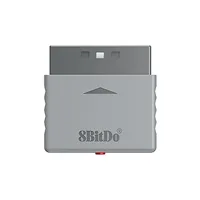
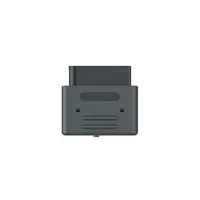
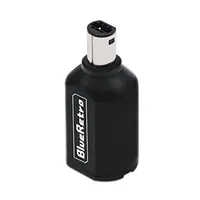
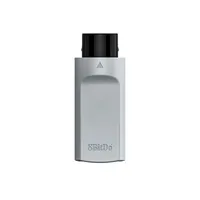
Old consoles naturally missed out on Bluetooth. Since quite a few of my best retro controller picks rely on the new-fangled wireless connectivity to hook up to systems, it's only right that I also include some of my go-to adapters and "retro receievers".
At the moment, these dongles are largely made by two accessory makers: 8Bitdo and Blueretro. I'm continually testing newcomers, but at the moment, these are the exact adapters I use to pair gamepads like the Gullikit Elves 2 Pro to retro consoles.
FAQ

What retro controller has zero stick drift?
If you're looking to prevent stick drift plaguing your classic gaming sessions, you'll want to grab a retro controller with either hall-effect joysticks or TMR (Tunnel magnetoresistance). Both types of stick effectively use magnets to detect positioning rather than using potentiometers and gimbals that make physical contact and grind down. While there's no guarantee your gamepads won't fail in different ways, you can rest assured that Mario won't start running off the edge of Tick Tock Clock due to those types of phantom inputs.
Do wireless retro controllers have inputs lag?
Yes, wireless retro controllers will introduce extra latency compared to wired gamepads. However, if you're using 2.4GHz connectivity, you're unlikely to feel the additional input lag since it equates to around 3-5 milliseconds. Even most Bluetooth pads are going to feel snappy enough, especially if you're a casual player, as those only introduce around 10 milliseconds. Whether or not you should stick with a cord comes down to if you're playing casually or need extremely tight frame accuracy for something like speed running , as while most players won't be able to tell the difference, there still is a difference.
Can I use retro controllers on modern PCs and consoles?
Believe it or not, you can plug original retro controllers into new consoles like the Switch 2 if you've got the right adapter. Button mapping and compatibility will vary between pads, but companies like Mayflash use USB adapters that support the likes of the Nintendo GameCube pad, but if you're looking for a seamless solution, your best bet is to pick up one of the best retro controllers with modern connectivity and compatibility with new-age systems via Bluetooth, 2.4GHz wireless, or USB-C.
Should I buy third-party controllers for retro consoles?
Many of the best retro controller remakes and alternatives made today aren't official. In fact, the only "first-party" pad on my top list is the Switch 2 GameCube controller, as the rest are by modern-day third-party accessory makers. While third parties like Mad Catz used come under fire for making subpar alternatives for the PS1, PS2, GameCube, Xbox, and many other systems, today's unofficial gadgets can boast extra perks and elevated build quality.
Looking to play on the go? Swing by the best gaming handhelds for portable PCs, emulation gadgets, and more.
