You are now subscribed
Your newsletter sign-up was successful
Want to add more newsletters?

Every Friday
GamesRadar+
Your weekly update on everything you could ever want to know about the games you already love, games we know you're going to love in the near future, and tales from the communities that surround them.

Every Thursday
GTA 6 O'clock
Our special GTA 6 newsletter, with breaking news, insider info, and rumor analysis from the award-winning GTA 6 O'clock experts.

Every Friday
Knowledge
From the creators of Edge: A weekly videogame industry newsletter with analysis from expert writers, guidance from professionals, and insight into what's on the horizon.

Every Thursday
The Setup
Hardware nerds unite, sign up to our free tech newsletter for a weekly digest of the hottest new tech, the latest gadgets on the test bench, and much more.

Every Wednesday
Switch 2 Spotlight
Sign up to our new Switch 2 newsletter, where we bring you the latest talking points on Nintendo's new console each week, bring you up to date on the news, and recommend what games to play.

Every Saturday
The Watchlist
Subscribe for a weekly digest of the movie and TV news that matters, direct to your inbox. From first-look trailers, interviews, reviews and explainers, we've got you covered.

Once a month
SFX
Get sneak previews, exclusive competitions and details of special events each month!
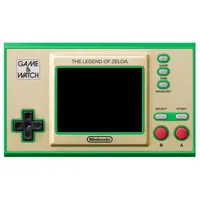
I've been waiting since 2021 to turn the Zelda Game and Watch into a best retro handheld contender, and there's finally a bunch of mods to make it happen. While enthusiasts have hacked the collectable portable in the past, this latest wave of hacks adds more memory and an SD card slot to help it emulate all the best retro consoles, all while still using Nintendo's innards.
In a new Zelda Game and Watch modding tutorial, YouTuber Macho Nacho Productions highlights exactly how to arm the collectable device with new abilities. The video kicks things off by running through what you'll actually need to enhance the handheld, but you'll naturally need to grab one at Amazon if you didn't pick it up five years ago.
Now, before you get too hyped to mod the Zelda handheld, you should know it involves surface-mount soldering a new memory chip and a ribbon cable for the new microSD card slot. On top of that, you'll have to pick up an EPOM programmer that connects via wires and swaps out the device's original firmware for homebrew software. That naturally comes with the risk of bricking your console if something goes wrong, but the process will back up the original software just in case.
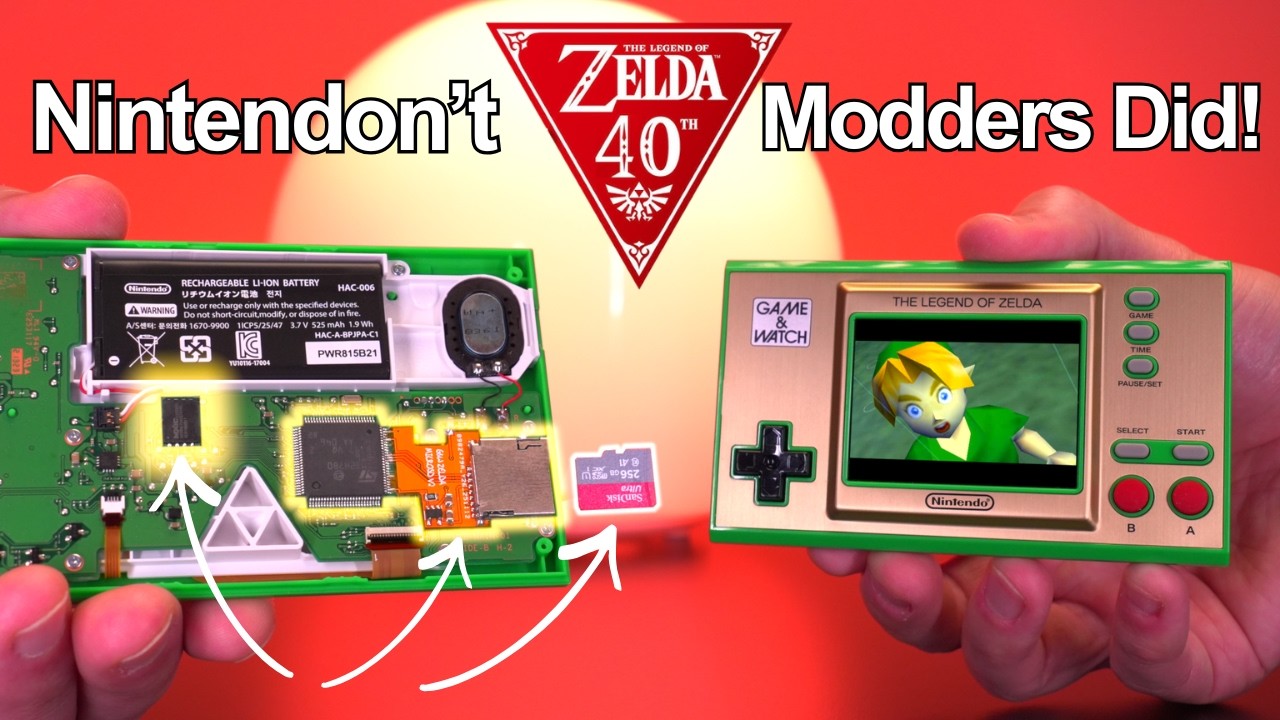
What I will say is that while reprogramming the chip using funky Python scripts to swap out firmware using connector pins sounds scary, the associated GitHub files for the required gnwmanager and SD card emulator software do come with instructions. If you take your time and use the YouTube video as a visual guide, the process shouldn't be too painful.
I'd also argue that replacing the 16MB memory chip with 64MB isn't as horrible as it sounds. In the tutorial, Macho Nacho uses tinfoil and Kapton tape to protect the board from damage while using a heat gun to lift the module, but you could also use a soldering iron, some flux, and copper wick to suck up the existing solder and reveal the circuit board's pads.
Macho Nacho does recommend trying to pick up a 64MB chip with longer legs that extend across the pads, since the chip in the video has connectors underneath. Other than that, though, flowing solder onto the joints doesn't look ridiculously challenging, but you will still need the usual steady hand and some patience, just like with the N64 HDMI mod I installed in my OG console.

As per the video, you'll be setting up the flashing software first then using it to unlock and backup the handheld's EPROM. That then means once you solder that new memory chip into place, you'll be ready to inject the custom software. I like the fact that you can check everything is working by reconnecting the LCD screen and powering on before moving on to installing the SD card slot.
The part I'm not so excited about is assembling the microSD ribbon cable, as you'll need to solder a bunch of tiny components to a flex PCB. Delicacy and temperature control are vital here, as it's easier than you'd think to destroy the pads. Just like that N64 mod I mentioned, it also attaches directly onto the legs of the handheld's CPU, so again, just take your time if you brave this mod.

This Zelda Game and Watch mod isn't beginner-friendly, but I wouldn't say it's impossible. On top of that, I'd say that the features also outweigh the effort in this case, too, as while you will be soldering and carving out a slot on your collectible handheld's case for that microSD card slot before buttoning it back together, it will end up being a pretty punchy emulation device.
Upon powering on the modded Game and Watch, it'll act exactly like a stock model. That means you're not losing the original four games or the clock functionality, but holding the Game button and left will throw you into a snazzy new "Retro Go" suite. The new UI includes a carousel-style library that'll provide access to a bunch of ROMs and console emulators, ranging from the Atari 2600 and Game Boy to the NES and Sega Genesis.
Elements like library box art and interface customization options are an instant nice touch, but the software also boasts full-fat emulation settings. This modded handheld puts some plug-and-play consoles to shame with scaling, filters, and speed tweaks, and you can even remap the start and select buttons so that you're not just stuck with two inputs.

This project is just outright impressive, especially since it transforms the Zelda Game and Watch into a tiny emulator with Nintendo's build quality. It's small enough that it challenges existing pocket-friendly options like the Anbernic RG28XX, all while boasting a superior screen and excellent buttons. Better still, its custom firmware is continually receiving support by its creator, Sylver, so even some of the minor drawbacks like slow library scrolling are eligible for a fix.
I am extremely keen to try out this mod for myself, as being able to load my library onto an SD card would help the handheld feel like the Game Boy Classic Edition that never was. If I do end up giving it a go, I'll let you know, but I'm too much of a woose to do it to my original, so I'll probably need to pick up a sacrificial handheld first.
Even if you're not into modding, I'd still check out the handheld itself, as while I've got 100 ways to play The Legend of Zelda, I'm still using the Game and Watch ahead of the 40th anniversary.
Looking for more ways to play on the go? Swing by the best gaming handhelds for portable PCs and more. If you've already got Valve's powerhouse, check out the best Steam Deck accessories and best Steam Deck docks to enhance your setup.

You must confirm your public display name before commenting
Please logout and then login again, you will then be prompted to enter your display name.