
 Join The Community





The Hello, Yoshi app is available to download for free from the Nintendo Switch eShop. The adorable game lets your kids (or you, I'm not judging) play around with Yoshi's face a la' Super Mario 64 style, manipulating his cute, green dinosaur features and springing them around the screen.
It's sickeningly cute. But before you go ahead and download it to your Nintendo Switch 2, I beg that you grab one of the best Nintendo Switch 2 accessories first, that being a handy dandy screen protector. The app involves using the handheld's touch screen to move around Yoshi's face, and the vision of kids pressing up their fingers on the bare 7.9-inch screen fills me with dread. Ensuring you have a screen protector in tow will help give your Switch 2 display an extra layer of defense and help lower my anxiety at the time. Your kids having fun with Yoshi should be the priority here, but when I see an opening to help protect your pricey Nintendo tech, I'm gonna take it.
I am not the target audience for Hello Yoshi, despite being a 30-something-year-old Super Mario fan. However, I did download the app to my own Switch 2 to see just how much touch-screen action it required, and it's a lot. Even after a few minutes' worth of stretching out Yoshi's face, I've already made plans to sit down and give my handheld's display some TLC with a microfibre cloth after work to ensure it's fingerprint-free.
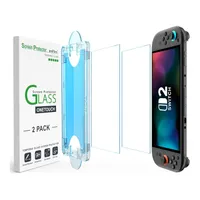
The buttons of the handheld aren't rendered totally useless, as using the directional face buttons will send a ripple through Yoshi's cute face. However, most of the interactivity involves touching the screen, and if you or your kids are too forceful, this could put your display at risk of damage. The best way to protect it is by grabbing a screen protector, like the AmFilm Auto-Alignment OneTouch Screen Protector available for $8.99 at Amazon, which includes two tempered glass sheets in the box.

If you're worried about messing up the application, the two sets of protectors mean you essentially have two goes at getting it right. The brand has also thrown in an installation tray to make it easier and as air-bubble-free as possible. You don't have to stick to this brand either, as there are plenty of screen protectors on the market right now. I'm currently rocking a Belkin TemperedGlass Anti-Reflective Screen Protector on my handheld, which is $24.99 at Amazon as of typing.
That's quite a large sum to spend on what is essentially an extra layer of protective glass, but I was fortunate enough to be sent one to test after the launch of the Switch 2 last year. I didn't manage to get it entirely free of air bubbles, but it's managed to keep my Switch 2's display free of wear and tear, even almost a year later.
When it comes to these screen protectors, ideally, you just want to ensure they're made of tempered glass. This is glass that's been reinforced by extra materials to prevent it from shattering, and as it's glass, you can see your lovely LCD Switch 2 display through it without issue. Well, so long as you don't accidentally get a cat hair stuck underneath it - I've been there before.

Most screen protectors will be made of tempered glass. My recommendation is also to ensure you grab a set, as it means if anything were to happen to it, you have another that you can quickly swap in its place. What you want to avoid is any of those 'screen protectors' that are essentially just stickers to place over your handheld screen.
The official Nintendo Carrying Case for the Switch 2 came with one of those, and I was pretty gobsmacked. That's not going to do much to reinforce your display and give it any extra protection. The screen already has a built-in plastic film layer to keep the glass in its place, should anything happen to the original screen underneath. So adding an extra sticker on top is pretty pointless.
Whatever brand you grab, just promise me you'll try and grab one before unveiling the adorable-ness that is the Hello Yoshi app to your kids. I love the idea of a new generation being introduced to not just Yoshi, but the fun of prodding and manipulating a Super Mario character's face. What I don't love is the idea of putting your pricey handheld's screen in danger of cracking like a Yoshi egg.
- View all Nintendo Switch 2 screen protectors at Amazon
Our team has also rounded up the best Nintendo Switch 2 controllers, the best Nintendo Switch headsets, and the best Nintendo Switch 2 microSD Express Cards that can complete your new Ninty gaming setup.

