

Join The Community
- Join our community
11
Premium Benefits
24/7
Access Available
21K+
Active Members
Commenting
Join the discussion
Exclusive Articles Coming Soon
Member-only articles
Weekly Newsletters
Weekly gaming & entertainment news
Member Badges
Earn badges as you go
Exclusive Competitions
Members-only prize draws
Curated Deals Coming Soon
Tech and gaming deals worth grabbing
GET COMMUNITY ACCESS QUICK
For the quickest way to join, simply enter your email below and get access. We will send a confirmation and sign you up to our newsletter to keep you updated on all your gaming news.
By submitting your information you agree to the Terms & Conditions and Privacy Policy and are aged 16 or over.
FIND OUT ABOUT OUR MAGAZINE
Want to subscribe to the magazine? Click the button below to find out more information.
Find out more
GET Community ACCESS QUICK

Join the GamesRadar community for quick access. Enter your email below and we'll send confirmation, and sign you up to our newsletter.

By submitting your information, you confirm you are aged 16 or over, have read our Privacy Policy and agree to the Terms & Conditions. Geographical rules apply.

Background
Welcome to GamesRADAR+ Community !
Hi ,

Your membership journey starts here.

Keep exploring and earning more as a member.

MY ACCOUNT

Badge picture
Earn your first badge
Read 1 article to unlock your first badge.
Keep earning badges
Explore ways to get more involved as a member.
Latest Games News

Latest Games News

Breaking gaming news and updates

Read Now
Latest Games Reviews

Latest Games Reviews

Expert verdicts on the newest releases

Read Now

See what you’ve unlocked.

Explore your membership benefits.

Explore
Member Exclusives

Stay Ahead with GamesRadar+

Get the biggest gaming news, reviews, and releases straight to your inbox.

Explore

Sign Out
GamesRadar+ GamesRadar+
US EditionUS CA EditionCanada UK EditionUK AU EditionAustralia
Sign in
  • View Profile
  • Sign out
  • Games
    • Game Insights
      • Games News
      • Games Features
      • Games Reviews
      • Games Guides
      • Big in 2026
      • Big Preview
      • Future Games Show
      • Golden Joystick Awards
    • Genres
      • Action Games
      • RPGs
      • Action RPGs
      • Adventure Games
      • Third Person Shooters
      • FPS Games
    • Platforms
      • PS5
      • Xbox Series X
      • PC
      • Nintendo Switch
      • Nintendo Switch 2
      • Tabletop Gaming
    • Franchises
      • Grand Theft Auto
      • Pokemon
      • Assassin's Creed
      • Monster Hunter
      • Fortnite
      • Cyberpunk
      • Red Dead
      • The Elder Scrolls
      • The Sims
  • Entertainment
    • TV Shows
      • TV News
      • TV Reviews
      • Anime Shows
      • Sci-Fi Shows
      • Superhero Shows
      • Animated Shows
      • Marvel TV Shows
      • Star Wars TV Shows
      • DC TV Shows
    • Movies
      • Movie News
      • Movie Reviews
      • Big Screen Spotlight
      • Superhero Movies
      • Action Movies
      • Anime Movies
      • Sci-Fi Movies
      • Horror Movies
      • Marvel Movies
      • DC Movies
    • Streaming
      • Apple TV Plus
      • Disney Plus
      • Netflix
      • HBO
      • Amazon Prime Video
      • Hulu
    • Comics
      • Marvel Comics
      • DC Comics
  • Hardware
    • Insights
      • Hardware News
      • Hardware Reviews
      • Hardware Features
      • Buying Guides
    • Computing
      • Desktop PCs
      • Laptops
      • Handhelds
    • Peripherals
      • Headsets & Headphones
      • TVs & Monitors
      • Gaming Mice
      • Gaming Keyboards
      • Gaming Chairs
      • Speakers & Audio
    • Accessories & Tech
      • Gaming Controllers
      • Tech
      • SSDs & Hard Drives
      • VR
      • Accessories
      • Retro
  • Deals
    • Toys & Collectibles
    • Lego
    • Dungeons and Dragons
    • Merch
  • Video
    • Video
    • GR+ Replay - Submit Your Clips
  • Newsletters
    • Quizzes
    • About Us
    • How to pitch to us
    • How we score
    • Newsarama
    • Retro Gamer
  • Home
  • Games
    • View Games
      • Games News
      • Games Features
      • Games Reviews
      • Games Guides
      • Big in 2026
      • Big Preview
      • Future Games Show
      • Golden Joystick Awards
      • Action Games
      • RPGs
      • Action RPGs
      • Adventure Games
      • Third Person Shooters
      • FPS Games
    • Platforms
      • View Platforms
      • PS5
      • Xbox Series X
      • PC
      • Nintendo Switch
      • Nintendo Switch 2
      • Tabletop Gaming
      • Grand Theft Auto
      • Pokemon
      • Assassin's Creed
      • Monster Hunter
      • Fortnite
      • Cyberpunk
      • Red Dead
      • The Elder Scrolls
      • The Sims
  • Entertainment
    • View Entertainment
    • TV Shows
      • View TV Shows
      • TV News
      • TV Reviews
      • Anime Shows
      • Sci-Fi Shows
      • Superhero Shows
      • Animated Shows
      • Marvel TV Shows
      • Star Wars TV Shows
      • DC TV Shows
    • Movies
      • View Movies
      • Movie News
      • Movie Reviews
      • Big Screen Spotlight
      • Superhero Movies
      • Action Movies
      • Anime Movies
      • Sci-Fi Movies
      • Horror Movies
      • Marvel Movies
      • DC Movies
    • Streaming
      • View Streaming
      • Apple TV Plus
      • Disney Plus
      • Netflix
      • HBO
      • Amazon Prime Video
      • Hulu
    • Comics
      • View Comics
      • Marvel Comics
      • DC Comics
  • Hardware
    • View Hardware
      • Hardware News
      • Hardware Reviews
      • Hardware Features
      • Buying Guides
      • Desktop PCs
      • Laptops
      • Handhelds
    • Peripherals
      • View Peripherals
      • Headsets & Headphones
      • TVs & Monitors
      • Gaming Mice
      • Gaming Keyboards
      • Gaming Chairs
      • Speakers & Audio
      • Gaming Controllers
      • Tech
      • SSDs & Hard Drives
      • VR
      • Accessories
      • Retro
  • Deals
    • Toys & Collectibles
    • Lego
    • Dungeons and Dragons
    • Merch
  • Video
    • View Video
    • Video
    • GR+ Replay - Submit Your Clips
  • Newsletters
    • Quizzes
    • About Us
    • How to pitch to us
    • How we score
    • Newsarama
    • Retro Gamer
Trending
  • Summer Preview
  • Prime Day deals
  • New Games 2026
  • Best gaming tech
  • GTA 6
  • Submit your clips. Win prizes
  1. Platforms
  2. Nintendo
  3. Nintendo Switch
  4. Animal Crossing: New Horizons
Supported

How to host an Animal Crossing: New Horizons fashion show

Guides
By Alysia Judge published 17 August 2020

Strut your stuff and show off your sense of style by hosting your own New Horizons fashion show

When you purchase through links on our site, we may earn an affiliate commission. Here’s how it works.

(Image credit: Nintendo)

GamesRadar created this content as part of a paid partnership with Nintendo. The contents of this article are entirely independent and solely reflect the editorial opinion of GamesRadar.

Animal Crossing: New Horizons is officially in the pages of Vogue, so by deduction  you’re one of the most fashionable people on the planet by playing it. Yeah! Work it! Queen! Ooo! A fashionista like you deserves to strut their stuff, so here are some tips to create your very own catwalk to create your own Animal Crossing: New Horizons fashion show.  

Watch the whole video below for our fashion show creation:

1. Find a location and decide your look

(Image credit: Nintendo)

You’re going to need find a patch of island that’s long and thin. It looks better if you build your catwalk vertically, because models will walk towards the camera rather than across it. 

Think about what aesthetic you want: Modern, cute, goth… there are many options! Find flooring that matches your vibe either through the creator terminal, or design it yourself  - in this case, we’re going retro. We’re going to build a backstage area using panels, so let’s customise them with a purple and black design to fit with the neon theme. 

Fashion shows are glitzy affairs with lots of lights and glamour. The floor light casts a dramatic shine into the air, and the studio spotlights add that photoshoot feel. Once they’re in your catalogue, buy any extra you need in the Nook terminal - though remember you can only order five bits of furniture a day. 

2. Start building
(Image credit: Nintendo)

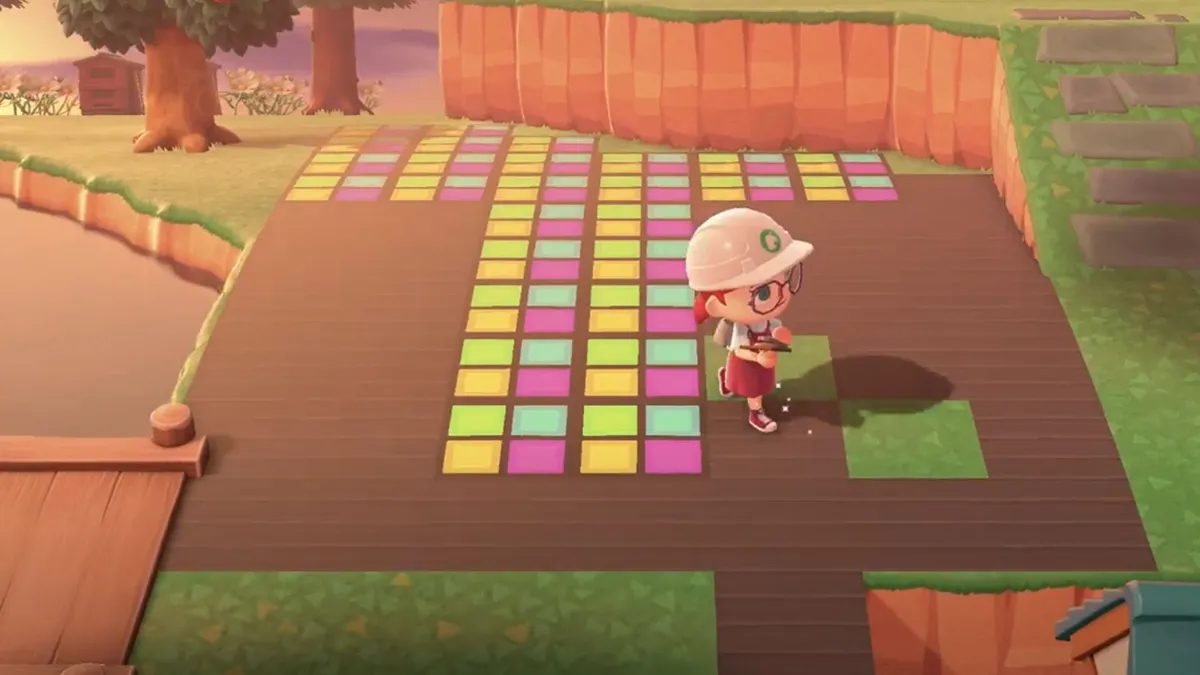
Once you have all your pieces, you can get started! Begin by plotting out the runway in a T shape. Those wings at the top are going to play host to the backstage area. Place some dark wooden flooring for that studio feel, and set up the panels we made earlier to section off the catwalk. 

Flanking the runway with floor lights creates a stylish atmosphere with their upward beams. Meanwhile, place the studio spotlights behind the runway chairs and set up your camera at the end of the runway. A little backstage changing room with a mirror is a nifty touch, so models can change their hair between looks. You can set up some mannequins too to really give it a fashion feel; in Animal Crossing if you drop a dress other islanders can pick it up, but if you place it, it becomes a beautiful decoration.

3. Have a wand

(Image credit: Nintendo)

One quick thing to note is that now is a great time to get a wand if you haven’t already. At some point, Celeste will appear on your island during a meteor shower and give you a recipe to make one. Once you’ve crafted it, you can equip it like a tool and store up to eight outfits that you can change into on the go. It’s every fashion lover’s dream, and pretty vital for quick changes at a fashion show!

4. Invite your designers

(Image credit: Nintendo)

Now to send out the hottest invites in town! Head to the airport and speak to Orville to send a letter. Let your guests know when the show is, and what clothes they need to bring… then all that’s left to do is wait! 

5.  Show time! 

(Image credit: Nintendo)

You can theme your runway however you want, but here’s an idea: Give your guests three outfit themes to show off. We chose “I could wear this in real life,” “Got dressed in the dark,” and “Lookin’ a million bells”. As each model walks down the runway, set up your camera at the end to snap pictures and broadcast the outfits for the world to see. We even had a Tom Nook cosplay for the “Lookin' a million Bells” theme. 

So there you have it, our top tips for creating your own Animal Crossing: New Horizons fashion show. Stunning! Inspired! Effervescent!  

Sign up to the GamesRadar+ Newsletter

Weekly digests, tales from the communities you love, and more

By submitting your information you agree to the Terms & Conditions and Privacy Policy and are aged 16 or over.
Alysia Judge
Alysia Judge
Social Links Navigation
Freelance Writer and Presenter
LATEST ARTICLES
  1. Gray bearded man speaks
    1
    Ubisoft says Assassin's Creed Shadows' story didn't land "as we hoped," final update to fix it
  2. 2
    House of the Dragon season 3 release schedule: what time is episode 1 on HBO Max and NOW TV?
  3. 3
    EU rules against Stop Killing Games, but after a 2-year campaign founder insists change is coming
  4. 4
    How to complete the Arc Raiders Forgotten Relics event
  5. 5
    Solo dev hopes to "beat the real GTA 6 to launch" with their own, AI-fueled version

GamesRadar+ is part of Future US Inc, an international media group and leading digital publisher. Visit our corporate site.

Add as a preferred source on Google Add as a preferred source on Google
  • Terms and conditions
  • Contact Future's experts
  • Privacy policy
  • Cookies policy
  • Accessibility statement
  • Careers
  • About us
  • Advertise with us
  • Review guidelines
  • Write for us

© Future US, Inc. Full 7th Floor, 130 West 42nd Street, New York, NY 10036.

Please login or signup to comment

Please wait...