
GamesRadar+ GamesRadar+
US EditionUS CA EditionCanada UK EditionUK AU EditionAustralia
Sign in
  • View Profile
  • Sign out
  • Games
    • Game Insights
      • Games News
      • Games Features
      • Games Reviews
      • Games Guides
      • Big in 2026
      • The Big Preview
      • On The Radar
      • Indie Spotlight
      • Future Games Show
      • Golden Joystick Awards
    • Genres
      • Action Games
      • RPGs
      • Action RPGs
      • Adventure Games
      • Third Person Shooters
      • FPS Games
    • Platforms
      • PS5
      • Xbox Series X
      • PC
      • Nintendo Switch
      • Nintendo Switch 2
      • Tabletop Gaming
    • Franchises
      • Grand Theft Auto
      • Pokemon
      • Assassin's Creed
      • Monster Hunter
      • Fortnite
      • Cyberpunk
      • Red Dead
      • The Elder Scrolls
      • The Sims
  • Entertainment
    • TV Shows
      • TV News
      • TV Reviews
      • Anime Shows
      • Sci-Fi Shows
      • Superhero Shows
      • Animated Shows
      • Marvel TV Shows
      • Star Wars TV Shows
      • DC TV Shows
    • Movies
      • Movie News
      • Movie Reviews
      • Big Screen Spotlight
      • Superhero Movies
      • Action Movies
      • Anime Movies
      • Sci-Fi Movies
      • Horror Movies
      • Marvel Movies
      • DC Movies
    • Streaming
      • Apple TV Plus
      • Disney Plus
      • Netflix
      • HBO
      • Amazon Prime Video
      • Hulu
    • Comics
      • Marvel Comics
      • DC Comics
    • Toys & Collectibles
    • Lego
    • Dungeons and Dragons
    • Merch
  • Hardware
    • Insights
      • Hardware News
      • Hardware Reviews
      • Hardware Features
    • Computing
      • Desktop PCs
      • Laptops
      • Handhelds
    • Peripherals
      • Headsets & Headphones
      • TVs & Monitors
      • Gaming Mice
      • Gaming Keyboards
      • Gaming Chairs
      • Speakers & Audio
    • Accessories & Tech
      • Gaming Controllers
      • Tech
      • SSDs & Hard Drives
      • VR
      • Accessories
      • Retro
  • Deals
    • Game Deals
    • Tech Deals
    • TV Deals
    • Buying Guides
  • Video
  • Newsletters
    • Quizzes
    • About Us
    • How to pitch to us
    • How we score
    • Newsarama
    • Retro Gamer
    • Total Film
  • home
  • Games
    • View Games
      • Games News
      • Games Features
      • Games Reviews
      • Games Guides
      • Big in 2026
      • The Big Preview
      • On The Radar
      • Indie Spotlight
      • Future Games Show
      • Golden Joystick Awards
      • Action Games
      • RPGs
      • Action RPGs
      • Adventure Games
      • Third Person Shooters
      • FPS Games
    • Platforms
      • View Platforms
      • PS5
      • Xbox Series X
      • PC
      • Nintendo Switch
      • Nintendo Switch 2
      • Tabletop Gaming
      • Grand Theft Auto
      • Pokemon
      • Assassin's Creed
      • Monster Hunter
      • Fortnite
      • Cyberpunk
      • Red Dead
      • The Elder Scrolls
      • The Sims
  • Entertainment
    • View Entertainment
    • TV Shows
      • View TV Shows
      • TV News
      • TV Reviews
      • Anime Shows
      • Sci-Fi Shows
      • Superhero Shows
      • Animated Shows
      • Marvel TV Shows
      • Star Wars TV Shows
      • DC TV Shows
    • Movies
      • View Movies
      • Movie News
      • Movie Reviews
      • Big Screen Spotlight
      • Superhero Movies
      • Action Movies
      • Anime Movies
      • Sci-Fi Movies
      • Horror Movies
      • Marvel Movies
      • DC Movies
    • Streaming
      • View Streaming
      • Apple TV Plus
      • Disney Plus
      • Netflix
      • HBO
      • Amazon Prime Video
      • Hulu
    • Comics
      • View Comics
      • Marvel Comics
      • DC Comics
    • Toys & Collectibles
    • Lego
    • Dungeons and Dragons
    • Merch
  • Hardware
    • View Hardware
      • Hardware News
      • Hardware Reviews
      • Hardware Features
      • Desktop PCs
      • Laptops
      • Handhelds
    • Peripherals
      • View Peripherals
      • Headsets & Headphones
      • TVs & Monitors
      • Gaming Mice
      • Gaming Keyboards
      • Gaming Chairs
      • Speakers & Audio
      • Gaming Controllers
      • Tech
      • SSDs & Hard Drives
      • VR
      • Accessories
      • Retro
  • Deals
    • View Deals
    • Game Deals
    • Tech Deals
    • TV Deals
    • Buying Guides
  • Video
  • Newsletters
    • Quizzes
    • About Us
    • How to pitch to us
    • How we score
    • Newsarama
    • Retro Gamer
    • Total Film
Trending
  • Pokemon Winds and Waves
  • New Games for 2026
  • GamesRadar+ Replay
  • Mario Day deals
  1. Hardware

What is XMP and how do you enable it?

Features
By Duncan Robertson published 20 June 2023

Let's get the RAM speed you paid for

When you purchase through links on our site, we may earn an affiliate commission. Here’s how it works.

XMP and AMD Expo sticker on a DDR5 RAM box
(Image credit: Future / Duncan Robertson)
Jump to:
  • How to enable XMP
  • Does XMP improve gaming performance?
  • Today's best DDR5 RAM deals
  • Facebook
  • X
  • Pinterest
  • Flipboard
  • Email
Share this article
Join the conversation
Follow us
Add us as a preferred source on Google
Get the GamesRadar+ Newsletter

Weekly digests, tales from the communities you love, and more


By submitting your information you agree to the Terms & Conditions and Privacy Policy and are aged 16 or over.

You are now subscribed

Your newsletter sign-up was successful


Want to add more newsletters?

GamesRadar+

Every Friday

GamesRadar+

Your weekly update on everything you could ever want to know about the games you already love, games we know you're going to love in the near future, and tales from the communities that surround them.

GTA 6 O'clock

Every Thursday

GTA 6 O'clock

Our special GTA 6 newsletter, with breaking news, insider info, and rumor analysis from the award-winning GTA 6 O'clock experts.

Knowledge

Every Friday

Knowledge

From the creators of Edge: A weekly videogame industry newsletter with analysis from expert writers, guidance from professionals, and insight into what's on the horizon.

The Setup

Every Thursday

The Setup

Hardware nerds unite, sign up to our free tech newsletter for a weekly digest of the hottest new tech, the latest gadgets on the test bench, and much more.

Switch 2 Spotlight

Every Wednesday

Switch 2 Spotlight

Sign up to our new Switch 2 newsletter, where we bring you the latest talking points on Nintendo's new console each week, bring you up to date on the news, and recommend what games to play.

The Watchlist

Every Saturday

The Watchlist

Subscribe for a weekly digest of the movie and TV news that matters, direct to your inbox. From first-look trailers, interviews, reviews and explainers, we've got you covered.

SFX

Once a month

SFX

Get sneak previews, exclusive competitions and details of special events each month!


An account already exists for this email address, please log in.
Subscribe to our newsletter

If you've recently bought yourself a shiny new DDR5 memory kit for your gaming PC, you might be asking yourself: "What is XMP?" This question comes up a lot with DDR5 RAM because although it's quoted to get blistering clock speeds on the packaging and in benchmark tests, the out-of-the-box speed you get when you first install it won't be anywhere near what's advertised.

It doesn't make much sense that the best RAM for gaming should run slower out-of-the-box than some high-ranking DDR4 kits, and this is often the case if you head into your task manager and look at the performance of your memory. So, in order to get the most out of your gaming PC, you'll need to use either XMP profiles (for Intel builds), or AMD EXPO for AMD builds.

But why, I hear you ask. Well, DDR5 memory is insanely fast, so much so that even DDR5-compatible CPUs struggle to keep up with it sometimes. If your RAM runs faster than your CPU's clock speed, it can give your computer a lot of trouble, and as we saw with our PNY XLR8 DDR5 RAM review, it can sometimes mean you need to completely reset your CMOS. So, out of the box, DDR5 RAM is set to run slower so that it doesn't immediately break your other components. It's annoying, but it does make sense.

But until recently, changing RAM speeds could be a stressful affair - you might have had to mess around making overclocking profiles before, which is a massive faff, and can easily go wrong. So, Intel and AMD created one-stop shops for overclocking RAM so that folks can get the highest speeds a lot easier. That's where XMP and EXPO come in, as XMP is actually a pseudo-acronym that means Extreme Memory Profile.

These make overclocking easy and can be accessed in your computer's BIOS. (for those who aren't that savvy with PC terminology, a BIOS is your motherboard's hardwired software menu that allows you to control vital parts of your PC underneath the Windows or operating system level.  

How to enable XMP

Gigabyte BIOS menu on a Philips 27-inch monitor

(Image credit: Future / Duncan Robertson)

The words "overclocking" and "BIOS" are enough to strike fear into the hearts of any gamer who isn't well-versed in PC hardware. Rest assured, this really isn't anything to worry about, and as long as you work within your CPU's capabilities, there won't be any problems. 

First, go to your Windows menu and restart your PC. As it reboots, repeatedly tap or hold the Delete key, or whatever key kickstarts your BIOS menu (if you're unsure, check your motherboard's manual, or do a quick Google search.

Sign up to the GamesRadar+ Newsletter

Weekly digests, tales from the communities you love, and more

By submitting your information you agree to the Terms & Conditions and Privacy Policy and are aged 16 or over.

That should bring you to your motherboard's main menu. Each menu will vary depending on the manufacturer, but most are consistent in that they have an "easy" mode and an "advanced" mode. Sometimes you can find XMP profiles in "easy", but we'd recommend going into the more in-depth menu so you can have more control.

Gigabyte BIOS menu tweaker

(Image credit: Future / Duncan Robertson)

 Then, you'll want to go to your BIOS's "tweaker", or memory section. First of all, you'll want to make sure that your BIOS has recognized the RAM you're using. If only one stick is showing and you're using two, this might be a sign that you haven't seated a memory stick properly. Motherboards often recognize what type of memory you're using, ie, a "Hynix" memory profile for example. If you want to be doubly sure it's recognized correctly, your RAM's packaging should tell you, or you can do another quick Google search. Most of the time, it'll recognise the format of memory and won't let you change it.

XMP setting highlighted in a Gigabye BIOS

(Image credit: Future / Duncan Robertson)

After that, you should see a section that says "enable XMP", or similar. There should also be a drop-down menu where you can choose your specific XMP profile. These come onboard the memory sticks themselves.

Sometimes there will be one catch-all memory profile and other times there will be three different ones. Choose the one that's best for your CPU, and then ensure that the RAM speed drop-down (which is likely the next menu setting down) is set to the speed that's advertised on the box. 

XMP and AMD Expo options in a Gigabyte BIOS

(Image credit: Future / Duncan Robertson)

If you'd like to push the RAM even higher than the advertised speeds, this is mostly ok. You will be properly overclocking, but if your CPU can handle faster speeds, there's no reason not to give it a go. We'd always recommend bumping up in smaller increments to be safe.

DDR5 RAM speed selector setting in a Gigabye BIOS menu

(Image credit: Future / Duncan Robertson)

I enabled XMP/AMD EXPO and my PC won't boot - what do I do?

First of all, don't panic. What's most likely, is that you've set your RAM speed to high for your processor, and now the RAM is trained through the BIOS to boot faster than it should.

The way you can tell if this is actually the case is by taking a look inside your PC when you try to boot it. There should be a cluster of four LEDs that have some writing on them. If the ones saying CPU or RAM are blinking or are on, this is likely what's happened.

Most modern motherboards now have a very handy reset CMOS button on them, and this is easily accessible where the rest of your connection ports are - usually on the back of your PC. If you press this button, and follow the instructions in your motherboard's manual with the specifics of how to use it, it should reset all of the BIOS settings you have, and you'll be able to start the XMP enabling process again. 

In the event that your motherboard does not have a reset CMOS button, you'll need to follow your manual's best practices. Often, this requires you to drain any remaining power in your PC by depressing the power button for a few seconds while the power switch is off and your computer is unplugged. You'll also want to touch something metal to take away any static electricity and find a metal pin, paper clip, or even a screwdriver. 

Again, your motherboard's manual will have specific instructions you should follow, but you need to find two pins on your mobo labeled "CMOS", and connect these pins through contact with one metal object. After holding for a few seconds, this should reset the CMOS, and you'll be able to boot your PC back to the BIOS again. 

Does XMP improve gaming performance?
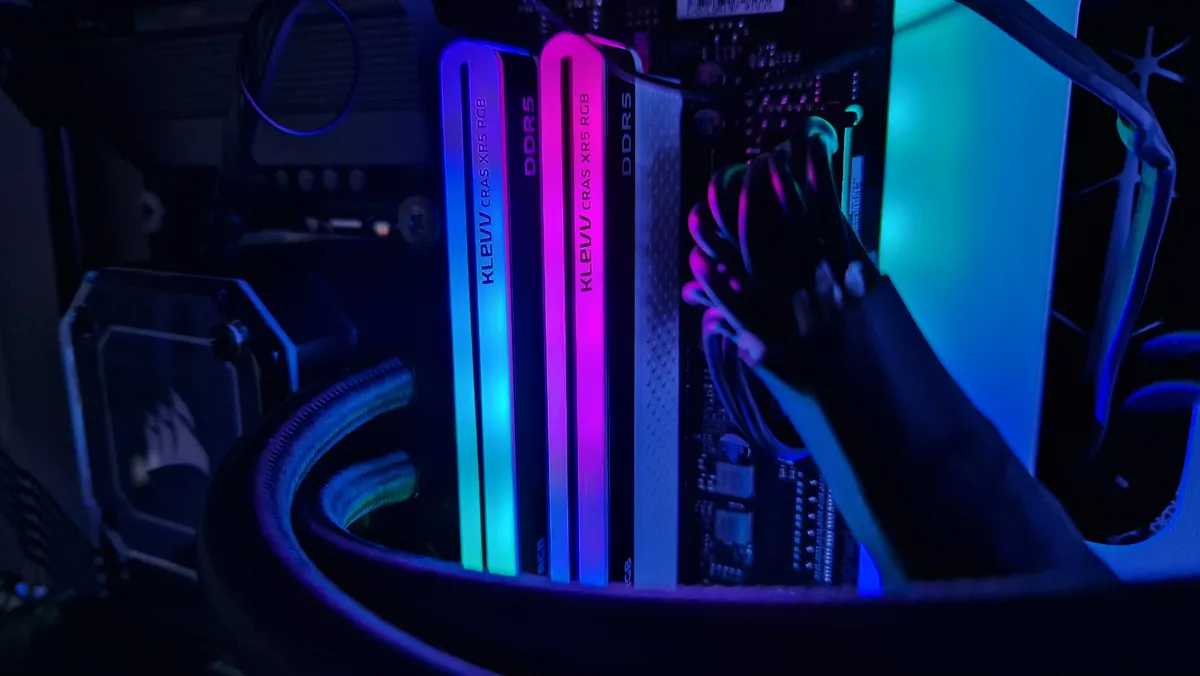
Klevv Cras XR5 RGB DDR5 RAM with blue and pink RGB lighting while installed in a gaming PC

(Image credit: Future / Duncan Robertson)

It's long been stated that RAM speeds don't have an impact on in-game performance. That is certainly the case with older generations of RAM that can't get up to fast enough clock speeds to make a genuine difference. However, with newer-gen processors, SSDs, and DDR5 RAM, there is a noticeable difference in in-game performance when you enable XMP profiles.

Time and time again with our DDR5 RAM reviews, we've found that DDR5 RAM can make a difference to in-game performance. It won't be a massive difference in terms of frames per second, but for folks who want to squeeze every drop of performance out of their rigs, XMP can get you up to 15fps more in certain games. 

In particular, we've seen that DDR5 can help take the strain off of a lesser GPU and CPU, if the motherboard is compatible, of course. So for example, until recently, our testing PC was rocking a 12th Gen Intel Core I7-12700K processor, and its steady stand-in GPU is an RTX 3050. 1080p and 1440p is where the RTX 3050 is most comfortable, but higher frame rates in 1440p might mean you turning down one-too-many settings than is comfortable. We've found that enabling XMP profiles can (albeit slightly) help to take the strain off the GPU when trying to play games at higher resolutions. 

Let's reiterate again, this isn't a massive change that you'll necessarily even notice. But we've found that overall, after enabling XMP profiles and tuning RAM speeds, that frame rates in our benchmarking games are more stable, a bit higher, and allow us to turn up a few more in-game settings. 

Sabrent Rocket DDR5 RAM Review image showing 2 modules, one on top of the other on a desk

(Image credit: Future / Duncan Robertson)

Today's best DDR5 RAM deals

We've used our price comparison software to bring you the best prices on DDR5 RAM in the window below. Armed with the knowledge of XMP, you're more than ready to jump into the DDR5 world yourself. Take a look below if you're still shopping around:

Today's best DDR5 RAM deals
Klevv Cras XR5 RGB DDR5
Amazon
$115.99
View
See all prices
We check over 250 million products every day for the best prices

Why not refresh other parts of your PC setup? Take a look at the best gaming mouse, the best gaming keyboard, and the best gaming mouse pad.

Duncan Robertson
Duncan Robertson
Social Links Navigation
Hardware Editor

One of my earliest memories is playing SuperMario64 and wondering why the controller I held had three grips, but I only had two hands. Ever since I've been in love with video games and their technology. After graduating from Edinburgh Napier University with a degree in Journalism, I contributed to the Scottish Games Network and completed an Editorial Internship at Expert Reviews. Over the last decade, I’ve been managing my own YouTube channel about my love of games too. These days, I'm one of the resident hardware nerds at GamesRadar+, and I take the lead on our coverage of gaming PCs, VR, controllers, gaming chairs, and content creation gear. Now, I better stop myself here before I get talking about my favourite games like HUNT: Showdown, Dishonored, and Towerfall Ascension.

Latest in Hardware
A Corsair marketing image for its Vengeance RGB DDR5 with a "big savings" deal stamp crossed out in front of it
Corsair is running a RAM "sale" right now, so if you want 25% off a 300% markup, it's the place to be
 
 
Underside of Alienware 16 Area-51 gaming laptop with glass viewing window and RGB fans
We could get a shock when 2026 gaming laptop prices are unveiled, here's what you need to know about buying this year
 
 
Photo of the Asus TUF Gaming Hatsune Miku collection sitting on a white desk.
I'm still using the Hatsune Miku Asus TUF Gaming collection this Miku Day, and that's never going to change
 
 
Image of the Hori Princess Rosalina Switch 2 controller on a wooden table.
Move over Mario, this Rosalina Switch 2 controller is so stellar that it deserves its own day too
 
 
Original NES console next to Sony CRT PVM with Mega Man 2 intro on screen.
After years of torturing myself over NES color accuracy, it turns out there is no consensus for how the retro console should look
 
 
Official marketing image showing the ROG Cetra Open earbuds sitting on a table with its case and wireless dongle.
First revealed at CES, Asus's first open-back ROG Cetra earbuds are finally available in the US
 
 
Latest in Features
In Hitman World of Assassination, Agent 47 sits at the departure gate in an airport during the loading screen
After weeks spent locked into Hitman's Freelancer mode, I realize there's one vital thing 007 First Light needs to learn
 
 
Glen Powell as Becket in How to Make a Killing
How to Make a Killing is Glen Powell's latest mid-budget movie, and I hope he never stops making them
 
 
Jensen Huang next to AI robot on stage at GTC 2024
Nvidia's CEO says "we created the modern video game industry," but all its push into AI upscaling has done is destroy good game optimization
 
 
Cillian Murphy as Tommy Shelby walking in Peaky Blinders: The Immortal Man
Peaky Blinders: The Immortal Man ending explained: does Tommy Shelby die and will there be a new season?
 
 
Lana and Mui run through a wooden marketplace on stilts above a gorgeous blue ocean in Planet of Lana 2, with the Indie Spotlight branded GamesRadar+ badge in the corner
Playing as my alien cat buddy makes this gorgeous puzzle platformer feel like a co-op adventure even when I'm alone
 
 
Leon Kennedy wears a serious expression as he looks out in Resident Evil Requiem. GamesRadar+'s On the Radar banner surrounds the image, with impact written in the top left-hand corner
Resident Evil Requiem is building two futures at once, and I have a couple guesses as to what the next remake might be
 
 
LATEST ARTICLES
  1. Pickmon
    1
    Pokemon and Palworld clones are officially out of hand, as fans react to "lawsuitmaxxing" new game Pickmon and its "straight up rip-offs" of iconic 'mons like Charizard
  2. 2
    After years of torturing myself over NES color accuracy, it turns out there is no consensus for how the retro console should look
  3. 3
    Kinda sounds like Elijah Wood WILL be in Lord of the Rings: The Hunt for Gollum, as he admits he "wouldn't want anybody else to play Frodo"
  4. 4
    Resident Evil Requiem Grace actor says Capcom wanted more "cinematic performances" to keep pace with the devs "leveling up" the technical side of the horror game
  5. 5
    How many areas there are in Pokemon Pokopia?

GamesRadar+ is part of Future US Inc, an international media group and leading digital publisher. Visit our corporate site.

Add as a preferred source on Google Add as a preferred source on Google
  • Terms and conditions
  • Contact Future's experts
  • Privacy policy
  • Cookies policy
  • Accessibility statement
  • Careers
  • About us
  • Advertise with us
  • Review guidelines
  • Write for us
  • Accessibility Statement

© Future US, Inc. Full 7th Floor, 130 West 42nd Street, New York, NY 10036.

Please login or signup to comment

Please wait...