GamesRadar+ GamesRadar+
US EditionUS CA EditionCanada UK EditionUK AU EditionAustralia
Sign in
  • View Profile
  • Sign out
  • Games
    • Game Insights
      • Games News
      • Games Features
      • Games Reviews
      • Games Guides
      • Big in 2026
      • The Big Preview
      • On The Radar
      • Indie Spotlight
      • Future Games Show
      • Golden Joystick Awards
    • Genres
      • Action Games
      • RPGs
      • Action RPGs
      • Adventure Games
      • Third Person Shooters
      • FPS Games
    • Platforms
      • PS5
      • Xbox Series X
      • PC
      • Nintendo Switch
      • Nintendo Switch 2
      • Tabletop Gaming
    • Franchises
      • Grand Theft Auto
      • Pokemon
      • Assassin's Creed
      • Monster Hunter
      • Fortnite
      • Cyberpunk
      • Red Dead
      • The Elder Scrolls
      • The Sims
  • Entertainment
    • TV Shows
      • TV News
      • TV Reviews
      • Anime Shows
      • Sci-Fi Shows
      • Superhero Shows
      • Animated Shows
      • Marvel TV Shows
      • Star Wars TV Shows
      • DC TV Shows
    • Movies
      • Movie News
      • Movie Reviews
      • Big Screen Spotlight
      • Superhero Movies
      • Action Movies
      • Anime Movies
      • Sci-Fi Movies
      • Horror Movies
      • Marvel Movies
      • DC Movies
    • Streaming
      • Apple TV Plus
      • Disney Plus
      • Netflix
      • HBO
      • Amazon Prime Video
      • Hulu
    • Comics
      • Marvel Comics
      • DC Comics
    • Toys & Collectibles
    • Lego
    • Dungeons and Dragons
    • Merch
  • Hardware
    • Insights
      • Hardware News
      • Hardware Reviews
      • Hardware Features
    • Computing
      • Desktop PCs
      • Laptops
      • Handhelds
    • Peripherals
      • Headsets & Headphones
      • TVs & Monitors
      • Gaming Mice
      • Gaming Keyboards
      • Gaming Chairs
      • Speakers & Audio
    • Accessories & Tech
      • Gaming Controllers
      • Tech
      • SSDs & Hard Drives
      • VR
      • Accessories
      • Retro
  • Deals
    • Game Deals
    • Tech Deals
    • TV Deals
    • Buying Guides
  • Video
  • Newsletters
    • Quizzes
    • About Us
    • How to pitch to us
    • How we score
    • Newsarama
    • Retro Gamer
    • Total Film
  • home
  • Games
    • View Games
      • Games News
      • Games Features
      • Games Reviews
      • Games Guides
      • Big in 2026
      • The Big Preview
      • On The Radar
      • Indie Spotlight
      • Future Games Show
      • Golden Joystick Awards
      • Action Games
      • RPGs
      • Action RPGs
      • Adventure Games
      • Third Person Shooters
      • FPS Games
    • Platforms
      • View Platforms
      • PS5
      • Xbox Series X
      • PC
      • Nintendo Switch
      • Nintendo Switch 2
      • Tabletop Gaming
      • Grand Theft Auto
      • Pokemon
      • Assassin's Creed
      • Monster Hunter
      • Fortnite
      • Cyberpunk
      • Red Dead
      • The Elder Scrolls
      • The Sims
  • Entertainment
    • View Entertainment
    • TV Shows
      • View TV Shows
      • TV News
      • TV Reviews
      • Anime Shows
      • Sci-Fi Shows
      • Superhero Shows
      • Animated Shows
      • Marvel TV Shows
      • Star Wars TV Shows
      • DC TV Shows
    • Movies
      • View Movies
      • Movie News
      • Movie Reviews
      • Big Screen Spotlight
      • Superhero Movies
      • Action Movies
      • Anime Movies
      • Sci-Fi Movies
      • Horror Movies
      • Marvel Movies
      • DC Movies
    • Streaming
      • View Streaming
      • Apple TV Plus
      • Disney Plus
      • Netflix
      • HBO
      • Amazon Prime Video
      • Hulu
    • Comics
      • View Comics
      • Marvel Comics
      • DC Comics
    • Toys & Collectibles
    • Lego
    • Dungeons and Dragons
    • Merch
  • Hardware
    • View Hardware
      • Hardware News
      • Hardware Reviews
      • Hardware Features
      • Desktop PCs
      • Laptops
      • Handhelds
    • Peripherals
      • View Peripherals
      • Headsets & Headphones
      • TVs & Monitors
      • Gaming Mice
      • Gaming Keyboards
      • Gaming Chairs
      • Speakers & Audio
      • Gaming Controllers
      • Tech
      • SSDs & Hard Drives
      • VR
      • Accessories
      • Retro
  • Deals
    • View Deals
    • Game Deals
    • Tech Deals
    • TV Deals
    • Buying Guides
  • Video
  • Newsletters
    • Quizzes
    • About Us
    • How to pitch to us
    • How we score
    • Newsarama
    • Retro Gamer
    • Total Film
Trending
  • Pokemon Winds and Waves
  • New Games for 2026
  • Submit your game clips
  • GDC
Jump to:
  • Quick list
  • Best overall
  • Best TKL
  • Best mecha-membrane
  • Best macros
Don't miss these
HP Omen Max 16 gaming laptop on a wooden desk
Laptops The best gaming laptop 2026 - HP holds first place as budget machines battle it out
Asus ROG Phone 9 Pro with Call of Duty Mobile main menu on screen
Mobile Gaming The best gaming phones 2026
SteelSeries Arctis Nova Pro Wireless gaming headset
Headsets & Headphones Best gaming headset 2026 - my go-to cups for every platform
SteelSeries Arctis Nova Pro Wireless in white being held in front of a PS5
Headsets & Headphones The best PS5 headset 2026: SteelSeries holds onto the crown for another year
GameSir G8 Galileo review image of the controller standing up against its box with red RGB lighting behind it
Gaming Controllers The best mobile controller for gaming 2026
Asus ROG Flow Z13 running Indiana Jones and the Great Circle on battery power
Mobile Gaming The best gaming tablets in 2026
Five different gaming controllers for PC scattered around a desktop surface
Gaming Controllers The best PC controller for gaming 2026
Corsair Galleon 100 SD gaming keyboard on a wooden desk
Gaming Keyboards Corsair's on a roll, this Stream Deck-toting deck is now officially the best full-sized gaming keyboard I've tested so far
Nintendo Switch 2 playing Donkey Kong Bananza with Pro Controller to the left
Gaming Controllers The best Nintendo Switch 2 controller 2026: Compatible gamepads road tested with Ninty's new handheld
Close up on macro buttons on the side of the Corsair Vanguard Pro 96 gaming keyboard
Gaming Keyboards Best gaming keyboard 2026: the Vanguard stands strong with another new entry for Corsair
A collection of TMR gaming controllers
Gaming Controllers I've tested them for you, and these are the 7 best TMR controllers on the shelves right now
DualSense Edge review image showing the controller next to the original DualSense in Nova Pink
Gaming Controllers The best PS5 controller 2026: Find your Edge
Xbox Elite Series 2 controller
Gaming Controllers The best Xbox Series X controller in 2026
Asus ROG Azoth 96 HE gaming keyboard on a wooden desk
Gaming Keyboards The Asus ROG Azoth 96 HE has returned to take the magnetic crown, but that price tag is going to be a problem
Sennheiser gaming headset guide
Headsets & Headphones The best EPOS Sennheiser gaming headsets
  1. Hardware
  2. Peripherals
  3. Gaming Keyboards

The best membrane keyboards 2026

Buying Guides
By Tabitha Baker last updated 5 March 2026

You don't need to break the bank to pick up key gaming features

When you purchase through links on our site, we may earn an affiliate commission. Here’s how it works.

Roccat Magma RGB
(Image credit: Future)
Jump to:
  • Quick list
  • Best overall
  • Best TKL
  • Best mecha-membrane
  • Best macros
  • Facebook
  • X
  • Pinterest
  • Flipboard
  • Email
Share this article
Join the conversation
Follow us
Add us as a preferred source on Google
Get the GamesRadar+ Newsletter

Weekly digests, tales from the communities you love, and more


By submitting your information you agree to the Terms & Conditions and Privacy Policy and are aged 16 or over.

You are now subscribed

Your newsletter sign-up was successful


Want to add more newsletters?

GamesRadar+

Every Friday

GamesRadar+

Your weekly update on everything you could ever want to know about the games you already love, games we know you're going to love in the near future, and tales from the communities that surround them.

GTA 6 O'clock

Every Thursday

GTA 6 O'clock

Our special GTA 6 newsletter, with breaking news, insider info, and rumor analysis from the award-winning GTA 6 O'clock experts.

Knowledge

Every Friday

Knowledge

From the creators of Edge: A weekly videogame industry newsletter with analysis from expert writers, guidance from professionals, and insight into what's on the horizon.

The Setup

Every Thursday

The Setup

Hardware nerds unite, sign up to our free tech newsletter for a weekly digest of the hottest new tech, the latest gadgets on the test bench, and much more.

Switch 2 Spotlight

Every Wednesday

Switch 2 Spotlight

Sign up to our new Switch 2 newsletter, where we bring you the latest talking points on Nintendo's new console each week, bring you up to date on the news, and recommend what games to play.

The Watchlist

Every Saturday

The Watchlist

Subscribe for a weekly digest of the movie and TV news that matters, direct to your inbox. From first-look trailers, interviews, reviews and explainers, we've got you covered.

SFX

Once a month

SFX

Get sneak previews, exclusive competitions and details of special events each month!


An account already exists for this email address, please log in.
Subscribe to our newsletter

The best membrane gaming keyboards aren't going to compete with the mechanical and magnetic options found further up the price scale, but they do offer gaming-specific features at a much lower price point. Dedicated macro controls, RGB lighting, and high-speed wired connections are the norm here, making them an excellent entry point into the world of mouse and keyboard controls.

So far, the Roccat Magma is the best membrane keyboard I've tested. It's packing a lighter key feel than most while still offering plenty of extra tricks. However, if you're after something a little more compact, the Glorious GMBK 75 is my go-to in the TKL bracket. The SteelSeries Apex 5 is for those after something a little more tactile from their switches, while the Corsair K55 RGB Pro excels in its extra macro features to boot. There's something for everyone in this cheaper selection, you just have to know what to look for and what to sacrifice.

Of course, there are plenty of options out there offering cheaper alternatives to the very best gaming keyboards on the shelves. Whether you're after a compact TKL model or something with a particularly macro-heavy interface, you'll find all my top picks just below.

The quick list

Roccat Magma

Best overall
1. Roccat Magma
View at Amazon
Check Walmart

You get a full suite of keys here, with a wrist rest included, super smooth switch action, and additional macro support. That RGB is a bonus as well.

Read more below

Glorious GMBK 75% Best TKL

2. Glorious GMBK 75%
View at Amazon
View at Best Buy
View at Walmart

The Glorious GMBK 75% is one of the newest membrane gaming keyboards on the market, and fends off competition from SteelSeries with its lighter typing feel and swappable caps.

Read more below

SteelSeries Apex 5 Best mecha-membrane

3. SteelSeries Apex 5
View at Amazon
View at Lenovo USA

I tested the blue clicky version and stuck with it for years. The Apex 5 is a more premium device that's still much cheaper than mechanicals.

Read more below

Corsair K55 RGB Pro Best macros

4. Corsair K55 RGB Pro
View at Best Buy
View at Amazon

If you're after additional macro functionality the Corsair K55 RGB pro offers plenty with a great build quality.

Read more below

Curated by
Tabitha Baker, Hardware Editor at GamesRadar
Curated by
Tabitha Baker
Managing Editor - Hardware

My first ever gaming keyboard was a super cheap membrane deck by Logitech - in fact most of my first setup was budget-minded. Since then I've been lucky enough to test the latest and greatest gaming keyboards on the market, spending the last four years reviewing decks at GamesRadar+. I've always kept that eye for value, though, regularly returning to these cheaper options.

The best membrane keyboard overall

Image 1 of 3
Roccat Magma gaming keyboard
(Image credit: Future)
Roccat Magma keys
(Image credit: Future)
Roccat Magma RGB
(Image credit: Future)

1. Roccat Magma

The best membrane keyboard overall

Our expert review:

Average Amazon review:
☆☆☆☆☆

Specifications

Size: Full
Keycaps: ABS
Media keys: Dual-function
RGB: 3 zones
Wrist rest: Detachable
USB passthrough: None
Today's Best Deals
View at Amazon
Check Walmart

Reasons to buy

+
Smooth and satisfying 
+
Extra macro functionality 
+
Fantastic price

Reasons to avoid

-
RGB customization limited to zones

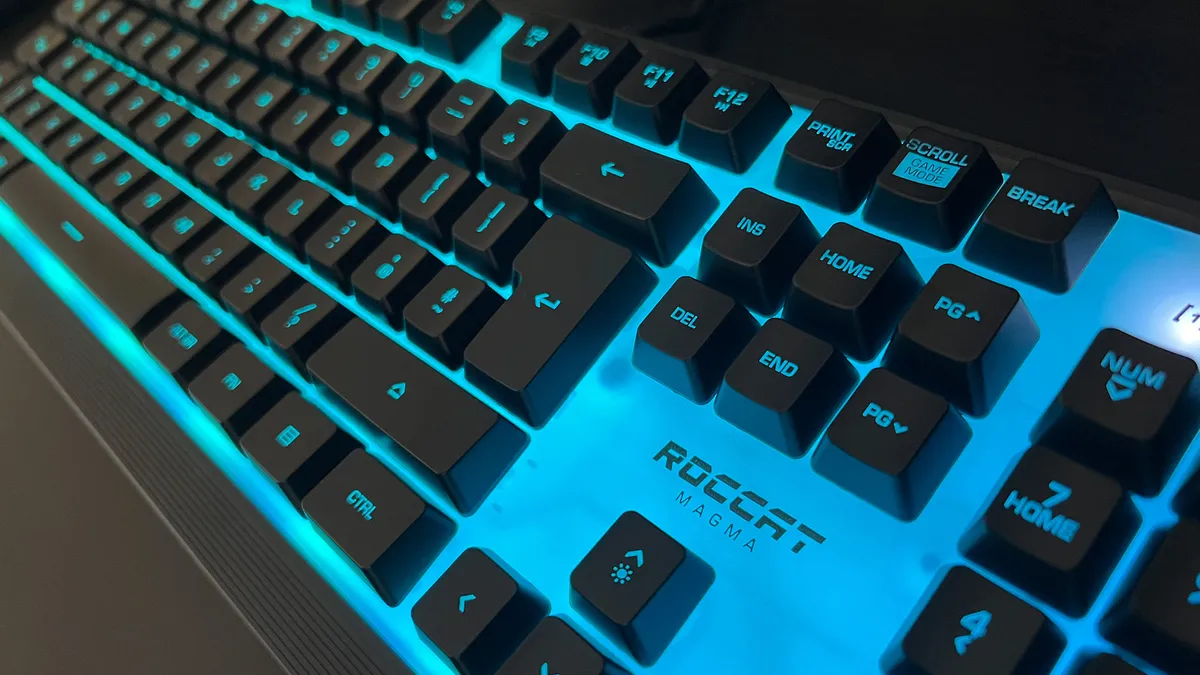
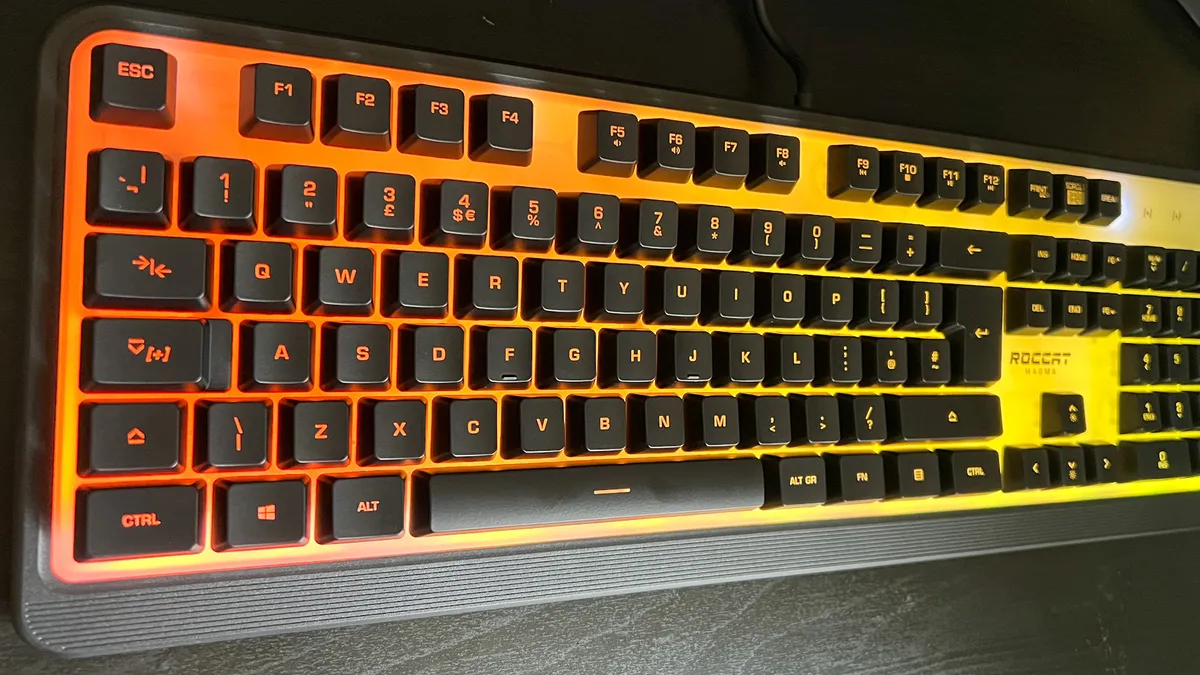
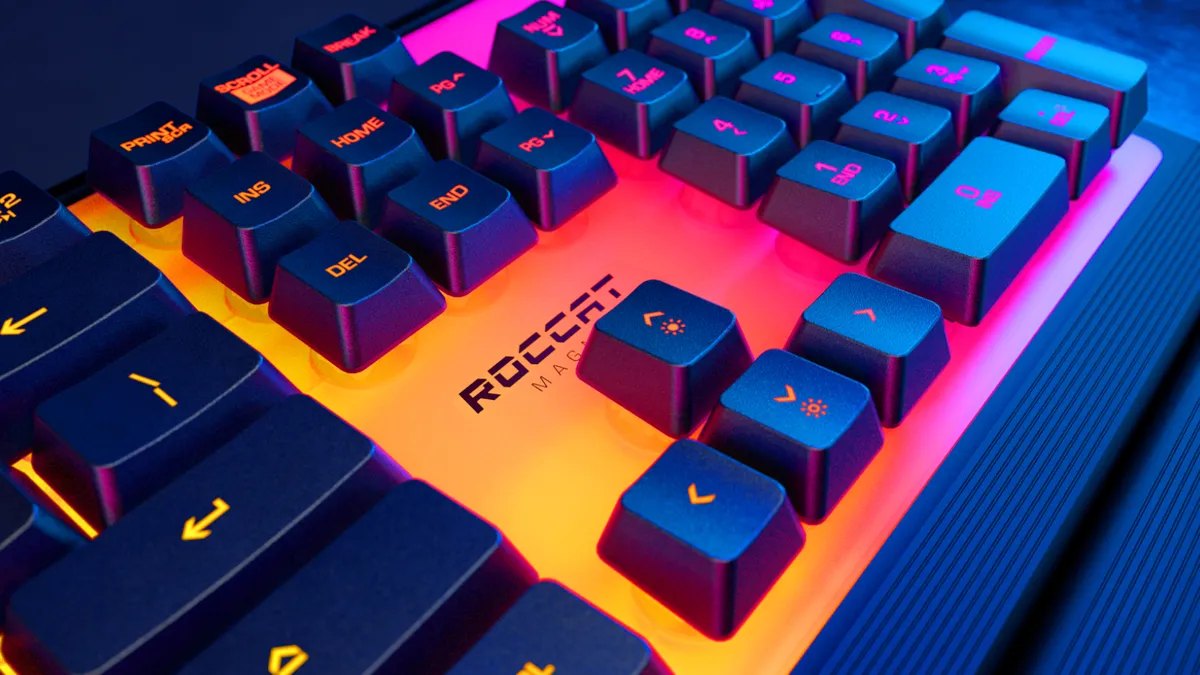
The Roccat Magma is my top pick for the best membrane keyboard on the market right now. Between a unique RGB color system, a whole second layer of macro options, and a feel of genuine quality in each keypress, the Magma impressed in my testing. There's still more weight under each press when compared with a mechanical deck, but set against the membrane keyboard backdrop, this is a particularly satisfying model.

Thanks to a distinctive panel with RGB lighting sitting underneath the main board, the Magma cleverly disguises a drop in aesthetic customization options with a replacement effect that some may even prefer.

Roccat Magma review

There's just enough resistance to ensure typing is comfortable yet tactile, and you'll still be able to tap away in a QTE without having to fight against a heavier actuation force. That's what makes the Magma so special - I was able to spend all day typing on these membrane keys, something we would struggle to achieve without fatigue on other options.

On top of that smooth experience, you're getting a full-sized deck with customizable RGB lighting and programmable macros for under $50 / £50. Membrane decks are cheap, but that's still excellent - even in this arena. You'll also find a detachable wrist rest included in that cost as well.

This is an all-rounder, perfect for anyone looking to spend a little more than bargain-bucket prices and still come away with solid value.

Read more: Roccat Magma review

The best TKL membrane keyboard

Image 1 of 3
Glorious GMBK 75% gaming keyboard on wooden desk
(Image credit: Future)
Glorious GMBK 75% gaming keyboard with arrow key caps removed showing switches
(Image credit: Future)
Close up on RGB strip lighting on the side of Glorious GMBK 75% keyboard
(Image credit: Future)

2. Glorious GMBK 75

The best TKL membrane keyboard

Our expert review:

Specifications

Size: TKL
Keycaps: ABS
Media keys: Dedicated
RGB: 10 zones
Wrist rest: None
USB passthrough: None
Today's Best Deals
View at Amazon
View at Best Buy
View at Walmart

Reasons to buy

+
Vibrant RGB lighting
+
Low price point
+
Cheap but still solid build quality
+
Swappable keycaps

Reasons to avoid

-
Heavy typing experience
-
Software can get stuck
-
Out the box caps are slippery

The Glorious GMBK 75% is one of the more recent membrane gaming keyboards released by major brands this year. These are pretty rare to come by, but Glorious not only keeps its price low with these membrane switches, it also brings a level of customizability to this deck. That's because, unlike most options, the GMBK 75% has swappable keycaps, allowing for a finer control over how each keypress feels.

I found the GMBK 75% to be a lot lighter in typing feel compared to the SteelSeries Apex 3 TKL that's coming for its crown. This is still a stiffer experience compared to mechanical options, but there's more room for skating and gliding across the keys. A cheaper ABS material keeps costs low, and it's a good thing they can be swapped out because they're not exactly the best feeling toppers on the market.

However, vibrant 10-zone RGB lighting and a solid build quality makes the Glorious GMBK 75% an excellent option for those after a gaming aesthetic without shelling out for mainstream flagship prices. You're getting dedicated media controls, a bouncy typing feel, and IP57 waterproofing straight out of the box as well.

Where the GMBK 75% does gain the upper hand compared to cheaper mechanical options is its software. Glorious Core software can be used to easily set your own keybindings, adjust RGB settings, and set up your own macros for a full suite of controls.

Read more: Glorious GMBK 75% review

The best mecha-membrane keyboard

Image 1 of 3
SteelSeries Apex 5 gaming keyboard
(Image credit: Future)
SteelSeries Apex 5 height
(Image credit: Future)
SteelSeries Apex 5 bezels
(Image credit: Future)

3. SteelSeries Apex 5

The best mecha-membrane keyboard

Our expert review:

Average Amazon review:
☆☆☆☆☆

Specifications

Size: Full
Keycaps: ABS
Media keys: Dual-function, volume wheel
RGB: Per-key
Wrist rest: Detachable
USB passthrough: None
Today's Best Deals
View at Amazon
View at Best Buy
View at Newegg
View at Lenovo USA

Reasons to buy

+
Soft matte key caps
+
Tactile and responsive
+
Powerful software

Reasons to avoid

-
OLED display is under-used
-
Fairly loud

I'm cheating a little here because the SteelSeries Apex 5 is a mecha-membrane keyboard. That means the switches retain that clack of a mechanical clicker but still offer the soft landing of a smooth membrane deck. The result is particularly satisfying tap. I tested the blue clicky variant for the maximum effect and was blown away by the speed and satisfaction under every press. If you prefer a lighter touch but still don't want to go full-mechanical, this is the deck for you.

It's easy to find just the right amount of resistance under each press, and with only a little practice you'll be flying across the keys with incredible speed.

SteelSeries Apex 5 review

Of course, you're spending a little more for the Apex 5 than you would other options on this list. However, the mecha-membrane switches under the hood are far more premium than the rubber domes on sub-$60 models, and you're picking up some extra features for even more value as well.

There's an OLED display up towards the top right corner (I did feel that this is a little under-utilized, but it will still display some neat stats in certain games), per-key RGB, a volume roller, and a detachable magnetic wrist rest as well. While keycaps are ABS, I was particularly impressed with the smoothness of the experience here. Every touch feels silky soft, but the curved shapes still ensure your grip is maintained throughout every battle. Combine that with a crisp clicker and this is a tactile dream.

Read more: SteelSeries Apex 5 review

The best membrane keyboard for macro fans

Image 1 of 2
Corsair K55 Pro
(Image credit: Corsair)
Corsair K55 Pro
(Image credit: Corsair)

4. Corsair K55 RGB Pro

The best membrane keyboard for macro fans

Specifications

Size: Full
Keycaps: ABS
Media keys: Dedicated
RGB: 5-zone
Wrist rest: Detachable
USB passthrough: None
Today's Best Deals
View at Best Buy
View at Newegg
View at CORSAIR
View at Amazon

Reasons to buy

+
Great build quality 
+
iCUE lighting works well 
+
Quiet use

Reasons to avoid

-
A little spongey 

You don't need to sacrifice core gaming features just because you're hunting down a membrane keyboard. In fact, the Corsair K55 RGB Pro excels in offering one of the most important features of all, still in a membrane deck. That's macro programming. Many premium decks offer a whole range of macro options, from individually assignable keys to dedicated extra buttons. Where you prefer to place your macros is down to personal play style, but there's plenty of functionality baked into Corsair's entry.

You're getting six additional buttons down the left side of the keyboard here, all fully dedicated to macro controls. Not only that, but you can assign these keys on the fly, a usually premium feature, or go more in-depth with Corsair's iCue software instead.

Not only that, but the Corsair K55 RGB Pro is still a solid deck elsewhere. Some of the keys can feel a little spongey under-hand, but there's still a nice snap here overall, and a fast debounce. That's to be expected from the brand behind some of the fastest decks on the market, though. You're also getting five-zone RGB lighting, a suite of dedicated media controls, and a detachable palm rest as well.


  • Back to top

How we test membrane keyboards

Why you can trust GamesRadar+ Our experts review games, movies and tech over countless hours, so you can choose the best for you. Find out more about our reviews policy.

We test membrane keyboards in the exact same way we would test any mechanical deck. We live with every set of keys for at least two weeks - playing, working, and tinkering with each one until it becomes part of the furniture. That's when we start putting it through its paces thoroughly, with typing tests and more intense gameplay scenarios to track response times, comfort, and key-spacing (and therefore precision). Throughout this time, we're consistently checking corners, keycaps, bezels, and any additional wrist rests or riser feet for signs of wear and tear, or any durability concerns. You can find out more about how we test keyboards in the full GamesRadar+ Hardware Policy.


How to choose the right membrane keyboard
Roccat Magma

(Image credit: Tabitha Baker)

Just because you're spending less on a membrane keyboard doesn't mean you can't still expect to prioritize some features over others. These decks still come in all shapes and sizes, so whether you need a wireless option or you need extra controls on board there's still plenty to choose from.

There's less of an emphasis on switch feel in membrane keyboards over mechanical models - and more focus on extra features. I'd recommend making sure you're getting all the extra controls you need, between media playback and volume and additional macro buttons. These features are far more commonplace on membrane keyboards lower down the price scale than you'll find in mechanical decks.

It's also worth noting whether you prefer a textured surface or a smoother grip on your key caps. If the former, I'd recommend a PBT keycap - a more durable build quality that often comes with a slightly grainy feel for better precision. ABS caps are cheaper, but can become oily after longer term use.

Of course, you'll also want to make sure you're getting the right size for you. Most membrane keyboards are in a full-sized design, netting you the full suite of keys and navigation buttons. However, there are smaller TKL options up for grabs as well, offering a more compact design for wider mouse sweeps.

Membrane keyboards vs mechanical keyboards

Mechanical keyboards

  • More satisfying and tactile
  • N-Key rollover
  • More durable
  • Customizable 

Membrane keyboards

  • Quieter
  • Cheaper
  • Softer typing feel
  • Sometimes include more features

Membrane keyboards are excellent if you're building a setup on a budget, but mechanical decks will offer up greater performance overall. That said, because of the additional cost of those individual switches, you may not find as many extra features like dedicated media controls, macro settings, per-key RGB lighting, or a wrist rest, in mechanical decks that cost significantly more. Still, both sides of the debate have their benefits and sacrifices, so it's worth checking out the features of each below.


Best membrane keyboards: FAQ

SteelSeries Apex 3

(Image credit: SteelSeries)

What is a membrane gaming keyboard?

A membrane gaming keyboard functions the same as a mechanical one, but the switches underneath each key are vastly different. A mechanical keyboard will rely on individual switches under each keycap for control, these are intricately designed and heavily customizable pieces of tech that offer a distinctly tactile feel and auditory response. However, a membrane deck consists of a rubber sheet placed across pads, which all register your input from the pressure of a key press.

Is a membrane keyboard good for gaming?

A membrane keyboard isn't quite as long-lasting or speedy as a mechanical model, but can still be an excellent tool for gaming. If you're playing casually and don't expect too much of a tactile response from your keypresses, these cheaper decks are still very much up to the job. You'll still find programmable keys, RGB lighting, media controls, and macro recording in these decks, as well as all the comfort and ergonomic features you'd expect in a mechanical option as well.

Is a membrane keyboard worth it?

If you're looking for a cheap gaming keyboard under $100 / £100, then the vast majority of options open to you are going to be membrane. Because of the gaming-specific features, waterproofing, and rapidly improving keypress feel, a membrane keyboard is generally going to be worth it if you're spending less than $60 / £60. You won't find a mechanical keyboard this cheap, so this is only way to net these features.

Things muddy a little around the $70/£70 - $100/£100 mark. This is where hybrid keyboards and budget-minded mechanical decks come into play. In the case of the former, you'll still find solid value in a mecha-membrane option, as long as it's cheaper than finding the same additional features on a fully mechanical keyboard.

In the case of the latter, however, it's worth weighing up what matters to you to find out if a membrane keyboard is worth it. If you're looking for a luxury typing experience and long term durability, you will want to sacrifice some of those extra features for the mechanical switches. However, if you're more concerned with fancy RGB settings, macro commands, and a wrist rest, a membrane keyboard will provide far better value.


We're also rounding up the best wireless gaming keyboards if you're after something a little more premium. Or, if all this talk of switches has you keen, we're also diving into the world of the best hot-swappable keyboards as well.

Round up of today's best deals
ROCCAT Magma Silent Membrane...
Roccat Magma
Amazon
$49.99
$37.99
View
See all prices
GLORIOUS Gaming Keyboard GMBK...
Glorious GMBK 75
Amazon
$59.99
View
See all prices
SteelSeries USB Apex 5 Hybrid...
SteelSeries Apex 5
Amazon
$96.99
View
See all prices
CORSAIR - K55 RGB Pro...
Corsair K55 RGB Pro
Best Buy
$69.99
$49.99
View
See all prices
We check over 250 million products every day for the best prices
powered by
Gamesradar
Sign up to the GamesRadar+ Newsletter

Weekly digests, tales from the communities you love, and more

By submitting your information you agree to the Terms & Conditions and Privacy Policy and are aged 16 or over.
Tabitha Baker
Tabitha Baker
Social Links Navigation
Managing Editor - Hardware

Managing Editor of Hardware at GamesRadar+, I originally landed in hardware at our sister site TechRadar before moving over to GamesRadar. In between, I've written for Tom’s Guide, Wireframe, The Indie Game Website and That Video Game Blog, covering everything from the PS5 launch to the Apple Pencil. Now, i'm focused on Nintendo Switch, gaming laptops (and the keyboards, headsets and mice that come with them), PS5, and trying to find the perfect projector. 

Back To Top
Read more
Close up on macro buttons on the side of the Corsair Vanguard Pro 96 gaming keyboard
Gaming Keyboards Best gaming keyboard 2026: the Vanguard stands strong with another new entry for Corsair
 
 
Asus ROG Azoth keyboard
Gaming Keyboards The best wireless gaming keyboard in 2026
 
 
Corsair Vanguard Pro 96, Asus ROG Azoth 96 HE, Corsair Galleon 100 SD and Cherry MX 8.2 Pro TMR TKL on a wooden desk
Gaming Keyboards Best Hall effect keyboard 2026
 
 
Asus ROG Azoth lubing
Gaming Keyboards The best hot-swappable keyboard in 2026: all the top customizable decks compared
 
 
Cherry XTRFY MX 8.2 Pro TMR Wireless gaming keyboard on a wooden desk with RGB lighting on
Gaming Keyboards Attention hot-swap fans, this Cherry keyboard can make your magnetic dreams come true - at a price | Review
 
 
Corsair Galleon 100 SD gaming keyboard on a wooden desk
Gaming Keyboards Corsair's on a roll, this Stream Deck-toting deck is now officially the best full-sized gaming keyboard I've tested so far
 
 
Latest in Gaming Keyboards
Asus ROG Azoth 96 HE gaming keyboard on a wooden desk
Gaming Keyboards The Asus ROG Azoth 96 HE has returned to take the magnetic crown, but that price tag is going to be a problem
 
 
Corsair Galleon 100 SD gaming keyboard on a wooden desk
Gaming Keyboards Corsair's on a roll, this Stream Deck-toting deck is now officially the best full-sized gaming keyboard I've tested so far
 
 
Asus ROG Azoth 96 HE gaming keyboard on a wooden desk
Gaming Keyboards I just spent my first weekend with this gaming keyboard and it's already pulling out all the stops
 
 
Cherry XTRFY MX 8.2 Pro TMR Wireless gaming keyboard on a wooden desk with RGB lighting on
Gaming Keyboards Attention hot-swap fans, this Cherry keyboard can make your magnetic dreams come true - at a price | Review
 
 
Razer Huntsman Signature Edition keyboard against a black background
Gaming Keyboards "Razer's most ambitious keyboard to date" costs how much? This super limited drop would bankrupt me if I let it
 
 
Keychron Q1 HE 8K gaming keyboard on a wooden desk with blue backlighting
Gaming Keyboards Keychron Q1 HE 8K drops features for speed, but it still feels fantastic | Review
 
 
Latest in Buying Guides
Photo of the Mario and Luigi Nendoroid figures sitting next to eachother.
Toys & Collectibles Celebrate MAR10 Day in style with the very best Super Mario merch
 
 
Squirtle and Jigglypuff figures alongside a Poke Ball, with Nintendo DS game cases visible in the background
Toys & Collectibles The best Pokemon merch to celebrate 30 years of the beloved series, chosen by superfans
 
 
Image of the Tears of the Kingdom Link amiibo sitting in front of a shelf of Zelda merch.
Toys & Collectibles Best Legend of Zelda merch, chosen by two lifelong fans
 
 
Cloud MTG card lying on top of a host of other MTG Final Fantasy cards
Games Check out these Valentine's Day gifts for gamers if you're stuck for ideas
 
 
Photo of the Lavender Arctis Nova 3 Wireless headset resting on a Nintendo Switch 2.
Headsets & Headphones The best Nintendo Switch headset 2026: SteelSeries is the key for gaming on the go for another year
 
 
Corsair Vanguard Pro 96, Asus ROG Azoth 96 HE, Corsair Galleon 100 SD and Cherry MX 8.2 Pro TMR TKL on a wooden desk
Gaming Keyboards Best Hall effect keyboard 2026
 
 
LATEST ARTICLES
  1. Photo of the ear cups of the Skullcandy PLYR 720 wireless gaming headset.
    1
    Should you buy an open-back headset for gaming?
  2. 2
    Mckenna Grace opens Pokemon cards at the Oscars, and it's one hell of a vibe
  3. 3
    Buffy the Vampire Slayer star Sarah Michelle Gellar says a Hulu exec who is "not a fan of the original" is to blame for the spin-off being axed
  4. 4
    Crimson Desert pre-load and release times
  5. 5
    Spider-Man: Brand New Day's 24-hour trailer launch is making Avengers: Doomsday's cast reveal look small scope: "It's never been done before"

GamesRadar+ is part of Future US Inc, an international media group and leading digital publisher. Visit our corporate site.

Add as a preferred source on Google Add as a preferred source on Google
  • Terms and conditions
  • Contact Future's experts
  • Privacy policy
  • Cookies policy
  • Accessibility statement
  • Careers
  • About us
  • Advertise with us
  • Review guidelines
  • Write for us
  • Accessibility Statement

© Future US, Inc. Full 7th Floor, 130 West 42nd Street, New York, NY 10036.

Please login or signup to comment

Please wait...