


I'm well used to seeing the Game Boy camera used in all sorts of kitschy, weird ways. I even brought mine to my family's Christmas get-together, and let me tell you, no one is recognizable in the snaps. So, upon hearing that someone managed to strap the old Nintendo handheld and accessory combo to a telescope and to take a photo of Jupiter from millions of miles away, it's safe to say I was baffled that it worked.
In an email to Time Extension, director, musician, and video game enthusiast Chris Graue presents a bizarre contraption that attaches Ninty's retro handheld and the Game Boy Camera to the Mount Wilson Observatory in California. Created in collaboration with camera and electrical department professional Drew van Oort, the project takes the 2BitToy Game Boy Camera specifically and makes it compatible with C-mount lenses.
"According to the GBC Astrophotography community, I've got the record for the longest lens and furthest object photographed with one," claims Graue. That's hardly surprising given we're talking about using the Observatory's 60-inch telescope as a lens to shoot something in space.
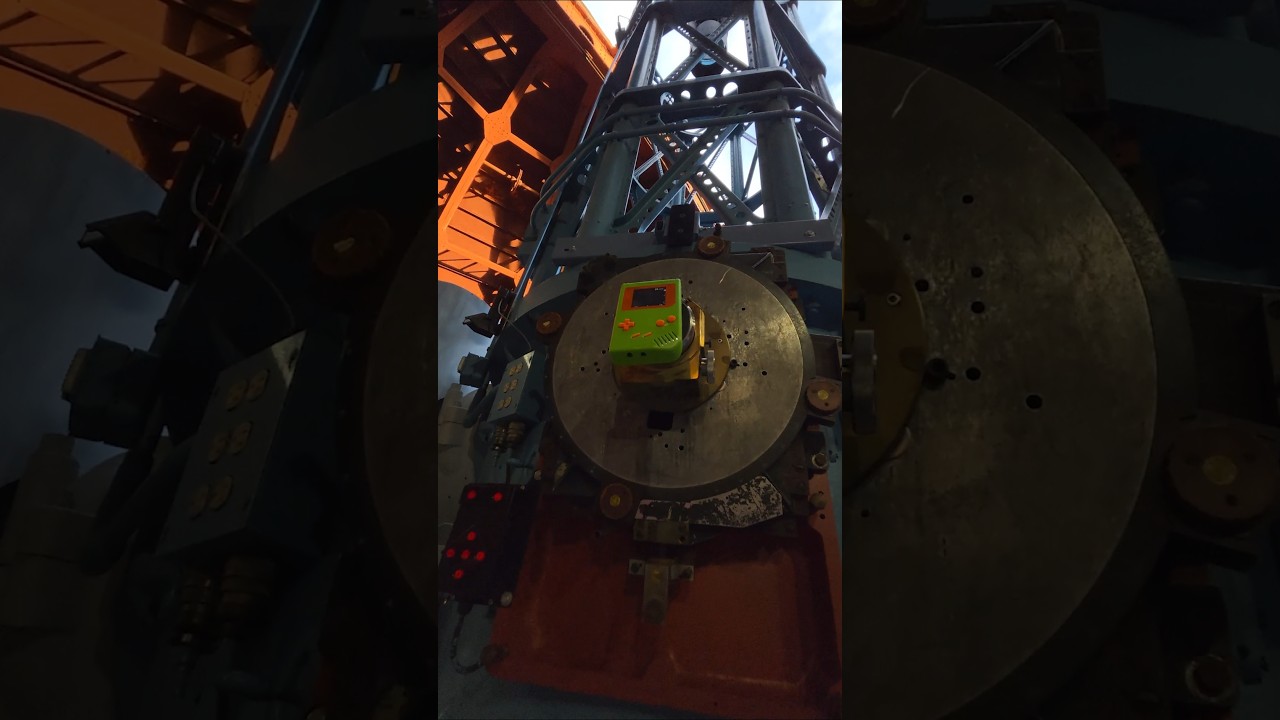
Can I take a moment to remind you we're talking about a four-bit greyscale, 128-pixel camera based on tech from 1998 taking a photo of Jupiter? Hilariously, the telescope it's using as a lens is even older, as it was seemingly first built in 1908. To actually pair the retro handheld with the scope, Graue says they 3D printed a 1.25-inch tube that combines with adapters to suit the 4-inch eyepiece (provided by Geovanni the "telescope man").
In a video documenting the project, Graue first attempts to snap a photo of the moon. It takes some twiddling, but eventually, he ends up with something that's not just white pixels. However, that apparently wasn't ambitious enough, as the telescope is then shifted to face Jupiter, and while the field of view is limited to the planet's edge, you can just about make out the stripes.
You've probably noticed that Graue isn't using a stock Nintendo handheld. It's actually using a backlit screen not unlike the Game Boy Color AMOLED touchscreen I used to mod my handheld, and it's wearing a striking green and orange shell. The getup is really just for vibes, but swapping out that original DMG non-backlit screen is essential if you want to stand a chance of seeing a distant planet like Jupiter. That said, Graue also uses an original Game Boy printer to get a physical copy of the photo, which feels more magical than looking at it on a modern panel.

The takeaway here, as Graue puts it, is "yes, if you're committed enough, you too can take a picture of Jupiter with your Game Boy Camera." The musician has even included the 3D print files for the aforementioned adapter, just in case you have access to a telescope bigger than my house.
This is certainly one of the wildest use cases for the Game Boy Camera I've come across yet. While Graue's project is inspired by the scene's commitment to keeping the accessory in use, it also doubles as promotion for his band, Louser, and its latest tour. So, if you appreciate bananas projects, the least you can do is go check out the pop-punk band.
Swing by the best retro consoles for ways to play your favorite oldies on authentic hardware.

