You are now subscribed
Your newsletter sign-up was successful
Want to add more newsletters?

Every Friday
GamesRadar+
Your weekly update on everything you could ever want to know about the games you already love, games we know you're going to love in the near future, and tales from the communities that surround them.

Every Thursday
GTA 6 O'clock
Our special GTA 6 newsletter, with breaking news, insider info, and rumor analysis from the award-winning GTA 6 O'clock experts.

Every Friday
Knowledge
From the creators of Edge: A weekly videogame industry newsletter with analysis from expert writers, guidance from professionals, and insight into what's on the horizon.

Every Thursday
The Setup
Hardware nerds unite, sign up to our free tech newsletter for a weekly digest of the hottest new tech, the latest gadgets on the test bench, and much more.

Every Wednesday
Switch 2 Spotlight
Sign up to our new Switch 2 newsletter, where we bring you the latest talking points on Nintendo's new console each week, bring you up to date on the news, and recommend what games to play.

Every Saturday
The Watchlist
Subscribe for a weekly digest of the movie and TV news that matters, direct to your inbox. From first-look trailers, interviews, reviews and explainers, we've got you covered.

Once a month
SFX
Get sneak previews, exclusive competitions and details of special events each month!
Tucked away amongst mountain ranges and lakes, Logitech's office in Lausanne, Switzerland, hides a secret. The brand has been hard at work changing the way the best gaming mouse models perform, and its latest release is one of the more dramatic of inventions the market has seen in the last decade.
The Logitech G Pro X2 Superstrike does away with main click switches entirely, opting not for optical or mechanical clackers but instead for the brand's HITS technology. A Haptic Inductive Trigger System runs all your main clicks here: an inductive electromagnetic sensor seated within the main board, a trigger plate on top, and an actuator over the top. It's a system that's been designed to offer a near-instantaneous click while still providing tactile feedback.
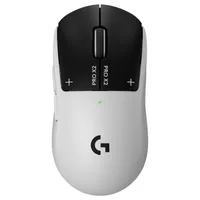
Rather than the snap of a mouse switch, the Superstrike responds with a simple vibration when each click is registered. Straight out the box it's a similar kind of feel to a particularly short, silent mechanical click, but G Hub also opens up customization options for a stronger or weaker feel.
The key here is that electromagnetic sensor, allowing for a range of different actuation points. At the very top of the ladder is a super-sensitive trigger actuating at a point about the same thickness as a single hair, while moving further down requires more force for each input.
All that sits inside the same, though a slightly thinner version, chassis as the Logitech G Pro X Superlight 2, a pill-shaped mouse we've all come to recognize over the years.

I've only had a few days with the Logitech G Pro X2 Superstrike on my own desk, but here's the long and short of it. While the range is predominantly designed for competitive esports players with larger budgets than most of us casual players, this is the closest I've come to recommending a 'pro' gaming mouse to a more amateur audience.
I say 'the closest I've come' because I wouldn't actually recommend it to the vast majority of players on the street who need a new pointer, even if they're starting their esports journey today. The same problems still creep in when considering the needs of the mass market.
The Logitech G Pro X2 Superstrike costs $179.99 / £159.99 for all its click sensors and 8,000Hz polling rates. That's a lot of money for a level of speed and customization that most players won't need or notice, but the tech on offer is nonetheless impressive.

Taking cues from the world of the best gaming keyboards, Logitech has dropped a rapid trigger reset into its main clicks. Adjustable across five degrees of speed, it makes repeat presses significantly faster (once the muscle memory has bedded in). Logitech states that it gives more casual players an edge that could see them competing at speeds more commonly associated with elite esports athletes. Not in reaction times, not in aim, and not in communication, but in the milliseconds in between each mouse click.
It's an upgrade to a small slice of the performance pie, but the adjustability itself is well worth investigating further if you want your gaming mouse to work a little harder for you.
After all, this is the first gaming mouse I've tested with any kind of actuation adjustment and the first to employ a rapid trigger feature at all. If you want speed on your left click but often misclick on the right as a result, Logitech has the answer right here.

So how do those haptics feel? This is what I was most nervous about when I laid hands on the Logitech G Pro X2 Superstrike for the first time. The switches inside the Logitech G Pro X Superlight 2 DEX and Superlight 2C are actually one of my favorite parts of the mouse overall, light, snappy, and incredibly satisfying.
These are, uh, none of those things.
It's a very different feeling to the clack we've all come to expect from any mouse's operation. Where you'd expect a switch to click, this one thuds. That's great for anyone looking to keep the noise down, but it takes away from the tactile joy and quiet confidence of previous Logitech snappers. This is an esports mouse, so you're trading that sensory satisfaction for speed and adjustability, but that sacrifice isn't going to make sense for everyone.

It does, however, mean that the Superstrike performs when it counts: in-game.
I've had a few evenings to put the rodent through its paces in CS2, and it does feel like a new breed. It's taken me a little while to get used to the main clicks being set at their shortest actuation point, but I'm only accidentally hitting the right click a few times per round now and that will likely reduce the further I get into testing. Those shorter stops feel incredibly fast, though, surprise I know.
I've found it's best to keep the right click at a slightly deeper actuation point than the left in traditional shooter scenarios, especially when you first start using it. There's no getting around it, the sensitivity and click feel take some serious time to get re-learn and performance is going to suffer in your first few days of play. Once the fingers have learned their positions, though, there's nothing else quite like it. Once the brain has caught up with the rapid trigger reset, you're away.

The Logitech G Pro X2 Superstrike hasn't been made for you and I. Us mere mortals aren't going to be concerned about the fractions of milliseconds between different flagship mouse models; we don't have eight hours a day to hone a rapid trigger response, and a win doesn't mean millions in the bank.
In fact, this is a mouse that somewhat epitomises a growing issue in the rodent market. I've touched on why gaming mice have an esports problem in the past. While the tech on offer here could certainly help elite pros gain an upper hand in competition, it's not going to do much for us. $179.99 is a lot to pay for bragging rights when the benefits are locked behind a skill gap.
And yet, the Superstrike still has its place on the page. I'm a little salty that Logitech (and other brands) aren't giving mainstream all-rounder mice this same level of dedicated development time, but with the advent of HITS tech, we could see more customizable mouse click options scaling further down the price range in the years to come. As a signifier of what we could be playing with at a less 'Pro' price in due course, the Superstrike is well worth celebrating today.
- See all gaming mice at Amazon
I'm rounding up all the best Logitech gaming mouse models as well as the best Razer mice if you're after something a little different. It's worth noting that Logi does also sit atop my guide to the best wireless gaming mouse options on the market as well.

You must confirm your public display name before commenting
Please logout and then login again, you will then be prompted to enter your display name.