Background
Welcome to GamesRADAR+ Community !
Hi ,

Your membership journey starts here.

Keep exploring and earning more as a member.

MY ACCOUNT

Badge picture
Earn your first badge
Read 1 article to unlock your first badge.
Keep earning badges
Explore ways to get more involved as a member.
Latest Games News

Latest Games News

Breaking gaming news and updates

Read Now
Latest Games Reviews

Latest Games Reviews

Expert verdicts on the newest releases

Read Now

See what you’ve unlocked.

Explore your membershipbenefits.

Explore
Member Exclusives

Stay Ahead with GamesRadar+

Get the biggest gaming news, reviews, and releases straight to your inbox.

Explore

Sign Out
GamesRadar+ GamesRadar+
US EditionUS CA EditionCanada UK EditionUK AU EditionAustralia
Sign in
  • View Profile
  • Sign out
  • Games
    • Game Insights
      • Games News
      • Games Features
      • Games Reviews
      • Games Guides
      • Big in 2026
      • Big Preview
      • Future Games Show
      • Golden Joystick Awards
    • Genres
      • Action Games
      • RPGs
      • Action RPGs
      • Adventure Games
      • Third Person Shooters
      • FPS Games
    • Platforms
      • PS5
      • Xbox Series X
      • PC
      • Nintendo Switch
      • Nintendo Switch 2
      • Tabletop Gaming
    • Franchises
      • Grand Theft Auto
      • Pokemon
      • Assassin's Creed
      • Monster Hunter
      • Fortnite
      • Cyberpunk
      • Red Dead
      • The Elder Scrolls
      • The Sims
  • Entertainment
    • TV Shows
      • TV News
      • TV Reviews
      • Anime Shows
      • Sci-Fi Shows
      • Superhero Shows
      • Animated Shows
      • Marvel TV Shows
      • Star Wars TV Shows
      • DC TV Shows
    • Movies
      • Movie News
      • Movie Reviews
      • Big Screen Spotlight
      • Superhero Movies
      • Action Movies
      • Anime Movies
      • Sci-Fi Movies
      • Horror Movies
      • Marvel Movies
      • DC Movies
    • Streaming
      • Apple TV Plus
      • Disney Plus
      • Netflix
      • HBO
      • Amazon Prime Video
      • Hulu
    • Comics
      • Marvel Comics
      • DC Comics
    • Toys & Collectibles
    • Lego
    • Dungeons and Dragons
    • Merch
  • Hardware
    • Insights
      • Hardware News
      • Hardware Reviews
      • Hardware Features
    • Computing
      • Desktop PCs
      • Laptops
      • Handhelds
    • Peripherals
      • Headsets & Headphones
      • TVs & Monitors
      • Gaming Mice
      • Gaming Keyboards
      • Gaming Chairs
      • Speakers & Audio
    • Accessories & Tech
      • Gaming Controllers
      • Tech
      • SSDs & Hard Drives
      • VR
      • Accessories
      • Retro
  • Deals
    • Game Deals
    • Tech Deals
    • TV Deals
    • Buying Guides
  • Video
    • Video
    • GR+ Replay - Submit Your Clips
  • Newsletters
    • Quizzes
    • About Us
    • How to pitch to us
    • How we score
    • Newsarama
    • Retro Gamer
  • home
  • Games
    • View Games
      • Games News
      • Games Features
      • Games Reviews
      • Games Guides
      • Big in 2026
      • Big Preview
      • Future Games Show
      • Golden Joystick Awards
      • Action Games
      • RPGs
      • Action RPGs
      • Adventure Games
      • Third Person Shooters
      • FPS Games
    • Platforms
      • View Platforms
      • PS5
      • Xbox Series X
      • PC
      • Nintendo Switch
      • Nintendo Switch 2
      • Tabletop Gaming
      • Grand Theft Auto
      • Pokemon
      • Assassin's Creed
      • Monster Hunter
      • Fortnite
      • Cyberpunk
      • Red Dead
      • The Elder Scrolls
      • The Sims
  • Entertainment
    • View Entertainment
    • TV Shows
      • View TV Shows
      • TV News
      • TV Reviews
      • Anime Shows
      • Sci-Fi Shows
      • Superhero Shows
      • Animated Shows
      • Marvel TV Shows
      • Star Wars TV Shows
      • DC TV Shows
    • Movies
      • View Movies
      • Movie News
      • Movie Reviews
      • Big Screen Spotlight
      • Superhero Movies
      • Action Movies
      • Anime Movies
      • Sci-Fi Movies
      • Horror Movies
      • Marvel Movies
      • DC Movies
    • Streaming
      • View Streaming
      • Apple TV Plus
      • Disney Plus
      • Netflix
      • HBO
      • Amazon Prime Video
      • Hulu
    • Comics
      • View Comics
      • Marvel Comics
      • DC Comics
    • Toys & Collectibles
    • Lego
    • Dungeons and Dragons
    • Merch
  • Hardware
    • View Hardware
      • Hardware News
      • Hardware Reviews
      • Hardware Features
      • Desktop PCs
      • Laptops
      • Handhelds
    • Peripherals
      • View Peripherals
      • Headsets & Headphones
      • TVs & Monitors
      • Gaming Mice
      • Gaming Keyboards
      • Gaming Chairs
      • Speakers & Audio
      • Gaming Controllers
      • Tech
      • SSDs & Hard Drives
      • VR
      • Accessories
      • Retro
  • Deals
    • View Deals
    • Game Deals
    • Tech Deals
    • TV Deals
    • Buying Guides
  • Video
    • View Video
    • Video
    • GR+ Replay - Submit Your Clips
  • Newsletters
    • Quizzes
    • About Us
    • How to pitch to us
    • How we score
    • Newsarama
    • Retro Gamer
Trending
  • Saros review
  • Arc Raiders
  • The Boys S5
  • Best turn-based RPGs
  • Submit your clips. Win prizes
  • Delta Force giveaway
Don't miss these
Five different gaming controllers for PC scattered around a desktop surface
Gaming Controllers The best PC controller for gaming 2026
HP Omen Max 16 gaming laptop on a wooden desk
Laptops The best gaming laptop 2026 - new releases start hitting the test bench
SteelSeries Arctis Nova Pro Wireless in white being held in front of a PS5
Headsets & Headphones The best PS5 headset 2026: SteelSeries holds onto the crown for another year
A collection of TMR gaming controllers
Gaming Controllers I've tested them for you, and these are the 7 best TMR controllers on the shelves right now
A side by side of the Steam Controller with the Razer Wolverine V3 Pro 8K
Gaming Controllers The Steam Controller doesn't appear to be a hit for competitive play, so here are the best alternatives
Image of the Midnight Blue Arctis Nova Pro Omni headset sitting on a black desk.
Headsets & Headphones SteelSeries celebrates its 25th anniversary with the release of the brand-new Hi-res Arctis Nova Pro Omni Wireless gaming headset
Corsair Galleon 100 SD and Stream Deck Neo on a wooden desk
Gaming Keyboards I paired three keyboards with the $99 Stream Deck Neo to see if Corsair's $350 Galleon 100 SD is actually worth it
SteelSeries Arctis Nova Pro Wireless gaming headset
Headsets & Headphones Best gaming headset 2026 - my go-to cups for every platform
Nintendo Switch 2 playing Donkey Kong Bananza with Pro Controller to the left
Gaming Controllers The best Nintendo Switch 2 controller 2026: Compatible gamepads road tested with Ninty's new handheld
DualSense Edge review image showing the controller next to the original DualSense in Nova Pink
Gaming Controllers The best PS5 controller 2026: Find your Edge
A Quoted Tech Horizon Custom gaming PC inside a MSI Pano chassis
Desktop PCs Quoted Tech Horizon Custom gaming PC review
Xbox Elite Series 2 controller
Gaming Controllers The best Xbox Series X controller in 2026
Close up on display of Asus ROG Strix Scar 18 gaming laptop
Laptops The best Asus gaming laptops 2026
An Elgato Wave 3 Mk2 microphone next to two Stream Decks
Peripherals Elgato's new Wave 3 Mk2 combines the best parts of dynamic and condenser microphones
The Azeron Keyzen and Cyborg II from the top down, comparing their switches
Gaming Controllers You don't have to choose between a controller and a keyboard; there's a secret third option
  1. Hardware
  2. Peripherals
  3. Gaming Keyboards

SteelSeries Apex Pro TKL Gen 3 review: "a Hall effect darling that doubles down on the original’s greatness"

Reviews
By Tabitha Baker published 19 December 2024

When you purchase through links on our site, we may earn an affiliate commission. Here’s how it works.

SteelSeries Apex Pro TKL Gen 3 keyboard with box and wrist rest on a wooden desk
(Image credit: © Future)

GamesRadar+ Verdict

The SteelSeries Apex Pro TKL Gen 3 takes what made the previous generation great and doubles down. New switches feel fantastic under the fingertips and provide a super responsive and intuitive hall effect experience. A slimline design packs all the comfort features you could ask for, with premium materials and a durable feel. The decision to opt for Gateron Reds outside of alphanumeric keys holds it back, and it’s certainly expensive for a wired deck, but it’s well worth the attention of power users.

$171.28 at Amazon
$179.99 at Best Buy
$217.99 at Newegg
$219.99 at Lenovo USA

Pros

  • +

    Fantastic typing feel

  • +

    Adjustable switches feel more intuitive than competition

  • +

    Wide range of customization options

  • +

    Handy OLED display

  • +

    Slick, slimline design

Cons

  • -

    Pricey for a wired deck

  • -

    Not all keys are hall effect

Best picks for you
  • Best Hall effect keyboard 2026
  • Best gaming keyboard 2026: the Vanguard stands strong with another new entry for Corsair
  • The best hot-swappable keyboard in 2026: all the top customizable decks compared

Why you can trust GamesRadar+ Our experts review games, movies and tech over countless hours, so you can choose the best for you. Find out more about our reviews policy.

The SteelSeries Apex Pro has always been the talk of the Hall effect town, offering adjustable switches in a super high-quality chassis with fantastic typing feel. The new Gen 3 model takes that luxurious foundation and adds new actuation features and a boosted dampening design. Throw in a new software mode designed to offer easily accessible presets for a range of games and new generation optical switches and it’s easy to see SteelSeries is working hard to differentiate its latest model.

There’s no getting around it, though, these decks are pricey. At $219.99 / £209.99, it’s up there with flagships from Razer and more. It’s got some serious competition in the Razer Huntsman V3 Pro, a full-sized keyboard that doesn’t use full Hall effect switches but still packs customizable and dual-step actuation while also throwing in an analog mode for extra joystick-like inputs.

Then there’s the Glorious GMMK 3 with its four-step actuation controls and modular design. This was previously a luxurious world for specialist tinkerers but these features are rapidly dropping down to the mainstream arena of the best gaming keyboards. SteelSeries is up against some greats in this battle but if you’re a power user ready to take your customizations to the next level, there’s plenty going on under the hood to justify that investment.

Latest Videos From
Swipe to scroll horizontally
Key Specs
Price$219.99 / £209.99
TypeOptical Hall-effect
ConnectionWired
SizeTKL
SwitchesSteelSeries OmniPoint 3.0 Adjustable HyperMagnetic Analog
KeycapsDoubleshot PBT
Media keysVolume roller
Wrist restYes
USB passthroughNo

Design

Side of SteelSeries Apex Pro TKL Gen 3 keyboard at full elevation on a wooden desk

(Image credit: Future)

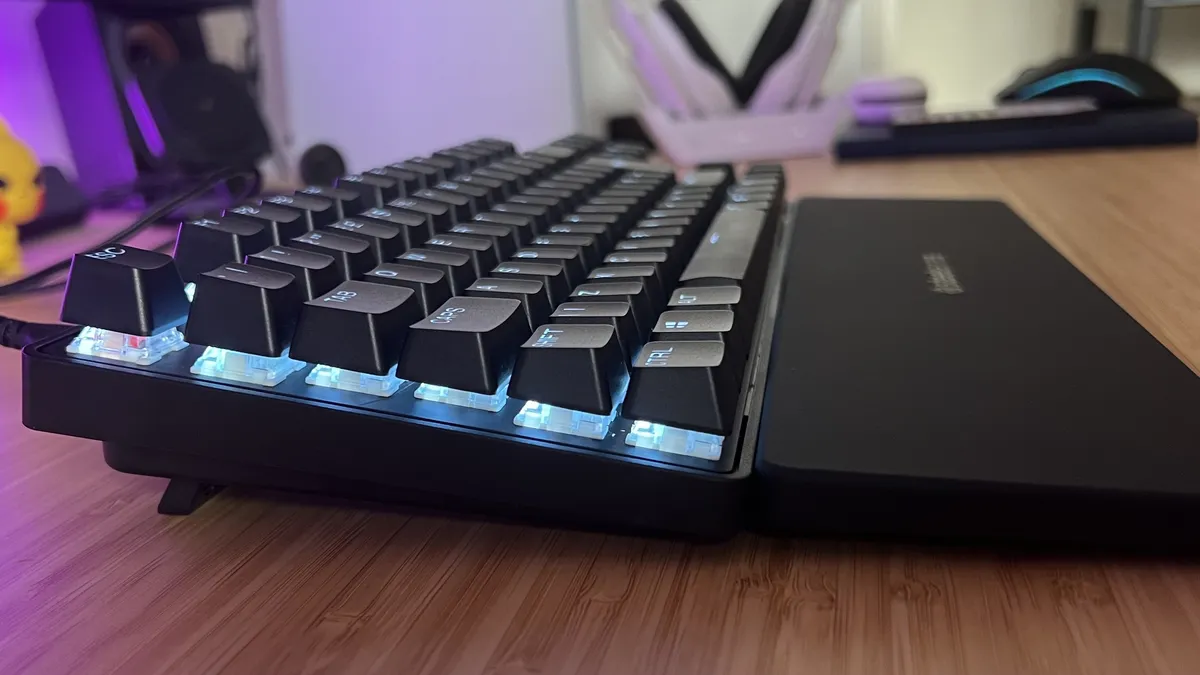
A subtle, slimline aesthetic hides the true power of the SteelSeries Apex Pro TKL Gen 3. This is a pretty nondescript all-black affair, save for those bright LEDs pooling around each keycap. The TKL form factor keeps things compact while still providing plenty of space for a well-balanced main deck and nav / arrow keys to boot. A quick glance at this deck doesn’t reveal anything too special, but I only needed to hold and use it for a short amount of time before I realized just how strong of a build this is.

The main chassis is plastic, but with an aluminum top plate that holds particularly well against even more frantic typing. I wouldn’t expect to find flex in a gaming keyboard over $200 / £200, but you’d be surprised. This lower plate doesn’t budge an inch, providing a solid springboard for those energetic switches to leap from with every debounce. Everything feels reassuringly dense and well supported here, without piling on the pounds. At 974g, the Apex Pro TKL is among the lighter decks on the market right now, which makes it perfect for those who travel with their setups regularly. Super grippy feet keep it squarely positioned on a desk, though - I never felt it slip whether I was on a softer desk mat or using the device straight on a wooden top.

Underside of SteelSeries Apex Pro TKL Gen 3 keyboard with rubber feet and elevation struts

(Image credit: Future)

Those doubleshot PBT keycaps are a delight, offering a slightly textured grippy surface that evades all oils and stays cool, crisp, and precise even after months of use. The tops of each cap have a slight curve to them - not as severe as I’ve tested in the past, just enough to keep your fingers nimble while supported. Per-key RGB LEDs line the main deck itself, with excellent brightness and a vivid color range that shines beautifully against and around the caps themselves. I’m particularly pleased to see that illumination is even across larger legends as well, as I’m all too used to fading lights around the capslock or tab key.

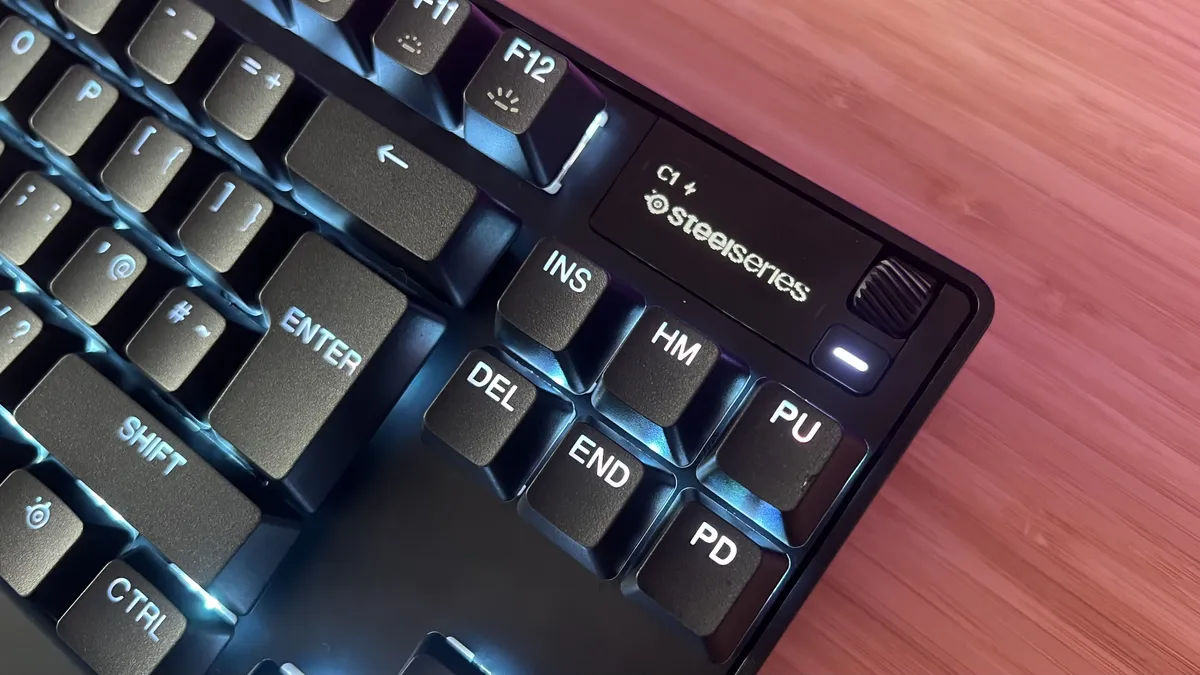
The top right corner is reserved for the display panel, a low-res window into a range of different system features, with a smaller scroll wheel and a navigation button to the right. The slimline shape of the chassis itself means there’s very little bezel around the edge, and so this display is squashed in-line with the function row. That means the top row of my nav cluster peaks just over the top of that display when sitting upright, and completely masks the menu button as well. It’s a small gripe, but it does require a little maneuvering to hit the button itself.

Sign up to the GamesRadar+ Newsletter

Weekly digests, tales from the communities you love, and more

By submitting your information you agree to the Terms & Conditions and Privacy Policy and are aged 16 or over.

Features

I’ll get straight to the good stuff because the SteelSeries Apex Pro TKL lives on its switches. These are new OmniPoint 3.0 Adjustable HyperMagnetic Analog switches, a set of Hall effect clickers that can be configured to actuate at between 0.1mm and 4mm travel - the choice is yours. That’s a standard range of distances to choose from, expanding the range from the previous generation’s 0.2mm to 3.8mm span and sitting more in-line with newer releases like the Razer Huntsman V3 Pro, Glorious GMMK 3 HE, and Endgame Gear KB65HE.

SteelSeries OmniPoint Gen 3 keyboard switch on a wooden desk

(Image credit: Future)

It means you can set your switches to trigger an input at a super flyweight 0.1mm (essentially tap-controls) or stay out of the way, requiring serious effort to trigger. The entire alphanumeric key selection can be configured at the same time, or you can set individual actuation points on a per-key basis. That’s the route I tend to take with more action-heavy games, keeping WASD fairly light and surrounding keys heavier to avoid accidental presses.

There’s more to this party, though. Because these optical switches can actuate all the way down the keypress, different inputs can be set for different travel distances. I have W, for example, set to a standard forward motion when half-pressed, ramping up to a sprint keybinding when bottomed out. The possibilities are endless here, and the snap of SteelSeries’ Omnipoint switches meant I was able to accurately judge (and commit to muscle memory) individual travel distances a little faster.

That’s always been one of my main stopping points before recommending a hall effect keyboard. Previous options have required some consistent re-learning to make these dual-step inputs actionable and useful. It might be because I have more experience with using these clickers after a year of testing different decks, but the Apex Pro TKL does give me a little more breathing room to find the right actuation point.

The Glorious GMMK 3 HE does go a step further, though, offering four-step actuation on both the key press and release. If you’re really looking to get the most out of each button, this is where you should be looking.

Rapid trigger is also available, with the system lifting the actuation point of a key itself when it detects rapid presses. It makes spamming a lot faster and less fatiguing overall. That’s not to be confused with Rapid Tap, SteelSeries’ version of the controversial SOCD system that allows for opposite inputs to cancel each other out. Say you’re strafing right and suddenly need to change direction, your next keypress will ignore the clicker you’re already holding down, making for a much faster transition. This feature is banned in a number of competitive arenas, though, so be sure to check with your game of choice before employing it. Finally, there’s Protection Mode - a feature that essentially locks off adjacent keys with a much higher actuation point to avoid accidental presses.

Hall effect and Gateron switches exposed on SteelSeries Apex Pro TKL Gen 3 keyboard

(Image credit: Future)

I was a little disappointed to find that only the alphanumeric keys feature these hall effect switches. Every other HE keyboard I’ve tested has used these optical switches throughout the entire board, but even the arrow keys are omitted here. Instead, a set of Gateron Reds keeps these clickers bumping along. Each hall effect switch in the main deck is hot-swappable, but the Gaterons that run around the edges are soldered. That’s a little tough to swallow considering the cost of the board - if you want true freedom of customization you’ll need to look elsewhere.

All of this is configured in SteelSeries’ GG software, a program that loads straight into a marketplace stuffed full of ads. The Engine section is where you’ll do most of your setup, with RGB lighting personalized in a separate Prism category. Everything is separated into handy tabs, with space for five different ‘Configs’ to be saved to the keyboard itself. The software is a little siloed, and can be intimidating at first glance - but there’s a lot going on here and it’s as streamlined as it can be for the most part.
Close up on OLED display panel on SteelSeries Apex Pro TKL Gen 3

(Image credit: Future)

This is also where you’ll find a range of dedicated apps for the OLED display. From displaying system information to calling out your kills in Counter Strike, this is a nifty addition that can grow over time with new software. The display can also be used for on-the-fly macro recording and quickly changing actuation points, accompanied by a particularly neat RGB effect. It’s controlled via a menu button and a scroll wheel, which also doubles as a volume slider by default. There are no playback controls straight out of the box, which is a little disappointing considering Asus and Razer keyboards tend to offer play, pause, and skip track options pretty easily in the same form factor.

So what’s missing? This is a fully wired deck, so no 2.4GHz or Bluetooth connection options that you might expect to find in a keyboard that costs over $200. The wireless version is considerably more expensive, but we’re still running cheaper than a fully decked out Glorious GMMK 3 Pro HE here. That wired connection comes in the form of a durable, braided USB-C to USB-A cable, but there’s no passthrough option available which means you might need to juggle some ports. There are no dedicated macro buttons included, but the TKL form factor means you still have full access to the function row.

Performance

Hall effect switches have always felt a little hollow to me. Yes, there tends to be a decent thocc, but the bottom out has always felt less sturdy than their mechanical predecessors. SteelSeries has solved that problem. The typing experience here is incredibly satisfying, with energetic, bouncy keys, a satisfyingly springy push and pull, and excellent spacing in between. The sound profile is particularly impressive, with a quiet, clean clack to each press, no reverb or ping, and a slick muted response.

When set at their shortest 0.1mm actuation point, these keys are almost touch-sensitive. It makes for an incredibly fast response, but one that still feels controlled and accurate due to the sturdiness of each key. That makes for some particularly speedy CS:2 gameplay - the slightest twitch reaction in a certain direction is matched instantly on-screen. Don’t get me wrong, I spent most of my time with the SteelSeries Apex Pro TKL Gen 3 set to around 1.7mm for full control, but this flexibility was certainly welcomed in faster moments, and felt tighter than other Hall effect decks I’ve tested.

SteelSeries Apex Pro TKL Gen 3 keyboard on a wooden desk with wrist rest attached

(Image credit: Future)

Each key runs exceptionally smoothly, with exquisitely lubed switches for a swift, scratch-free press. They’re not exactly light - there’s still enough tension in these springs to feel satisfying and avoid errant knocks - but they’re light enough to remain comfortable when typing for long periods of time. That’s sometimes a tricky line for Hall effect decks to walk, but SteelSeries has nailed this feel overall.

All available actuation customizations work flawlessly and I never experienced any software hiccups during testing. The only issue I ran into (and this seems to be the case for every SteelSeries deck I’ve tested) was with the RGB lighting. On first boot, certain keys consistently refused to join the others, always sticking to their default setting. From what I can tell, these are the keys that differ between US and UK layout decks, and the issue was fixed with a few reboots.

Should you buy the SteelSeries Apex Pro TKL Gen 3?

SteelSeries Apex Pro TKL Gen 3 keyboard on a wooden desk

(Image credit: Future)

There’s a lot going on here, but there needs to be. The SteelSeries Apex Pro TKL Gen 3 is one of the most expensive wired gaming keyboards on the market, but it’s near the top of its game in terms of customization. It’s frustrating that not all keys are included in this hall effect system - you don’t have to look far to find a deck, like the Glorious GMMK 3 HE, to find a fully hot-swappable, adjustable keyboard. Not only that, but some of the best wireless gaming keyboards are poised to offer the same HE personalization as well.

However, the Hall effect switches that are present are used to their full potential, with an exceedingly strong typing feel to boot. If you want to replicate the feel of a joystick you’ll need to look at Razer’s analog options like the Huntsman V3 Pro, but for more competitive quick-functions you’re getting everything you need here. SteelSeries’ switches do feel a little more robust under the fingers, though, which translates into a more intuitive feeling of different actuation points. If you’re new to this type of board but have the budget to go all out on your first purchase, it’s a must-see Hall effect darling that doubles down on the original’s greatness.

Swipe to scroll horizontally
Ratings
Speed★★★★★
Customization★★★★☆
Typing feel★★★★★
Portability★★★★☆
Controls★★★★☆
Today's best deals
SteelSeries National Promo
SteelSeries Apex Pro TKL Gen 3
Amazon
$239.99
$171.28
View
See all prices
Razer Huntsman V3 Pro TKL...
Razer Huntsman V3 Pro
Amazon
$138.05
View
See all prices
Endgame Gear KB65HE
Endgame Gear KB65HE
Amazon
$149.99
View
See all prices
We check over 250 million products every day for the best prices

How I tested the SteelSeries Apex Pro TKL Gen 3

I used the SteelSeries Apex Pro TKL Gen 3 for all daily work and play over the course of two months. In that time, I primarily tested across Counter Strike 2 and Hogwarts Legacy while also tinkering in Assassin’s Creed Odyssey, Final Fantasy XVI, and Fallout 4. For more information on how we test gaming keyboards, check out the full GamesRadar+ Hardware Policy.

I’m also on the hunt to find the best hot-swappable keyboards and all the best membrane gaming keyboards as well. For a full setup refresh, check out the best gaming mouse models on the market right now.

SteelSeries Apex Pro TKL Gen 3: Price Comparison
SteelSeries National Promo
Amazon
$239.99
$171.28
View
SteelSeries - Apex Pro TKL...
Best Buy
$239.99
$179.99
View
SteelSeries Apex Pro TKL Gen...
Newegg
$217.99
View
SteelSeries Apex Pro TKL Gen...
Lenovo USA
$239.99
$219.99
View
SteelSeries 64740 Apex Pro...
Target
$267.30
View
Show more
We check over 250 million products every day for the best prices
powered by
Gamesradar
TOPICS
SteelSeries
CATEGORIES
PC Gaming Platforms
Tabitha Baker
Tabitha Baker
Social Links Navigation
Managing Editor - Hardware

Managing Editor of Hardware at GamesRadar+, I originally landed in hardware at our sister site TechRadar before moving over to GamesRadar. In between, I've written for Tom’s Guide, Wireframe, The Indie Game Website and That Video Game Blog, covering everything from the PS5 launch to the Apple Pencil. Now, i'm focused on Nintendo Switch, gaming laptops (and the keyboards, headsets and mice that come with them), PS5, and trying to find the perfect projector. 

Read more
Corsair Vanguard Pro 96, Asus ROG Azoth 96 HE, Corsair Galleon 100 SD and Cherry MX 8.2 Pro TMR TKL on a wooden desk
Gaming Keyboards Best Hall effect keyboard 2026
 
 
Asus ROG Azoth 96 HE gaming keyboard on a wooden desk
Gaming Keyboards The Asus ROG Azoth 96 HE has returned to take the magnetic crown, but that price tag is going to be a problem
 
 
Close up on macro buttons on the side of the Corsair Vanguard Pro 96 gaming keyboard
Gaming Keyboards Best gaming keyboard 2026: Asus strikes again with another Azoth entry
 
 
Cherry XTRFY MX 8.2 Pro TMR Wireless gaming keyboard on a wooden desk with RGB lighting on
Gaming Keyboards Attention hot-swap fans, this Cherry keyboard can make your magnetic dreams come true - at a price | Review
 
 
Asus ROG Azoth lubing
Gaming Keyboards The best hot-swappable keyboard in 2026: all the top customizable decks compared
 
 
Asus ROG Azoth keyboard
Gaming Keyboards The best wireless gaming keyboard in 2026
 
 
Latest in Gaming Keyboards
Corsair Galleon 100 SD and Stream Deck Neo on a wooden desk
Gaming Keyboards I paired three keyboards with the $99 Stream Deck Neo to see if Corsair's $350 Galleon 100 SD is actually worth it
 
 
Logitech G512 X gaming keyboard with keycaps removed to show mechanical and magnetic switches underneath
Gaming Keyboards Logitech jumps on the TMR keyboard trend, but does so in the smartest way I've seen yet
 
 
Close up on magnetic switches underneath Asus ROG Azoth 96 HE arrow keys
Gaming Keyboards This top-shelf Hall effect gaming keyboard has a pricing problem, but Amazon's working on it
 
 
Close up on extra function buttons on Keychron V6 Max
Gaming Keyboards Keychron essentially just made its top keyboards 3D-printable
 
 
Newmen GM326 gaming keyboard on a wooden desk with blue backlighting
Gaming Keyboards This $30 gaming keyboard "puts others to shame" and it's somehow even cheaper right now
 
 
Asus ROG Strix Morph 96 Wireless
Gaming Keyboards The Asus ROG Strix Morph 96 wants to be fully disassembled, but with the way it runs right out the box I'm not sure you'll need to
 
 
Latest in Reviews
Mixtape screenshot featuring the three main characters pushing a shopping cart while being chased
Adventure Games Mixtape review: "A nostalgic, vibes-based experience set to a shockingly solid soundtrack"
 
 
Baraka in Mortal Kombat 2
Action Movies Mortal Kombat 2 review: “Lands some killer blows, but far from a flawless victory”
 
 
BenQ Mobiuz EX271UZ monitor on desk with purple CatchyOS wallpaper on screen.
TVs & Monitors The BenQ Mobiuz EX271UZ is a solid OLED monitor that's missing a few tricks for the price
 
 
Hand holding Gulikit Elves 2 Pro controller with Sony Trinitron CRT TV and Sega Mega Drive in backdrop with Alex Kidd in Miracle World title on screen.
Retro Gulikit Elves 2 Pro review
 
 
Lego Grogu (Mandalorian Apprentice) (75446)
Toys & Collectibles Lego Grogu (Mandalorian Apprentice) #75446 review: "Captures the true essence of our little green hero"
 
 
A Quoted Tech Horizon Custom gaming PC inside a MSI Pano chassis
Desktop PCs Quoted Tech Horizon Custom gaming PC review
 
 
LATEST ARTICLES
  1. Kingdom Come: Deliverance 2 peasants drinking at a table
    1
    Kingdom Come: Deliverance 2 lead designer says "friction is intentionally" in the RPG because when "you overcome the friction, you feel better about yourself"
  2. 2
    Mortal Kombat 2 ending explained: who fights, who dies and every fatality
  3. 3
    After 3 years of work, GTA 4 dev's sandbox game hits Steam as he has to tell people it's "completely different" from Minecraft: "For starters, no Steve"
  4. 4
    Paranormal Activity game dead after Paramount refuses to give legendary Mortuary Assistant dev more time to make it "the best it could possibly be"
  5. 5
    Old School RuneScape players riot as YouTuber's account is reset hours after finishing ridiculous 3-month grind, but Jagex has receipts

GamesRadar+ is part of Future US Inc, an international media group and leading digital publisher. Visit our corporate site.

Add as a preferred source on Google Add as a preferred source on Google
  • Terms and conditions
  • Contact Future's experts
  • Privacy policy
  • Cookies policy
  • Accessibility statement
  • Careers
  • About us
  • Advertise with us
  • Review guidelines
  • Write for us

© Future US, Inc. Full 7th Floor, 130 West 42nd Street, New York, NY 10036.

Please login or signup to comment

Please wait...