

Join The Community
- Join our community
11
Premium Benefits
24/7
Access Available
21K+
Active Members
Commenting
Join the discussion
Exclusive Articles Coming Soon
Member-only articles
Weekly Newsletters
Weekly gaming & entertainment news
Member Badges
Earn badges as you go
Exclusive Competitions
Members-only prize draws
Curated Deals Coming Soon
Tech and gaming deals worth grabbing
GET COMMUNITY ACCESS QUICK
For the quickest way to join, simply enter your email below and get access. We will send a confirmation and sign you up to our newsletter to keep you updated on all your gaming news.
By submitting your information you agree to the Terms & Conditions and Privacy Policy and are aged 16 or over.
FIND OUT ABOUT OUR MAGAZINE
Want to subscribe to the magazine? Click the button below to find out more information.
Find out more
GET Community ACCESS QUICK

Join the GamesRadar community for quick access. Enter your email below and we'll send confirmation, and sign you up to our newsletter.

By submitting your information you agree to the Terms & Conditions and Privacy Policy and are aged 16 or over.

Background
Welcome to GamesRADAR+ Community !
Hi ,

Your membership journey starts here.

Keep exploring and earning more as a member.

MY ACCOUNT

Badge picture
Earn your first badge
Read 1 article to unlock your first badge.
Keep earning badges
Explore ways to get more involved as a member.
Latest Games News

Latest Games News

Breaking gaming news and updates

Read Now
Latest Games Reviews

Latest Games Reviews

Expert verdicts on the newest releases

Read Now

See what you’ve unlocked.

Explore your membership benefits.

Explore
Member Exclusives

Stay Ahead with GamesRadar+

Get the biggest gaming news, reviews, and releases straight to your inbox.

Explore

Sign Out
GamesRadar+ GamesRadar+
US EditionUS CA EditionCanada UK EditionUK AU EditionAustralia
Sign in
  • View Profile
  • Sign out
  • Games
    • Game Insights
      • Games News
      • Games Features
      • Games Reviews
      • Games Guides
      • Big in 2026
      • The Big Preview
      • On The Radar
      • Indie Spotlight
      • Future Games Show
      • Golden Joystick Awards
    • Genres
      • Action Games
      • RPGs
      • Action RPGs
      • Adventure Games
      • Third Person Shooters
      • FPS Games
    • Platforms
      • PS5
      • Xbox Series X
      • PC
      • Nintendo Switch
      • Nintendo Switch 2
      • Tabletop Gaming
    • Franchises
      • Grand Theft Auto
      • Pokemon
      • Assassin's Creed
      • Monster Hunter
      • Fortnite
      • Cyberpunk
      • Red Dead
      • The Elder Scrolls
      • The Sims
  • Entertainment
    • TV Shows
      • TV News
      • TV Reviews
      • Anime Shows
      • Sci-Fi Shows
      • Superhero Shows
      • Animated Shows
      • Marvel TV Shows
      • Star Wars TV Shows
      • DC TV Shows
    • Movies
      • Movie News
      • Movie Reviews
      • Big Screen Spotlight
      • Superhero Movies
      • Action Movies
      • Anime Movies
      • Sci-Fi Movies
      • Horror Movies
      • Marvel Movies
      • DC Movies
    • Streaming
      • Apple TV Plus
      • Disney Plus
      • Netflix
      • HBO
      • Amazon Prime Video
      • Hulu
    • Comics
      • Marvel Comics
      • DC Comics
    • Toys & Collectibles
    • Lego
    • Dungeons and Dragons
    • Merch
  • Hardware
    • Insights
      • Hardware News
      • Hardware Reviews
      • Hardware Features
    • Computing
      • Desktop PCs
      • Laptops
      • Handhelds
    • Peripherals
      • Headsets & Headphones
      • TVs & Monitors
      • Gaming Mice
      • Gaming Keyboards
      • Gaming Chairs
      • Speakers & Audio
    • Accessories & Tech
      • Gaming Controllers
      • Tech
      • SSDs & Hard Drives
      • VR
      • Accessories
      • Retro
  • Deals
    • Game Deals
    • Tech Deals
    • TV Deals
    • Buying Guides
  • Video
  • Newsletters
    • Quizzes
    • About Us
    • How to pitch to us
    • How we score
    • Newsarama
    • Retro Gamer
    • Total Film
  • home
  • Games
    • View Games
      • Games News
      • Games Features
      • Games Reviews
      • Games Guides
      • Big in 2026
      • The Big Preview
      • On The Radar
      • Indie Spotlight
      • Future Games Show
      • Golden Joystick Awards
      • Action Games
      • RPGs
      • Action RPGs
      • Adventure Games
      • Third Person Shooters
      • FPS Games
    • Platforms
      • View Platforms
      • PS5
      • Xbox Series X
      • PC
      • Nintendo Switch
      • Nintendo Switch 2
      • Tabletop Gaming
      • Grand Theft Auto
      • Pokemon
      • Assassin's Creed
      • Monster Hunter
      • Fortnite
      • Cyberpunk
      • Red Dead
      • The Elder Scrolls
      • The Sims
  • Entertainment
    • View Entertainment
    • TV Shows
      • View TV Shows
      • TV News
      • TV Reviews
      • Anime Shows
      • Sci-Fi Shows
      • Superhero Shows
      • Animated Shows
      • Marvel TV Shows
      • Star Wars TV Shows
      • DC TV Shows
    • Movies
      • View Movies
      • Movie News
      • Movie Reviews
      • Big Screen Spotlight
      • Superhero Movies
      • Action Movies
      • Anime Movies
      • Sci-Fi Movies
      • Horror Movies
      • Marvel Movies
      • DC Movies
    • Streaming
      • View Streaming
      • Apple TV Plus
      • Disney Plus
      • Netflix
      • HBO
      • Amazon Prime Video
      • Hulu
    • Comics
      • View Comics
      • Marvel Comics
      • DC Comics
    • Toys & Collectibles
    • Lego
    • Dungeons and Dragons
    • Merch
  • Hardware
    • View Hardware
      • Hardware News
      • Hardware Reviews
      • Hardware Features
      • Desktop PCs
      • Laptops
      • Handhelds
    • Peripherals
      • View Peripherals
      • Headsets & Headphones
      • TVs & Monitors
      • Gaming Mice
      • Gaming Keyboards
      • Gaming Chairs
      • Speakers & Audio
      • Gaming Controllers
      • Tech
      • SSDs & Hard Drives
      • VR
      • Accessories
      • Retro
  • Deals
    • View Deals
    • Game Deals
    • Tech Deals
    • TV Deals
    • Buying Guides
  • Video
  • Newsletters
    • Quizzes
    • About Us
    • How to pitch to us
    • How we score
    • Newsarama
    • Retro Gamer
    • Total Film
Trending
  • Pokemon Winds and Waves
  • New Games for 2026
  • Submit your game clips
  • GDC
Jump to:
  • Air pollution
  • Ground pollution
  • Water pollution
  • Noise pollution
  1. Games
  2. Simulation
  3. Cities: Skylines 2

Cities Skylines 2 pollution guide

Guides
By Marloes Valentina Stella published 2 November 2023

From bad air to noise, here’s how to fix pollution in Cities Skylines 2

When you purchase through links on our site, we may earn an affiliate commission. Here’s how it works.

Cities Skylines 2 pollution
(Image credit: Paradox Interactive)
Jump to:
  • Air pollution
  • Ground pollution
  • Water pollution
  • Noise pollution
  • Facebook
  • X
  • Pinterest
  • Flipboard
  • Email
Share this article
Join the conversation
Follow us
Add us as a preferred source on Google
Get the GamesRadar+ Newsletter

Weekly digests, tales from the communities you love, and more


By submitting your information you agree to the Terms & Conditions and Privacy Policy and are aged 16 or over.

You are now subscribed

Your newsletter sign-up was successful


Want to add more newsletters?

GamesRadar+

Every Friday

GamesRadar+

Your weekly update on everything you could ever want to know about the games you already love, games we know you're going to love in the near future, and tales from the communities that surround them.

GTA 6 O'clock

Every Thursday

GTA 6 O'clock

Our special GTA 6 newsletter, with breaking news, insider info, and rumor analysis from the award-winning GTA 6 O'clock experts.

Knowledge

Every Friday

Knowledge

From the creators of Edge: A weekly videogame industry newsletter with analysis from expert writers, guidance from professionals, and insight into what's on the horizon.

The Setup

Every Thursday

The Setup

Hardware nerds unite, sign up to our free tech newsletter for a weekly digest of the hottest new tech, the latest gadgets on the test bench, and much more.

Switch 2 Spotlight

Every Wednesday

Switch 2 Spotlight

Sign up to our new Switch 2 newsletter, where we bring you the latest talking points on Nintendo's new console each week, bring you up to date on the news, and recommend what games to play.

The Watchlist

Every Saturday

The Watchlist

Subscribe for a weekly digest of the movie and TV news that matters, direct to your inbox. From first-look trailers, interviews, reviews and explainers, we've got you covered.

SFX

Once a month

SFX

Get sneak previews, exclusive competitions and details of special events each month!


Join the club

Get full access to premium articles, exclusive features and a growing list of member rewards.


An account already exists for this email address, please log in.
Subscribe to our newsletter

Cities Skylines 2 pollution is no joke, as your citizens will fall ill and (understandably) get upset if you allow pollution to get out of hand. Cities Skylines 2 pollution comes in many forms: air pollution, ground pollution, water pollution, and even noise pollution. Combine that with the fact that you have many different sources of pollution, including dirty industries, wrongly placed sewage outlets, and noisy schools, and you’ve got many different ways to tackle this problem.

From air pollution to ground pollution, here’s how to fix pollution problems in Cities Skylines 2. For some general help we've also got some Cities Skylines 2 tips to cover the basic, a guide on Cities Skylines 2 money to keep you solvent and some help with Cities Skylines 2 development nodes to explain all that. 

Cities Skylines 2 pollution explained

Cities Skylines 2 pollution explained

(Image credit: Paradox Interactive)
Cities Skylines 2 guides

Cities Skylines 2 not enough customers
How to rotate buildings in Cities Skylines 2
Cities Skylines 2 high rent
How to export in Cities Skylines 2

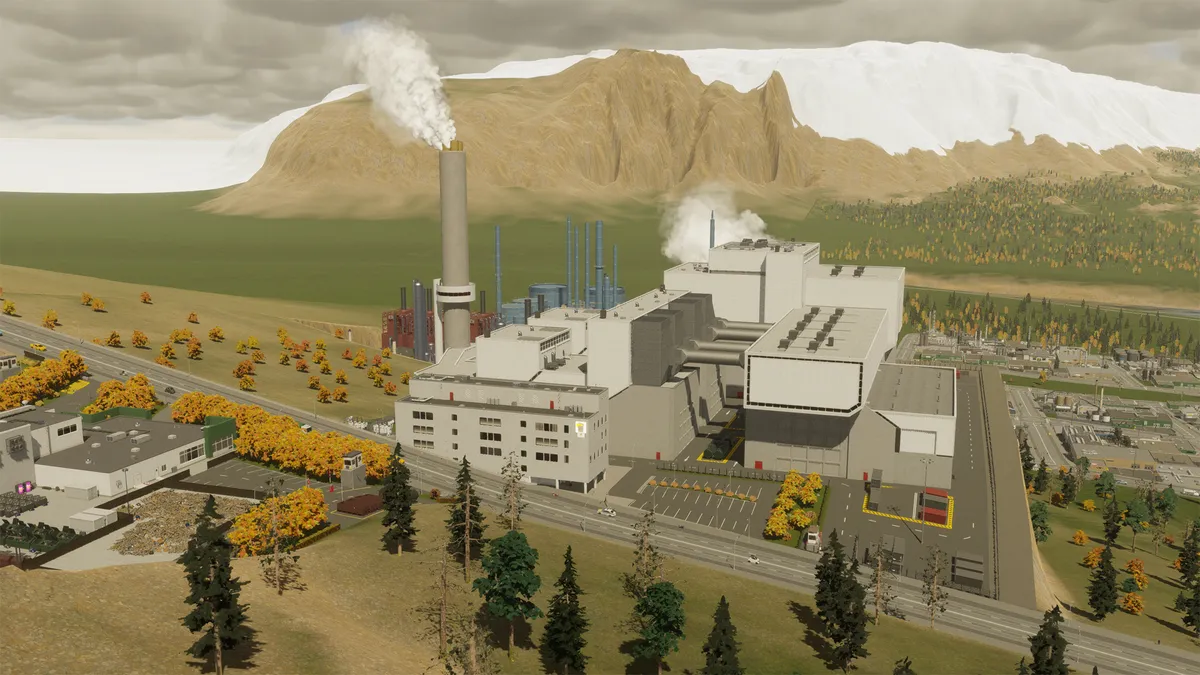
In Cities Skylines 2, pollution is caused by industries, traffic, sewage, and certain buildings. There are four types of pollution: air, ground, water, and noise. If you want to see how badly they affect your city, you can open the info view; the bottom row shows every pollution type. 

As a general rule, your citizens don’t like pollution and don’t want to live near polluted areas. It’s therefore important to keep the main sources of pollution, industrial zones and power plants, far away from your residential areas.  

Before placing a new building, make sure you’ve checked the description, as it will tell you what types of pollution the building will cause. If the building does indeed cause pollution, you will see a rating from low to high, with the “high” pollution buildings being the worst of the bunch. 

Types of pollution in Cities Skylines 2 
Types of pollution in Cities Skylines 2

(Image credit: Paradox Interactive)

Let’s take a look at the types of Cities Skylines 2 pollution and their main causes: 

  • Air pollution: caused by industrial zones and dirty buildings such as coal power plants and garbage incineration plants. It’s affected by wind, thus spreading the pollution to areas downwind of the source. 
  • Ground pollution: like air pollution, this mostly occurs below industrial zones and polluting buildings, where it gets worse over time. Naturally, ground pollution stays in one place, unaffected by wind direction. 
  • Water pollution: typically caused by your sewage, but in the case of groundwater pollution, it can also be the result of a dirty building or industry placed on top of the groundwater deposit. Water pollution in a river or sea follows the dominant water flow, so the pollution spreads downstream of the source. 
  • Noise pollution: caused by nearly anything, including large roads, schools, any non-residential zone, public transport stations… Noise pollution spreads in a small radius around the source, and the severity depends on the type of building or zone.

How to fix air pollution in Cities Skylines 2

How to fix air pollution in Cities Skylines 2

(Image credit: Paradox Interactive)
  • No traffic jams
  • Green energy
  • Heavy traffic/combustion engine bans
  • Less industry
  • Industrial zones go downwind

It’s nearly impossible to rid your Cities Skylines 2 town of air pollution completely, but you can take measures to greatly reduce it. For starters, make sure you have a good traffic flow, with as few traffic jams as possible. Furthermore, you should choose green energy over coal and gas power plants. Wind turbines are available right from the start of the game, so they’re a great option. You can also ban heavy traffic and combustion engines from your residential areas using the “district tool” on your toolbar: create a district, then select it to see these two optional policies. 

Sign up to the GamesRadar+ Newsletter

Weekly digests, tales from the communities you love, and more

By submitting your information you agree to the Terms & Conditions and Privacy Policy and are aged 16 or over.

Once your city has grown significantly, you can assign more commercial and office zones instead of industrial zones – but beware that this requires a high number of citizens (customers) and a more advanced economy with highly skilled workers. 

Finally, if you must have industrial zones and polluting buildings, try to place them as far downwind as possible, preferably near the border of the map. Otherwise, as shown in the picture above, a strong wind current may blow air pollution to a nearby residential area. It would be best to demolish this industrial zone, build a new one further to the left, and reassign this one to offices or commercial purposes. 

How to fix ground pollution in Cities Skylines 2

How to fix ground pollution in Cities Skylines 2

(Image credit: Paradox Interactive)
  • Reduce industrial zones
  • Green energy
  • Remove sources and wait

Ground pollution in Cities Skylines 2 builds up very slowly, but it also decreases very, very slowly. In truth, the best way to combat ground pollution is to not let it go too far; if you’re starting a new city and you’re forced to create an industrial zone near your city center, you may want to remove it and build a new industrial zone as soon as you’ve unlocked new map tiles near the border of your town. 

This wasn’t done in the picture above, thus resulting in a heavily polluted patch of land in the middle of the city. Although the industrial buildings have been removed on the right, it will take a while for the ground pollution to disappear. If you’d like to avoid ground pollution as much as possible, try to use fewer industrial zones and greener sources of energy.

How to fix water pollution in Cities Skylines 2

How to fix water pollution in Cities Skylines 2

(Image credit: Paradox Interactive)
  • Wastewater treatment plant
  • Sewage outlets go downstream
  • Mind the groundwater

The best way to fix water pollution in Cities Skylines 2 is to build a wastewater treatment plant. This will purify the water and pump it back into the system, thus greatly reducing your city’s wastewater. If you don’t have such a plant yet, you’ll either have to pay to export your sewage water (requires a sewage pipe to the edge of the map) or rely on a sewage outlet leading into a river or sea. 

Although the latter will pollute the water, it’s still the best way to handle your wastewater if you don’t want to spend extra money. Just make sure you always place the sewage outlets downstream, away from water pumping stations – otherwise, your fresh water will be polluted and your citizens will get sick. If you want to relocate or remove your sewage outlet, beware that it will take a while for the water pollution to disappear completely. 

Finally, beware that groundwater deposits will become polluted if you place polluting buildings and industries on top of them. If that happens, do not use this groundwater deposit for your city!

How to fix noise pollution in Cities Skylines 2

Cities Skylines 2 pollution

(Image credit: Paradox Interactive)
  • Avoid too many (high-density) residential buildings
  • Small/pedestrian streets
  • Heavy traffic bans
  • Sound barriers
  • Underground roads
  • Spread public buildings

To diminish the noise pollution on your residential streets, don’t build too many houses on the same road, and certainly not just high-density housing. Place parks and pedestrian streets in between blocks, and only allow a few commercial and office buildings near your residential areas. It’s also a good idea to create districts (using the district tool) and implement a heavy traffic ban in your residential zones. 

After unlocking road services, you can place sound barriers along your highways, which will greatly reduce their noise pollution. Alternatively, you can create underground roads. As you still need public services near your residential areas, try to spread them out and surround them with small empty plots of land or parks. As shown in the picture above, the elementary school is surrounded by parkland, thus creating a noise-reducing buffer between the school and the residents. 

And that’s how to tackle pollution in Cities Skylines 2. Enjoy your clean city!

© GamesRadar+. Not to be reproduced without permission

Marloes Valentina Stella
Social Links Navigation
Freelance Writer

I’m a freelance journalist who (surprise!) kind of has a thing for videogames. When I’m not working on guides for GamesRadar, you can probably find me somewhere in Teyvat, Novigrad, or Whiterun. Unless I’m feeling competitive, in which case you should try Erangel. You can also find my words on PCGamesN, Fanbyte, PCGamer, Polygon, Esports Insider, and Game Rant.

Latest in Simulation
Wonders of Sodor
Simulation Games Train sim sickos push new Thomas the Tank Engine game to breaking point, shattering world records
 
 
A widescreen image of the Animal Crossing PC port
Animal Crossing Unofficial Animal Crossing PC port is here, offering a widescreen 4K experience
 
 
Garry's Mod
Simulation Games Garry's Mod creator expected to only "make about $30,000" on the sandbox game
 
 
Jujutsu Kaisen Incremental codes
Simulation Games Jujutsu Kaisen Incremental codes (March 2026) and how to redeem them for free rerolls
 
 
Sorcerer Incremental codes: A white-haired ninja.
Simulation Games Sorcerer Incremental codes (March 2026) for weapon rolls and more
 
 
Fruit Piece Incremental codes
Simulation Games Fruit Piece Incremental codes (March 2026) and how to redeem them for free Beli, Scrolls, Rolls, and more
 
 
Latest in Guides
Fortnite New Sanctuary vault
Fortnite How to open the New Sanctuary vault in Fortnite
 
 
Helldivers 2 Illuminate Veracitor chasing Helldiver with harvester nearby
Third Person Shooters How to kill the new Veracitor and Gatekeeper Illuminate enemies in Helldivers 2
 
 
MLB The Show 26
Sports Games MLB The Show 26 codes (March 2026) and how to redeem them for free packs
 
 
Crimson Desert Abyss Without Balance puzzles
RPGs How to solve the Abyss Without Balance and Polar Opposites puzzles in Crimson Desert
 
 
Dragon's Stone Chamber in Crimson Desert
RPGs How to solve the Dragon's Stone Chamber in Crimson Desert
 
 
How to steal in Crimson Desert
RPGs How to steal in Crimson Desert
 
 
LATEST ARTICLES
  1. Fully painted Legio Custodes warrior on a wooden table
    1
    The new Warhammer Custodes look amazing, but my god, I wish they were easier to build
  2. 2
    3 new to Netflix movies I recommend you watch this weekend (March 21 - March 22)
  3. 3
    "My dream game": After 7 hours, Palworld publishing lead delivers his Crimson Desert verdict: "This game is made for me"
  4. 4
    "The biggest time save in nearly a decade of Pokemon speedrunning" has been discovered in FireRed
  5. 5
    Marathon's Cryo Archive is locked to weekends partly because you're going to "lose a lot of gear"

GamesRadar+ is part of Future US Inc, an international media group and leading digital publisher. Visit our corporate site.

Add as a preferred source on Google Add as a preferred source on Google
  • Terms and conditions
  • Contact Future's experts
  • Privacy policy
  • Cookies policy
  • Accessibility statement
  • Careers
  • About us
  • Advertise with us
  • Review guidelines
  • Write for us
  • Accessibility Statement

© Future US, Inc. Full 7th Floor, 130 West 42nd Street, New York, NY 10036.

Please login or signup to comment

Please wait...