
Pokemon Go's Nearby function tells you exactly where Pokemon are hiding and it's live in the UK and US
Weekly digests, tales from the communities you love, and more
You are now subscribed
Your newsletter sign-up was successful
Want to add more newsletters?
Every Friday
GamesRadar+
Your weekly update on everything you could ever want to know about the games you already love, games we know you're going to love in the near future, and tales from the communities that surround them.
Every Thursday
GTA 6 O'clock
Our special GTA 6 newsletter, with breaking news, insider info, and rumor analysis from the award-winning GTA 6 O'clock experts.
Every Friday
Knowledge
From the creators of Edge: A weekly videogame industry newsletter with analysis from expert writers, guidance from professionals, and insight into what's on the horizon.
Every Thursday
The Setup
Hardware nerds unite, sign up to our free tech newsletter for a weekly digest of the hottest new tech, the latest gadgets on the test bench, and much more.
Every Wednesday
Switch 2 Spotlight
Sign up to our new Switch 2 newsletter, where we bring you the latest talking points on Nintendo's new console each week, bring you up to date on the news, and recommend what games to play.
Every Saturday
The Watchlist
Subscribe for a weekly digest of the movie and TV news that matters, direct to your inbox. From first-look trailers, interviews, reviews and explainers, we've got you covered.
Once a month
SFX
Get sneak previews, exclusive competitions and details of special events each month!
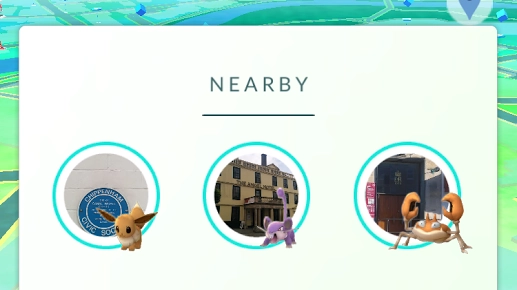
The wait is over. Pokemon Go's Nearby function has been thoroughly tested in Niantic's home city of San Francisco and has now rolled out across the rest of the US and Europe. Instead of just showing the 'mon who are around and leaving it up to Chansey (sorry) what you might encounter in the wild, you can now see exactly where Pokemon are hiding.
While you can still catch in between Pokestops, the Nearby function shows which 'mon is lurking where. This means it's perfect if you can see one you don't have and won't need to wander around in circles hoping it will appear and simultaneously wondering what you're doing with your life. It's worth noting that the Sightings option has now disappeared entirely, still leaving it up to the Pokemon gods who you'll find in the wild. This might return though, on a recent trip to SF, I noticed that both functions were in the app.
If you want to hunt down a specific Pokemon, open the Nearby screen and touch on the Pokemon you want to ensnare. A screen will come up showing the Pokestop. Touch it again and it'll appear on your map with pawprints, showing exactly where you have to go. Handy. However, beware, you'll still have to be fast. They won't stick around for too long and you don't want the below screen when you're on your way to an Aerodactyl... Happy hunting.
Seen something newsworthy? Tell us!
Weekly digests, tales from the communities you love, and more

Louise Blain is a journalist and broadcaster specialising in gaming, technology, and entertainment. She is the presenter of BBC Radio 3’s monthly Sound of Gaming show and has a weekly consumer tech slot on BBC Radio Scotland. She can also be found on BBC Radio 4, BBC Five Live, Netflix UK's YouTube Channel, and on The Evolution of Horror podcast. As well as her work on GamesRadar, Louise writes for NME, T3, and TechRadar. When she’s not working, you can probably find her watching horror movies or playing an Assassin’s Creed game and getting distracted by Photo Mode.


